Viele Probleme, wenig Ahnung!

Hallo Community!

Vorab gleich meine Entschuldigung für den elend langen Text! Ich habe mehrere ZimaBoard2 gekauft, darauf läuft ZimaOs 1.5.4 und bin ehrlich gesagt absolut verzweifelt und frustriert. Bisher habe ich eine Synology DS918+ und Windows benutzt, mit Linux oder gar ZimaOS habe ich keine Erfahrung. Damit ist mein Problem eigentlich schon perfekt beschrieben, befürchte ich. :slight_smile:

Nach knapp 14 Tagen komme ich nun halbwegs mit dem Terminal zurecht, verstehe zumindest einen Bruchteil davon. Ich kann problemlos in den Einstellungen der Container im Zima Dashboard Ports, Speicher und Variablen anlegen und verstehen.

Folgende Probleme habe ich:

Backup:
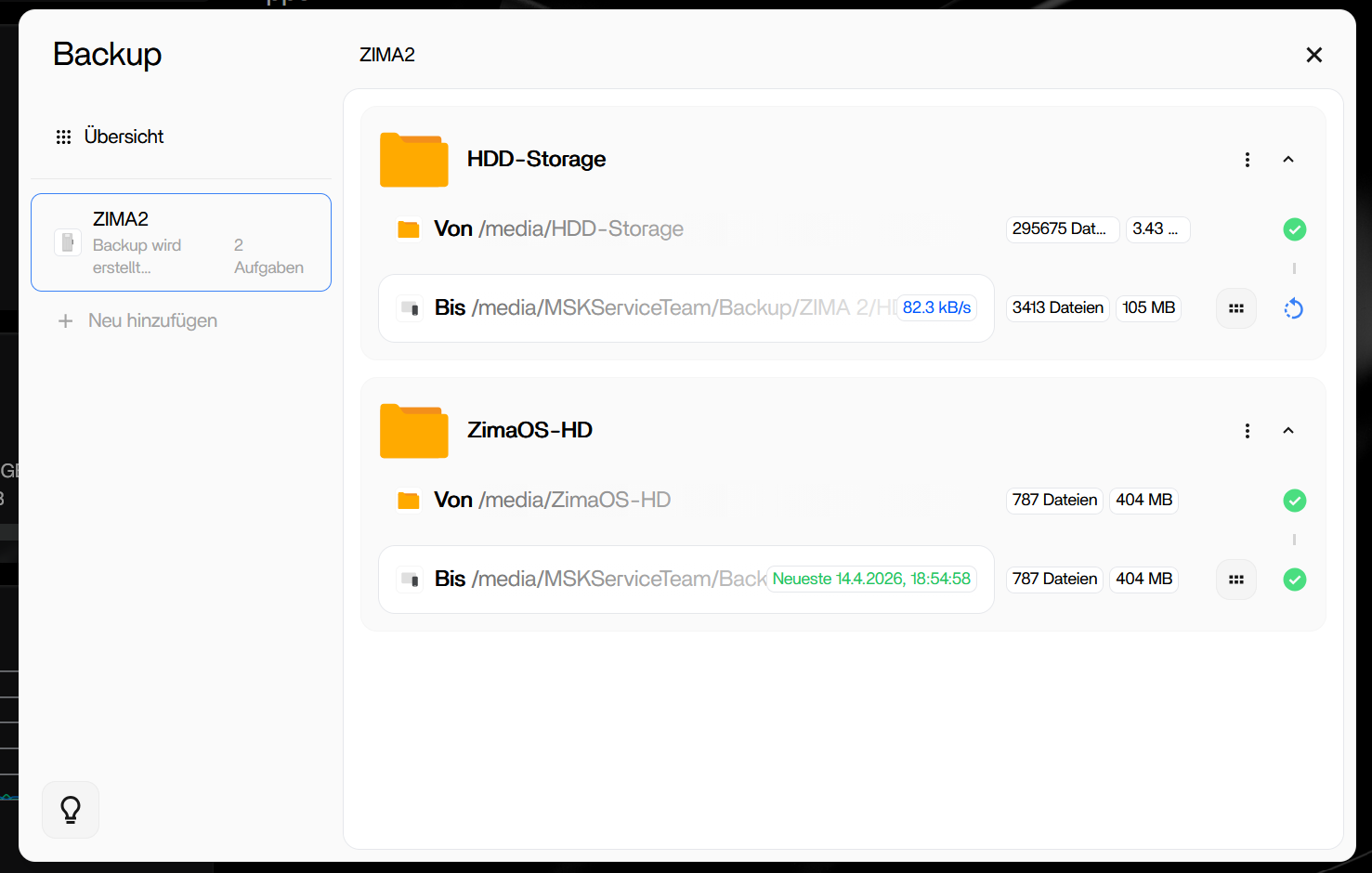
Die Backupfunktion scheine ich nicht zu verstehen, oder sie ist defekt. Ich lege meinen Hauptorder (Safe-Storage) als Quelle an und meine Festplatte in derDS918+ als Ziel. Es werden Daten kopiert, doch das Backup läuft quasi unendlich ohne Erfolgsmeldung. In dem Backupauftrag werden Dateigrößen angezeigt die unmöglich stimmen können. Der Zielordner springt herum, mal 0 Bytes, dann 400GB, oder auch 200TB auf einer 4TB Festplatte. Für die Systemdaten kann ich es nicht beschwören, meine selbst angelegten Ordner sind jedoch alle da. Allerdings sammeln sich immer mehr Daten am Ziel an, eine Synchronisierung scheint es nicht zu geben, es wird offenbar einfach kopiert und nicht abgeglichen.
Mein eigentliches Ziel: Ein 1:1 Backup mit Synchronisation das ich manuell starten kann, mit meiner echten Ordnerstruktur. Keine Verschlüsselung, keine Pakete bzw. Häppchen.

Emails:
Mein persönlicher Albtraum! Bisher nutze ich Synology Mail Plus. Meine Vorgehensweise war bisher sehr simpel aber effektiv. Emails für 3 getrennte Benutzer von 3 Konten per pop3 abrufen, Emails senden und eigene Ordner erstellen, in denen ich manuell meine Mails einsortiere. Die Mails sind damit dauerhaft am NAS gespeichert, alles gut.

Genau das wollte ich nun auch am ZimaBoard. Da ich keine Ahnung von Linux habe, habe ich mich auf Anleitungen im Internet und die Google KI verlassen. Kurzfassung: nach 6 Tagen und mehr als 40 Stunden Chat mit der KI musste ich aufgeben. Gibt es tatsächlich keine Software die mit Synology Mail Plus vergleichbar ist? Gibt es keine Software die einfach Mails per pop3 abrufen, senden und dauerhaft speichern kann?

Nextcloud Mail wäre mein Traum, es läuft super, aber es bietet kein pop3 und keine dauerhafte Speicherung. Die Mails sollen nicht beim Anbieter liegen bleiben.
Die KI hat mich Stunden herumgejagt, ein Konto in Stalwart anlegen lassen und mir dann gesagt ich soll die Mails in Nextcloud einfach von einem Konto in das andere schieben. Nach 7 Stunden hat Google dann gemeint, hoppla das lässt Nextcloud gar nicht zu…
Mailcow konnte ich nach stundenlanger Konfiguration zum laufen bringen, doch der Sync Job funktionierte nicht. Mails wurden abgeholt aber konnten laut KI nicht an Dovecot (oder so ähnlich) übergeben werden.
Stalwart läuft, aber auch hier gab es Probleme mit der Abholung der Mails.
Poste.io, Cypht, Roundcube und andere Apps habe ich nicht zum laufen gebracht, sind durchgehend abgestürzt.

Meine Erkenntnis: Ein User der keinen Plan hat und eine KI die sich im Kreis dreht und alle paar Minuten widerspricht sind kein gutes Team. :frowning:

Ich bin für jede Hilfe und Idee dankbar!
Lg Manfred

1 Like

Ich kann Dir zwar leider nicht helfen, aber bei mir genau das gleiche. Komme auch von einer Synology und hatte praktisch 0 Unix Kenntnisse. Die KI hat mich auch stundenlang im Kreis herumgejagt, aber schlussendlich hat dann alles funktioniert:

  1. dranbleiben
  2. Diverse KIs fragen, bei mir half Leo (von Brave) und der gratis integriere KI Assistent von Brave
    allerdings nur Text
  3. Teilweise auch Chatgpt
  4. Goolge und Perplexity für dies unbrauchbar
  5. Schrittchenweises vorgehen, Punkt um Punkt abarbeiten was geht

aber eben ich habe drei lange Nächte gebraucht bis Tailscale, Photoprims, Calibre Web Automation einwandfrei liefen. Jetzt kommt die Windows VM dran.

Viel Glück.

1 Like

Have you tried Stalwart GitHub - stalwartlabs/stalwart: All-in-one Mail & Collaboration server. Secure, scalable and fluent in every protocol (IMAP, JMAP, SMTP, CalDAV, CardDAV, WebDAV). · GitHub? I found this app while reviewing your previous requirements. If you’re interested, I can provide you with the Stalwart installation guide. As for how to use it, we can discuss that together.

Danke für deine Antwort!

Die Google KI habe ich mittlerweile ausgedruckt und angezündet. :rofl:
Spaß beiseite, ich habe die Methode geändert. Ich frage Google, mache einen Screenshot und frage Chat GPT was es davon hält. Und umgekehrt. Das ist seeehr (seeeehr) Mühsam, aber damit funktioniert es gerade gut genug damit ich weiterkomme.

Emails klappen nun mit Mailcow, alle anderen Apps funktionieren soweit das ich zufrieden bin.
Nur die Backup App scheint absolut nicht zu funktionieren, auf beiden ZimaBoard2. Die angezeigten Daten während des Backups können nicht stimmen, die Daten am Ziellaufwerk auch nicht. Am 2. Board werden zu wenige Daten auf das Netzlaufwerk kopiert. Mir fehlen knapp 2GB am Ziel, bei 105 GB an der Quelle.
Beim 1. Board kann ich nicht sagen ob alles da ist, da hier die gleiche App mit den gleichen Einstellungen und dem gleichen Ziel (eigener Ordner natürlich) bei 800GB jetzt schon 2,7TB liegen!

LG Manfred

Hi Jerry!

I’d appreciate any help and guidance that could help me move forward. My entire project is currently on hold because I’m trying to equip each of my teams with its own ZimaBoard2. I’ve managed to install Mailcow in the meantime, and it’s running smoothly. Unfortunately, Stalwart doesn’t have POP3 retrieval, which I absolutely need.

Unfortunately, the backup using the integrated app still isn’t working!
The data displayed during the backup process can’t be correct, and neither can the data on the target drive. On the second board, too little data is being copied to the network drive. I’m missing almost 2GB at the destination, with 105GB at the source.

On the first board, I can’t say for sure if everything is there, because using the same app with the same settings and the same destination (a separate folder, of course), with a file size of 800GB at the source, there are already 2.7TB in the destination directory!

I’m very worried about whether I’ll actually have all the data backed up in an emergency, but at the same time, I don’t want to clutter up my network drive.

I’m probably just spoiled by Synology; I never had these kinds of problems with them.

Best regards, Manfred

Do you mean Mailcow’s backup function?
I’m sorry I haven’t used this app yet, but I need some more reliable information to help you analyze it.

No, I mean the backup function of ZimaOS 1.5

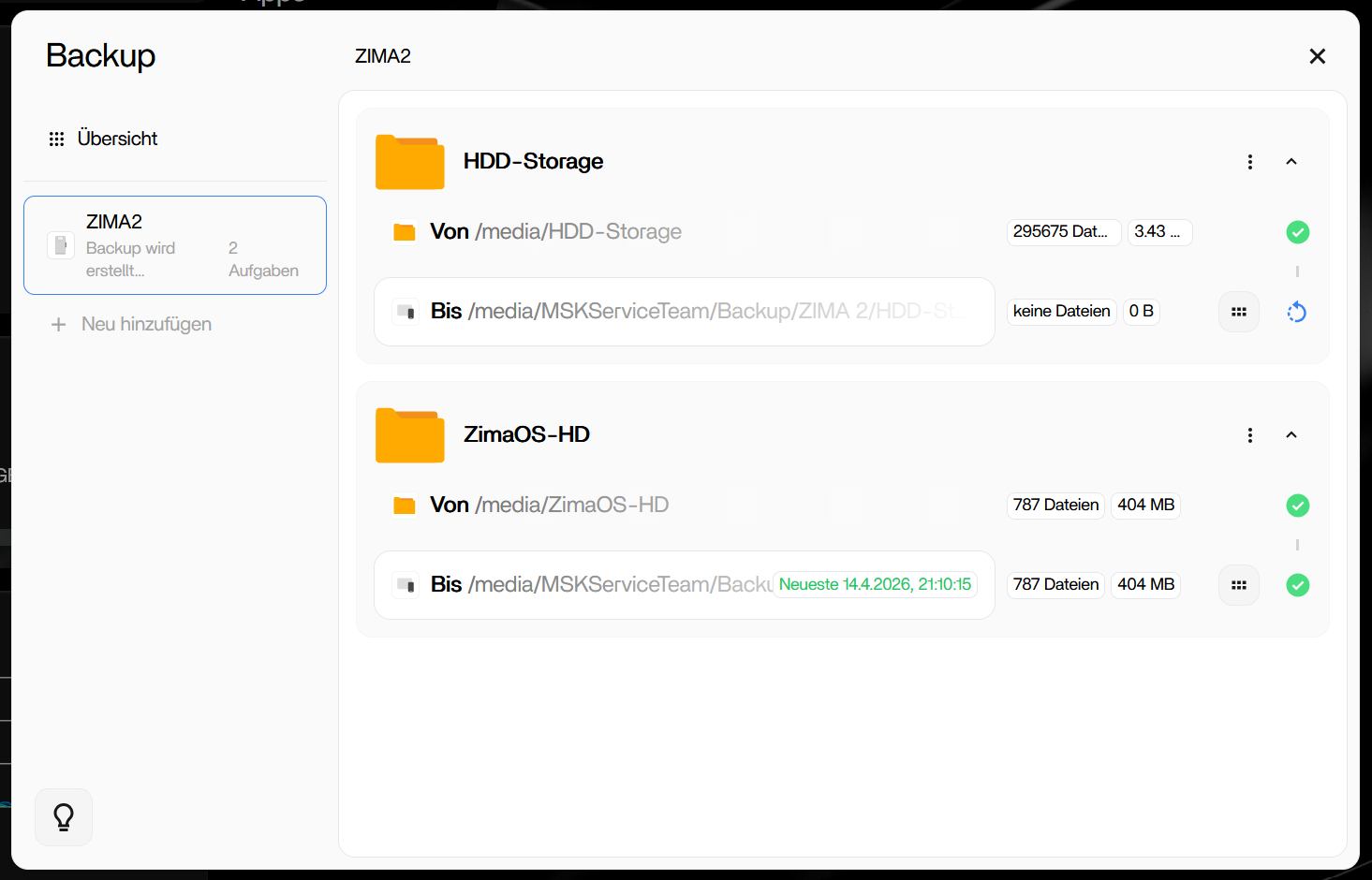
The app claims the destination is 105MB, but it’s actually 2.8TB. Intermittently, the app displays “no data 0B”. The network drive is always available and mounted.

2 minutes later:

I’d like to know if this is just a display error, or if the backup actually only takes up 105 MB.

On the first ZimaBoard2, I can’t say for sure if everything is there, because using the same app with the same settings and the same destination (a separate folder, of course), with a file size of 800GB at the source, there are already 2.7TB in the destination directory!

On the second ZimaBoard2, too little data is being copied to the network drive. I’m missing almost 2GB at the destination, with 105GB at the source.

Manually created folders, including personal files, will definitely be backed up on both systems.

There are two problems:
1 . First ZimaBoard2, do you confirm that the reserved version function is enabled?
2. On the second ZimaBoard2, is your target directory also the size viewed on ZimaOS? Or does the target directory exist on another device?

I want to make sure I haven’t made any mistakes. That’s why I started over. Apparently, the integrated backup function has a major problem.

Here’s my exact procedure:

  1. Deleted all old backup jobs (to the Synology NAS).

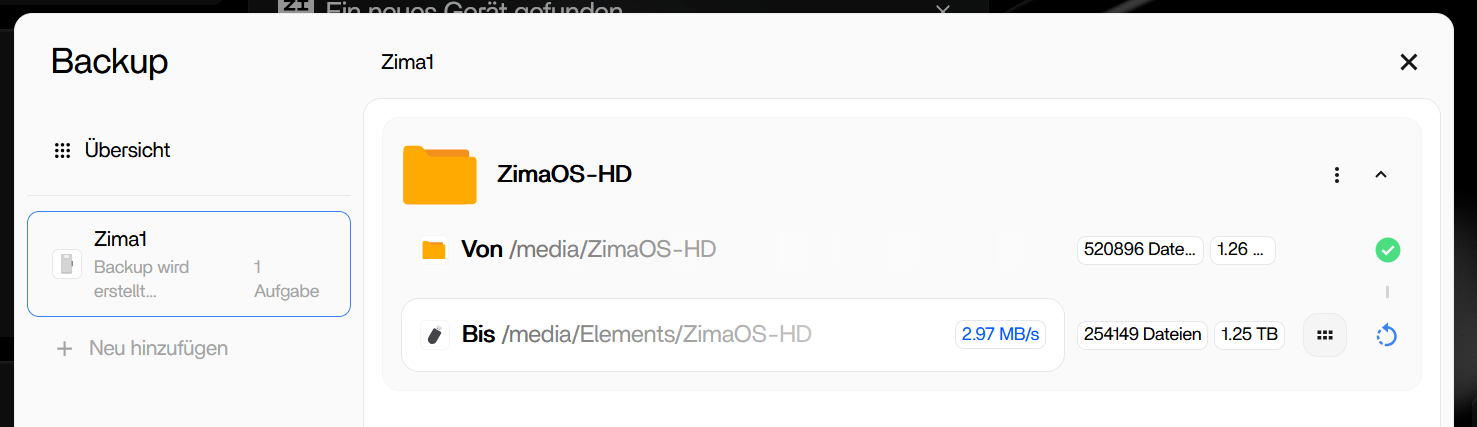
  2. Restarted ZIMABoard2 (ZimaOS 1.5). It has two 2TB HDDs configured in RAID 1.

  3. Formatted and connected an external USB hard drive (named Elements).

  4. Created and started a new backup job (ZimaOS HD → USB hard drive, manual schedule, versions enabled).

  5. The backup ran for almost two days (source 1.25 TB → destination 1.25 TB).

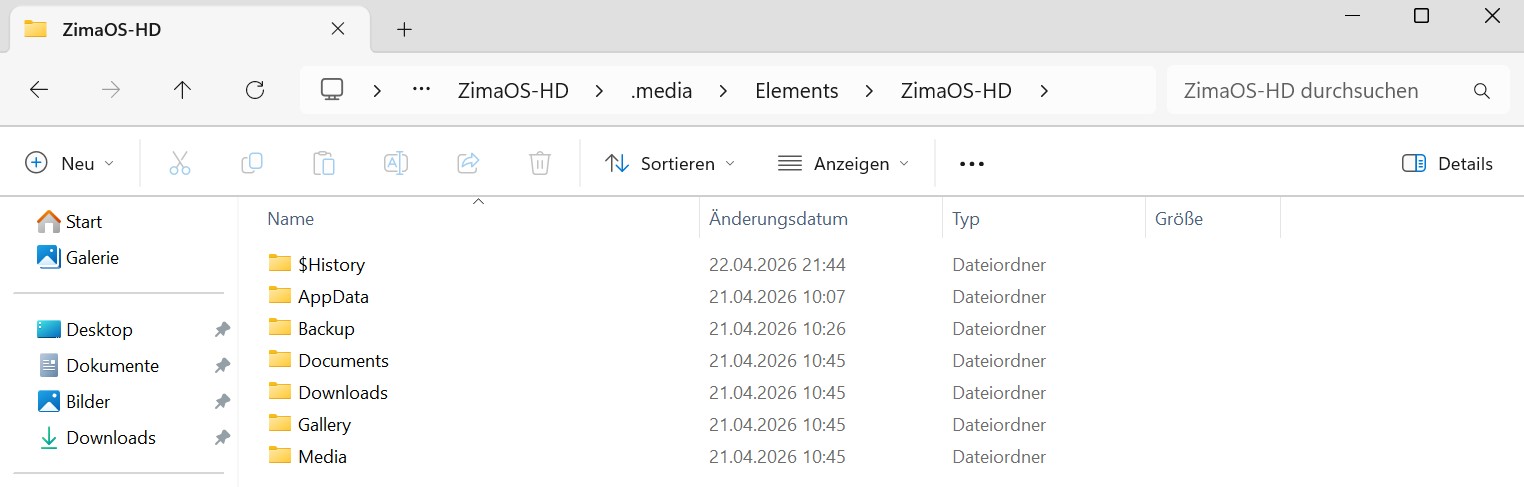
The external backup was created successfully! I then disconnected the USB hard drive in the Files app.

The next day, I reconnected the USB hard drive and started the backup. The ZIMABoard2 had 1.26TB of data on its hard drive. Some data was copied, then the progress bar froze. The LED indicator on the backup drive also showed no access. I experienced the exact same issue when backing up to the Synology NAS!

I can now press Stop in the backup app and then restart the backup. According to the display, some data is copied again before the backup hangs again.

Also interesting: When I close the backup app window, it shows 0B at the destination when I reopen it. Only when I manually stop and restart the backup does the (presumably) correct data size reappear.

I don’t understand why only the first backup works without problems and subsequent ones fail. Especially since it occurs with both ZimaBoards and with backups to both the network drive and the USB drive. Honestly, it’s frustrating because everything else seems to work perfectly.

Thank you very much for your patience in testing the app and for your feedback. We apologize for the inconvenience this has caused.

I will forward this issue to our development team, and we will thoroughly investigate it and fix it as soon as possible.

1 Like

I’ve reviewed the situation you described above and summarized two issues:

  1. A known issue: If you are backing up the entire /media/ZimaOS-HD, it will definitely contain Docker-related pipe socket issues (this issue was fixed in version 1.5.4). Are you currently using ZimaOS version 1.5.0?
  2. Regarding the inaccurate backup progress bar issue, the team has previously spent time troubleshooting this problem. It is anticipated that versions after 1.6.2 will provide a more accurate backup status display.

If it’s convenient, could you provide remote access? This would allow us to pinpoint the backup issue more quickly.

I’m currently using ZimaOS+ v1.5.4 on the device where the problem occurs. On my second device, I updated to v1.6.0, but I haven’t tested my scenario with this version yet; I’ll do that this weekend.

I don’t want to update my main system yet until I have a complete backup I can rely on.

The error occurs regardless of whether I select /media/Safe-Storage or /media/ZimaOS-HD as the source. And it always happens on the second backup. The first backup always completes without errors. At least, that’s what it shows!

To my shame, I have to admit that I haven’t yet managed to select multiple individual folders in the backup app. And no, I’m not going to create a separate backup job for every folder. :slight_smile:

Which folders (apart from my own custom folders, of course) do I actually need to back up to ensure I have all my data in case of an emergency?

When I select /media/ZimaOS-HD, my personal folders aren’t backed up.

Is it sufficient to back up /media/Safe-Storage?

My backup is intended as a true “disaster backup.” If the ZimaBoard2, including its hard drives, fails, everything should be working again as quickly as possible, even without an internet connection.

Please understand that I don’t allow remote access to my main system, as it also contains customer data. If the same error occurs on the second NAS running version 1.6.0, I’d be happy to enable remote access there.

Hi MSK,

thanks for sharing your experiences!

I’ll monitor this thread as I also want to backup from one ZimaBoard2 unit to another ZimaBoard2 unit. So having your experienced issues fixed and getting to a reliable status is absolutely crucial!

I’m also still new to the ZimaOS world, and while I like the tinkering aspects of it, a rock solid backup and data / system safety is an absolute must-have. Basically a NAS’ very genuine main purpose. But I’m seeing in this forum here sometimes some posts, which are worrying to me.

Speaking of that, I stumbled over these 2 posts here, which you maybe also want to take a deeper look. Basically you need to establish and backup the system disk as well, since the RAID1 configuration information is stored there. If the system disk dies or gets corrupted with a faulty OS update for example or whatever accident happens, then big headaches would start, if there is no backup of the system, in particular of that specific config data.

https://community.zimaspace.com/t/tutorial-zimaos-backup-and-restore-using-usb-drive-shared-by-gelbuilding/7015

https://community.zimaspace.com/t/rebuilding-a-raid-1-array-after-zimaos-reinstall-the-safe-ui-native-way/8475

I’m wondering what other steps / precautionary measure should be also considered. Perhaps a very senior experienced ZimaOS person can comment on. I bought ZimaBoard units and into ZimaOS to primarily have a safe place for my data and proper backups. Having to read a couple of user experiences with lost access to RAID setups, not fully functioning backups, no out-of-the-box system backup and restore approach offered user-friendly in ZimaOS, is not really acceptable and makes ZimaOS looking not ready for prime time.

Thanks for your reply, I would like to add 2 more points

  1. System backup has always been a problem, the team has discussed how to design and implement the relevant functional lines, obviously now users back up the entire system disk in our opinion is not necessary, because in fact, only some core data needs to be backed up, such as QB downloaded movies, or some unnecessary data is actually not necessary to back up, for example, when docker pulls the image mentioned earlier, the corresponding companion file ‘pipeline socket’ and other files. There is no need to back up, and these files continue to be backed up, and there is no way to provide users with a good channel to restore the system, even if they get this pile of redundant data, it cannot be said that they will immediately restore a zimaos system that is the same as before
  2. After version 1.6.0, the storage function has introduced a new function, which will write the information of ‘how the disk should be mounted’ directly into the storage, the effect is what you mentioned, even if there is a problem with the system disk, the storage can be automatically remounted successfully on zimaos, because the core data that records how the storage is mounted is also recorded in the storage, so after 1.6.0, users can no longer worry about the problem of mounting on their own RAID/single disk after the system disk problem

Thanks for your response and that sounds like good news!

So with ZimaOS 1.6.0 (and later) the relevant storage configuration info is additionally also stored on the - to stick with the chosen example - RAID1-configured disks. So the storage disks could technically even be swapped out of a ZimaBoard2 unit#1 and built into a ZimaBoard2 unit#2 (or any other PC hardware set up with ZimaOS) and over there it would recognize the RAID1, mount it properly, and operations can continue to work as expected. Is this understanding correct?

3 Likes

yes

1 Like

Unfortunately, my problem persists in version 1.61.

The first backup works perfectly, but from the second backup onward, the process hangs. Even after more than six hours, there’s no change in the app’s display, and there’s no write access to the USB hard drive.

When I close and reopen the backup window, the destination shows “0 B”.

I’ve now tested it with four internal hard drives, two external USB hard drives, and three Zimaboard2.

The backup source was always ZimaOS-HD.