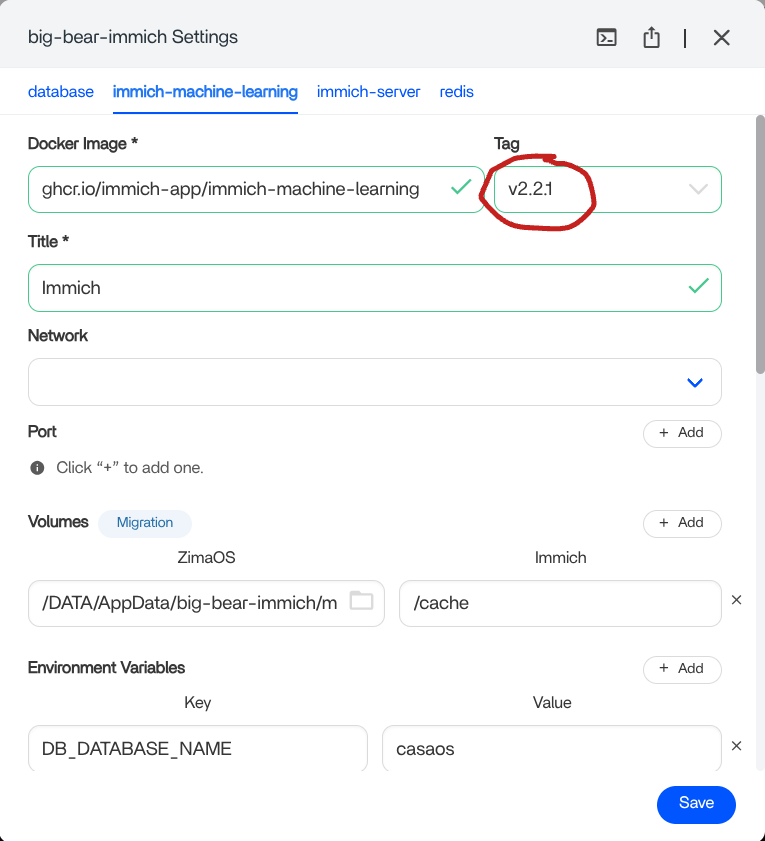
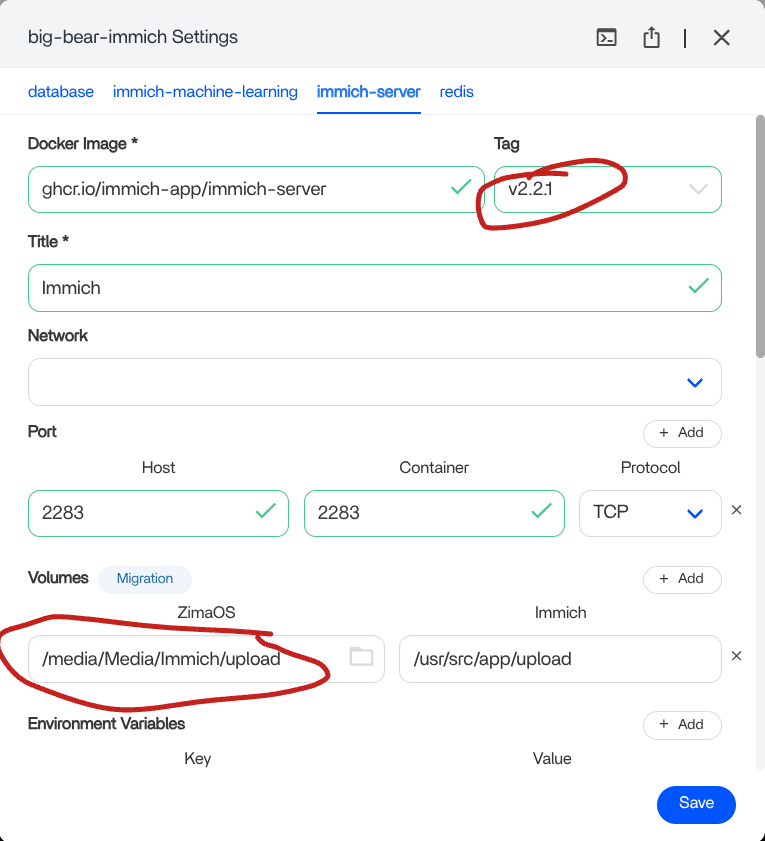
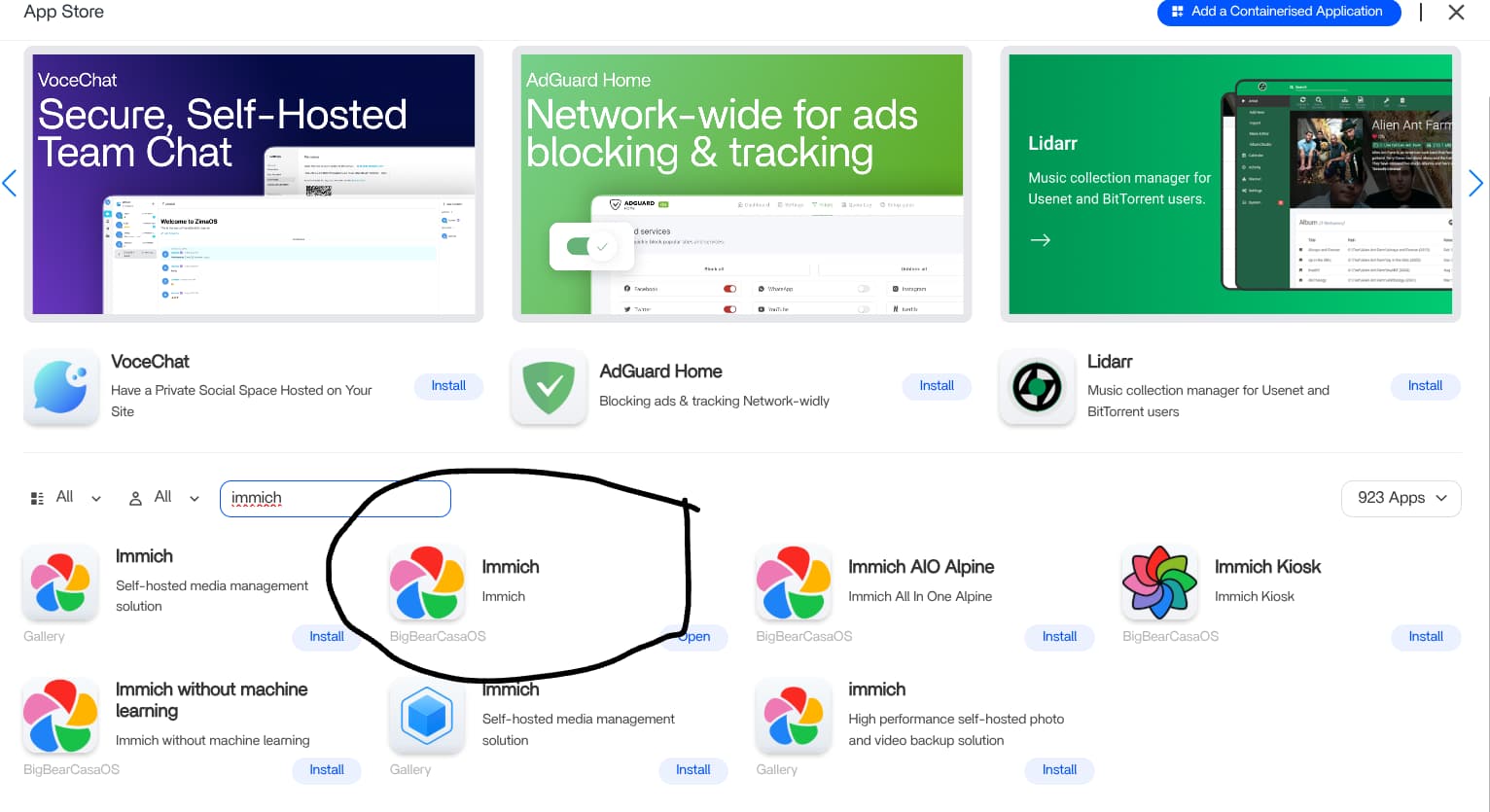
After a failed attempt to update Immich to v2, I had to uninstall it. It took a few tries using different methods direct from the Immich web pages and the “Gallery” version on the ZimaOS App Store but I couldn’t get any to work when trying to install the latest version. In the end, I went back to the App Store and custom installed the Big Bear version.
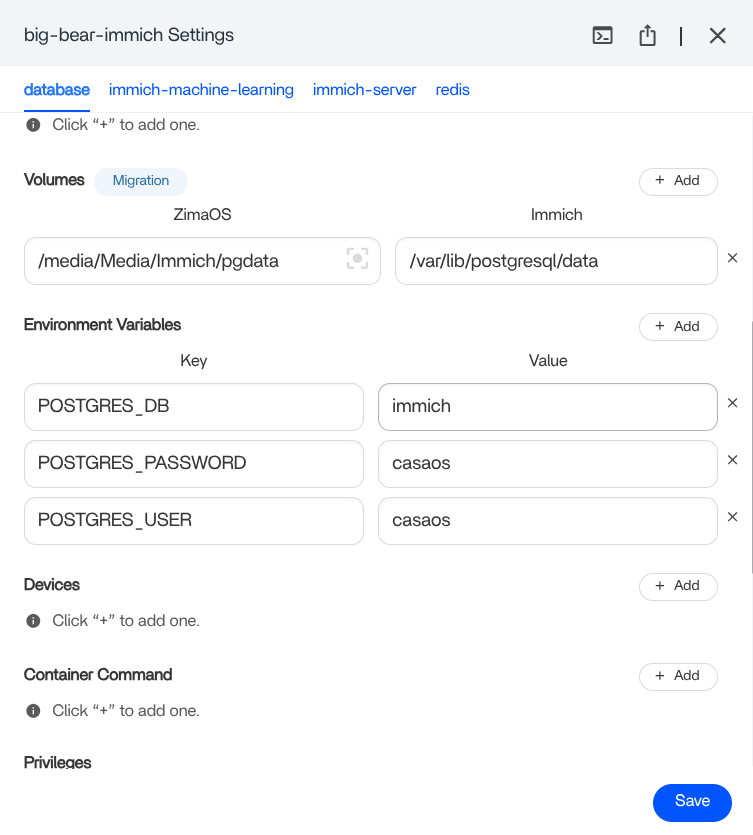
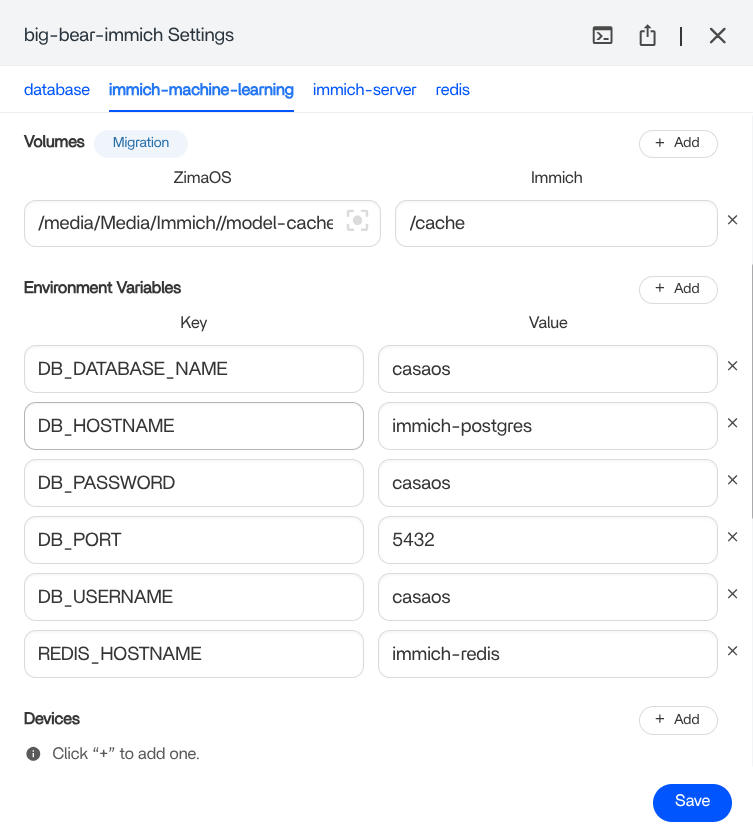
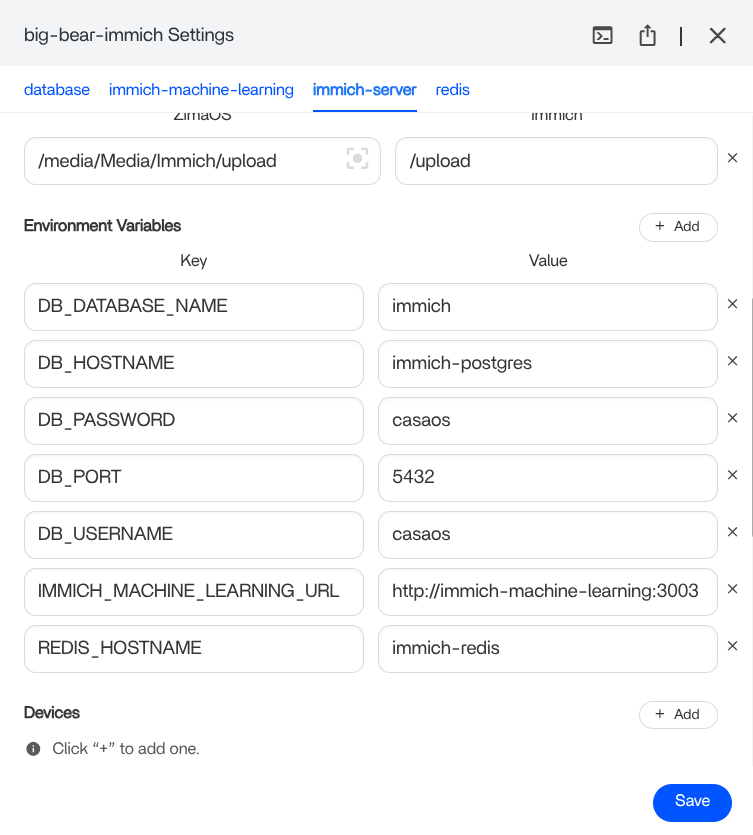
Here are some screenshots of the version used and my settings.
I don’t know why it didn’t work for you on Immich v2 because I was struggling to make it work and I didn’t succeed until I tried your method, and all that using Immich v2! So thank you so much! I’m a total noob with servers, it’s the first time I’m trying to do these things and I’m completely lost!
Now, it’s true that I was a bit disoriented at first since tabs are different between the version you used for this tutorial and the v2, but once you locate everything, it’s the same.
And now that it works, I just need to figure out why I can’t access the server from the Immich app on Android :_)
Would you mind sharing where you got your Immich installation from? Maybe you found a version I haven’t seen as I didn’t get v2.0.1 to work here. Or perhaps the installation files have been updated since I tried? Either way, I’m glad you managed to get it working on your system. Great news!
With regards to the Android app, I haven’t had any issues there. As far as I recall, you need to input the Immich server URL including Port which in my case is http://192.168.1.84:2283 and then your email/password for your Immich user account.
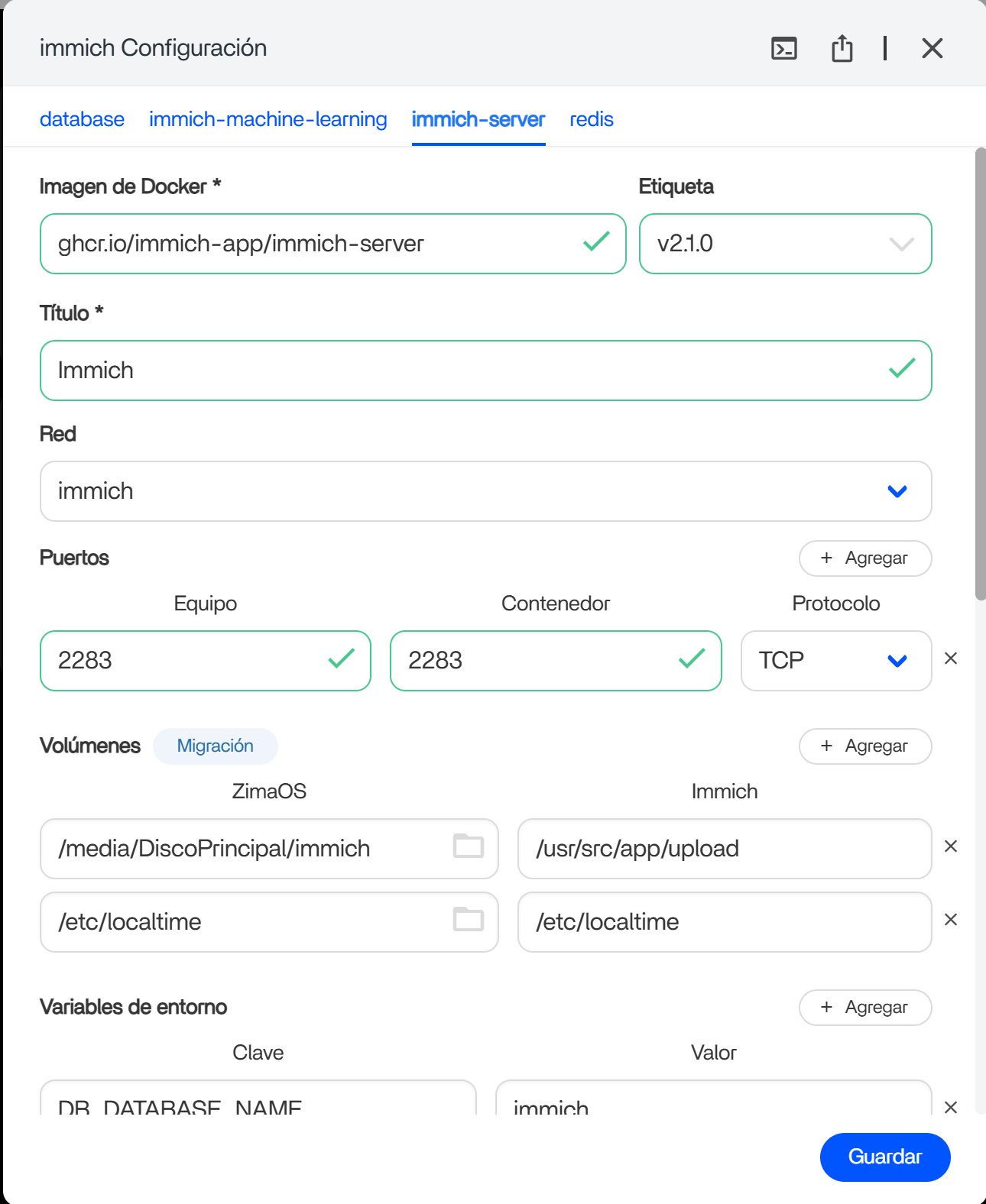
Hey! I got it from the App store of ZimaOS! It’s the the V2, which it’s actually on the 2.1.0 version.
As for the Android client, it actually just took me a moment to find the solution, thanks to a post in ice whale’s forum. It’s almost like you say, that it’s also how they tell you on the app to write it, but it wasn’t working until I added “/api” after the port. Maybe it’s also something of the 2.1.0 version, I don’t know. Luckily someone else knew how to solve it
Hi, that’s great news getting the Android app working as well. I’ve only just seen the Immich v2 on the app store so I will try installing that one. Thanks for the heads up. Happy days!
This is exactly what i have done repeatidly. For some reason it does not work. I also went ahead and tried Immich v2 like “juanmrh” said he had done. It did not work either. So frustrating. I swear it is ZimaOS that is the problem. What else could it possibly be. It worked once and then it did not. Makes no sense what so ever.
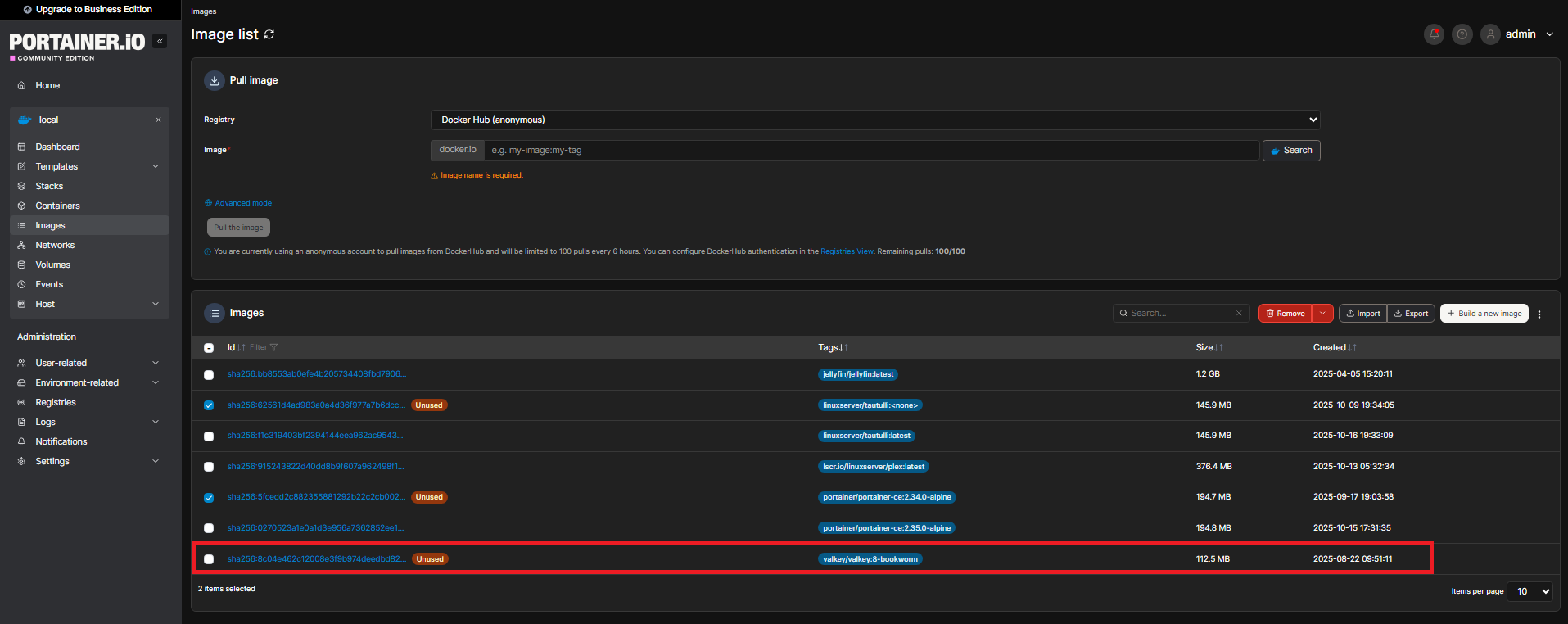
One thing i found interesting. After attempting to install Immich every time i go into portainer and i see a image called valkey/valkey:8-bookworm. Its interesting because as you can see in this image i took of the screen everything else i have is labeled or tagged as what it actually is… so why is immich tagged valkey/valkey:8-bookworm?
valkey/valkey:8-bookworm is the machine-learning V2 image but no idea why it’s named as such?
I also couldn’t get Immich to install other than the older version back to v1.4.1 I think if was. I tried many ways to get V2 working including the V2 on the app store but to no avail. Each time, it seems to install just fine but the icon is greyed out and the app will not start.
I did find a workaround but still not ideal. I installed Immich from the CLI copying the instructions on the Immich website. Once installed, the icon is still greyed out but I can start Immich by manually typing the address into my web browser i.e. http://192.168.1.84:2238 in my instance. I just added a website link to the dashboard with this address.
7 months and still no valid fix ?
I tried every version on the app store and every suggestion in this and another thread, whenever i try to set it up on another location it just won’t work.
Anyone got an update?
Hi, if you want, I can give you the solution. I have it working perfectly with a RAID 1 array (I’m not sure if it would work with other RAID configurations). My ZimaOS is in beta (in case that helps). Installed programs:
ddns-updater
immich
nginx (ports changed in ZimaOS…)
I’ll send you a screenshot of the ONLY thing you need to change, and the RAID array will appear in Immich.
Create a folder on your RAID disk, then during installation select “custom.” Where you see a folder, locate it and install.
Solved! I hope this helps. ONLY THAT MODIFICATION, NO OTHERS
In my case, the disk is called DiscoPrincipal and if you look, it’s in the Zimaos section.
The version I have installed is the one labeled “gallery” (not the one labeled “casaos”… those gave me an error).
Hi, many thanks for this. I can confirm that it is now working properly on my system using the Big Bear version on the App Store. I changed the version for the Machine Learning and Server tabs, along with my required storage location as can be seen below.
I installed Immich 2.1.0 (installed by default) and I can’t upgrade it to latest version or any other version.
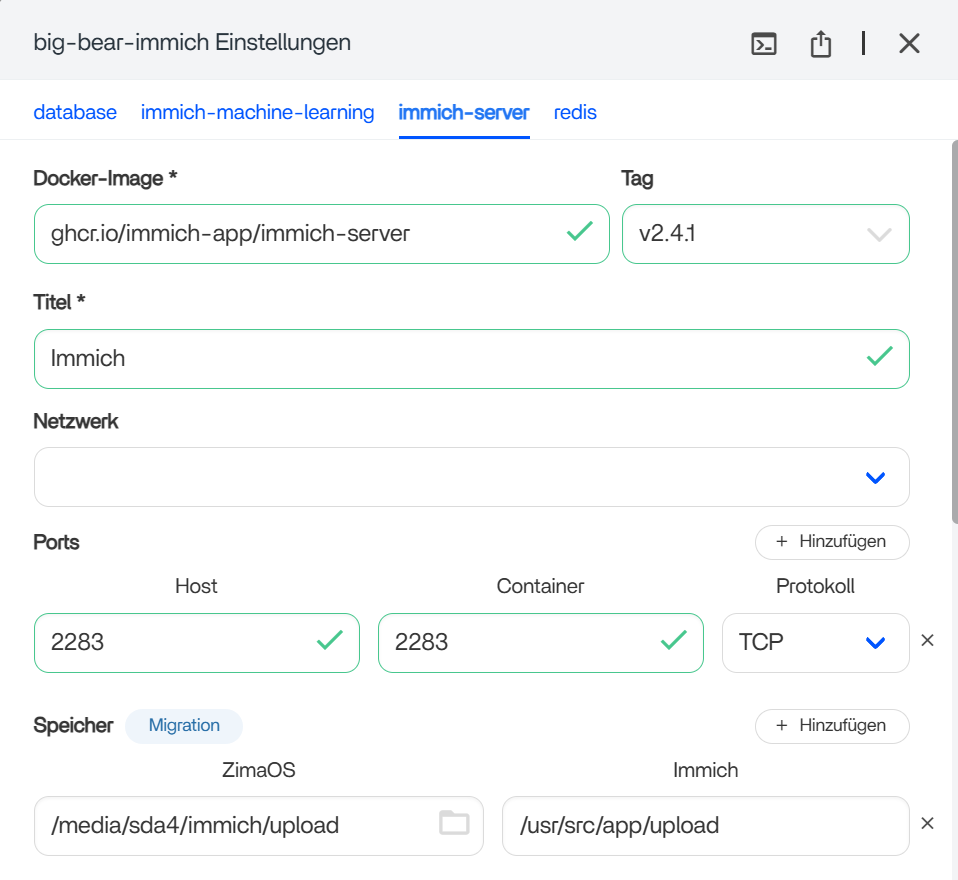
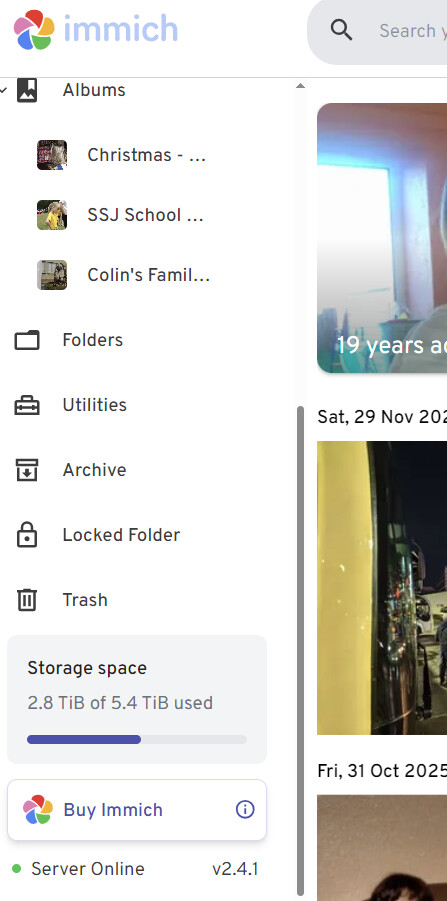
The configuration wizard states that I’m on v2.4.1 but when I open the application, the server version is listed as 2.1.0.
Also, I have installed “Portainer” to see if I can find more details about the docker container running and I found that “Immich” is still using the 2.1.0 image and the image for 2.4.1 is listed as unused.
Not sure what to do to get the application (server) upgraded to the latest version.
Did you add v2.4.1 to the Tag boxes on the immich-machine-learning and immich-server tabs as in this post? Is it the Big Bear version of Immich you installedfrom the ZimaOS App Store via the dashboard?
If so and it still doesn’t update then I suppose you could uninstall it, then reinstall it but choose “Custom Install” so that you can enter v2.4.1 in the 2 tabs as stated? That might work?
Hi, I’ve updated the tags for the machine learning and server containers to 2.4.1.
While the ZimaOS app configuration indicates I am running the updated version, the Immich web interface still reports 2.1.0. I’ve confirmed in Portainer that the ‘docker-compose’ stack is still utilizing the old images, while the new images are marked as ‘unused.’
It appears ZimaOS downloaded the update but failed to recreate the containers with the new images. How can I force the stack to redeploy using the pulled versions?
Everything is working properly for the app/server, I already uploaded a lot of family pictures and configured mobile apps for me and my wife, I’m trying to avoid to uninstall and have to upload and synchronize everything again.
This goes beyond my expertise then unfortunately. However, if Immich is currently working on v2.1.0 then I would leave it alone for now?
Just a thought about when you mention the web version, if you mean the app on the ZimaOS dashboard that opens Immich in a browser page like my image below?
Yes, all is working perfectly.
Right now isn’t an issue staying on version 2.1.0.
Not sure if in the future new features will require a newer version or maybe a security fix gets patched.
I think it’s an issue on ZimaOS side, the App’s configuration doesn’t match with is actually running in the backend side.

 ?
?