ZimaOS v1.6.2 is Officially Released: Safer, More Stable, More Compatible

Hello @everyone,

This update focuses on three key areas: security hardening, system stability, and improved hardware compatibility.

On the security side, we have prioritized fixes for security issues in account management, file services, and messaging services. We have also strengthened the default security policies for SSH and NFS. SSH now disables remote root login by default and includes additional protections against brute-force attacks. NFS is also disabled by default to reduce unnecessary exposure risks. At the same time, our team is actively exploring a security Hotfix mechanism, with the goal of delivering critical security fixes more quickly in the future and reducing the need to wait for a full version release.

On the stability side, we have fixed and improved scenarios involving RAID, USB storage, backup, OneDrive, and cloud upload workflows, making everyday use more reliable.

For hardware compatibility, ZimaOS has updated the Linux kernel and added multiple new driver supports, allowing better compatibility with Intel® Core™ Ultra Series, more GPUs support, wired network adapters and more.

In addition, the Files app now supports dark mode, and Alibaba Cloud Drive integration has been added, making file management even more convenient.

Here is the full changelog:

Security

  1. Fixed a high-risk security issue in the account management module, further improving the safety of administrator operations

  2. Fixed a high-risk security issue in the file service, improving the safety of file access and operations

  3. Fixed a high-risk security issue in the messaging service, improving system communication security

  4. SSH now disables remote login for the root user by default, reducing the exposure risk of high-privilege accounts

  5. SSH has added several security policies to prevent brute-force attacks

  6. NFS service is now disabled by default, reducing the risk of unauthorized access

New

  1. Added dark mode for the Files app

Sp@dtrain802cial thanks to @dtrain802

  1. Added Alibaba Cloud Drive integration support

  2. Updated Linux kernel to 6.1@GrimOak.Zima.9

Special tha@m1ntakuks to @GrimOak.Zima ( NOT A STAFF ) @m1ntaku

  1. Added driver support for NVIDIA 470 / 580 / Open Kernel Module, Intel Xe / Battlemage, Realtek RTW88 / RTL8127, Intel / MediaTek / AIC8800 wireless devices, and Cirrus Logic audio devices, and added an NVIDIA driver auto-detection and adaptation mechanism that automatically matches the appropriate driver version@GrimOak.Zimabased on the hard@Drunkenfistare

Special thanks to @GrimOak.Zima ( NOT A STAFF ) @Drunkenfist The Great Gorilla

Fixed

  1. Fixed OneDrive key expiration causing connection issues, restored basic integration availability, and optimized the key update mechanism——thanks @Rubble

  2. Fixed an issue where the Collabora Server app blocked backups, ensuring backup tasks can run properly——thanks to @MSK

  3. Fixed an issue where multiple USB storage devices could be assigned the same mount point at startup

  4. Fixed an issue where legacy -device-name suffixes were generated when USB mount points conflicted

  5. Fixed RAID degradation after reboot when a RAID array was created from disks with the same serial number ——thanks to @coelho

Optimized

  1. Optimized high-frequency file operation workflows such as import, migration, encryption, copy, and cut

  2. Optimized cloud drive upload status display, making it clearer for users to understand the current progress, completion status, and failure reasons

Don’t wait. Upgrade now please. :tada::tada::tada:

If you have any questions or feedback, please let us know in the comments below. Thank you as always for your support!

Best wishes,

IceWhale Team
4 Likes

so my zima should show a upgrade me button ? cant find it in settings its not telling me

Hello, our push notification mechanism is based on batch delivery. You can force an upgrade next time by referring to this document. Update offline | Zimaspace Docs

I updated this morning from 1.6.1 to 1.6.2. I noticed the following:

  1. Once I rebooted, it wouldn’t boot. I had to change the boot order in the BIOS because it automatically decided to boot from a non-bootable partition.
  2. Updating applications has become much slower than the previous version (Immich 3.0.1 → 3.0.2 is taking over 15 minutes, duplicati about 20 minutes).
1 Like

I tried to update twice, without success.
Each attempt results in a reboot, after which the system enters ‘maintenance mode’.
I press S, and it reboots again. I log in, and the ‘update’ notification remains.

So it looks like there were made serious mistakes in the upgrade package. I don’t see any message in my Settings page. Just wait until I get a green light in this announcement page

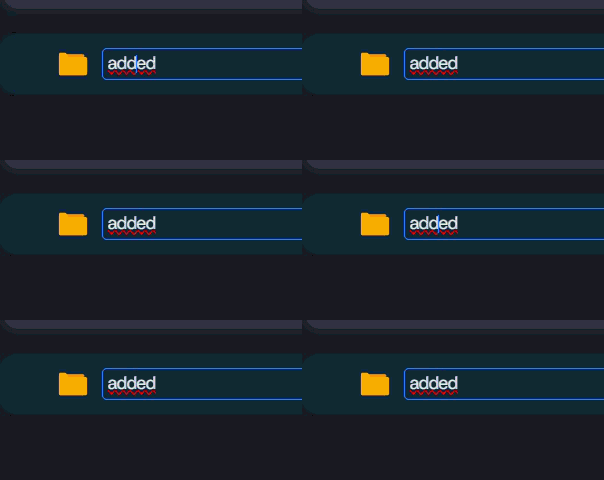
I found another small UI issue in Dark Mode.

When creating or renaming a folder or file, the text cursor (caret) is almost invisible. It has very low contrast against the background, making it difficult to see where the cursor is while typing.

I’ve attached a screenshot for reference.

20260713-1113-04.8733946

Thank you for your feedback. I will pass it on to the relevant colleagues.
You are truly attentive; please keep it up.

Thank you for the information!

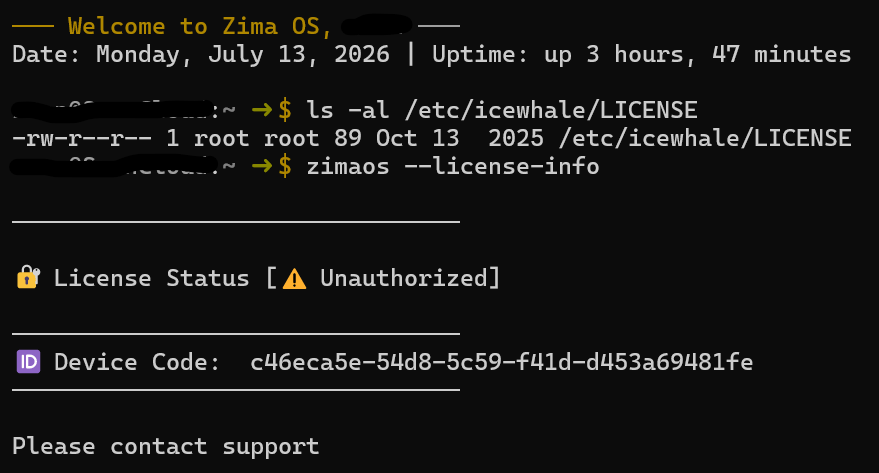
But unfortunately my ZimaOS+ license was lost with the update to v1.6.2.

How can I reactivate it?

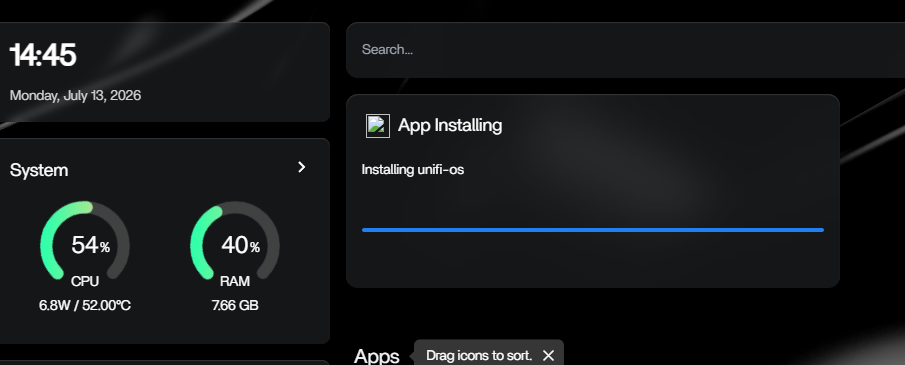
I noticed a small cosmetic issue when installing or updating docker containers, where there seems to be a missing image:

Please execute these two commands as root. We need to know the specific authorization details; please send me a screenshot of the command’s output.

ls -al /etc/icewhale/LICENSE

zimaos --license-info

Thanks a lot!

Does it still show this after you refresh?

Here are the answers:

Thank you very much for your support.

Yes. But it turns out it defaults to https://icon.casaos.io/main/all/unifi-os-server.png, but that does not exist. I installed Unifi OS from a custom yaml file which didn’t have an icon setup. It seems Zima defaults to it’s own icon-store/<container name>. I changed to a valid icon file and now it’s ok.

I found another issue in the Files app.

When I move multiple folders from one drive to another, the files are moved successfully, but the original folders are left behind as empty folders on the source drive.

I would expect the source folders to be removed automatically after the move is completed.

This happens consistently on my system.

This only happens when moving folders, not when copying them.

I never experienced this behavior in previous versions of ZimaOS. It only started after updating to ZimaOS 1.6.2, so it seems to be a new regression introduced in this release.

Thanks for reporting this.

That does sound like a possible Files app regression in ZimaOS 1.6.2, especially if:

  • the files are moved successfully
  • only the empty source folders are left behind
  • it happens consistently
  • copy does not show the same behaviour
  • it did not happen before 1.6.2

To help confirm it, can you please share a bit more detail:

  1. Source drive filesystem type
  2. Destination drive filesystem type
  3. Whether both drives are internal, USB, or network mounted
  4. Whether the move was done only through the ZimaOS Files app
  5. A simple example path, like:
    • from: /media/drive1/test-folder
    • to: /media/drive2/test-folder

If possible, please also try one small test folder with only a few files inside and confirm whether the empty parent folder is left behind again.

I will add this to the ZimaBrain/ZimaOS 1.6.2 regression watch list as:

Files app move operation leaves empty source folders behind when moving folders between drives.

Thanks again, this is useful because it sounds repeatable.

Thanks for looking into this.

Here are the details:

  • Source drive: sda1

  • Destination drive: sda4

  • Filesystem: Both drives are ext4.

  • Both drives are internal SATA drives.

  • The move was performed only through the ZimaOS Files app.

I also tested with a small folder containing only a few files, and the result is the same. The files are moved successfully, but the original source folder remains as an empty folder.

I can confirm that I never experienced this behavior before updating to ZimaOS 1.6.2.

1 Like