ZimaOS v1.6.0 Released: More Personal, More Reliable, Better Storage Experience

Good News: ZimaOS Total downloads have surpassed 4.1 million! Thank you for your continued support :heart:

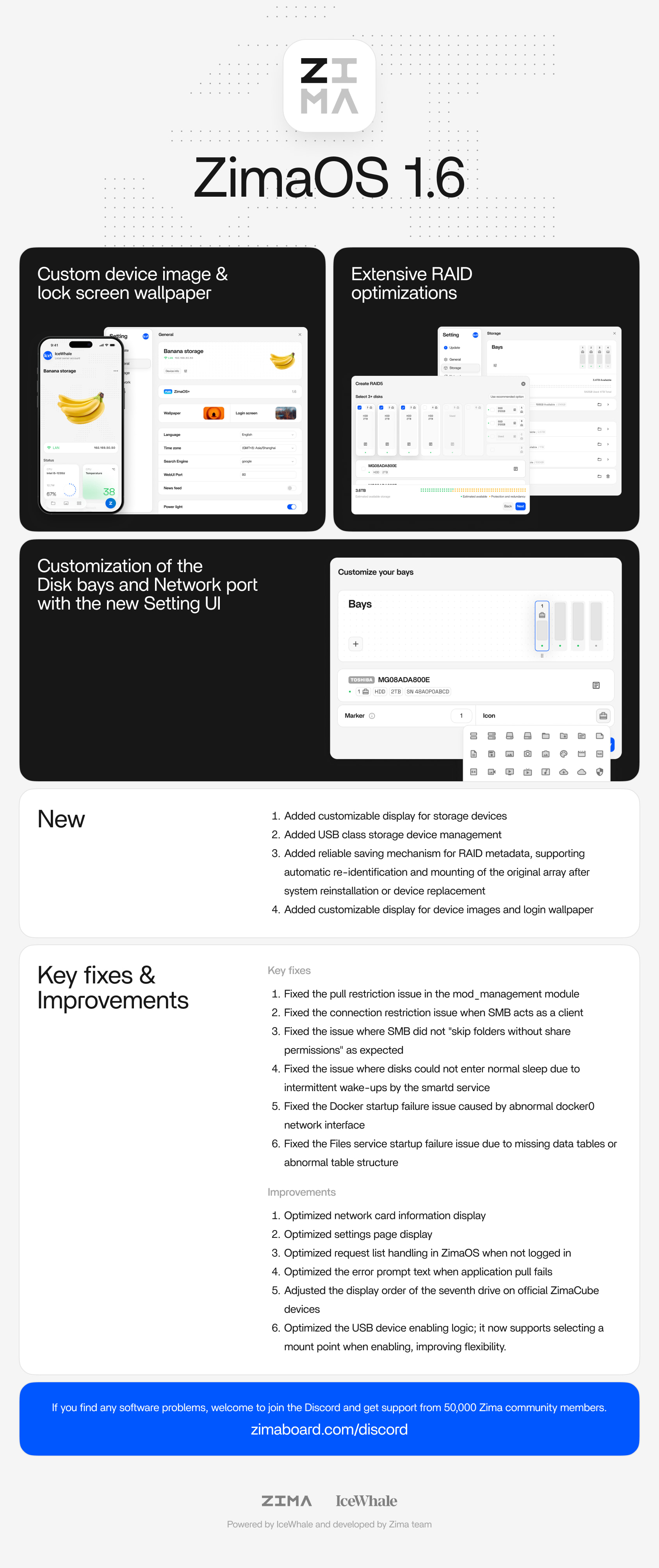
This release puts customization front and center.

ZimaOS now feels more like yours — with personalized device visuals, storage layouts, and even the login experience.

We’ve also improved storage reliability with better USB management and a more robust RAID recovery mechanism, along with system-wide stability improvements.

:backhand_index_pointing_down: Read the full release notes below:

New

  1. Added customizable display for storage devices

  2. Added USB class storage device management
    Special thanks to @SerbanSerba@Igor Ci. @Igor @Chris Panton @Wunjox

  3. Added reliable saving mechanism for RAID metadata, supporting automatic re-identification and mounting of the original array after system reinstallation or device replacement

  4. Added customizable display for device images and login wallpaper Special @JCShanks to @JCS

Fixed

  1. Fixed the pull restriction issue in the mod_management module

  2. Fixed the connection restriction issue when SMB acts as a client

  3. Fixed the issue where SMB did not “skip folders without share permissions” as expected –thanks@hr_b @JoeSchi

  4. Fixed the issue where disks could not enter normal sleep due to intermittent wake-ups by the smartd service –thanks@kraizelburg @t1ll1s @Rafit77

  5. Fixed the Docker startup failure issue caused by abnormal docker0 network interface

  6. Fixed the Files service startup failure issue due to missing data tables or abnormal table structure –thanks@imbatman69 @James

  7. Fixed the problem where storage appeared missing due to the presence of vfat-type disks –thanks@opantal2 @jopro1

  8. Fixed inaccurate display of the Recycle Bin –thanks@luke

Optimized

  1. Optimized network card information display

  2. Optimized settings page display

  3. Optimized request list handling in ZimaOS when not logged in

  4. Optimized the error prompt text when application pull fails

  5. Adjusted the display order of the seventh drive on official ZimaCube devices

–thanks@journeymangeek @GrimOak.Zima ( NOT A STAFF )

  1. Optimized the USB device enabling logic; it now supports selecting a mount point when enabling, improving flexibility.

Don’t wait. Upgrade now please!!! :tada::tada::tada::tada:

**
Best regards,**

IceWhale team

8 Likes

When will this show up on my device so that I can upgrade? I’m assuming that we can safely upgrade in place?

Hi

I’ve upgraded and now when I click on Files app it open blank page and storage asking me to setup my new disks:

Samba shares shows all ok at least for OS disk and other apps like Jellyfin works fine.

I really don’t want to mess up my data.

Please advise.

Regards

Tom

Hello, first post first problem.

One ZimaOS+ PC and one Test System. On Zima+ System my Files Page was already empty, on Test System everything was fine.
Please help !

Regards

Andreas

1 Like

Try opening the Files app in incognito mode in browser, works for me.

Did anyone from IceWhale respond to you with a solution? I just updated, and my external USB drives were no longer properly listed under Storage or the Files app. I could not go through that again after spending a month recovering files a few months ago.

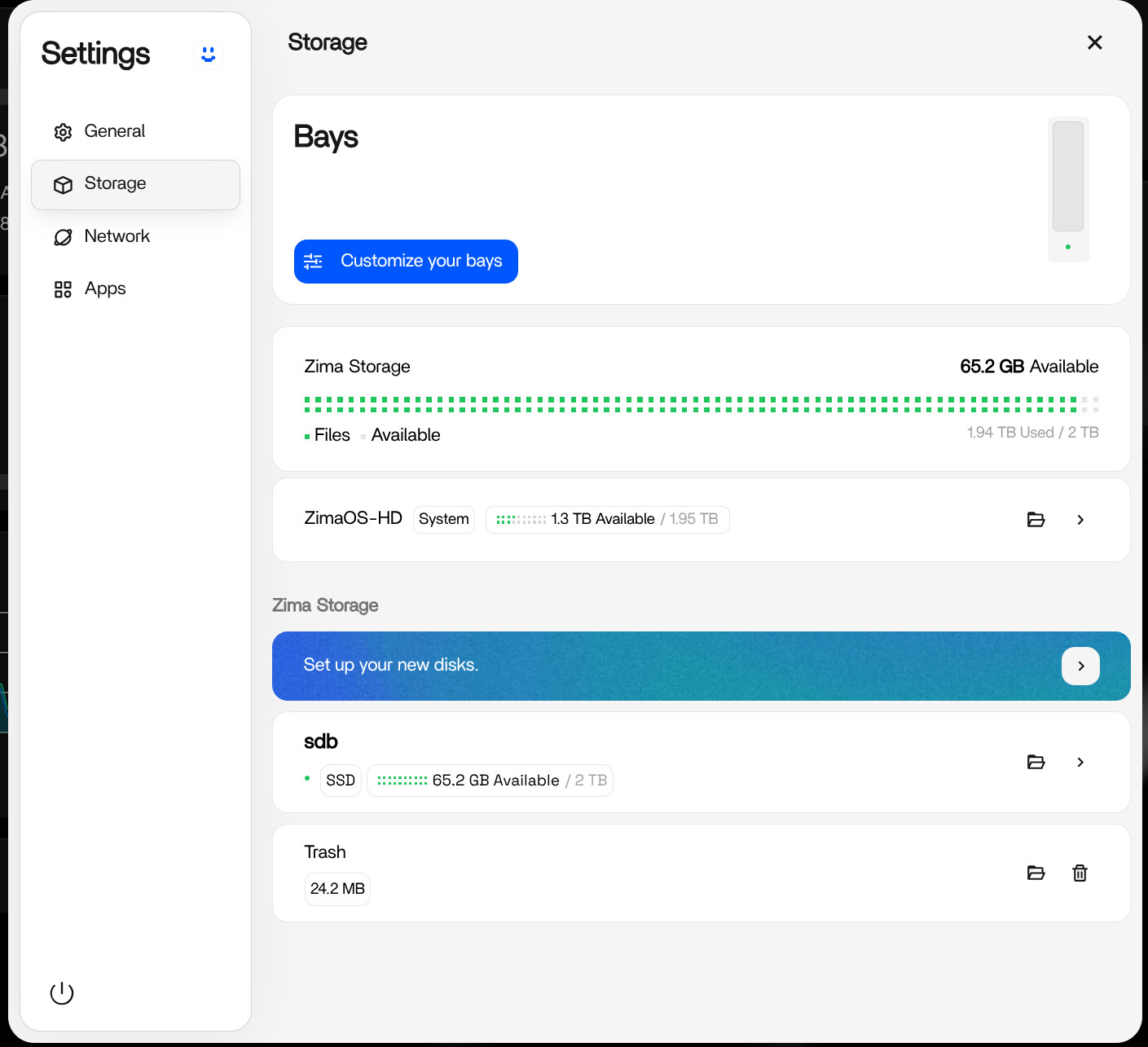
Update: I will not claim this will work for everyone, but we may have had the same issue. I took the risk and followed the blue bar that says “Set up your new disks.”

  • There are two main sections: RAID and Enable.

  • Under Enable, there is a small arrow icon. Click that.

  • Your drives will hopefully be listed on that page.

  • Do not choose “Enable (Format all).”

  • Choose the other “Enable” button below it.

  • For me, it said it would keep my data.

  • It also has a Disk Name field, but mine did not show the previous disk label.

  • I manually typed the correct previous disk name/label and enabled the drive.

  • It worked. All of my drives came back exactly as they were.

You can check your previous drive labels in the web terminal by running the command:

lsblk

Feedback to Icewhale:

  • That arrow icon under “Enable” is not intuitive, why bother with that goofy background image? it’s confusing.
  • More importantly, placing 2 x Enable buttons next to each other: 1 to format all and 1 to keep data = ugh, bad UI layout. That entire section should be goof-proof and clear as day.

I have just updated to ZimaOS 1.6 and after a reboot my two USB disks were gone. I pulled out the two USB plugs and plugged them back in, and Zima said “2 new disks found.”

I had expected to see the two USB disks connected, but no. So I clicked the button “Set up your new disks,” the dialog froze and nothing happened.

I started to sweat and couldn’t figure out the way forward, but then my wife said: “Can’t you downgrade?” and after some searching I found the following command: curl -fsSL 'https://ota.zimaos.com/1.5.0' | sh and now everything works again.

I LOVE MY WIFE :slight_smile:

1 Like

Morning from Germany,

maybe a solution for the empty files page.

Try it form another PC, everything is fine.

Delete my Browser Cache form first PC - everything is in place again.

Regards Andreas

I have been using ZimaOS for a while now. Before that I ran CasaOS for a pretty long time.

While ZimaOS looks nicer on the surface and sees more regular Updates, there are some pretty huge Problems that can’t be fixed on the user end, because ZimaOS is “immutable”.

I am running multiple SSDs, and two of them are connected via USB. This shouldn’t be an issue, but sadly my main Backup SSD keeps filling up with Junk. What does that mean? I store Proxmox Backups on the USB SSD every night. I keep 3 Backups, which amounts to about 500GB. No big deal since the SSD has 1tb of Space.

However, after a few Days my Backups are still 500GB, but the SSD is reported as “full”. This is due to the fact, that ZimaOS apparently doesn’t run “trim” and also doesn’t support trim for USB Drives. On CasaOS this was wasy to fix, but on ZimaOS…no joy.

As an emergency measure (because my backups kept failing due to a full disk) I created a cronjob via the crontab. This erases the invisible “trash” files every night, ensuring that my system remains functional. Sadly, every time ZimaOS Updates (beta 2-3, 3 to Final) that crontab gets deleted and I have to start over.

Supposedly there is a built-in zimacron in 1.6 that is configurable via the UI, but that doesn’t exist on my Inatall and any attempt to manually install it fails.

So…this is turning into a “maintenance nightmare” for me.

First of all, I am a paid ZimaOS+ member.

Two HUGE issues after successfully upgrading from ZimaOS 1.5.4 to 1.6.0.

  1. Device built-in storage is almost full.
    The built-in storage space ZimaOS-HD is almost full.
    Why? I had already migrated everything that I could to my RAID array and before the upgrade there was very little space used on my 1TB NVMe boot drive. Suddenly after upgrading, Zima says that it’s full with only a few MB available.

  2. Before the upgrade, I had two external USB drives that I’ve been using as backup targets. After the upgrade, Zima sees the drives and gives me the option to format or enable. When I try to enable, I get an error that says “Storage Limit Exceeded” and it won’t let me enable it. This is unacceptable. If I can’t mount those drives any longer, my backups are useless. Interestingly enough, my backup jobs were still using the drives (or seemed to be) and backup up to them. But there is no way to browse them or restore from them. Again, unacceptable. I’m not sure why you released this while it’s still obviously in beta form (at best).

    Now my Files app won’t work any longer, likely because it thinks the boot drive is full. If this can’t be fixed right away, I guess I’ll just eat the $29 for going to Plus and move to OMV. What a waste of time and money.

Mark@ZimaOS:~ ➜ $ df -h /DATA
Filesystem Size Used Avail Use% Mounted on
/dev/nvme0n1p8 904G 904G 0 100% /DATA
Mark@ZimaOS:~ ➜ $ df -h /
Filesystem Size Used Avail Use% Mounted on
/dev/root 1.2G 1.2G 0 100% /

Mark@ZimaOS:/media/ZimaOS-HD ➜ $ sudo du -sh .log/* 2>/dev/null | sort -hr
Password:
41M .log/journal
19M .log/audit
8.7M .log/casaos
468K .log/samba
288K .log/icewhale
180K .log/libvirt
4.0K .log/private
Mark@ZimaOS:/media/ZimaOS-HD ➜ $ sudo rm -rf .casaos/appstore/*
Mark@ZimaOS:/media/ZimaOS-HD ➜ $ sudo du -sh .casaos/* 2>/dev/null | sort -hr
20M .casaos/user-spacer
904K .casaos/1
500K .casaos/db
240K .casaos/files.db
156K .casaos/apps
12K .casaos/virt
12K .casaos/ssl
12K .casaos/ca
4.0K .casaos/baseinfo.conf
4.0K .casaos/appstore
0 .casaos/spacer
0 .casaos/rclone.conf
0 .casaos/files.db-wal
0 .casaos/files.db-shm
Mark@ZimaOS:/media/ZimaOS-HD ➜ $ sudo swapoff -a
sudo rm -f .swapfile
sudo fallocate -l 8G .swapfile # change to 4G or 6G if you want even smaller
sudo chmod 600 .swapfile
sudo mkswap .swapfile
sudo swapon .swapfileMark@ZimaOS:/media/ZimaOS-HD ➜ $
Mark@ZimaOS:/media/ZimaOS-HD ➜ $ sudo rm -f /tmp/MakeMKV* 2>/dev/null || true

Same situation here… Best practice: Never touch a running system.

as my grandmother used to say to me, “ well, bless your little heart ! “. by god stepping back to v1.5.0 did the trick. I updated to 1.6 and several usb devices had disapeared. when i tried to enable them using the start on the blue bar it all just locked up. So thank you and thank your wife for leading us down this path :slight_smile: .

Thanks for the information. After upgrading to ZimaOS 1.6 on Beelink Mini Me, everything disappeared. I could not log onto through web terminal, all storage disappeared. I downgraded to 1.5.3 which was the last stable version for me. Now everything works again.

Gracias!!!

You and your wife are legends upgraded last night, and nothing worked this morning after the command line and a reboot; everything was back and working.

The IceWhale team is conspicuously absent from this topic and from ANY topics related to the 1.6.0 upgrade issues (of which there seem to be a lot). Seems like they threw out a crap upgrade and walked away. Now they’re either too embarrassed or too afraid to respond. I guess I will move to OpenMediaVault. Can I get my money back for Plus?

I updated to 1.6 with no issues on my end.

For context, my setup is:

  • Clean ZimaOS install
  • Proper use of /DATA/AppData for persistence
  • Docker managed via CLI (not just WebUI)
  • Stable storage mounts (NVMe + HDD, no messy USB states)

From what I’m seeing, most issues aren’t the update itself, it’s exposing underlying problems (especially storage and Docker state).


Quick way to diagnose this properly.

If your system “broke” after update, don’t start deleting things, check in this order:


1. Check disks first (this is the main failure point)

lsblk -o NAME,SIZE,FSTYPE,MOUNTPOINT

Look for:

  • Missing mountpoints
  • Drives not mounted under /media/...
  • Drives showing but not mounted

Then:

df -h

Confirm:

  • Your data disks are actually mounted
  • Not showing as empty or missing

If disks aren’t mounted properly > everything above it (Docker, apps) will break.


2. Check if Docker is actually running

docker ps

If nothing shows, check all containers:

docker ps -a

Look for:

  • Containers exited
  • Restart loops
  • Missing containers entirely

3. Check container mount paths (critical)

Pick one broken app:

docker inspect <container_name> | grep Mounts -A 20

Confirm:

  • Source paths still exist (especially /DATA/... or /media/...)
  • No broken or missing bind mounts

If the path doesn’t exist anymore > container will fail or act empty.


4. Check logs (don’t guess, read it)

docker logs <container_name>

You’ll usually see:

  • “No such file or directory” > broken mount
  • Permission errors > wrong path/location
  • Device missing > storage issue

5. Check if storage got “reset” by 1.6

Go to:

  • Storage Manager > see if your disks appear under “Add Storage”

If they do:

  • ZimaOS lost the mount reference
  • Your data is still there, just not mounted

6. Confirm system isn’t I/O stuck

top

Look for:

  • High wa (iowait)
  • dockerd or containerd stuck

This usually ties back to storage issues.


What NOT to do

Avoid random commands like:

rm -rf
swapoff
rebuild swap
delete system folders

These don’t fix root cause and can make things worse.


Bottom line

Most 1.6 issues come down to:

  • Storage not mounting correctly
  • Broken Docker bind paths
  • Older installs carrying bad configs

Once you verify:
Disk > Docker > Mounts > Logs

You’ll find the issue quickly.