Hi
@isanto1306,
I have now implemented both of your suggestions. Thank you for raising them.
“Why did my NAS restart?” is now routed to a dedicated Host Restart and Incident History layer instead of Containers and Applications.
ZimaBrain now checks for:
It remains evidence-first. If the exact cause cannot be proven, it will clearly say that instead of guessing.
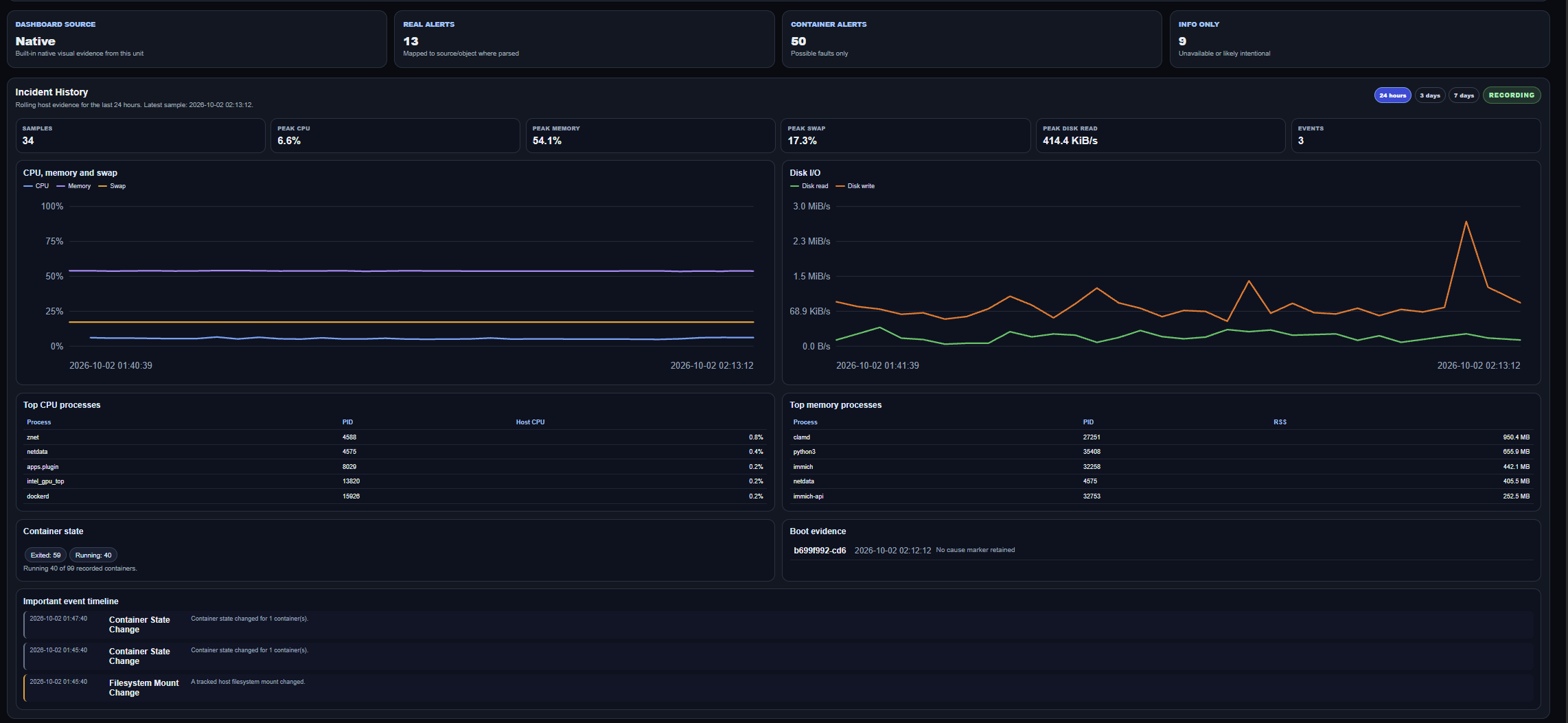
I also added a lightweight background monitor with a seven-day rolling history. It records CPU, memory, swap, disk I/O, top processes, container states, filesystem and mount changes, and important system events.
The new Incident History dashboard provides 24-hour, 3-day and 7-day views, including charts, top processes, container state, boot evidence and an event timeline.
ZimaBrain can now answer:
-
Why did my NAS become unresponsive?
-
Why did CPU and RAM reach 100%?
-
What was running before the reboot?
Monitoring starts after the feature is installed, so it cannot recover information that was already lost during an earlier reboot. However, it will now retain evidence for future incidents.
There are also two honest limitations:
-
A power outage cannot normally be proven without UPS or hardware evidence. ZimaBrain reports an abrupt shutdown as possible when no clean-shutdown marker exists.
-
It does not record every file rename or move because that would be noisy and privacy-heavy. However, it records the resulting CPU, memory, disk-I/O and process activity, together with filesystem errors and mount changes.
Previous-boot journal analysis also depends on ZimaOS retaining its journal across reboots. When that evidence is unavailable, ZimaBrain clearly says so rather than guessing.
I have attached a screenshot of the new dashboard. I believe this makes ZimaBrain much more useful for diagnosing problems that disappear after restarting the NAS.
The updated ZimaBrain image is now published and available from Docker Hub:
gelbuilding/zimabrain-ce:1.6.0-beta
If you already installed ZimaBrain using Docker Compose, open the directory containing your docker-compose.yml and run:
docker compose pull zimabrain-ce
Then recreate the container using the new image:
docker compose up -d --no-deps --force-recreate zimabrain-ce
Your existing ZimaBrain data and monitoring history will remain in the configured /DATA/AppData storage path.
You can confirm the container is running with:
docker compose ps
Then refresh the ZimaBrain page. The new Incident History panel should appear in the interface.