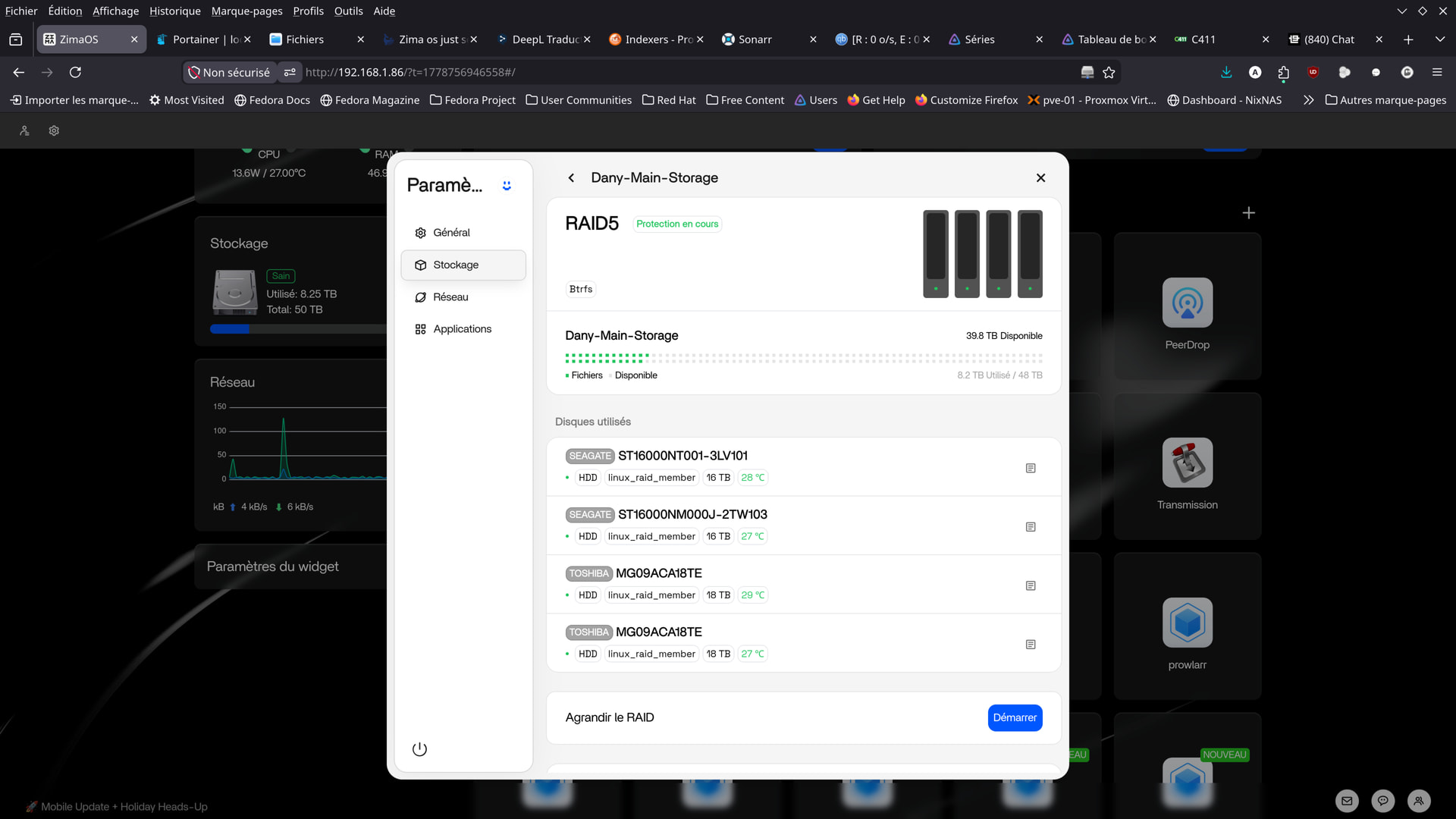
root@ZimaOS:/root ➜ # dmesg | grep -Ei “ata|sata|btrfs|md|raid|error|fail”
[ 0.000000] Command line: BOOT_IMAGE=(hd5,gpt4)/bzImage root=PARTUUID=a3ec664e-32ce-4665-95ea-7ae90ce9aa20 rootwait zram.enabled=1 zram.num_devices=3 net.naming-scheme=v250 systemd.machine_id=5c0aa80748604afa81ce94ceeac4b0a6 fsck.repair=yes console=tty1 quiet splash loglevel=3 systemd.show_status=1 rd.udev.log_level=3 net.ifnames=0 biosdevname=0 intel_iommu=on vfio_iommu_type1.allow_unsafe_interrupts=1 thunderbolt.host_reset=false rauc.slot=B
[ 0.000000] AMD AuthenticAMD
[ 0.000000] BIOS-e820: [mem 0x0000000076213000-0x0000000076222fff] ACPI data
[ 0.000000] reserve setup_data: [mem 0x0000000000000000-0x000000000009ffff] usable
[ 0.000000] reserve setup_data: [mem 0x0000000000100000-0x000000006ce5d017] usable
[ 0.000000] reserve setup_data: [mem 0x000000006ce5d018-0x000000006cf18a57] usable
[ 0.000000] reserve setup_data: [mem 0x000000006cf18a58-0x000000006cf19017] usable
[ 0.000000] reserve setup_data: [mem 0x000000006cf19018-0x000000006cf4e457] usable
[ 0.000000] reserve setup_data: [mem 0x000000006cf4e458-0x00000000754b5fff] usable
[ 0.000000] reserve setup_data: [mem 0x00000000754b6000-0x0000000076212fff] reserved
[ 0.000000] reserve setup_data: [mem 0x0000000076213000-0x0000000076222fff] ACPI data
[ 0.000000] reserve setup_data: [mem 0x0000000076223000-0x0000000077084fff] ACPI NVS
[ 0.000000] reserve setup_data: [mem 0x0000000077085000-0x00000000775a2fff] reserved
[ 0.000000] reserve setup_data: [mem 0x00000000775a3000-0x00000000775a3fff] usable
[ 0.000000] reserve setup_data: [mem 0x00000000775a4000-0x0000000077629fff] reserved
[ 0.000000] reserve setup_data: [mem 0x000000007762a000-0x0000000077ffffff] usable
[ 0.000000] reserve setup_data: [mem 0x0000000078000000-0x000000007bffffff] reserved
[ 0.000000] reserve setup_data: [mem 0x0000000080000000-0x000000008fffffff] reserved
[ 0.000000] reserve setup_data: [mem 0x00000000fed1c000-0x00000000fed44fff] reserved
[ 0.000000] reserve setup_data: [mem 0x00000000ff000000-0x00000000ffffffff] reserved
[ 0.000000] reserve setup_data: [mem 0x0000000100000000-0x0000000c7fffffff] usable
[ 0.010345] ACPI: SSDT 0x0000000076D1A2B8 00036D (v01 SataRe SataTabl 00001000 INTL 20120913)
[ 0.010459] NODE_DATA(0) allocated [mem 0xc7fffbc80-0xc7ffffdff]
[ 0.119690] Kernel command line: BOOT_IMAGE=(hd5,gpt4)/bzImage root=PARTUUID=a3ec664e-32ce-4665-95ea-7ae90ce9aa20 rootwait zram.enabled=1 zram.num_devices=3 net.naming-scheme=v250 systemd.machine_id=5c0aa80748604afa81ce94ceeac4b0a6 fsck.repair=yes console=tty1 quiet splash loglevel=3 systemd.show_status=1 rd.udev.log_level=3 net.ifnames=0 biosdevname=0 intel_iommu=on vfio_iommu_type1.allow_unsafe_interrupts=1 thunderbolt.host_reset=false rauc.slot=B
[ 0.301373] MDS: Mitigation: Clear CPU buffers
[ 0.301376] MMIO Stale Data: Mitigation: Clear CPU buffers
[ 0.374266] MDS CPU bug present and SMT on, data leak possible. See MDS - Microarchitectural Data Sampling — The Linux Kernel documentation for more details.
[ 0.374272] TAA CPU bug present and SMT on, data leak possible. See TAA - TSX Asynchronous Abort — The Linux Kernel documentation for more details.
[ 0.374273] MMIO Stale Data CPU bug present and SMT on, data leak possible. See Processor MMIO Stale Data Vulnerabilities — The Linux Kernel documentation for more details.
[ 0.376434] Memory: 49147636K/50165936K available (20480K kernel code, 2678K rwdata, 7512K rodata, 3308K init, 4260K bss, 1003600K reserved, 0K cma-reserved)
[ 0.396260] raid6: avx2x4 gen() 20257 MB/s
[ 0.413262] raid6: avx2x2 gen() 21959 MB/s
[ 0.430266] raid6: avx2x1 gen() 17367 MB/s
[ 0.430267] raid6: using algorithm avx2x2 gen() 21959 MB/s
[ 0.447271] raid6: … xor() 13023 MB/s, rmw enabled
[ 0.447273] raid6: using avx2x2 recovery algorithm
[ 0.550858] libata version 3.00 loaded.
[ 1.034900] Adaptec aacraid driver 1.2.1[50983]-custom
[ 1.034926] aic94xx: Adaptec aic94xx SAS/SATA driver version 1.0.3 loaded
[ 1.035088] RocketRAID 3xxx/4xxx Controller driver v1.10.0
[ 1.035828] ahci 0000:00:11.4: AHCI vers 0001.0300, 32 command slots, 6 Gbps, SATA mode
[ 1.036794] ata1: SATA max UDMA/133 abar m2048@0xfb719000 port 0xfb719100 irq 38 lpm-pol 4
[ 1.036797] ata2: DUMMY
[ 1.036798] ata3: DUMMY
[ 1.036799] ata4: DUMMY
[ 1.037008] ahci 0000:00:1f.2: AHCI vers 0001.0300, 32 command slots, 6 Gbps, SATA mode
[ 1.043572] ata5: DUMMY
[ 1.043575] ata6: SATA max UDMA/133 abar m2048@0xfb716000 port 0xfb716180 irq 39 lpm-pol 4
[ 1.043577] ata7: SATA max UDMA/133 abar m2048@0xfb716000 port 0xfb716200 irq 39 lpm-pol 4
[ 1.043579] ata8: SATA max UDMA/133 abar m2048@0xfb716000 port 0xfb716280 irq 39 lpm-pol 4
[ 1.043581] ata9: SATA max UDMA/133 abar m2048@0xfb716000 port 0xfb716300 irq 39 lpm-pol 4
[ 1.043582] ata10: DUMMY
[ 1.097028] Btrfs loaded, zoned=no, fsverity=no
[ 1.341568] ata1: SATA link up 6.0 Gbps (SStatus 133 SControl 300)
[ 1.347890] ata1.00: ATA-9: LDLC F6+M.2 480, S0424A0, max UDMA/133
[ 1.349417] ata6: SATA link up 6.0 Gbps (SStatus 133 SControl 300)
[ 1.349494] ata8: SATA link up 6.0 Gbps (SStatus 133 SControl 300)
[ 1.349546] ata7: SATA link up 6.0 Gbps (SStatus 133 SControl 300)
[ 1.349575] ata9: SATA link up 6.0 Gbps (SStatus 133 SControl 300)
[ 1.350349] ACPI BIOS Error (bug): Could not resolve symbol [_SB.PCI0.SAT1.SPT2._GTF.DSSP], AE_NOT_FOUND (20240827/psargs-332)
[ 1.350366] ACPI Error: Aborting method _SB.PCI0.SAT1.SPT2._GTF due to previous error (AE_NOT_FOUND) (20240827/psparse-529)
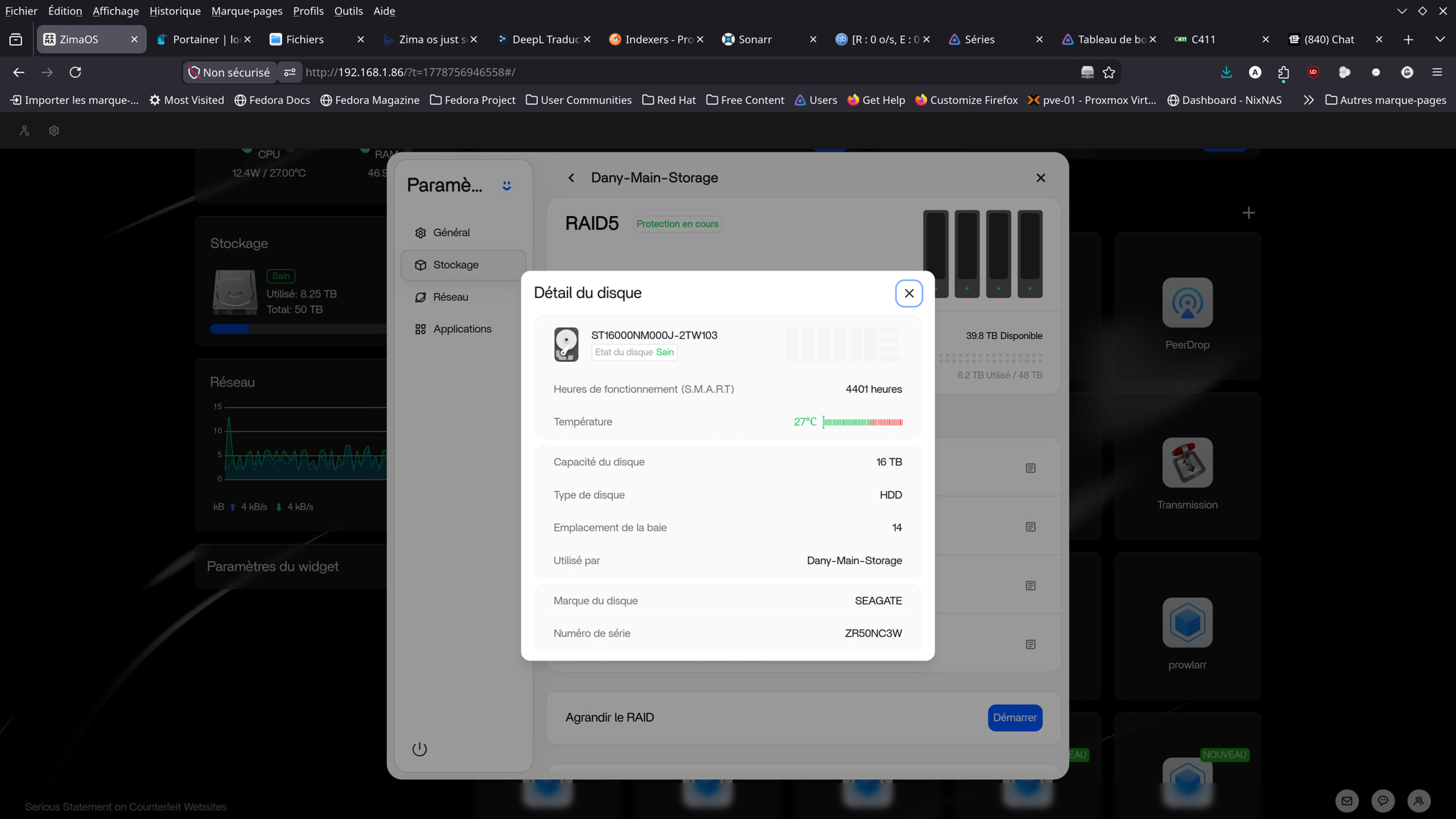
[ 1.350382] ata7.00: ATA-11: ST16000NM000J-2TW103, SN01, max UDMA/133
[ 1.351753] ata1.00: 937703088 sectors, multi 1: LBA48 NCQ (depth 32), AA
[ 1.352508] ACPI BIOS Error (bug): Could not resolve symbol [_SB.PCI0.SAT1.SPT3._GTF.DSSP], AE_NOT_FOUND (20240827/psargs-332)
[ 1.352524] ACPI Error: Aborting method _SB.PCI0.SAT1.SPT3._GTF due to previous error (AE_NOT_FOUND) (20240827/psparse-529)
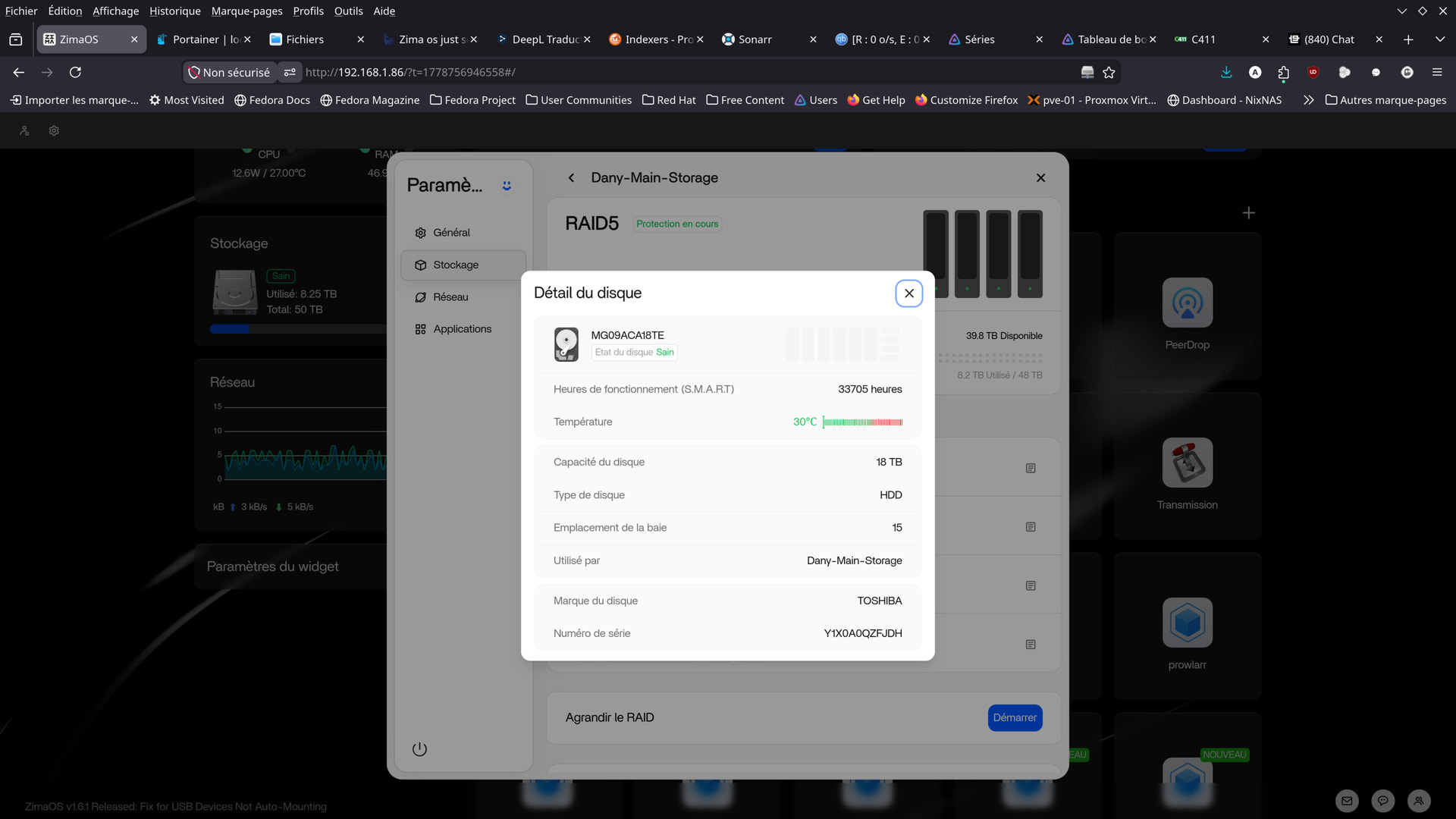
[ 1.352540] ata8.00: ATA-11: TOSHIBA MG09ACA18TE, 0104, max UDMA/133
[ 1.352606] ACPI BIOS Error (bug): Could not resolve symbol [_SB.PCI0.SAT1.SPT4._GTF.DSSP], AE_NOT_FOUND (20240827/psargs-332)
[ 1.352622] ACPI Error: Aborting method _SB.PCI0.SAT1.SPT4._GTF due to previous error (AE_NOT_FOUND) (20240827/psparse-529)
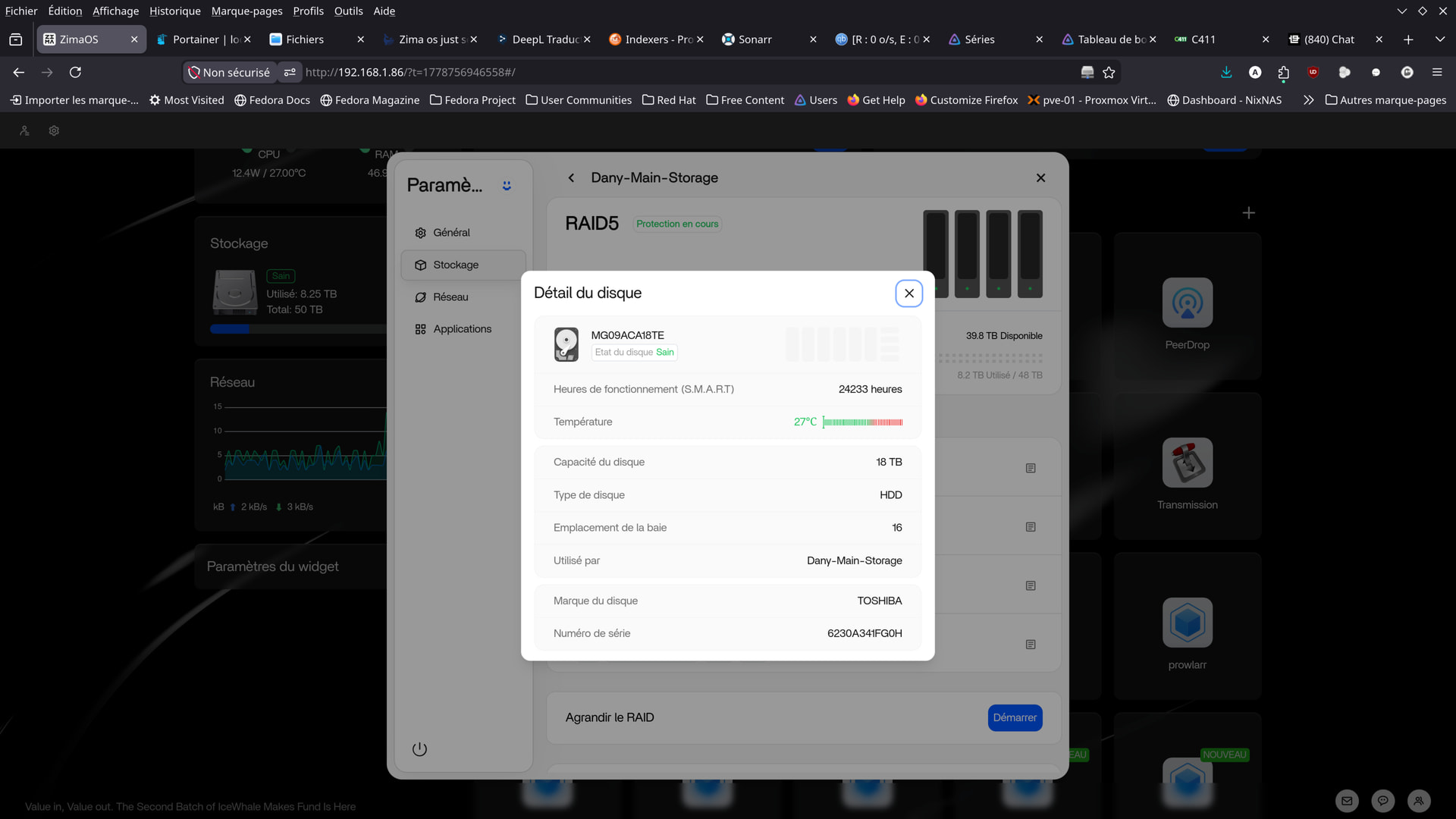
[ 1.352638] ata9.00: ATA-11: TOSHIBA MG09ACA18TE, 4004, max UDMA/133
[ 1.356139] ACPI BIOS Error (bug): Could not resolve symbol [_SB.PCI0.SAT1.SPT1._GTF.DSSP], AE_NOT_FOUND (20240827/psargs-332)
[ 1.356155] ACPI Error: Aborting method _SB.PCI0.SAT1.SPT1._GTF due to previous error (AE_NOT_FOUND) (20240827/psparse-529)
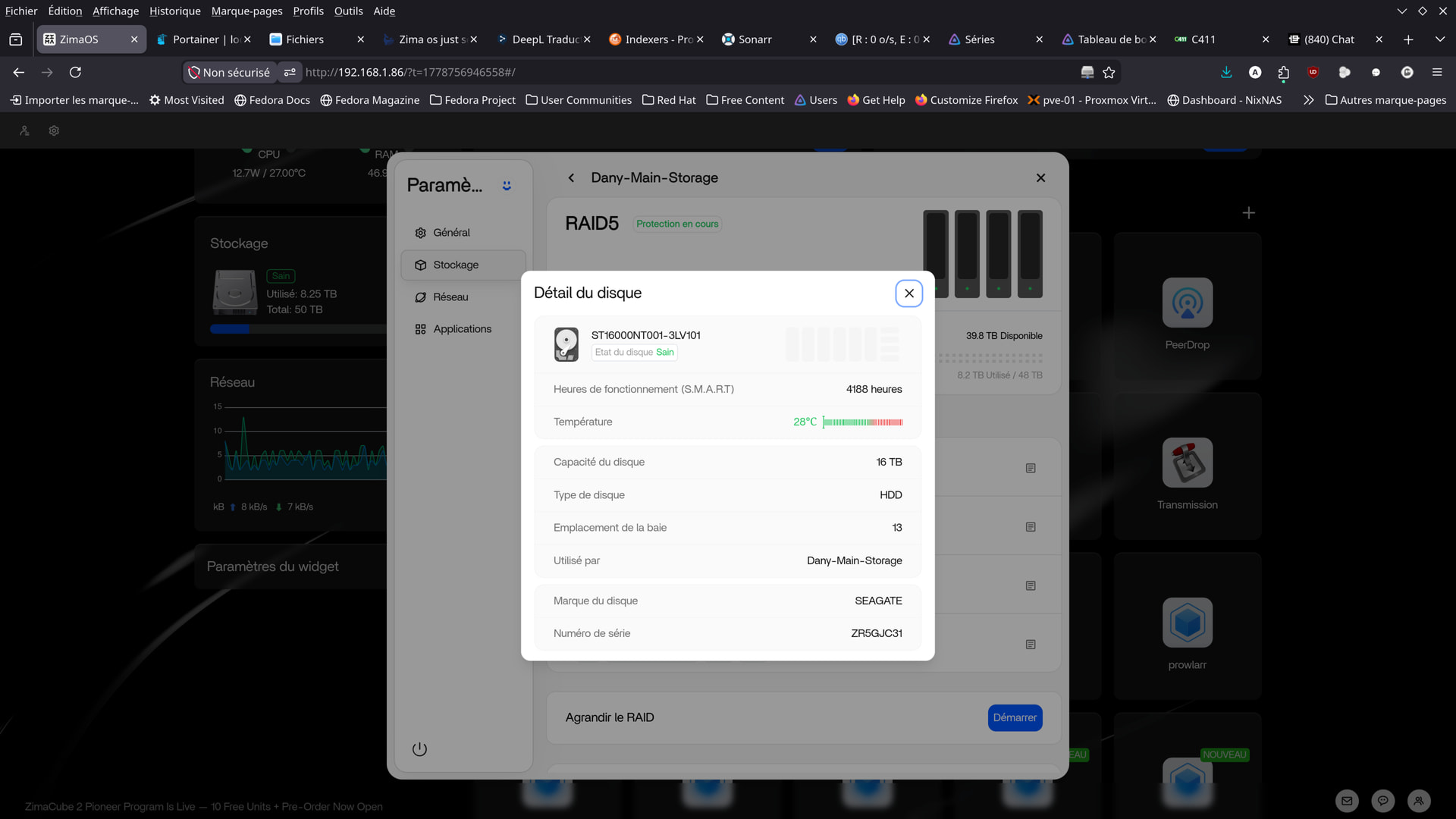
[ 1.356170] ata6.00: ATA-11: ST16000NT001-3LV101, EN01, max UDMA/133
[ 1.359561] ata8.00: 35156656128 sectors, multi 16: LBA48 NCQ (depth 32), AA
[ 1.359580] ata9.00: 35156656128 sectors, multi 16: LBA48 NCQ (depth 32), AA
[ 1.367575] ata1.00: configured for UDMA/133
[ 1.369838] ata9.00: Features: NCQ-prio
[ 1.371226] ata8.00: Features: NCQ-prio
[ 1.372992] ACPI BIOS Error (bug): Could not resolve symbol [_SB.PCI0.SAT1.SPT4._GTF.DSSP], AE_NOT_FOUND (20240827/psargs-332)
[ 1.373008] ACPI Error: Aborting method _SB.PCI0.SAT1.SPT4._GTF due to previous error (AE_NOT_FOUND) (20240827/psparse-529)
[ 1.374458] ACPI BIOS Error (bug): Could not resolve symbol [_SB.PCI0.SAT1.SPT3._GTF.DSSP], AE_NOT_FOUND (20240827/psargs-332)
[ 1.374474] ACPI Error: Aborting method _SB.PCI0.SAT1.SPT3._GTF due to previous error (AE_NOT_FOUND) (20240827/psparse-529)
[ 1.377862] scsi 0:0:0:0: Direct-Access ATA LDLC F6+M.2 480 4A0 PQ: 0 ANSI: 5
[ 1.389893] ata9.00: configured for UDMA/133
[ 1.393291] ata8.00: configured for UDMA/133
[ 1.403385] ata7.00: 31251759104 sectors, multi 16: LBA48 NCQ (depth 32), AA
[ 1.403810] ata6.00: 31251759104 sectors, multi 16: LBA48 NCQ (depth 32), AA
[ 1.883717] ata6.00: Features: NCQ-sndrcv
[ 1.884428] ACPI BIOS Error (bug): Could not resolve symbol [_SB.PCI0.SAT1.SPT1._GTF.DSSP], AE_NOT_FOUND (20240827/psargs-332)
[ 1.884445] ACPI Error: Aborting method _SB.PCI0.SAT1.SPT1._GTF due to previous error (AE_NOT_FOUND) (20240827/psparse-529)
[ 1.912007] ata7.00: Features: NCQ-sndrcv
[ 1.912719] ACPI BIOS Error (bug): Could not resolve symbol [_SB.PCI0.SAT1.SPT2._GTF.DSSP], AE_NOT_FOUND (20240827/psargs-332)
[ 1.912734] ACPI Error: Aborting method _SB.PCI0.SAT1.SPT2._GTF due to previous error (AE_NOT_FOUND) (20240827/psparse-529)
[ 2.400205] ata6.00: configured for UDMA/133
[ 2.453568] ata7.00: configured for UDMA/133
[ 2.456864] scsi 5:0:0:0: Direct-Access ATA ST16000NT001-3LV EN01 PQ: 0 ANSI: 5
[ 2.530739] scsi 6:0:0:0: Direct-Access ATA ST16000NM000J-2T SN01 PQ: 0 ANSI: 5
[ 2.531308] scsi 7:0:0:0: Direct-Access ATA TOSHIBA MG09ACA1 0104 PQ: 0 ANSI: 5
[ 2.531920] scsi 8:0:0:0: Direct-Access ATA TOSHIBA MG09ACA1 4004 PQ: 0 ANSI: 5
[ 2.571376] md: Waiting for all devices to be available before autodetect
[ 2.571381] md: If you don’t use raid, use raid=noautodetect
[ 2.571385] md: Autodetecting RAID arrays.
[ 2.571387] md: autorun …
[ 2.571389] md: … autorun DONE.
[ 2.578268] Write protecting the kernel read-only data: 28672k
[ 2.578661] Freeing unused kernel image (rodata/data gap) memory: 680K
[ 2.938636] EXT4-fs (nvme0n1p7): mounted filesystem 588bf225-9ccb-482c-a908-85ecfd9c3204 r/w with ordered data mode. Quota mode: none.
[ 5.886147] systemd[1]: systemd 256.17 running in system mode (+PAM +AUDIT -SELINUX +APPARMOR -IMA -SMACK +SECCOMP +GCRYPT -GNUTLS +OPENSSL +ACL +BLKID +CURL +ELFUTILS -FIDO2 -IDN2 -IDN +IPTC +KMOD +LIBCRYPTSETUP +LIBCRYPTSETUP_PLUGINS +LIBFDISK +PCRE2 -PWQUALITY -P11KIT -QRENCODE -TPM2 +BZIP2 -LZ4 +XZ +ZLIB -ZSTD -BPF_FRAMEWORK +XKBCOMMON -UTMP -SYSVINIT -LIBARCHIVE)
[ 5.886156] systemd[1]: Detected architecture x86-64.
[ 5.888826] systemd[1]: Hostname set to .
[ 5.978659] systemd[1]: /usr/lib/systemd/system/virtstoraged.socket:7: ListenStream= references a path below legacy directory /var/run/, updating /var/run/libvirt/virtstoraged-sock → /run/libvirt/virtstoraged-sock; please update the unit file accordingly.
[ 5.990031] systemd[1]: /usr/lib/systemd/system/virtstoraged-ro.socket:9: ListenStream= references a path below legacy directory /var/run/, updating /var/run/libvirt/virtstoraged-sock-ro → /run/libvirt/virtstoraged-sock-ro; please update the unit file accordingly.
[ 5.990327] systemd[1]: /usr/lib/systemd/system/virtstoraged-admin.socket:9: ListenStream= references a path below legacy directory /var/run/, updating /var/run/libvirt/virtstoraged-admin-sock → /run/libvirt/virtstoraged-admin-sock; please update the unit file accordingly.
[ 5.990638] systemd[1]: /usr/lib/systemd/system/virtsecretd.socket:7: ListenStream= references a path below legacy directory /var/run/, updating /var/run/libvirt/virtsecretd-sock → /run/libvirt/virtsecretd-sock; please update the unit file accordingly.
[ 5.991139] systemd[1]: /usr/lib/systemd/system/virtsecretd-ro.socket:9: ListenStream= references a path below legacy directory /var/run/, updating /var/run/libvirt/virtsecretd-sock-ro → /run/libvirt/virtsecretd-sock-ro; please update the unit file accordingly.
[ 5.991432] systemd[1]: /usr/lib/systemd/system/virtsecretd-admin.socket:9: ListenStream= references a path below legacy directory /var/run/, updating /var/run/libvirt/virtsecretd-admin-sock → /run/libvirt/virtsecretd-admin-sock; please update the unit file accordingly.
[ 5.991739] systemd[1]: /usr/lib/systemd/system/virtqemud.socket:7: ListenStream= references a path below legacy directory /var/run/, updating /var/run/libvirt/virtqemud-sock → /run/libvirt/virtqemud-sock; please update the unit file accordingly.
[ 5.992283] systemd[1]: /usr/lib/systemd/system/virtqemud-ro.socket:9: ListenStream= references a path below legacy directory /var/run/, updating /var/run/libvirt/virtqemud-sock-ro → /run/libvirt/virtqemud-sock-ro; please update the unit file accordingly.
[ 5.992593] systemd[1]: /usr/lib/systemd/system/virtqemud-admin.socket:9: ListenStream= references a path below legacy directory /var/run/, updating /var/run/libvirt/virtqemud-admin-sock → /run/libvirt/virtqemud-admin-sock; please update the unit file accordingly.
[ 5.992888] systemd[1]: /usr/lib/systemd/system/virtproxyd.socket:7: ListenStream= references a path below legacy directory /var/run/, updating /var/run/libvirt/libvirt-sock → /run/libvirt/libvirt-sock; please update the unit file accordingly.
[ 5.993607] systemd[1]: /usr/lib/systemd/system/virtproxyd-ro.socket:9: ListenStream= references a path below legacy directory /var/run/, updating /var/run/libvirt/libvirt-sock-ro → /run/libvirt/libvirt-sock-ro; please update the unit file accordingly.
[ 5.993920] systemd[1]: /usr/lib/systemd/system/virtproxyd-admin.socket:9: ListenStream= references a path below legacy directory /var/run/, updating /var/run/libvirt/libvirt-admin-sock → /run/libvirt/libvirt-admin-sock; please update the unit file accordingly.
[ 5.994181] systemd[1]: /usr/lib/systemd/system/virtnwfilterd.socket:7: ListenStream= references a path below legacy directory /var/run/, updating /var/run/libvirt/virtnwfilterd-sock → /run/libvirt/virtnwfilterd-sock; please update the unit file accordingly.
[ 5.994633] systemd[1]: /usr/lib/systemd/system/virtnwfilterd-ro.socket:9: ListenStream= references a path below legacy directory /var/run/, updating /var/run/libvirt/virtnwfilterd-sock-ro → /run/libvirt/virtnwfilterd-sock-ro; please update the unit file accordingly.
[ 5.994905] systemd[1]: /usr/lib/systemd/system/virtnwfilterd-admin.socket:9: ListenStream= references a path below legacy directory /var/run/, updating /var/run/libvirt/virtnwfilterd-admin-sock → /run/libvirt/virtnwfilterd-admin-sock; please update the unit file accordingly.
[ 5.995168] systemd[1]: /usr/lib/systemd/system/virtnodedevd.socket:7: ListenStream= references a path below legacy directory /var/run/, updating /var/run/libvirt/virtnodedevd-sock → /run/libvirt/virtnodedevd-sock; please update the unit file accordingly.
[ 5.995639] systemd[1]: /usr/lib/systemd/system/virtnodedevd-ro.socket:9: ListenStream= references a path below legacy directory /var/run/, updating /var/run/libvirt/virtnodedevd-sock-ro → /run/libvirt/virtnodedevd-sock-ro; please update the unit file accordingly.
[ 5.995912] systemd[1]: /usr/lib/systemd/system/virtnodedevd-admin.socket:9: ListenStream= references a path below legacy directory /var/run/, updating /var/run/libvirt/virtnodedevd-admin-sock → /run/libvirt/virtnodedevd-admin-sock; please update the unit file accordingly.
[ 5.996170] systemd[1]: /usr/lib/systemd/system/virtnetworkd.socket:7: ListenStream= references a path below legacy directory /var/run/, updating /var/run/libvirt/virtnetworkd-sock → /run/libvirt/virtnetworkd-sock; please update the unit file accordingly.
[ 5.996642] systemd[1]: /usr/lib/systemd/system/virtnetworkd-ro.socket:9: ListenStream= references a path below legacy directory /var/run/, updating /var/run/libvirt/virtnetworkd-sock-ro → /run/libvirt/virtnetworkd-sock-ro; please update the unit file accordingly.
[ 5.996913] systemd[1]: /usr/lib/systemd/system/virtnetworkd-admin.socket:9: ListenStream= references a path below legacy directory /var/run/, updating /var/run/libvirt/virtnetworkd-admin-sock → /run/libvirt/virtnetworkd-admin-sock; please update the unit file accordingly.
[ 5.997159] systemd[1]: /usr/lib/systemd/system/virtlogd.socket:5: ListenStream= references a path below legacy directory /var/run/, updating /var/run/libvirt/virtlogd-sock → /run/libvirt/virtlogd-sock; please update the unit file accordingly.
[ 5.997862] systemd[1]: /usr/lib/systemd/system/virtlogd-admin.socket:7: ListenStream= references a path below legacy directory /var/run/, updating /var/run/libvirt/virtlogd-admin-sock → /run/libvirt/virtlogd-admin-sock; please update the unit file accordingly.
[ 5.998106] systemd[1]: /usr/lib/systemd/system/virtlockd.socket:5: ListenStream= references a path below legacy directory /var/run/, updating /var/run/libvirt/virtlockd-sock → /run/libvirt/virtlockd-sock; please update the unit file accordingly.
[ 5.998518] systemd[1]: /usr/lib/systemd/system/virtlockd-admin.socket:7: ListenStream= references a path below legacy directory /var/run/, updating /var/run/libvirt/virtlockd-admin-sock → /run/libvirt/virtlockd-admin-sock; please update the unit file accordingly.
[ 5.998786] systemd[1]: /usr/lib/systemd/system/virtinterfaced.socket:7: ListenStream= references a path below legacy directory /var/run/, updating /var/run/libvirt/virtinterfaced-sock → /run/libvirt/virtinterfaced-sock; please update the unit file accordingly.
[ 5.999227] systemd[1]: /usr/lib/systemd/system/virtinterfaced-ro.socket:9: ListenStream= references a path below legacy directory /var/run/, updating /var/run/libvirt/virtinterfaced-sock-ro → /run/libvirt/virtinterfaced-sock-ro; please update the unit file accordingly.
[ 5.999509] systemd[1]: /usr/lib/systemd/system/virtinterfaced-admin.socket:9: ListenStream= references a path below legacy directory /var/run/, updating /var/run/libvirt/virtinterfaced-admin-sock → /run/libvirt/virtinterfaced-admin-sock; please update the unit file accordingly.
[ 6.007562] systemd[1]: /usr/lib/systemd/system/zimaos-user.service:8: PIDFile= references a path below legacy directory /var/run/, updating /var/run/casaos/user-service.pid → /run/casaos/user-service.pid; please update the unit file accordingly.
[ 6.008152] systemd[1]: /usr/lib/systemd/system/zimaos-search.service:7: PIDFile= references a path below legacy directory /var/run/, updating /var/run/zimaos/zimaos-search.pid → /run/zimaos/zimaos-search.pid; please update the unit file accordingly.
[ 6.008384] systemd[1]: /usr/lib/systemd/system/zimaos-message-bus.service:8: PIDFile= references a path below legacy directory /var/run/, updating /var/run/casaos/message-bus.pid → /run/casaos/message-bus.pid; please update the unit file accordingly.
[ 6.008670] systemd[1]: /usr/lib/systemd/system/zimaos-local-storage.service:8: PIDFile= references a path below legacy directory /var/run/, updating /var/run/zimaos/local-storage.pid → /run/zimaos/local-storage.pid; please update the unit file accordingly.
[ 6.009442] systemd[1]: /usr/lib/systemd/system/zimaos-gateway.service:7: PIDFile= references a path below legacy directory /var/run/, updating /var/run/casaos/gateway.pid → /run/casaos/gateway.pid; please update the unit file accordingly.
[ 6.009670] systemd[1]: /usr/lib/systemd/system/zimaos-app-management.service:9: PIDFile= references a path below legacy directory /var/run/, updating /var/run/casaos/app-management.pid → /run/casaos/app-management.pid; please update the unit file accordingly.
[ 6.013723] systemd[1]: /usr/lib/systemd/system/winbind.service:8: PIDFile= references a path below legacy directory /var/run/, updating /var/run/samba/winbindd.pid → /run/samba/winbindd.pid; please update the unit file accordingly.
[ 6.017397] systemd[1]: /usr/lib/systemd/system/smb.service:9: PIDFile= references a path below legacy directory /var/run/, updating /var/run/samba/smbd.pid → /run/samba/smbd.pid; please update the unit file accordingly.
[ 6.017605] systemd[1]: /usr/lib/systemd/system/samba-bgqd.service:10: PIDFile= references a path below legacy directory /var/run/, updating /var/run/samba/samba-bgqd.pid → /run/samba/samba-bgqd.pid; please update the unit file accordingly.
[ 6.020234] systemd[1]: /usr/lib/systemd/system/nmb.service:9: PIDFile= references a path below legacy directory /var/run/, updating /var/run/samba/nmbd.pid → /run/samba/nmbd.pid; please update the unit file accordingly.
[ 6.021587] systemd[1]: /usr/lib/systemd/system/icewhale-files.service:7: PIDFile= references a path below legacy directory /var/run/, updating /var/run/casaos/icewhale-files.pid → /run/casaos/icewhale-files.pid; please update the unit file accordingly.
[ 6.021804] systemd[1]: /usr/lib/systemd/system/icewhale-files-backup.service:7: PIDFile= references a path below legacy directory /var/run/, updating /var/run/casaos/icewhale-files-backup.pid → /run/casaos/icewhale-files-backup.pid; please update the unit file accordingly.
[ 6.023749] systemd[1]: /usr/lib/systemd/system/ctdb.service:12: PIDFile= references a path below legacy directory /var/run/, updating /var/run/ctdb/ctdbd.pid → /run/ctdb/ctdbd.pid; please update the unit file accordingly.
[ 6.024656] systemd[1]: /usr/lib/systemd/system/casaos-installer.service:7: PIDFile= references a path below legacy directory /var/run/, updating /var/run/casaos/installer.pid → /run/casaos/installer.pid; please update the unit file accordingly.
[ 6.033066] systemd[1]: /usr/lib/systemd/system/libvirtd.socket:5: ListenStream= references a path below legacy directory /var/run/, updating /var/run/libvirt/libvirt-sock → /run/libvirt/libvirt-sock; please update the unit file accordingly.
[ 6.033668] systemd[1]: /usr/lib/systemd/system/libvirtd-ro.socket:7: ListenStream= references a path below legacy directory /var/run/, updating /var/run/libvirt/libvirt-sock-ro → /run/libvirt/libvirt-sock-ro; please update the unit file accordingly.
[ 6.033897] systemd[1]: /usr/lib/systemd/system/libvirtd-admin.socket:7: ListenStream= references a path below legacy directory /var/run/, updating /var/run/libvirt/libvirt-admin-sock → /run/libvirt/libvirt-admin-sock; please update the unit file accordingly.
[ 6.044545] systemd[1]: multi-user.target: Found ordering cycle on getty.target/start
[ 6.044550] systemd[1]: multi-user.target: Found dependency on zimaos-welcome@tty1.service/start
[ 6.044552] systemd[1]: multi-user.target: Found dependency on multi-user.target/start
[ 6.044555] systemd[1]: multi-user.target: Job getty.target/start deleted to break ordering cycle starting with multi-user.target/start
[ 6.045722] systemd[1]: Queued start job for default target Multi-User System.
[ 6.066220] systemd[1]: Unnecessary job was removed for /dev/nvme0n1p7.
[ 6.067507] systemd[1]: Created slice Slice /system/modprobe.
[ 6.068365] systemd[1]: Created slice Slice /system/systemd-fsck.
[ 6.069123] systemd[1]: Created slice Slice /system/systemd-growfs.
[ 6.069905] systemd[1]: Created slice Slice /system/zimaos-welcome.
[ 6.070534] systemd[1]: Created slice User and Session Slice.
[ 6.070885] systemd[1]: Started Dispatch Password Requests to Console Directory Watch.
[ 6.070991] systemd[1]: Started Forward Password Requests to Wall Directory Watch.
[ 6.071072] systemd[1]: Expecting device /dev/disk/by-label/casaos-boot…
[ 6.071125] systemd[1]: Expecting device /dev/disk/by-label/casaos-data…
[ 6.071165] systemd[1]: Expecting device /dev/disk/by-label/casaos-overlay…
[ 6.071212] systemd[1]: Reached target Local Encrypted Volumes.
[ 6.071263] systemd[1]: Reached target Local Integrity Protected Volumes.
[ 6.071327] systemd[1]: Reached target NFS client services.
[ 6.071377] systemd[1]: Reached target Host and Network Name Lookups.
[ 6.071437] systemd[1]: Reached target Path Units.
[ 6.071675] systemd[1]: Reached target Slice Units.
[ 6.071919] systemd[1]: Reached target Swaps.
[ 6.072177] systemd[1]: Reached target Local Verity Protected Volumes.
[ 6.072437] systemd[1]: Reached target libvirt guests shutdown target.
[ 6.076854] systemd[1]: Listening on RPCbind Server Activation Socket.
[ 6.077528] systemd[1]: Reached target RPC Port Mapper.
[ 6.078749] systemd[1]: Listening on Credential Encryption/Decryption.
[ 6.079605] systemd[1]: Listening on Journal Audit Socket.
[ 6.080267] systemd[1]: Listening on Journal Socket (/dev/log).
[ 6.080662] systemd[1]: Listening on Journal Sockets.
[ 6.081434] systemd[1]: Listening on Network Service Netlink Socket.
[ 6.082049] systemd[1]: Listening on udev Control Socket.
[ 6.082377] systemd[1]: Listening on udev Kernel Socket.
[ 6.085524] systemd[1]: Mounting Huge Pages File System…
[ 6.087047] systemd[1]: Mounting POSIX Message Queue File System…
[ 6.088474] systemd[1]: Mounting Kernel Debug File System…
[ 6.089848] systemd[1]: Mounting Kernel Trace File System…
[ 6.091343] systemd[1]: Mounting Temporary Directory /tmp…
[ 6.092181] systemd[1]: var.mount: Directory /var to mount over is not empty, mounting anyway.
[ 6.093038] systemd[1]: Mounting Buildroot /var tmpfs…
[ 6.095375] systemd[1]: Starting Create List of Static Device Nodes…
[ 6.096832] systemd[1]: Starting Load Kernel Module configfs…
[ 6.098286] systemd[1]: Starting Load Kernel Module drm…
[ 6.099708] systemd[1]: Starting Load Kernel Module efi_pstore…
[ 6.101111] systemd[1]: Starting Load Kernel Module fuse…
[ 6.102634] systemd[1]: Starting File System Check on Root Device…
[ 6.105077] systemd[1]: Starting Journal Service…
[ 6.107682] systemd[1]: Starting Load Kernel Modules…
[ 6.109100] systemd[1]: Starting Generate network units from Kernel command line…
[ 6.110593] systemd[1]: Starting Load udev Rules from Credentials…
[ 6.112023] systemd[1]: Starting Coldplug All udev Devices…
[ 6.114882] systemd[1]: Mounted Huge Pages File System.
[ 6.116960] systemd[1]: Mounted POSIX Message Queue File System.
[ 6.118259] systemd[1]: Mounted Kernel Debug File System.
[ 6.118906] systemd[1]: Mounted Kernel Trace File System.
[ 6.119569] systemd[1]: Mounted Temporary Directory /tmp.
[ 6.120222] systemd[1]: Mounted Buildroot /var tmpfs.
[ 6.120729] systemd[1]: Finished Create List of Static Device Nodes.
[ 6.121526] systemd[1]: modprobe@configfs.service: Deactivated successfully.
[ 6.121695] systemd[1]: Finished Load Kernel Module configfs.
[ 6.122492] systemd[1]: modprobe@drm.service: Deactivated successfully.
[ 6.122649] systemd[1]: Finished Load Kernel Module drm.
[ 6.123407] systemd[1]: modprobe@efi_pstore.service: Deactivated successfully.
[ 6.123563] systemd[1]: Finished Load Kernel Module efi_pstore.
[ 6.124299] systemd[1]: modprobe@fuse.service: Deactivated successfully.
[ 6.124456] systemd[1]: Finished Load Kernel Module fuse.
[ 6.125280] systemd[1]: Finished File System Check on Root Device.
[ 6.126039] systemd[1]: Finished Generate network units from Kernel command line.
[ 6.126858] systemd[1]: Reached target Preparation for Network.
[ 6.128240] systemd[1]: Mounting FUSE Control File System…
[ 6.129650] systemd[1]: Mounting Kernel Configuration File System…
[ 6.131261] systemd[1]: Starting Load AppArmor profiles…
[ 6.132684] systemd[1]: Starting Remount Root and Kernel File Systems…
[ 6.134088] systemd[1]: Starting Create Static Device Nodes in /dev gracefully…
[ 6.134516] systemd-journald[418]: Collecting audit messages is enabled.
[ 6.135032] systemd[1]: Finished Load udev Rules from Credentials.
[ 6.135807] audit: type=1130 audit(1778913157.838:2): pid=1 uid=0 auid=4294967295 ses=4294967295 subj=unconfined msg=‘unit=systemd-udev-load-credentials comm=“systemd” exe=“/usr/lib/systemd/systemd” hostname=? addr=? terminal=? res=success’
[ 6.136848] systemd[1]: Mounted FUSE Control File System.
[ 6.138005] systemd[1]: Mounted Kernel Configuration File System.
[ 6.145110] systemd[1]: Finished Remount Root and Kernel File Systems.
[ 6.145780] audit: type=1130 audit(1778913157.848:3): pid=1 uid=0 auid=4294967295 ses=4294967295 subj=unconfined msg=‘unit=systemd-remount-fs comm=“systemd” exe=“/usr/lib/systemd/systemd” hostname=? addr=? terminal=? res=success’
[ 6.146246] systemd[1]: One time configuration for iscsi.service was skipped because of an unmet condition check (ConditionPathExists=!/etc/iscsi/initiatorname.iscsi).
[ 6.146290] systemd[1]: Platform Persistent Storage Archival was skipped because of an unmet condition check (ConditionDirectoryNotEmpty=/sys/fs/pstore).
[ 6.147563] systemd[1]: Starting Load/Save OS Random Seed…
[ 6.158605] systemd[1]: Finished Load/Save OS Random Seed.
[ 6.159283] audit: type=1130 audit(1778913157.861:4): pid=1 uid=0 auid=4294967295 ses=4294967295 subj=unconfined msg=‘unit=systemd-random-seed comm=“systemd” exe=“/usr/lib/systemd/systemd” hostname=? addr=? terminal=? res=success’
[ 6.173299] systemd[1]: Finished Create Static Device Nodes in /dev gracefully.
[ 6.174425] audit: type=1130 audit(1778913157.877:5): pid=1 uid=0 auid=4294967295 ses=4294967295 subj=unconfined msg=‘unit=systemd-tmpfiles-setup-dev-early comm=“systemd” exe=“/usr/lib/systemd/systemd” hostname=? addr=? terminal=? res=success’
[ 6.178597] systemd[1]: Starting Create Static Device Nodes in /dev…
[ 6.229464] systemd[1]: Finished Create Static Device Nodes in /dev.
[ 6.230449] systemd[1]: Reached target Preparation for Local File Systems.
[ 6.233739] systemd[1]: Starting Rule-based Manager for Device Events and Files…
[ 6.299708] systemd[1]: Started Journal Service.
[ 7.419843] EXT4-fs (nvme0n1p8): mounted filesystem fadab15d-e9cc-4bc2-b4af-a2b49a30cbe5 r/w with ordered data mode. Quota mode: none.
[ 7.469179] systemd-journald[418]: Received client request to flush runtime journal.
[ 10.596155] cfg80211: Loading compiled-in X.509 certificates for regulatory database
[ 10.599459] Adding 8388604k swap on /DATA/.swapfile. Priority:10 extents:64 across:1218314240k SS
[ 12.171366] md: md127 stopped.
[ 12.235504] md: md0 stopped.
[ 12.389912] md: kicking non-fresh sdd from array!
[ 12.412405] md/raid:md0: device sdb operational as raid disk 0
[ 12.412415] md/raid:md0: device sde operational as raid disk 3
[ 12.412418] md/raid:md0: device sdc operational as raid disk 1
[ 12.412908] md/raid:md0: raid level 5 active with 3 out of 4 devices, algorithm 2
[ 12.442734] md0: detected capacity change from 0 to 93754484736
[ 12.527468] BTRFS: device fsid a327f5d4-f069-7380-ae4d-51fab01a4ab2 devid 1 transid 5111 /dev/md0 (9:0) scanned by zimaos-local-st (1024)
[ 12.609676] md: recover of RAID array md0
[ 12.632569] BTRFS info (device md0): first mount of filesystem a327f5d4-f069-7380-ae4d-51fab01a4ab2
[ 12.632584] BTRFS info (device md0): using crc32c (crc32c-intel) checksum algorithm
[ 12.632590] BTRFS info (device md0): using free-space-tree
[ 16.011239] md: md0: recover done.
[ 921.891734] nvme nvme0: using unchecked data buffer
root@ZimaOS:/root ➜ # cat /proc/mdstat
Personalities : [raid6] [raid5] [raid4]
md0 : active raid5 sdd[2] sdb[0] sde[4] sdc[1]
46877242368 blocks super 1.2 level 5, 512k chunk, algorithm 2 [4/4] [UUUU]
bitmap: 0/117 pages [0KB], 65536KB chunk
unused devices:
 if it continues and you exhausted other options like firmware update etc maybe a cheap sas controller card in IT mode and couple of sas to sata cables might let you skip the sata controller and the errors. also if you just get sas to sas cables you could buy enterprise sas drives second hand really cheap compared to sata drives on ebay lol