I don’t know what I did or how to switch it back to read-write mode
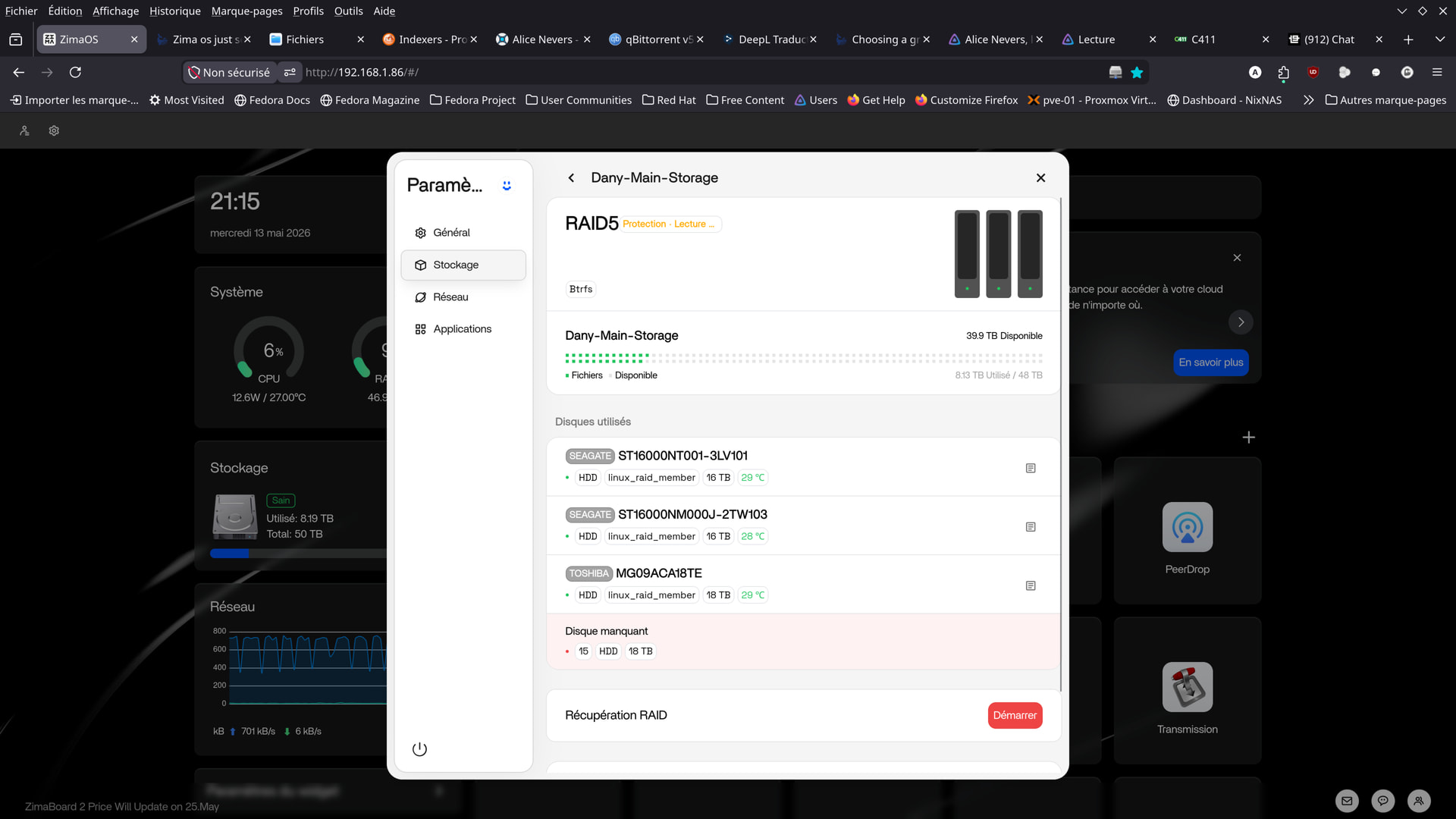
looks like a drive failure causing the kernel to put the other drives into read-only to protect it. reboot the server and see if it stays the same. if so it’s likely a drive failure. check all cable connections to the drives are firmly connected.
Terminal Diagnostics If you suspect a drive failure, access the terminal via SSH or local console and run the following commands to diagnose the issue:
-
Check RAID Status: Run
cat /proc/mdstatto see if the array is degraded (e.g.,[U_]indicates a missing drive) or healthy ([UU]). -
Identify Drives: Use
lsblk -o NAME,SIZE,MODEL,SERIAL,MOUNTPOINTto list all block devices and their serial numbers, helping you identify which physical drive is missing or unrecognized. -
Detailed RAID Info: Run
sudo mdadm --detail /dev/md0(or your specific RAID device) to see the status of individual disks within the array. -
System Logs: Check for hardware errors with
dmesg -T | egrep -i "error|reset|fail|I/O" | tail -150.
Once I restarted it, everything went back to normal.
I’m sending you the output of the commands you sent me anyway.
I’d especially like to hear your thoughts on the “dmesg” output.
dany@ZimaOS> cat /proc/mdstat
Personalities : [raid6] [raid5] [raid4]
md0 : active raid5 sdd[2] sdb[0] sde[4] sdc[1]
46877242368 blocks super 1.2 level 5, 512k chunk, algorithm 2 [4/4] [UUUU]
bitmap: 0/117 pages [0KB], 65536KB chunk
dany@ZimaOS:~ ➜ $ lsblk -o NAME,SIZE,MODEL,SERIAL,MOUNTPOINT
NAME SIZE MODEL SERIAL MOUNTPOINT
loop0 4.5M
loop1 5.2M
loop2 137.3M
loop3 17.8M
loop4 10.7M
loop5 1.1M
loop6 208K
loop7 208K
loop8 137.3M
loop9 4.5M
loop10 10.7M
loop11 17.8M
loop12 1.1M
loop13 5.2M
sda 447.1G LDLC F6+M.2 480 09042219D0059
├─sda1 447.1G
└─sda9 8M
sdb 14.6T ST16000NT001-3LV101 ZR5GJC31
└─md0 43.7T /var/lib/casaos_data/.media/Dany-Main-Storage
sdc 14.6T ST16000NM000J-2TW103 ZR50NC3W
└─md0 43.7T /var/lib/casaos_data/.media/Dany-Main-Storage
sdd 16.4T TOSHIBA MG09ACA18TE Y1X0A0QZFJDH
└─md0 43.7T /var/lib/casaos_data/.media/Dany-Main-Storage
sde 16.4T TOSHIBA MG09ACA18TE 6230A341FG0H
└─md0 43.7T /var/lib/casaos_data/.media/Dany-Main-Storage
nbd0 0B
nbd1 0B
nbd2 0B
nbd3 0B
nbd4 0B
nbd5 0B
nbd6 0B
nbd7 0B
zram0 2G [SWAP]
zram1 0B
zram2 0B
nvme0n1 1.8T Samsung SSD 990 EVO Plus 2TB S7U7NU0YA03604M
├─nvme0n1p1 32M /mnt/boot
├─nvme0n1p2 24M
├─nvme0n1p3 6G
├─nvme0n1p4 24M
├─nvme0n1p5 6G /
├─nvme0n1p6 8M
├─nvme0n1p7 96M /mnt/overlay
└─nvme0n1p8 1.8T /DATA
nbd8 0B
nbd9 0B
nbd10 0B
nbd11 0B
nbd12 0B
nbd13 0B
nbd14 0B
nbd15 0B
dany@ZimaOS:~ ➜ $ sudo mdadm --detail /dev/md0
Password:
/dev/md0:
Version : 1.2
Creation Time : Fri Apr 17 19:30:18 2026
Raid Level : raid5
Array Size : 46877242368 (43.66 TiB 48.00 TB)
Used Dev Size : 15625747456 (14.55 TiB 16.00 TB)
Raid Devices : 4
Total Devices : 4
Persistence : Superblock is persistent

 Intent Bitmap : Internal

   Update Time : Wed May 13 22:26:14 2026
         State : clean
Active Devices : 4

Working Devices : 4
Failed Devices : 0
Spare Devices : 0

        Layout : left-symmetric
    Chunk Size : 512K

Consistency Policy : bitmap

          Name : zimaos:2c687430170ffc53
          UUID : a327f5d4:f0697380:ae4d51fa:b01a4ab2
        Events : 16982

Number   Major   Minor   RaidDevice State
   0       8       16        0      active sync   /dev/sdb
   1       8       32        1      active sync   /dev/sdc
   2       8       48        2      active sync   /dev/sdd
   4       8       64        3      active sync   /dev/sde
dany@ZimaOS:~ ➜ $ dmesg -T | egrep -i “error|reset|fail|I/O” | tail -150
egrep: warning: egrep is obsolescent; using grep -E
[Wed May 13 22:25:43 2026] Command line: BOOT_IMAGE=(hd5,gpt4)/bzImage root=PARTUUID=a3ec664e-32ce-4665-95ea-7ae90ce9aa20 rootwait zram.enabled=1 zram.num_devices=3 net.naming-scheme=v250 systemd.machine_id=5c0aa80748604afa81ce94ceeac4b0a6 fsck.repair=yes console=tty1 quiet splash loglevel=3 systemd.show_status=1 rd.udev.log_level=3 net.ifnames=0 biosdevname=0 intel_iommu=on vfio_iommu_type1.allow_unsafe_interrupts=1 thunderbolt.host_reset=false rauc.slot=B
[Wed May 13 22:25:43 2026] Kernel command line: BOOT_IMAGE=(hd5,gpt4)/bzImage root=PARTUUID=a3ec664e-32ce-4665-95ea-7ae90ce9aa20 rootwait zram.enabled=1 zram.num_devices=3 net.naming-scheme=v250 systemd.machine_id=5c0aa80748604afa81ce94ceeac4b0a6 fsck.repair=yes console=tty1 quiet splash loglevel=3 systemd.show_status=1 rd.udev.log_level=3 net.ifnames=0 biosdevname=0 intel_iommu=on vfio_iommu_type1.allow_unsafe_interrupts=1 thunderbolt.host_reset=false rauc.slot=B
[Wed May 13 22:25:43 2026] APIC: Switch to symmetric I/O mode setup
[Wed May 13 22:25:43 2026] DMAR: Intel(R) Virtualization Technology for Directed I/O
[Wed May 13 22:25:43 2026] 00:05: ttyS0 at I/O 0x3f8 (irq = 4, base_baud = 115200) is a 16550A
[Wed May 13 22:25:44 2026] serial8250: ttyS1 at I/O 0x2f8 (irq = 3, base_baud = 115200) is a 16550A
[Wed May 13 22:25:44 2026] ACPI BIOS Error (bug): Could not resolve symbol [_SB.PCI0.SAT1.SPT1._GTF.DSSP], AE_NOT_FOUND (20240827/psargs-332)
[Wed May 13 22:25:44 2026] ACPI Error: Aborting method _SB.PCI0.SAT1.SPT1._GTF due to previous error (AE_NOT_FOUND) (20240827/psparse-529)
[Wed May 13 22:25:44 2026] ACPI BIOS Error (bug): Could not resolve symbol [_SB.PCI0.SAT1.SPT2._GTF.DSSP], AE_NOT_FOUND (20240827/psargs-332)
[Wed May 13 22:25:44 2026] ACPI Error: Aborting method _SB.PCI0.SAT1.SPT2._GTF due to previous error (AE_NOT_FOUND) (20240827/psparse-529)
[Wed May 13 22:25:44 2026] ACPI BIOS Error (bug): Could not resolve symbol [_SB.PCI0.SAT1.SPT4._GTF.DSSP], AE_NOT_FOUND (20240827/psargs-332)
[Wed May 13 22:25:44 2026] ACPI Error: Aborting method _SB.PCI0.SAT1.SPT4._GTF due to previous error (AE_NOT_FOUND) (20240827/psparse-529)
[Wed May 13 22:25:44 2026] ACPI BIOS Error (bug): Could not resolve symbol [_SB.PCI0.SAT1.SPT3._GTF.DSSP], AE_NOT_FOUND (20240827/psargs-332)
[Wed May 13 22:25:44 2026] ACPI Error: Aborting method _SB.PCI0.SAT1.SPT3._GTF due to previous error (AE_NOT_FOUND) (20240827/psparse-529)
[Wed May 13 22:25:44 2026] ACPI BIOS Error (bug): Could not resolve symbol [_SB.PCI0.SAT1.SPT3._GTF.DSSP], AE_NOT_FOUND (20240827/psargs-332)
[Wed May 13 22:25:44 2026] ACPI Error: Aborting method _SB.PCI0.SAT1.SPT3._GTF due to previous error (AE_NOT_FOUND) (20240827/psparse-529)
[Wed May 13 22:25:44 2026] sd 0:0:0:0: [sda] Preferred minimum I/O size 512 bytes
[Wed May 13 22:25:44 2026] ACPI BIOS Error (bug): Could not resolve symbol [_SB.PCI0.SAT1.SPT4._GTF.DSSP], AE_NOT_FOUND (20240827/psargs-332)
[Wed May 13 22:25:44 2026] ACPI Error: Aborting method _SB.PCI0.SAT1.SPT4._GTF due to previous error (AE_NOT_FOUND) (20240827/psparse-529)
[Wed May 13 22:25:45 2026] ACPI BIOS Error (bug): Could not resolve symbol [_SB.PCI0.SAT1.SPT1._GTF.DSSP], AE_NOT_FOUND (20240827/psargs-332)
[Wed May 13 22:25:45 2026] ACPI Error: Aborting method _SB.PCI0.SAT1.SPT1._GTF due to previous error (AE_NOT_FOUND) (20240827/psparse-529)
[Wed May 13 22:25:45 2026] ACPI BIOS Error (bug): Could not resolve symbol [_SB.PCI0.SAT1.SPT2._GTF.DSSP], AE_NOT_FOUND (20240827/psargs-332)
[Wed May 13 22:25:45 2026] ACPI Error: Aborting method _SB.PCI0.SAT1.SPT2._GTF due to previous error (AE_NOT_FOUND) (20240827/psparse-529)
[Wed May 13 22:25:45 2026] sd 5:0:0:0: [sdb] Preferred minimum I/O size 4096 bytes
[Wed May 13 22:25:45 2026] sd 6:0:0:0: [sdc] Preferred minimum I/O size 4096 bytes
[Wed May 13 22:25:45 2026] sd 7:0:0:0: [sdd] Preferred minimum I/O size 4096 bytes
[Wed May 13 22:25:45 2026] sd 8:0:0:0: [sde] Preferred minimum I/O size 4096 bytes
[Wed May 13 22:26:03 2026] ata8: SError: { CommWake DevExch }
[Wed May 13 22:26:03 2026] ata8.00: failed command: READ FPDMA QUEUED
res 40/00:00:00:00:00/00:00:00:00:00/00 Emask 0x10 (ATA bus error)
[Wed May 13 22:26:03 2026] ata8.00: failed command: READ FPDMA QUEUED
res 40/00:00:00:00:00/00:00:00:00:00/00 Emask 0x10 (ATA bus error)
[Wed May 13 22:26:03 2026] ata8.00: failed command: WRITE FPDMA QUEUED
res 40/00:00:00:00:00/00:00:00:00:00/00 Emask 0x10 (ATA bus error)
[Wed May 13 22:26:03 2026] ata8: hard resetting link
[Wed May 13 22:26:13 2026] ACPI BIOS Error (bug): Could not resolve symbol [_SB.PCI0.SAT1.SPT3._GTF.DSSP], AE_NOT_FOUND (20240827/psargs-332)
[Wed May 13 22:26:13 2026] ACPI Error: Aborting method _SB.PCI0.SAT1.SPT3._GTF due to previous error (AE_NOT_FOUND) (20240827/psparse-529)
[Wed May 13 22:26:13 2026] ACPI BIOS Error (bug): Could not resolve symbol [_SB.PCI0.SAT1.SPT3._GTF.DSSP], AE_NOT_FOUND (20240827/psargs-332)
[Wed May 13 22:26:13 2026] ACPI Error: Aborting method _SB.PCI0.SAT1.SPT3._GTF due to previous error (AE_NOT_FOUND) (20240827/psparse-529)
[Wed May 13 22:26:13 2026] sd 7:0:0:0: [sdd] tag#0 FAILED Result: hostbyte=DID_OK driverbyte=DRIVER_OK cmd_age=13s
[Wed May 13 22:26:13 2026] I/O error, dev sdd, sector 35156656000 op 0x0:(READ) flags 0x80700 phys_seg 1 prio class 0
[Wed May 13 22:26:38 2026] ata8: SError: { CommWake DevExch }
[Wed May 13 22:26:38 2026] ata8.00: failed command: READ FPDMA QUEUED
res 40/00:01:00:4f:c2/00:00:00:00:00/00 Emask 0x10 (ATA bus error)
[Wed May 13 22:26:38 2026] ata8: hard resetting link
[Wed May 13 22:26:47 2026] ACPI BIOS Error (bug): Could not resolve symbol [_SB.PCI0.SAT1.SPT3._GTF.DSSP], AE_NOT_FOUND (20240827/psargs-332)
[Wed May 13 22:26:47 2026] ACPI Error: Aborting method _SB.PCI0.SAT1.SPT3._GTF due to previous error (AE_NOT_FOUND) (20240827/psparse-529)
[Wed May 13 22:26:47 2026] ACPI BIOS Error (bug): Could not resolve symbol [_SB.PCI0.SAT1.SPT3._GTF.DSSP], AE_NOT_FOUND (20240827/psargs-332)
[Wed May 13 22:26:47 2026] ACPI Error: Aborting method _SB.PCI0.SAT1.SPT3._GTF due to previous error (AE_NOT_FOUND) (20240827/psparse-529)
[Wed May 13 22:27:06 2026] ata8: SError: { PHYRdyChg CommWake DevExch }
[Wed May 13 22:27:06 2026] ata8.00: failed command: READ FPDMA QUEUED
res 40/00:01:00:00:00/00:00:00:00:00/00 Emask 0x10 (ATA bus error)
[Wed May 13 22:27:06 2026] ata8.00: failed command: READ FPDMA QUEUED
res 40/00:01:00:4f:c2/00:00:00:00:00/00 Emask 0x10 (ATA bus error)
[Wed May 13 22:27:06 2026] ata8: hard resetting link
[Wed May 13 22:27:16 2026] ACPI BIOS Error (bug): Could not resolve symbol [_SB.PCI0.SAT1.SPT3._GTF.DSSP], AE_NOT_FOUND (20240827/psargs-332)
[Wed May 13 22:27:16 2026] ACPI Error: Aborting method _SB.PCI0.SAT1.SPT3._GTF due to previous error (AE_NOT_FOUND) (20240827/psparse-529)
[Wed May 13 22:27:16 2026] ACPI BIOS Error (bug): Could not resolve symbol [_SB.PCI0.SAT1.SPT3._GTF.DSSP], AE_NOT_FOUND (20240827/psargs-332)
[Wed May 13 22:27:16 2026] ACPI Error: Aborting method _SB.PCI0.SAT1.SPT3._GTF due to previous error (AE_NOT_FOUND) (20240827/psparse-529)
[Wed May 13 22:27:37 2026] ata8: SError: { CommWake DevExch }
[Wed May 13 22:27:37 2026] ata8.00: failed command: READ FPDMA QUEUED
res 40/00:01:00:00:00/00:00:00:00:00/00 Emask 0x10 (ATA bus error)
[Wed May 13 22:27:37 2026] ata8: hard resetting link
[Wed May 13 22:27:47 2026] ACPI BIOS Error (bug): Could not resolve symbol [_SB.PCI0.SAT1.SPT3._GTF.DSSP], AE_NOT_FOUND (20240827/psargs-332)
[Wed May 13 22:27:47 2026] ACPI Error: Aborting method _SB.PCI0.SAT1.SPT3._GTF due to previous error (AE_NOT_FOUND) (20240827/psparse-529)
[Wed May 13 22:27:47 2026] ACPI BIOS Error (bug): Could not resolve symbol [_SB.PCI0.SAT1.SPT3._GTF.DSSP], AE_NOT_FOUND (20240827/psargs-332)
[Wed May 13 22:27:47 2026] ACPI Error: Aborting method _SB.PCI0.SAT1.SPT3._GTF due to previous error (AE_NOT_FOUND) (20240827/psparse-529)
[Wed May 13 22:28:13 2026] ata8: SError: { PHYRdyChg CommWake DevExch }
[Wed May 13 22:28:13 2026] ata8.00: failed command: READ FPDMA QUEUED
res 40/00:01:00:00:00/00:00:00:00:00/00 Emask 0x10 (ATA bus error)
[Wed May 13 22:28:13 2026] ata8: hard resetting link
[Wed May 13 22:28:22 2026] ACPI BIOS Error (bug): Could not resolve symbol [_SB.PCI0.SAT1.SPT3._GTF.DSSP], AE_NOT_FOUND (20240827/psargs-332)
[Wed May 13 22:28:22 2026] ACPI Error: Aborting method _SB.PCI0.SAT1.SPT3._GTF due to previous error (AE_NOT_FOUND) (20240827/psparse-529)
[Wed May 13 22:28:22 2026] ACPI BIOS Error (bug): Could not resolve symbol [_SB.PCI0.SAT1.SPT3._GTF.DSSP], AE_NOT_FOUND (20240827/psargs-332)
[Wed May 13 22:28:22 2026] ACPI Error: Aborting method _SB.PCI0.SAT1.SPT3._GTF due to previous error (AE_NOT_FOUND) (20240827/psparse-529)
dany@ZimaOS:~ ➜ $
tough one, could be as simple as a poor cable connections, insufficient power supply ,or just the drive itself is failing.
ACPI Error: Aborting method _SB.PCI0.SAT1.SPT1._GTF due to previous error (AE_NOT_FOUND) (20240827/psparse-529)
ACPI BIOS Error (bug): Could not resolve symbol [_SB.PCI0.SAT1.SPT2._GTF.DSSP], AE_NOT_FOUND (20240827/psargs-332) could be a bug where manufacturers provide non-compliant ACPI tables that work for Windows but fail Linux parsing and a bios update or configuration option could fix it.
I’d wait for a second opinion from spider777 or gelbuilding, I might be reading too far into it. double check all your cables are firmly pushed into the drives and motherboard sata ports.
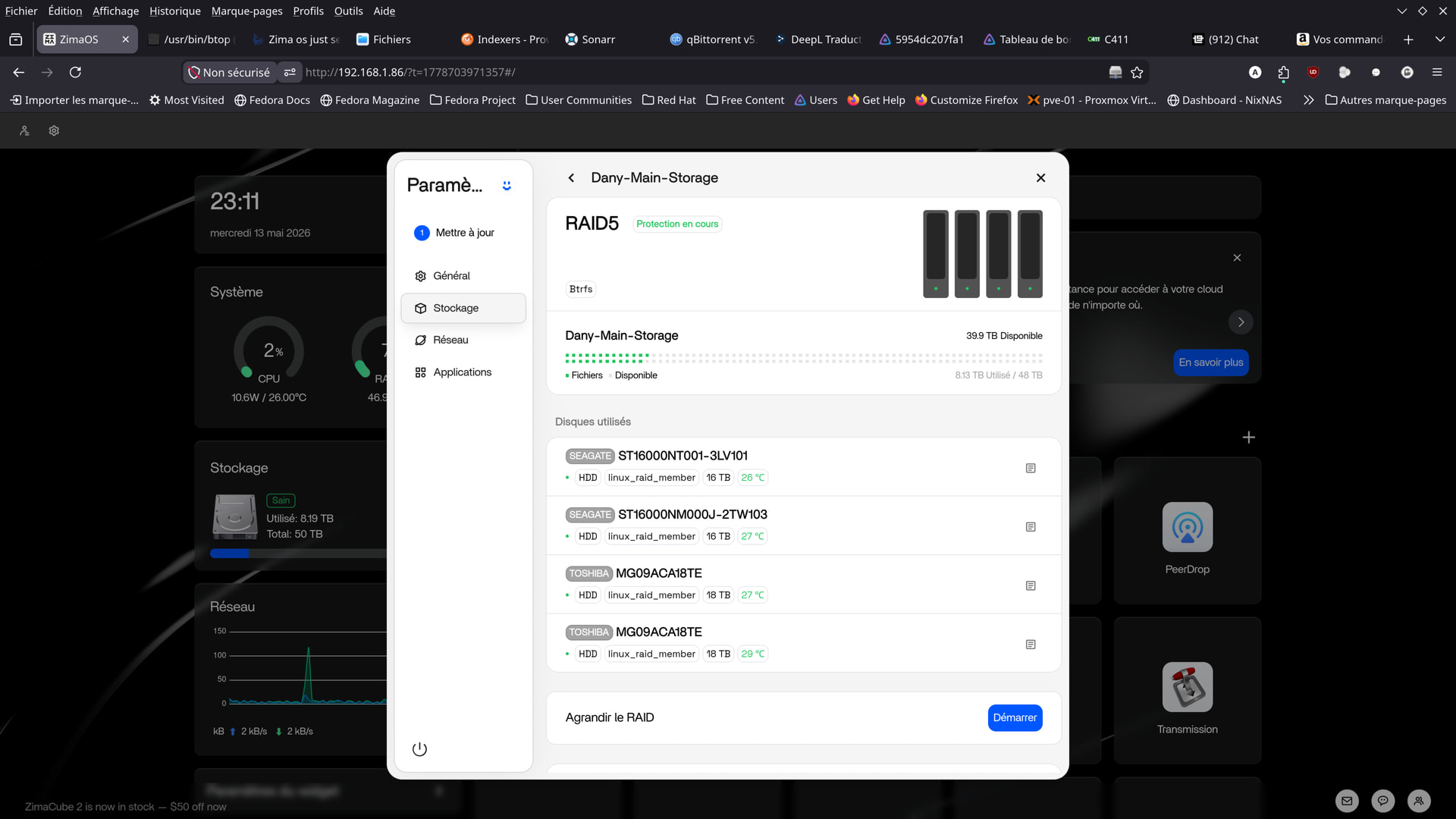
the green protecting just means its working normally now. your raid 5 is healthy. nothing needs to be done when you see that status.
thanks . now all is ok .
keep an eye on it, might just have been loose connection or the machinist motherboard bios acpi tables being more designed for windows than linux. someone more clever than me will hopefully shine more light on it.
from what I can find the possibility is your motherboard and likely harmless.
ACPI BIOS Error (bug): Could not resolve symbol [_SB.PCI0.SAT1.SPT2._GTF.DSSP], AE_NOT_FOUND (20240827/psargs-332)
This error is a common, generally harmless firmware bug where the motherboard’s BIOS/UEFI defines an ACPI table referencing a _GTF (Get Task File) method for SATA ports, but fails to define the required DSSP (Device Specific State Power) symbol within it. On X99 chipset systems like the Machinist, this is frequently caused by non-compliant or outdated UEFI firmware that does not fully adhere to the ACPI specification for SATA controllers.
Users of Machinist X99 motherboards running Linux often encounter ACPI BIOS errors (such as AE_NOT_FOUND) or boot failures that require disabling ACPI entirely. These issues typically stem from improper ACPI tables in the Chinese-made BIOS, which can cause the system to shut down during boot or display persistent error logs regarding power management and PCI root bridge enumeration.
To resolve these issues, consider the following solutions:
Ignore if Stable: If your system boots, suspends, and runs without instability, these messages can generally be safely ignored as they do not impact core functionality.
Change SATA Mode: Ensure your BIOS SATA operation is set to AHCI rather than RAID or IDE, as some legacy modes exacerbate these ACPI parsing issues
Update BIOS/UEFI: Check the motherboard manufacturer’s website for a firmware update, which often resolves ACPI table parsing errors
I also remember you mentioning you couldn’t find resizable bar, I’m not sure what motherboard you have exactly though I came across X99 board bioses that can enable rebar: Mi899 - Explore Motherboards
I’d be a little careful here before assuming it was only an ACPI warning. The important part is your first screenshot showed the RAID in “Protection : lecture…” (read-only protection mode) with a missing disk, then later it came back healthy again.
That usually points more toward:
- temporary disk disconnect
- loose SATA/power cable
- unstable SATA controller/firmware
- drive timeout/reset
The good news is the second screenshot looks normal again. “Protection en cours” during RAID5 means it’s rebuilding/resyncing protection data, not stuck in read-only anymore.
So at this point I would not cancel anything if the array is healthy now.
What I would do instead is:
- keep an eye on SMART health for all drives
- check SATA/power connections
- monitor if the same disk drops again
- check kernel logs for SATA reset/disconnect messages
If it happens again, I’d definitely grab:
dmesg | grep -Ei "ata|sata|btrfs|md|raid|error|fail"
and:
cat /proc/mdstat
before rebooting, because that will tell us whether this was:
- a real drive issue
- cable/power issue
- controller timeout
- or possibly another 1.6.x storage regression
The ACPI warnings James mentioned are real and common on some X99/Machinist boards under Linux, but they usually don’t directly force a healthy RAID into read-only mode by themselves.
Hello.
Just like yesterday, my Toshiba hard drives crashed.
Both of them this time.
Synchronization has been going on for at least 10 minutes.
It’s taking a long time…
I restarted the computer and just saw your messages.
I’m sending you the requested reports, but I hope they’ll be of some use to you.
Thanks for everything.
I’ve ordered a replacement hard drive.
dany@ZimaOS:~ ➜ $ dmesg | grep -Ei “ata|sata|btrfs|md|raid|error|fail”
[ 0.000000] Command line: BOOT_IMAGE=(hd5,gpt4)/bzImage root=PARTUUID=a3ec664e-32ce-4665-95ea-7ae90ce9aa20 rootwait zram.enabled=1 zram.num_devices=3 net.naming-scheme=v250 systemd.machine_id=5c0aa80748604afa81ce94ceeac4b0a6 fsck.repair=yes console=tty1 quiet splash loglevel=3 systemd.show_status=1 rd.udev.log_level=3 net.ifnames=0 biosdevname=0 intel_iommu=on vfio_iommu_type1.allow_unsafe_interrupts=1 thunderbolt.host_reset=false rauc.slot=B
[ 0.000000] AMD AuthenticAMD
[ 0.000000] BIOS-e820: [mem 0x0000000076213000-0x0000000076222fff] ACPI data
[ 0.000000] reserve setup_data: [mem 0x0000000000000000-0x000000000009ffff] usable
[ 0.000000] reserve setup_data: [mem 0x0000000000100000-0x000000006ce5d017] usable
[ 0.000000] reserve setup_data: [mem 0x000000006ce5d018-0x000000006cf18a57] usable
[ 0.000000] reserve setup_data: [mem 0x000000006cf18a58-0x000000006cf19017] usable
[ 0.000000] reserve setup_data: [mem 0x000000006cf19018-0x000000006cf4e457] usable
[ 0.000000] reserve setup_data: [mem 0x000000006cf4e458-0x00000000754b5fff] usable
[ 0.000000] reserve setup_data: [mem 0x00000000754b6000-0x0000000076212fff] reserved
[ 0.000000] reserve setup_data: [mem 0x0000000076213000-0x0000000076222fff] ACPI data
[ 0.000000] reserve setup_data: [mem 0x0000000076223000-0x0000000077084fff] ACPI NVS
[ 0.000000] reserve setup_data: [mem 0x0000000077085000-0x00000000775a2fff] reserved
[ 0.000000] reserve setup_data: [mem 0x00000000775a3000-0x00000000775a3fff] usable
[ 0.000000] reserve setup_data: [mem 0x00000000775a4000-0x0000000077629fff] reserved
[ 0.000000] reserve setup_data: [mem 0x000000007762a000-0x0000000077ffffff] usable
[ 0.000000] reserve setup_data: [mem 0x0000000078000000-0x000000007bffffff] reserved
[ 0.000000] reserve setup_data: [mem 0x0000000080000000-0x000000008fffffff] reserved
[ 0.000000] reserve setup_data: [mem 0x00000000fed1c000-0x00000000fed44fff] reserved
[ 0.000000] reserve setup_data: [mem 0x00000000ff000000-0x00000000ffffffff] reserved
[ 0.000000] reserve setup_data: [mem 0x0000000100000000-0x0000000c7fffffff] usable
[ 0.010167] ACPI: SSDT 0x0000000076D1A2B8 00036D (v01 SataRe SataTabl 00001000 INTL 20120913)
[ 0.010279] NODE_DATA(0) allocated [mem 0xc7fffbc80-0xc7ffffdff]
[ 0.119324] Kernel command line: BOOT_IMAGE=(hd5,gpt4)/bzImage root=PARTUUID=a3ec664e-32ce-4665-95ea-7ae90ce9aa20 rootwait zram.enabled=1 zram.num_devices=3 net.naming-scheme=v250 systemd.machine_id=5c0aa80748604afa81ce94ceeac4b0a6 fsck.repair=yes console=tty1 quiet splash loglevel=3 systemd.show_status=1 rd.udev.log_level=3 net.ifnames=0 biosdevname=0 intel_iommu=on vfio_iommu_type1.allow_unsafe_interrupts=1 thunderbolt.host_reset=false rauc.slot=B
[ 0.300930] MDS: Mitigation: Clear CPU buffers
[ 0.300932] MMIO Stale Data: Mitigation: Clear CPU buffers
[ 0.359839] MDS CPU bug present and SMT on, data leak possible. See https://www.kernel.org/doc/html/latest/admin-guide/hw-vuln/mds.html` for more details. [ 0.359839] TAA CPU bug present and SMT on, data leak possible. See https://www.kernel.org/doc/html/latest/admin-guide/hw-vuln/tsx_async_abort.html for more details. [ 0.359839] MMIO Stale Data CPU bug present and SMT on, data leak possible. See https://www.kernel.org/doc/html/latest/admin-guide/hw-vuln/processor_mmio_stale_data.html for more details. [ 0.362996] Memory: 49147640K/50165936K available (20480K kernel code, 2678K rwdata, 7512K rodata, 3308K init, 4260K bss, 1003596K reserved, 0K cma-reserved) [ 0.384796] raid6: avx2x4 gen() 10920 MB/s [ 0.401801] raid6: avx2x2 gen() 12133 MB/s [ 0.418806] raid6: avx2x1 gen() 9361 MB/s [ 0.418809] raid6: using algorithm avx2x2 gen() 12133 MB/s [ 0.435819] raid6: … xor() 11758 MB/s, rmw enabled [ 0.435822] raid6: using avx2x2 recovery algorithm [ 0.539470] libata version 3.00 loaded. [ 1.027153] Adaptec aacraid driver 1.2.1[50983]-custom [ 1.027179] aic94xx: Adaptec aic94xx SAS/SATA driver version 1.0.3 loaded [ 1.027343] RocketRAID 3xxx/4xxx Controller driver v1.10.0 [ 1.028045] ahci 0000:00:11.4: AHCI vers 0001.0300, 32 command slots, 6 Gbps, SATA mode [ 1.028835] ata1: SATA max UDMA/133 abar m2048@0xfb719000 port 0xfb719100 irq 38 lpm-pol 4 [ 1.028838] ata2: DUMMY [ 1.028839] ata3: DUMMY [ 1.028840] ata4: DUMMY [ 1.029029] ahci 0000:00:1f.2: AHCI vers 0001.0300, 32 command slots, 6 Gbps, SATA mode [ 1.035501] ata5: DUMMY [ 1.035503] ata6: SATA max UDMA/133 abar m2048@0xfb716000 port 0xfb716180 irq 39 lpm-pol 4 [ 1.035506] ata7: SATA max UDMA/133 abar m2048@0xfb716000 port 0xfb716200 irq 39 lpm-pol 4 [ 1.035508] ata8: SATA max UDMA/133 abar m2048@0xfb716000 port 0xfb716280 irq 39 lpm-pol 4 [ 1.035509] ata9: SATA max UDMA/133 abar m2048@0xfb716000 port 0xfb716300 irq 39 lpm-pol 4 [ 1.035510] ata10: DUMMY [ 1.085360] Btrfs loaded, zoned=no, fsverity=no [ 1.333492] ata1: SATA link up 6.0 Gbps (SStatus 133 SControl 300) [ 1.339810] ata1.00: ATA-9: LDLC F6+M.2 480, S0424A0, max UDMA/133 [ 1.341512] ata9: SATA link up 6.0 Gbps (SStatus 133 SControl 300) [ 1.341545] ata8: SATA link up 6.0 Gbps (SStatus 133 SControl 300) [ 1.341621] ata7: SATA link up 6.0 Gbps (SStatus 133 SControl 300) [ 1.341653] ata6: SATA link up 6.0 Gbps (SStatus 133 SControl 300) [ 1.342403] ACPI BIOS Error (bug): Could not resolve symbol [_SB.PCI0.SAT1.SPT1._GTF.DSSP], AE_NOT_FOUND (20240827/psargs-332) [ 1.342431] ACPI Error: Aborting method _SB.PCI0.SAT1.SPT1._GTF due to previous error (AE_NOT_FOUND) (20240827/psparse-529) [ 1.342448] ata6.00: ATA-11: ST16000NT001-3LV101, EN01, max UDMA/133 [ 1.342514] ACPI BIOS Error (bug): Could not resolve symbol [_SB.PCI0.SAT1.SPT2._GTF.DSSP], AE_NOT_FOUND (20240827/psargs-332) [ 1.342531] ACPI Error: Aborting method _SB.PCI0.SAT1.SPT2._GTF due to previous error (AE_NOT_FOUND) (20240827/psparse-529) [ 1.342546] ata7.00: ATA-11: ST16000NM000J-2TW103, SN01, max UDMA/133 [ 1.343648] ata1.00: 937703088 sectors, multi 1: LBA48 NCQ (depth 32), AA [ 1.344572] ACPI BIOS Error (bug): Could not resolve symbol [_SB.PCI0.SAT1.SPT3._GTF.DSSP], AE_NOT_FOUND (20240827/psargs-332) [ 1.344588] ACPI Error: Aborting method _SB.PCI0.SAT1.SPT3._GTF due to previous error (AE_NOT_FOUND) (20240827/psparse-529) [ 1.344604] ata8.00: ATA-11: TOSHIBA MG09ACA18TE, 0104, max UDMA/133 [ 1.344955] ACPI BIOS Error (bug): Could not resolve symbol [_SB.PCI0.SAT1.SPT4._GTF.DSSP], AE_NOT_FOUND (20240827/psargs-332) [ 1.344971] ACPI Error: Aborting method _SB.PCI0.SAT1.SPT4._GTF due to previous error (AE_NOT_FOUND) (20240827/psparse-529) [ 1.344986] ata9.00: ATA-11: TOSHIBA MG09ACA18TE, 4004, max UDMA/133 [ 1.351632] ata8.00: 35156656128 sectors, multi 16: LBA48 NCQ (depth 32), AA [ 1.359493] ata1.00: configured for UDMA/133 [ 1.363426] ata8.00: Features: NCQ-prio [ 1.365611] ata9.00: 35156656128 sectors, multi 16: LBA48 NCQ (depth 32), AA [ 1.366571] ACPI BIOS Error (bug): Could not resolve symbol [_SB.PCI0.SAT1.SPT3._GTF.DSSP], AE_NOT_FOUND (20240827/psargs-332) [ 1.366585] ACPI Error: Aborting method _SB.PCI0.SAT1.SPT3._GTF due to previous error (AE_NOT_FOUND) (20240827/psparse-529) [ 1.369783] scsi 0:0:0:0: Direct-Access ATA LDLC F6+M.2 480 4A0 PQ: 0 ANSI: 5 [ 1.375904] ata9.00: Features: NCQ-prio [ 1.379089] ACPI BIOS Error (bug): Could not resolve symbol [_SB.PCI0.SAT1.SPT4._GTF.DSSP], AE_NOT_FOUND (20240827/psargs-332) [ 1.379104] ACPI Error: Aborting method _SB.PCI0.SAT1.SPT4._GTF due to previous error (AE_NOT_FOUND) (20240827/psparse-529) [ 1.385016] ata8.00: configured for UDMA/133 [ 1.390763] ata7.00: 31251759104 sectors, multi 16: LBA48 NCQ (depth 32), AA [ 1.394785] ata6.00: 31251759104 sectors, multi 16: LBA48 NCQ (depth 32), AA [ 1.395939] ata9.00: configured for UDMA/133 [ 1.874499] ata6.00: Features: NCQ-sndrcv [ 1.875200] ACPI BIOS Error (bug): Could not resolve symbol [_SB.PCI0.SAT1.SPT1._GTF.DSSP], AE_NOT_FOUND (20240827/psargs-332) [ 1.875216] ACPI Error: Aborting method _SB.PCI0.SAT1.SPT1._GTF due to previous error (AE_NOT_FOUND) (20240827/psparse-529) [ 1.899356] ata7.00: Features: NCQ-sndrcv [ 1.900110] ACPI BIOS Error (bug): Could not resolve symbol [_SB.PCI0.SAT1.SPT2._GTF.DSSP], AE_NOT_FOUND (20240827/psargs-332) [ 1.900126] ACPI Error: Aborting method _SB.PCI0.SAT1.SPT2._GTF due to previous error (AE_NOT_FOUND) (20240827/psparse-529) [ 2.391137] ata6.00: configured for UDMA/133 [ 2.422874] scsi 5:0:0:0: Direct-Access ATA ST16000NT001-3LV EN01 PQ: 0 ANSI: 5 [ 2.440100] ata7.00: configured for UDMA/133 [ 2.468190] scsi 6:0:0:0: Direct-Access ATA ST16000NM000J-2T SN01 PQ: 0 ANSI: 5 [ 2.468774] scsi 7:0:0:0: Direct-Access ATA TOSHIBA MG09ACA1 0104 PQ: 0 ANSI: 5 [ 2.469386] scsi 8:0:0:0: Direct-Access ATA TOSHIBA MG09ACA1 4004 PQ: 0 ANSI: 5 [ 2.516009] md: Waiting for all devices to be available before autodetect [ 2.516015] md: If you don’t use raid, use raid=noautodetect [ 2.516018] md: Autodetecting RAID arrays. [ 2.516020] md: autorun … [ 2.516022] md: … autorun DONE. [ 2.522901] Write protecting the kernel read-only data: 28672k [ 2.523286] Freeing unused kernel image (rodata/data gap) memory: 680K [ 2.882964] EXT4-fs (nvme0n1p7): mounted filesystem 588bf225-9ccb-482c-a908-85ecfd9c3204 r/w with ordered data mode. Quota mode: none. [ 5.832605] systemd[1]: systemd 256.17 running in system mode (+PAM +AUDIT -SELINUX +APPARMOR -IMA -SMACK +SECCOMP +GCRYPT -GNUTLS +OPENSSL +ACL +BLKID +CURL +ELFUTILS -FIDO2 -IDN2 -IDN +IPTC +KMOD +LIBCRYPTSETUP +LIBCRYPTSETUP_PLUGINS +LIBFDISK +PCRE2 -PWQUALITY -P11KIT -QRENCODE -TPM2 +BZIP2 -LZ4 +XZ +ZLIB -ZSTD -BPF_FRAMEWORK +XKBCOMMON -UTMP -SYSVINIT -LIBARCHIVE) [ 5.832614] systemd[1]: Detected architecture x86-64. [ 5.835307] systemd[1]: Hostname set to . [ 5.937735] systemd[1]: /usr/lib/systemd/system/virtstoraged.socket:7: ListenStream= references a path below legacy directory /var/run/, updating /var/run/libvirt/virtstoraged-sock → /run/libvirt/virtstoraged-sock; please update the unit file accordingly. [ 5.951379] systemd[1]: /usr/lib/systemd/system/virtstoraged-ro.socket:9: ListenStream= references a path below legacy directory /var/run/, updating /var/run/libvirt/virtstoraged-sock-ro → /run/libvirt/virtstoraged-sock-ro; please update the unit file accordingly. [ 5.951760] systemd[1]: /usr/lib/systemd/system/virtstoraged-admin.socket:9: ListenStream= references a path below legacy directory /var/run/, updating /var/run/libvirt/virtstoraged-admin-sock → /run/libvirt/virtstoraged-admin-sock; please update the unit file accordingly. [ 5.952095] systemd[1]: /usr/lib/systemd/system/virtsecretd.socket:7: ListenStream= references a path below legacy directory /var/run/, updating /var/run/libvirt/virtsecretd-sock → /run/libvirt/virtsecretd-sock; please update the unit file accordingly. [ 5.952694] systemd[1]: /usr/lib/systemd/system/virtsecretd-ro.socket:9: ListenStream= references a path below legacy directory /var/run/, updating /var/run/libvirt/virtsecretd-sock-ro → /run/libvirt/virtsecretd-sock-ro; please update the unit file accordingly. [ 5.953040] systemd[1]: /usr/lib/systemd/system/virtsecretd-admin.socket:9: ListenStream= references a path below legacy directory /var/run/, updating /var/run/libvirt/virtsecretd-admin-sock → /run/libvirt/virtsecretd-admin-sock; please update the unit file accordingly. [ 5.953368] systemd[1]: /usr/lib/systemd/system/virtqemud.socket:7: ListenStream= references a path below legacy directory /var/run/, updating /var/run/libvirt/virtqemud-sock → /run/libvirt/virtqemud-sock; please update the unit file accordingly. [ 5.954067] systemd[1]: /usr/lib/systemd/system/virtqemud-ro.socket:9: ListenStream= references a path below legacy directory /var/run/, updating /var/run/libvirt/virtqemud-sock-ro → /run/libvirt/virtqemud-sock-ro; please update the unit file accordingly. [ 5.954429] systemd[1]: /usr/lib/systemd/system/virtqemud-admin.socket:9: ListenStream= references a path below legacy directory /var/run/, updating /var/run/libvirt/virtqemud-admin-sock → /run/libvirt/virtqemud-admin-sock; please update the unit file accordingly. [ 5.954783] systemd[1]: /usr/lib/systemd/system/virtproxyd.socket:7: ListenStream= references a path below legacy directory /var/run/, updating /var/run/libvirt/libvirt-sock → /run/libvirt/libvirt-sock; please update the unit file accordingly. [ 5.955668] systemd[1]: /usr/lib/systemd/system/virtproxyd-ro.socket:9: ListenStream= references a path below legacy directory /var/run/, updating /var/run/libvirt/libvirt-sock-ro → /run/libvirt/libvirt-sock-ro; please update the unit file accordingly. [ 5.956021] systemd[1]: /usr/lib/systemd/system/virtproxyd-admin.socket:9: ListenStream= references a path below legacy directory /var/run/, updating /var/run/libvirt/libvirt-admin-sock → /run/libvirt/libvirt-admin-sock; please update the unit file accordingly. [ 5.956354] systemd[1]: /usr/lib/systemd/system/virtnwfilterd.socket:7: ListenStream= references a path below legacy directory /var/run/, updating /var/run/libvirt/virtnwfilterd-sock → /run/libvirt/virtnwfilterd-sock; please update the unit file accordingly. [ 5.956927] systemd[1]: /usr/lib/systemd/system/virtnwfilterd-ro.socket:9: ListenStream= references a path below legacy directory /var/run/, updating /var/run/libvirt/virtnwfilterd-sock-ro → /run/libvirt/virtnwfilterd-sock-ro; please update the unit file accordingly. [ 5.957281] systemd[1]: /usr/lib/systemd/system/virtnwfilterd-admin.socket:9: ListenStream= references a path below legacy directory /var/run/, updating /var/run/libvirt/virtnwfilterd-admin-sock → /run/libvirt/virtnwfilterd-admin-sock; please update the unit file accordingly. [ 5.957643] systemd[1]: /usr/lib/systemd/system/virtnodedevd.socket:7: ListenStream= references a path below legacy directory /var/run/, updating /var/run/libvirt/virtnodedevd-sock → /run/libvirt/virtnodedevd-sock; please update the unit file accordingly. [ 5.958218] systemd[1]: /usr/lib/systemd/system/virtnodedevd-ro.socket:9: ListenStream= references a path below legacy directory /var/run/, updating /var/run/libvirt/virtnodedevd-sock-ro → /run/libvirt/virtnodedevd-sock-ro; please update the unit file accordingly. [ 5.958597] systemd[1]: /usr/lib/systemd/system/virtnodedevd-admin.socket:9: ListenStream= references a path below legacy directory /var/run/, updating /var/run/libvirt/virtnodedevd-admin-sock → /run/libvirt/virtnodedevd-admin-sock; please update the unit file accordingly. [ 5.958925] systemd[1]: /usr/lib/systemd/system/virtnetworkd.socket:7: ListenStream= references a path below legacy directory /var/run/, updating /var/run/libvirt/virtnetworkd-sock → /run/libvirt/virtnetworkd-sock; please update the unit file accordingly. [ 5.959529] systemd[1]: /usr/lib/systemd/system/virtnetworkd-ro.socket:9: ListenStream= references a path below legacy directory /var/run/, updating /var/run/libvirt/virtnetworkd-sock-ro → /run/libvirt/virtnetworkd-sock-ro; please update the unit file accordingly. [ 5.959881] systemd[1]: /usr/lib/systemd/system/virtnetworkd-admin.socket:9: ListenStream= references a path below legacy directory /var/run/, updating /var/run/libvirt/virtnetworkd-admin-sock → /run/libvirt/virtnetworkd-admin-sock; please update the unit file accordingly. [ 5.960196] systemd[1]: /usr/lib/systemd/system/virtlogd.socket:5: ListenStream= references a path below legacy directory /var/run/, updating /var/run/libvirt/virtlogd-sock → /run/libvirt/virtlogd-sock; please update the unit file accordingly. [ 5.961083] systemd[1]: /usr/lib/systemd/system/virtlogd-admin.socket:7: ListenStream= references a path below legacy directory /var/run/, updating /var/run/libvirt/virtlogd-admin-sock → /run/libvirt/virtlogd-admin-sock; please update the unit file accordingly. [ 5.961394] systemd[1]: /usr/lib/systemd/system/virtlockd.socket:5: ListenStream= references a path below legacy directory /var/run/, updating /var/run/libvirt/virtlockd-sock → /run/libvirt/virtlockd-sock; please update the unit file accordingly. [ 5.961926] systemd[1]: /usr/lib/systemd/system/virtlockd-admin.socket:7: ListenStream= references a path below legacy directory /var/run/, updating /var/run/libvirt/virtlockd-admin-sock → /run/libvirt/virtlockd-admin-sock; please update the unit file accordingly. [ 5.962259] systemd[1]: /usr/lib/systemd/system/virtinterfaced.socket:7: ListenStream= references a path below legacy directory /var/run/, updating /var/run/libvirt/virtinterfaced-sock → /run/libvirt/virtinterfaced-sock; please update the unit file accordingly. [ 5.962847] systemd[1]: /usr/lib/systemd/system/virtinterfaced-ro.socket:9: ListenStream= references a path below legacy directory /var/run/, updating /var/run/libvirt/virtinterfaced-sock-ro → /run/libvirt/virtinterfaced-sock-ro; please update the unit file accordingly. [ 5.963197] systemd[1]: /usr/lib/systemd/system/virtinterfaced-admin.socket:9: ListenStream= references a path below legacy directory /var/run/, updating /var/run/libvirt/virtinterfaced-admin-sock → /run/libvirt/virtinterfaced-admin-sock; please update the unit file accordingly. [ 5.973037] systemd[1]: /usr/lib/systemd/system/zimaos-user.service:8: PIDFile= references a path below legacy directory /var/run/, updating /var/run/casaos/user-service.pid → /run/casaos/user-service.pid; please update the unit file accordingly. [ 5.973822] systemd[1]: /usr/lib/systemd/system/zimaos-search.service:7: PIDFile= references a path below legacy directory /var/run/, updating /var/run/zimaos/zimaos-search.pid → /run/zimaos/zimaos-search.pid; please update the unit file accordingly. [ 5.974115] systemd[1]: /usr/lib/systemd/system/zimaos-message-bus.service:8: PIDFile= references a path below legacy directory /var/run/, updating /var/run/casaos/message-bus.pid → /run/casaos/message-bus.pid; please update the unit file accordingly. [ 5.974477] systemd[1]: /usr/lib/systemd/system/zimaos-local-storage.service:8: PIDFile= references a path below legacy directory /var/run/, updating /var/run/zimaos/local-storage.pid → /run/zimaos/local-storage.pid; please update the unit file accordingly. [ 5.975485] systemd[1]: /usr/lib/systemd/system/zimaos-gateway.service:7: PIDFile= references a path below legacy directory /var/run/, updating /var/run/casaos/gateway.pid → /run/casaos/gateway.pid; please update the unit file accordingly. [ 5.975776] systemd[1]: /usr/lib/systemd/system/zimaos-app-management.service:9: PIDFile= references a path below legacy directory /var/run/, updating /var/run/casaos/app-management.pid → /run/casaos/app-management.pid; please update the unit file accordingly. [ 5.980941] systemd[1]: /usr/lib/systemd/system/winbind.service:8: PIDFile= references a path below legacy directory /var/run/, updating /var/run/samba/winbindd.pid → /run/samba/winbindd.pid; please update the unit file accordingly. [ 5.985772] systemd[1]: /usr/lib/systemd/system/smb.service:9: PIDFile= references a path below legacy directory /var/run/, updating /var/run/samba/smbd.pid → /run/samba/smbd.pid; please update the unit file accordingly. [ 5.986018] systemd[1]: /usr/lib/systemd/system/samba-bgqd.service:10: PIDFile= references a path below legacy directory /var/run/, updating /var/run/samba/samba-bgqd.pid → /run/samba/samba-bgqd.pid; please update the unit file accordingly. [ 5.989446] systemd[1]: /usr/lib/systemd/system/nmb.service:9: PIDFile= references a path below legacy directory /var/run/, updating /var/run/samba/nmbd.pid → /run/samba/nmbd.pid; please update the unit file accordingly. [ 5.991140] systemd[1]: /usr/lib/systemd/system/icewhale-files.service:7: PIDFile= references a path below legacy directory /var/run/, updating /var/run/casaos/icewhale-files.pid → /run/casaos/icewhale-files.pid; please update the unit file accordingly. [ 5.991422] systemd[1]: /usr/lib/systemd/system/icewhale-files-backup.service:7: PIDFile= references a path below legacy directory /var/run/, updating /var/run/casaos/icewhale-files-backup.pid → /run/casaos/icewhale-files-backup.pid; please update the unit file accordingly. [ 5.993760] systemd[1]: /usr/lib/systemd/system/ctdb.service:12: PIDFile= references a path below legacy directory /var/run/, updating /var/run/ctdb/ctdbd.pid → /run/ctdb/ctdbd.pid; please update the unit file accordingly. [ 5.994941] systemd[1]: /usr/lib/systemd/system/casaos-installer.service:7: PIDFile= references a path below legacy directory /var/run/, updating /var/run/casaos/installer.pid → /run/casaos/installer.pid; please update the unit file accordingly. [ 6.004792] systemd[1]: /usr/lib/systemd/system/libvirtd.socket:5: ListenStream= references a path below legacy directory /var/run/, updating /var/run/libvirt/libvirt-sock → /run/libvirt/libvirt-sock; please update the unit file accordingly. [ 6.005370] systemd[1]: /usr/lib/systemd/system/libvirtd-ro.socket:7: ListenStream= references a path below legacy directory /var/run/, updating /var/run/libvirt/libvirt-sock-ro → /run/libvirt/libvirt-sock-ro; please update the unit file accordingly. [ 6.005620] systemd[1]: /usr/lib/systemd/system/libvirtd-admin.socket:7: ListenStream= references a path below legacy directory /var/run/, updating /var/run/libvirt/libvirt-admin-sock → /run/libvirt/libvirt-admin-sock; please update the unit file accordingly. [ 6.016302] systemd[1]: multi-user.target: Found ordering cycle on getty.target/start [ 6.016307] systemd[1]: multi-user.target: Found dependency on zimaos-welcome@tty1.service/start [ 6.016310] systemd[1]: multi-user.target: Found dependency on multi-user.target/start [ 6.016312] systemd[1]: multi-user.target: Job getty.target/start deleted to break ordering cycle starting with multi-user.target/start [ 6.017526] systemd[1]: Queued start job for default target Multi-User System. [ 6.035243] systemd[1]: Unnecessary job was removed for /dev/nvme0n1p7. [ 6.036531] systemd[1]: Created slice Slice /system/modprobe. [ 6.037372] systemd[1]: Created slice Slice /system/systemd-fsck. [ 6.038231] systemd[1]: Created slice Slice /system/systemd-growfs. [ 6.039105] systemd[1]: Created slice Slice /system/zimaos-welcome. [ 6.039793] systemd[1]: Created slice User and Session Slice. [ 6.040166] systemd[1]: Started Dispatch Password Requests to Console Directory Watch. [ 6.040265] systemd[1]: Started Forward Password Requests to Wall Directory Watch. [ 6.040341] systemd[1]: Expecting device /dev/disk/by-label/casaos-boot… [ 6.040405] systemd[1]: Expecting device /dev/disk/by-label/casaos-data… [ 6.040455] systemd[1]: Expecting device /dev/disk/by-label/casaos-overlay… [ 6.040504] systemd[1]: Reached target Local Encrypted Volumes. [ 6.040558] systemd[1]: Reached target Local Integrity Protected Volumes. [ 6.040620] systemd[1]: Reached target NFS client services. [ 6.040680] systemd[1]: Reached target Host and Network Name Lookups. [ 6.040730] systemd[1]: Reached target Path Units. [ 6.040965] systemd[1]: Reached target Slice Units. [ 6.041211] systemd[1]: Reached target Swaps. [ 6.041478] systemd[1]: Reached target Local Verity Protected Volumes. [ 6.041712] systemd[1]: Reached target libvirt guests shutdown target. [ 6.046883] systemd[1]: Listening on RPCbind Server Activation Socket. [ 6.047509] systemd[1]: Reached target RPC Port Mapper. [ 6.048628] systemd[1]: Listening on Credential Encryption/Decryption. [ 6.049512] systemd[1]: Listening on Journal Audit Socket. [ 6.050135] systemd[1]: Listening on Journal Socket (/dev/log). [ 6.050812] systemd[1]: Listening on Journal Sockets. [ 6.051440] systemd[1]: Listening on Network Service Netlink Socket. [ 6.052059] systemd[1]: Listening on udev Control Socket. [ 6.052666] systemd[1]: Listening on udev Kernel Socket. [ 6.055614] systemd[1]: Mounting Huge Pages File System… [ 6.056890] systemd[1]: Mounting POSIX Message Queue File System… [ 6.058281] systemd[1]: Mounting Kernel Debug File System… [ 6.059642] systemd[1]: Mounting Kernel Trace File System… [ 6.061051] systemd[1]: Mounting Temporary Directory /tmp… [ 6.061914] systemd[1]: var.mount: Directory /var to mount over is not empty, mounting anyway. [ 6.062778] systemd[1]: Mounting Buildroot /var tmpfs… [ 6.065177] systemd[1]: Starting Create List of Static Device Nodes… [ 6.066627] systemd[1]: Starting Load Kernel Module configfs… [ 6.068009] systemd[1]: Starting Load Kernel Module drm… [ 6.069453] systemd[1]: Starting Load Kernel Module efi_pstore… [ 6.070796] systemd[1]: Starting Load Kernel Module fuse… [ 6.072311] systemd[1]: Starting File System Check on Root Device… [ 6.074748] systemd[1]: Starting Journal Service… [ 6.077075] systemd[1]: Starting Load Kernel Modules… [ 6.078566] systemd[1]: Starting Generate network units from Kernel command line… [ 6.079996] systemd[1]: Starting Load udev Rules from Credentials… [ 6.081385] systemd[1]: Starting Coldplug All udev Devices… [ 6.084202] systemd[1]: Mounted Huge Pages File System. [ 6.084882] systemd[1]: Mounted POSIX Message Queue File System. [ 6.085172] systemd[1]: Mounted Kernel Debug File System. [ 6.087515] systemd[1]: Mounted Kernel Trace File System. [ 6.088175] systemd[1]: Mounted Temporary Directory /tmp. [ 6.088791] systemd[1]: Mounted Buildroot /var tmpfs. [ 6.089612] systemd[1]: Finished Create List of Static Device Nodes. [ 6.090394] systemd[1]: modprobe@configfs.service: Deactivated successfully. [ 6.090586] systemd[1]: Finished Load Kernel Module configfs. [ 6.091341] systemd[1]: modprobe@drm.service: Deactivated successfully. [ 6.091519] systemd[1]: Finished Load Kernel Module drm. [ 6.092290] systemd[1]: modprobe@efi_pstore.service: Deactivated successfully. [ 6.092451] systemd[1]: Finished Load Kernel Module efi_pstore. [ 6.093230] systemd[1]: modprobe@fuse.service: Deactivated successfully. [ 6.093394] systemd[1]: Finished Load Kernel Module fuse. [ 6.094197] systemd[1]: Finished File System Check on Root Device. [ 6.094987] systemd[1]: Finished Generate network units from Kernel command line. [ 6.095788] systemd[1]: Reached target Preparation for Network. [ 6.097186] systemd[1]: Mounting FUSE Control File System… [ 6.098716] systemd[1]: Mounting Kernel Configuration File System… [ 6.100182] systemd[1]: Starting Load AppArmor profiles… [ 6.101836] systemd[1]: Starting Remount Root and Kernel File Systems… [ 6.103203] systemd-journald[417]: Collecting audit messages is enabled. [ 6.103233] systemd[1]: Starting Create Static Device Nodes in /dev gracefully… [ 6.104157] systemd[1]: Finished Load udev Rules from Credentials. [ 6.104905] audit: type=1130 audit(1778746298.807:2): pid=1 uid=0 auid=4294967295 ses=4294967295 subj=unconfined msg=‘unit=systemd-udev-load-credentials comm=“systemd” exe=“/usr/lib/systemd/systemd” hostname=? addr=? terminal=? res=success’ [ 6.105921] systemd[1]: Mounted FUSE Control File System. [ 6.107130] systemd[1]: Mounted Kernel Configuration File System. [ 6.113873] systemd[1]: Finished Remount Root and Kernel File Systems. [ 6.114514] audit: type=1130 audit(1778746298.817:3): pid=1 uid=0 auid=4294967295 ses=4294967295 subj=unconfined msg=‘unit=systemd-remount-fs comm=“systemd” exe=“/usr/lib/systemd/systemd” hostname=? addr=? terminal=? res=success’ [ 6.115305] systemd[1]: One time configuration for iscsi.service was skipped because of an unmet condition check (ConditionPathExists=!/etc/iscsi/initiatorname.iscsi). [ 6.115352] systemd[1]: Platform Persistent Storage Archival was skipped because of an unmet condition check (ConditionDirectoryNotEmpty=/sys/fs/pstore). [ 6.116487] systemd[1]: Starting Load/Save OS Random Seed… [ 6.127855] systemd[1]: Finished Load/Save OS Random Seed. [ 6.128522] audit: type=1130 audit(1778746298.831:4): pid=1 uid=0 auid=4294967295 ses=4294967295 subj=unconfined msg=‘unit=systemd-random-seed comm=“systemd” exe=“/usr/lib/systemd/systemd” hostname=? addr=? terminal=? res=success’ [ 6.145930] systemd[1]: Finished Create Static Device Nodes in /dev gracefully. [ 6.149120] audit: type=1130 audit(1778746298.850:5): pid=1 uid=0 auid=4294967295 ses=4294967295 subj=unconfined msg=‘unit=systemd-tmpfiles-setup-dev-early comm=“systemd” exe=“/usr/lib/systemd/systemd” hostname=? addr=? terminal=? res=success’ [ 6.151593] systemd[1]: Starting Create Static Device Nodes in /dev… [ 6.212097] systemd[1]: Finished Create Static Device Nodes in /dev. [ 6.213125] systemd[1]: Reached target Preparation for Local File Systems. [ 6.216565] systemd[1]: Starting Rule-based Manager for Device Events and Files… [ 6.275975] systemd[1]: Started Journal Service. [ 7.538491] EXT4-fs (nvme0n1p8): mounted filesystem fadab15d-e9cc-4bc2-b4af-a2b49a30cbe5 r/w with ordered data mode. Quota mode: none. [ 7.583109] systemd-journald[417]: Received client request to flush runtime journal. [ 10.683814] cfg80211: Loading compiled-in X.509 certificates for regulatory database [ 10.685403] Adding 8388604k swap on /DATA/.swapfile. Priority:10 extents:64 across:1218314240k SS [ 12.248929] md: md127 stopped. [ 12.309564] md: md0 stopped. [ 12.469076] md: kicking non-fresh sdd from array! [ 12.494943] md/raid:md0: device sdb operational as raid disk 0 [ 12.494951] md/raid:md0: device sde operational as raid disk 3 [ 12.494954] md/raid:md0: device sdc operational as raid disk 1 [ 12.495487] md/raid:md0: raid level 5 active with 3 out of 4 devices, algorithm 2 [ 12.513433] md0: detected capacity change from 0 to 93754484736 [ 12.593535] md: recover of RAID array md0 [ 12.593561] md: md0: recover done. [ 12.721999] BTRFS: device fsid a327f5d4-f069-7380-ae4d-51fab01a4ab2 devid 1 transid 4967 /dev/md0 (9:0) scanned by zimaos-local-st (1069) [ 12.722590] BTRFS info (device md0): first mount of filesystem a327f5d4-f069-7380-ae4d-51fab01a4ab2 [ 12.722607] BTRFS info (device md0): using crc32c (crc32c-intel) checksum algorithm [ 12.722615] BTRFS info (device md0): using free-space-tree [ 95.602193] nvme nvme0: using unchecked data buffer`
dany@ZimaOS:~ ➜ $ cat /proc/mdstat
Personalities : [raid6] [raid5] [raid4]
md0 : active raid5 sdd[2] sdb[0] sde[4] sdc[1]
46877242368 blocks super 1.2 level 5, 512k chunk, algorithm 2 [4/4] [UUUU]
bitmap: 0/117 pages [0KB], 65536KB chunk

unused devices:
dany@ZimaOS:~ ➜ $
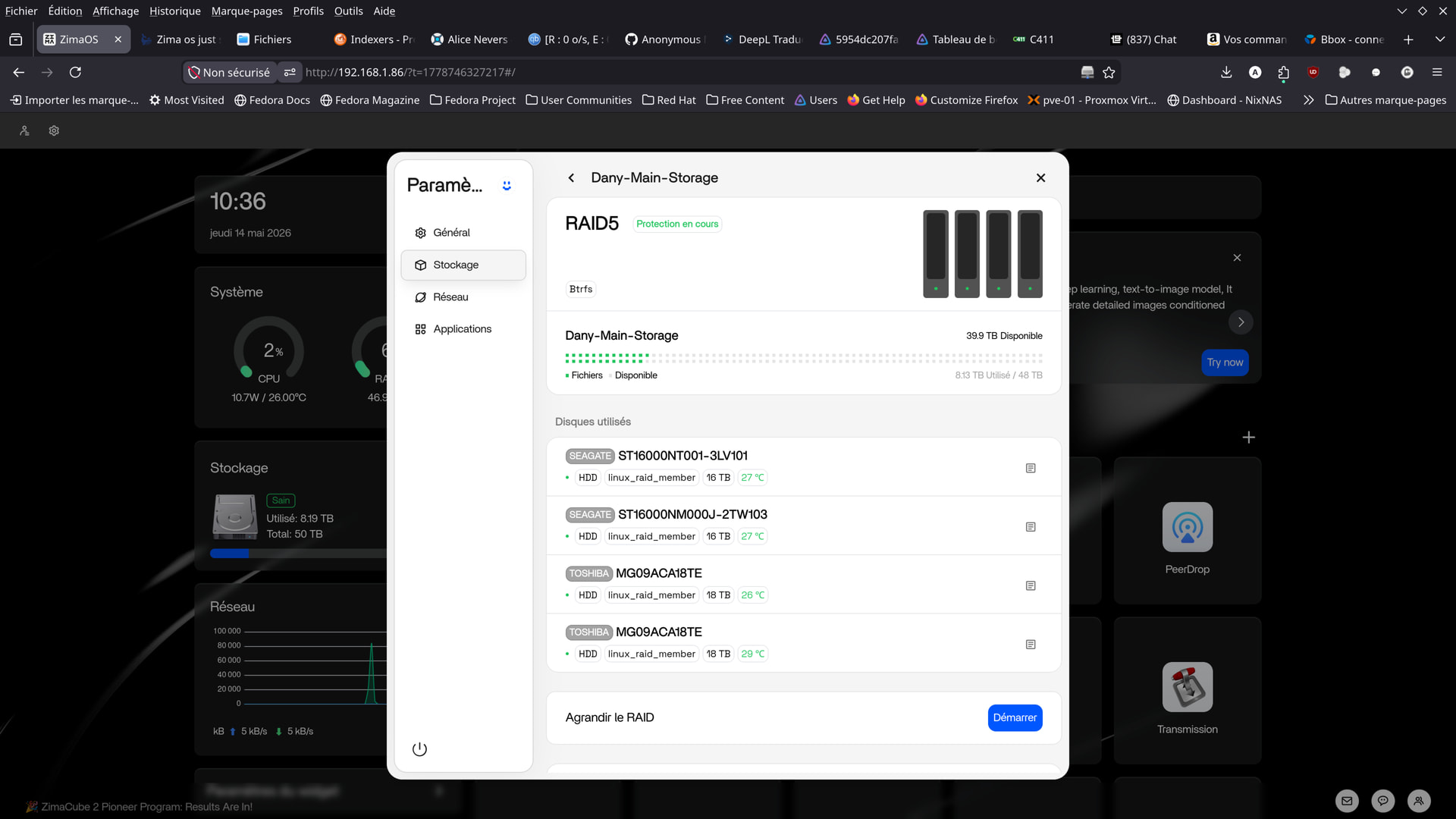
The RAID seems to be stuck on the green “Protection in progress” flag.
How can I speed up the disk synchronization?
I’ve been waiting for almost an hour now…
be best to let it complete the scan of the disks, not ideal having to wait I know.
Yeah I wouldn’t worry too much about the “Protection in progress” message right now. Your RAID is already showing [UUUU], which means all 4 drives are active and the array is healthy again.
What likely happened is one drive temporarily dropped during boot:
md: kicking non-fresh sdd from array!
Then mdraid automatically recovered it and started a parity resync/protection pass in the background.
On a 48TB RAID5, that process can take many hours, sometimes even longer depending on disk activity, so 1 hour is actually pretty normal.
What would concern me more is not the sync speed itself, but why the drive dropped in the first place. Since you mentioned the Toshiba drives before, I’d definitely keep an eye on:
- SATA cables
- power connections
- PSU stability
- motherboard SATA controller
Especially if the same drive keeps disappearing.
The good news is your current mdstat output looks healthy:
[4/4] [UUUU]
So at least for now, the RAID recovered properly and is no longer in read-only/degraded mode.
I’ve been waiting for several hours now.
Zima OS is stuck on “Protection in progress.”
This time, both Toshiba drives failed simultaneously on a RAID 5 array.
I hope I didn’t break anything, but I’m not sure given how long the resynchronization is taking.
And it’s particularly frustrating not to be able to use the RAID freely.
Especially with the current price of drives! …
I’ve already spent over €2,000 on unreliable drives…
At over €700 per drive right now,
this NAS is literally costing me a fortune!
And restarting doesn’t help—the RAID is still down.
Just need to let it complete the process to be honest Dany, restarting the computer will just restart the checking process. 48TB is a lot of space to check over. it can take some hours.
there isn’t enough evidence yet that it is faulty or unreliable drives.
what is the output from: sudo smartctl -A /dev/sdd
and also: sudo smartctl -A /dev/sde
dany@ZimaOS:~ ➜ $ sudo smartctl -A /dev/sdd
Password:
smartctl 7.4 2023-08-01 r5530 [x86_64-linux-6.12.25] (local build)
Copyright (C) 2002-23, Bruce Allen, Christian Franke, www.smartmontools.org

=== START OF READ SMART DATA SECTION ===
SMART Attributes Data Structure revision number: 16
Vendor Specific SMART Attributes with Thresholds:
ID# ATTRIBUTE_NAME          FLAG     VALUE WORST THRESH TYPE      UPDATED  WHEN_FAILED RAW_VALUE
1 Raw_Read_Error_Rate     0x000b   100   100   050    Pre-fail  Always       -       0
2 Throughput_Performance  0x0005   100   100   050    Pre-fail  Offline      -       0
3 Spin_Up_Time            0x0027   100   100   001    Pre-fail  Always       -       2566
4 Start_Stop_Count        0x0032   100   100   000    Old_age   Always       -       371
5 Reallocated_Sector_Ct   0x0033   100   100   010    Pre-fail  Always       -       0
7 Seek_Error_Rate         0x000b   100   100   050    Pre-fail  Always       -       0
8 Seek_Time_Performance   0x0005   100   100   050    Pre-fail  Offline      -       0
9 Power_On_Hours          0x0032   016   016   000    Old_age   Always       -       33683
10 Spin_Retry_Count        0x0033   100   100   030    Pre-fail  Always       -       0
12 Power_Cycle_Count       0x0032   100   100   000    Old_age   Always       -       369
23 Helium_Condition_Lower  0x0023   100   100   075    Pre-fail  Always       -       0
24 Helium_Condition_Upper  0x0023   100   100   075    Pre-fail  Always       -       0
27 MAMR_Health_Monitor     0x0023   100   100   030    Pre-fail  Always       -       526425
191 G-Sense_Error_Rate      0x0032   100   100   000    Old_age   Always       -       56
192 Power-Off_Retract_Count 0x0032   100   100   000    Old_age   Always       -       329
193 Load_Cycle_Count        0x0032   100   100   000    Old_age   Always       -       554
194 Temperature_Celsius     0x0022   100   100   000    Old_age   Always       -       28 (Min/Max 15/60)
196 Reallocated_Event_Count 0x0033   100   100   010    Pre-fail  Always       -       0
197 Current_Pending_Sector  0x0032   100   100   000    Old_age   Always       -       0
198 Offline_Uncorrectable   0x0030   100   100   000    Old_age   Offline      -       0
199 UDMA_CRC_Error_Count    0x0032   200   200   000    Old_age   Always       -       7
220 Disk_Shift              0x0002   100   100   000    Old_age   Always       -       51773445
222 Loaded_Hours            0x0032   017   017   000    Old_age   Always       -       33539
223 Load_Retry_Count        0x0032   100   100   000    Old_age   Always       -       0
224 Load_Friction           0x0022   100   100   000    Old_age   Always       -       0
226 Load-in_Time            0x0026   100   100   000    Old_age   Always       -       626
240 Head_Flying_Hours       0x0001   100   100   001    Pre-fail  Offline      -       0
241 Total_LBAs_Written      0x0032   100   100   000    Old_age   Always       -       165086924446
242 Total_LBAs_Read         0x0032   100   100   000    Old_age   Always       -       88030178844
dany@ZimaOS:~ ➜ $ sudo smartctl -A /dev/sde
smartctl 7.4 2023-08-01 r5530 [x86_64-linux-6.12.25] (local build)
Copyright (C) 2002-23, Bruce Allen, Christian Franke, www.smartmontools.org

=== START OF READ SMART DATA SECTION ===
SMART Attributes Data Structure revision number: 16
Vendor Specific SMART Attributes with Thresholds:
ID# ATTRIBUTE_NAME          FLAG     VALUE WORST THRESH TYPE      UPDATED  WHEN_FAILED RAW_VALUE
1 Raw_Read_Error_Rate     0x000b   100   100   050    Pre-fail  Always       -       0
2 Throughput_Performance  0x0005   100   100   050    Pre-fail  Offline      -       0
3 Spin_Up_Time            0x0027   100   100   001    Pre-fail  Always       -       3835
4 Start_Stop_Count        0x0032   100   100   000    Old_age   Always       -       163
5 Reallocated_Sector_Ct   0x0033   100   100   010    Pre-fail  Always       -       0
7 Seek_Error_Rate         0x000b   100   100   050    Pre-fail  Always       -       0
8 Seek_Time_Performance   0x0005   100   100   050    Pre-fail  Offline      -       0
9 Power_On_Hours          0x0032   040   040   000    Old_age   Always       -       24211
10 Spin_Retry_Count        0x0033   100   100   030    Pre-fail  Always       -       0
12 Power_Cycle_Count       0x0032   100   100   000    Old_age   Always       -       157
23 Helium_Condition_Lower  0x0023   100   100   075    Pre-fail  Always       -       0
24 Helium_Condition_Upper  0x0023   100   100   075    Pre-fail  Always       -       0
27 MAMR_Health_Monitor     0x0023   100   100   030    Pre-fail  Always       -       264797
191 G-Sense_Error_Rate      0x0032   100   100   000    Old_age   Always       -       0
192 Power-Off_Retract_Count 0x0032   100   100   000    Old_age   Always       -       127
193 Load_Cycle_Count        0x0032   100   100   000    Old_age   Always       -       472
194 Temperature_Celsius     0x0022   100   100   000    Old_age   Always       -       29 (Min/Max 15/56)
196 Reallocated_Event_Count 0x0033   100   100   010    Pre-fail  Always       -       0
197 Current_Pending_Sector  0x0032   100   100   000    Old_age   Always       -       0
198 Offline_Uncorrectable   0x0030   100   100   000    Old_age   Offline      -       0
199 UDMA_CRC_Error_Count    0x0032   200   200   000    Old_age   Always       -       66
220 Disk_Shift              0x0002   100   100   000    Old_age   Always       -       50724876
222 Loaded_Hours            0x0032   041   041   000    Old_age   Always       -       23814
223 Load_Retry_Count        0x0032   100   100   000    Old_age   Always       -       0
224 Load_Friction           0x0022   100   100   000    Old_age   Always       -       0
226 Load-in_Time            0x0026   100   100   000    Old_age   Always       -       677
240 Head_Flying_Hours       0x0001   100   100   001    Pre-fail  Offline      -       0
241 Total_LBAs_Written      0x0032   100   100   000    Old_age   Always       -       202033842903
242 Total_LBAs_Read         0x0032   100   100   000    Old_age   Always       -       55764533899

dany@ZimaOS:~ ➜ $
that looks fine to me tbh. drives seem healthy. no reallocated sectors or anything. just a small number of crc errors and we seen them in the previous logs. sounds more like cabling,power or somethling to do with motherboard firmware, sata controller.
what power supply are you using?
have you tried swapping sata cables and making sure all your power cable connections are okay?
root@ZimaOS:/root ➜ # smartctl -a /dev/sdd
smartctl 7.4 2023-08-01 r5530 [x86_64-linux-6.12.25] (local build)
Copyright (C) 2002-23, Bruce Allen, Christian Franke, www.smartmontools.org

=== START OF INFORMATION SECTION ===
Model Family:     Toshiba MG09ACA… Enterprise Capacity HDD
Device Model:     TOSHIBA MG09ACA18TE
Serial Number:    Y1X0A0QZFJDH
LU WWN Device Id: 5 000039 b48db751d
Firmware Version: 0104
User Capacity:    18,000,207,937,536 bytes [18.0 TB]
Sector Sizes:     512 bytes logical, 4096 bytes physical
Rotation Rate:    7200 rpm
Form Factor:      3.5 inches
Device is:        In smartctl database 7.3/5528
ATA Version is:   ACS-4 T13/BSR INCITS 529 revision 5
SATA Version is:  SATA 3.3, 6.0 Gb/s (current: 6.0 Gb/s)
Local Time is:    Thu May 14 14:47:38 2026 CEST
SMART support is: Available - device has SMART capability.
SMART support is: Enabled

=== START OF READ SMART DATA SECTION ===
SMART overall-health self-assessment test result: PASSED

General SMART Values:
Offline data collection status:  (0x82)	Offline data collection activity
was completed without error.
Auto Offline Data Collection: Enabled.
Self-test execution status:      (  37)	The self-test routine was interrupted
by the host with a hard or soft reset.
Total time to complete Offline
data collection: 		(  120) seconds.
Offline data collection
capabilities: 			 (0x5b) SMART execute Offline immediate.
Auto Offline data collection on/off support.
Suspend Offline collection upon new
command.
Offline surface scan supported.
Self-test supported.
No Conveyance Self-test supported.
Selective Self-test supported.
SMART capabilities:            (0x0003)	Saves SMART data before entering
power-saving mode.
Supports SMART auto save timer.
Error logging capability:        (0x01)	Error logging supported.
General Purpose Logging supported.
Short self-test routine
recommended polling time: 	 (   2) minutes.
Extended self-test routine
recommended polling time: 	 (1506) minutes.
SCT capabilities: 	       (0x003d)	SCT Status supported.
SCT Error Recovery Control supported.
SCT Feature Control supported.
SCT Data Table supported.

SMART Attributes Data Structure revision number: 16
Vendor Specific SMART Attributes with Thresholds:
ID# ATTRIBUTE_NAME          FLAG     VALUE WORST THRESH TYPE      UPDATED  WHEN_FAILED RAW_VALUE
1 Raw_Read_Error_Rate     0x000b   100   100   050    Pre-fail  Always       -       0
2 Throughput_Performance  0x0005   100   100   050    Pre-fail  Offline      -       0
3 Spin_Up_Time            0x0027   100   100   001    Pre-fail  Always       -       2566
4 Start_Stop_Count        0x0032   100   100   000    Old_age   Always       -       371
5 Reallocated_Sector_Ct   0x0033   100   100   010    Pre-fail  Always       -       0
7 Seek_Error_Rate         0x000b   100   100   050    Pre-fail  Always       -       0
8 Seek_Time_Performance   0x0005   100   100   050    Pre-fail  Offline      -       0
9 Power_On_Hours          0x0032   016   016   000    Old_age   Always       -       33683
10 Spin_Retry_Count        0x0033   100   100   030    Pre-fail  Always       -       0
12 Power_Cycle_Count       0x0032   100   100   000    Old_age   Always       -       369
23 Helium_Condition_Lower  0x0023   100   100   075    Pre-fail  Always       -       0
24 Helium_Condition_Upper  0x0023   100   100   075    Pre-fail  Always       -       0
27 MAMR_Health_Monitor     0x0023   100   100   030    Pre-fail  Always       -       526425
191 G-Sense_Error_Rate      0x0032   100   100   000    Old_age   Always       -       56
192 Power-Off_Retract_Count 0x0032   100   100   000    Old_age   Always       -       329
193 Load_Cycle_Count        0x0032   100   100   000    Old_age   Always       -       554
194 Temperature_Celsius     0x0022   100   100   000    Old_age   Always       -       28 (Min/Max 15/60)
196 Reallocated_Event_Count 0x0033   100   100   010    Pre-fail  Always       -       0
197 Current_Pending_Sector  0x0032   100   100   000    Old_age   Always       -       0
198 Offline_Uncorrectable   0x0030   100   100   000    Old_age   Offline      -       0
199 UDMA_CRC_Error_Count    0x0032   200   200   000    Old_age   Always       -       7
220 Disk_Shift              0x0002   100   100   000    Old_age   Always       -       51773445
222 Loaded_Hours            0x0032   017   017   000    Old_age   Always       -       33539
223 Load_Retry_Count        0x0032   100   100   000    Old_age   Always       -       0
224 Load_Friction           0x0022   100   100   000    Old_age   Always       -       0
226 Load-in_Time            0x0026   100   100   000    Old_age   Always       -       626
240 Head_Flying_Hours       0x0001   100   100   001    Pre-fail  Offline      -       0
241 Total_LBAs_Written      0x0032   100   100   000    Old_age   Always       -       165086926596
242 Total_LBAs_Read         0x0032   100   100   000    Old_age   Always       -       88030179484

SMART Error Log Version: 1
ATA Error Count: 3
CR = Command Register [HEX]
FR = Features Register [HEX]
SC = Sector Count Register [HEX]
SN = Sector Number Register [HEX]
CL = Cylinder Low Register [HEX]
CH = Cylinder High Register [HEX]
DH = Device/Head Register [HEX]
DC = Device Command Register [HEX]
ER = Error register [HEX]
ST = Status register [HEX]
Powered_Up_Time is measured from power on, and printed as
DDd+hh:mm:SS.sss where DD=days, hh=hours, mm=minutes,
SS=sec, and sss=millisec. It “wraps” after 49.710 days.

Error 3 occurred at disk power-on lifetime: 9112 hours (379 days + 16 hours)
When the command that caused the error occurred, the device was active or idle.

After command completion occurred, registers were:
ER ST SC SN CL CH DH


84 43 08 97 45 e4 40  Error: ICRC, ABRT at LBA = 0x00e44597 = 14960023

Commands leading to the command that caused the error were:
CR FR SC SN CL CH DH DC   Powered_Up_Time  Command/Feature_Name


61 00 30 b0 5e e4 40 00      16:34:14.801  WRITE FPDMA QUEUED
61 00 28 b0 54 e4 40 00      16:34:14.798  WRITE FPDMA QUEUED
61 18 20 98 4f e4 40 00      16:34:14.792  WRITE FPDMA QUEUED
61 00 18 98 45 e4 40 00      16:34:14.787  WRITE FPDMA QUEUED
61 00 08 98 3b e4 40 00      16:34:14.782  WRITE FPDMA QUEUED

Error 2 occurred at disk power-on lifetime: 9111 hours (379 days + 15 hours)
When the command that caused the error occurred, the device was active or idle.

After command completion occurred, registers were:
ER ST SC SN CL CH DH


84 43 80 37 da c7 40  Error: ICRC, ABRT at LBA = 0x00c7da37 = 13097527

Commands leading to the command that caused the error were:
CR FR SC SN CL CH DH DC   Powered_Up_Time  Command/Feature_Name


61 00 a0 38 f0 c7 40 00      16:31:22.367  WRITE FPDMA QUEUED
61 00 98 38 ea c7 40 00      16:31:22.364  WRITE FPDMA QUEUED
61 00 90 38 e0 c7 40 00      16:31:22.359  WRITE FPDMA QUEUED
61 00 88 38 da c7 40 00      16:31:22.356  WRITE FPDMA QUEUED
61 00 80 38 d0 c7 40 00      16:31:22.350  WRITE FPDMA QUEUED

Error 1 occurred at disk power-on lifetime: 9095 hours (378 days + 23 hours)
When the command that caused the error occurred, the device was active or idle.

After command completion occurred, registers were:
ER ST SC SN CL CH DH


84 43 08 2f 6b 2b 40  Error: ICRC, ABRT at LBA = 0x002b6b2f = 2845487

Commands leading to the command that caused the error were:
CR FR SC SN CL CH DH DC   Powered_Up_Time  Command/Feature_Name


61 00 28 b0 85 2b 40 00      00:18:18.136  WRITE FPDMA QUEUED
61 00 20 b0 7b 2b 40 00      00:18:18.132  WRITE FPDMA QUEUED
61 00 18 b0 71 2b 40 00      00:18:18.127  WRITE FPDMA QUEUED
61 80 10 30 6b 2b 40 00      00:18:18.123  WRITE FPDMA QUEUED
61 00 08 30 61 2b 40 00      00:18:18.118  WRITE FPDMA QUEUED

SMART Self-test log structure revision number 1
Num  Test_Description    Status                  Remaining  LifeTime(hours)  LBA_of_first_error

1  Extended offline    Interrupted (host reset)      50%     33041         -

2  Short offline       Completed without error       00%     33029         -

SMART Selective self-test log data structure revision number 1
SPAN  MIN_LBA  MAX_LBA  CURRENT_TEST_STATUS
1        0        0  Not_testing
2        0        0  Not_testing
3        0        0  Not_testing
4        0        0  Not_testing
5        0        0  Not_testing
Selective self-test flags (0x0):
After scanning selected spans, do NOT read-scan remainder of disk.
If Selective self-test is pending on power-up, resume after 0 minute delay.

The above only provides legacy SMART information - try ‘smartctl -x’ for more
root@ZimaOS:/root ➜ # smartctl -a /dev/sde
smartctl 7.4 2023-08-01 r5530 [x86_64-linux-6.12.25] (local build)
Copyright (C) 2002-23, Bruce Allen, Christian Franke, www.smartmontools.org

=== START OF INFORMATION SECTION ===
Model Family:     Toshiba MG09ACA… Enterprise Capacity HDD
Device Model:     TOSHIBA MG09ACA18TE
Serial Number:    6230A341FG0H
LU WWN Device Id: 5 000039 bb8c8c8ac
Firmware Version: 4004
User Capacity:    18,000,207,937,536 bytes [18.0 TB]
Sector Sizes:     512 bytes logical, 4096 bytes physical
Rotation Rate:    7200 rpm
Form Factor:      3.5 inches
Device is:        In smartctl database 7.3/5528
ATA Version is:   ACS-4 T13/BSR INCITS 529 revision 5
SATA Version is:  SATA 3.3, 6.0 Gb/s (current: 6.0 Gb/s)
Local Time is:    Thu May 14 14:50:15 2026 CEST
SMART support is: Available - device has SMART capability.
SMART support is: Enabled

=== START OF READ SMART DATA SECTION ===
SMART overall-health self-assessment test result: PASSED

General SMART Values:
Offline data collection status:  (0x84)	Offline data collection activity
was suspended by an interrupting command from host.
Auto Offline Data Collection: Enabled.
Self-test execution status:      (  37)	The self-test routine was interrupted
by the host with a hard or soft reset.
Total time to complete Offline
data collection: 		(  120) seconds.
Offline data collection
capabilities: 			 (0x5b) SMART execute Offline immediate.
Auto Offline data collection on/off support.
Suspend Offline collection upon new
command.
Offline surface scan supported.
Self-test supported.
No Conveyance Self-test supported.
Selective Self-test supported.
SMART capabilities:            (0x0003)	Saves SMART data before entering
power-saving mode.
Supports SMART auto save timer.
Error logging capability:        (0x01)	Error logging supported.
General Purpose Logging supported.
Short self-test routine
recommended polling time: 	 (   2) minutes.
Extended self-test routine
recommended polling time: 	 (1531) minutes.
SCT capabilities: 	       (0x003d)	SCT Status supported.
SCT Error Recovery Control supported.
SCT Feature Control supported.
SCT Data Table supported.

SMART Attributes Data Structure revision number: 16
Vendor Specific SMART Attributes with Thresholds:
ID# ATTRIBUTE_NAME          FLAG     VALUE WORST THRESH TYPE      UPDATED  WHEN_FAILED RAW_VALUE
1 Raw_Read_Error_Rate     0x000b   100   100   050    Pre-fail  Always       -       0
2 Throughput_Performance  0x0005   100   100   050    Pre-fail  Offline      -       0
3 Spin_Up_Time            0x0027   100   100   001    Pre-fail  Always       -       3835
4 Start_Stop_Count        0x0032   100   100   000    Old_age   Always       -       163
5 Reallocated_Sector_Ct   0x0033   100   100   010    Pre-fail  Always       -       0
7 Seek_Error_Rate         0x000b   100   100   050    Pre-fail  Always       -       0
8 Seek_Time_Performance   0x0005   100   100   050    Pre-fail  Offline      -       0
9 Power_On_Hours          0x0032   040   040   000    Old_age   Always       -       24212
10 Spin_Retry_Count        0x0033   100   100   030    Pre-fail  Always       -       0
12 Power_Cycle_Count       0x0032   100   100   000    Old_age   Always       -       157
23 Helium_Condition_Lower  0x0023   100   100   075    Pre-fail  Always       -       0
24 Helium_Condition_Upper  0x0023   100   100   075    Pre-fail  Always       -       0
27 MAMR_Health_Monitor     0x0023   100   100   030    Pre-fail  Always       -       264797
191 G-Sense_Error_Rate      0x0032   100   100   000    Old_age   Always       -       0
192 Power-Off_Retract_Count 0x0032   100   100   000    Old_age   Always       -       127
193 Load_Cycle_Count        0x0032   100   100   000    Old_age   Always       -       472
194 Temperature_Celsius     0x0022   100   100   000    Old_age   Always       -       29 (Min/Max 15/56)
196 Reallocated_Event_Count 0x0033   100   100   010    Pre-fail  Always       -       0
197 Current_Pending_Sector  0x0032   100   100   000    Old_age   Always       -       0
198 Offline_Uncorrectable   0x0030   100   100   000    Old_age   Offline      -       0
199 UDMA_CRC_Error_Count    0x0032   200   200   000    Old_age   Always       -       66
220 Disk_Shift              0x0002   100   100   000    Old_age   Always       -       50724876
222 Loaded_Hours            0x0032   041   041   000    Old_age   Always       -       23814
223 Load_Retry_Count        0x0032   100   100   000    Old_age   Always       -       0
224 Load_Friction           0x0022   100   100   000    Old_age   Always       -       0
226 Load-in_Time            0x0026   100   100   000    Old_age   Always       -       677
240 Head_Flying_Hours       0x0001   100   100   001    Pre-fail  Offline      -       0
241 Total_LBAs_Written      0x0032   100   100   000    Old_age   Always       -       202033844341
242 Total_LBAs_Read         0x0032   100   100   000    Old_age   Always       -       55764535387

SMART Error Log Version: 1
ATA Error Count: 62 (device log contains only the most recent five errors)
CR = Command Register [HEX]
FR = Features Register [HEX]
SC = Sector Count Register [HEX]
SN = Sector Number Register [HEX]
CL = Cylinder Low Register [HEX]
CH = Cylinder High Register [HEX]
DH = Device/Head Register [HEX]
DC = Device Command Register [HEX]
ER = Error register [HEX]
ST = Status register [HEX]
Powered_Up_Time is measured from power on, and printed as
DDd+hh:mm:SS.sss where DD=days, hh=hours, mm=minutes,
SS=sec, and sss=millisec. It “wraps” after 49.710 days.

Error 62 occurred at disk power-on lifetime: 11879 hours (494 days + 23 hours)
When the command that caused the error occurred, the device was active or idle.

After command completion occurred, registers were:
ER ST SC SN CL CH DH


84 43 60 5f 3b 79 40  Error: ICRC, ABRT at LBA = 0x00793b5f = 7945055

Commands leading to the command that caused the error were:
CR FR SC SN CL CH DH DC   Powered_Up_Time  Command/Feature_Name


61 f0 d8 f0 aa 79 40 00      17:09:57.574  WRITE FPDMA QUEUED
61 00 d0 f0 a0 79 40 00      17:09:57.574  WRITE FPDMA QUEUED
61 f0 c8 00 9b 79 40 00      17:09:57.574  WRITE FPDMA QUEUED
61 00 c0 00 91 79 40 00      17:09:57.574  WRITE FPDMA QUEUED
61 f0 b8 10 8b 79 40 00      17:09:57.574  WRITE FPDMA QUEUED

Error 61 occurred at disk power-on lifetime: 11879 hours (494 days + 23 hours)
When the command that caused the error occurred, the device was active or idle.

After command completion occurred, registers were:
ER ST SC SN CL CH DH


84 43 20 4f 4b 71 40  Error: ICRC, ABRT at LBA = 0x00714b4f = 7424847

Commands leading to the command that caused the error were:
CR FR SC SN CL CH DH DC   Powered_Up_Time  Command/Feature_Name


61 00 10 70 30 72 40 00      17:09:53.103  WRITE FPDMA QUEUED
61 00 08 80 20 72 40 00      17:09:53.103  WRITE FPDMA QUEUED
61 f0 00 90 1a 72 40 00      17:09:53.103  WRITE FPDMA QUEUED
61 f0 f8 80 2a 72 40 00      17:09:53.103  WRITE FPDMA QUEUED
61 00 f0 90 10 72 40 00      17:09:53.103  WRITE FPDMA QUEUED

Error 60 occurred at disk power-on lifetime: 11879 hours (494 days + 23 hours)
When the command that caused the error occurred, the device was active or idle.

After command completion occurred, registers were:
ER ST SC SN CL CH DH


84 43 40 2f 6e 3e 40  Error: ICRC, ABRT at LBA = 0x003e6e2f = 4091439

Commands leading to the command that caused the error were:
CR FR SC SN CL CH DH DC   Powered_Up_Time  Command/Feature_Name


61 e0 30 50 57 3f 40 00      17:09:39.150  WRITE FPDMA QUEUED
61 00 28 50 4d 3f 40 00      17:09:39.144  WRITE FPDMA QUEUED
61 00 20 50 43 3f 40 00      17:09:39.141  WRITE FPDMA QUEUED
61 00 18 50 39 3f 40 00      17:09:39.136  WRITE FPDMA QUEUED
61 e0 10 70 37 3f 40 00      17:09:39.131  WRITE FPDMA QUEUED

Error 59 occurred at disk power-on lifetime: 11879 hours (494 days + 23 hours)
When the command that caused the error occurred, the device was active or idle.

After command completion occurred, registers were:
ER ST SC SN CL CH DH


84 43 c0 2f 64 c2 40  Error: ICRC, ABRT at LBA = 0x00c2642f = 12739631

Commands leading to the command that caused the error were:
CR FR SC SN CL CH DH DC   Powered_Up_Time  Command/Feature_Name


61 00 b0 50 4d c3 40 00      17:09:10.442  WRITE FPDMA QUEUED
61 00 a8 50 43 c3 40 00      17:09:10.439  WRITE FPDMA QUEUED
61 00 a0 50 39 c3 40 00      17:09:10.434  WRITE FPDMA QUEUED
61 e0 f8 70 37 c3 40 00      17:09:10.429  WRITE FPDMA QUEUED
61 00 98 70 2d c3 40 00      17:09:10.426  WRITE FPDMA QUEUED

Error 58 occurred at disk power-on lifetime: 11878 hours (494 days + 22 hours)
When the command that caused the error occurred, the device was active or idle.

After command completion occurred, registers were:
ER ST SC SN CL CH DH


84 43 40 c7 d9 3a 40  Error: ICRC, ABRT at LBA = 0x003ad9c7 = 3856839

Commands leading to the command that caused the error were:
CR FR SC SN CL CH DH DC   Powered_Up_Time  Command/Feature_Name


61 00 30 a8 c3 3b 40 00      16:29:19.434  WRITE FPDMA QUEUED
61 00 28 a8 b9 3b 40 00      16:29:19.432  WRITE FPDMA QUEUED
61 00 20 a8 af 3b 40 00      16:29:19.428  WRITE FPDMA QUEUED
61 00 18 a8 ad 3b 40 00      16:29:19.422  WRITE FPDMA QUEUED
61 00 10 a8 a3 3b 40 00      16:29:19.417  WRITE FPDMA QUEUED

SMART Self-test log structure revision number 1
Num  Test_Description    Status                  Remaining  LifeTime(hours)  LBA_of_first_error

1  Extended offline    Interrupted (host reset)      50%     23569         -

2  Short offline       Completed without error       00%     23557         -

3  Short offline       Completed without error       00%        41         -

4  Short offline       Completed without error       00%        40         -

5  Selective offline   Completed without error       00%        27         -

6  Selective offline   Completed without error       00%        26         -

7  Selective offline   Completed without error       00%        25         -

8  Short offline       Completed without error       00%        22         -

SMART Selective self-test log data structure revision number 1
SPAN      MIN_LBA      MAX_LBA  CURRENT_TEST_STATUS
1  21476346880  21550812160  Not_testing
2  25374367744  25448833024  Not_testing
3  29272388608  29346853888  Not_testing
4  33170409472  33244874752  Not_testing
5            0            0  Not_testing
Selective self-test flags (0x0):
After scanning selected spans, do NOT read-scan remainder of disk.
If Selective self-test is pending on power-up, resume after 0 minute delay.

The above only provides legacy SMART information - try ‘smartctl -x’ for more
WRITE FPDMA QUEUED indicates that a Native Command Queuing (NCQ) write operation to the SATA device failed. This error typically stems from hardware communication issues (such as faulty SATA cables, loose connections, or failing power supplies) or firmware/kernel compatibility bugs