I have 2 10 tb hdd connected as raid 1. apparently 1 drive is bad, but the raid aray is fully unaccessble? i only can format and break? but that is not the reason why i choose for raid 1.
how can i receive back my data? Also i would like which one broke, easier to replace the drive. But i get no info whatsoever?
The terminal/SSH should still be accessible even if the RAID pool is broken, because ZimaOS runs from the OS disk.
If SSH is not accessible, I suggest:
- Reboot once
- If still stuck, power off and disconnect ONE RAID disk, boot again and try SSH.
- If it boots, that disk was likely the problem.
- If it still doesn’t boot, reconnect it and disconnect the other disk instead.
This way you don’t need to know in advance which drive is good, you test one at a time safely.
In RAID1, if only one disk fails, the array should still be readable from the remaining disk.
So if ZimaOS shows the pool as totally inaccessible and only offers Break / Format, it usually means:
- the second disk also dropped offline (often cable/power/USB issue), or
- the RAID didn’t assemble properly, or
- the filesystem is damaged.
Important
I suggest do NOT click Break or Format (it can destroy recovery).
I suggest this quick check (SSH)
Run and paste the output:
lsblk -o NAME,SIZE,MODEL,SERIAL,MOUNTPOINT
cat /proc/mdstat
sudo mdadm --detail --scan
sudo mdadm --detail /dev/md0 || true
sudo mdadm --detail /dev/md127 || true
dmesg -T | egrep -i "error|reset|fail|I/O" | tail -150
This will show:
- which drive failed
- if RAID1 is degraded but recoverable
If RAID can assemble (safe mount test)
sudo mdadm --assemble --scan
sudo mkdir -p /mnt/recovery
sudo mount -o ro /dev/md0 /mnt/recovery
If it mounts, your data is inside:
/mnt/recovery
using the codes at first gave me nothing.
Disconnecting the drives and starting up with 1 connected gave me a workable drive. did the same with the other also gave me a workable drive. So connecting both again gave me back my raid?
using nog the commands gives me this:
root@ZimaBoard2:/root ➜ # cat /proc/mdstat
Personalities : [raid1]
md0 : active raid1 sdb[1] sda[0]
9775212480 blocks super 1.2 [2/2] [UU]
bitmap: 0/73 pages [0KB], 65536KB chunk
unused devices:
root@ZimaBoard2:/root ➜ # sudo mdadm --detail --scan
sudo mdadm --detail /dev/md0 || true
sudo mdadm --detail /dev/md127 || true
dmesg -T | egrep -i “error|reset|fail|I/O” | tail -150ARRAY /dev/md0 metadata=1.2 UUID=acf351b7:c5c0b367:68c03fc5:962a28f9
root@ZimaBoard2:/root ➜ #
Looks like a sata interface issue?
after playing around slowly everything is failing. even my monitor and usb drive is failing.
going to poweroff and let it ‘rest’
What is it? poor quelity sata ports?
i bought the heavy adapter (12v 10A) so it surely would have enough power to keep the 2 10 tb drives running. But is the sata ports are panicing i have no idea what to do next.
Perplexity called it bootstress?
Somebody any idea. data on the drives is recovered so totaly free to experiment 
Based on your outputs, your RAID is actually healthy.
/proc/mdstat shows [UU] which means both drives are detected and synced properly:
md0 : active raid1 ... [2/2] [UU]
So this is not a RAID failure.
What you’re describing (USB + monitor failing, everything becoming unstable when both HDDs are connected) strongly suggests a hardware / connection instability, usually:
- bad SATA cable / loose connection
- unstable SATA adapter / backplane
- power delivery issue under load (even with a big PSU, splitters/adapters can still cause drops)
What I suggest you test
- Replace both SATA data cables
- Move the HDDs to different SATA ports (test each port)
- Avoid SATA power splitters/adapters if possible
- If using a SATA hat/backplane, bypass it and test direct SATA
Your data is safe now — this looks like SATA/controller/power instability, not disk failure.
That is what i did now.
Buy new cables. I’m not going to buy a sata hat because i wanta nvme to be on there. And i’m not going going to spend money just to test it. If it fails again the zimablade2 goes back to sender. It costs enough to have a trustworthy device. Cable failure can happen but if it keeps happening it is a device failure.
I hope not.
Totally fair approach.
If you’ve already isolated it this way (each drive works alone, RAID shows [UU] when stable), then new SATA cables is the correct next step and it’s also the cheapest / most likely fix.
And I agree with your logic:
- Cable failure can happen
- But if the issue repeats after known-good cables (and ideally different SATA ports), then it’s no longer “bad luck” — it points to a device-level issue (SATA controller/backplane/power delivery on the board).
I suggest this as your “final proof test”
After new cables:
- Run both drives connected for a few hours
- Put real load on it (copy a few hundred GB, RAID activity)
- Watch errors:
dmesg -T | egrep -i "error|reset|fail|I/O"
That is exactly what i want to do.
I wanted to setup this combination as my home cloud but if it is not stable i’m not going to put my data on this combination. I already degraded it to become my ARR stack device. It is a bit expensive for that but my Faith has a slight dent now. 
I connected the new cables, now it does not start up anymore. When i disconnect the drives also not starting up. No ssh nothing. putting a monitor on it i see the messages faild tot start RPC bind. and at the end failed to start NFS status monitor for NFSv2/3 locking..
I can do ctrl D to continue, but that does not solve anything, and putting in my password and try to start the services via cli does not work either.
Next step reinstall the OS. But Where does this come from. it sits without power for three days and it is corrupt?
thanks for the detailed update. From those messages, I believe the OS is booting, but it’s getting stuck because NFS services are failing, not because your RAID is broken.
Those errors usually show up when:
- the system is trying to mount/export NFS shares,
- or there’s a stale/corrupt NFS state after an unclean shutdown,
- or a storage mount that NFS depends on isn’t available (so NFS/RPC can’t start cleanly).
Good news
This does not automatically mean the OS is corrupt.
What I suggest (fastest “no reinstall” path)
Since you can get into the local CLI and press Ctrl+D, do this:
1) Check if the system can see disks at all
lsblk
2) Check what services are failing
systemctl --failed
3) Check NFS + rpcbind status logs
systemctl status rpcbind --no-pager
systemctl status nfs-server --no-pager
journalctl -xb | tail -200
Quick fix (common solution)
If NFS locking state is stuck/corrupt, clearing it often fixes boot/service startup:
systemctl stop nfs-server rpcbind
rm -rf /var/lib/nfs/*
systemctl start rpcbind
systemctl start nfs-server
systemctl --failed
Then reboot:
reboot
If it still won’t recover
Then yes — reinstalling OS is the clean option, but your data on the RAID disks should still be safe (as long as you don’t format the data drives).
If you paste the output of systemctl --failed and lsblk, I can tell you exactly what’s blocking startup and the safest next step.
I did what you suggested and all went well till systemctl start nfs-server. then i got back into the screen to press ctrl D or password.
The NFS server is killing it?
How can that happen? changed noting from 3 days ago. just connected new cables?
Yep — NFS is the trigger.
This usually happens when NFS is trying to export a folder that isn’t mounted / doesn’t exist yet (eg /DATA/...). New cables can change disk mount timing, so NFS starts first → fails → drops you into the Ctrl+D emergency screen.
Quick fix (boot stable again)
Disable NFS for now:
systemctl disable --now nfs-server rpcbind
reboot
After boot, check what it’s exporting:
cat /etc/exports
If it lists paths that don’t exist, remove/comment them, then re-enable NFS later.
nope, does not work. coming back into emergency mode.
Just extra info, it does not start from block A, but uses block B (after several minutes Zima splash screen) already downloading zima OS. But it is really slow………… any other suggestions?
Going out and walk with my dog. fresh air maybe new ideas..
Yes, Factory Restore is the right next step, because ZimaOS is already booting from Block B, which usually means Block A failed and it’s in fallback mode.
What I suggest:
- Run Factory Restore (OS only) so your RAID/DATA is not touched.
- Do the restore with all RAID disks and USB drives disconnected (only boot device connected).
- If it still loops into emergency mode, then do a clean reinstall of ZimaOS (again, with RAID disks disconnected).
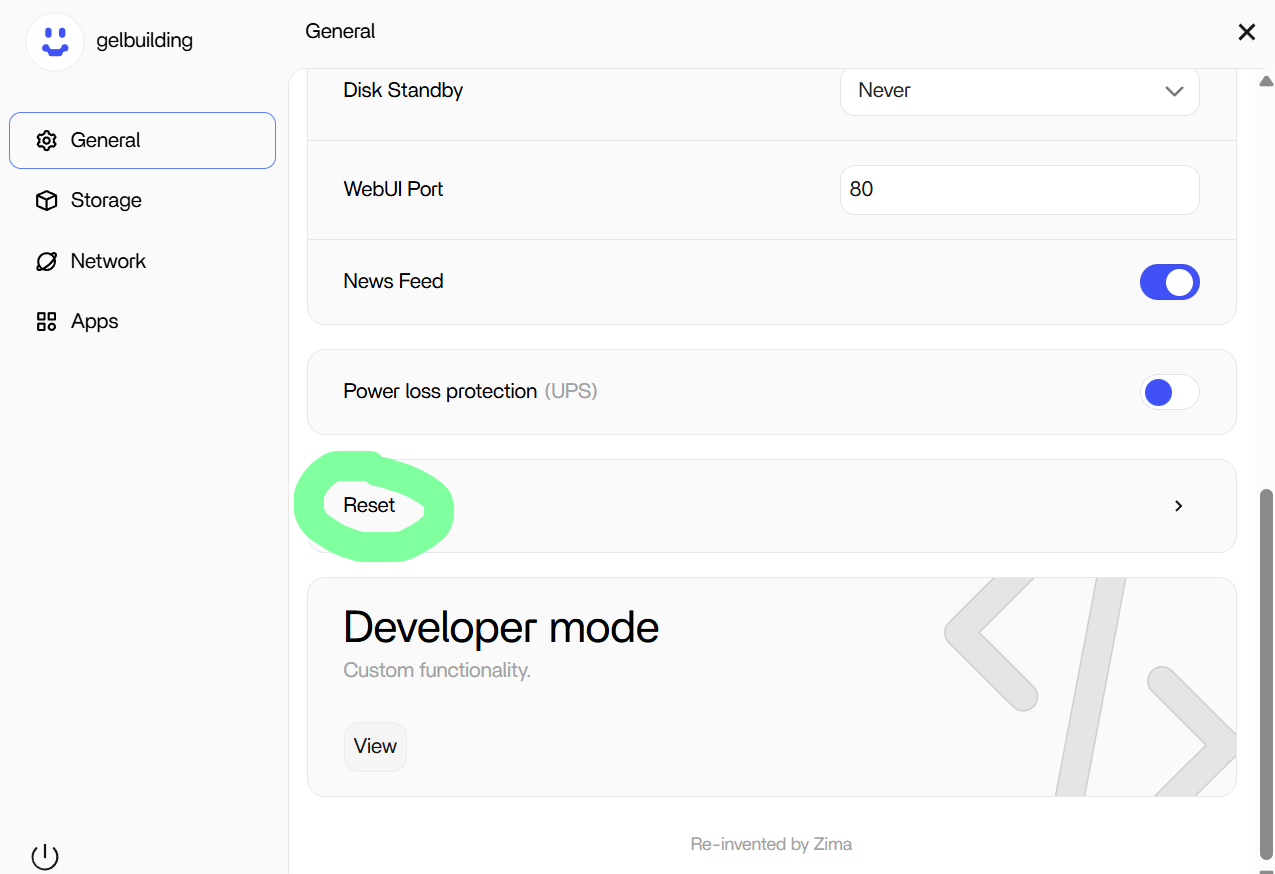
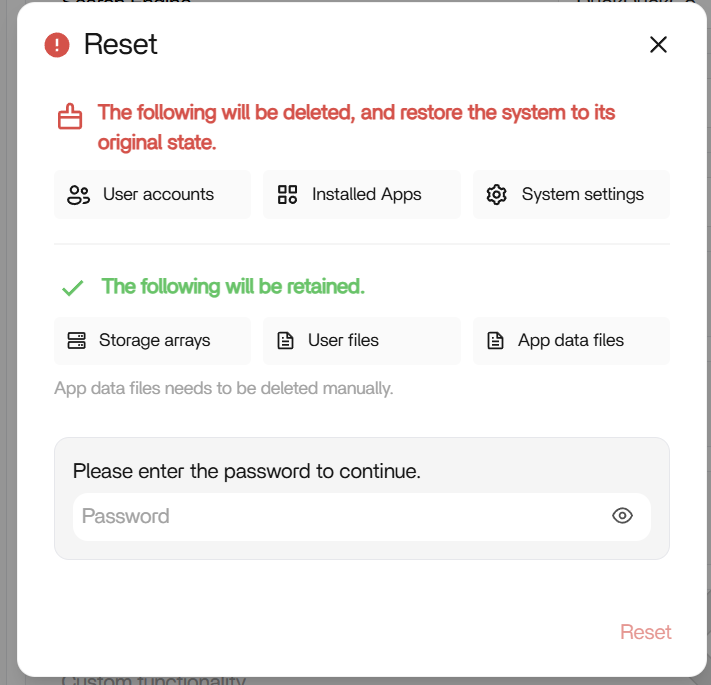
Also note: if you do Factory Restore / OS reinstall, the installed apps will disappear from the dashboard.
But your AppData / container data on the data drive is usually still there, so once you reinstall the apps (same ones), they will normally pick up the existing config/data again.
1 Like
Thank you. but data is not important. everything is already backed up. so going for fresh and completely new.
Thank you for the effort.
What I suggest:
- Finish Factory Restore / reinstall with RAID disks disconnected (so OS boots cleanly)
- Once ZimaOS dashboard loads normally, power off
- Reconnect both RAID disks
- Boot back up
After boot:
- ZimaOS should detect them and the RAID array should reappear
- If it doesn’t show in the UI immediately, the data is still there and can be reassembled via terminal.
So disconnecting is only temporary — it’s just to make sure restore/first boot is clean and safe.
Please see this post.
Thank you, in this case i will follow my own path, because i want to ‘stresstest’ the raid config by copying a lot of data to it.
But i still don’t understand that switching cables can break my os. i have various debian instalations and messed up big time, but never ever had it that the os would not boot up. even disconnecting drives, swithing locations whatever. that has never corrupted my os. so what happened here does not give me much confidence in the OS, or hardware. i don’t know where it went wrong. OS? or hardware. if it is hardware i want a new device, if it is OS i will replace it with something more trustworthy. so still in dubio. But i will start firstly with reinstalling the OS.
Cable 1 original from Zima.
connected, lsblk no disks, poweroff, switched connections, lsblk no disks.
cable 2, exactly the same. now even the monitor does not ive visual anymore. tried cable 1 again same.
after 5 minutes i got screen back but 640x480.
Al in al not good.
I agree with you: changing SATA cables/ports does not “break” an OS on a healthy system.
The only realistic way it appears linked is if the system already had intermittent SATA dropouts (CRC errors / link resets / timeouts). If that happens while the OS is writing (journal, docker, system services), you can end up with a dirty filesystem or boot issues on the next restart and on ZimaOS you may also see fallback to the other slot (Block B).
So it’s not that the cable swap corrupted anything, the swap just coincided with (or revealed) an underlying connectivity/power/controller instability.
That’s why the proper verification is:
- clean OS install
- then stress test
- and watch for SATA/I/O resets in
dmesg
If those errors return on a fresh OS, it confirms hardware/link instability rather than the OS itself.