Hi, I’m having trouble setting up Nextcloud using MariaDB. So far all I’ve done is install the Nextcloud and MariaDB apps. I’m not sure how to configure the database and was hoping somebody else knows how.
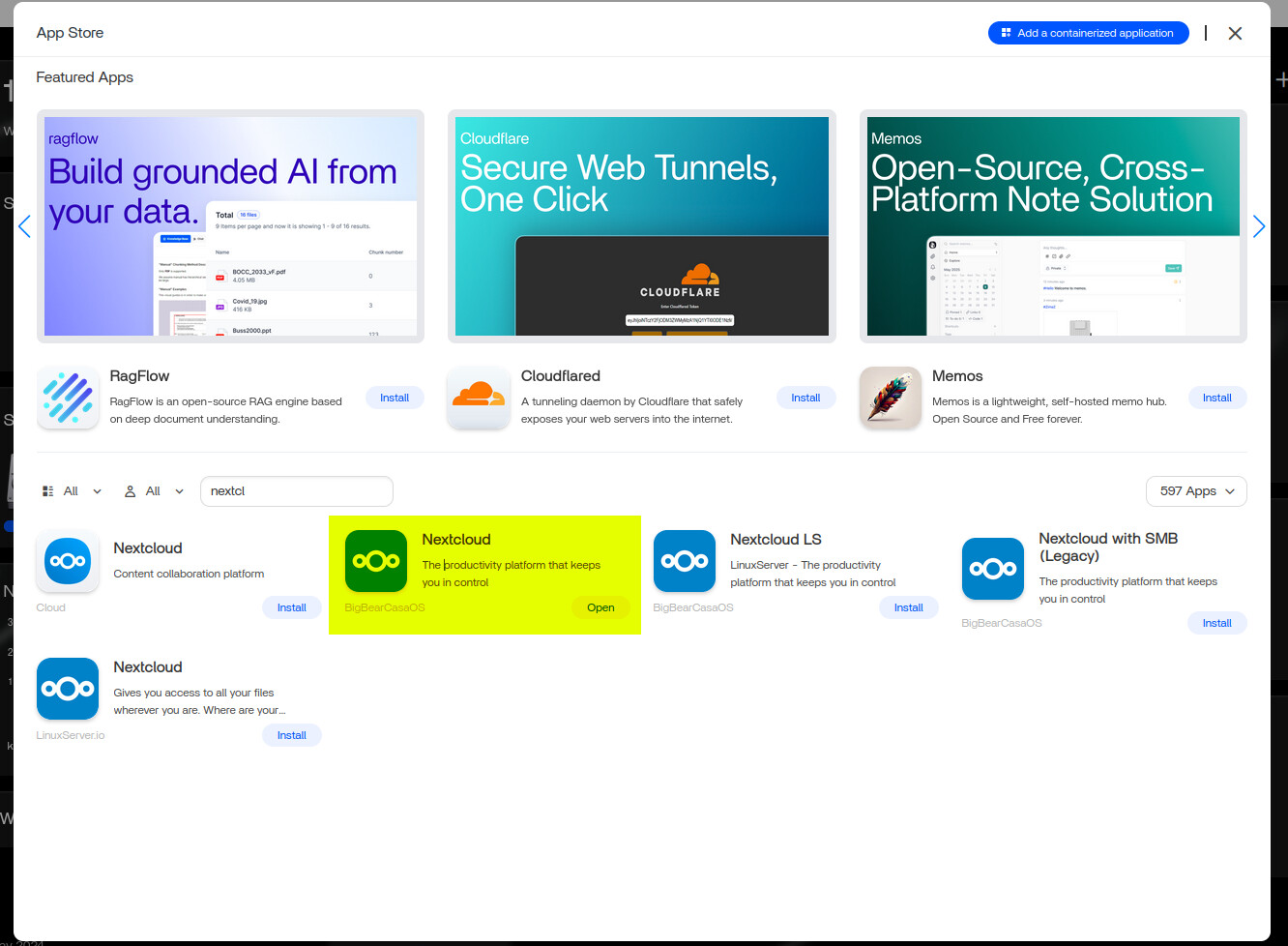
If you haven’'t gone through the initial setup screen on Nextcloud, it is easier to set the database there rather than having to try and change the database source afterwards.
I used a phpmyadmin container to create the user and database so I could enter those details into the Nextcloud setup (where you create the initial admin user). The host is the server IP address and if you are using port 3306 for the Mariadb server, the port isn’t usually required. If not, you will need to go into the terminal of the mariadb container and create the user & database in there - with the right permissions set too. I fond phpmyadmin much easier to user here as it is graphical and not command line driven. It is also possible to see the tables being added to the database when setup is running on Nextcloud.
This is a common first-time setup issue and an easy fix.
You don’t configure MariaDB separately. You just point Nextcloud to it during setup.
Do this:
- Install MariaDB first
When installing, set and note:
- Database name (e.g.
nextcloud) - Database user (e.g.
nc_user) - Database password
- Install Nextcloud
On the setup screen select MariaDB / MySQL and enter:
- Database user:
nc_user - Database password: (the one you set)
- Database name:
nextcloud - Database host:
mariadb:3306
(Use the MariaDB app/container name, not an IP)
- Click Finish setup and wait a minute.
Avoid these mistakes:
- Don’t use
localhostor127.0.0.1 - Don’t use the MariaDB root user
- Make sure MariaDB is fully running before starting Nextcloud
If it still fails, post the exact error and the MariaDB app name, we’ll sort it quickly.
Hello, I also having problems, after struggling for about 6 hours trying several things from Bigbear Youtube etc, I tried above settings that [gelbuilding] shared. It is the closest I get to something that is almost working. I am a new user on ZimaOS v1.5.3
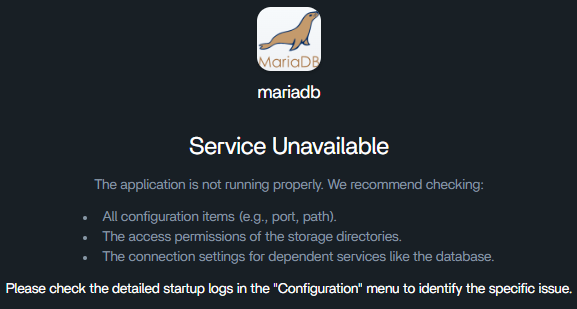
The error I get is:
mariadb
Service Unavailable
The application is not running properly. We recommend checking:
All configuration items (e.g., port, path).
The access permissions of the storage directories.
The connection settings for dependent services like the database.
Please check the detailed startup logs in the “Configuration” menu to identify the specific issue.
I also tried installing and running the Bigbear repo in ZimaOS, but that one doest even start up it just opens a new window with my ZimaOS dashboard. Is the ZimaOS repo different then the CasaOS version?
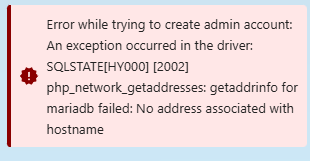
I believe this error means Nextcloud can’t resolve the MariaDB service name, so it never reaches the database.
php_network_getaddresses: getaddrinfo for mariadb failed
usually indicates the MariaDB app name isn’t reachable on the Docker network.
What I suggest checking:
- Confirm the MariaDB app name
ZimaOS > Apps > MariaDB
Use the exact app/container name shown there. - Database host in Nextcloud must be:
<MariaDB-app-name>:3306
Not localhost and not an IP.
- Check MariaDB logs
ZimaOS → Apps → MariaDB → Logs
Confirm it starts cleanly with no permission or data directory errors.
MariaDB must be fully running before completing Nextcloud setup. - Use a normal database user
I suggest not using the MariaDB root account.
About BigBear:
I believe BigBear apps are maintained separately. For app-specific behavior or questions, I suggest contacting BigBear directly via their official website or documentation.
If it still fails, I suggest sharing:
- The exact MariaDB app name
- A screenshot of the MariaDB logs
That should narrow it down quickly.
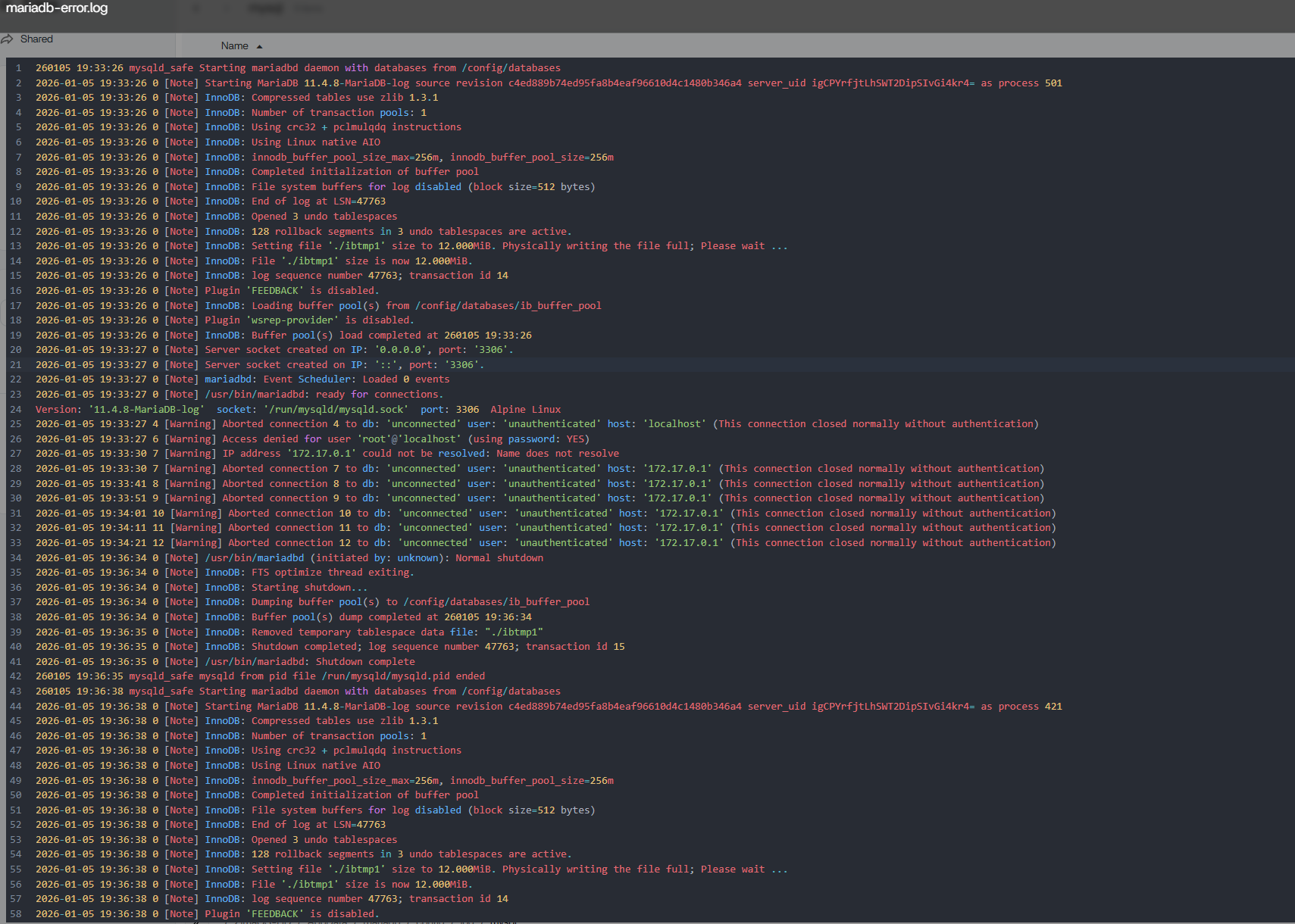
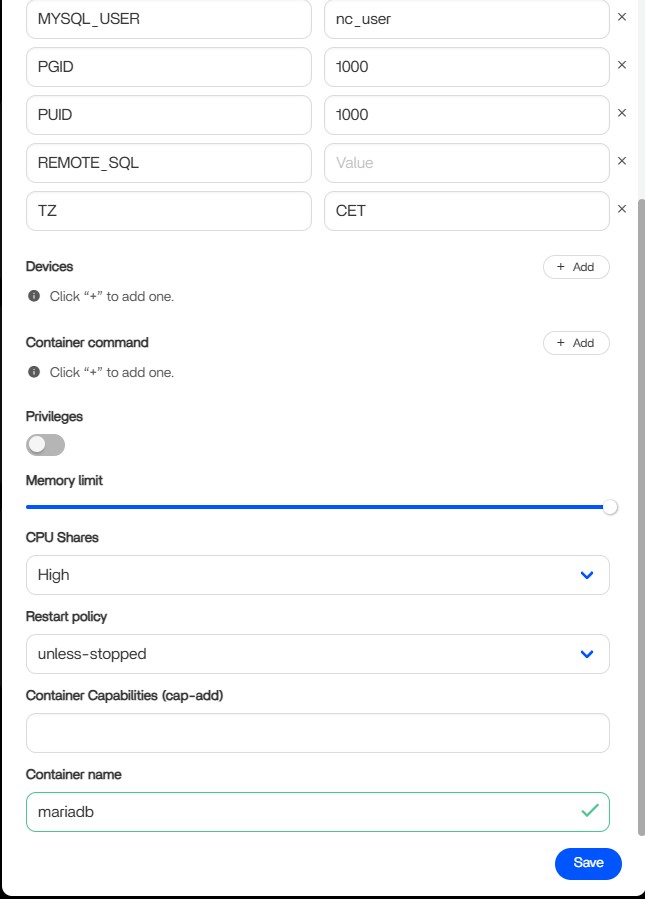
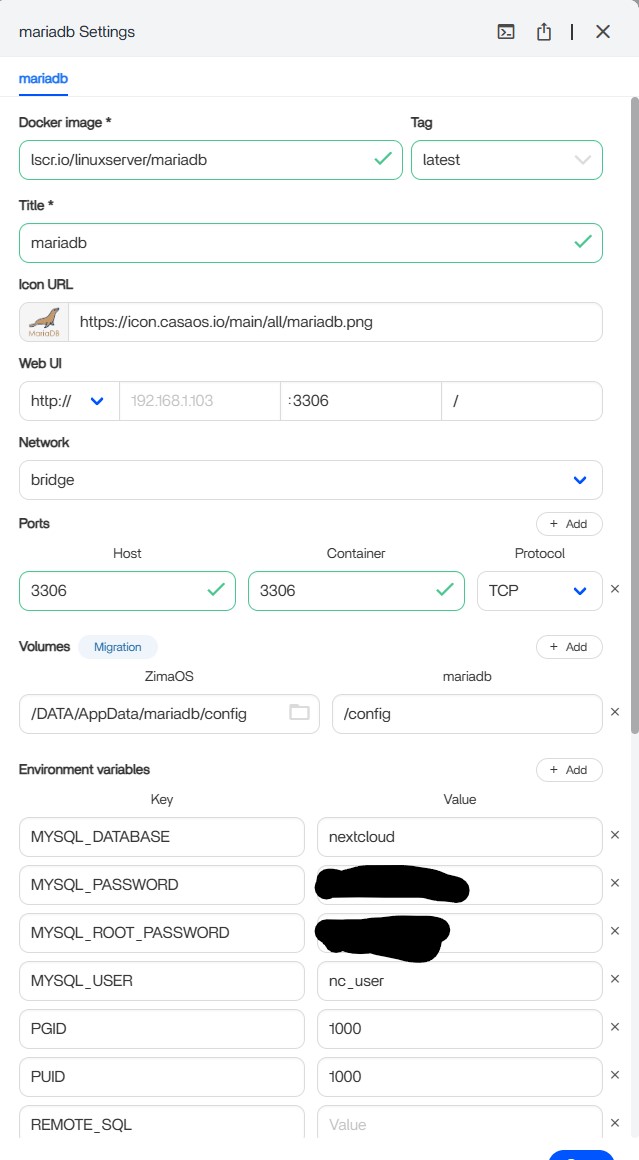
Thanks for the logs, the first screenshot is the key one.
I believe this shows MariaDB is actually starting correctly. The log reaches “ready for connections” and listens on port 3306, so the database itself is healthy. The warnings shown are not fatal.
What I believe is happening is a health-check mismatch: MariaDB starts and runs, but the app UI still reports Service Unavailable.
I suggest:
- Don’t change any MariaDB env vars or passwords again.
- Confirm the data volume mapping hasn’t changed since first start.
- Restart MariaDB only (stop > start).
- Continue the Nextcloud setup using:
mariadb:3306
If it still fails, I suggest removing only the MariaDB app (not the data folder) and reinstalling once with the correct values, then leaving them unchanged.
Nothing in the log points to a broken database.
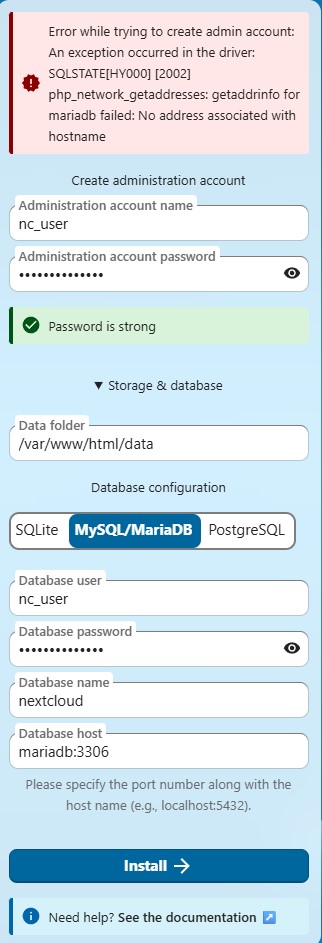
This error is very specific and actually narrows it down well.
getaddrinfo for mariadb failed means Nextcloud cannot resolve the hostname mariadb at all. That’s a Docker networking / name resolution issue, not a database or password problem.
I believe what’s happening is that Nextcloud and MariaDB are not on the same Docker network, so the hostname mariadb doesn’t exist from Nextcloud’s point of view.
I suggest checking this:
- Confirm both apps use the same network
In ZimaOS > App settings for Nextcloud and MariaDB
Both should be on the same network (usuallybridge).
If one was changed or recreated, name resolution will fail. - Confirm the container name
The database host must match the container name exactly.
From your screenshot it ismariadb, so:
mariadb:3306
is correct only if both apps share the same network.
- Restart both apps
Restart MariaDB first, then Nextcloud.
The MariaDB logs already show it is running and listening, so once the network is correct, this error should disappear immediately.
Okay, I will try when I come back home. The thing is I already kind of tried this but will do so once more just to be sure.
Both containers are on “Bridge” by the way.
Perhaps I should uninstall both apps and delete all folders, forcing a clean start for both app installations.
Thank you for your time gelbuilding, I really appreciate it!
I followed these 3 suggested steps but nothing changed, I get the same error again.
After this, I uninstalled both mariadb and nextcloud, and deleted the folders for a fresh installation, but again, I get the same error…
I really expected a more straightforward installation/setup process on ZimaOS…I already pay for the unlock as I have more then 4 hdd’s…
Thanks for testing all of that, I agree, you’ve been very thorough.
At this point, I believe we need to look directly at the logs to see where the name resolution is failing.
If you’re happy to share, could you please post:
- Nextcloud logs
ZimaOS > Apps > Nextcloud > Logs
Specifically the lines shown right after you click Install. - MariaDB logs (first 20–30 lines after start)
ZimaOS > Apps > MariaDB > Logs - A screenshot showing the Network setting for both containers.
That should tell us whether this is a Docker DNS issue or something failing during container startup. Once we see that, we should be able to pinpoint it properly.
I think there is something wrong in Nextcloud, if I look at the logs I only get messages like: “message”:“Host 192.168.1.103 was not connected to because it violates local access rules”
See attached picture.

I searched on the internet and found something that looks like a similar problem: Host 10.0.17.6 was not connected to because it violates local access rules · Issue #188 · nextcloud/all-in-one · GitHub
But if I try the mentioned solution my Nextcloud won’t start up anymore. But since this is new to me it could be that I’ve made a mistake. Given solution is: Add [‘allow_local_remote_servers’ => true,] outside the pool in the config file.
Edit: Adding my Nextcloud config file:
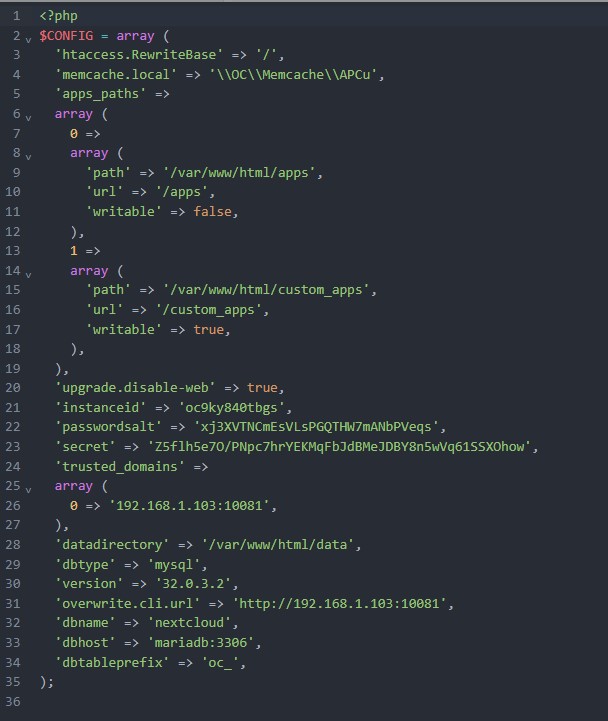
Good find, that GitHub issue is related in general, but I don’t believe it’s the root cause here.
The message
“Host … was not connected to because it violates local access rules”
appears after Nextcloud starts handling HTTP requests. Your main blocker still happens earlier during setup:
php_network_getaddresses: getaddrinfo for mariadb failed
That error means Nextcloud cannot resolve the hostname mariadb, which points to a Docker name-resolution issue rather than a Nextcloud security or config problem.
Regarding the suggested fix you found:
'allow_local_remote_servers' => true,
This setting is only relevant after Nextcloud is fully installed and running. Adding it during initial install, or placing it incorrectly in config.php, can prevent Nextcloud from starting, which matches what you observed.
Based on everything so far, I believe:
- MariaDB itself is running and healthy
- Credentials and permissions are not the issue
- The remaining problem is container-to-container DNS resolution
To understand this better, could you please run these checks via SSH and share the output:
- Confirm both containers are running
docker ps
- Check what network MariaDB is actually on
docker inspect mariadb --format '{{.HostConfig.NetworkMode}}'
- Check the network used by Nextcloud
docker inspect nextcloud --format '{{.HostConfig.NetworkMode}}'
- Test name resolution from inside Nextcloud
docker exec -it nextcloud ping -c 3 mariadb
- As a comparison, test via IP
docker inspect mariadb --format '{{range .NetworkSettings.Networks}}{{.IPAddress}}{{end}}'
Then temporarily try:
<that-ip>:3306
as the database host in Nextcloud.
If the IP works but the hostname does not, it confirms this is a Docker DNS issue, not a Nextcloud configuration problem. Once we see these results, we’ll know exactly where the break is.
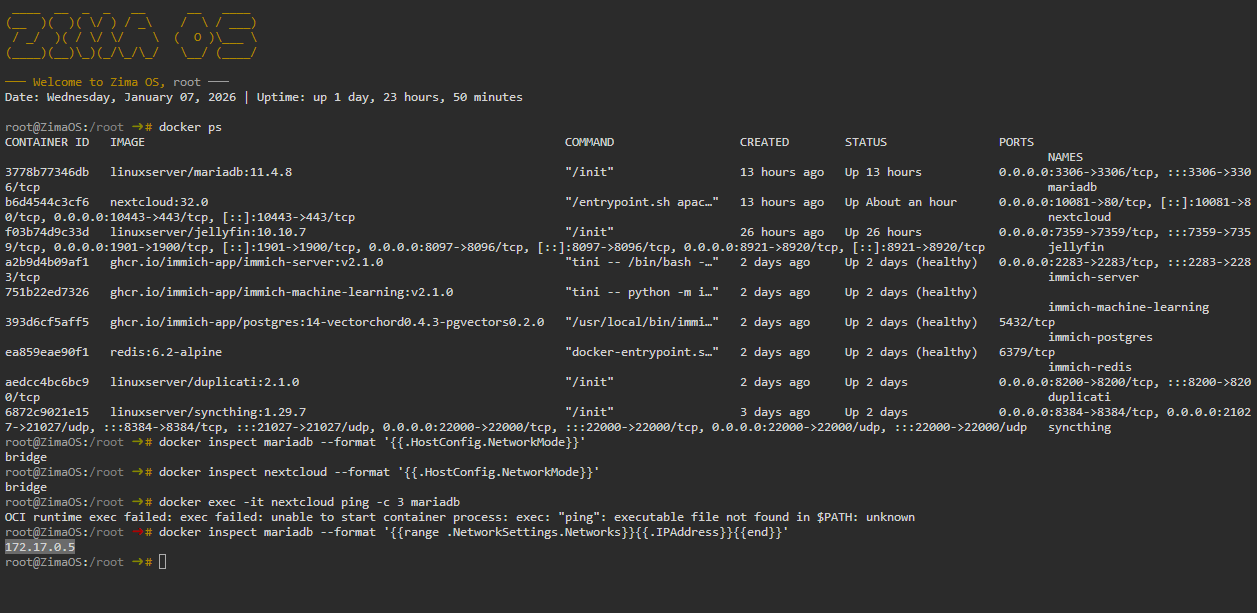
Great, that confirms it
The issue is not Nextcloud or MariaDB. Both are working correctly.
The problem is that container name resolution (mariadb) is failing on the default bridge network, while direct IP connectivity works. That’s why:
mariadb:3306fails172.17.0.5:3306works immediately
Fix:
Use the MariaDB container IP as the database host in Nextcloud:
172.17.0.5:3306
This is a valid and safe workaround and explains why Nextcloud installs successfully as soon as the IP is used.
You didn’t misconfigure anything, this is a Docker DNS edge case. If name-based resolution is needed later, it would require using a user-defined Docker network, which isn’t fully exposed in the ZimaOS UI yet.
Thanks you so much!
I am glad that Nextcloud works now, but I am curious about the root cause of this since this could happen to other people also.
And I am concerned that I will be going to have issues with all my other Docker Aplications, Nextcloud was the first thing I wanted to install/setup. Still need to setup Jellyfin, Immich and perhaps overseerr/sonarr/radarr.
I bought ZimaOS so that I don’t need to learn Linux for setting up a homeserver 
You’re very welcome and that’s a completely reasonable question.
The good news is that ZimaOS is doing exactly what it’s designed to do for the vast majority of apps. This situation is more of an edge case that only appears when one container needs to explicitly talk to another by name during setup, like Nextcloud with an external database.
Most apps people commonly install on ZimaOS, Jellyfin, Immich, Overseerr, Sonarr, Radarr are generally very straightforward and don’t require this kind of manual linking, which is why many users never encounter this at all.
ZimaOS’s strength is that it removes almost all of the Linux and Docker complexity, and in your case it did exactly that, once the small networking quirk was identified, everything worked without deeper system changes.
Overall, this doesn’t indicate a fragile setup or future problems. It’s simply a corner case, and ZimaOS handled the rest of the stack reliably. You’re set up well to continue installing apps without needing to dive into Linux internals.
Glad to hear Nextcloud is now up and running, that’s the hardest one out of the way
Thanks for the help. It turns out I just made an error with the port number. But I did run into another issue. I can’t seem to configure Nextcloud in a way where it stays separate from my storage pool itself. Is that just a limitation of containers?