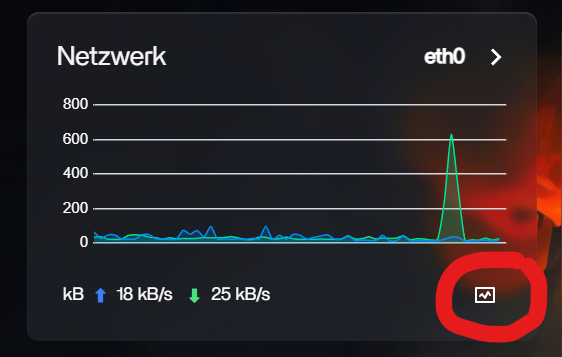
[Module] ZFW v1.0.10 — host firewall as a ZimaOS dashboard tile

Hi all,

Some of you know the situation: ZimaOS doesn’t ship a host firewall. iptables is empty, Samba and NFS are on the LAN, every app you install opens its port directly on 0.0.0.0. For a private appliance behind a NAT router that’s been acceptable; for anyone whose LAN has guests, IoT gadgets or a virtualization host it’s a real exposure.

ZFW is a small module I’ve been writing to fix that without changing how ZimaOS feels to use.

  • Installs as a sysext module + a tile in the ZimaOS dashboard.
  • Allowlist editor for native ports, blocklist for Docker-published ports (filters at DOCKER-USER, not INPUT — Docker traffic doesn’t go through INPUT, this is the most common mistake in homelab firewall how-tos).
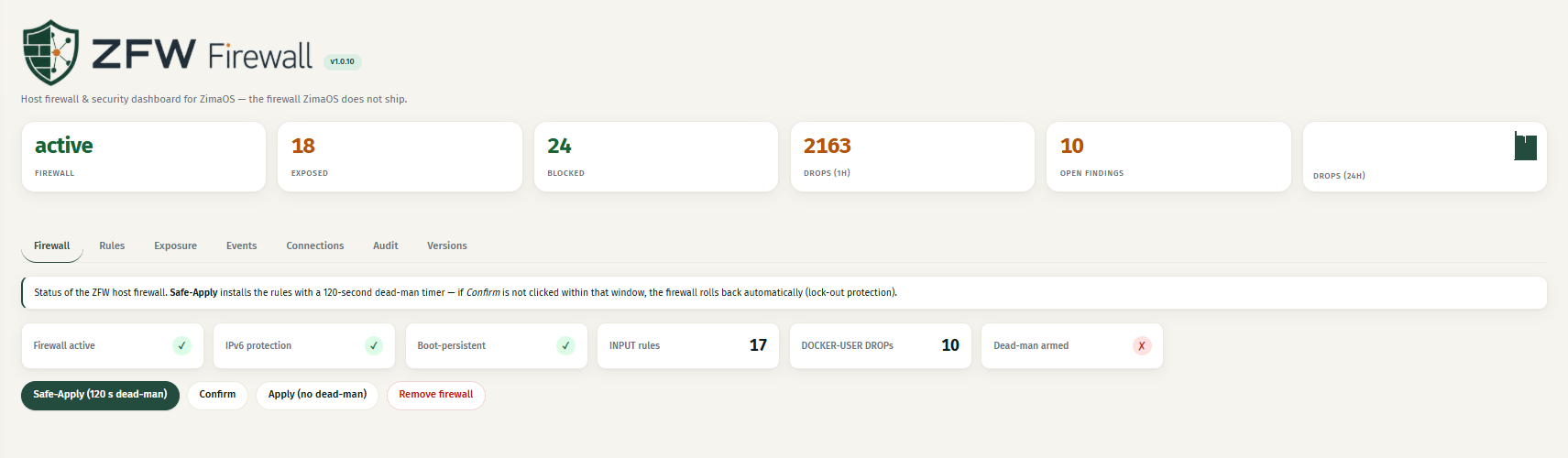
  • Live status: every listening TCP port classified as LAN-reachable / blocked / loopback. So you can actually see what’s exposed.
  • Safe-Apply with a 120-second dead-man revert. Apply something wrong, walk away, the rules come back automatically. The current SSH session is kept alive.
  • localhost, the host’s own IP, and tailscale0/ZeroTier are always allowed. Tailscale and Pangolin/Newt access keeps working.

“One thing that stood out during testing was how responsive you were to feedback. We identified issues, discussed them, and in many cases there was a fix available almost immediately. That’s not something you see very often and it gives a lot of confidence in the direction of the project.”
— gelbuilding, after testing ZFW on a ZimaBoard

Install (amd64 for ZimaBoard/ZimaCube, arm64 for Lattepanda/Pi-class):

scp dist/zfw-1.0.10-amd64.tar.gz root@<host>:/tmp/
ssh root@<host> 'cd /tmp && tar xzf zfw-1.0.10-amd64.tar.gz && cd zfw-* && sh install.sh'

Releases, threat model, security report, and bug-bounty policy:
**

About me**

I’m Lintux (Holger). Inside the ZimaOS ecosystem I also maintain zima-linux-client (desktop client with integrated ZeroTier and SMB), Cron (the task-scheduler module), the Tailscale sysext, and a handful of other modules. ZFW grew out of the same itch: things the OS doesn’t ship that the community keeps asking for.

40+ years in IT, a lot of it spent shipping production systems where “don’t break the user” was the actual job description. That’s the lens ZFW is built through — Safe-Apply exists for a reason.

Looking specifically for:

  • Reports from arm64 hosts (I have less mileage there).
  • Anything that breaks a Docker app you use — please open an issue with the app name and its published ports.
  • Which would you rather see next: IPv6, rule-set backup/restore, per-container rule binding, or multi-host management?

Cheers,
Lintux

8 Likes

That’s awesome! Thanks for your hard work. I will install it and check it out.

1 Like

This is amazing Lintux thank you.

1 Like

If something goes wrong, how do I rollback the installation (uninstall)? I don’t have much technical knowledge. Is it possible to use a script to remove what was done?

1 Like

Yes — and for most cases you don’t even need a script.

If something goes wrong, you have three levels of “undo”, from easiest to most thorough:

1. During setup, you almost can’t break anything. When you apply rules with Safe-Apply, ZFW starts a 120-second countdown. If you don’t click Confirm in that time — for example because a rule locked you out — the firewall automatically rolls back to how it was. So a bad rule fixes itself.

2. To turn the firewall off (the usual “something’s wrong” fix). Open the ZFW tile in your ZimaOS dashboard and click the “Remove firewall” button. That instantly removes all the firewall rules and puts your system back to its normal state — no commands, no typing. ZFW is now doing nothing. (The app tile stays installed, but it isn’t affecting your network anymore.)

3. To remove ZFW completely from the system. This deletes the app itself, not just the rules. It needs one command in a terminal. Copy the uninstall.sh file onto your ZimaOS box and run it as root:

ssh root@<your-zimaos-ip> 'cd /tmp && sh uninstall.sh'

It cleans up everything and turns the firewall off in the process. If you’d rather not use a terminal at all, just use option 2 above — that’s enough to make ZFW stop affecting your system.

In short: if you’re worried, click “Remove firewall”. That’s the safe, no-technical-knowledge way to undo it. The script (option 3) is only needed if you want ZFW gone entirely

download_uninstall

1 Like

Thank you very much and congratulations on your work and dedication.

1 Like

This is a very good addition for ZimaOS, and I can say that from actually testing it on a ZimaBoard over the last few releases.

ZFW is not just a basic firewall page. It is a host firewall module for ZimaOS, packaged properly as a dashboard tile, which makes it feel like it belongs inside the system rather than being a random CLI workaround.

The big point here is that stock ZimaOS does not really give users a clear host firewall layer, and many Docker apps published to 0.0.0.0 can be reachable across the LAN unless something else is controlling that access.

What stands out to me is that it understands Docker properly. It is not just filtering normal INPUT traffic. The use of DOCKER-USER is important because Docker-published ports do not behave the same as normal host services. If a firewall only looks at INPUT, users can get a false sense of security while Docker services are still exposed.

From my testing, installation was straightforward, the dashboard was easy to understand, and rule management made sense. I was able to create custom rules, verify they worked, and after the latest updates I also confirmed the firewall rules survived reboot correctly.

The Safe Apply feature is probably the most important part for normal users. A 120-second rollback timer makes a lot of sense on a headless NAS-style system, because one wrong firewall rule can lock a user out. Having the rule automatically revert unless confirmed gives users a safety net.

I also like that it fits the ZimaOS design. From what I can see, it installs as a sysext module, appears as a dashboard tile, uses its own daemon and web UI, and checks the ZimaOS session token so the firewall UI itself is not left open.

The live diagnostics are another strong point. Showing listening TCP ports and classifying what is LAN-reachable, blocked, or loopback-only gives users the visibility they need before making changes.

During testing I also found a few issues, including a reboot persistence problem. Each time I reported something, Holger investigated it, reproduced it, and had a fix available quickly. Watching it improve version by version has been impressive.

For me, this is the right direction for ZimaOS modules:

collect the facts firstshow what is actually exposedseparate host services from Docker-published servicesapply changes safelyprovide a rollback path

This would be very useful for users running apps, reverse proxies, tunnels, or anything that may be exposed outside the local network. The technical implementation is solid, but just as important, it feels designed for normal ZimaOS users rather than only advanced Linux users.

2 Likes

@Lintux Thanks for this firewall –really great – installs easily and the two-minute test function allows you to make adjustments safely.

The Cron app is really well made and pleasant to use.

Will casadrop be published on the GitHub? File and folder sharing is really a lack on ZimaOS…

Thank you for this great work

Merci pour ce pare feu – vraiment génial – s’installe facilement et la fonction de test pendant deux minutes permet d’effectuer les réglages en toute sécurité.

L’application Cron est vraiment bien faite et agréable à utiliser.

Est ce que casadrop sera édité sur le GitHub ? Le partage de fichiers et dossiers est vraiment un manque sur ZimaOS …

En merci pour ce super boulot

1 Like