Hi Yoh,
Thanks — your report turned up an actual bug, and there are two separate things going on. One is a ZFW bug that is now fixed; the other is a rule that needs adding.
- The Zima App client — that one was my fault, and it’s fixed
ZimaOS ships IceWhale’s own remote-access mesh, Zima Net (znet), which owns the network interface tun0. ZFW auto-allowed every other mesh — Tailscale, ZeroTier, WireGuard — but not that one, so it was dropping ZimaOS’ own remote access. Measured on a ZimaCube:
ZFW-IN-DROP IN=tun0 SRC=10.126.126.243 DST=10.126.126.1 PROTO=TCP DPT=9527
125 dropped SYNs in a single connection attempt, while the client sat on “connecting” forever.
Your 1.7.0 is affected. I checked that specifically rather than assuming: I downloaded the official ZimaOS 1.7.0 image, verified it against IceWhale’s published checksum, and unpacked it — usr/bin/znet, its service unit, and a systemd preset reading enable znet.service are all in there. Zima Net ships and is on by default on stock 1.7.0.
Fix: upgrade ZFW to v1.0.24, released today:
On Zima, as root — pick the arch that matches your box
cd /tmp
curl -LO https://github.com/chicohaager/zfw/releases/download/v1.0.24/zfw-1.0.24-amd64.tar.gz
tar xzf zfw-1.0.24-amd64.tar.gz && cd zfw-1.0.24-amd64 && sh install.sh
It updates in place, keeps your rules, and after it you click Apply → Confirm once. (The Docker Hub installer image is still on 1.0.23 for the moment; use the tarball.)
- The Freebox VPN — that one is a rule, and it’s working as configured
This is a different mechanism and the upgrade will not fix it by itself.
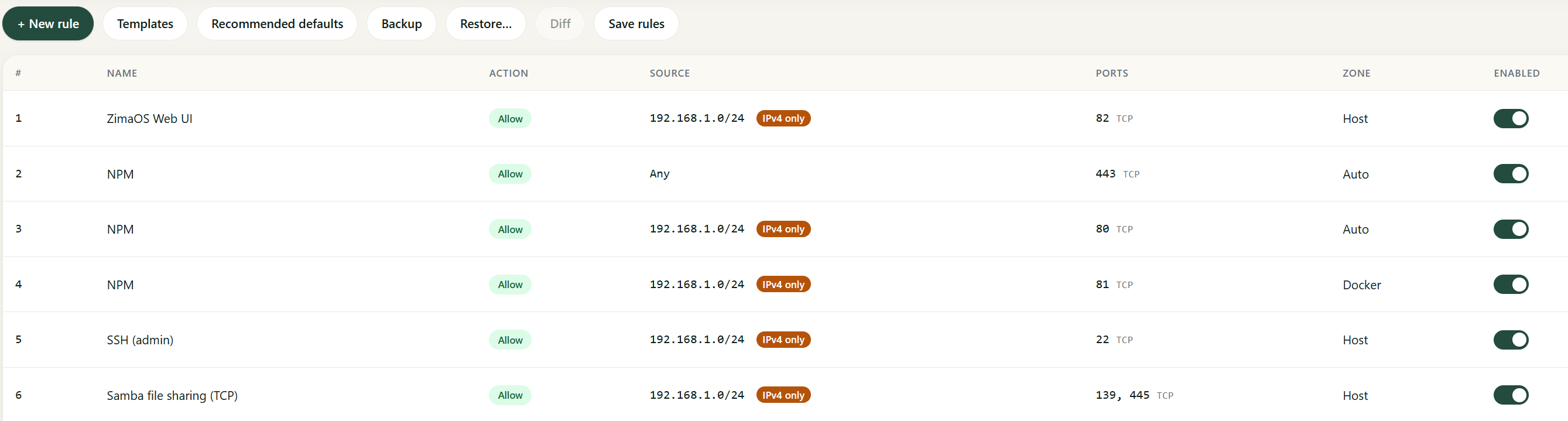
When ZFW builds its starter rules it detects your LAN (say 192.168.1.0/24) and writes that subnet as the source into every one of them — Web UI, SSH, Samba, and one per published container port. The policy is default-deny. Your Freebox VPN clients arrive with a source in 192.168.27.0/24, a different subnet, so no rule matches and they are dropped. Local access works, VPN access doesn’t — exactly what you describe.
And note: ZFW does auto-allow WireGuard, but only when WireGuard terminates on the ZimaOS host. Yours terminates on the Freebox, so the Zima only sees normal packets on its LAN port with a 192.168.27.x source. That auto-allow cannot help here.
Step 1 — look before you write rules. Open ZFW → Events, then try the failing connection from the VPN. Every drop is listed with Source IP, destination port, protocol and zone. That answers three things at once:
- Which source does the Zima actually see? If the Freebox source-NATs the VPN traffic, you’ll see the box’s LAN address there instead of 192.168.27.x — and a rule written for 192.168.27.0/24 could never match. This may well be why your new rules had no effect.
- Which zone? host = a port ZimaOS itself serves (80/443 UI, 22, Samba). docker = a published container port. Different chains; a rule in the wrong zone does nothing.
- IPv4 or IPv6?
If nothing shows up in Events while it fails, ZFW isn’t what’s blocking you.
Step 2 — the rule. Rules → add:
- Direction: Inbound
- Source: IP range (CIDR) → 192.168.27.0/24, or whatever Events showed
- Ports: the ones you need · Protocol: TCP or Both
- Zone: the usual trap. “Automatic” decides per port from the container ports published at that moment — if the container was stopped when you saved, it filed the port under host, where it does nothing for container traffic. When in doubt, make two rules: one Host service, one Docker container.
Then Apply → Confirm within 120 s → Commit (boot persistence).
On IPv6: a rule with an IPv4 source is never mirrored into the IPv6 chain — an IPv4 CIDR simply cannot express an IPv6 rule. If Events shows drops in the IPv6 zone, add a second rule with the IPv6 prefix as its source.
Why it broke after the ZimaOS update: Docker flushes its filter chain on every restart, and a system update restarts Docker. With rules committed, ZFW re-applies automatically — but against the container/port inventory from before the update. If the update changed which ports are published, re-applying (which recompiles against the live inventory) is the right fix, not a workaround.
If you paste the Events lines you see while the VPN connection fails, I can tell you exactly which of the two you’re hitting.