Is there any way to install coral apex drivers? Please note that ZimaOS is locked and does not allow you to install packages with apt or dpkg, you cannot have it work on my mini pc.
I don’t like having back to CasaOS i like ZimaOS because it has a better web and have more options.
Since all hardware drivers for ZimaOS are pre-built, they cannot be installed later.
I’d be happy to integrate the driver for this device on the system, but since I don’t have this device, I hope you can help test it.
I can build a separate system update package if you want, and you’ll need to manually update the system to verify that it works.
Hello, I built a ZimaOS update package with gasket driver.
This is a dedicated beta version with kernel version 6.12.
You can get updates via this link: https://github.com/jerrykuku/staff/releases/download/v0.1.2/zimaos_zimacube-1.4.1-gasket-driver.raucb
Download it to ZimaOS, then use rauc install <raucb path> to install the update, and reboot the system once the installation is complete.
Note: This is a beta release, there may be other issues, if you run into problems you can still choose a different slot at boot time to roll back to the old system.
Hi Jerry, I see the new release ZimaOS 1.4.1 but I don’t see in the release notes if the gasket-driver was implemented. I don’t want to install the new release and lose that driver. Thanks.
I would like also to be able to use my Coral TPU device with Frigate running on the Zima Board 2. Plugging it into one of the Zima Board 2’s USB ports just shows a solid white light on it.I have moved Frigate from my Home Assistant Green as it was slowing the system to a crawl. Many thanks for any help.
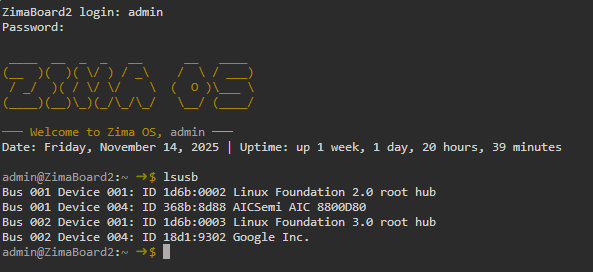
lsusb does recoginize that the Coral TPU has been plugged in (the AIC is my wireless USB dongle),
How to get the VID and PID
You can get both values by running this command in the ZimaOS shell:
lsusb
You’ll see output like:
Bus 001 Device 004: ID 18d1:9302 Google Inc.
In this example:
VID = 18d1
PID = 9302
If you see more than one USB device listed, just share the line that corresponds to the Coral device.
What “better positioning drive” means
What Jerry is referring to is identifying the device correctly so the right driver/module can be matched to it in ZimaOS.
Once the exact VID/PID is known, it’s much easier to confirm whether:
the required driver is already present,
a kernel module needs enabling,
or additional support needs to be added for that specific Coral model.
Next step
Post the full lsusb output (or at least the Coral line), and that should give enough information to move forward.