is there a way to have https on all my apps besides zimaos local.zimaos ?
also I tried installing nginxproxy but is using por 443 and is not letting me use it, can i change the one from zima to a different number?
is there a way to have https on all my apps besides zimaos local.zimaos ?
also I tried installing nginxproxy but is using por 443 and is not letting me use it, can i change the one from zima to a different number?
Hi, copy that. We will talk about it.
Would you tell us how you will use HTTPS on ZimaOS specifically? (Real workflow?)
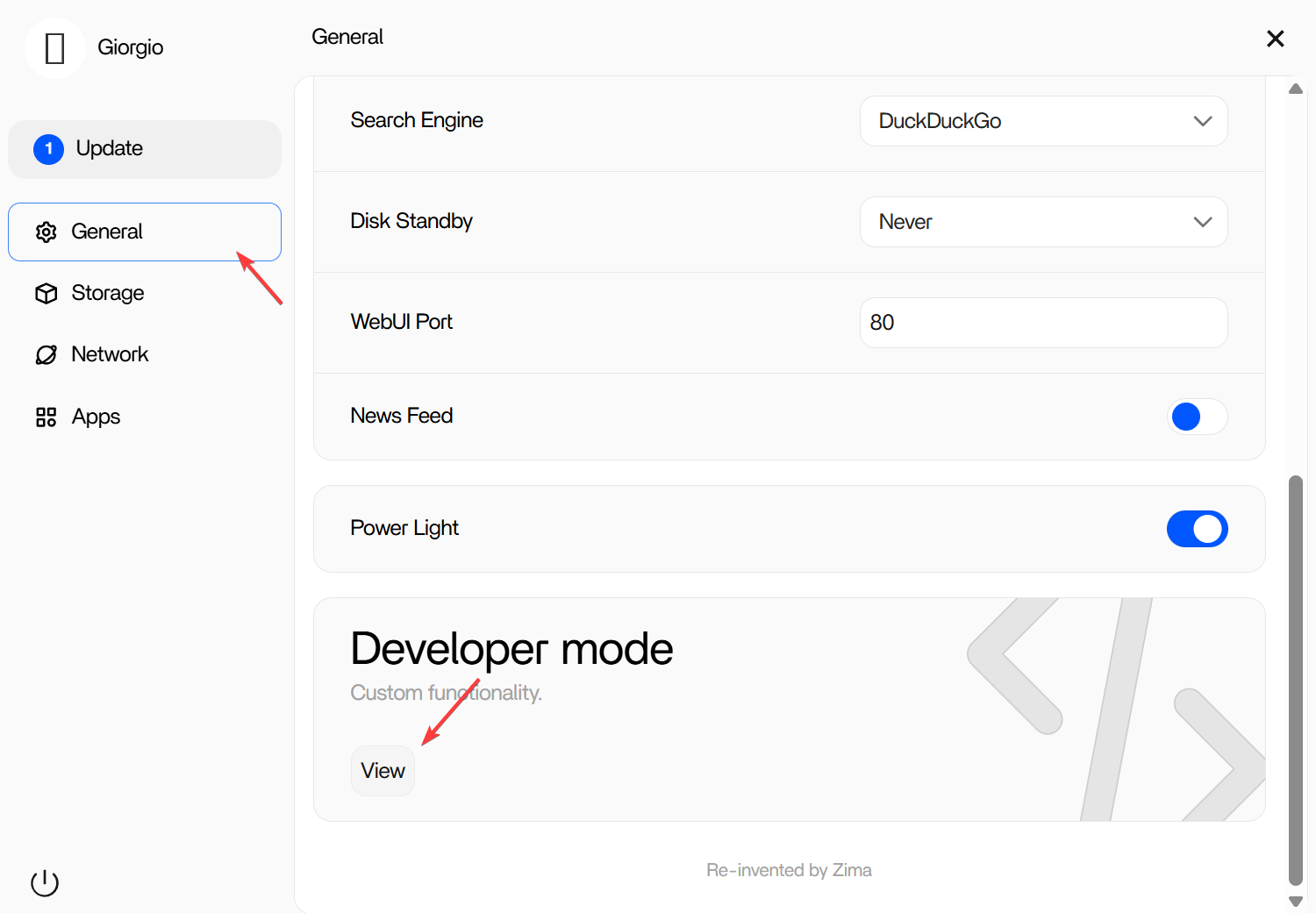
It can be turn off in settings panel.
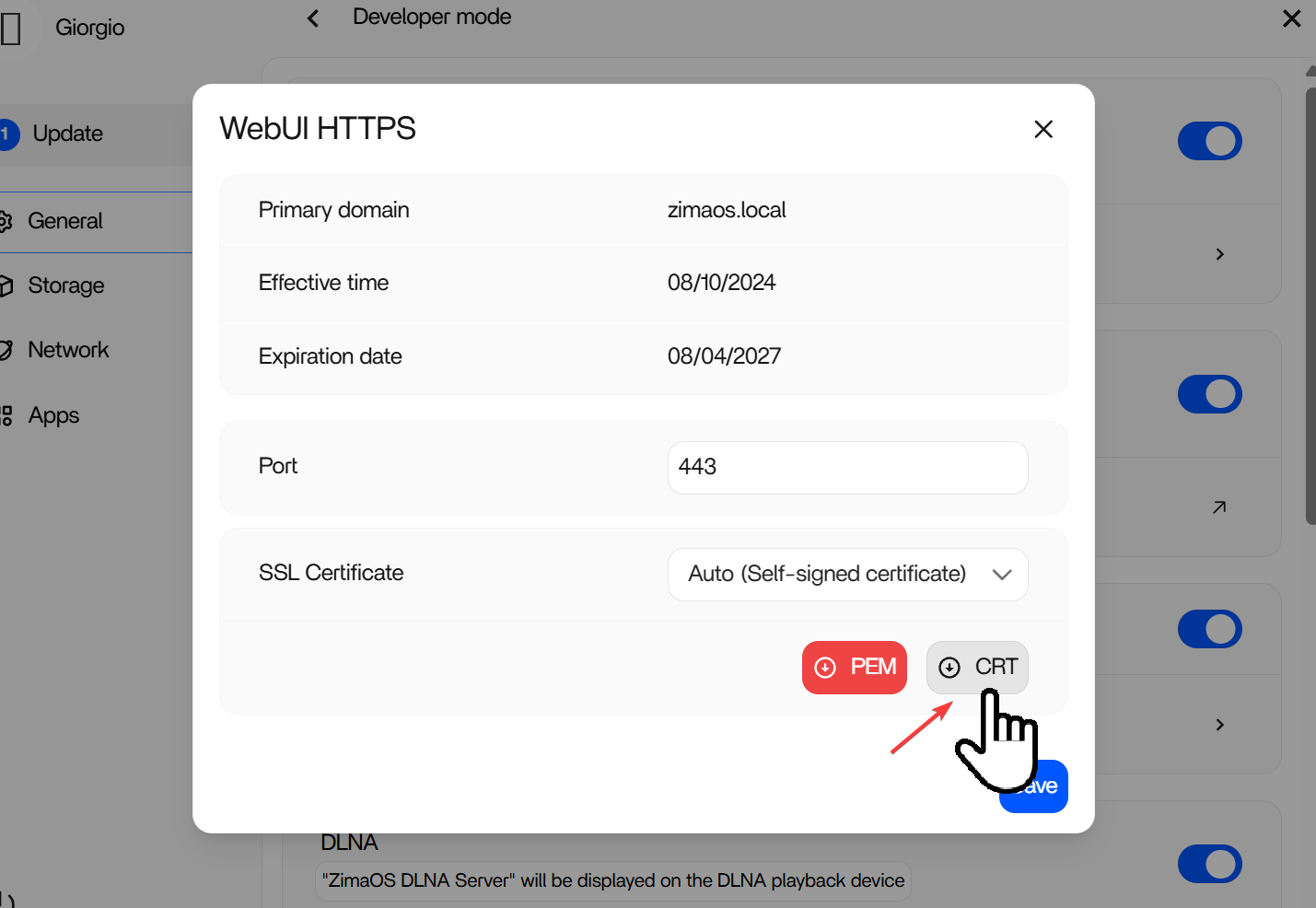
Or, you can download the generated CRT file and make the Chrome trust it.
After importing the crt file, use https://zimaos.local to visit ZimaOS dashboard.
Regarding how to import crt file in Windows, refer to this guide:
To trust the “ZimaOS Local” certificate in Windows for use in a browser, follow these steps:
This will allow your browser to trust the certificate for local connections. Ensure the certificate file is from a trusted source to avoid security risks.
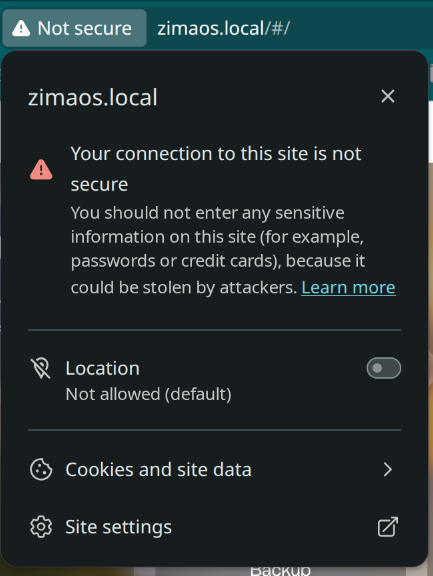
Hey appreciate the guide but I have Pop OS linux, i managed to import it to my browser and the main zimaos.local including files etc works fine, but all the other apps like plex, emby, jellyfin, is not showing this secure connection.
did you figure it out?
This is expected behaviour.
The certificate you imported only applies to ZimaOS at:
Apps like Plex, Emby, and Jellyfin run as separate services and expose their own ports (e.g. :32400, :8096). They use plain HTTP by default and do not share the ZimaOS certificate.
So nothing is wrong, importing the .crt only secures the main dashboard, not the individual apps.
If you want full HTTPS everywhere, you’d need a reverse proxy (like Nginx Proxy Manager or Caddy) in front of the apps with proper certificates.
Hello @gelbuilding
Was wondering if there are any good resources for setting up Nginx on Zima OS for those new to both? My goal is to get rid of the “Not Secure” browser warnings. I fixed the issue in Zima OS with their cert but still have the problem with apps like Emby and Adguard, which I understand is normal. I read some information that spoke of going the self-signed route but realized that perhaps that was beyond my scope? All info here in this community talks about Ngixn. I downloaded that from the Zima OS app store, but am unsure of the configuration and was met with a “ports in use” message that I’m unsure about. I’m also unsure of the other resources I will need (Let’s Encypt? MySQL?) Will I need to forward ports in my router? I have found an install guide on the Nginx website that helps, but it’s geared towards Linux users, with a lot of CL.
I also read here in the community:
https://community.zimaspace.com/t/does-anybody-do-one-to-one-help-with-setting-up-zima-os
which speaks of Nginx, but in terms of DuckDNS that helps a little, too.
Just wondering if there’s any other Zima OS related resources for setting this up that I’m missing? I can’t seem to find anything that’s detailed at all.
Thanks for any direction you could provide.
Yes, there is a clean way to do it, and you are already looking in the right direction.
What you are seeing is normal. The certificate you added only secures the main ZimaOS dashboard. Apps like Emby, AdGuard, Plex and others run as separate services on their own ports, so they do not automatically use that same certificate. That is why the browser still shows them as not secure.
Where it gets confusing is that most Nginx guides are written for a normal Linux server, not specifically for ZimaOS. So when you installed Nginx and got the “ports in use” message, that is usually the first sign that something on the system is already using the standard web ports.
The easiest way to think about the setup is this:
Your apps keep running exactly as they do now on their normal local ports, like Emby on 8096.
A reverse proxy sits in front of them as the single entry point.
Instead of opening apps by IP and port, you open them with names like emby.yourname.duckdns.org.
The reverse proxy then forwards that request to the correct app internally and handles the HTTPS certificate for you.
For someone new to this, I would honestly suggest Nginx Proxy Manager rather than plain Nginx. It gives you a web interface and makes the whole job much easier.
A clean beginner path would be:
emby.yourname.duckdns.org > forwards to your ZimaOS IP on port 8096adguard.yourname.duckdns.org > forwards to the AdGuard web portYou do not need MySQL just to get started with the concept. The main pieces are really just:
So nothing is broken on your setup. You are just at the point where ZimaOS HTTPS and app HTTPS split into two different things, and the missing piece is the reverse proxy sitting in front of the apps.
Hi @gelbuilding
Thank you very much for this info. My apologies, when I mentioned Nginx I meant the Nginx Proxy Manager. I couldn’t get it installed because of the port issue. After your reply, I looked and the only thing I could find using port 80 was ZimaOS. Once I changed that in ZimaOS I was able to get Nginx Proxy Manager installed. Thanks to the great info you’ve provided I already have a better understanding as to how this should work and I feel a lot more confident with attempting the rest of the setup.
I really appreciate your help.
Hi @gelbuilding
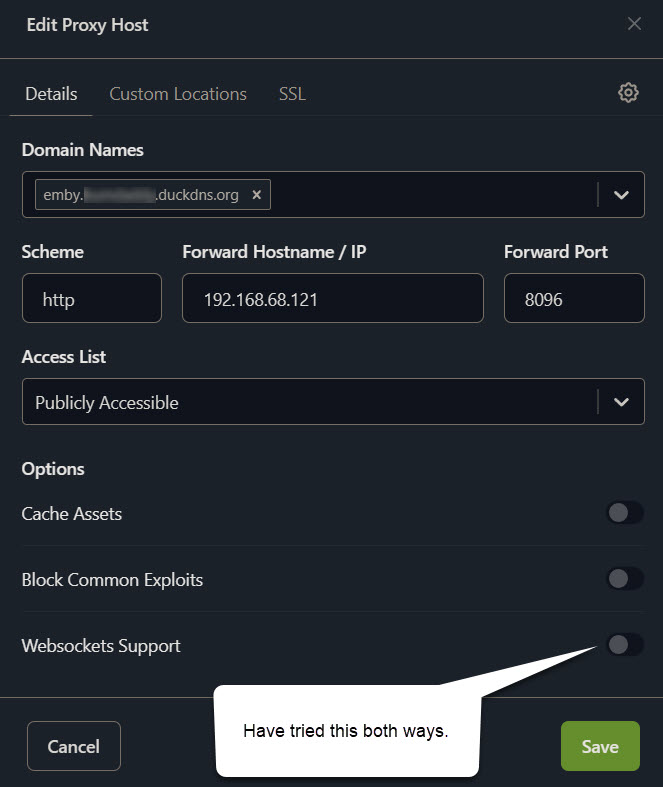
Was able to get domain from DuckDNS and have connected it to NPM, but I’m still not quite there yet. If I go to emby.myname.duckdns.org it doesn’t take me to emby it takes me to the NPM login. So I’m thinking it’s got to be something in my configuration in NPM. I was able to create the proxy for emby but I’m unable to create the SSL certificate. When I try I get “Internal Error” or, on occasion, “Failed to Fetch”. I feel like I have tried all the possible configurations, but I’m still missing something. I’m forwarding emby.myname.duckdns.org to my internal IP address for ZimaOS (also same IP as emby) to port 8096 (emby). The “Scheme” is HTTP and I have tried both ways with Websockets enabled/disabled.
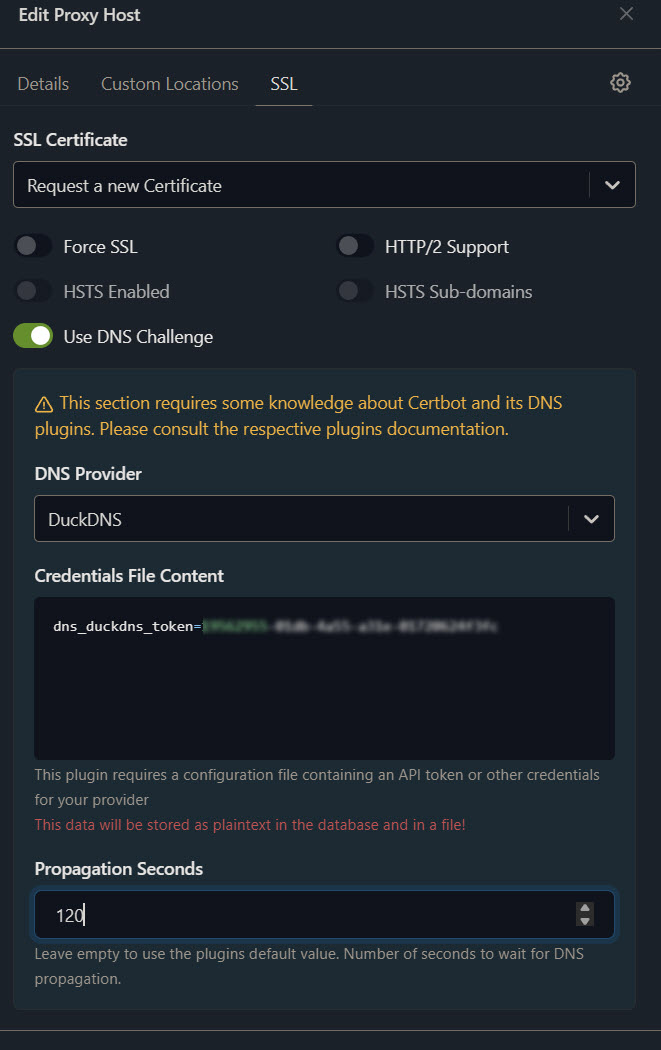
On the SSL tab under the “Request a new Certificate” box there are toggles.
I tried with none toggled and tried with “Use DNS Challenge” toggled, where I chose DuckDNS and added my API key to the config box there, and added a 120 second delay, but this didn’t work either.
Regarding forwarding ports…
NPM is running in ZimaOS. Both ZimaOS and NPM have the same IP. I forwarded ports 80 and 443 to that IP and internal port 81, which is NPM. Is this correct or should I be forwarding to internal port that ZimaOS uses?
I feel like I’m so close but I’m out of ideas.
Is there something simple that I’m missing or am I in over my head?
Hey mate, yeah you are very close. This is one of those setups where one small thing blocks everything.
I can already see a couple of key issues from what you described.
First, the reason it’s taking you to the NPM login instead of Emby is because traffic is not hitting your proxy host correctly. That usually means one of these:
Right now your port forwarding is the main problem.
You said you forwarded:
80 and 443 > internal port 81
That is incorrect.
Port 81 is only for the NPM admin UI. It should never be used for public traffic.
This is what it should be:
80 > NPM port 80
443 > NPM port 443
Nothing should point to 81 except when you access the NPM dashboard manually in your browser.
So fix that first. That alone should stop it redirecting to the NPM login.
Second issue is your SSL setup.
You are mixing two different methods:
HTTP challenge
DNS challenge
You only need one.
Since you already opened ports 80 and 443, do this:
Do not enable “Use DNS Challenge”
Just request a normal certificate
Also make sure:
Domain resolves correctly to your public IP
You can test this from your phone on mobile data
Third, your proxy host config actually looks fine:
Domain
Forward IP
192.168.68.121
Port
8096
Scheme
http
That part is correct.
Websockets setting won’t block this, so don’t worry about that.
Fourth, important ZimaOS detail
You said you changed ZimaOS off port 80 to install NPM. That’s good, but you must confirm:
NPM is now the only thing using ports 80 and 443
If ZimaOS is still binding anything on those ports, Let’s Encrypt will fail and you’ll get errors like:
Internal Error
Failed to Fetch
That matches exactly what you’re seeing.
So in simple terms, your blockers are:
Fix those and you should be up.
Quick checklist:
Open emby.yourname.duckdns.org from outside your network
If that works, then enable Force SSL after the cert is issued.
You’re not in over your head, this is exactly the tricky part everyone hits. Once this clicks, the rest is easy.
Thank you, @gelbuilding .
So yeah, I was totally overthinking when I did the port forwarding. I thought since my IP was used for more than just NPM that I somehow needed to differentiate that those ports were for NPM.
Now that it’s been fixed, the proxy is working correctly and my emby.domain.duckdns.org resolves to Emby from outside of my network.
Unfortunately, I am still unable to create the SSL certificate. Keep getting “Internal Error”. I have checked for port conflicts. Dockpeek shows that NPM is using ports 80,81, and 443, and I don’t see those ports being used anywhere else.
If I run sudo ss -tunlp it shows those three ports used by “docker-proxy”

At this point I’m not sure what’s going on and I’m not sure that I care anymore.
Ever since flashing my first router 20+ years ago with DDWRT I have lived with these
 warnings.
I thought that maybe finally I could put that annoyance to rest. But now I think I’m realizing why I never was able to accomplish this successfully.
I DO appreciate your help, though. You are an asset to this community and I appreciate your encouragement as well as your patience and ability to explain things in laymen’s terms. Thank you.
I just need to realize that just because something is possible in ZimaOS, doesn’t mean everyone should be doing it. There are PLENTY of aspects of ZImaOS that I understand, work well, and are well within my ability. I just need to be happy with that.
Hey mate, honestly you’re a lot closer than you think, and you’ve actually done the hard part already.
The proxy working externally proves your setup is basically correct. Domain, routing, NPM, all of that is good. This is now just the SSL step failing, not the whole setup.
Also just to clear your mind a bit, what you’re seeing with docker-proxy on ports 80, 81 and 443 is exactly what we want. That means NPM has successfully bound those ports. So no issue there at all.
The reason your certificate is failing is almost always one of these two things:
Since your proxy is already working externally, we can rule out most of the big problems. So this is likely something small.
A couple of key points based on what you said:
You do not need DNS challenge here
Turn OFF “Use DNS Challenge”
Just use the normal method
Request certificate
Agree to terms
Done
Also make sure when you request the cert:
Domain is exactly
and nothing extra like http or spaces
Another important one that catches people:
Make sure you are testing from outside your network when requesting or verifying
Your phone on mobile data is perfect for this
If Let’s Encrypt cannot hit your domain over port 80 from the internet, it will throw vague errors like “Internal Error” or “Failed to Fetch”, which is exactly what you’re seeing.
One more quick sanity check:
Open this in your browser on mobile data
If that loads Emby, then SSL will work
If it doesn’t, that’s the blocker
And just to say this clearly, you’re not out of your depth here. This is the exact point where most people give up, because everything looks correct but SSL still fails.
You’ve already done the hardest parts:
NPM running correctly
Ports correct
Proxy working externally
What’s left is just getting Let’s Encrypt to complete that final handshake.
If you want, next step we can check one thing at a time and get it over the line. You’re honestly one small fix away.
Thanks gelbuilding.
Two things that I am, and have always been, are curious and stubborn. So I really would like to get this figured out, but I don’t want to wear out my welcome, either.
To your points…
I’m not using the “Use DNS Challenge” option. I only tried that once just be sure that wasn’t what was tripping me up. I just mentioned it so you were aware of the things I had already tried.
My domain is correct and DOES connect to Emby from outside of my network. This works with my phone (WiFi off) and though my laptop connected via VPN (Chicago).
One thing I DO want to mention is that, in the course of all of this troubleshooting, I have uninstalled NPM and deleted the App Data folder on 2 occasions. The first time, because I was getting nowhere and thought maybe that would help. The second time because I think I broke NPM and it would not load. I had tried using the “Latest” release instead of the “Stable” but I would just get the “Loading” circle and finally “The API is not healthy” screen. I also noticed that on occasion when NPM was trying to load that it was not showing my “Admin” account, but rather “Standard User”
So I’m wondering, Do you think that there may any lingering residue from previous installations that may be causing these problems? Just wanted to mention it, in case.
Thanks again for your help with this. I am certainly learning a lot.
I just reread what your wrote…
Make sure you are testing from outside your network when requesting or verifying
Your phone on mobile data is perfect for this
Are you saying I need to be outside of my network when requesting the SSL certificate? How would I accomplish this, short of moving my server offsite?
Hey mate, good questions and you’re handling this exactly right, this is the stage where it finally clicks.
First, to answer your main question clearly:
No, you do NOT need to be outside your network to request the SSL certificate.
That part happens entirely between Let’s Encrypt and your server. Your location doesn’t matter. What matters is that Let’s Encrypt can reach your server from the internet on port 80.
So you can stay right where you are.
Now based on everything you’ve said, we can narrow this down properly.
This is the key fact:
Your domain works externally and loads Emby
That is very important. It tells us:
DNS is correct
Port forwarding is correct
NPM is routing correctly
So we are past all the hard stuff.
That leaves only a couple of real causes for the SSL failure:
About your reinstall concern
Yes, wiping the AppData folder removes NPM cleanly. There’s no hidden system residue on ZimaOS that would survive that. So you can rule that out.
The “API not healthy” and “Standard User” thing you saw before was just a broken container state from the “latest” image, not related to your current issue.
So you’re clean now
Now the most likely issue based on your setup
Even though everything looks correct, Let’s Encrypt is VERY picky about port 80.
During the certificate request, it tries to access:
http://emby.yourname.duckdns.org/.well-known/acme-challenge/
If anything interferes with that, it fails with vague errors like:
Internal Error
Failed to Fetch
Here’s the catch:
Even if Emby loads fine, the challenge path might still be blocked or misrouted.
Let’s test that properly
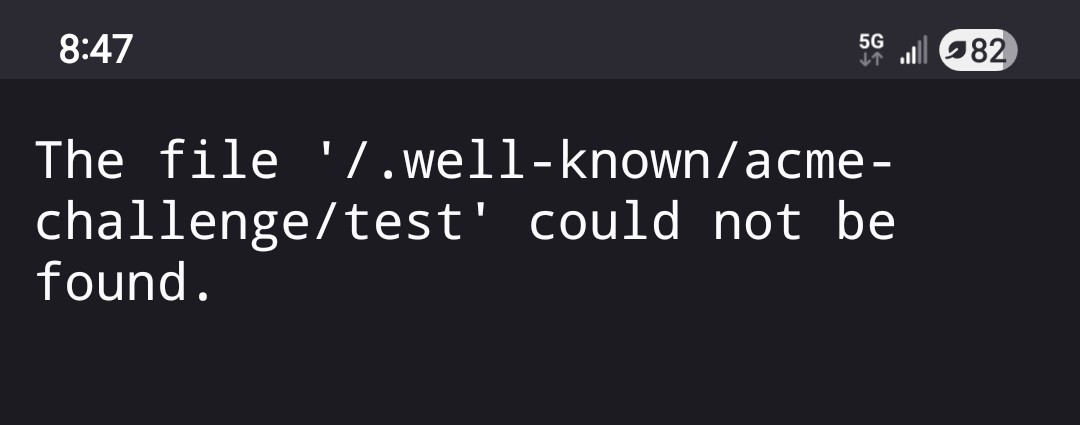
On your phone with WiFi OFF, open:
http://emby.yourname.duckdns.org/.well-known/acme-challenge/test
You don’t need it to load anything meaningful, but it should NOT:
Redirect somewhere weird
Show a different service
Timeout
If that path isn’t reachable cleanly, Let’s Encrypt will fail.
One more thing I want you to check in NPM
Edit your proxy host and make sure:
Block Common Exploits = OFF
That setting can sometimes interfere with the challenge.
Final small but important detail
When requesting the cert:
Do NOT enable Force SSL yet
Request the cert first
Once it succeeds, then enable Force SSL
So where you are right now
You are not stuck
You are not out of your depth
You’ve actually done everything right and you’re down to one of those small edge-case issues that only shows up at the final step.
If you want to push this over the line, next step I’d take is:
Tell me exactly what happens when you open that /.well-known URL from mobile data
That will expose the last blocker
Hey mate, just on your note about not wanting to wear out your welcome, honestly don’t stress about that at all.
This is exactly what the community is here for. You’re asking good questions, explaining what you’ve tried, and working through it properly. That actually makes it easier to help and helps others reading along as well.
So keep going 
Perfect mate, that result is actually exactly what we want.
“The file could not be found” means:
The request is reaching your server correctly
NPM is handling the request
Nothing is blocking the path
So this confirms 100 percent:
DNS is good
Port forwarding is good
NPM routing is good
That rules out all the usual problems.
So now we focus on the actual issue, which is inside NPM when requesting the cert.
At this point, the failure is almost always one of these:
Next steps, clean and simple:
Let’s Encrypt will temporarily block repeated failed attempts, and that gives “Internal Error” exactly like you’re seeing
One more quick check
When you request the cert, only use:
Nothing else added
Where you are now
This is actually the best place to be
All networking is confirmed working
You’re down to the final certificate request step
You’ve basically already won, this is just the last bit being picky.
If it still fails after waiting, next step we go straight to NPM logs and pinpoint it exactly