Help with HTTPS

I checked both the NPM container settings and UI settings and don’t see anywhere that asks for email address other than under “Users” in the UI which is the login email (admin@example.com). Where do I find this? There’s a SSL tab in Proxy configuration, but no email area?

If I don’t know what this is then I bet this is the problem. :wink:

Hey mate, yep you’ve found it, and this is a common point of confusion

NPM does not ask for the Let’s Encrypt email globally in the settings like you’d expect. It actually asks for it the first time you request a certificate.

So here’s what to do:

  1. Go back to your Proxy Host
  2. Go to the SSL tab
  3. Select “Request a new certificate”

When you do that properly, you should see fields appear for:

Email address
Agree to Terms

If you’re not seeing the email field, it usually means the request isn’t being triggered correctly, which lines up with the “Internal Error” you’re getting.


So let’s force it cleanly:

  1. Edit your proxy host
  2. SSL tab
  3. Select “Request a new certificate”
  4. Make sure:
  • Domain is correct
  • No DNS challenge
  • Force SSL is OFF
  1. Click Save

At that moment, NPM should attempt the request and prompt/store the email.


If it still does not show or fails instantly, then we know it’s not a config issue anymore, it’s NPM failing internally before even reaching Let’s Encrypt.

In that case, next step is checking logs, because that will show the exact error instead of the vague “Internal Error”.


But yeah, you’re thinking in the right direction. If you haven’t seen the email prompt at all, that’s a strong sign the request isn’t completing properly.

You’re right at the final step now

1 Like

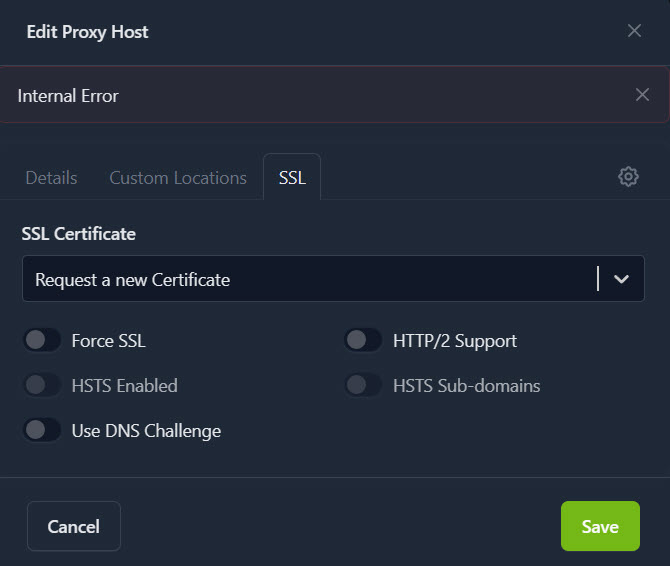
Still getting the error. Just to be clear, this is where i should be requesting the certificate?

Hey mate, yep that is exactly the right place to request the certificate

Your setup there looks correct, so don’t second guess that part.

The important detail here is this:

You are selecting “Request a new Certificate” and immediately getting “Internal Error” before anything else happens.

That tells us NPM is failing before it even properly talks to Let’s Encrypt, which is why you’re not seeing the email prompt.


At this point, this is not a config issue anymore, it’s either:

  1. NPM container issue
  2. Let’s Encrypt temporary block from too many attempts
  3. Missing dependency inside the container

Let’s keep this simple and clean:

  1. Wait 10 to 15 minutes before trying again
    This avoids Let’s Encrypt rate limits
  2. Try again exactly as shown
    No DNS challenge
    No Force SSL
    Just Request Certificate and Save

If it STILL instantly throws “Internal Error”, then we stop guessing and check the real cause.

Next step is logs, because that will show the actual error:

Run this:

docker logs nginxproxymanager

Look for anything mentioning:

letsencrypt
certbot
error


One more thing I want you to confirm

Make sure your container image is:

jc21/nginx-proxy-manager (stable)

Not latest or anything custom, since you mentioned that caused issues before.


Where you are now
You are doing everything right
Your config is correct
Your network is correct

This is now just a container level issue or rate limit, not your setup

Send the log output if it still fails and we’ll pinpoint it straight away
1 Like

Success!!!

I’ve set it to “Force SSL” after.

I believe from the logs that this was all because I hadn’t changed the login email address, just the password in NPM. :flushed_face:

It took 15-30 minutes to update on their end, and then it finally worked.

It’s always the last place you’d think.

Tomorrow I can discover what my success actually means. It’s past my bedtime. :sleeping_face:

Thanks for all of your help. I truly appreciate it.

Have a good night!

1 Like

Hey mate, that’s awesome to see, well done.

And yep, that lines up perfectly. NPM uses that email for Let’s Encrypt, so if it’s still the default or not properly set, it can fail in weird ways with no clear message. Classic last mile issue.

Also makes sense on the timing. Let’s Encrypt and DNS can take a bit to settle, so that 15 to 30 minute window is pretty normal.

You’ve basically done the full proper setup now:

Domain working
Proxy working
SSL issued
Force SSL enabled

That’s the whole pipeline done properly.

Get some rest mate, tomorrow you’ll see everything nice and clean over HTTPS and it’ll all feel worth it

1 Like

@gelbuilding
Yes, you were right on about the email address. It was that suggestion that had me looking in NPM for anywhere to put my email. I had read that you must login with admin@example.com email and default password the very first time you go in, and that you should change your password, but it doesn’t say anything about that same email address being used to validate your certificates. I thought the default address was like logging in as root or something. I planned to change it once I had things running.
Once I entered a valid email it took a little while for my email address to update as I was basically watching the logs in real-time, and the logs were flagging the default password until eventually it didn’t and it was there in the logs were I actually read and found out that the certificate had been issued successfully. :clap:

I have successfully added more proxies and been issued certificates for them so I think everything is running smoothly now.

I know for a lot of users this would have been a walk in the park, but I really appreciate you taking the time to get me through it, and hopefully future users like me, who want to do this but are unsure quite how, will also be helped by this information. Like you said, “This is exactly what the community is here for.” and I am glad to know this because not all communities are the same. Had this been the TrueNAS community I would have been eaten by the sharks in minutes. So I thank you and Icewhale for this helpful, friendly community.

Peace :peace_symbol:

1 Like