I’ll dive into this later but i have all kinds of issues since version 1.7.0. My Tailscale sysext needs a manual start after every boot now, the new app experience worked once…but after a reboot I’m back in the old experience. Plex won’t start (there’s another post about this). I have 6 container updates all of a sudden but installing is painfully slow or does not work at all on my Zimaboard 2 1664 with HDD’s. My advice… wait with installing this update.
@DeHeipaal If possible, I would like to help you troubleshoot the problems one by one. How is Tailscale installed?
Thanks. I’ll get back with updates. Need to find some time first.
For Tailscale i used this post mainly Tailscale running natively on ZimaOS — sharing a sysext module
Issue 1: [fixed by reinstalling]
Reinstalled the Tailscale sysext (especially the watchdog that is in the install script) and that seems to have fixed it.
Issue 2: [solved magically…browser refresh issue maybe?]
Just WOW…i was working on another issue (automount of a USB disk, not related to v1.7.0 I think)…while working on that I refreshed the zimaos webpage…and now all of a sudden the new “App experience” shows up magically. I now have the new App Store and new way of showing the tiles. Was that a browser cache thing…hmmm…might be. Well, I used Chrome.
Issue 3: [reinstall fixed the issue]
Tried the fix in Zimaos 1.7 plex not working but that didn’t work. Started reinstalling but ran into new issues 6 and 7. A reinstall fixed the issue.
Issue 4: [real issue?]
The container updates that appeared were not executed, but have disappeared…I don’t think they really were updates because I stay up to date. So all of a sudden 6 updates is not what I expected. This fixed itself 
Sadly, after a while it gives me the 6 updates in Settings again (probably after a reboot), but the App Store Update says “Loading updates…” and nothing comes.
This looks like a real issue…v1.7.0 sees updates that are not there…and when I start an update it never finishes…and then the Update screen does not load anymore (“Loading updates…” forever)
Could this be because I used :latest instead of the bigbeartechworld version, and v1.7.0 does not handle this well?
Issue 5: [no issue anymore with issue 2 fixed, Uptime Kuma connectivity issue fixed]
The Pi-hole tile was not working anymore, while the /admin URL itself worked just fine. When issue 2 was fixed, this issue was gone too.
My Uptime Kuma http check did not see the admin page anymore since v1.7.0.
I had to recreate the pihole-bridge, then all worked well.
New issue 6: [design flaw]
Ran into another big WOW…when you delete an “app”…like Plex in my case, it deletes all AppData too…NOOOO, thats a big design flaw if you ask me. You could have at least made a warning if this was by design. And it doesn’t even go to the Trash, it’s just gone  Restoring a backup now…
New issue 7: [IO issue with Files app]
I have my AppData on a RAID1 HDD set (not on the internal eMMC of the Zimaboard 2). The backup of AppData is on this RAID1 set too. But copying from the backup location to the AppData location (so on the same RAID1 set) is really slow. It takes like an hour to copy 6GB. And it doesnt matter if I do this with a Mac client or with the Files app…both are slow. icewhale-files takes 25% CPU too for the copy.
Updating to v1.7.0 was not the experience I hoped for
@DeHeipaal I’m really sorry for the unpleasant experience. Your feedback points us in the direction of improvement, and we will keep making progress.
- Issue 2: My guess is that it’s just a browser cache issue.
- Issue 3: Still can’t run even after deleting the incorrect characters?
- Issue 6: Uninstalling the app will delete the app data. After our testing yesterday, we confirmed that this is a flaw in the design of this version and it will be fixed in the next release.
- Issue 4: Open the browser console and filter for the
apps/upgradablenetwork request, so I can continue to track the error. - Issue 7: You can first rule out whether the disk itself is slow. SSH or TTY into the machine and directly copy a file from one disk to the target path to see if the speed is normal.
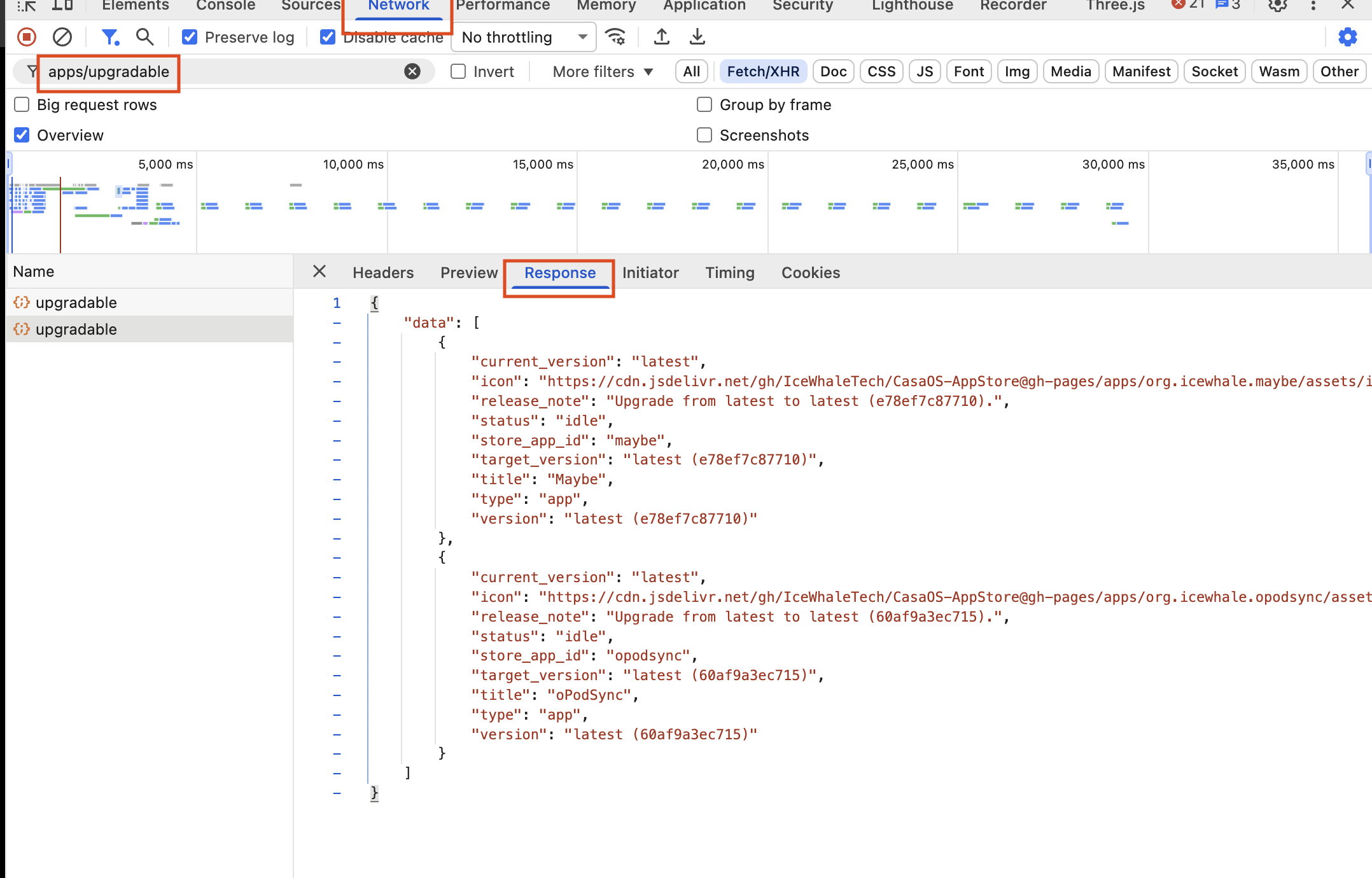
Hi Bin,
Solved issue 3 by reinstalling Plex (and restoring AppData folder). Quickly tried removing the < br > earlier but that didn’t seem to solve the problem.
Issue 4, the 6 updates are gone (again)…hope it stays this way.
Issue 7, a copy on the RAID1 set is quick:
sudo dd if=/dev/zero of=/media/Zima-HDDstorage/test.img bs=1M count=2000 status=progress conv=fdatasync
2000+0 records in
2000+0 records out
2097152000 bytes (2.1 GB, 2.0 GiB) copied, 10.7196 s, 196 MB/s
But a copy with the Files app is super slow…with high CPU usage of the icewhale-files proces.
Status: most stuff is fixed or known issue now. The AppData folder delete (issue 6) is a confirmed issue. And the copy speed in the Files app is not confirmed (by others) yet.
I think this last one is a bug in how icewhale-files handles small-file iteration or progress tracking in this version which is also causing a single-threaded CPU lockup.
Not sure about the Tailscale fix though (issue 1). I have done more reboots and the last time I checked tailscaled was again not active…