Hello,
I finally switched up from casaos to zimaos. I’m running on an intel N100 mini pc. I have an Asustor NAS with all my media on it. I am looking to access my media so I can get Plex and audiobookshelf up and running.
Zimaos gives me error of “Not Available”. I’ve got SMB configured correctly for SMB2 ,SMB3 and the acount for the zimaos machine has the right privileges.
I’m stumped, any suggestions?
That “Not Available” message normally means ZimaOS can see the NAS, but can’t access the share.
I’d quickly check:
- user actually has permission to that specific folder on the Asustor
- SMB version mismatch (try forcing SMB 3.0 or even 2.1)
- no IP restrictions on the NAS side
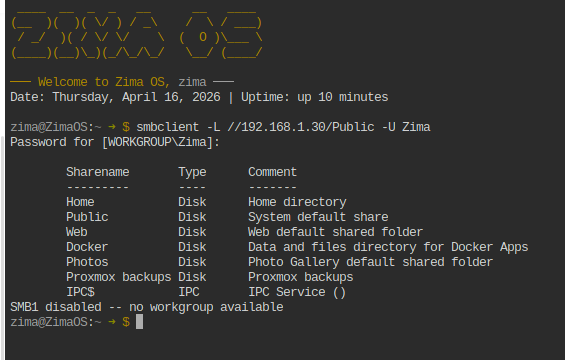
If you can, test it from terminal, that’ll tell us straight away if it’s auth or SMB:
smbclient -L //<NAS_IP> -U <username>
If that throws an error, post it here and we’ll lock it in.
1 Like
Hi gelbuilding,
Thank you for the help. I followed your instructions. It looks like zimaos is seeing the asustor NAS but the error is “SMB1 diabled – no workgroup available”. The directory list is correct so it’s seeing the NAS. The password is correct. On the NAS I’m set for SMB2 and SMB3. SMB signing set to auto.
Okay,
Deep breath on my part. I tried a different user account on the NAS and it connected instantly. I am even more confused. I truly don’t get it.
That SMB1 message is normal, nothing to worry about.
The important part is your test worked and listed all shares, so ZimaOS is connecting fine.
Since it worked instantly with a different user, that confirms it’s just a permissions issue on the NAS side.
I’d check:
- that user has explicit access to the share (not just group-based)
- no deny rules are applied
- permissions are applied to the actual folder, not just the parent
Asustor can be a bit tricky with permissions, but you’re definitely on the right track now.
Hi Gel,
After some experimentation the magic is to have “web” folder permission enabled. Thank you for the help. I’ve now got the permissions set for the user I want and the folders I want. That was an adventure to find!
Thanks again.
1 Like