Hi everyone, I am facing a critical issue with my ZimaOS NAS. It started when my Overseerr container stopped loading posters and metadata, although the Web UI remained accessible.
After a long debugging session, I isolated the root cause. It is not a Docker or Network issue, but a storage issue on the system partition.
The Problem: The root partition (/) is 100% full. Since ZimaOS has a very small system partition (1.2GB), this seems to be preventing the system from creating temporary files required for SSL handshakes, causing all external HTTPS requests to fail.
Diagnosis & Logs:
Symptoms: Running curl -v https://www.google.com fails instantly with: OpenSSL SSL_connect: SSL_ERROR_SYSCALL However, curl http://www.google.com (HTTP) works perfectly.
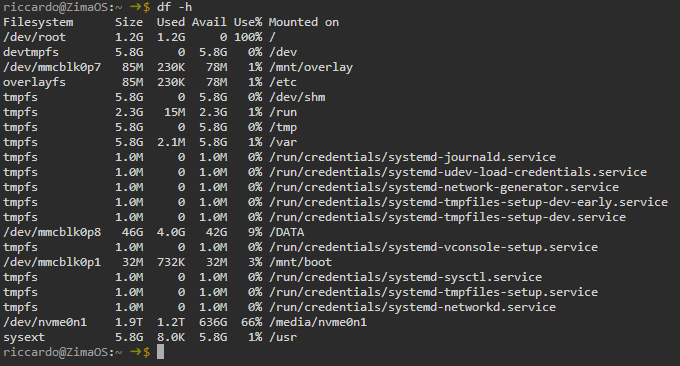
Disk Space: The command df -h / shows: /dev/root 1.2G 1.2G 0 100% /
Deep Analysis: We inspected the filesystem using a bind mount to look “under” the active overlays (sudo mount --bind / /tmp/root_debug). We found that /usr is reporting a size of 2.8GB inside the bind mount. This suggests that the writable layer of the OverlayFS is completely saturated.
What I have tried so far:
Ran docker system prune (it only freed about 40MB).
Cleared logs in /var/log and vacuumed the systemd journal.
Tried removing unused firmware in /usr/lib/firmware.
Despite these efforts, df -h / remains stuck at 100%. I suspect there might be “masked” files (e.g., data written to /var or /usr before the external Data disk was mounted) or zombie files that the system is not releasing.
My Question: On ZimaOS (which uses a read-only/overlay filesystem structure), what is the correct procedure to identify and clean the writable upper layer to unblock the root partition without performing a full factory reset?
After a couple of hours the problem vanish, then today I wake up the problem reappears.
I really don’t know how to fix it. TLS is completely broken and I’m also not able to install new app from the store because of that.
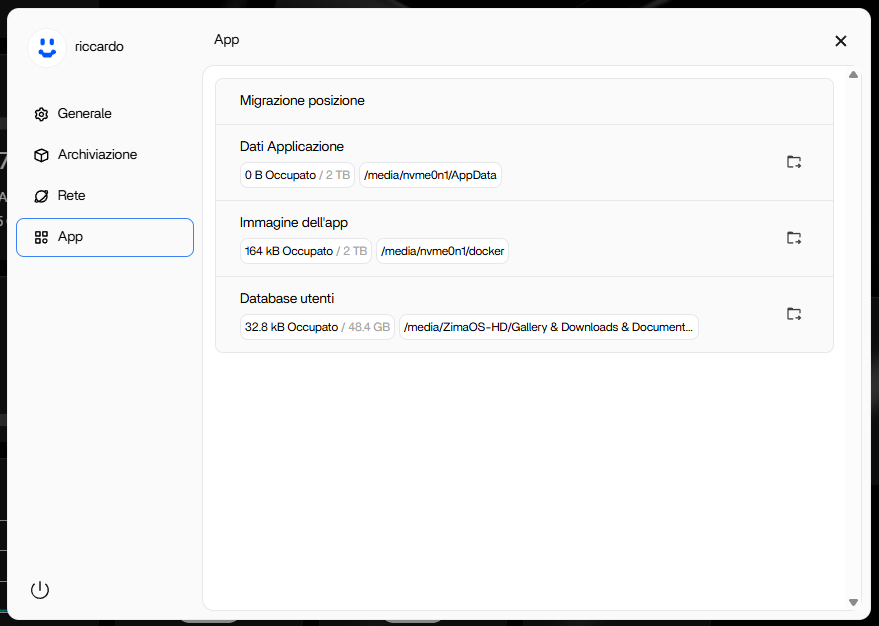
First of all, thank you for answering. I followed your guide exactly: I performed a fresh install of the OS on the eMMC (64GB) of my Beelink Mini. Before installing any apps, I migrated both AppData and Docker Images to my 2TB SSD.
However, I am facing two issues:
/dev/root still shows 100% usage (I am not sure if this is normal for ZimaOS’s immutable system).
I cannot install any apps because of network errors. I can ping IP addresses (like 8.8.8.8), but curl commands and the App Store fail with SSL/TLS handshake errors (SSL_ERROR_SYSCALL).
I am stuck and cannot use the device. Do you have any other suggestions? Thanks!
/dev/root showing 100% is normal on ZimaOS
The system partition is immutable and very small by design. It will often report 100% even on a clean install. That alone is not a problem.
TLS still failing means the overlay is not actually clean
If SSL/TLS is broken immediately after install (before any apps are running), it means the writable overlay layer is already compromised during first boot or migration. Ping working but curl failing with SSL_ERROR_SYSCALL is the classic symptom.
At this point there is no in-place fix.
To be explicit, the only working path is all three, in order:
Factory reset
On first boot, migrate AppData and Docker images before installing or opening any apps
Then install apps
If migration happens after anything has already written to /, the overlay can still break and TLS will fail again.
So the issue isn’t that migration is wrong, it’s that the overlay must be clean before migration and before any app activity. Once TLS is broken, reinstall is the only recovery.
You didn’t do anything wrong, this is a ZimaOS overlay limitation, not a Docker or network issue.
I have some bad news. I followed your “quarantine” procedure exactly:
Performed a fresh install from USB on the eMMC.
Booted with no ethernet cable connected.
Immediately migrated both AppData and Docker Images to my secondary 2TB NVMe drive.
Only then, I connected the internet and installed my apps (Plex).
Everything worked perfectly for about 2 days. However, today the problem is back exactly as before (system read-only, SSL errors, likely overlay saturation).
Since I explicitly moved the storage to the NVMe, the eMMC should barely be touched. It feels like either ZimaOS “forgot” the migration path after a reboot, or something is writing massive logs/data to the system partition bypassing the configuration.
Is there a command I can run (via SSH) to identify exactly which folder is consuming the space on the overlay? I need to understand if it’s a rogue container or a system log issue.
Same issue here. Followed all those steps after a factory reset, and the root partition always get full and the ZimaOS start to get very unstable after that.
Thanks for confirming, this rules out migration and user error.
If the issue returns after a clean install with AppData and Docker images migrated before any apps, then something in ZimaOS itself is still writing to the OverlayFS (system logs or services). These writes bypass AppData migration and can slowly fill the overlay over time.
There is no reliable SSH command to safely identify or clean the overlay upper layer once this starts. Tools like du or bind mounts won’t give actionable results.
At this point this should be treated as a ZimaOS bug, especially on eMMC-based systems.
The best next step is to contact IceWhale support or open a bug report, including:
hardware specs
ZimaOS version
confirmation that migration was done before app install
that the issue reappears after a few days
You’ve done everything correctly, there’s nothing more to fix from the user side.
@Ciro93
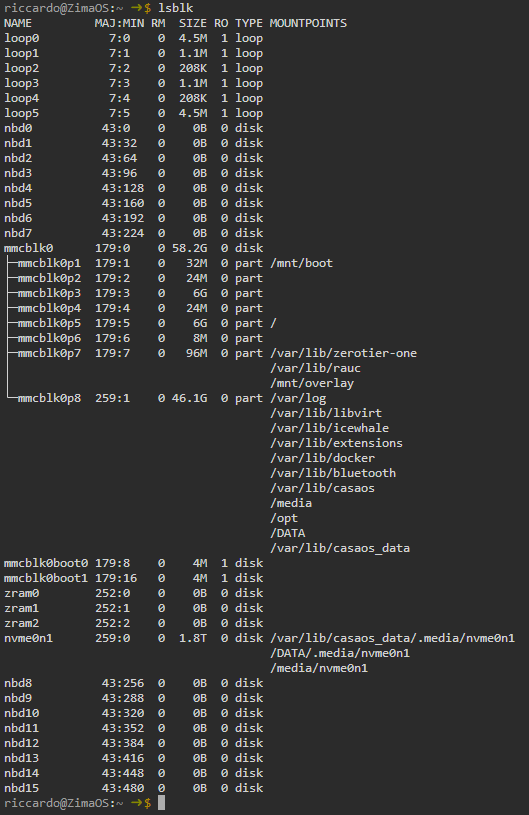
Your question looks like partition 8 (the actual user data partition) is not scaled up and does not require a system reset, can you provide the return result of these commands?
I’ll try to explain everything again so you (and others facing similar issues) can understand my problem better.
Hardware Setup: I bought a Beelink Mini Me with an Intel N150, 12GB of RAM, 64GB eMMC, and a 2TB NVMe SSD.
The History: I originally installed ZimaOS (version 1.4.x, I believe) on the eMMC. It worked smoothly for about 5 months with apps and data stored on the eMMC (I still had about 25-30GB free, so space wasn’t an issue back then).
The Problem: About a week ago, I tried to open my Overseerr container to request a movie for my Plex server. The application wouldn’t work properly; posters and metadata failed to load. I tried restarting the container, but it didn’t help. After some troubleshooting with AI assistance, we discovered a persistent TLS/SSL handshake error. The NAS cannot perform HTTPS requests (though HTTP works fine). This explains why Overseerr fails (it can’t fetch metadata via HTTPS) and why I cannot install new applications from the App Store (connection to Docker Hub fails due to TLS errors).
Attempted Fixes:
First Reinstall: I followed the instructions provided by @gelbuilding using my original installation USB. I left the Ethernet cable plugged in during installation, but the problem returned immediately, which was weird.
Second Reinstall (Quarantine Method): I used the latest ISO and kept the Ethernet cable unplugged for as long as possible during the setup (I only plugged it in when necessary to access the UI). This seemed to work initially! I migrated AppData to the 2TB NVMe immediately.
Current Situation: Despite the “clean” install and migrating data to the NVMe, the problem returned after just a couple of days. I am now back to square one with the TLS errors. In both reinstall attempts, I installed the OS on the eMMC and did not wipe the 2TB SSD (just remounted it).
I am still fighting this issue that keeps reappearing in a very short period of time, which is extremely weird. I will certainly open a ticket with the support desk because I’m stuck.
Meme probleme chez moi. ZimaOS installé sur un serveur fait maison, a bien fonctionné depuis 3 mois, mais depuis quelques jour, root reste a 100%, et impossible d’installer des apps ou des VM. j’ai bien tenté de réinstaller depuis 0 le systeme, mais mème sans aucune apps, au 1er démarrage, root est a 100%.
Bon après 3 jours de test, en faite les VM peuvent bien s’installer et être utilisés. Les 1.2Go de dev/root sont comme un dossier temporaire. le systeme voit 1.2Go, mais en faite il y a beaucoup plus. Pour installer un linux (mint, ubuntu …) pas de problème. Mais pour mettre un home assistant en .img, impossible. Il ne veut pas car il ne voit pas assez de place disponible. En faite il faut choisir une version de home assistant créée pour les VM, il faut prendre la version haos.ova.vdi. et la ca fonctionne nickel. Et surtout, point très important, ZimaOS ne doit pas être en HTTPS, car ça bloque les VM.