ZimaOS not detecting all my CPU Cores

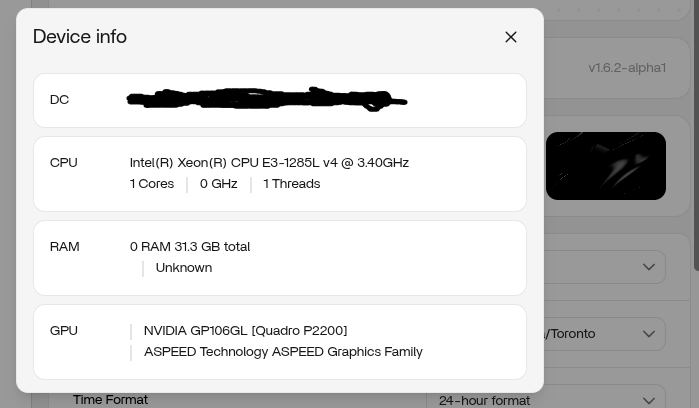
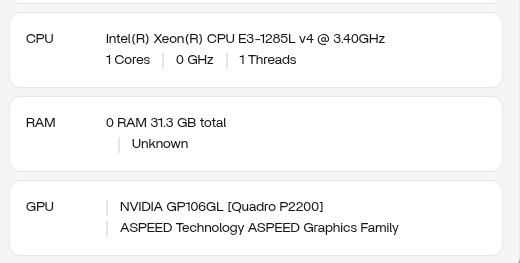
I have ZimaOS 1.6.1. Moved from a E3-1240v3 to a E3-1285Lv4. Issue is all the cores were detected on the E3-1240v3 but ZimaOS does not detect the cores on my E3-1285Lv4. I verified by rebooting into Linux Mint and it can see all cores.

This is not a BIOS/UEFI issue, nor a IPMI issue.

lscpu shows:
Xyzven@ZimaOS:~ ➜ $ lscpu
Architecture: x86_64
CPU op-mode(s): 32-bit, 64-bit
Address sizes: 39 bits physical, 48 bits virtual
Byte Order: Little Endian
CPU(s): 1
On-line CPU(s) list: 0
Vendor ID: GenuineIntel
Model name: Intel(R) Xeon(R) CPU E3-1285L v4 @ 3.40GHz
CPU family: 6
Model: 71
Thread(s) per core: 1
Core(s) per socket: 1
Socket(s): 1
Stepping: 1
CPU(s) scaling MHz: 97%
CPU max MHz: 3800.0000
CPU min MHz: 800.0000
BogoMIPS: 6799.97
Flags: fpu vme de pse tsc msr pae mce cx8 apic sep mtrr pge mca cmov pat pse36 clflush dts acpi mmx fxsr sse sse2 ss ht tm pbe syscall nx pdpe1gb rdtscp lm constant_tsc arch_perfmon pebs bts rep_good nopl xtopology nons
top_tsc cpuid aperfmperf pni pclmulqdq dtes64 monitor ds_cpl vmx smx est tm2 ssse3 sdbg fma cx16 xtpr pdcm pcid sse4_1 sse4_2 x2apic movbe popcnt tsc_deadline_timer aes xsave avx f16c rdrand lahf_lm abm 3dnowpref
etch cpuid_fault epb pti ssbd ibrs ibpb stibp tpr_shadow flexpriority ept vpid ept_ad fsgsbase tsc_adjust bmi1 hle avx2 smep bmi2 erms invpcid rtm rdseed adx smap intel_pt xsaveopt dtherm ida arat pln pts vnmi md
_clear flush_l1d
Virtualization features:
Virtualization: VT-x
Caches (sum of all):
L1d: 32 KiB (1 instance)
L1i: 32 KiB (1 instance)
L2: 256 KiB (1 instance)
L3: 6 MiB (1 instance)
L4: 128 MiB (1 instance)
NUMA:
NUMA node(s): 1
NUMA node0 CPU(s): 0
Vulnerabilities:
Gather data sampling: Not affected
Itlb multihit: KVM: Mitigation: Split huge pages
L1tf: Mitigation; PTE Inversion; VMX conditional cache flushes, SMT disabled
Mds: Mitigation; Clear CPU buffers; SMT disabled
Meltdown: Mitigation; PTI
Mmio stale data: Unknown: No mitigations
Reg file data sampling: Not affected
Retbleed: Not affected
Spec rstack overflow: Not affected
Spec store bypass: Mitigation; Speculative Store Bypass disabled via prctl
Spectre v1: Mitigation; usercopy/swapgs barriers and __user pointer sanitization
Spectre v2: Mitigation; Retpolines; IBPB conditional; IBRS_FW; STIBP disabled; RSB filling; PBRSB-eIBRS Not affected; BHI Not affected
Srbds: Mitigation; Microcode
Tsx async abort: Mitigation; Clear CPU buffers; SMT disabled
Hello, could you run the following commands and tell me the output:

cat /proc/cmdline

cat /sys/devices/system/cpu/possible

cat /sys/devices/system/cpu/present

cat /sys/devices/system/cpu/online

dmesg | grep -Ei ‘microcode|APIC|MADT|x2apic|SMP|smpboot|CPU topo|Brought up|nr_cpu_ids|maxcpus|nosmp’

@ZimaOS:~ ➜ $ cat /proc/cmdline
BOOT_IMAGE=(hd4,gpt4)/bzImage root=PARTUUID=a3ec664e-32ce-4665-95ea-7ae90ce9aa20 rootwait zram.enabled=1 zram.num_devices=3 net.naming-scheme=v250 systemd.machine_id=8a6c54fa2dc94bf585e24ffc23d65dc8 fsck.repair=yes console=tty1 quiet splash loglevel=3 systemd.show_status=1 rd.udev.log_level=3 net.ifnames=0 biosdevname=0 intel_iommu=on vfio_iommu_type1.allow_unsafe_interrupts=1 thunderbolt.host_reset=false rauc.slot=B

@ZimaOS:~ ➜ $ cat /sys/devices/system/cpu/possible
0-8

@ZimaOS:~ ➜ $ cat /sys/devices/system/cpu/present
0

@ZimaOS:~ ➜ $ cat /sys/devices/system/cpu/online
0

@ZimaOS:~ ➜ $ dmesg | grep -Ei ‘microcode|APIC|MADT|x2apic|SMP|smpboot|CPU topo|Brought up|nr_cpu_ids|maxcpus|nosmp’
-bash: smpboot: command not found
-bash: SMP: command not found
-bash: MADT: command not found
-bash: CPU: command not found
-bash: maxcpus: command not found
-bash: nosmp’: command not found
-bash: Brought: command not found
-bash: nr_cpu_ids: command not found
-bash: APIC: command not found
-bash: x2apic: command not found

I ended up correcting your quotes to fix the grep command. Seems the forum replaces the ‘ with a different ascii character.

@ZimaOS:~ ➜ $ dmesg | grep -Ei ‘microcode|APIC|MADT|x2apic|SMP|smpboot|CPU topo|Brought up|nr_cpu_ids|maxcpus|nosmp’
[ 0.000000] Linux version 6.12.25 (root@4f05175143f9) (x86_64-buildroot-linux-gnu-gcc.br_real (Buildroot 2023.02-10700-g0f735ee08d0) 13.4.0, GNU ld (GNU Binutils) 2.43.1) #3 SMP PREEMPT_DYNAMIC Mon Apr 20 05:09:01 UTC 2026
[ 0.000000] APIC: Static calls initialized
[ 0.006562] ACPI: APIC 0x00000000DD8B67B8 00009E (v03 SUPERM SMCI–MB 01072009 AMI 00010013)
[ 0.006591] ACPI: Reserving APIC table memory at [mem 0xdd8b67b8-0xdd8b6855]
[ 0.065966] CPU topo: Boot CPU APIC ID not the first enumerated APIC ID: 0 != cc
[ 0.065967] CPU topo: [Firmware Bug]: APIC enumeration order not specification compliant
[ 0.065970] ACPI: LAPIC_NMI (acpi_id[0xff] high edge lint[0x1])
[ 0.065980] I/O APIC 0xfecd0000 registers return all ones, skipping!
[ 0.065990] IOAPIC[0]: apic_id 8, version 32, address 0xfec00000, GSI 0-23
[ 0.065996] ACPI: Using ACPI (MADT) for SMP configuration information
[ 0.066005] CPU topo: Max. logical packages: 2
[ 0.066005] CPU topo: Max. logical dies: 2
[ 0.066006] CPU topo: Max. dies per package: 1
[ 0.066010] CPU topo: Max. threads per core: 1
[ 0.066010] CPU topo: Num. cores per package: 1
[ 0.066010] CPU topo: Num. threads per package: 1
[ 0.066011] CPU topo: Allowing 1 present CPUs plus 8 hotplug CPUs
[ 0.071612] setup_percpu: NR_CPUS:64 nr_cpumask_bits:9 nr_cpu_ids:9 nr_node_ids:1
[ 0.161868] rcu: RCU restricting CPUs from NR_CPUS=64 to nr_cpu_ids=9.
[ 0.161870] rcu: Adjusting geometry for rcu_fanout_leaf=16, nr_cpu_ids=9
[ 0.163735] APIC: Switch to symmetric I/O mode setup
[ 0.163822] x2apic: IRQ remapping doesn’t support X2APIC mode
[ 0.164228] ..TIMER: vector=0x30 apic1=0 pin1=2 apic2=0 pin2=0
[ 0.169779] SRBDS: Mitigation: Microcode
[ 0.192787] smpboot: CPU0: Intel(R) Xeon(R) CPU E3-1285L v4 @ 3.40GHz (family: 0x6, model: 0x47, stepping: 0x1)
[ 0.199115] smp: Bringing up secondary CPUs …
[ 0.199120] smp: Brought up 1 node, 1 CPU
[ 0.199121] smpboot: Total of 1 processors activated (6800.11 BogoMIPS)
[ 0.299666] ACPI: Using IOAPIC for interrupt routing
[ 0.863049] microcode: Current revision: 0x00000022

I also got a separate reply from the IceWhale team:

We’ve identified and fixed the issue related to CPU detection for the E3-1285L v4 on your X10SLL-F.

Could you please test this build and let us know if the issue is resolved on your side?

Test build download:

https://mega.nz/folder/4GwnzIxY#4PXOmk0foLnBXfihbwhPsQ

Thank you again for your patience and for helping us improve ZimaOS.

I got the same result:

Hello, could you try adding nox2apic in /mnt/boot/cmdline.txt after installing this rauc and then rebooting

ZimaOS updated using supplied RAUCB file with changes request below and did a reboot with the same results so far.

@ZimaOS:~ ➜ $ cat /mnt/boot/cmdline.txt
console=tty1 quiet splash loglevel=3 systemd.show_status=1 rd.udev.log_level=3 net.ifnames=0 biosdevname=0 intel_iommu=on vfio_iommu_type1.allow_unsafe_interrupts=1 thunderbolt.host_reset=false nox2apic

@ZimaOS:~ ➜ $ dmesg | grep -Ei ‘microcode|APIC|MADT|x2apic|SMP|smpboot|CPU topo|Brought up|nr_cpu_ids|maxcpus|nosmp’
[ 0.000000] Linux version 6.12.25 (root@abf44b133d8d) (x86_64-buildroot-linux-gnu-gcc.br_real (Buildroot 2023.02-10700-g0f735ee08d) 13.4.0, GNU ld (GNU Binutils) 2.43.1) #2 SMP PREEMPT_DYNAMIC Fri May 15 10:52:28 UTC 2026
[ 0.000000] Command line: BOOT_IMAGE=(hd4,gpt2)/bzImage root=PARTUUID=8d3d53e3-6d49-4c38-8349-aff6859e82fd rootwait zram.enabled=1 zram.num_devices=3 net.naming-scheme=v250 systemd.machine_id=8a6c54fa2dc94bf585e24ffc23d65dc8 fsck.repair=yes console=tty1 quiet splash loglevel=3 systemd.show_status=1 rd.udev.log_level=3 net.ifnames=0 biosdevname=0 intel_iommu=on vfio_iommu_type1.allow_unsafe_interrupts=1 thunderbolt.host_reset=false nox2apic rauc.slot=A
[ 0.000000] APIC: Static calls initialized
[ 0.006297] ACPI: APIC 0x00000000DD8B67B8 00009E (v03 SUPERM SMCI–MB 01072009 AMI 00010013)
[ 0.006326] ACPI: Reserving APIC table memory at [mem 0xdd8b67b8-0xdd8b6855]
[ 0.064084] CPU topo: Ignoring hot-pluggable APIC ID 0 in present package.
[ 0.064086] ACPI: LAPIC_NMI (acpi_id[0xff] high edge lint[0x1])
[ 0.064092] I/O APIC 0xfecd0000 registers return all ones, skipping!
[ 0.064102] IOAPIC[0]: apic_id 8, version 32, address 0xfec00000, GSI 0-23
[ 0.064108] ACPI: Using ACPI (MADT) for SMP configuration information
[ 0.064118] CPU topo: Max. logical packages: 1
[ 0.064118] CPU topo: Max. logical dies: 1
[ 0.064119] CPU topo: Max. dies per package: 1
[ 0.064123] CPU topo: Max. threads per core: 1
[ 0.064123] CPU topo: Num. cores per package: 1
[ 0.064123] CPU topo: Num. threads per package: 1
[ 0.064124] CPU topo: Allowing 1 present CPUs plus 0 hotplug CPUs
[ 0.064124] CPU topo: Rejected CPUs 8
[ 0.069473] setup_percpu: NR_CPUS:64 nr_cpumask_bits:1 nr_cpu_ids:1 nr_node_ids:1
[ 0.070004] Kernel command line: BOOT_IMAGE=(hd4,gpt2)/bzImage root=PARTUUID=8d3d53e3-6d49-4c38-8349-aff6859e82fd rootwait zram.enabled=1 zram.num_devices=3 net.naming-scheme=v250 systemd.machine_id=8a6c54fa2dc94bf585e24ffc23d65dc8 fsck.repair=yes console=tty1 quiet splash loglevel=3 systemd.show_status=1 rd.udev.log_level=3 net.ifnames=0 biosdevname=0 intel_iommu=on vfio_iommu_type1.allow_unsafe_interrupts=1 thunderbolt.host_reset=false nox2apic rauc.slot=A
[ 0.164825] rcu: RCU restricting CPUs from NR_CPUS=64 to nr_cpu_ids=1.
[ 0.164828] rcu: Adjusting geometry for rcu_fanout_leaf=16, nr_cpu_ids=1
[ 0.166713] APIC: Switch to symmetric I/O mode setup
[ 0.167093] ..TIMER: vector=0x30 apic1=0 pin1=2 apic2=0 pin2=0
[ 0.171783] SRBDS: Mitigation: Microcode
[ 0.191134] Freeing SMP alternatives memory: 56K
[ 0.194765] smpboot: CPU0: Intel(R) Xeon(R) CPU E3-1285L v4 @ 3.40GHz (family: 0x6, model: 0x47, stepping: 0x1)
[ 0.201037] smp: Bringing up secondary CPUs …
[ 0.201042] smp: Brought up 1 node, 1 CPU
[ 0.201043] smpboot: Total of 1 processors activated (6800.22 BogoMIPS)
[ 0.301641] ACPI: Using IOAPIC for interrupt routing

Hello, could you execute the following commands and send me the file contents or the files: sudo cp /sys/firmware/acpi/tables/APIC /tmp/APIC.dat
sudo dmesg > /tmp/dmesg.txt

First delete ‘nox2apic’ from cmdline.txt and restart before executing

I have the files but I cannot upload as it says “Sorry, new users can not upload attachments.”.

APIC.dat - Pastebin.com - APIC

dmesg.txt - Pastebin.com - dmesg

Thanks for the logs. I reviewed the APIC/MADT table you sent.

The issue is not that ZimaOS disables the cores later during boot. The problem happens much earlier, when the kernel reads the firmware CPU topology table.

In the APIC table exposed to ZimaOS, there are 8 Local APIC CPU entries, but all of them have:

APIC ID = 0

flags = 0

That means the entries are marked as disabled/unusable and they also do not contain valid unique APIC IDs for the other cores. Because of that, the Linux kernel can only keep the boot CPU online, which matches what we see:

present: 0

online: 0

smp: Brought up 1 node, 1 CPU

This also explains why `nox2apic` did not help. x2APIC is not the root cause here; the CPU topology table that ZimaOS receives is already invalid before x2APIC matters. The microcode update was applied, but it also cannot fix an already malformed ACPI/APIC table.

Since Linux Mint can see all cores, the next thing we need to confirm is whether Linux Mint receives a different APIC/MADT table from the firmware, or whether it boots through a different UEFI path/kernel path.

Could you please boot into Linux Mint and run:

mkdir -p /tmp/zimaos-cpu-debug

lscpu > /tmp/zimaos-cpu-debug/lscpu-mint.txt
cat /proc/cmdline > /tmp/zimaos-cpu-debug/cmdline-mint.txt
cat /sys/devices/system/cpu/possible > /tmp/zimaos-cpu-debug/cpu-possible-mint.txt
cat /sys/devices/system/cpu/present > /tmp/zimaos-cpu-debug/cpu-present-mint.txt
cat /sys/devices/system/cpu/online > /tmp/zimaos-cpu-debug/cpu-online-mint.txt

sudo cp /sys/firmware/acpi/tables/APIC /tmp/zimaos-cpu-debug/APIC-mint.dat
sudo dmesg > /tmp/zimaos-cpu-debug/dmesg-mint.txt
sudo dmidecode -t bios -t system -t processor > /tmp/zimaos-cpu-debug/dmidecode-mint.txt
sudo efibootmgr -v > /tmp/zimaos-cpu-debug/efibootmgr-mint.txt

tar -czf /tmp/zimaos-cpu-debug-mint.tar.gz -C /tmp zimaos-cpu-debug

Finally, please send me the /tmp/zimaos-cpu-debug-mint.tar.gz file.

One more thing to try:

This operation may cause the system to fail to boot. It is recommended that you back up important data before attempting it and ensure you have a way to restore boot.

from the motherboard boot menu, please try booting ZimaOS through the fallback UEFI path:

\EFI\BOOT\BOOTX64.EFI

We have seen some Supermicro/AMI platforms expose different firmware tables depending on the UEFI boot path. Your ZimaOS log also shows `DMI not present or invalid`, which suggests the firmware table handoff may be incomplete in the current boot path.

Reference link: https://bbs.archlinux.org/viewtopic.php?id=265879

1 Like

so my X10SLL-F has issues booting from a “UEFI OS” that is ZimaOS. I can force it into booting by “ADD A DRIVER” option and selecting the BOOTX64.EFI option. I wonder if this is the cause because I installed Truenas and the motherboard can detect and boot into TrueNAS without needing a “driver” boot option.

I did get all of the info you needed from TrueNAS but cannot attach to this forum because it sucks in upload file format options. I replied to the email thread but I suspect it may not get to you.

That definitely does not look normal.

The interesting part is that Linux Mint detects all cores correctly on the same hardware, which makes me think the CPU itself is probably fine and this may be something kernel or boot related inside ZimaOS.

Since lscpu is only showing 1 CPU/thread, it looks like the kernel is actually only bringing one core online rather than just a dashboard reporting issue.

Could you maybe check these as well:

dmesg | grep -i smp

cat /proc/cmdline

nproc

Mainly curious if something strange like maxcpus=1 or nosmp ended up in the boot parameters, or if the kernel logs show SMP/APIC initialization problems.

The fact the previous Xeon worked on the same board is also a pretty important clue.

Thanks, this explains the behavior much better.

The important difference is that TrueNAS is receiving a valid firmware CPU topology table, while ZimaOS is not.

In the TrueNAS APIC/MADT table, all 8 CPU entries are enabled and have valid unique APIC IDs, so TrueNAS brings up all 8 threads.

In the ZimaOS APIC/MADT table, the CPU entries are malformed: they are marked disabled and all report APIC ID 0. Because of that, the kernel can only bring up CPU0.

This strongly suggests the issue is related to the way ZimaOS is being booted on this Supermicro board, especially since you mentioned it only boots when using the “ADD A DRIVER” option and manually selecting BOOTX64.EFI. That option is normally meant for loading an EFI driver, not for creating a normal OS boot entry.

Could you try creating a proper UEFI boot option for ZimaOS in the BIOS, pointing to:

\EFI\BOOT\BOOTX64.EFI

Please use “Add New Boot Option” / “Boot from File” if available, not “ADD A DRIVER”.

After booting that way, please run:

dmesg | grep -Ei 'DMI|SMBIOS|ACPI: APIC|CPU topo|smp: Brought up'
lscpu

What we want to see is whether ZimaOS then receives the same valid APIC table that TrueNAS receives.

ok, for the life of me, I could not get ZimaOS to boot on my Supermicro X10SLL-F as a UEFI OS. I created a “ADD Driver” option and that’s how I got it to boot after install. This worked well for the E3-1240v3 (Haswell) CPU. Once I got the drive to boot, I decided to go Zima+ and add all new hardware (GPU, SAS HBA, 10Gb NIC) and that broke Zima+. Of course, the Icewhale team was awesome and kept giving me new keys to fix.

Once I felt all things were good, I proceeded to upgrade my CPU to a E3-1285Lv4 (Broadwell). I read that the Supermicro suffers from not detecting all cores so I did all the work to update the BIOS again as well as the IPMI. Somewhere along the way, the OS could not see the additional cores and defaulted to 1 CPU and 1 Core.

I did was Piterdan suggested and removed the “DRIVER” and tried to ensure I did a UEFI OS and then the actual drive in the boot selection order and today it booted into Zima with no issues. I can confirm BTOP also sees all the cores!!

@ZimaOS:~ ➜ $ dmesg | grep -Ei ‘DMI|SMBIOS|ACPI: APIC|CPU topo|smp: Brought up’
[ 0.000000] efi: ESRT=0xdf77f998 ACPI 2.0=0xdd8a7000 ACPI=0xdd8a7000 SMBIOS=0xf04c0
[ 0.000000] SMBIOS 2.7 present.
[ 0.000000] DMI: Supermicro X10SLL-F/X10SLL-F, BIOS 3.4 03/08/2021
[ 0.000000] DMI: Memory slots populated: 4/4
[ 0.006109] ACPI: APIC 0x00000000DD8B67F8 000092 (v03 SUPERM SMCI–MB 01072009 AMI 00010013)
[ 0.065334] CPU topo: Max. logical packages: 1
[ 0.065334] CPU topo: Max. logical dies: 1
[ 0.065335] CPU topo: Max. dies per package: 1
[ 0.065339] CPU topo: Max. threads per core: 2
[ 0.065339] CPU topo: Num. cores per package: 4
[ 0.065340] CPU topo: Num. threads per package: 8
[ 0.065340] CPU topo: Allowing 8 present CPUs plus 0 hotplug CPUs
[ 0.214403] MDS CPU bug present and SMT on, data leak possible. See for more details.
[ 0.214403] TAA CPU bug present and SMT on, data leak possible. See for more details.
[ 0.215281] smp: Brought up 1 node, 8 CPUs
[ 7.945856] systemd[1]: /usr/lib/systemd/system/virtstoraged-admin.socket:9: ListenStream= references a path below legacy directory /var/run/, updating /var/run/libvirt/virtstoraged-admin-sock → /run/libvirt/virtstoraged-admin-sock; please update the unit file accordingly.
[ 7.946582] systemd[1]: /usr/lib/systemd/system/virtsecretd-admin.socket:9: ListenStream= references a path below legacy directory /var/run/, updating /var/run/libvirt/virtsecretd-admin-sock → /run/libvirt/virtsecretd-admin-sock; please update the unit file accordingly.
[ 7.947348] systemd[1]: /usr/lib/systemd/system/virtqemud-admin.socket:9: ListenStream= references a path below legacy directory /var/run/, updating /var/run/libvirt/virtqemud-admin-sock → /run/libvirt/virtqemud-admin-sock; please update the unit file accordingly.
[ 7.948226] systemd[1]: /usr/lib/systemd/system/virtproxyd-admin.socket:9: ListenStream= references a path below legacy directory /var/run/, updating /var/run/libvirt/libvirt-admin-sock → /run/libvirt/libvirt-admin-sock; please update the unit file accordingly.
[ 7.948937] systemd[1]: /usr/lib/systemd/system/virtnwfilterd-admin.socket:9: ListenStream= references a path below legacy directory /var/run/, updating /var/run/libvirt/virtnwfilterd-admin-sock → /run/libvirt/virtnwfilterd-admin-sock; please update the unit file accordingly.
[ 7.949658] systemd[1]: /usr/lib/systemd/system/virtnodedevd-admin.socket:9: ListenStream= references a path below legacy directory /var/run/, updating /var/run/libvirt/virtnodedevd-admin-sock → /run/libvirt/virtnodedevd-admin-sock; please update the unit file accordingly.
[ 7.950377] systemd[1]: /usr/lib/systemd/system/virtnetworkd-admin.socket:9: ListenStream= references a path below legacy directory /var/run/, updating /var/run/libvirt/virtnetworkd-admin-sock → /run/libvirt/virtnetworkd-admin-sock; please update the unit file accordingly.
[ 7.951060] systemd[1]: /usr/lib/systemd/system/virtlogd-admin.socket:7: ListenStream= references a path below legacy directory /var/run/, updating /var/run/libvirt/virtlogd-admin-sock → /run/libvirt/virtlogd-admin-sock; please update the unit file accordingly.
[ 7.951533] systemd[1]: /usr/lib/systemd/system/virtlockd-admin.socket:7: ListenStream= references a path below legacy directory /var/run/, updating /var/run/libvirt/virtlockd-admin-sock → /run/libvirt/virtlockd-admin-sock; please update the unit file accordingly.
[ 7.952239] systemd[1]: /usr/lib/systemd/system/virtinterfaced-admin.socket:9: ListenStream= references a path below legacy directory /var/run/, updating /var/run/libvirt/virtinterfaced-admin-sock → /run/libvirt/virtinterfaced-admin-sock; please update the unit file accordingly.
[ 7.993504] systemd[1]: /usr/lib/systemd/system/libvirtd-admin.socket:7: ListenStream= references a path below legacy directory /var/run/, updating /var/run/libvirt/libvirt-admin-sock → /run/libvirt/libvirt-admin-sock; please update the unit file accordingly.
[ 9.361426] input: HDA NVidia HDMI/DP,pcm=3 as /devices/pci0000:00/0000:00:01.0/0000:01:00.1/sound/card0/input10
[ 9.361458] input: HDA NVidia HDMI/DP,pcm=7 as /devices/pci0000:00/0000:00:01.0/0000:01:00.1/sound/card0/input11
[ 9.361483] input: HDA NVidia HDMI/DP,pcm=8 as /devices/pci0000:00/0000:00:01.0/0000:01:00.1/sound/card0/input12
[ 9.361505] input: HDA NVidia HDMI/DP,pcm=9 as /devices/pci0000:00/0000:00:01.0/0000:01:00.1/sound/card0/input13
[ 41.761758] kvm_intel: L1TF CPU bug present and SMT on, data leak possible. See CVE-2018-3646 and L1TF - L1 Terminal Fault — The Linux Kernel documentation for details.

@ZimaOS:~ ➜ $ lscpu
Architecture: x86_64
CPU op-mode(s): 32-bit, 64-bit
Address sizes: 39 bits physical, 48 bits virtual
Byte Order: Little Endian
CPU(s): 8
On-line CPU(s) list: 0-7
Vendor ID: GenuineIntel
Model name: Intel(R) Xeon(R) CPU E3-1285L v4 @ 3.40GHz
CPU family: 6
Model: 71
Thread(s) per core: 2
Core(s) per socket: 4
Socket(s): 1
Stepping: 1
CPU(s) scaling MHz: 26%
CPU max MHz: 3800.0000
CPU min MHz: 800.0000
BogoMIPS: 6800.60
Flags: fpu vme de pse tsc msr pae mce cx8 apic sep mtrr pge mca cmov pat pse36 clflush dts acpi mmx fxsr sse sse2 ss ht tm pbe syscall nx pdpe1gb rdtscp lm constant_tsc arch_perfmon pebs bts rep_good nopl xtopology nons
top_tsc cpuid aperfmperf pni pclmulqdq dtes64 monitor ds_cpl vmx smx est tm2 ssse3 sdbg fma cx16 xtpr pdcm pcid sse4_1 sse4_2 x2apic movbe popcnt tsc_deadline_timer aes xsave avx f16c rdrand lahf_lm abm 3dnowpref
etch cpuid_fault epb pti ssbd ibrs ibpb stibp tpr_shadow flexpriority ept vpid ept_ad fsgsbase tsc_adjust bmi1 hle avx2 smep bmi2 erms invpcid rtm rdseed adx smap intel_pt xsaveopt dtherm ida arat pln pts vnmi md
_clear flush_l1d
Virtualization features:
Virtualization: VT-x
Caches (sum of all):
L1d: 128 KiB (4 instances)
L1i: 128 KiB (4 instances)
L2: 1 MiB (4 instances)
L3: 6 MiB (1 instance)
L4: 128 MiB (1 instance)
NUMA:
NUMA node(s): 1
NUMA node0 CPU(s): 0-7
Vulnerabilities:
Gather data sampling: Not affected
Itlb multihit: KVM: Mitigation: Split huge pages
L1tf: Mitigation; PTE Inversion; VMX conditional cache flushes, SMT vulnerable
Mds: Mitigation; Clear CPU buffers; SMT vulnerable
Meltdown: Mitigation; PTI
Mmio stale data: Unknown: No mitigations
Reg file data sampling: Not affected
Retbleed: Not affected
Spec rstack overflow: Not affected
Spec store bypass: Mitigation; Speculative Store Bypass disabled via prctl
Spectre v1: Mitigation; usercopy/swapgs barriers and __user pointer sanitization
Spectre v2: Mitigation; Retpolines; IBPB conditional; IBRS_FW; STIBP conditional; RSB filling; PBRSB-eIBRS Not affected; BHI Not affected
Srbds: Mitigation; Microcode
Tsx async abort: Mitigation; Clear CPU buffers; SMT vulnerable

I want to chaulk this up to user error because clearly it was something I did. However, I do want to point out I am on the v1.6.2-alpha1. I don’t know how to roll back to v1.6.2 to see if it’s fixed there.

1 Like

Hello,

1.6.2 has not been released yet. If you would like to go back to a published stable version, you can manually roll back to v1.6.1:

Download link:
https://github.com/IceWhaleTech/ZimaOS/releases/download/1.6.1/zimaos-x86_64-1.6.1.raucb

Download the file using the link above and roll back via local update. Thanks again for your troubleshooting and for sharing your findings!