Zimaos gui not loading completly after restart (no apps, no system info, licence not applyed)

Hi,

I have trouble running ZIMAOS and need help.

I have reinstalled it many times during the last month and it almost always gets in a loop after restart.
Sometimes it takes around 20-30 minutes to get out of the loop, usually a reinstall is needed - it is very frustrating.
At first I thought Docker containers are the problem but on the latest install I have no docker container apps installed and it still hangs.

It is custom computer, my configuration is:

- Jonsbo N3 Case 
- Be quiet 450Watt SFX power supply
- Biostar A68N-2100K MiniITX MBO with E1-6010 onBoard, 2xDDR3 slots, 2xSATA 
- 2 x 8GB  1600 MHz DDR3 RAM moduls
- INSPUR 9211-8i 6Gbps HBA LSI card for 8 sata HDDS (it is loaded during boot and HDDs are recognised)
- I have 10 HDDS: 
	- 128GB SSD (system disk, it is connected on MBO, it shows 110GB as available so it is not disk full problem)
	- 500GB 2.5" HDD - btrfs formated (for docker apps, it is connected on MBO)
	- 3 x 8TB 3.5" HDDs - ntfs formatted
	- 3 x 4TB 3.5" HDDs - ntfs formatted
	- 2 x 1TB 3.5" HDDs - ntfs formatted

Right now I have ZimaOS+v1.5.4, I updated from 1.5.3 - I had the same problem with it and I hoped the update would help but that didn’t happen…

I don’t have a WiFi card and don’t need one.
Plan is to put additional USB3 LAN card and it would be great if ZIMAOS had lan aggregation option :slight_smile:

I don’t have a graphic card (only the one integrated on the CPU).

Everything is recognised during initial installation of ZIMAOS.
Problems start when I restart it.
ZIMAOS boots up and gui is visible after 2 minutes (2 min is kind of slow but OK to me, this is a weak computer).
Problem is it is not completely loaded:

  • I can’t see any apps,
  • I can’t see system info
  • plus version is not active - it is showing that it is community version

When I run systemctl I get the following:

Feb 14 19:07:40 ZimaOS systemd[1]: Starting zimaos Main Service…
Feb 14 19:07:40 ZimaOS zimaos[14687]: 2026-02-14T19:07:40.658+0100 error error initializing NVML {“func”: “service.NewGPUService”, “file”: “/home/runner/work/ZimaOS-Main/ZimaOS-Main/service/gpu.go”, “line”: 22, “result”: “Driver Not Loaded”}
Feb 14 19:07:41 ZimaOS zimaos[14687]: 2026-02-14T19:07:41.896+0100 info joined {“func”: “izerotier.CheckNetwork”, “file”: “/home/runner/work/ZimaOS-Main/ZimaOS-Main/pkg/izerotier/zthelp.go”, “line”: 74, “joined”: true, “networkId”: “***************”, “address”: “”, “ip”: “10.147.17.1”}
Feb 14 19:07:48 ZimaOS zimaos[14687]: 2026-02-14T19:07:48.762+0100 error connect wifi failed {“func”: “core.Seventh”, “file”: “/home/runner/work/ZimaOS-Main/ZimaOS-Main/route/core/init.go”, “line”: 196, “error”: “failed to connect to wifi: exit status 1, output: Error: No Wi-Fi device found.\n”}
Feb 14 19:07:48 ZimaOS zimaos[14687]: 2026-02-14T19:07:48.816+0100 info DeviceInfo Changed {“func”: “core.DectectDeviceChange”, “file”: “/home/runner/work/ZimaOS-Main/ZimaOS-Main/route/core/init.go”, “line”: 242}
Feb 14 19:07:51 ZimaOS zimaos[14687]: 2026-02-14T19:07:51.592+0100 info Port updated {“func”: “core.DectectPortChange”, “file”: “/home/runner/work/ZimaOS-Main/ZimaOS-Main/route/core/init.go”, “line”: 214, “new_port”: 80}
Feb 14 19:07:55 ZimaOS systemd[1]: zimaos.service: Main process exited, code=exited, status=1/FAILURE
Feb 14 19:07:55 ZimaOS systemd[1]: zimaos.service: Failed with result ‘exit-code’.
Feb 14 19:07:55 ZimaOS systemd[1]: Failed to start zimaos Main Service.
Feb 14 19:07:55 ZimaOS systemd[1]: zimaos.service: Consumed 9.980s CPU time, 43.1M memory peak.
Feb 14 19:08:00 ZimaOS systemd[1]: zimaos.service: Scheduled restart job, restart counter is at 43.
Feb 14 19:08:00 ZimaOS systemd[1]: Starting zimaos Main Service…
Feb 14 19:08:01 ZimaOS zimaos[14979]: 2026-02-14T19:08:01.225+0100 error error initializing NVML {“func”: “service.NewGPUService”, “file”: “/home/runner/work/ZimaOS-Main/ZimaOS-Main/service/gpu.go”, “line”: 22, “result”: “Driver Not Loaded”}
Feb 14 19:08:07 ZimaOS zimaos[14979]: 2026-02-14T19:08:07.619+0100 info joined {“func”: “izerotier.CheckNetwork”, “file”: “/home/runner/work/ZimaOS-Main/ZimaOS-Main/pkg/izerotier/zthelp.go”, “line”: 74, “joined”: true, “networkId”: “*************”, “address”: “”, “ip”: “10.147.17.1”}
Feb 14 19:08:10 ZimaOS zimaos[14979]: 2026-02-14T19:08:10.427+0100 error connect wifi failed {“func”: “core.Seventh”, “file”: “/home/runner/work/ZimaOS-Main/ZimaOS-Main/route/core/init.go”, “line”: 196, “error”: “failed to connect to wifi: exit status 1, output: Error: No Wi-Fi device found.\n”}
Feb 14 19:08:10 ZimaOS zimaos[14979]: 2026-02-14T19:08:10.521+0100 info DeviceInfo Changed {“func”: “core.DectectDeviceChange”, “file”: “/home/runner/work/ZimaOS-Main/ZimaOS-Main/route/core/init.go”, “line”: 242}
Feb 14 19:08:13 ZimaOS zimaos[14979]: 2026-02-14T19:08:13.252+0100 info Port updated {“func”: “core.DectectPortChange”, “file”: “/home/runner/work/ZimaOS-Main/ZimaOS-Main/route/core/init.go”, “line”: 214, “new_port”: 80}
Feb 14 19:08:16 ZimaOS systemd[1]: zimaos.service: Main process exited, code=exited, status=1/FAILURE
Feb 14 19:08:16 ZimaOS systemd[1]: zimaos.service: Failed with result ‘exit-code’.
Feb 14 19:08:16 ZimaOS systemd[1]: Failed to start zimaos Main Service.
Feb 14 19:08:16 ZimaOS systemd[1]: zimaos.service: Consumed 10.678s CPU time, 41.9M memory peak.
Feb 14 19:08:21 ZimaOS systemd[1]: zimaos.service: Scheduled restart job, restart counter is at 44.
Feb 14 19:08:21 ZimaOS systemd[1]: Starting zimaos Main Service…
Feb 14 19:08:21 ZimaOS zimaos[15272]: 2026-02-14T19:08:21.712+0100 error error initializing NVML {“func”: “service.NewGPUService”, “file”: “/home/runner/work/ZimaOS-Main/ZimaOS-Main/service/gpu.go”, “line”: 22, “result”: “Driver Not Loaded”}
Feb 14 19:08:22 ZimaOS zimaos[15272]: 2026-02-14T19:08:22.938+0100 info joined {“func”: “izerotier.CheckNetwork”, “file”: “/home/runner/work/ZimaOS-Main/ZimaOS-Main/pkg/izerotier/zthelp.go”, “line”: 74, “joined”: true, “networkId”: “***********”, “address”: “”, “ip”: “10.147.17.1”}
Feb 14 19:08:30 ZimaOS zimaos[15272]: 2026-02-14T19:08:30.145+0100 error connect wifi failed {“func”: “core.Seventh”, “file”: “/home/runner/work/ZimaOS-Main/ZimaOS-Main/route/core/init.go”, “line”: 196, “error”: “failed to connect to wifi: exit status 1, output: Error: No Wi-Fi device found.\n”}
Feb 14 19:08:30 ZimaOS zimaos[15272]: 2026-02-14T19:08:30.257+0100 info DeviceInfo Changed {“func”: “core.DectectDeviceChange”, “file”: “/home/runner/work/ZimaOS-Main/ZimaOS-Main/route/core/init.go”, “line”: 242}
Feb 14 19:08:32 ZimaOS zimaos[15272]: 2026-02-14T19:08:32.988+0100 info Port updated {“func”: “core.DectectPortChange”, “file”: “/home/runner/work/ZimaOS-Main/ZimaOS-Main/route/core/init.go”, “line”: 214, “new_port”: 80}
Feb 14 19:08:36 ZimaOS systemd[1]: zimaos.service: Main process exited, code=exited, status=1/FAILURE
Feb 14 19:08:36 ZimaOS systemd[1]: zimaos.service: Failed with result ‘exit-code’.
Feb 14 19:08:36 ZimaOS systemd[1]: Failed to start zimaos Main Service.
Feb 14 19:08:36 ZimaOS systemd[1]: zimaos.service: Consumed 9.973s CPU time, 44.5M memory peak.

and it goes on and on…

So from it I can see that it is trying to initialize the Nvidia GPU and WiFi card and it is continuously restarting…

Is it restarting because of it or is there another reason?
This loop can last for 15-20 minutes and then sometimes it manages to load the rest of the GUI and recognises the licence and sometimes I need to reinstall everything.

Why is this happening?

Are NVIDIA and WIFI errors the problem or is it something else?

Why is ZIMAOS trying to load hardware my system doesn’t have?
This loading of NVIDIA and WIFI happens during first boot to and it doesn’t represent a problem then, problems start from next restart…

Does anyone have a solution for this? Can I disable ZIMAOS from trying to load NVIDIA and WIFI during boot?

I really like ZIMAOS and I would like to use it but this is frustrating, I’m afraid to restart my server… :frowning:

From your logs, the NVIDIA and Wi-Fi errors are not the cause. Those messages are normal on systems without an NVIDIA GPU or Wi-Fi card. They are logged, but they should not crash the system.

The real issue is this line:

zimaos.service: Main process exited, status=1/FAILURE

The backend service is crashing and systemd keeps restarting it. That’s why the GUI loads partially but:

  • No apps are shown
  • No system info appears
  • The Plus license is not active

The frontend loads, but the backend is stuck in a restart loop.

Given your setup (LSI HBA + 10 disks, most of them NTFS), the most likely cause is storage detection timing out during boot. ZimaOS scans and mounts all disks on startup. If one disk is slow to respond or mount, the backend can exit and restart repeatedly. That would also explain why sometimes it loads after 15–30 minutes.

To isolate this:

  1. Power down.
  2. Disconnect all NTFS drives (leave only the system SSD connected).
  3. Boot again.

If the GUI loads fully and stays stable, then the issue is storage detection — not GPU or Wi-Fi.

If that’s confirmed, reconnect the drives gradually to identify which disk (or the HBA scan delay) is triggering the crash.

If possible, also share:

journalctl -u zimaos.service -b -n 200 --no-pager

That will show exactly what is causing the backend to exit.

You’re on the right track, this is almost certainly storage-related, not missing hardware.

Hi gelbuilding,
thank you for replying!

I restarted the server with all hdds connected to catch additional error info.
This is “sudo journalctl -u zimaos.service -b --no-pager” output (I have cut the middle because it only repeats the same thing, you can see the boot process takes 23 minutes from 8:03 to 8:26):

Feb 15 08:03:22 ZimaOS systemd[1]: Starting zimaos Main Service…
Feb 15 08:03:23 ZimaOS zimaos[1837]: 2026-02-15T08:03:23.529+0100 error error initializing NVML {“func”: “service.NewGPUService”, “file”: “/home/runner/work/ZimaOS-Main/ZimaOS-Main/service/gpu.go”, “line”: 22, “result”: “Driver Not Loaded”}
Feb 15 08:03:24 ZimaOS zimaos[1837]: 2026-02-15T08:03:24.918+0100 info joined {“func”: “izerotier.CheckNetwork”, “file”: “/home/runner/work/ZimaOS-Main/ZimaOS-Main/pkg/izerotier/zthelp.go”, “line”: 74, “joined”: true, “networkId”: “*************”, “address”: “”, “ip”: “10.147.17.1”}
Feb 15 08:03:35 ZimaOS zimaos[1837]: Get “http://127.0.0.1:0/v1/users/status”: dial tcp 127.0.0.1:0: connect: connection refused
Feb 15 08:03:35 ZimaOS zimaos[1837]: 2026-02-15T08:03:35.698+0100 error connect wifi failed {“func”: “core.Seventh”, “file”: “/home/runner/work/ZimaOS-Main/ZimaOS-Main/route/core/init.go”, “line”: 196, “error”: “failed to connect to wifi: exit status 1, output: Error: No Wi-Fi device found.\n”}
Feb 15 08:03:38 ZimaOS zimaos[1837]: 2026-02-15T08:03:38.304+0100 info Port updated {“func”: “core.DectectPortChange”, “file”: “/home/runner/work/ZimaOS-Main/ZimaOS-Main/route/core/init.go”, “line”: 214, “new_port”: 80}
Feb 15 08:03:41 ZimaOS systemd[1]: zimaos.service: Main process exited, code=exited, status=1/FAILURE
Feb 15 08:03:41 ZimaOS systemd[1]: zimaos.service: Failed with result ‘exit-code’.
Feb 15 08:03:41 ZimaOS systemd[1]: Failed to start zimaos Main Service.
Feb 15 08:03:41 ZimaOS systemd[1]: zimaos.service: Consumed 7.774s CPU time, 63.3M memory peak.
Feb 15 08:03:46 ZimaOS systemd[1]: zimaos.service: Scheduled restart job, restart counter is at 1.
Feb 15 08:03:46 ZimaOS systemd[1]: Starting zimaos Main Service…
Feb 15 08:03:48 ZimaOS zimaos[2323]: 2026-02-15T08:03:48.906+0100 error error initializing NVML {“func”: “service.NewGPUService”, “file”: “/home/runner/work/ZimaOS-Main/ZimaOS-Main/service/gpu.go”, “line”: 22, “result”: “Driver Not Loaded”}
Feb 15 08:03:50 ZimaOS zimaos[2323]: 2026-02-15T08:03:50.307+0100 info joined {“func”: “izerotier.CheckNetwork”, “file”: “/home/runner/work/ZimaOS-Main/ZimaOS-Main/pkg/izerotier/zthelp.go”, “line”: 74, “joined”: true, “networkId”: “*************”, “address”: “”, “ip”: “10.147.17.1”}
Feb 15 08:04:03 ZimaOS systemd[1]: zimaos.service: Main process exited, code=exited, status=1/FAILURE
Feb 15 08:04:04 ZimaOS systemd[1]: zimaos.service: Failed with result ‘exit-code’.
Feb 15 08:04:04 ZimaOS systemd[1]: Failed to start zimaos Main Service.
Feb 15 08:04:04 ZimaOS systemd[1]: zimaos.service: Consumed 5.229s CPU time, 37.7M memory peak.
Feb 15 08:04:09 ZimaOS systemd[1]: zimaos.service: Scheduled restart job, restart counter is at 2.
Feb 15 08:04:09 ZimaOS systemd[1]: Starting zimaos Main Service…
Feb 15 08:04:09 ZimaOS zimaos[2870]: 2026-02-15T08:04:09.350+0100 error error initializing NVML {“func”: “service.NewGPUService”, “file”: “/home/runner/work/ZimaOS-Main/ZimaOS-Main/service/gpu.go”, “line”: 22, “result”: “Driver Not Loaded”}
Feb 15 08:04:10 ZimaOS zimaos[2870]: 2026-02-15T08:04:10.661+0100 info joined {“func”: “izerotier.CheckNetwork”, “file”: “/home/runner/work/ZimaOS-Main/ZimaOS-Main/pkg/izerotier/zthelp.go”, “line”: 74, “joined”: true, “networkId”: “**************”, “address”: “”, “ip”: “10.147.17.1”}
Feb 15 08:04:23 ZimaOS zimaos[2870]: 2026-02-15T08:04:23.320+0100 error connect wifi failed {“func”: “core.Seventh”, “file”: “/home/runner/work/ZimaOS-Main/ZimaOS-Main/route/core/init.go”, “line”: 196, “error”: “failed to connect to wifi: exit status 1, output: Error: No Wi-Fi device found.\n”}
Feb 15 08:04:23 ZimaOS zimaos[2870]: 2026-02-15T08:04:23.440+0100 info DeviceInfo Changed {“func”: “core.DectectDeviceChange”, “file”: “/home/runner/work/ZimaOS-Main/ZimaOS-Main/route/core/init.go”, “line”: 242}
Feb 15 08:04:24 ZimaOS systemd[1]: zimaos.service: Main process exited, code=exited, status=1/FAILURE
Feb 15 08:04:24 ZimaOS systemd[1]: zimaos.service: Failed with result ‘exit-code’.
Feb 15 08:04:24 ZimaOS systemd[1]: Failed to start zimaos Main Service.
Feb 15 08:04:24 ZimaOS systemd[1]: zimaos.service: Consumed 6.121s CPU time, 37.8M memory peak.
Feb 15 08:04:29 ZimaOS systemd[1]: zimaos.service: Scheduled restart job, restart counter is at 3.


Feb 15 08:25:28 ZimaOS systemd[1]: Starting zimaos Main Service…
Feb 15 08:25:28 ZimaOS zimaos[21112]: 2026-02-15T08:25:28.666+0100 error error initializing NVML {“func”: “service.NewGPUService”, “file”: “/home/runner/work/ZimaOS-Main/ZimaOS-Main/service/gpu.go”, “line”: 22, “result”: “Driver Not Loaded”}
Feb 15 08:25:29 ZimaOS zimaos[21112]: 2026-02-15T08:25:29.925+0100 info joined {“func”: “izerotier.CheckNetwork”, “file”: “/home/runner/work/ZimaOS-Main/ZimaOS-Main/pkg/izerotier/zthelp.go”, “line”: 74, “joined”: true, “networkId”: “*************”, “address”: “”, “ip”: “10.147.17.1”}
Feb 15 08:25:37 ZimaOS zimaos[21112]: 2026-02-15T08:25:37.741+0100 error connect wifi failed {“func”: “core.Seventh”, “file”: “/home/runner/work/ZimaOS-Main/ZimaOS-Main/route/core/init.go”, “line”: 196, “error”: “failed to connect to wifi: exit status 1, output: Error: No Wi-Fi device found.\n”}
Feb 15 08:25:37 ZimaOS zimaos[21112]: 2026-02-15T08:25:37.855+0100 info DeviceInfo Changed {“func”: “core.DectectDeviceChange”, “file”: “/home/runner/work/ZimaOS-Main/ZimaOS-Main/route/core/init.go”, “line”: 242}
Feb 15 08:25:40 ZimaOS zimaos[21112]: 2026-02-15T08:25:40.552+0100 info Port updated {“func”: “core.DectectPortChange”, “file”: “/home/runner/work/ZimaOS-Main/ZimaOS-Main/route/core/init.go”, “line”: 214, “new_port”: 80}
Feb 15 08:25:43 ZimaOS systemd[1]: zimaos.service: Main process exited, code=exited, status=1/FAILURE
Feb 15 08:25:43 ZimaOS systemd[1]: zimaos.service: Failed with result ‘exit-code’.
Feb 15 08:25:43 ZimaOS systemd[1]: Failed to start zimaos Main Service.
Feb 15 08:25:43 ZimaOS systemd[1]: zimaos.service: Consumed 9.011s CPU time, 41.7M memory peak.
Feb 15 08:25:48 ZimaOS systemd[1]: zimaos.service: Scheduled restart job, restart counter is at 65.
Feb 15 08:25:48 ZimaOS systemd[1]: Starting zimaos Main Service…
Feb 15 08:25:49 ZimaOS zimaos[21400]: 2026-02-15T08:25:49.111+0100 error error initializing NVML {“func”: “service.NewGPUService”, “file”: “/home/runner/work/ZimaOS-Main/ZimaOS-Main/service/gpu.go”, “line”: 22, “result”: “Driver Not Loaded”}
Feb 15 08:25:50 ZimaOS zimaos[21400]: 2026-02-15T08:25:50.335+0100 info joined {“func”: “izerotier.CheckNetwork”, “file”: “/home/runner/work/ZimaOS-Main/ZimaOS-Main/pkg/izerotier/zthelp.go”, “line”: 74, “joined”: true, “networkId”: “*********************”, “address”: “”, “ip”: “10.147.17.1”}
Feb 15 08:25:55 ZimaOS zimaos[21400]: 2026-02-15T08:25:55.659+0100 error connect wifi failed {“func”: “core.Seventh”, “file”: “/home/runner/work/ZimaOS-Main/ZimaOS-Main/route/core/init.go”, “line”: 196, “error”: “failed to connect to wifi: exit status 1, output: Error: No Wi-Fi device found.\n”}
Feb 15 08:25:55 ZimaOS zimaos[21400]: 2026-02-15T08:25:55.749+0100 info DeviceInfo Changed {“func”: “core.DectectDeviceChange”, “file”: “/home/runner/work/ZimaOS-Main/ZimaOS-Main/route/core/init.go”, “line”: 242}
Feb 15 08:25:58 ZimaOS zimaos[21400]: 2026-02-15T08:25:58.479+0100 info Port updated {“func”: “core.DectectPortChange”, “file”: “/home/runner/work/ZimaOS-Main/ZimaOS-Main/route/core/init.go”, “line”: 214, “new_port”: 80}
Feb 15 08:26:02 ZimaOS zimaos[21400]: 2026-02-15T08:26:02.355+0100 info ZimaOS Avahi service updated successfully {“func”: “core.updateAvahiServiceFile”, “file”: “/home/runner/work/ZimaOS-Main/ZimaOS-Main/route/core/init.go”, “line”: 373}
Feb 15 08:26:02 ZimaOS zimaos[21400]: 2026-02-15T08:26:02.759+0100 info Network status updated {“func”: “service.UpdateNetworkStatus”, “file”: “/home/runner/work/ZimaOS-Main/ZimaOS-Main/service/network.go”, “line”: 142}
Feb 15 08:26:02 ZimaOS zimaos[21400]: 2026-02-15T08:26:02.845+0100 info Notified systemd that casaos main service is ready {“func”: “main.startMainHTTPServer”, “file”: “/home/runner/work/ZimaOS-Main/ZimaOS-Main/main.go”, “line”: 538}
Feb 15 08:26:02 ZimaOS zimaos[21400]: 2026-02-15T08:26:02.846+0100 info ZimaOS main service is listening… {“func”: “main.startMainHTTPServer”, “file”: “/home/runner/work/ZimaOS-Main/ZimaOS-Main/main.go”, “line”: 543, “address”: “127.0.0.1:38710”}
Feb 15 08:26:02 ZimaOS zimaos[21400]: ⇨ http server started on 127.0.0.1:38710
Feb 15 08:26:02 ZimaOS systemd[1]: Started zimaos Main Service.
Feb 15 08:26:02 ZimaOS sudo[21661]: root : PWD=/ ; USER=root ; COMMAND=/usr/sbin/dmidecode -s system-manufacturer
Feb 15 08:26:02 ZimaOS sudo[21661]: pam_unix(sudo:session): session opened for user root(uid=0) by (uid=0)
Feb 15 08:26:03 ZimaOS sudo[21661]: pam_unix(sudo:session): session closed for user root
Feb 15 08:26:03 ZimaOS sudo[21667]: root : PWD=/ ; USER=root ; COMMAND=/usr/sbin/dmidecode -s system-product-name
Feb 15 08:26:03 ZimaOS sudo[21667]: pam_unix(sudo:session): session opened for user root(uid=0) by (uid=0)
Feb 15 08:26:03 ZimaOS sudo[21667]: pam_unix(sudo:session): session closed for user root
Feb 15 08:26:03 ZimaOS sudo[21671]: root : PWD=/ ; USER=root ; COMMAND=/usr/sbin/dmidecode -s baseboard-serial-number
Feb 15 08:26:03 ZimaOS sudo[21671]: pam_unix(sudo:session): session opened for user root(uid=0) by (uid=0)
Feb 15 08:26:03 ZimaOS sudo[21671]: pam_unix(sudo:session): session closed for user root
Feb 15 08:26:03 ZimaOS sudo[21675]: root : PWD=/ ; USER=root ; COMMAND=/usr/sbin/dmidecode -s system-serial-number
Feb 15 08:26:03 ZimaOS sudo[21675]: pam_unix(sudo:session): session opened for user root(uid=0) by (uid=0)
Feb 15 08:26:03 ZimaOS sudo[21675]: pam_unix(sudo:session): session closed for user root
Feb 15 08:26:04 ZimaOS zimaos[21400]: {“time”:“2026-02-15T08:26:04.707555225+01:00”,“id”:“”,“remote_ip”:“192.168.1.140”,“host”:“192.168.1.235”,“method”:“GET”,“uri”:“/v2/zimaos/gpu”,“user_agent”:“Mozilla/5.0 (Windows NT 10.0; Win64; x64) AppleWebKit/537.36 (KHTML, like Gecko) Chrome/144.0.0.0 Safari/537.36”,“status”:200,“error”:“”,“latency”:5887859,“latency_human”:“5.887859ms”,“bytes_in”:0,“bytes_out”:32}
Feb 15 08:26:04 ZimaOS zimaos[21400]: 2026-02-15T08:26:04.731+0100 error GetAppInfo error {“func”: “service.(*GPUService).GetGPUApplications”, “file”: “/home/runner/work/ZimaOS-Main/ZimaOS-Main/service/gpu.go”, “line”: 145, “error”: “failed to ping the service as address http://127.0.0.1:44785”}
Feb 15 08:26:04 ZimaOS zimaos[21400]: {“time”:“2026-02-15T08:26:04.732762318+01:00”,“id”:“”,“remote_ip”:“192.168.1.140”,“host”:“192.168.1.235”,“method”:“GET”,“uri”:“/v2/zimaos/gpu/applications”,“user_agent”:“Mozilla/5.0 (Windows NT 10.0; Win64; x64) AppleWebKit/537.36 (KHTML, like Gecko) Chrome/144.0.0.0 Safari/537.36”,“status”:200,“error”:“”,“latency”:6313804,“latency_human”:“6.313804ms”,“bytes_in”:0,“bytes_out”:111}
Feb 15 08:26:05 ZimaOS zimaos[21400]: 2026-02-15T08:26:05.866+0100 info DeviceInfo Changed {“func”: “core.DectectDeviceChange”, “file”: “/home/runner/work/ZimaOS-Main/ZimaOS-Main/route/core/init.go”, “line”: 242}
Feb 15 08:26:09 ZimaOS zimaos[21400]: {“time”:“2026-02-15T08:26:09.749855481+01:00”,“id”:“”,“remote_ip”:“192.168.1.140”,“host”:“192.168.1.235:9527”,“method”:“GET”,“uri”:“/”,“user_agent”:“axios/1.10.0”,“status”:200,“error”:“”,“latency”:146082761,“latency_human”:“146.082761ms”,“bytes_in”:0,“bytes_out”:382}
Feb 15 08:26:09 ZimaOS zimaos[21400]: {“time”:“2026-02-15T08:26:09.763070777+01:00”,“id”:“”,“remote_ip”:“10.147.17.163”,“host”:“10.147.17.1:9527”,“method”:“GET”,“uri”:“/”,“user_agent”:“axios/1.10.0”,“status”:200,“error”:“”,“latency”:147195832,“latency_human”:“147.195832ms”,“bytes_in”:0,“bytes_out”:382}
Feb 15 08:26:19 ZimaOS zimaos[21400]: {“time”:“2026-02-15T08:26:19.557577287+01:00”,“id”:“”,“remote_ip”:“10.147.17.163”,“host”:“10.147.17.1:9527”,“method”:“GET”,“uri”:“/”,“user_agent”:“axios/1.10.0”,“status”:200,“error”:“”,“latency”:209592045,“latency_human”:“209.592045ms”,“bytes_in”:0,“bytes_out”:382}
Feb 15 08:26:19 ZimaOS zimaos[21400]: {“time”:“2026-02-15T08:26:19.597824409+01:00”,“id”:“”,“remote_ip”:“192.168.1.140”,“host”:“192.168.1.235:9527”,“method”:“GET”,“uri”:“/”,“user_agent”:“axios/1.10.0”,“status”:200,“error”:“”,“latency”:259710768,“latency_human”:“259.710768ms”,“bytes_in”:0,“bytes_out”:382}
Feb 15 08:26:29 ZimaOS zimaos[21400]: {“time”:“2026-02-15T08:26:29.787588289+01:00”,“id”:“”,“remote_ip”:“192.168.1.140”,“host”:“192.168.1.235:9527”,“method”:“GET”,“uri”:“/”,“user_agent”:“axios/1.10.0”,“status”:200,“error”:“”,“latency”:148828698,“latency_human”:“148.828698ms”,“bytes_in”:0,“bytes_out”:382}
Feb 15 08:26:29 ZimaOS zimaos[21400]: {“time”:“2026-02-15T08:26:29.814090224+01:00”,“id”:“”,“remote_ip”:“10.147.17.163”,“host”:“10.147.17.1:9527”,“method”:“GET”,“uri”:“/”,“user_agent”:“axios/1.10.0”,“status”:200,“error”:“”,“latency”:143039241,“latency_human”:“143.039241ms”,“bytes_in”:0,“bytes_out”:382}
Feb 15 08:26:39 ZimaOS zimaos[21400]: {“time”:“2026-02-15T08:26:39.744628528+01:00”,“id”:“”,“remote_ip”:“192.168.1.140”,“host”:“192.168.1.235:9527”,“method”:“GET”,“uri”:“/”,“user_agent”:“axios/1.10.0”,“status”:200,“error”:“”,“latency”:149771570,“latency_human”:“149.77157ms”,“bytes_in”:0,“bytes_out”:382}
Feb 15 08:26:39 ZimaOS zimaos[21400]: {“time”:“2026-02-15T08:26:39.751189415+01:00”,“id”:“”,“remote_ip”:“10.147.17.163”,“host”:“10.147.17.1:9527”,“method”:“GET”,“uri”:“/”,“user_agent”:“axios/1.10.0”,“status”:200,“error”:“”,“latency”:149936962,“latency_human”:“149.936962ms”,“bytes_in”:0,“bytes_out”:382}
Feb 15 08:26:49 ZimaOS zimaos[21400]: {“time”:“2026-02-15T08:26:49.725425586+01:00”,“id”:“”,“remote_ip”:“10.147.17.163”,“host”:“10.147.17.1:9527”,“method”:“GET”,“uri”:“/”,“user_agent”:“axios/1.10.0”,“status”:200,“error”:“”,“latency”:193609795,“latency_human”:“193.609795ms”,“bytes_in”:0,“bytes_out”:382}
Feb 15 08:26:49 ZimaOS zimaos[21400]: {“time”:“2026-02-15T08:26:49.805190567+01:00”,“id”:“”,“remote_ip”:“192.168.1.140”,“host”:“192.168.1.235:9527”,“method”:“GET”,“uri”:“/”,“user_agent”:“axios/1.10.0”,“status”:200,“error”:“”,“latency”:280228233,“latency_human”:“280.228233ms”,“bytes_in”:0,“bytes_out”:382}
Feb 15 08:26:59 ZimaOS zimaos[21400]: {“time”:“2026-02-15T08:26:59.794653396+01:00”,“id”:“”,“remote_ip”:“192.168.1.140”,“host”:“192.168.1.235:9527”,“method”:“GET”,“uri”:“/”,“user_agent”:“axios/1.10.0”,“status”:200,“error”:“”,“latency”:150385855,“latency_human”:“150.385855ms”,“bytes_in”:0,“bytes_out”:382}
Feb 15 08:26:59 ZimaOS zimaos[21400]: {“time”:“2026-02-15T08:26:59.795330657+01:00”,“id”:“”,“remote_ip”:“10.147.17.163”,“host”:“10.147.17.1:9527”,“method”:“GET”,“uri”:“/”,“user_agent”:“axios/1.10.0”,“status”:200,“error”:“”,“latency”:145260456,“latency_human”:“145.260456ms”,“bytes_in”:0,“bytes_out”:382}
Feb 15 08:27:09 ZimaOS zimaos[21400]: {“time”:“2026-02-15T08:27:09.909370725+01:00”,“id”:“”,“remote_ip”:“10.147.17.163”,“host”:“10.147.17.1:9527”,“method”:“GET”,“uri”:“/”,“user_agent”:“axios/1.10.0”,“status”:200,“error”:“”,“latency”:141690836,“latency_human”:“141.690836ms”,“bytes_in”:0,“bytes_out”:382}
Feb 15 08:27:09 ZimaOS zimaos[21400]: {“time”:“2026-02-15T08:27:09.915137246+01:00”,“id”:“”,“remote_ip”:“192.168.1.140”,“host”:“192.168.1.235:9527”,“method”:“GET”,“uri”:“/”,“user_agent”:“axios/1.10.0”,“status”:200,“error”:“”,“latency”:153536804,“latency_human”:“153.536804ms”,“bytes_in”:0,“bytes_out”:382}

so it has this “ZimaOS systemd[1]: zimaos.service: Main process exited, code=exited, status=1/FAILURE” line written 65 times but i don’t see any additional info…

LSI HBA card has it’s own bios and it’s boot screen is shown first in boot process, before MBO’s boot screen.
On it all 8 hdds are recognised and showed as connected. It looks OK, but I will test without it.

I have NTFS formatted drives (unusual and not reccomended I know, and probably slows everything down a little) because on previous Synology NAS build I had a big problem with migrating data when it failed (MBO died). So in this build, if something like that happens, I want to be able to simply take the HDD out and connect it to my PC and read the data.

when I run lsblk I can see all HDDs (when I run this GUI was still not loaded):

NAME MAJ:MIN RM SIZE RO TYPE MOUNTPOINTS
loop0 7:0 0 208K 1 loop
loop1 7:1 0 1.1M 1 loop
loop2 7:2 0 4.5M 1 loop
loop3 7:3 0 4.5M 1 loop
loop4 7:4 0 1.1M 1 loop
loop5 7:5 0 208K 1 loop
sda 8:0 0 931.5G 0 disk
└─sda1 8:1 0 931.5G 0 part /var/lib/casaos_data/.media/sda1
/DATA/.media/sda1
/media/sda1
sdb 8:16 0 931.5G 0 disk
└─sdb1 8:17 0 931.5G 0 part /var/lib/casaos_data/.media/sdb1
/DATA/.media/sdb1
/media/sdb1
sdc 8:32 0 3.6T 0 disk
└─sdc1 8:33 0 3.6T 0 part /var/lib/casaos_data/.media/sdc1
/DATA/.media/sdc1
/media/sdc1
sdd 8:48 0 3.6T 0 disk
└─sdd1 8:49 0 3.6T 0 part /var/lib/casaos_data/.media/sdd1
/DATA/.media/sdd1
/media/sdd1
sde 8:64 0 3.6T 0 disk
└─sde1 8:65 0 3.6T 0 part /var/lib/casaos_data/.media/sde1
/DATA/.media/sde1
/media/sde1
sdf 8:80 0 7.3T 0 disk
└─sdf1 8:81 0 7.3T 0 part /var/lib/casaos_data/.media/sdf1
/DATA/.media/sdf1
/media/sdf1
sdg 8:96 0 7.3T 0 disk
└─sdg1 8:97 0 7.3T 0 part /var/lib/casaos_data/.media/sdg1
/DATA/.media/sdg1
/media/sdg1
sdh 8:112 0 7.3T 0 disk
└─sdh1 8:113 0 7.3T 0 part /var/lib/casaos_data/.media/sdh1
/DATA/.media/sdh1
/media/sdh1
sdi 8:128 0 119.2G 0 disk
├─sdi1 8:129 0 32M 0 part /mnt/boot
├─sdi2 8:130 0 24M 0 part
├─sdi3 8:131 0 6G 0 part
├─sdi4 8:132 0 24M 0 part
├─sdi5 8:133 0 6G 0 part /
├─sdi6 8:134 0 8M 0 part
├─sdi7 8:135 0 96M 0 part /var/lib/rauc
│ /var/lib/zerotier-one
│ /mnt/overlay
└─sdi8 8:136 0 107.1G 0 part /var/log
/var/lib/casaos
/var/lib/libvirt
/opt
/var/lib/icewhale
/media
/var/lib/extensions
/var/lib/docker
/var/lib/bluetooth
/DATA
/var/lib/casaos_data
sdj 8:144 0 465.8G 0 disk /var/lib/casaos_data/.media/sdj
/DATA/.media/sdj
/media/sdj
nbd0 43:0 0 0B 0 disk
nbd1 43:32 0 0B 0 disk
nbd2 43:64 0 0B 0 disk
nbd3 43:96 0 0B 0 disk
nbd4 43:128 0 0B 0 disk
nbd5 43:160 0 0B 0 disk
nbd6 43:192 0 0B 0 disk
nbd7 43:224 0 0B 0 disk
zram0 252:0 0 0B 0 disk
zram1 252:1 0 0B 0 disk
zram2 252:2 0 0B 0 disk
nbd8 43:256 0 0B 0 disk
nbd9 43:288 0 0B 0 disk
nbd10 43:320 0 0B 0 disk
nbd11 43:352 0 0B 0 disk
nbd12 43:384 0 0B 0 disk
nbd13 43:416 0 0B 0 disk
nbd14 43:448 0 0B 0 disk
nbd15 43:480 0 0B 0 disk

" df -h " shows following:

Filesystem Size Used Avail Use% Mounted on
/dev/root 1.2G 1.2G 0 100% /
devtmpfs 3.4G 0 3.4G 0% /dev
/dev/sdi7 85M 238K 78M 1% /mnt/overlay
overlayfs 85M 238K 78M 1% /etc
tmpfs 3.4G 0 3.4G 0% /dev/shm
tmpfs 1.4G 4.4M 1.4G 1% /run
tmpfs 3.4G 1.8M 3.4G 1% /var
tmpfs 3.4G 0 3.4G 0% /tmp
tmpfs 1.0M 0 1.0M 0% /run/credentials/systemd-network-generator.service
tmpfs 1.0M 0 1.0M 0% /run/credentials/systemd-journald.service
tmpfs 1.0M 0 1.0M 0% /run/credentials/systemd-udev-load-credentials.service
tmpfs 1.0M 0 1.0M 0% /run/credentials/systemd-tmpfiles-setup-dev-early.service
tmpfs 1.0M 0 1.0M 0% /run/credentials/systemd-tmpfiles-setup-dev.service
tmpfs 1.0M 0 1.0M 0% /run/credentials/systemd-sysctl.service
/dev/sdi1 32M 732K 32M 3% /mnt/boot
/dev/sdi8 105G 2.8G 103G 3% /DATA
tmpfs 1.0M 0 1.0M 0% /run/credentials/systemd-vconsole-setup.service
tmpfs 1.0M 0 1.0M 0% /run/credentials/systemd-tmpfiles-setup.service
tmpfs 1.0M 0 1.0M 0% /run/credentials/systemd-networkd.service
/dev/sda1 932G 883G 49G 95% /media/sda1
/dev/sdb1 932G 610G 322G 66% /media/sdb1
/dev/sdj 466G 91G 374G 20% /media/sdj
/dev/sdd1 3.7T 1.3T 2.5T 34% /media/sdd1
/dev/sde1 3.7T 2.9T 786G 79% /media/sde1
/dev/sdc1 3.7T 2.4T 1.3T 65% /media/sdc1
/dev/sdg1 7.3T 6.7T 597G 92% /media/sdg1
/dev/sdf1 7.3T 3.0T 4.4T 41% /media/sdf1
/dev/sdh1 7.3T 3.3T 4.1T 45% /media/sdh1
sysext 3.4G 8.0K 3.4G 1% /usr

when I run commands:

systemctl status zimaos.service
systemctl status docker
systemctl status network-online.target

docker is started,
network is online,
zimaos.service fails with same error as before (no additional info)

my next step, as you said, I will disconnect all drives and see how it goes…

hi,

after removing 8 of 10 hdds (the ones on LSI HBA card) system is booting faster!

here is systemctl output:

sudo journalctl -u zimaos.service -b --no-pager
Password:
Feb 15 09:25:44 ZimaOS systemd[1]: Starting zimaos Main Service…
Feb 15 09:25:45 ZimaOS zimaos[1455]: 2026-02-15T09:25:45.509+0100 error error initializing NVML {“func”: “service.NewGPUService”, “file”: “/home/runner/work/ZimaOS-Main/ZimaOS-Main/service/gpu.go”, “line”: 22, “result”: “Driver Not Loaded”}
Feb 15 09:25:46 ZimaOS zimaos[1455]: 2026-02-15T09:25:46.856+0100 info joined {“func”: “izerotier.CheckNetwork”, “file”: “/home/runner/work/ZimaOS-Main/ZimaOS-Main/pkg/izerotier/zthelp.go”, “line”: 74, “joined”: true, “networkId”: “", “address”: “”, “ip”: “10.147.17.1”}
Feb 15 09:25:55 ZimaOS zimaos[1455]: Get “http://127.0.0.1:0/v1/users/status”: dial tcp 127.0.0.1:0: connect: connection refused
Feb 15 09:25:55 ZimaOS zimaos[1455]: 2026-02-15T09:25:55.892+0100 error connect wifi failed {“func”: “core.Seventh”, “file”: “/home/runner/work/ZimaOS-Main/ZimaOS-Main/route/core/init.go”, “line”: 196, “error”: “failed to connect to wifi: exit status 1, output: Error: No Wi-Fi device found.\n”}
Feb 15 09:25:58 ZimaOS zimaos[1455]: 2026-02-15T09:25:58.709+0100 info Port updated {“func”: “core.DectectPortChange”, “file”: “/home/runner/work/ZimaOS-Main/ZimaOS-Main/route/core/init.go”, “line”: 214, “new_port”: 80}
Feb 15 09:26:01 ZimaOS systemd[1]: zimaos.service: Main process exited, code=exited, status=1/FAILURE
Feb 15 09:26:01 ZimaOS systemd[1]: zimaos.service: Failed with result ‘exit-code’.
Feb 15 09:26:01 ZimaOS systemd[1]: Failed to start zimaos Main Service.
Feb 15 09:26:01 ZimaOS systemd[1]: zimaos.service: Consumed 8.633s CPU time, 63.8M memory peak.
Feb 15 09:26:06 ZimaOS systemd[1]: zimaos.service: Scheduled restart job, restart counter is at 1.
Feb 15 09:26:06 ZimaOS systemd[1]: Starting zimaos Main Service…
Feb 15 09:26:07 ZimaOS zimaos[2184]: 2026-02-15T09:26:07.455+0100 error error initializing NVML {“func”: “service.NewGPUService”, “file”: “/home/runner/work/ZimaOS-Main/ZimaOS-Main/service/gpu.go”, “line”: 22, “result”: “Driver Not Loaded”}
Feb 15 09:26:08 ZimaOS zimaos[2184]: 2026-02-15T09:26:08.775+0100 info joined {“func”: “izerotier.CheckNetwork”, “file”: “/home/runner/work/ZimaOS-Main/ZimaOS-Main/pkg/izerotier/zthelp.go”, “line”: 74, “joined”: true, “networkId”: "
”, “address”: “”, “ip”: “10.147.17.1”}
Feb 15 09:26:15 ZimaOS zimaos[2184]: 2026-02-15T09:26:15.934+0100 error connect wifi failed {“func”: “core.Seventh”, “file”: “/home/runner/work/ZimaOS-Main/ZimaOS-Main/route/core/init.go”, “line”: 196, “error”: “failed to connect to wifi: exit status 1, output: Error: No Wi-Fi device found.\n”}
Feb 15 09:26:16 ZimaOS zimaos[2184]: 2026-02-15T09:26:16.125+0100 info DeviceInfo Changed {“func”: “core.DectectDeviceChange”, “file”: “/home/runner/work/ZimaOS-Main/ZimaOS-Main/route/core/init.go”, “line”: 242}
Feb 15 09:26:18 ZimaOS zimaos[2184]: 2026-02-15T09:26:18.778+0100 info Port updated {“func”: “core.DectectPortChange”, “file”: “/home/runner/work/ZimaOS-Main/ZimaOS-Main/route/core/init.go”, “line”: 214, “new_port”: 80}
Feb 15 09:26:21 ZimaOS zimaos[2184]: 2026-02-15T09:26:21.729+0100 info ZimaOS Avahi service updated successfully {“func”: “core.updateAvahiServiceFile”, “file”: “/home/runner/work/ZimaOS-Main/ZimaOS-Main/route/core/init.go”, “line”: 373}
Feb 15 09:26:22 ZimaOS systemd[1]: zimaos.service: Main process exited, code=exited, status=1/FAILURE
Feb 15 09:26:22 ZimaOS systemd[1]: zimaos.service: Failed with result ‘exit-code’.
Feb 15 09:26:22 ZimaOS systemd[1]: Failed to start zimaos Main Service.
Feb 15 09:26:22 ZimaOS systemd[1]: zimaos.service: Consumed 10.022s CPU time, 42M memory peak.
Feb 15 09:26:27 ZimaOS systemd[1]: zimaos.service: Scheduled restart job, restart counter is at 2.
Feb 15 09:26:27 ZimaOS systemd[1]: Starting zimaos Main Service…
Feb 15 09:26:27 ZimaOS zimaos[2560]: 2026-02-15T09:26:27.968+0100 error error initializing NVML {“func”: “service.NewGPUService”, “file”: “/home/runner/work/ZimaOS-Main/ZimaOS-Main/service/gpu.go”, “line”: 22, “result”: “Driver Not Loaded”}
Feb 15 09:26:29 ZimaOS zimaos[2560]: 2026-02-15T09:26:29.161+0100 info joined {“func”: “izerotier.CheckNetwork”, “file”: “/home/runner/work/ZimaOS-Main/ZimaOS-Main/pkg/izerotier/zthelp.go”, “line”: 74, “joined”: true, “networkId”: “****************”, “address”: “”, “ip”: “10.147.17.1”}
Feb 15 09:26:33 ZimaOS zimaos[2560]: 2026-02-15T09:26:33.578+0100 error connect wifi failed {“func”: “core.Seventh”, “file”: “/home/runner/work/ZimaOS-Main/ZimaOS-Main/route/core/init.go”, “line”: 196, “error”: “failed to connect to wifi: exit status 1, output: Error: No Wi-Fi device found.\n”}
Feb 15 09:26:33 ZimaOS zimaos[2560]: 2026-02-15T09:26:33.642+0100 info DeviceInfo Changed {“func”: “core.DectectDeviceChange”, “file”: “/home/runner/work/ZimaOS-Main/ZimaOS-Main/route/core/init.go”, “line”: 242}
Feb 15 09:26:36 ZimaOS zimaos[2560]: 2026-02-15T09:26:36.426+0100 info Port updated {“func”: “core.DectectPortChange”, “file”: “/home/runner/work/ZimaOS-Main/ZimaOS-Main/route/core/init.go”, “line”: 214, “new_port”: 80}
Feb 15 09:26:39 ZimaOS zimaos[2560]: 2026-02-15T09:26:39.415+0100 info ZimaOS Avahi service updated successfully {“func”: “core.updateAvahiServiceFile”, “file”: “/home/runner/work/ZimaOS-Main/ZimaOS-Main/route/core/init.go”, “line”: 373}
Feb 15 09:26:39 ZimaOS zimaos[2560]: 2026-02-15T09:26:39.639+0100 info Network status updated {“func”: “service.UpdateNetworkStatus”, “file”: “/home/runner/work/ZimaOS-Main/ZimaOS-Main/service/network.go”, “line”: 142}
Feb 15 09:26:39 ZimaOS systemd[1]: Started zimaos Main Service.
Feb 15 09:26:39 ZimaOS zimaos[2560]: 2026-02-15T09:26:39.735+0100 info Notified systemd that casaos main service is ready {“func”: “main.startMainHTTPServer”, “file”: “/home/runner/work/ZimaOS-Main/ZimaOS-Main/main.go”, “line”: 538}
Feb 15 09:26:39 ZimaOS zimaos[2560]: 2026-02-15T09:26:39.736+0100 info ZimaOS main service is listening… {“func”: “main.startMainHTTPServer”, “file”: “/home/runner/work/ZimaOS-Main/ZimaOS-Main/main.go”, “line”: 543, “address”: “127.0.0.1:38710”}
Feb 15 09:26:39 ZimaOS zimaos[2560]: ⇨ http server started on 127.0.0.1:38710
Feb 15 09:26:39 ZimaOS sudo[2839]: root : PWD=/ ; USER=root ; COMMAND=/usr/sbin/dmidecode -s system-manufacturer
Feb 15 09:26:39 ZimaOS sudo[2839]: pam_unix(sudo:session): session opened for user root(uid=0) by (uid=0)
Feb 15 09:26:39 ZimaOS sudo[2839]: pam_unix(sudo:session): session closed for user root
Feb 15 09:26:39 ZimaOS sudo[2844]: root : PWD=/ ; USER=root ; COMMAND=/usr/sbin/dmidecode -s system-product-name
Feb 15 09:26:39 ZimaOS sudo[2844]: pam_unix(sudo:session): session opened for user root(uid=0) by (uid=0)
Feb 15 09:26:39 ZimaOS sudo[2844]: pam_unix(sudo:session): session closed for user root
Feb 15 09:26:40 ZimaOS sudo[2848]: root : PWD=/ ; USER=root ; COMMAND=/usr/sbin/dmidecode -s baseboard-serial-number
Feb 15 09:26:40 ZimaOS sudo[2848]: pam_unix(sudo:session): session opened for user root(uid=0) by (uid=0)
Feb 15 09:26:40 ZimaOS sudo[2848]: pam_unix(sudo:session): session closed for user root
Feb 15 09:26:40 ZimaOS sudo[2853]: root : PWD=/ ; USER=root ; COMMAND=/usr/sbin/dmidecode -s system-serial-number
Feb 15 09:26:40 ZimaOS sudo[2853]: pam_unix(sudo:session): session opened for user root(uid=0) by (uid=0)
Feb 15 09:26:40 ZimaOS sudo[2853]: pam_unix(sudo:session): session closed for user root
Feb 15 09:26:43 ZimaOS zimaos[2560]: {“time”:“2026-02-15T09:26:43.803683605+01:00”,“id”:“”,“remote_ip”:“10.147.17.163”,“host”:“10.147.17.1:9527”,“method”:“GET”,“uri”:“/”,“user_agent”:“axios/1.10.0”,“status”:200,“error”:“”,“latency”:248872268,“latency_human”:“248.872268ms”,“bytes_in”:0,“bytes_out”:382}
Feb 15 09:26:43 ZimaOS zimaos[2560]: {“time”:“2026-02-15T09:26:43.909104145+01:00”,“id”:“”,“remote_ip”:“192.168.1.140”,“host”:“192.168.1.235:9527”,“method”:“GET”,“uri”:“/”,“user_agent”:“axios/1.10.0”,“status”:200,“error”:“”,“latency”:381092648,“latency_human”:“381.092648ms”,“bytes_in”:0,“bytes_out”:382}
Feb 15 09:26:43 ZimaOS zimaos[2560]: 2026-02-15T09:26:43.924+0100 info DeviceInfo Changed {“func”: “core.DectectDeviceChange”, “file”: “/home/runner/work/ZimaOS-Main/ZimaOS-Main/route/core/init.go”, “line”: 242}
Feb 15 09:26:53 ZimaOS zimaos[2560]: {“time”:“2026-02-15T09:26:53.702590112+01:00”,“id”:“”,“remote_ip”:“192.168.1.140”,“host”:“192.168.1.235:9527”,“method”:“GET”,“uri”:“/”,“user_agent”:“axios/1.10.0”,“status”:200,“error”:“”,“latency”:143778851,“latency_human”:“143.778851ms”,“bytes_in”:0,“bytes_out”:382}
Feb 15 09:26:53 ZimaOS zimaos[2560]: {“time”:“2026-02-15T09:26:53.716758857+01:00”,“id”:“”,“remote_ip”:“10.147.17.163”,“host”:“10.147.17.1:9527”,“method”:“GET”,“uri”:“/”,“user_agent”:“axios/1.10.0”,“status”:200,“error”:“”,“latency”:145652100,“latency_human”:“145.6521ms”,“bytes_in”:0,“bytes_out”:382}
Feb 15 09:27:03 ZimaOS zimaos[2560]: {“time”:“2026-02-15T09:27:03.745149317+01:00”,“id”:“”,“remote_ip”:“10.147.17.163”,“host”:“10.147.17.1:9527”,“method”:“GET”,“uri”:“/”,“user_agent”:“axios/1.10.0”,“status”:200,“error”:“”,“latency”:138919365,“latency_human”:“138.919365ms”,“bytes_in”:0,“bytes_out”:382}
Feb 15 09:27:03 ZimaOS zimaos[2560]: {“time”:“2026-02-15T09:27:03.750657456+01:00”,“id”:“”,“remote_ip”:“192.168.1.140”,“host”:“192.168.1.235:9527”,“method”:“GET”,“uri”:“/”,“user_agent”:“axios/1.10.0”,“status”:200,“error”:“”,“latency”:152348243,“latency_human”:“152.348243ms”,“bytes_in”:0,“bytes_out”:382}
Feb 15 09:27:13 ZimaOS zimaos[2560]: {“time”:“2026-02-15T09:27:13.828097994+01:00”,“id”:“”,“remote_ip”:“10.147.17.163”,“host”:“10.147.17.1:9527”,“method”:“GET”,“uri”:“/”,“user_agent”:“axios/1.10.0”,“status”:200,“error”:“”,“latency”:193972857,“latency_human”:“193.972857ms”,“bytes_in”:0,“bytes_out”:382}
Feb 15 09:27:13 ZimaOS zimaos[2560]: {“time”:“2026-02-15T09:27:13.879910538+01:00”,“id”:“”,“remote_ip”:“192.168.1.140”,“host”:“192.168.1.235:9527”,“method”:“GET”,“uri”:“/”,“user_agent”:“axios/1.10.0”,“status”:200,“error”:“”,“latency”:256718537,“latency_human”:“256.718537ms”,“bytes_in”:0,“bytes_out”:382}
Feb 15 09:27:23 ZimaOS zimaos[2560]: {“time”:“2026-02-15T09:27:23.687821195+01:00”,“id”:“”,“remote_ip”:“192.168.1.140”,“host”:“192.168.1.235:9527”,“method”:“GET”,“uri”:“/”,“user_agent”:“axios/1.10.0”,“status”:200,“error”:“”,“latency”:149363838,“latency_human”:“149.363838ms”,“bytes_in”:0,“bytes_out”:382}

I will now add hdds one by one to see when booting changes…

Perfect, this is very useful.

Now we can see clearly what’s happening.

With the 8 HBA disks removed:

  • The service still restarts once or twice
  • But then it stabilises
  • Started zimaos Main Service appears
  • HTTP server binds to 127.0.0.1:38710
  • Status 200 responses follow

That means the backend is healthy once storage pressure is reduced.

So this confirms:

It is not NVIDIA.
It is not Wi-Fi.
It is storage / HBA related.


Important detail

This line earlier is interesting:

Get “http://127.0.0.1:0/v1/users/status”: dial tcp 127.0.0.1:0: connect: connection refused

Port :0 means something failed to initialise correctly during startup.
That often happens when a dependency (like disk metadata or storage scan) is not ready yet.

When the HBA disks are removed, startup completes normally.

That is a very strong signal.


Your current approach is correct

Adding disks one by one is exactly what should be done.

But do it methodically:

  1. Power off.
  2. Connect ONE disk to the HBA.
  3. Boot.
  4. Check if service stabilises within 1–2 minutes.
  5. Repeat.

If it breaks again, you’ve found the trigger disk.


What I suspect now

One of these is likely:

  • A failing HDD
  • A disk with filesystem errors
  • NTFS disk causing long mount delay
  • HBA firmware delay under load
  • Power supply sag when all drives spin up simultaneously

You are running 10 disks on a 450W SFX PSU with an older platform.
Spin-up current can spike hard at boot.


If it fails again

Immediately run:

dmesg | grep -i error

and

lsblk -f

Look for:

  • timeouts
  • reset messages
  • I/O errors
  • disks without UUID

One more thing

If the issue only appears when all HBA disks are connected, but none individually cause failure, then it may be:

HBA firmware or PCIe bus saturation on that board.

That Biostar A68N + E1-6010 is extremely limited PCIe-lane wise.


You’re doing this correctly now.

We’ve proven the root cause domain: storage/HBA layer.

Keep testing disk by disk and post when it breaks again.

This behaviour strongly suggests the startup delay is happening during hardware initialization, most likely when the system is scanning and registering all attached drives through the HBA.

When multiple disks are present, something in that phase appears to stall or fail, which causes the backend service to exit and restart until the condition clears. Once the hardware load is reduced, the service completes its startup sequence normally.

At this point we have a solid direction, but to confirm exactly what is triggering the failure, we need to see the output from the diagnostic commands requested earlier while the issue is occurring. Those logs will show whether we are dealing with a disk timeout, controller delay, filesystem issue, or another low-level error.

Once we have that, we can pinpoint the exact cause rather than just narrowing the scope.

Hi gelbuilding,

Thank you!!!

you were right, one of the drives was the problem. Unfortunately it is one of the 8TB ones! :frowning: It’s Seagate IRONWOLF from 2021. That is weird, it is a NAS drive and it looks normal and I never had any problems with it. I tried it alone on another sata lane and the result was the same (booting loop > 10x so I killed everything), so it is definitely this HDD.

I tried running all HDDs except this one and ZIMAOS boots in 2 minutes - it is the same like the example I showed before with 2 hdd’s.

I will run some diagnostics on it on my windows machine, I don’t understand why is this one problematic.

If it was too many HDD’s for my PSU then it should have run OK when I plugged it in alone.
If it was faulty HBA card than it should have worked on another SATA lane.

Well I’m glad HBA card is not the problem, don’t know what I would do than.

Thank you!!!

That makes perfect sense now, and you tested it exactly the right way.

If the system loops even when that drive is connected alone on a different SATA port, then it’s almost certainly the drive itself, not the HBA, not the PSU, not the motherboard.

What’s happening in cases like this is usually not a “dead” drive, but a drive that is:

• taking too long to respond
• retrying internally due to bad sectors
• stuck in repeated error recovery cycles
• or returning inconsistent SMART data during initialization

Modern NAS drives can still spin up and appear normal in Windows, but under Linux they can cause long I/O waits or kernel timeouts during device probing. ZimaOS scans all block devices at boot, if one drive hangs while responding, it can delay or destabilize the backend service.

The fact that the system boots perfectly without that disk confirms it.

Your next step is correct: run full SMART diagnostics on Windows. Check especially for:

  • Reallocated Sector Count
  • Pending Sectors
  • UDMA CRC Errors
  • Read Error Rate
  • Long self-test results

Even if SMART says “Good”, pay attention to pending sectors or slow response behaviour.

An IronWolf from 2021 failing isn’t impossible. Mechanical drives don’t fail only by dying, sometimes they degrade into slow-response mode first.

The good news:

• Your HBA is fine
• Your PSU is fine
• Your platform is fine
• ZimaOS is fine

You isolated it cleanly. That’s proper troubleshooting.

If you want, paste the SMART output and I’ll help interpret it.

hi,

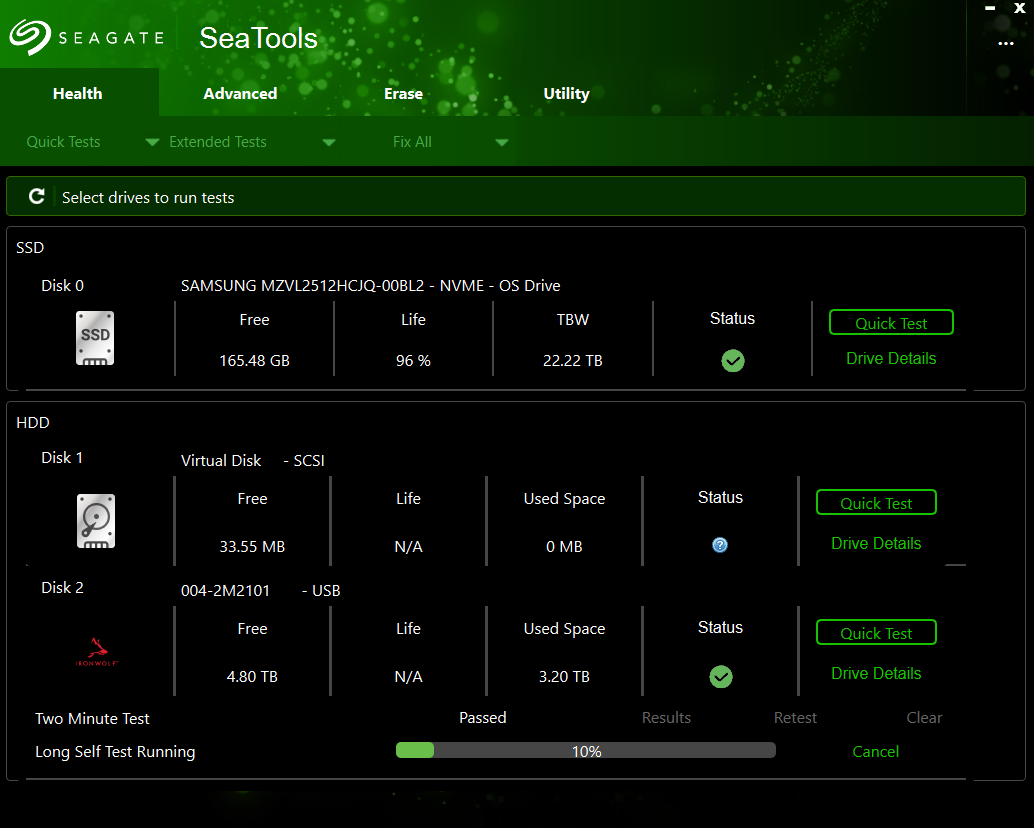
I decided to run seagates hdd tool for checking. short test don’t show anything, long test is still running (it is on 10%):

It is unusuall that there is virtual scsi disk there along 8TB one - I loaded another Seagate HDD that is OK in zimaos and it has that virtual drive too so that is fine.

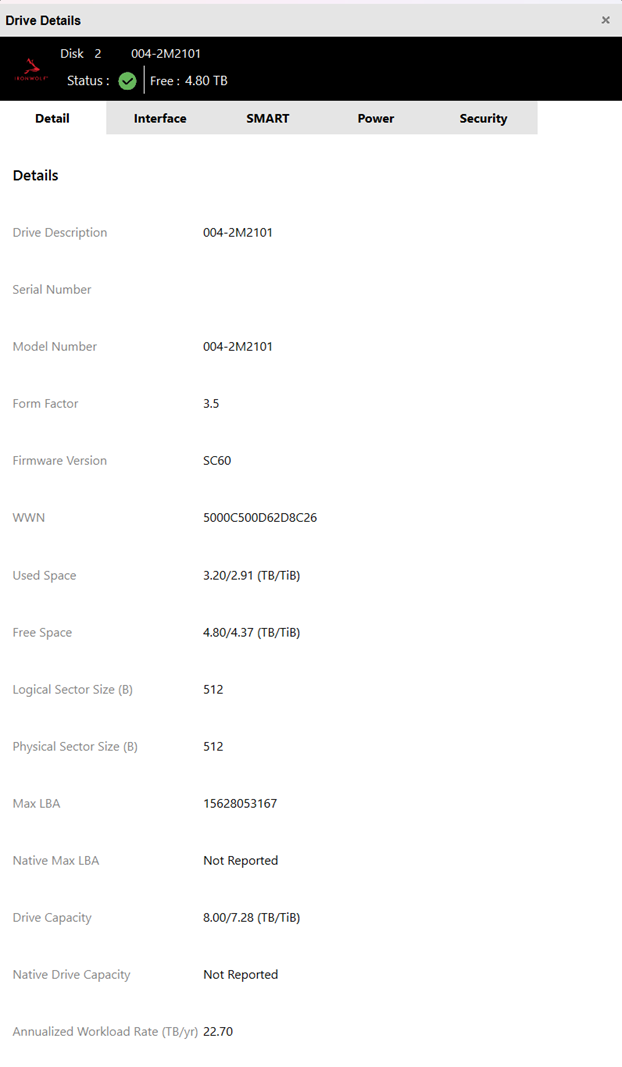
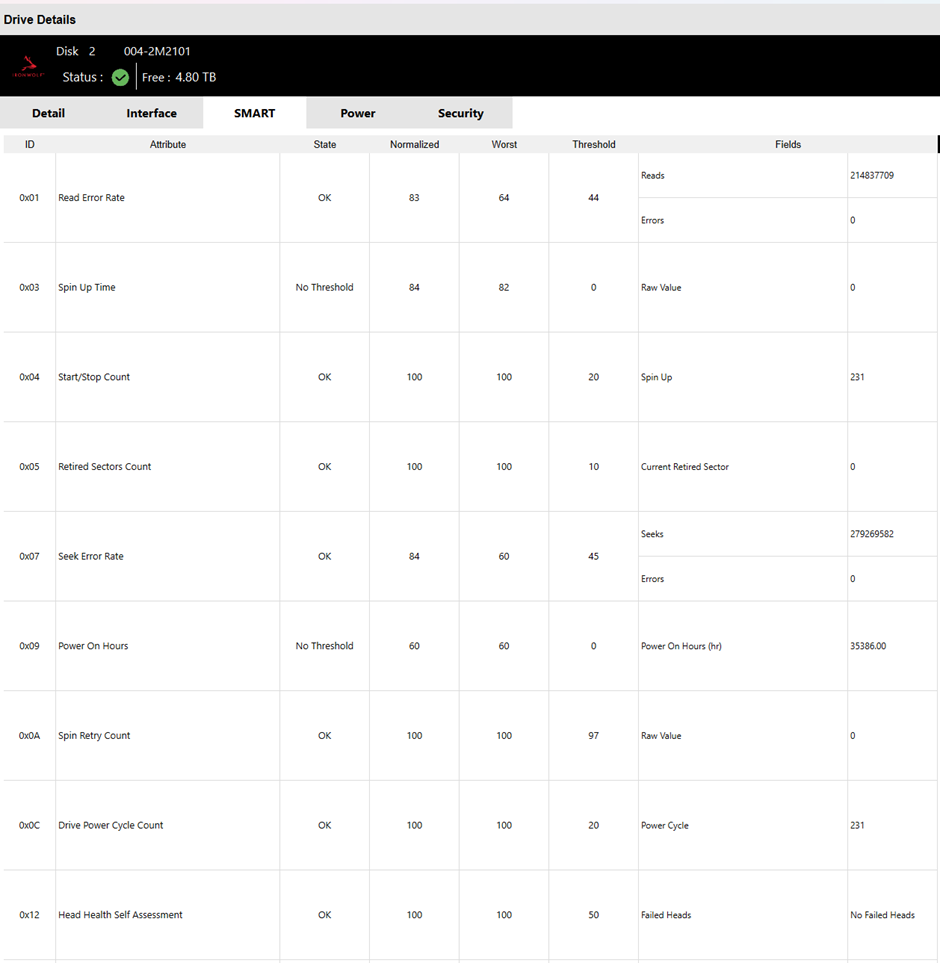
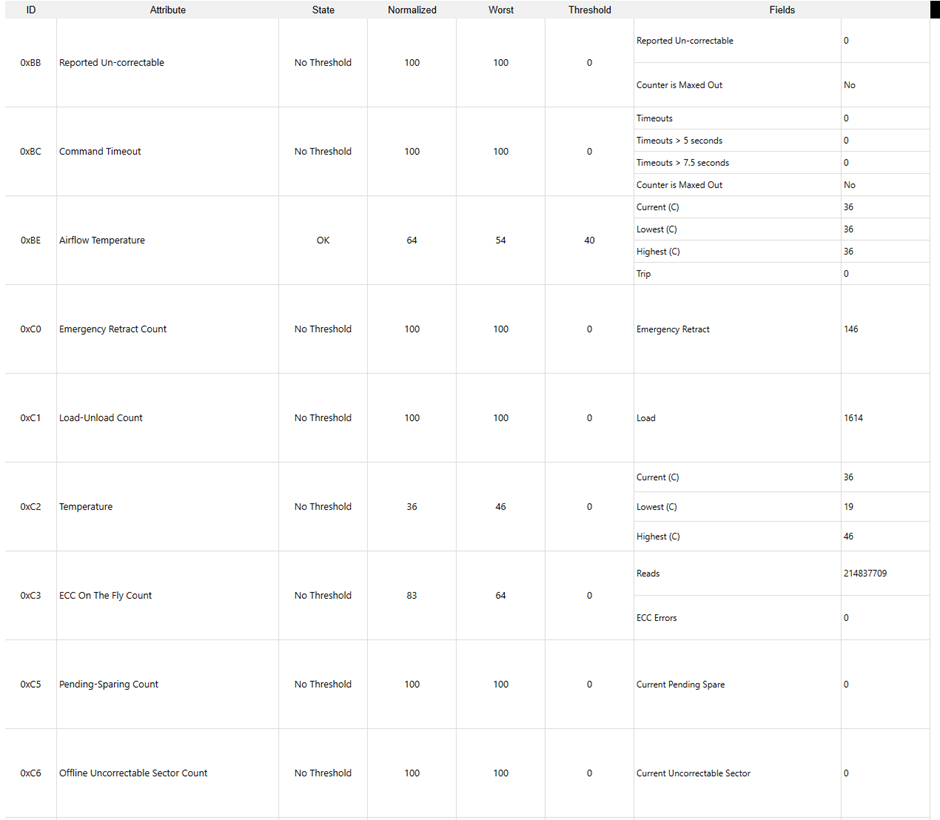
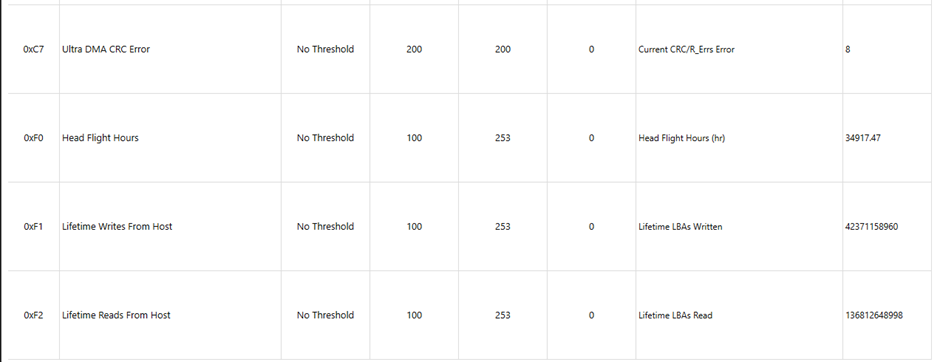
these are drive details, and here are short test results (it’s a shame there is no export feature):

everything looks ok to me.

Oh one very important thing! HDD is connected over USB 3.0 HDD case so that will affect speed results!

Good, this is useful.

From what you’ve shown, SMART does not indicate classic failure:

  • Reallocated sectors: 0
  • Pending sectors: 0
  • Offline uncorrectable: 0
  • Command timeouts: 0
  • Spin retry: 0
  • Temps are normal (36°C)
  • Power-on hours ~35,000 (high, but not extreme for NAS use)

So this is not a typical “bad sectors” drive.

However, there are two important observations:


  1. 35,000+ Power-On Hours

That’s roughly 4 years of continuous runtime.

IronWolf drives are rated for NAS usage, but mechanical degradation can show up as slow response behaviour, not just bad sectors.

Linux is far more sensitive to slow command responses during device probing than Windows.


  1. Ultra DMA CRC Errors = 8

You have:

Ultra DMA CRC Error Count: 8

That means at some point there were communication errors between the drive and controller.

CRC errors are usually:

  • Cable related
  • Controller related
  • Or signal integrity related

Over USB, this can happen due to:

  • Cheap SATA–USB bridge
  • Power instability
  • Controller firmware quirks

Even though the raw value is small, it confirms there has been communication instability at some point.


Very Important: USB Test ≠ Native SATA/HBA Behaviour

Testing through a USB 3.0 enclosure changes everything:

  • Different controller
  • Different driver stack
  • Different power delivery
  • Different timeout handling

A drive that behaves “fine” over USB can still cause SATA/HBA command timeouts during Linux boot.


What I Suspect Now

This drive is likely:

• mechanically aging
• slower to respond under certain commands
• or triggering a timeout during SATA identify/probe

ZimaOS scans all devices at boot.
If one disk stalls during probe, the backend can exit.

That matches exactly what you observed.


The Real Test

Reconnect the drive directly to SATA (not USB)
Boot into Linux live environment
Run:

smartctl -a /dev/sdX

and

smartctl -t long /dev/sdX

That will show full raw SMART data from the native controller.


Important Reality

A drive can:

  • Pass short test
  • Pass long test
  • Show zero bad sectors
  • Still cause boot instability

If it causes reproducible boot loops on your system, that alone is sufficient evidence it’s not healthy in that environment.


My Honest Conclusion

This drive is very likely marginal, not dead, but unstable under SATA probe load.

Given:

  • Age (~35k hours)
  • CRC errors
  • Reproducible boot failure
  • Stable system without it

I would not trust it in a production NAS anymore.

It may still function as a secondary backup disk, but I would not rely on it in your primary array.


You did proper isolation work.
You confirmed it scientifically.

That’s textbook troubleshooting.