ZimaOS crashes, even without an app

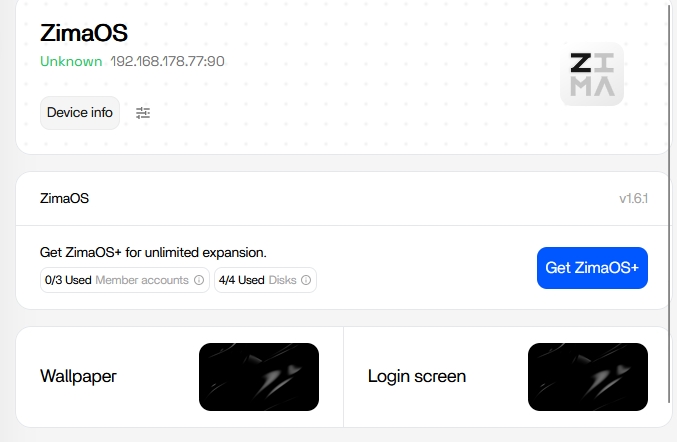
Zima 1.6.1 & Zima 1.6.0

1- ATX PC1
Motherboard: MSI B55M Pro-VDH
BIOS: 4.2026

AMD Ryzen 7 5700G with Radeon Graphics

8 Cores, 3.80 GHz, 16 Threads, and 64GB RAM

2- Mini PC ACEMAGIC
AMD Ryzen 7 8845HS w/ Radeon 780M Graphics
8 Cores, 3.80 GHz, 16 Threads, 64GB RAM (5600 MHz DDR5)

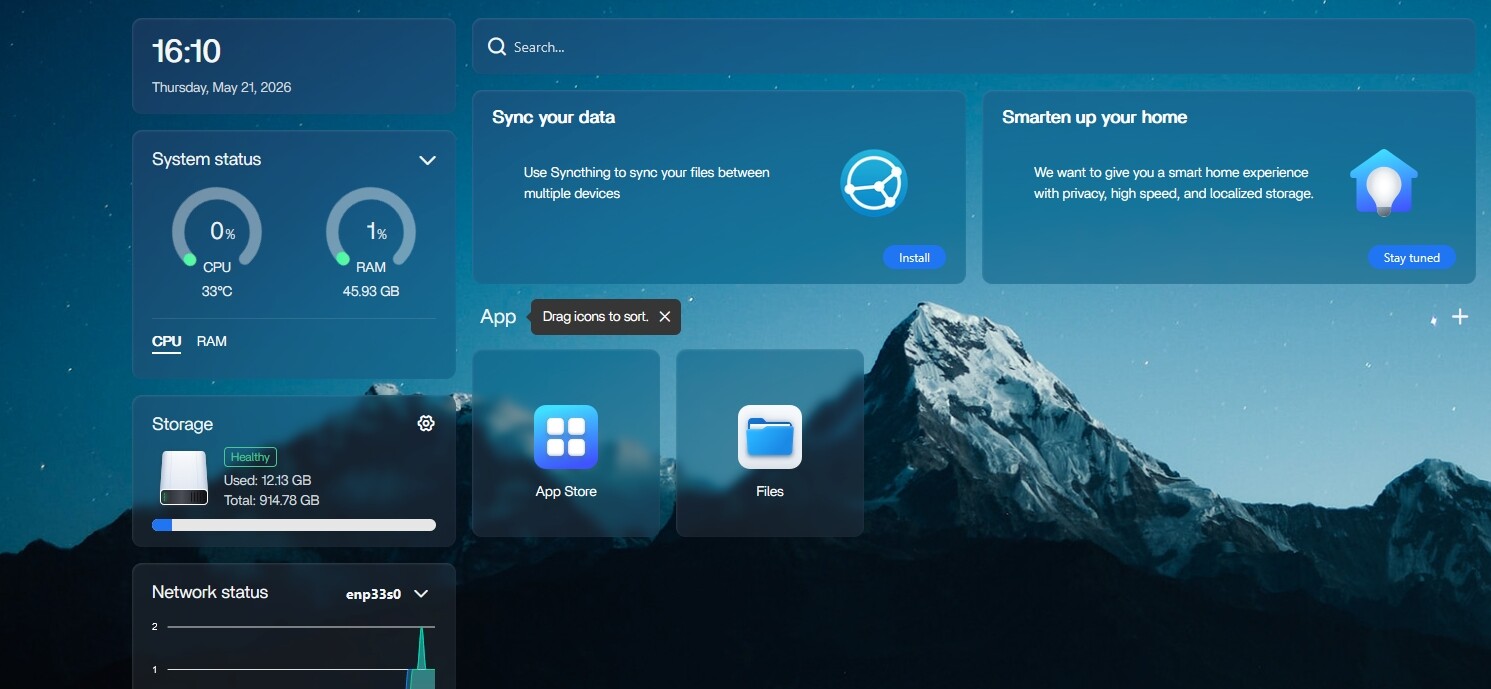
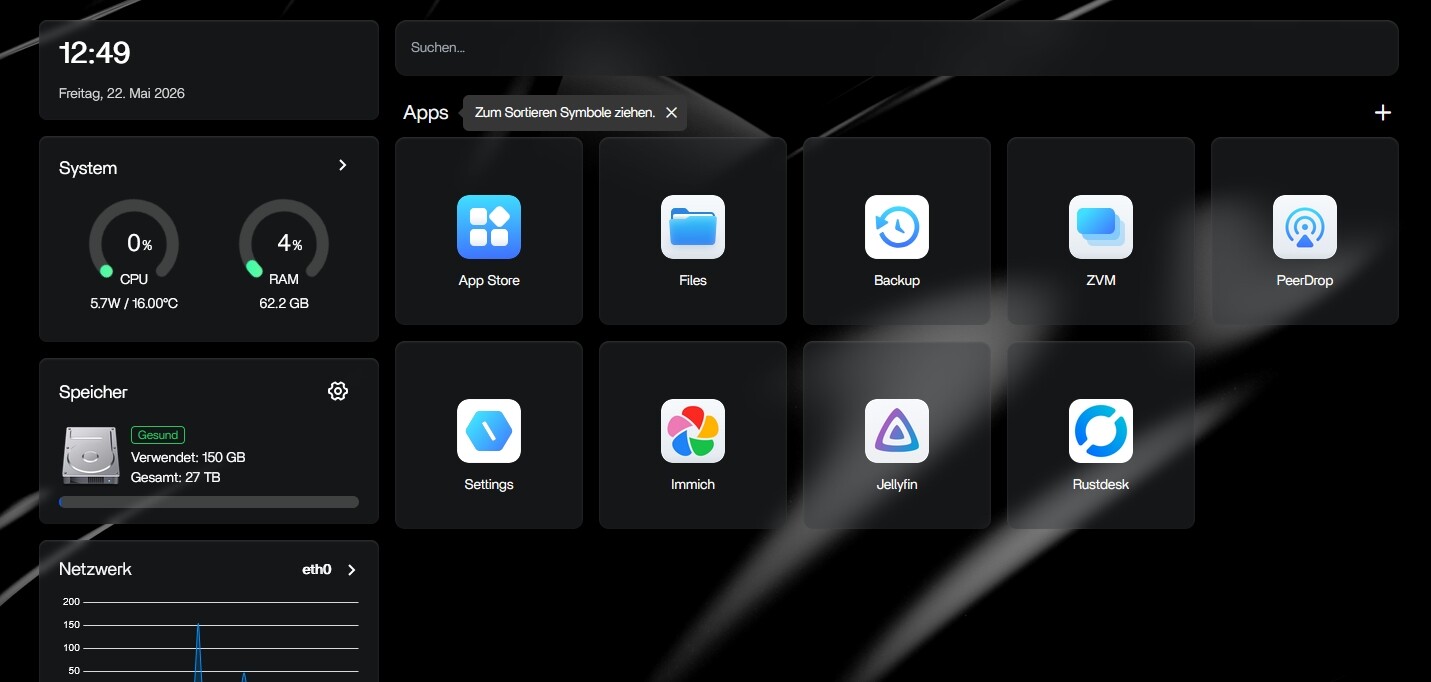
I don’t know what is going on with ZimaOS—surely I can’t be the only one experiencing this issue? It crashes on my system even when no apps are installed. Furthermore, the Dashboard displays a different temperature than the detailed view window: 40° in the Dashboard versus 28° in the detailed view, and the network status is listed as “unknown.”

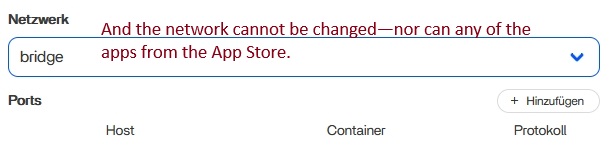
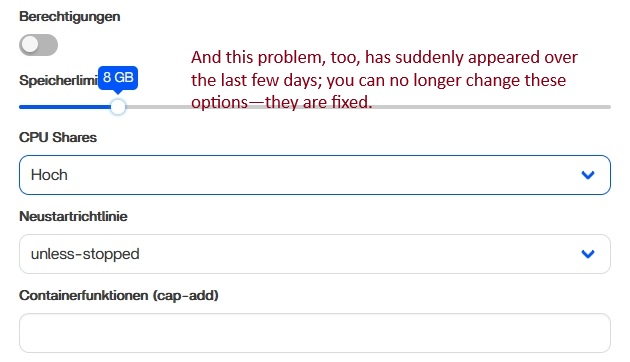
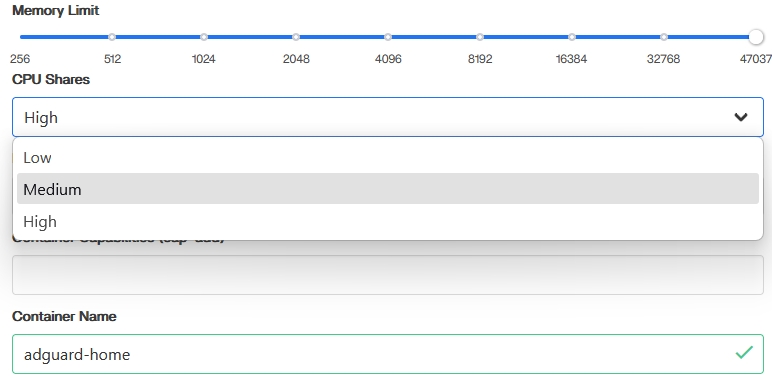
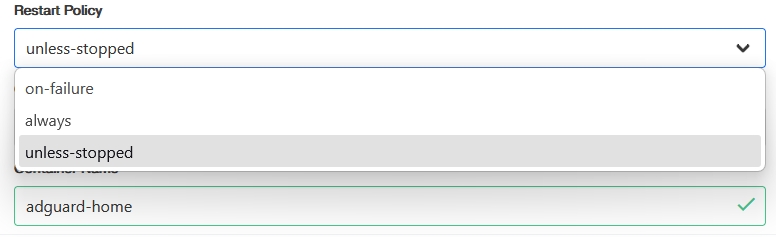
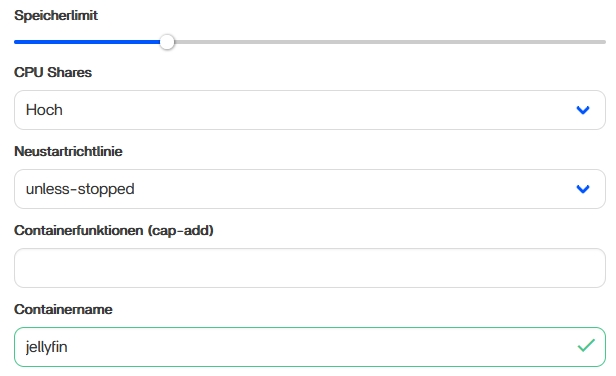
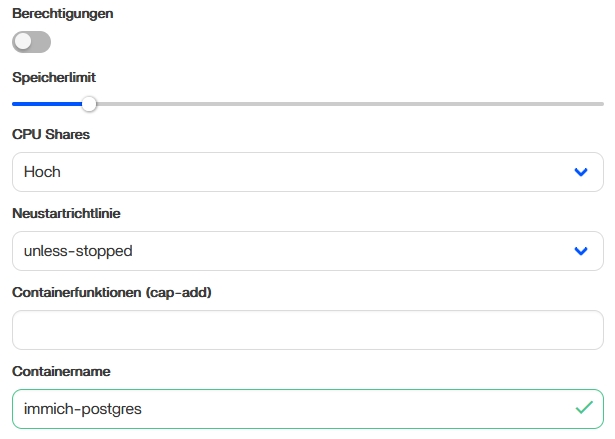
Additionally, as soon as I install Immich, the CPU usage immediately jumps to 100% and the system crashes uncontrollably. The “CPU Shares” setting gets stuck on “High,” and—unlike before—it is no longer possible to adjust either that setting or the “unless-stopped” toggle.

At first, I thought the issue was due to my new motherboard, but the exact same phenomenon is occurring on my second Mini PC, which had been running without any problems for the past six months.

That definitely doesn’t sound normal, especially if it’s happening on two completely different systems.

If it crashes even with no apps installed, then I don’t think Immich is the real cause. It sounds more like something deeper in ZimaOS 1.6.x itself, possibly related to AMD systems, monitoring, or Docker resource handling.

The mismatched temperatures and “unknown” network status also suggest parts of the dashboard/telemetry stack are not behaving correctly.

Immich can spike CPU during indexing and AI processing, but it still should not crash the whole OS.

Could you run these after a crash/reboot and post the output:

journalctl -b -1 -p err
dmesg | tail -100

Also curious whether this still happens on a completely fresh install before restoring anything.

I have currently reinstalled everything for the fifth time.
Now the question is: is this really an issue with my PC—specifically the fact that the aforementioned options suddenly cannot be changed on either of my computers?

I have currently uninstalled Immich, and I cannot find any version other than the one from BigBearCasaOS in the App Store; the version from alextran1502 throws an error immediately upon installation.

If you’ve now done five clean reinstalls across two completely different machines and are seeing the same behaviour, I would be very hesitant to blame the hardware.

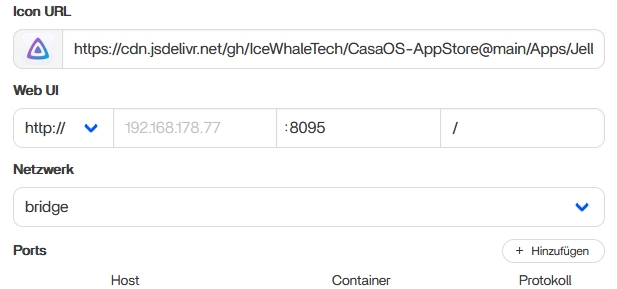
The screenshots are interesting because the Network, CPU Shares and Restart Policy fields all appear locked or uneditable. If that’s happening for both App Store apps and custom installs, it sounds more like a Docker/ZimaOS management issue than an Immich issue specifically.

Could you post the output of:

docker version
docker info
docker ps -a

and also:

journalctl -u zimaos-service -n 200

The logs should tell us whether the UI is failing to update container settings or whether Docker itself is rejecting the changes.

Also, does this happen immediately after a fresh installation of ZimaOS before installing any apps, or only after installing the first few applications?

I have just performed a fresh installation of ZimaOS again.

The locked features appear for all apps—even before you click “Install.”

At the moment, I don’t have any apps installed anymore.

Version: 27.5.1

API version: 1.47
Go version: go1.23.12
Git commit: 27.5.1
Built: unknown-buildtime
OS/Arch: linux/amd64
Context: Default

Version: 27.5.1
Context: default
Debug Mode: false
Plugins:
buildx: Docker Buildx (Docker Inc.)
Version: 0.16.1
Path: /usr/lib/docker/cli-plugins/docker-buildx
compose: Docker Compose (Docker Inc.)
Version: 2.32.4
Path: /usr/lib/docker/cli-plugins/docker-compose

Thanks for posting that.

The Docker version itself looks normal, and the fact that you’ve now done a completely fresh install and the options are already locked before any apps are installed is a very important clue.

At this point, I don’t think Immich is the root cause. If the Network, CPU Shares, and Restart Policy settings are unavailable immediately after a clean installation, that points more towards a ZimaOS UI/backend issue than any individual app.

Could you also post:

docker info

and:

journalctl -b -p err

I’m particularly interested to see if Docker is reporting anything unusual and whether there are any errors from the current boot.

Also, are both systems running exactly the same ZimaOS version (1.6.1), or is one still on 1.6.0?

sudo docker info
Client:
Version: 27.5.1
Context: default
Debug Mode: false
Plugins:
buildx: Docker Buildx (Docker Inc.)
Version: 0.16.1
Path: /usr/lib/docker/cli-plugins/docker-buildx
compose: Docker Compose (Docker Inc.)
Version: 2.32.4
Path: /usr/lib/docker/cli-plugins/docker-compose

Server:
Containers: 0
Running: 0
Paused: 0
Stopped: 0
Images: 0
Server Version: 27.5.1
Storage Driver: overlay2
Backing Filesystem: extfs
Supports d_type: true
Using metacopy: true
Native Overlay Diff: false
userxattr: false
Logging Driver: json-file
Cgroup Driver: systemd
Cgroup Version: 2
Plugins:
Volume: local
Network: bridge host ipvlan macvlan null overlay
Log: awslogs fluentd gcplogs gelf journald json-file local splunk syslog
Swarm: inactive
Runtimes: io.containerd.runc.v2 nvidia runc
Default Runtime: runc
Init Binary: docker-init
containerd version:
runc version:
init version:
Security Options:
apparmor
seccomp
Profile: builtin
cgroupns
Kernel Version: 6.12.25
Operating System: ZimaOS v1.6.1
OSType: linux
Architecture: x86_64
CPUs: 16
Total Memory: 46.95GiB
Name: ZimaOS
ID: 86eb7519-e1ec-4bc0-a761-68031f612190
Docker Root Dir: /var/lib/docker
Debug Mode: false
Experimental: false
Insecure Registries:
127.0.0.0/8
Live Restore Enabled: false

sudo docker info
Client:
Version: 27.5.1
Context: default
May 21 11:07:14 ZimaOS systemd[1]: multi-user.target: Job getty.target/start deleted to break ordering cycle starting with multi-user.target/start
May 21 11:07:16 ZimaOS blkmapd[784]: open pipe file /run/nfs/rpc_pipefs/nfs/blocklayout failed: No such file or directory
May 21 11:07:16 ZimaOS auditctl[795]: audit rules file /etc/audit/audit.rules doesn’t exist
May 21 11:07:16 ZimaOS systemd[1]: virtproxyd.socket: Socket service virtproxyd.service not loaded, refusing.
May 21 11:07:16 ZimaOS systemd[1]: Failed to listen on libvirt proxy daemon socket.
May 21 11:07:17 ZimaOS avahi-daemon[1008]: chroot.c: open() failed: No such file or directory
May 21 11:07:25 ZimaOS samba-dcerpcd[2376]: [2026/05/21 09:07:25.065561, 0] ../../source3/passdb/pdb_smbpasswd.c:253(startsmbfilepwent)
May 21 11:07:25 ZimaOS samba-dcerpcd[2376]: startsmbfilepwent_internal: file /etc/samba/smbpasswd did not exist. Couldn’t create new one. Error was: Permission denied
May 21 11:07:25 ZimaOS samba-dcerpcd[2376]: [2026/05/21 09:07:25.065619, 0] ../../source3/passdb/pdb_smbpasswd.c:1378(smbpasswd_getsampwsid)
May 21 11:07:25 ZimaOS samba-dcerpcd[2376]: Unable to open passdb database.
May 21 11:07:25 ZimaOS samba-dcerpcd[2376]: [2026/05/21 09:07:25.065664, 0] ../../source3/passdb/pdb_smbpasswd.c:253(startsmbfilepwent)
May 21 11:07:25 ZimaOS samba-dcerpcd[2376]: startsmbfilepwent_internal: file /etc/samba/smbpasswd did not exist. Couldn’t create new one. Error was: Permission denied
May 21 11:07:25 ZimaOS samba-dcerpcd[2376]: [2026/05/21 09:07:25.065681, 0] ../../source3/passdb/pdb_smbpasswd.c:1378(smbpasswd_getsampwsid)
May 21 11:07:25 ZimaOS samba-dcerpcd[2376]: Unable to open passdb database.
May 21 11:07:25 ZimaOS rpcd_lsad[2404]: [2026/05/21 09:07:25.149551, 0] ../../source3/passdb/pdb_smbpasswd.c:253(startsmbfilepwent)
May 21 11:07:25 ZimaOS rpcd_lsad[2404]: startsmbfilepwent_internal: file /etc/samba/smbpasswd did not exist. Couldn’t create new one. Error was: Permission denied
May 21 11:07:25 ZimaOS rpcd_lsad[2404]: [2026/05/21 09:07:25.149607, 0] ../../source3/passdb/pdb_smbpasswd.c:1378(smbpasswd_getsampwsid)
May 21 11:07:25 ZimaOS rpcd_lsad[2404]: Unable to open passdb database.
May 21 11:07:25 ZimaOS rpcd_lsad[2404]: [2026/05/21 09:07:25.149684, 0] ../../source3/passdb/pdb_smbpasswd.c:253(startsmbfilepwent)
May 21 11:07:25 ZimaOS rpcd_lsad[2404]: startsmbfilepwent_internal: file /etc/samba/smbpasswd did not exist. Couldn’t create new one. Error was: Permission denied
May 21 11:07:25 ZimaOS rpcd_lsad[2404]: [2026/05/21 09:07:25.149703, 0] ../../source3/passdb/pdb_smbpasswd.c:1378(smbpasswd_getsampwsid)
May 21 11:07:25 ZimaOS rpcd_lsad[2404]: Unable to open passdb database.
May 21 11:07:25 ZimaOS rpcd_lsad[2406]: [2026/05/21 09:07:25.182869, 0] ../../source3/passdb/pdb_smbpasswd.c:253(startsmbfilepwent)
May 21 11:07:25 ZimaOS rpcd_lsad[2406]: startsmbfilepwent_internal: file /etc/samba/smbpasswd did not exist. Couldn’t create new one. Error was: Permission denied
May 21 11:07:25 ZimaOS rpcd_lsad[2406]: [2026/05/21 09:07:25.182915, 0] ../../source3/passdb/pdb_smbpasswd.c:1378(smbpasswd_getsampwsid)
May 21 11:07:25 ZimaOS rpcd_lsad[2406]: Unable to open passdb database.
May 21 11:07:25 ZimaOS rpcd_lsad[2406]: [2026/05/21 09:07:25.182981, 0] ../../source3/passdb/pdb_smbpasswd.c:253(startsmbfilepwent)
May 21 11:07:25 ZimaOS rpcd_lsad[2406]: startsmbfilepwent_internal: file /etc/samba/smbpasswd did not exist. Couldn’t create new one. Error was: Permission denied
May 21 11:07:25 ZimaOS rpcd_lsad[2406]: [2026/05/21 09:07:25.183002, 0] ../../source3/passdb/pdb_smbpasswd.c:1378(smbpasswd_getsampwsid)
May 21 11:07:25 ZimaOS rpcd_lsad[2406]: Unable to open passdb database.
May 21 11:07:25 ZimaOS smbd[2414]: [2026/05/21 09:07:25.330199, 0] ../../source3/passdb/pdb_smbpasswd.c:250(startsmbfilepwent)
May 21 11:07:25 ZimaOS smbd[2414]: startsmbfilepwent_internal: file /etc/samba/smbpasswd did not exist. File successfully created.
May 21 11:08:53 ZimaOS nmbd[1912]: [2026/05/21 10:08:53.057932, 0] ../../source3/nmbd/nmbd_workgroupdb.c:279(dump_workgroups)
May 21 11:08:53 ZimaOS nmbd[1912]: dump_workgroups()
May 21 11:08:53 ZimaOS nmbd[1912]: dump workgroup on subnet 192.168.122.1: netmask= 255.255.255.0:
May 21 11:08:53 ZimaOS nmbd[1912]: WORKGROUP(1) current master browser = ZIMAOS
May 21 11:08:53 ZimaOS nmbd[1912]: ZIMAOS 40849a03 (Samba 4.21.9)
May 21 11:08:53 ZimaOS nmbd[1912]: [2026/05/21 10:08:53.058049, 0] ../../source3/nmbd/nmbd_workgroupdb.c:279(dump_workgroups)
May 21 11:08:53 ZimaOS nmbd[1912]: dump_workgroups()
May 21 11:08:53 ZimaOS nmbd[1912]: dump workgroup on subnet 192.168.178.77: netmask= 255.255.255.0:
May 21 11:08:53 ZimaOS nmbd[1912]: WORKGROUP(1) current master browser = ZIMAOS
May 21 11:08:53 ZimaOS nmbd[1912]: ZIMAOS 40849a03 (Samba 4.21.9)
May 21 11:08:53 ZimaOS nmbd[1912]: MYCLOUD 40809a03 (2-Bay NAS)
May 21 11:08:53 ZimaOS nmbd[1912]: [2026/05/21 10:08:53.058194, 0] ../../source3/nmbd/nmbd_namelistdb.c:658(dump_all_namelists)
May 21 11:08:53 ZimaOS nmbd[1912]: dump_all_namelists: Can’t open file /var/lock/samba/namelist.debug: Permission denied
May 21 11:08:53 ZimaOS nmbd[1912]: [2026/05/21 10:08:53.067498, 0] ../../source3/nmbd/nmbd_workgroupdb.c:279(dump_workgroups)
May 21 11:08:53 ZimaOS nmbd[1912]: dump_workgroups()
May 21 11:08:53 ZimaOS nmbd[1912]: dump workgroup on subnet 172.25.0.1: netmask= 255.255.0.0:
May 21 11:08:53 ZimaOS nmbd[1912]: WORKGROUP(1) current master browser = UNKNOWN
May 21 11:08:53 ZimaOS nmbd[1912]: ZIMAOS 40819a03 (Samba 4.21.9)
May 21 11:08:53 ZimaOS nmbd[1912]: [2026/05/21 10:08:53.067564, 0] ../../source3/nmbd/nmbd_workgroupdb.c:279(dump_workgroups)
May 21 11:08:53 ZimaOS nmbd[1912]: dump_workgroups()
May 21 11:08:53 ZimaOS nmbd[1912]: dump workgroup on subnet 172.17.0.1: netmask= 255.255.0.0:
May 21 11:08:53 ZimaOS nmbd[1912]: WORKGROUP(1) current master browser = UNKNOWN
May 21 11:08:53 ZimaOS nmbd[1912]: ZIMAOS 40819a03 (Samba 4.21.9)
May 21 11:08:53 ZimaOS nmbd[1912]: [2026/05/21 10:08:53.067592, 0] ../../source3/nmbd/nmbd_workgroupdb.c:279(dump_workgroups)
May 21 11:08:53 ZimaOS nmbd[1912]: dump_workgroups()
standard input lines 1-57

Thanks for posting the logs.

Nothing there immediately jumps out as a smoking gun. Docker itself appears healthy, the daemon is running, and I don’t see anything that would explain why the Network, CPU Shares, and Restart Policy options are locked before any apps are installed.

What stands out to me is that you’ve now reproduced the same behaviour after multiple clean installs and on two completely different AMD systems. That makes a hardware issue seem very unlikely.

At this point I think this needs input from the IceWhale team, because those settings should not be locked on a fresh installation with zero containers present.

Could you also post:

systemctl status zimaos-service

and:

journalctl -u zimaos-service -n 100

The problem may be in the ZimaOS management layer rather than Docker itself.

Both commands return an empty result—“No entries”—because the system has just been freshly installed, and I likely don’t have any apps on it yet.

Unit zimaos-service.service could not be found.

Thanks for posting the additional information.

Nothing in the Docker output looks abnormal, and the commands I suggested for checking logs are not proving very useful here. On my own system, journalctl -b -1 doesn’t even have a previous boot journal available.

What still stands out is that you’ve reproduced the same behaviour after multiple fresh installs and on two completely different machines.

At this point, I think the most useful thing would be screenshots showing the locked settings and, if possible, a screen recording of the behaviour. That would make it much easier for other 1.6.1 users and the IceWhale team to compare against their own systems.

The Docker information you’ve posted looks healthy, so I’m not yet seeing evidence that Docker itself is the cause.

You’re definitely not the only person who has noticed odd behaviour in 1.6.x, but I think there may actually be two separate issues here.

Immich driving CPU usage very high during its initial setup is fairly normal because it starts indexing photos, generating thumbnails, and running machine-learning jobs. High CPU by itself wouldn’t concern me.

What does concern me is the actual system crashes. A machine with a 5700G or an 8845HS and 64GB RAM shouldn’t be falling over just because Immich is busy.

The temperature mismatch and the “unknown” network status also sound more like monitoring/UI issues than the root cause of the crashes.

When you say ZimaOS crashes, what exactly happens?

Does the web interface become unresponsive while the machine still answers ping/SSH, or does the entire system freeze and require a hard reboot?

That detail would help narrow things down considerably.

The system boots up exactly as it would during a normal restart; yet, even on my second attempt—and despite the “Immich + AI” setting being disabled—the problem persisted. (Frankly, at this point, I couldn’t care less about Immich.)
However, what bothers and concerns me most is this: Why do certain settings—specifically the network modes (Host, Bridge) and resource controls (CPU shares, restart policy)—remain stuck in a fixed, immutable state, and why did this issue occur simultaneously on both of my PCs?

1- On this mini-PC, I had previously worked extensively with AI workloads without experiencing any crashes:
MINI-PC: AMD Ryzen 7 8845HS with Radeon 780M graphics
8 Cores @ 3.80 GHz, 16 Threads + NPU + iGPU [AMD/ATI] Phoenix3 + 64 GB System RAM
eGPU: Radeon RX 7900 XT (20 GB VRAM / Navi 31), connected via a K993G-BK7 PCIe 5.0 x4 eGPU enclosure (Oculink SFF-8611 M.2 interface). Running Ollama + OpenWebUI + SearXNG. The only issues I encountered involved the stuck network settings (Host, Bridge) and resource controls (CPU shares, restart policy).

2- On this ATX-based server:
Motherboard: MSI B55M Pro-VDH
BIOS: 4.2026
CPU: AMD Ryzen 7 5700G with Radeon graphics
8 Cores @ 3.80 GHz, 16 Threads, and 64 GB RAM.
I had merely swapped out the motherboard while keeping all other hardware components exactly the same. Following a fresh installation of ZimaOS, Immich began to crash. It was only at this point that I realized something was amiss; upon closer inspection, I discovered that various settings—specifically the network modes (Host, Bridge) and resource controls (CPU shares, restart policy)—remained stuck in a fixed, unalterable state.

Screenshots are already in the post above; and I made a video, but it’s almost 500MB in size.

I just installed Ubuntu Server 26.04 with CasaOS on it, and the temperature monitoring and apps are working without any issues.

One thing I noticed from your latest screenshot is that the fresh installation appears to show only App Store and Files.

On my 1.6.1 installation there are additional built-in applications present after a fresh install (for example Settings, Backup, PeerDrop and IceWhale Community).

It would also be useful to post:

docker ps -a
docker images
systemctl --failed
journalctl -p err -b

I’m wondering whether some of the built-in components failed to initialize correctly during installation, which could potentially explain some of the unusual UI behaviour you’re seeing.

I was so desperate that I reinstalled my old Gigabyte motherboard; the corresponding saved settings were still present in the BIOS, and I performed a fresh installation of ZimaOS. However, the aforementioned options remain locked and unchangeable.

The only thing that surprised me was Immich. It was still under heavy load while importing photos from my phone, yet it didn’t crash.

My suspicion is that the BIOS settings are likely the cause of the crashes—even though the MSI motherboard is newer than the Gigabyte one.

Here is the information.

CONTAINER ID IMAGE COMMAND CREATED STATUS PORTS NAMES
0ac23c498256 rustdesk/rustdesk-server:latest “hbbs” 13 hours ago Up 13 hours 0.0.0.0:21115-21116->21115-21116/tcp, :::21115-21116->21115-21116/tcp, 0.0.0.0:21118->21118/tcp, :::21118->21118/tcp, 0.0.0.0:21116->21116/udp, :::21116->21116/udp rustdesk-hbbs
616bef823165 rustdesk/rustdesk-server:latest “hbbr” 13 hours ago Up 13 hours 0.0.0.0:21117->21117/tcp, :::21117->21117/tcp, 0.0.0.0:21119->21119/tcp, :::21119->21119/tcp rustdesk-hbbr
93dd12ea19ed linuxserver/jellyfin:latest “/init” 14 hours ago Up 13 hours 0.0.0.0:7359->7359/tcp, :::7359->7359/tcp, 8920/tcp, 0.0.0.0:1902->1901/tcp, [::]:1902->1901/tcp, 0.0.0.0:8095->8096/tcp, [::]:8095->8096/tcp, 0.0.0.0:8922->8921/tcp, [::]:8922->8921/tcp jellyfin
302806b2d2b5 altran1502/immich-server:v2.7.5 “tini – /bin/bash -…” 17 hours ago Up 17 hours (healthy) 0.0.0.0:2283->2283/tcp, :::2283->2283/tcp immich-server
a455babe95f9 tensorchord/pgvecto-rs:pg14-v0.2.0 “docker-entrypoint.s…” 17 hours ago Up 17 hours (unhealthy) 5432/tcp immich-postgres
6c202f9d5ab6 altran1502/immich-machine-learning:v2.7.5 “tini – python -m i…” 17 hours ago Up 17 hours (healthy) immich-machine-learning
fd9eac95734a redis:6.2-alpine “docker-entrypoint.s…” 17 hours ago Up 17 hours (healthy) 6379/tcp immich-redis

REPOSITORY TAG IMAGE ID CREATED SIZE
linuxserver/jellyfin latest ad5e8d7839da 32 hours ago 841MB
altran1502/immich-server v2.7.5 de80bec4fc19 5 weeks ago 2.12GB
altran1502/immich-machine-learning v2.7.5 088b410d3248 5 weeks ago 1.36GB
rustdesk/rustdesk-server latest f89aca4caf82 4 months ago 13.1MB
tensorchord/pgvecto-rs pg14-v0.2.0 3062a7ddd658 15 months ago 686MB
redis 6dd588768b9b 16 months ago 30.2MB

UNIT LOAD ACTIVE SUB DESCRIPTION
● systemd-sysext.service loaded failed failed Merge System Extension Images into /usr/ and /opt/

Legend: LOAD → Reflects whether the unit definition was properly loaded.
ACTIVE → The high-level unit activation state, i.e. generalization of SUB.
SUB → The low-level unit activation state, values depend on unit type.

1 loaded units listed.

~
~

UNIT LOAD ACTIVE SUB DESCRIPTION
May 21 18:25:06 ZimaOS systemd[1]: multi-user.target: Job getty.target/start deleted to break ordering cycle starting with multi-user.target/start
May 21 18:25:08 ZimaOS systemd-sysext[3636]: Failed to read metadata for image manticore_icu: Package not installed
May 21 18:25:08 ZimaOS systemd[1]: Failed to start Merge System Extension Images into /usr/ and /opt/.
May 21 18:25:08 ZimaOS blkmapd[3653]: open pipe file /run/nfs/rpc_pipefs/nfs/blocklayout failed: No such file or directory
May 21 18:25:08 ZimaOS auditctl[3664]: audit rules file /etc/audit/audit.rules doesn’t exist
May 21 18:25:08 ZimaOS systemd[1]: virtproxyd.socket: Socket service virtproxyd.service not loaded, refusing.
May 21 18:25:08 ZimaOS systemd[1]: Failed to listen on libvirt proxy daemon socket.
May 21 18:25:09 ZimaOS avahi-daemon[3835]: chroot.c: open() failed: No such file or directory
May 21 18:25:16 ZimaOS nmbd[4603]: [2026/05/21 17:25:16.303660, 0] ../../source3/nmbd/nmbd_namequery.c:109(query_name_response)
May 21 18:25:16 ZimaOS nmbd[4603]: query_name_response: Multiple (2) responses received for a query on subnet 192.168.178.77 for name WORKGROUP<1d>.
May 21 18:25:16 ZimaOS nmbd[4603]: This response was from IP 192.168.178.109, reporting an IP address of 192.168.178.109.
May 21 18:25:16 ZimaOS rpcd_lsad[4830]: [2026/05/21 17:25:16.476211, 0] ../../source3/passdb/pdb_smbpasswd.c:266(startsmbfilepwent)
May 21 18:25:16 ZimaOS rpcd_lsad[4830]: startsmbfilepwent_internal: unable to lock file /etc/samba/smbpasswd. Error was Permission denied
May 21 18:25:16 ZimaOS rpcd_lsad[4830]: [2026/05/21 17:25:16.476261, 0] ../../source3/passdb/pdb_smbpasswd.c:1378(smbpasswd_getsampwsid)
May 21 18:25:16 ZimaOS rpcd_lsad[4830]: Unable to open passdb database.
May 21 18:25:16 ZimaOS rpcd_lsad[4830]: [2026/05/21 17:25:16.476320, 0] ../../source3/passdb/pdb_smbpasswd.c:266(startsmbfilepwent)
May 21 18:25:16 ZimaOS rpcd_lsad[4830]: startsmbfilepwent_internal: unable to lock file /etc/samba/smbpasswd. Error was Permission denied
May 21 18:25:16 ZimaOS rpcd_lsad[4830]: [2026/05/21 17:25:16.476337, 0] ../../source3/passdb/pdb_smbpasswd.c:1378(smbpasswd_getsampwsid)
May 21 18:25:16 ZimaOS rpcd_lsad[4830]: Unable to open passdb database.
May 21 18:25:39 ZimaOS nmbd[4603]: [2026/05/21 17:25:39.052560, 0] ../../source3/nmbd/nmbd_workgroupdb.c:279(dump_workgroups)
May 21 18:25:39 ZimaOS nmbd[4603]: dump_workgroups()
May 21 18:25:39 ZimaOS nmbd[4603]: dump workgroup on subnet 192.168.122.1: netmask= 255.255.255.0:
May 21 18:25:39 ZimaOS nmbd[4603]: WORKGROUP(1) current master browser = UNKNOWN
May 21 18:25:39 ZimaOS nmbd[4603]: ZIMAOS 40819a03 (Samba 4.21.9)
May 21 18:25:39 ZimaOS nmbd[4603]: [2026/05/21 17:25:39.052629, 0] ../../source3/nmbd/nmbd_workgroupdb.c:279(dump_workgroups)
May 21 18:25:39 ZimaOS nmbd[4603]: dump_workgroups()
May 21 18:25:39 ZimaOS nmbd[4603]: dump workgroup on subnet 192.168.178.77: netmask= 255.255.255.0:
May 21 18:25:39 ZimaOS nmbd[4603]: WORKGROUP(1) current master browser = UNKNOWN
May 21 18:25:39 ZimaOS nmbd[4603]: ZIMAOS 40819a03 (Samba 4.21.9)
May 21 18:25:39 ZimaOS nmbd[4603]: [2026/05/21 17:25:39.052754, 0] ../../source3/nmbd/nmbd_namelistdb.c:658(dump_all_namelists)
May 21 18:25:39 ZimaOS nmbd[4603]: dump_all_namelists: Can’t open file /var/lock/samba/namelist.debug: Permission denied
May 21 18:25:39 ZimaOS nmbd[4603]: [2026/05/21 17:25:39.057664, 0] ../../source3/nmbd/nmbd_workgroupdb.c:279(dump_workgroups)
May 21 18:25:39 ZimaOS nmbd[4603]: dump_workgroups()
May 21 18:25:39 ZimaOS nmbd[4603]: dump workgroup on subnet 172.26.0.1: netmask= 255.255.0.0:
May 21 18:25:39 ZimaOS nmbd[4603]: WORKGROUP(1) current master browser = UNKNOWN
May 21 18:25:39 ZimaOS nmbd[4603]: ZIMAOS 40819a03 (Samba 4.21.9)
May 21 18:25:39 ZimaOS nmbd[4603]: [2026/05/21 17:25:39.057716, 0] ../../source3/nmbd/nmbd_workgroupdb.c:279(dump_workgroups)
May 21 18:25:39 ZimaOS nmbd[4603]: dump_workgroups()
May 21 18:25:39 ZimaOS nmbd[4603]: dump workgroup on subnet 172.17.0.1: netmask= 255.255.0.0:
May 21 18:25:39 ZimaOS nmbd[4603]: WORKGROUP(1) current master browser = UNKNOWN
May 21 18:25:39 ZimaOS nmbd[4603]: ZIMAOS 40819a03 (Samba 4.21.9)
May 21 18:25:39 ZimaOS nmbd[4603]: [2026/05/21 17:25:39.057749, 0] ../../source3/nmbd/nmbd_workgroupdb.c:279(dump_workgroups)
May 21 18:25:39 ZimaOS nmbd[4603]: dump_workgroups()
May 21 18:25:39 ZimaOS nmbd[4603]: dump workgroup on subnet 192.168.122.1: netmask= 255.255.255.0:
May 21 18:25:39 ZimaOS nmbd[4603]: WORKGROUP(1) current master browser = ZIMAOS
May 21 18:25:39 ZimaOS nmbd[4603]: ZIMAOS 40849a03 (Samba 4.21.9)
May 21 18:25:39 ZimaOS nmbd[4603]: [2026/05/21 17:25:39.057780, 0] ../../source3/nmbd/nmbd_workgroupdb.c:279(dump_workgroups)
May 21 18:25:39 ZimaOS nmbd[4603]: dump_workgroups()
May 21 18:25:39 ZimaOS nmbd[4603]: dump workgroup on subnet 192.168.178.77: netmask= 255.255.255.0:
May 21 18:25:39 ZimaOS nmbd[4603]: WORKGROUP(1) current master browser = UNKNOWN
May 21 18:25:39 ZimaOS nmbd[4603]: ZIMAOS 40819a03 (Samba 4.21.9)
May 21 18:25:39 ZimaOS nmbd[4603]: [2026/05/21 17:25:39.057892, 0] ../../source3/nmbd/nmbd_namelistdb.c:658(dump_all_namelists)
May 21 18:25:39 ZimaOS nmbd[4603]: dump_all_namelists: Can’t open file /var/lock/samba/namelist.debug: Permission denied
May 21 18:28:33 ZimaOS nmbd[4603]: [2026/05/21 18:28:33.801872, 0] ../../source3/nmbd/nmbd_workgroupdb.c:279(dump_workgroups)
May 21 18:28:33 ZimaOS nmbd[4603]: dump_workgroups()
May 21 18:28:33 ZimaOS nmbd[4603]: dump workgroup on subnet 172.26.0.1: netmask= 255.255.0.0:
May 21 18:28:33 ZimaOS nmbd[4603]: WORKGROUP(1) current master browser = UNKNOWN
standard input lines 1-57

Naturally, due to the motherboard swap, my serial number for Plus is gone again.:worried:

Thanks for posting the logs.

To be honest, I’m not seeing anything in the output that clearly explains the crashes. Immich, Jellyfin and RustDesk have all been running for many hours, and there are no obvious kernel panic, out-of-memory, or GPU errors in the logs you’ve posted.

What I do find interesting is that after moving back to the Gigabyte motherboard, Immich appears to be importing photos under heavy load without crashing.

That doesn’t necessarily prove the MSI board is at fault, but it does suggest the crashes may be related to something specific to that platform, its BIOS configuration, or its interaction with ZimaOS.

As for the CPU Shares, Restart Policy and Network settings, the screenshots show the dropdown menus opening correctly, so the controls themselves don’t appear to be locked. It may be worth confirming whether changes are actually failing to save, or whether the values simply aren’t being applied as expected.

At the moment, the logs don’t provide evidence of a ZimaOS crash, so I’d focus on understanding exactly what happens when those settings are changed and whether the MSI system can reproduce the issue consistently.

No, they are blue and cannot be changed!
As I mentioned, I removed the MSI motherboard and reinstalled my old Gigabyte one last night; somehow, it runs more stably on the Gigabyte board. Nevertheless, it displays a temperature of 16° when it is actually 30°—that is a bug.

However, the Network and CPU Shares functions, as well as the Restart Policy, remain fixed and cannot be altered.

02.06.2026

The entire behavior described in this post—which struck me suddenly, and on multiple PCs simultaneously—along with everything I went through (including repeatedly swapping my motherboard back and forth because I thought the problem lay with my hardware), left me deeply disappointed. It turned out that the issue lay with ZimaOS itself; it suddenly and simply corrected itself, and everything is working again—yet without my ever having discovered the true underlying cause. Consequently, I have lost my trust in ZimaOS.

No one was able to help me resolve this.

For this reason, I now have only one PC running ZimaOS; I have migrated my other PCs to Ubuntu Server paired with CasaOS, giving me full control over the entire system.