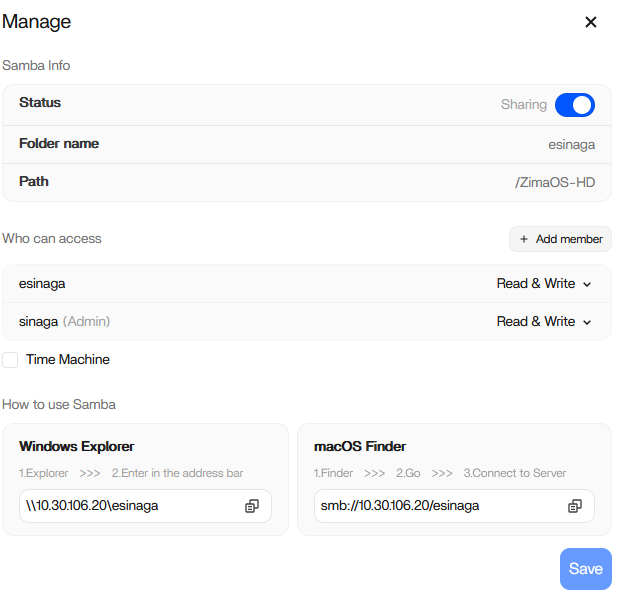
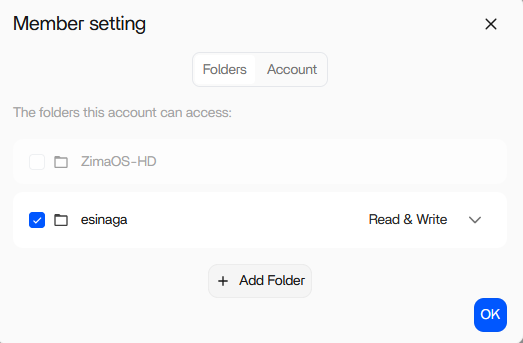
I am new in ZimaOS, and just recently installed ZimaOS 1.6.1 on my pc.
Successfully installed and i can access and login from my mobile phone (Android).
And i also create a new member/user from the server and set a new folder share that can be access only by that bew user. But when i login using the new user on my mobile phone, i cannot open the folder it says access denied.
Is this something that can be achieve using zimaOS..?
Yes, that should absolutely be possible in ZimaOS. The per-user folder permissions are intended to work that way.
A couple of things to check first:
Make sure the new user was actually added to the shared folder permissions.
Sometimes creating the user and creating the share separately does not automatically grant access.
Go to:
Files > Shared Folder > Edit Share > Permissions
and verify the new user has at least Read access (or Read/Write if needed).
After changing permissions, fully log out of the mobile app and log back in as the new user.
The mobile app can sometimes cache the previous session/permissions.
Check whether the folder was created under a location owned by another user or app.
For example, folders inside some app-data paths may not inherit normal Files app permissions correctly.
Test from another device if possible.
Try:
web browser
Windows SMB share
another phone
This helps determine whether it is:
a permission issue
or just the Android app session/cache.
Also important:
There have been a number of permission/storage quirks reported around ZimaOS 1.6.x lately, especially involving shares, mounts, and user access behaviour, so it may not necessarily be something you configured wrong.
When accessing from my android phone, it says: Permission Denied.
Already reinstalled zima client on my phone and tried from a different phone too. Still premission Denied.
Interesting, if it works from a computer but fails only from the Android Zima client, then the permissions themselves are probably correct.
Your screenshots actually look properly configured to me.
That points more toward:
a Zima mobile app bug
mobile app session caching
or a Samba/authentication issue specific to Android client handling in 1.6.1.
Especially since:
SMB works from PC
permissions are assigned correctly
you already tested another phone
reinstalling the app did not help
So this likely is not user error.
I would mention a couple more things to test:
Try creating a completely new test shared folder with a very simple name, for example:
test
sharedtest
and assign only the new user.
Avoid special characters/spaces temporarily in:
usernames
folder names
passwords
just for testing.
Try accessing through a mobile SMB app instead of the Zima app:
CX File Explorer
Solid Explorer
MiXplorer
using:
smb://10.30.106.20/esinaga
and login with:
username: esinagapassword: <user password>
If SMB works from Android using another app, then the issue is almost certainly inside the Zima mobile client itself.
And honestly, with the amount of permission/share oddities reported around 1.6.x lately, I would not be surprised if this is another regression specific to the mobile app authentication flow.
i still cannot access the shared folder from new member using mobile phone (android).
But somehow i can run backup from my mobile phone to ZimaOS (Choose where to store my backup), but there is a BIG issue: many times lost connection from my mobile phones.