I spent days chasing little gremlins in the terminal—odd container restarts, ports that wouldn’t stick, volumes that felt haunted by old configs. In the end I stopped “surgically” fixing things and did a full factory reset to ZimaOS 1.4.4. Best call I’ve made in a while.
From first boot it felt different: the system was crisp and predictable, containers came up cleanly, and the App Store behaved exactly how you’d expect—no silent reverts or UI quirks. Networking turned pleasantly boring: services bound to the right addresses, dashboards were there when I went to them, and I wasn’t juggling conflicts or ghost networks. With the leftovers from older betas gone, my environment variables, mounts, and overrides actually made sense again. Logs were readable, warnings were useful, and performance felt snappier across the board.
The biggest lesson for me was that a tidy base beats endless terminal firefights. I jotted down the ports, domains, and a few key env vars I cared about, brought back my core services first, verified they were healthy, then layered everything else on top. Taking a minute to check volumes under /DATA as I went saved me from dragging any maybe mounts into the new setup. Once the foundation was clean, troubleshooting on the rare occasions I needed it, was straightforward because there wasn’t any historical noise getting in the way.
Bottom line: ZimaOS 1.4.4 shines when you give it a clean runway.
Resetting saved me hours and delivered a steadier, faster box than all my incremental tweaks ever did.
What country are you in? ISP used? Using a wired connection to Ethernet or Wi-Fi? Is there a VPN or other network firewall? Are there other administrators to manage the network?
Did you change your network or notice any changes before or after installing the current version?
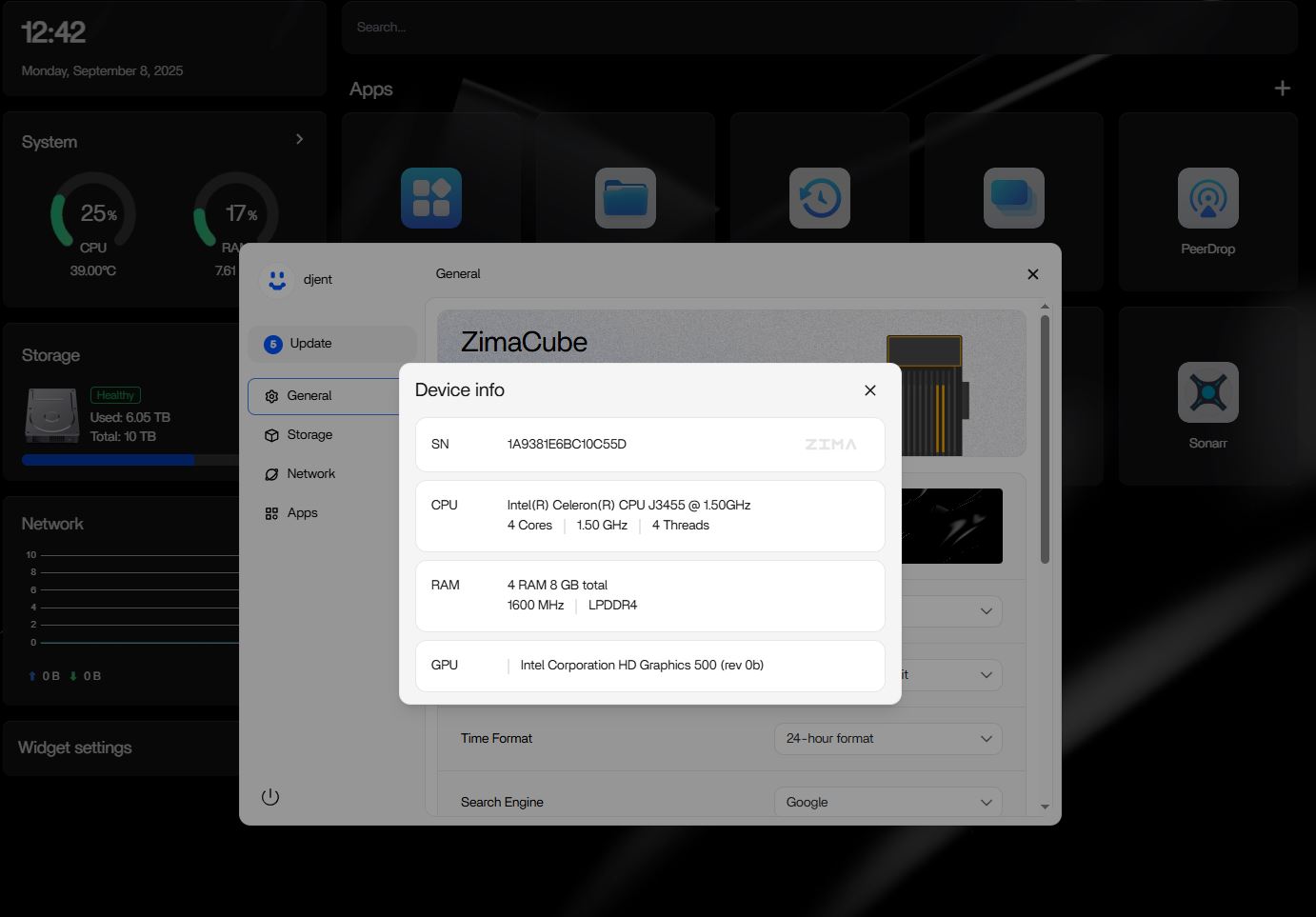
Always attach the specs of your hardware. Photos of your device would be helpful. Videos are better. These are all for locating the issue. Look forward to your feedback.
I live in Kuwait using a 5G plan from an ISP company called stc. Using an ethernet connection with my Zimaboard 832 using Zima OS, not using VPN my firewall is Malwarebytes and no other admins envolved.
i did change some setting in my Unifi Dream Wall switch did some port forward then reverted back to normal after that tried to add DNS ports then reverted back to normal.
Time/NTP: Make sure the board’s clock is correct. Turn NTP on (timedatectl set-ntp true) and confirm (timedatectl status). If the time is wrong, set it, then retry the App Store.
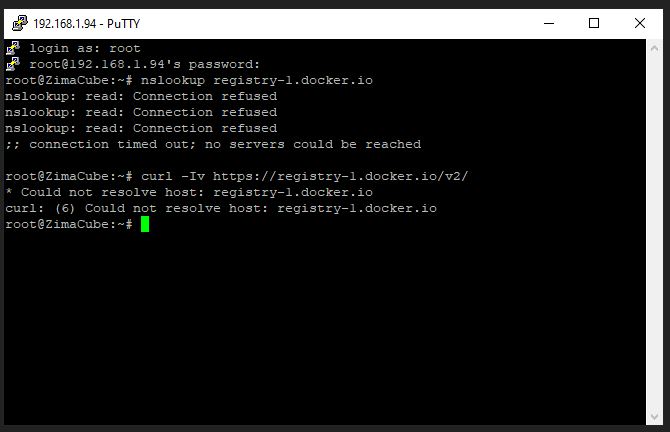
DNS: Temporarily switch DNS to 1.1.1.1 or 8.8.8.8. Verify resolution works (nslookup registry-1.docker.io).
Direct reachability: Test HTTPS to Docker Hub (curl -Iv https://registry-1.docker.io/v2/). A 200/401 means the path is open; TLS/timeout errors point to clock/DNS/firewall.
UniFi Dream Wall: Remove any leftover port-forward/ACL/IPS rules. Make sure nothing is intercepting DNS or blocking 443 for the board.
Firewall/AV on network: Ensure Malwarebytes (or similar) isn’t filtering the board’s IP or outbound 443.
Control test: Try a different DNS or a phone hotspot to rule out ISP/5G quirks.
No meant with my Unifi Dream wall switch when i changed port fort fowarding and dns i did not keep them i reverted them back to defaults thought they are the problem but still can’t download stuff
Checked the unifi UDW and firewall all ok after followed first 3 step there’s a problem
Perfect, that screenshot tells the story: DNS on the board isn’t working at all. Both nslookup and curl fail to resolve registry-1.docker.io, which means the App Store error is just a symptom—fix DNS and the downloads will come back.
On the Zima board, check what resolver it’s using with resolvectl status. If you see no DNS servers, set one on the active interface (usually eth0/enp*) like: resolvectl dns eth0 1.1.1.1 8.8.8.8, then resolvectl flush-caches. If /etc/resolv.conf isn’t pointing to systemd’s stub, re-link it: ln -sf /run/systemd/resolve/stub-resolv.conf /etc/resolv.conf.
Since you tweaked UniFi earlier, also set explicit DNS on the LAN in the UniFi Network app (e.g., 1.1.1.1 and 8.8.8.8 instead of “Auto”), and temporarily disable any DNS filtering/Family/Ad-block/IDS rules that might be intercepting port 53. Quick sanity checks: ping -c1 1.1.1.1 (IP reachability) and resolvectl query registry-1.docker.io (name resolution). If that resolves, the App Store should work immediately. If it still doesn’t, try a brief phone-hotspot test to rule out the ISP’s 5G DNS.
Great happy at least what the problem is lol been struggling for hours
Says resolvectl command not found!
Can you please show me step by step how to configure the resolve because i’m not that advanced like you lol copying and pasting commands makes it easy on me.
If those show an IP or a 200/401 from curl, the App Store should work straight away.
If it still fails (router side)
In UniFi, set your LAN DHCP “DNS Server” to 1.1.1.1 and 8.8.8.8 (not Auto), apply, renew the ZimaBoard’s lease or reboot, and make sure no DNS filtering/Threat-Mgmt rule is intercepting port 53. As a control, a quick phone-hotspot test rules out 5G ISP DNS quirks.
Honestly, this stuff has a steep learning curve, lots of trial and error and I’m reading everything I can get my hands on. I’m no expert, just learning all the time.