Hi All,
We are developing and actively testing a new ZimaBrain Snapshot / ZimaOS App Recovery feature.
The goal is to restore installed ZimaOS applications and their persistent state—not to create another backup system for personal media, documents, downloads, or other user files.
This is currently an experimental development build. We plan to release a public test version soon after completing Cube and ZimaBoard verification.
What the recovery point currently captures
The current recovery bundle includes:
- Application persistent data under
/DATA/AppData - Saved ZimaOS Custom App definitions under
/var/lib/casaos/apps - Docker Engine named volumes discovered from verified Docker mountpoints
- File metadata, logical sizes, file counts and per-file SHA-256 evidence
- Separate checksummed archives for each recovery component
- A downloadable verified manifest describing exactly what was captured
This is an archive-based recovery point. It is not currently a native Btrfs copy-on-write snapshot.
Current Cube test
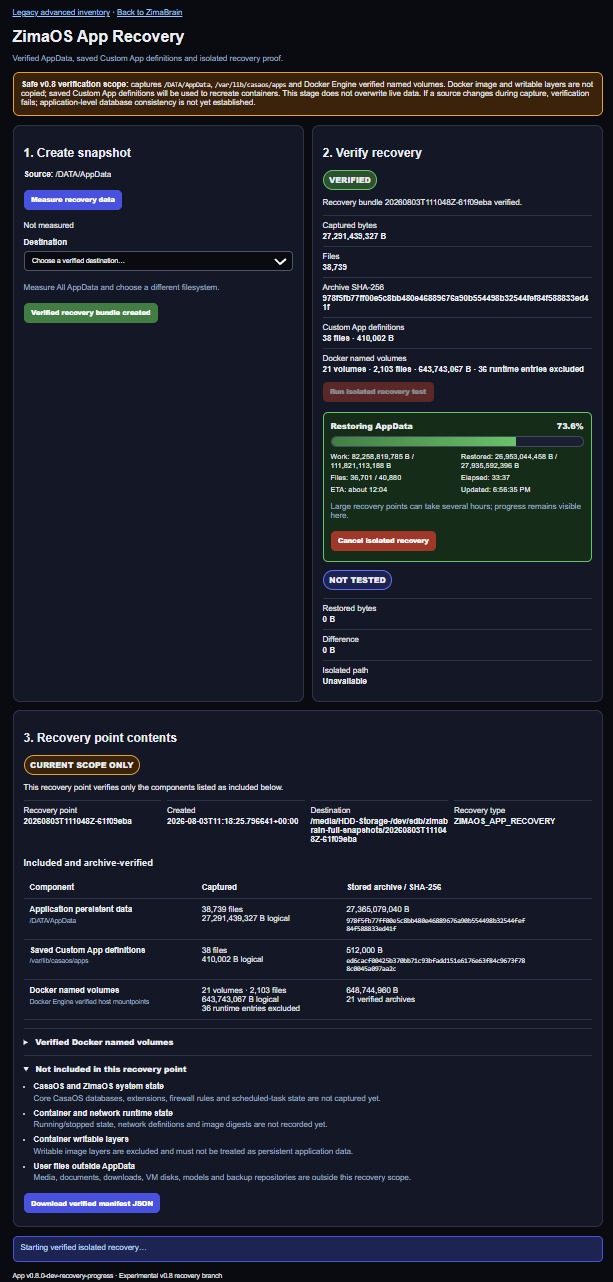
Our current ZimaCube test recovery point contains:
- AppData: 38,739 files and 27,291,439,327 logical bytes
- Custom App definitions: 38 files and 410,002 bytes
- Docker named volumes: 21 volumes, 2,103 files and 643,743,067 logical bytes
- Total: 40,880 files and approximately 27.94 GB of logical recovery data
- Runtime exclusions: 36 FIFO or Unix socket entries safely excluded and recorded
Runtime endpoints such as sockets and FIFOs are not persistent application data, so they are excluded with explicit manifest evidence rather than copied into the recovery bundle.
Verification process
The system does more than check whether an archive exists.
It currently performs these steps:
- Measures all recovery sources and confirms destination capacity.
- Requires the destination to be on a different filesystem from every captured source.
- Creates separate archives and manifests for AppData, Custom App definitions and Docker named volumes.
- Calculates archive and per-file SHA-256 checksums.
- Fails verification if a captured source changes during creation.
- Restores everything into a new isolated directory.
- Validates archive paths before extraction.
- Compares the restored file set, byte totals, metadata and per-file checksums against the captured manifest.
- Records a persistent green VERIFIED state only after every check passes.
The isolated recovery test never overwrites live AppData and never starts applications from restored data.
New recovery progress interface
Large recovery points can take time because the verifier reads and checks the data multiple times.
The latest interface now displays:
- Current recovery phase
- Green progress bar
- Percentage completed
- Processed and total verification bytes
- Restored logical bytes
- Restored and total file counts
- Elapsed time
- Estimated time remaining
- Live heartbeat
- Safe cancellation control
Cancellation stops only the exact isolated recovery worker and removes only its incomplete isolated output. It does not alter the verified recovery bundle or live ZimaOS data.
The recovery page also opens immediately while stored recovery evidence is reverified in the background.
Current limitations
We are deliberately not claiming complete system recovery yet.
The current recovery point does not include:
- Core CasaOS or ZimaOS databases
- User accounts
- Extensions
- Firewall rules
- Scheduled-task state
- Running or stopped container state
- Docker network definitions
- Docker image layers or image digests
- Container writable layers
- User media, documents, downloads, VM disks, AI models or external backup repositories
- Application-consistent database dumps
Saved Custom App definitions are intended to recreate containers, but Docker images are expected to be pulled again.
Applications are stopped during controlled testing to improve data consistency. Proper application-level database backup hooks still need to be designed.
Performance observations
Our current test performs approximately 111.8 GB of verification work for about 27.94 GB of logical recovery data because archives and restored files are read several times:
- Archive checksum verification
- Archive-entry validation
- File extraction
- Independent restored-file checksum verification
Small files are significantly slower than large sequential files because each file requires creation, metadata handling and checksum work.
The current /DATA/AppData directory is stored on Btrfs but is not itself a Btrfs subvolume. /var/lib/casaos/apps is stored on ext4. Therefore, an instant native Btrfs snapshot cannot currently cover the complete recovery scope.
Feedback requested
We would appreciate guidance from IceWhale developers and experienced ZimaOS users:
- Is
/DATA/AppData,/var/lib/casaos/appsand Docker named volumes the correct foundation for application recovery? - Which additional CasaOS or ZimaOS databases are required to restore the installed-app inventory and Custom App metadata safely?
- Is there an official or preferred API for exporting and recreating installed applications?
- Which Docker network, image digest or runtime configuration should be retained?
- What application-consistency hooks would you recommend for PostgreSQL, MariaDB, Redis and similar services?
- Would a future ZimaOS storage layout using dedicated Btrfs subvolumes be practical?
- Should recovery target the same ZimaOS installation, a clean installation, or both?
- Are there additional safety checks you would require before allowing controlled live restoration?
We want to confirm that the recovery architecture is heading in the right direction before enabling live replacement.
This remains an experimental test branch. Live AppData restoration is still disabled while we complete verification, cancellation, performance and recovery-scope testing.
We hope to release a test build soon and would appreciate technical feedback from the community.
 Docker networks not included