Zimaboard2 with ZimaOS OOTB - How to update OS? Immich missing?

Hello!
First time user of a new Zimaboard2. It has OOTB installed ZimaOS in version 1.4.3, but I see the latest release is 1.5.3. I dont see the red dot to initiate the update of ZimaOS. Can someone help me to understand why it is not there and how do I finally update ZimaOS now (following the recommended way from Zima, which I thought it would be the “red dot” thing)?

Also, I wanted to install the Immich software, but the App Store does not list it (the search won’t find anything), although even official Zima websites show it should be there. BigBearTechworld was configured by default with this unit of a new Zimaboard2 + ZimaOS. But it also shows only 83 apps. The corresponding Github page for BigBearTechworld lists more than 200apps.

So my questions are currently:

  • how to update ZimaOS, why is the red dot no there?
  • why is Immich not listed in the App Store and how come much less applications are listed than it supposed to have?

The Zimaboard 2 is a new unit and I set it up the first time.

After a bit of research on the internet, I can also confirm that the time + date have been already correctly displaying date and time, so I didn’t have to correct anything in this regard.
Then - while I didnt see a need but did it anyway - I set the Google DNS servers and rebooted the Zimaboard2. Hower, nothing changed and I don’t understand what this situation is about with a brand new unit of Zimaboard2 coming with a factory installed ZimaOS.

Anyone an idea what is going wrong and how can I fix it?

Thank you!
There are two separate things going on here, and both are normal behaviour on a brand-new ZimaBoard 2.

First – why the OS update (red dot) is not showing

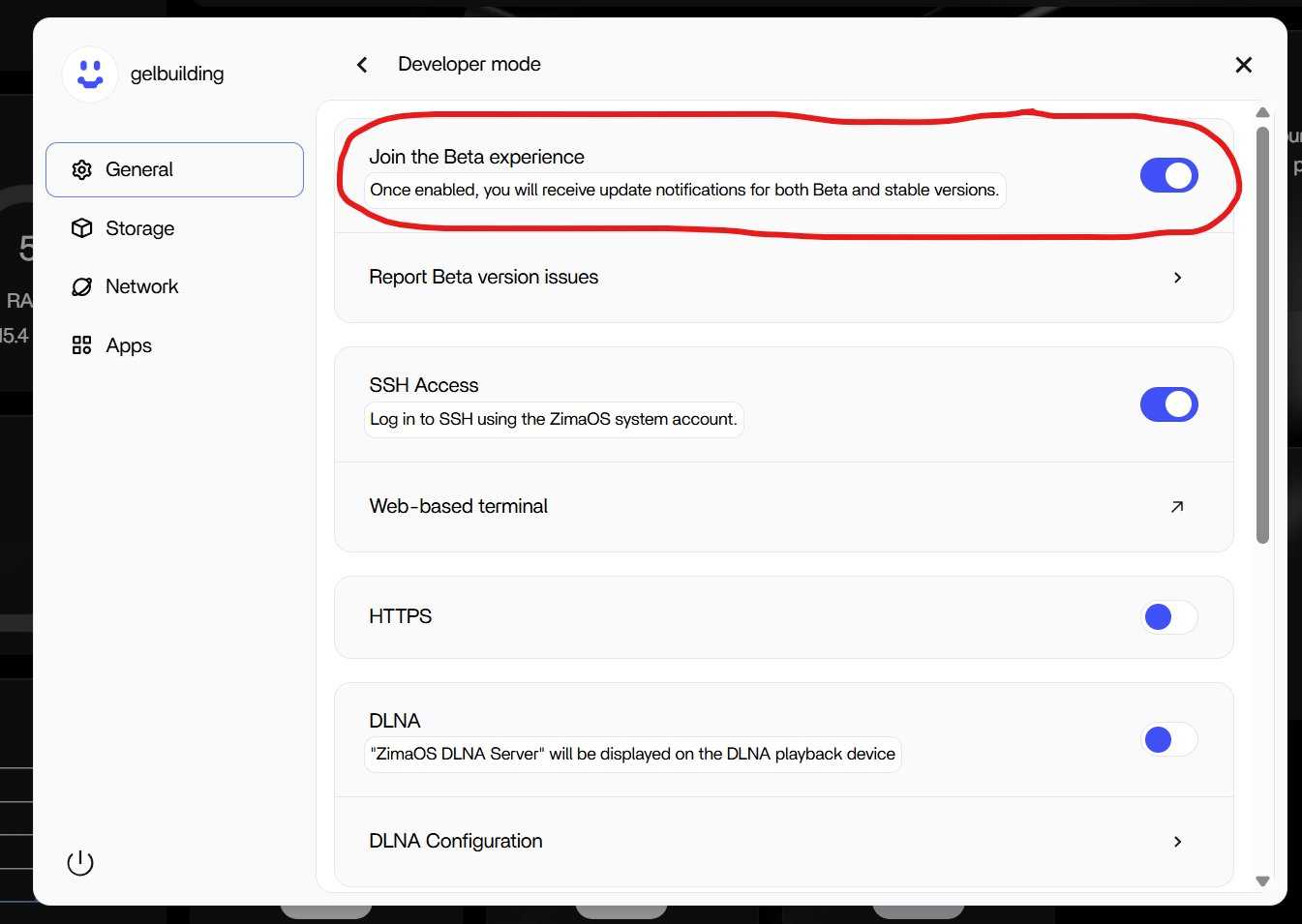
On fresh installs, ZimaOS will not show any OS updates at all unless Beta updates are enabled.

You need to go to:

General > Developer mode > Join the Beta experience > ON

Once this is enabled, ZimaOS will receive both Stable and Beta update notifications, and the red-dot updater will appear when your device is eligible.
Without this toggle enabled, even stable releases like 1.5.3 may never show up.

This is expected behaviour and not a network, DNS, or time issue.


Second – why Immich and many apps are missing

Your system is currently on ZimaOS 1.4.3.
The App Store only shows apps that are compatible with the running OS version.

Newer apps (including Immich) are intentionally hidden on 1.4.x.
BigBearTechWorld lists 200+ apps on GitHub, but ZimaOS dynamically filters that list based on OS version, stability, and architecture. Seeing ~80 apps on 1.4.3 is normal.

Once you update to 1.5.x, the app catalog refreshes and Immich will appear.


Summary

  • Enable Join the Beta experience to receive OS updates
  • Update to 1.5.x using the red-dot updater
  • App Store will then show the full, current app list

Nothing is wrong with your ZimaBoard 2, it’s just a couple of hidden defaults that aren’t obvious at first.

1 Like

Hello gelbuilding,
thank you very much for your great hints! And yes, you are totally right that it’s not obvious and wished the steps would be part of the “onboarding documentation” or so.

Ok, so toggling the “Join the Beta experience” on resulted exactly what you wrote, showing the update as well as the App Store got populated with more apps, incl. the Immich software, which installed without issues.

As for the update to 1.5.3 though I seem to run into a (new?) issue. I did select the step to initiate the update, but the screen respectively the progress bar got stuck on 0% for the whole time. I installed the “ttydBridge” and executed a ping, which wasn’t successful, so one the one hand I would have interpreted it that the ZimaBoard2 has no outbound internet connection, but then I don’t understand how it was able before to install Immich for example.

I went to the network section in the settings area, and toggled between DHCP and manual, but finally settled to the “default” and IP4 and IP6 are set to DHCP. With the ttydBridge - at some point, I can’t relate it 100% back to a specific activity, pings are now working (pinging outside web server domains for example).

I looked into the router’s admin panel to check if there was any rule limiting the ZimaBoard device, but there ain’t anything. Also a standard firewall was enabled, but that router is an ISP-controlled/-owned one, so there is nothing to see with regards to more detailed firewall rules, other than just a very generic highlevel “on/off”. I did disable it for a temporary test, but it didn’t resolve the issue with the Zima update progress. The router itself I did also restart for the sake of also having it “turned off and on again”.

Meanwhile I also exchanged the Ethernet cable and selected a different LAN port on the router too. No change.

Meanwhile, the update is also not shown anymore. I did restart the Zimaboard2 by now also several times. It continues to show 1.4.3, and doesn’t change - as once observed - to 1.5.3 anymore.

So right now, the App Store is listing now 369 apps, that seems about right.
But the update option is not listed.

Any further advice you may could give me?
By the way I noticed that after one or the other Zimaboard2 restart, sometimes the timezone is not set correct, after another restart it shows up again as correct.
Also the “Device info” window, which is accessible via Settings > General, is sometimes not populated and/or has missing fields. Not sure if that is some sort of hiccup or just a matter of time it needs till it completed the gathering of the information and till it is able to display it properly.

Next, the ZimaOS is (still) currently shown as “ZimaOS v1.4.3”. What needs to be done that it starts also showing (which implies enabling the corresponding feature set I assume) the “PLUS” information? Since the ZimaOS on a Zima hardware supposed to be the full version, right?

Thanks for any further hints.

I have now downloaded the 1.5.3 update file and uploaded it to the supposed ota folderpath in order to initiate an “offline update”.This worked now (although I’d like still to know what’s going wrong with the regular “online update” approach). Also the “Plus” symbol appears right next to the new version number too.

1 Like