Hi, I’m using a ZimaBlade on firmware v1.4.3 for a home media server running latest available JellyFin from your APP store (V10.10.7), but have been recently experiencing a lot of application delays and high CPU and also coincidentally noticed that the CPU speed does not go above 800Mhz from inside BTOP too. I did not take note of the CPU speed prior to any updates or before these issues, but the system was a lot more responsive under previous version of ZimaOS and JellyFin, with no delays including navigation within the app so it is very noticeable that something is wrong now. I have also had the Zimablade from new from your store for just over 4 Months.
ZimaBlade is running the N3350 CPU with 8GB RAM and latest firmware v1.4.3. My CPU temperature does not exceed 45degC, even under high load and transcoding due to my addition of custom heatsink and fan. When first got ZimaBlade it was physically hot to touch with CPU temps up to 65degC with the default case in some cases of using it for my Media, but the overall system was still responsive under these conditions.
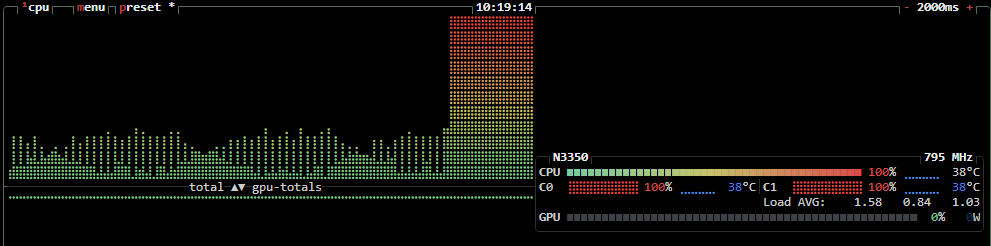
When using Jellyfin, any of the images in any of my galleries, whether movies or photos, takes a long time to load the initial thumbnails, just like they are being recreated individually for the first time, every time. I looked at the CPU from ZimaOS homepage and saw it was running at 100% during the processing, and then within BTOP the CPU speed never went above 800Mhz. As the CPU temps are low (between 34degC and 45degC), i’m pretty sure its not from thermal throttling so something seems to be locking the CPU frequency to such a low value and very high CPU load since any updates.
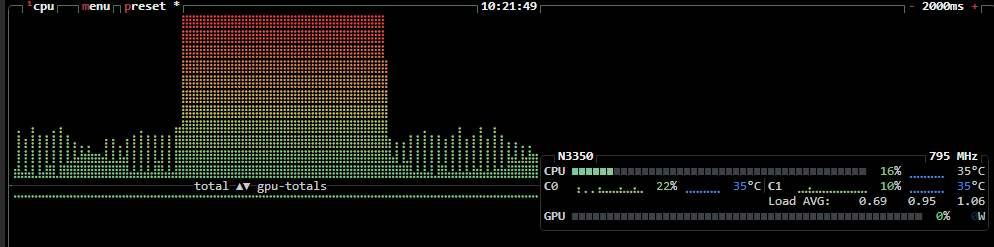
First Image provided shows the CPU jump to 100% when attempting to load one of my image gallery in Jellyfin, and you can also see frequency at 795 MHz. The second image is another one showing low CPU when its finished updating the images in the current page and jumps up to 100% when i’ve moved to the next page in the gallery, then back down to low when it has finished processing the thumbnail images. CPU frequency also changes very slightly between 795 MHz and 796 Mhz during this time.
Our engineers will investigate this issue. But before that, could you please recall the differences between your previous usage environment and your current one? For example, is the ambient temperature significantly higher now? And would you try it again in an air-conditioned room? We’d love to hear your feedback.
Hi, the differences have only been with firmware update within ZimaOS from v1.4.2 updated to latest and the Jellyfin app updated from just one version below this version via the update mechanism within ZimaOS.
The physical environment has not changed since I first used the ZimaBlade, nor has room ambient temperatures been issues (they are around 20degC).
I have also performed a new installation on a ZimaBoard that I also own, which has the same processor. It also shows the same issue of being limited only to 800Mhz and Jellyfin being extremely slow. Have any further updates been identified with this issue?
I found your scaling_governor set to userspace. Have you used any setup software to modify it? For example, the cpupower command, the default setting of ZimaOS should be powersave,
We can manually change it back using the following command:
echo powersave | sudo tee /sys/devices/system/cpu/cpu*/cpufreq/scaling_governor
or
echo ondemand | sudo tee /sys/devices/system/cpu/cpu*/cpufreq/scaling_governor
The specific meaning of all the options is as follows, you can choose the right one according to your needs: performance : Always runs the CPU at the highest frequency.
powersave : Always runs the CPU at the lowest frequency.
ondemand : Dynamically adjusts the frequency based on CPU load (increases frequency when load is high, decreases frequency when load is low).
conservative : Similar to ondemand, but frequency transitions are smoother and more power-efficient.