Zima-vm-extras [Beta] — autostart, snapshots, USB & PCIe passthrough for ZVM

Hi,

I built a small ZimaOS module that adds the operational features ZVM is currently missing. If you run more than one VM on your ZimaCube, you probably know the pain: no autostart on boot, no snapshots before risky updates, no USB or PCIe passthrough GUI. I got tired of working around it via SSH every time, so I packaged the fixes as a proper sysext module.

It’s a separate module that lives next to the official ZVM — it doesn’t replace or modify it. The official ZVM stays in charge of creating and editing VMs. zima-vm-extras just adds the missing knobs on top, using the same libvirt backend underneath.

Built and tested on a ZimaCube running ZimaOS 1.6.1 (kernel 6.12, libvirt 10.2, qemu 9.2).
Features

  • Autostart per VM with custom boot order and delay (seconds between VMs at host boot)

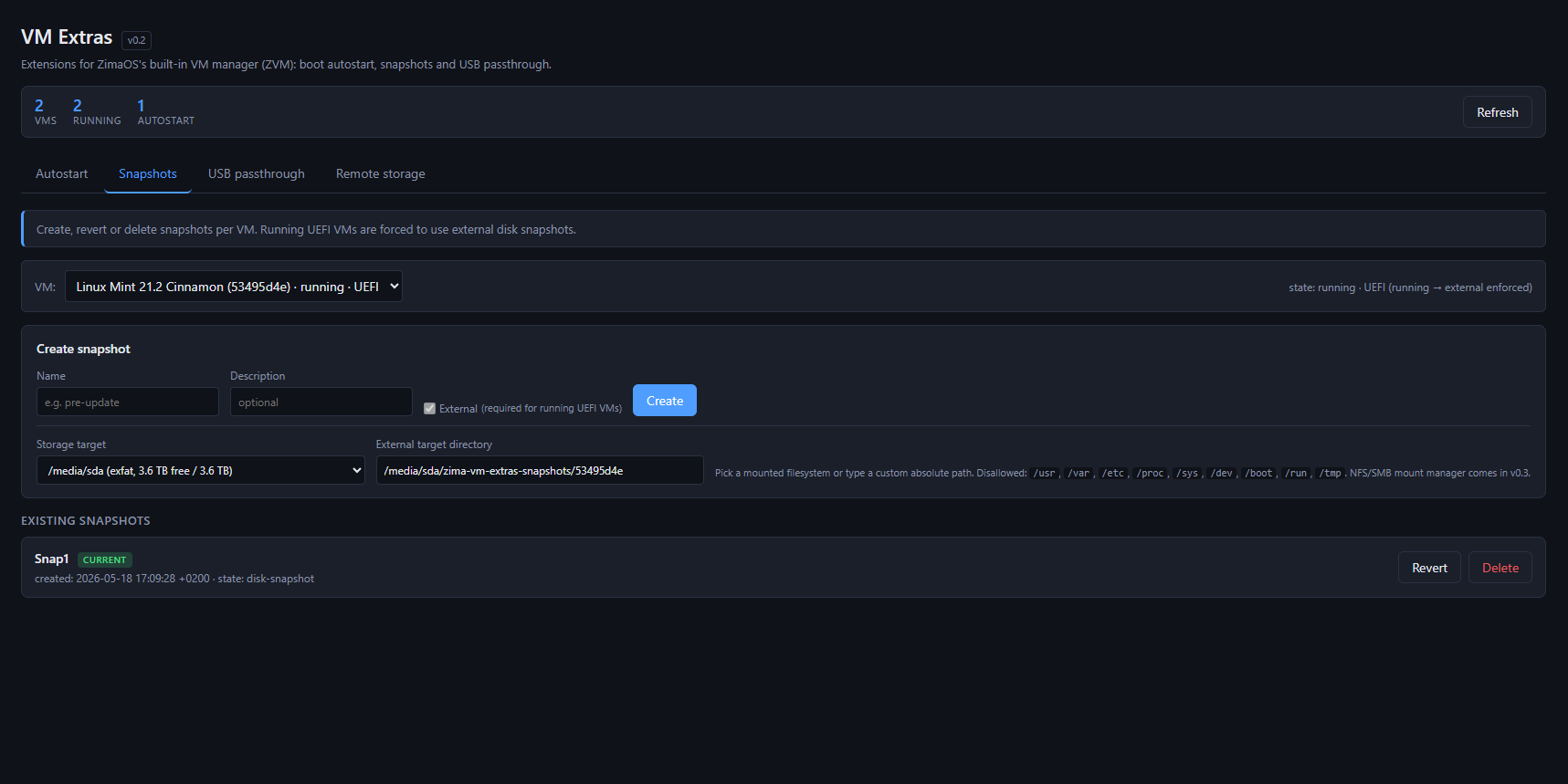
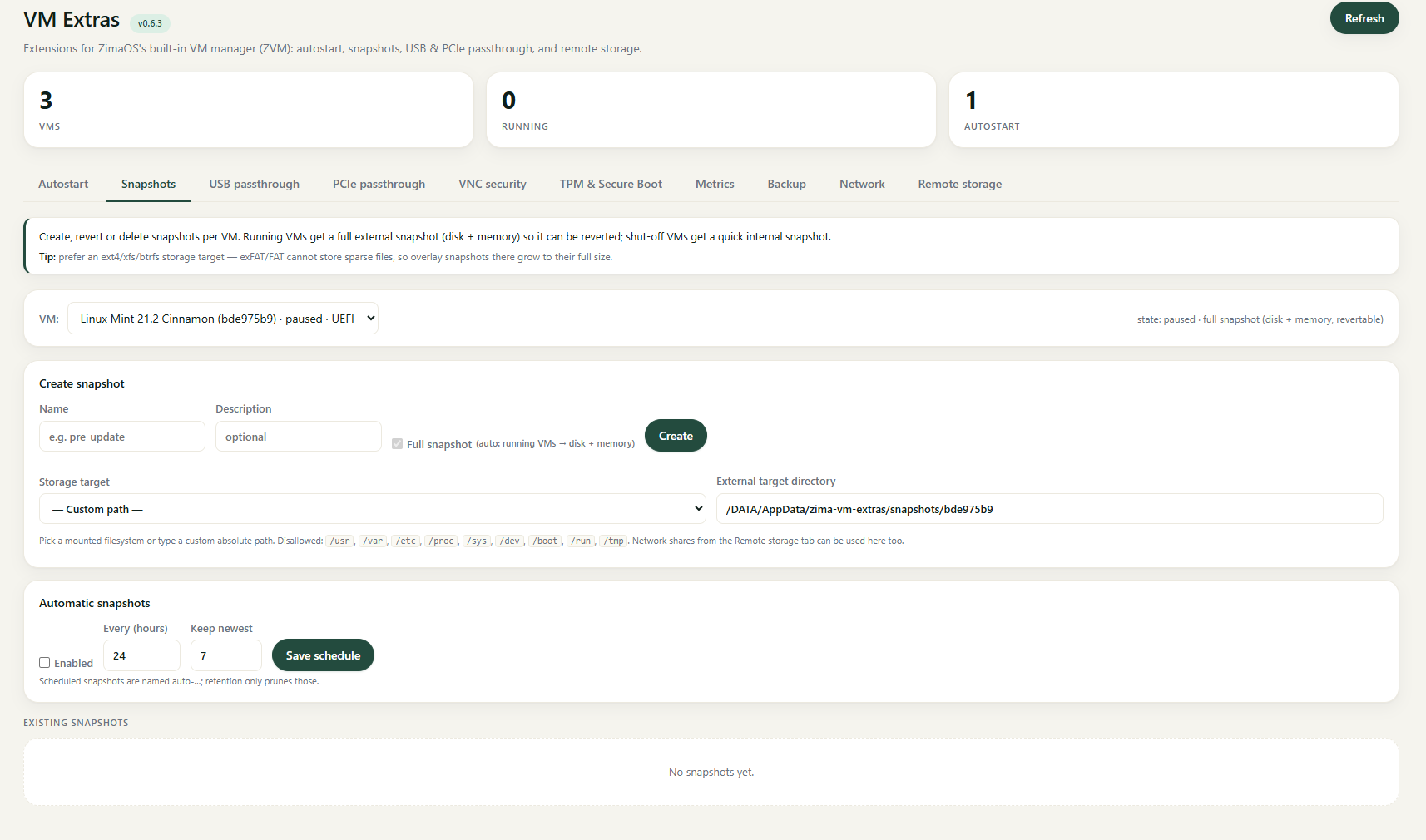
  • Snapshots — create, list, revert. Internal for stopped VMs, external with memory state for live VMs. Storage under /DATA/AppData/zima-vm-extras/snapshots/

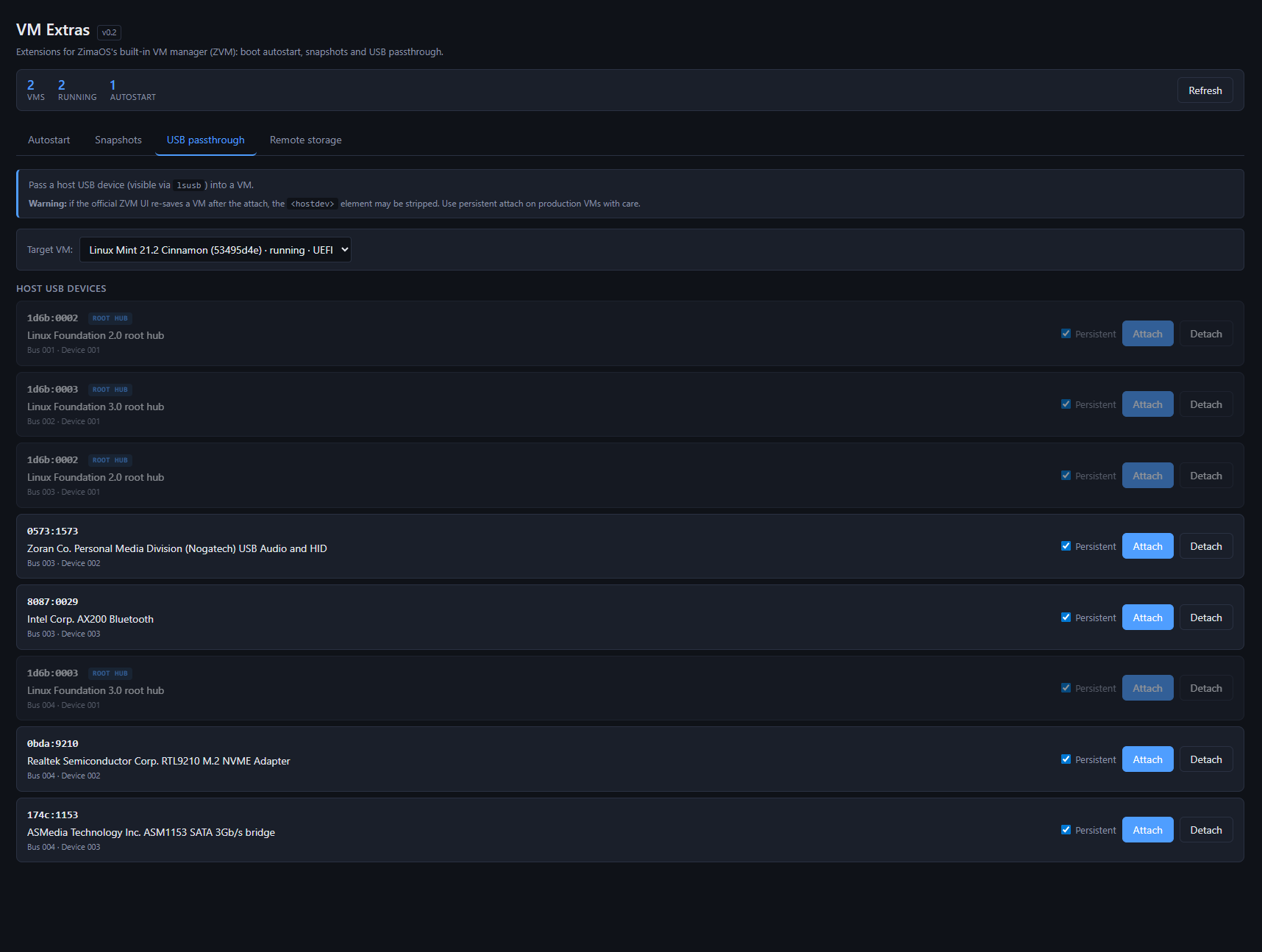
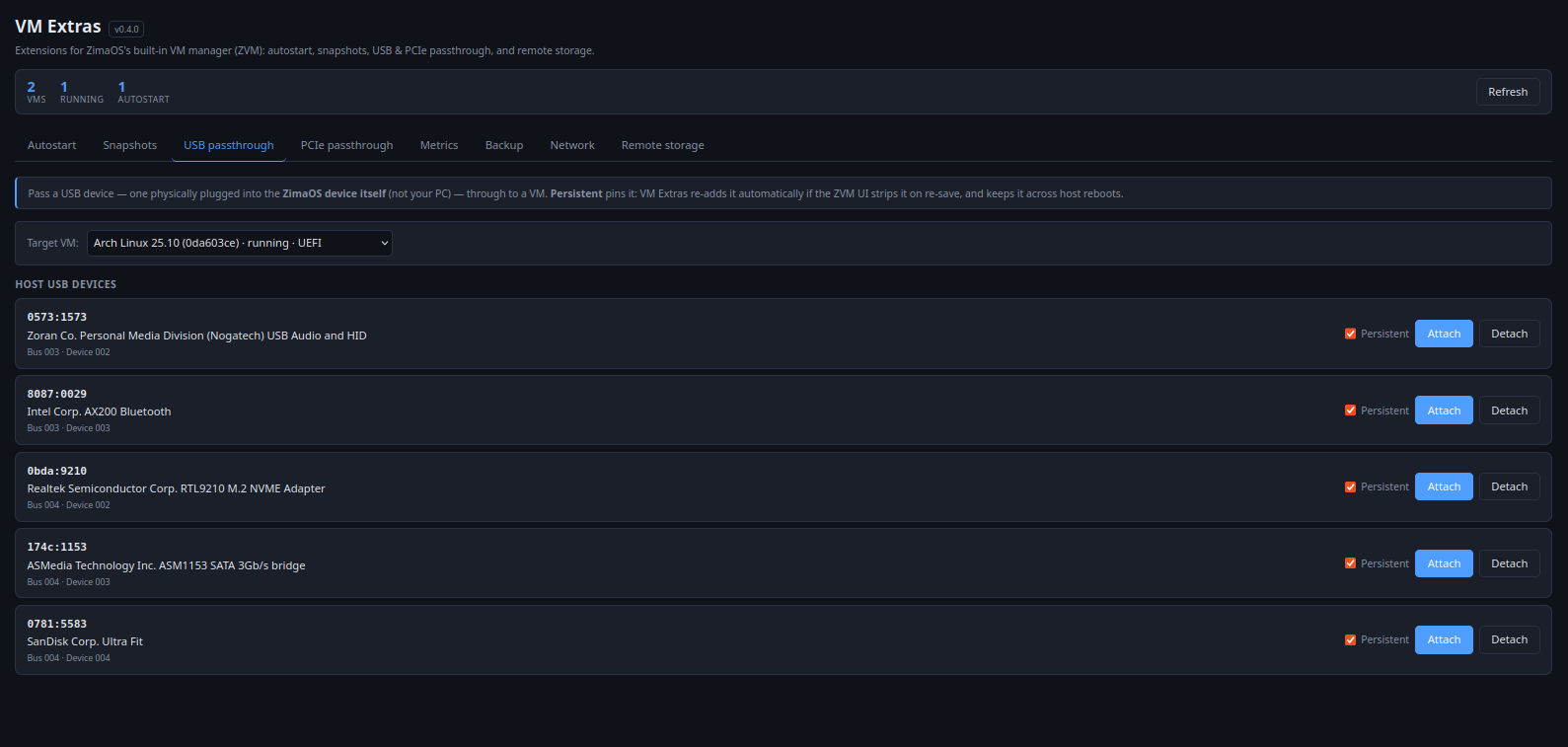
  • USB passthrough GUI — pick a device from the host’s lsusb, attach to a VM persistently. No more shell XML editing

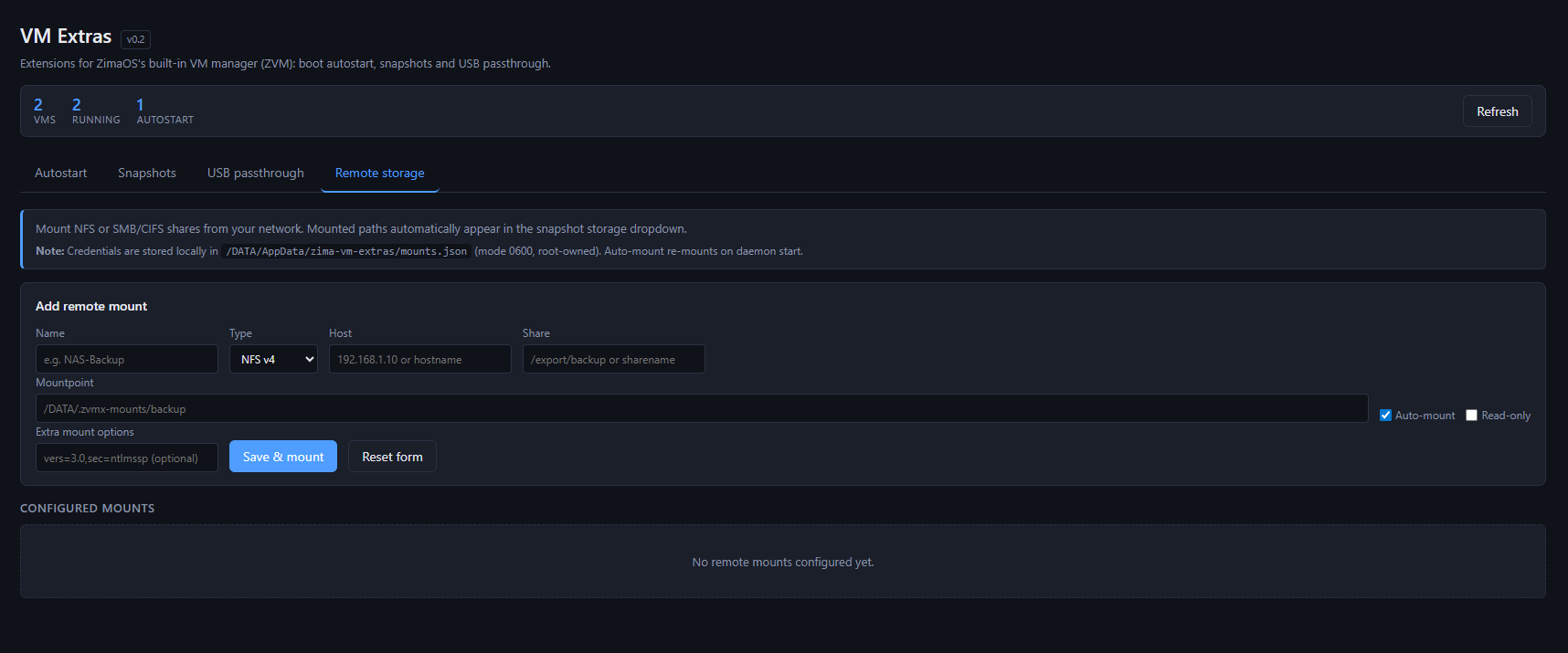
  • Remote storage mounts — NFS v4 and SMB/CIFS shares from your network, auto-remounted on daemon start. Mounted paths automatically appear as snapshot storage targets. Great for offloading snapshots and backups to a separate NAS

  • Bridge-routing workaround — toggle between Bridge / Macvtap / NAT to work around the VM↔host routing issue

  • Backup / export of VMs as tar.gz (qcow2 + XML), scheduled or on-demand

  • Watchdog with auto-restart on VM failure

  • Live metrics — CPU, RAM, disk I/O, network, plus a 60-min trend graph per VM

Technical bits

  • Go daemon on 192.168.x.x:8473, pure stdlib, ~5 MB binary, ~1.9 MB compressed sysext

  • Vanilla HTML/JS frontend, no build step, matches ZimaOS dark theme

  • Talks to libvirt via virsh subprocess (stable interface, no cgo)

  • Reads the same authoritative API as ZVM (/v2/virt_management/domain/), so the views stay consistent

  • Same module layout as zima_cron and casadrop — fully ZimaOS-native

Open question to the community: Is this useful to anyone besides me? If there’s interest, I’ll publish the GitHub repo and submit it to the Mod-Store. Otherwise it stays a personal tool :wink:

Feedback or feature requests very welcome

Lintuxer on Discord
7 Likes

This is actually really impressive work.

You can tell this was built by someone who actually uses ZVM daily and got tired of doing everything manually through SSH every time. The fact that it sits beside the official ZVM instead of replacing it is probably the smartest design choice here.

Honestly, a lot of these features are things people have been asking for repeatedly:

  • autostart
  • snapshots
  • USB passthrough
  • proper backup/export
  • remote snapshot storage
  • VM monitoring

The USB passthrough GUI alone will probably make a lot of users happy because editing libvirt XML manually is not fun for most people.

I also really like the remote storage integration for snapshots/backups. That is a very practical solution, especially for larger qcow2 files where local NVMe space disappears fast.

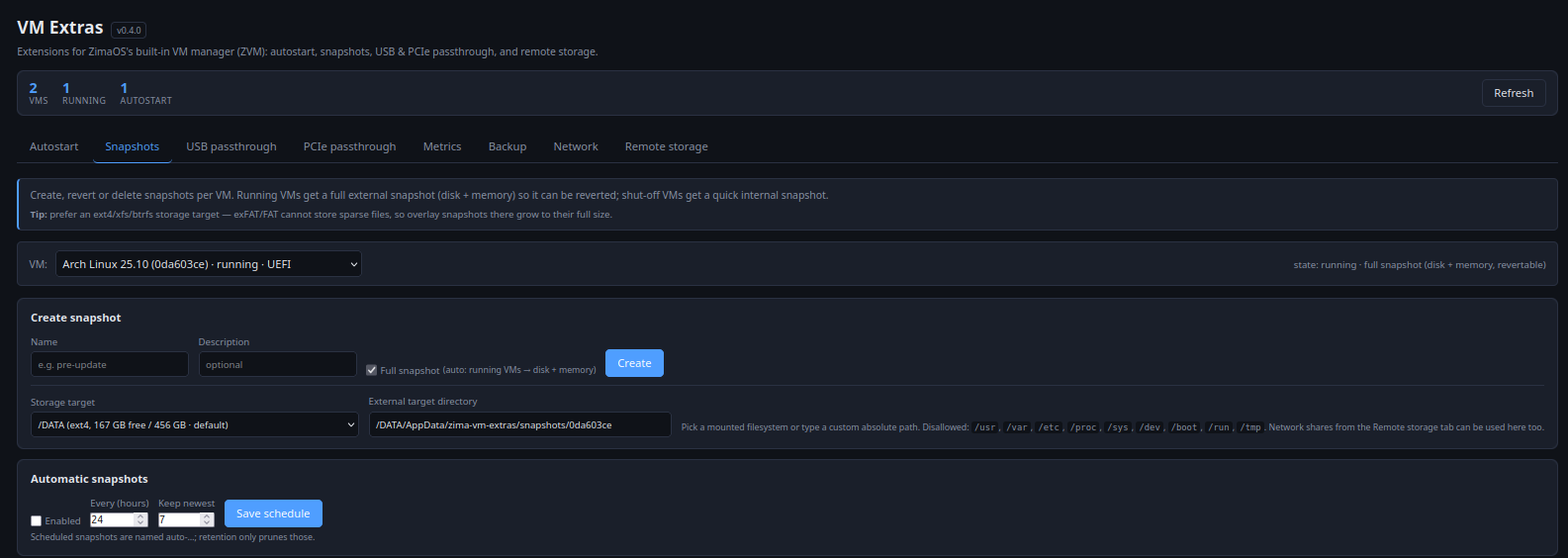
And the UI honestly looks very clean and native to ZimaOS from the screenshots.

Only thing I’d be cautious about long term is passthrough persistence and XML regeneration after ZimaOS updates, but you already seem aware of that from the warning message.

Personally I think there would absolutely be interest in this from the community, especially from people running multiple VMs or coming from Proxmox/Unraid backgrounds.

This feels like one of those projects that starts as a “tool for myself” and ends up becoming something a lot of users rely on daily.

1 Like

The screenshots look like it will be very useful.

My feature request is the ability to edit the NIC attachments so you can, for example, bridge both without editing XML.

@gelbuilding Thanks, that’s exactly the spirit it was built in
@matterbury. NIC editing is doable for v0.3: list/add/remove interfaces per VM, pick from existing libvirt networks or bridges, choose mode (network/bridge/macvtap) and model (virtio/e1000e/rtl8139). Same hot-attach pattern as USB.

Caveat: creating a new host bridge with eth0 as slave (the “VM directly on my LAN like Proxmox” case) is out of scope for v0.3 — a botched bridge migration can take the ZimaCube off the network. I’d rather do that right in a separate effort with a rollback timer.

If you already have a host bridge, v0.3 will let you attach to it. Does that cover your case, or do you specifically need the host-bridge-creation part?

2 Likes

I’m not sure b/c I don’t completely understand you :laughing: but what I am thinking is the dropdown that’s already in the ZVM settings (at the bottom) but rather than letting you pick one NIC and mode, you could pick the mode for each NIC (including off). tbh I don’t know how that could bork the cube itself but I’ll trust you on that.
@matterbury Got it — you want a VM to have multiple NICs, and for each NIC the existing dropdown (NAT / Bridge to eth0 / eth1 / wlan0 / None) selectable independently. That’s safe and very doable, since ZimaOS networking stays untouched — it just uses what libvirt already supports. Coming in v0.3.

2 Likes

How does one download this terrific sounding app? This is exactly what I was looking for. I was about to migrate away to TrueNAS for my VM, due to USB passthrough issues. If the Zima developers are reading, please fix the USB passthrough issue, or I may need to switch.

@cerebus777 USB passthrough is exactly what pushed me to build this, so I know the pain. It’s not public yet: still beta on my own hardware, and I don’t ship anything that touches people’s VMs until it’s solid. Repo + Mod-Store submission within the next week

1 Like

Quick update — v0.4.0 is out and fully tested on ZimaOS 1.6.1 (kernel 6.12, libvirt 10, qemu 9). Verified on a ZimaCube Pro with both a running Arch VM and a shut-off Mint VM.

  • Autostart — VMs start on host boot via the daemon, with per-VM order and delay so they come up in sequence. Optional per-VM watchdog restarts a VM if it stops or crashes.

  • Snapshots — create / revert / delete per VM. Running VMs get a full external snapshot (disk + memory) so it’s genuinely revertable; shut-off VMs get a quick internal one. Optional schedule with retention.

  • USB passthrough — pass a host USB device into a VM from the GUI, no manual XML. Persistent devices get re-applied automatically if the ZVM UI strips them on re-save, and across reboots.

  • PCIe passthrough — via VFIO, with IOMMU groups and current host driver shown; bridges are blocked. Same persistence/reconcile as USB.

  • Metrics — live per-VM CPU, memory, disk and network from libvirt.

  • Backup — export a VM (domain XML + disk images) as a standalone compact qcow2, asynchronously.

  • Network — switch a VM’s NIC to another libvirt network and change its model. Config-only, never touches host bridges.

  • Remote storage — mount NFS / SMB-CIFS shares as snapshot/backup targets.

On testing: 63 test cases passed, 0 failed. That covers build/static analysis (go vet, go test -race), security (daemon not exposed on the LAN, CSRF origin checks, argument/path-injection guards, hardened systemd unit), and end-to-end runs of snapshot create/revert/delete, backup export, NIC switching and live metrics. A handful of cases are out of scope on purpose — e.g. a real power-cycle and a live PCIe attach that would touch host hardware.

Code and details: https://github.com/chicohaager/ZVM-Extra

2 Likes

Hi Lintux,

This is excellent work. I installed and tested v0.4.0 today on my ZimaBoard and the result was very clean.

A few things I verified successfully:

VM Extras installed correctly as a sysext.

The zima-vm-extras.service started properly and stayed active.

The module appeared in the ZimaOS UI and loaded without issues.

It correctly detected a new Debian test VM created through ZVM.

Metrics worked and showed live VM CPU, memory, disk and network data.

Snapshot creation worked on a shut-off VM.

The snapshot also appeared correctly in libvirt with:

virsh snapshot-list f3437ead

The shut-off snapshot behaved exactly as described, as an internal libvirt snapshot rather than creating large external files under the VM Extras snapshot directory. That was good to see because it confirms the logic is doing what you said it would do.

I also like that the service listens only on localhost, not exposed directly on the LAN. That is the right approach for this type of extension.

Overall, very impressive work. The UI is clean, the workflow makes sense, and the features are genuinely useful. Snapshots, metrics, autostart ordering, USB persistence, backup, remote storage, and safer PCIe handling all fill real gaps in the current ZVM experience.

I have not tested PCIe passthrough yet because I wanted to keep the first test safe and controlled, but so far everything I tested worked exactly as expected.

Great job again. This is turning into a very strong companion extension for ZVM.

2 Likes

Thanks for testing it George. Future releases will have all the same design (like ZFW)
Best Holger
PS.: Today is BBQ time - no time for ZimaOS :wink:

2 Likes

Great works! It seems to effectively address the current shortcomings of ZVM.

Updated version is available GitHub - chicohaager/ZVM-Extra: Community add-on for ZimaOS's built-in ZVM module — autostart, revertable snapshots, USB & PCIe passthrough, backup/export, live metrics, NIC switching and NFS/SMB storage · GitHub

3 Likes

Thanks a lot for all your creations (cron, ZFW … and this ZVME ultimate app).

I have some litlle bugs on v0.6.3 (nothing very important)

  • Snapshot tab
    • don’t well working if names are contening spaces (creation work but deletion don’t work)
    • Storage target don’t shown if VM not running (is this a feature or a bug)
  • On metrics tab, all my VM are marked with 100% Memory usage (ie : 4.0 GB / 4.0 GB)

Also, I don’t have undestoud how to fix the VM←→Host issue ? (in my case : using my HomeAssistant VM via Nginx Rev Proxy Docker instance). This is not working if Zima and the VM are on the same Ethernet port. The only warkeround I have found is to connect Eth0 and Eth1 to an Ethernet Switch …

Some ideas of improvment :

  • Starting / stopping VM in the ZVME interface
  • Persistant target directory on backup tab
  • Interacctive folder selection function for target directory in snapshot and backup tabs
  • In metrics tabs : graphic history

Thanks for your detailed report —
Fixed in v0.7.0.

  • Snapshot names with spaces
  • 100 % memory on every VM.
  • Some minor bug fixes

Your suggestions — three are in v0.7.0: start/stop/reboot/force-off buttons on the Autostart tab (with a warning if the VM’s watchdog would just restart it), the backup and snapshot target directories are remembered (stored on the ZimaOS box, not in your browser), and the Metrics tab draws a short history sparkline per value.
VM ↔ Host on the same NIC. I can’t reproduce this — my VMs are on the NAT network — so treat this as a hypothesis rather than an answer. But your workaround (two ports into a switch) is the classic macvtap signature: guest↔LAN works, guest↔host does not, because the host NIC and the macvtap endpoints have no path between them; going out to a switch and back is exactly what restores it. One command tells you:

virsh dumpxml | grep -A3 ‘<interface’

If you see type=‘direct’ with , that’s it. The proper fix is a real Linux bridge (br0) with eth0 enslaved, instead of macvtap — then host and guest are on the same bridge and can talk. Happy to go into detail if that’s what you find.

Thanks a lot for your reactivity !

@Zima-Jerry Is it possible to add in future version of ZimaOS an option in ZVM to use a real bridge mode instead of a “direct” mode ?
We are some users with same problem : needing internal communication between VM and Docker (ie : using nginx rev proxy docker to have a secure distant access to a web server in a VM, for exemple “Home Assistant” Home Automation server), but this is not working if in the same interface (ie: all on Eth0). For the moment, we haven’t another solution to use two NIC (Eth0 + Eth1) connected to an Ethernet Switch.

@Lintux Another ideas for futur in ZVME :

  • A totaly integrated management of VM
    • Creating
    • Modifiing
    • Restoring from bakcup
    • Secured noVNC viewing with password

This “Expert” VM management interface is a real game changing for ZimaOS !

BR

1 Like