I did some more testing and found an important difference between the web interface and the Zima Client.
Using the ZimaOS web interface:
- If I access ZimaOS through the local NAS IP, I can open all Docker applications (both with and without a reverse proxy).
- If I access ZimaOS through the reverse proxy, only the applications that also have a reverse proxy work.
Using the Zima Client on my iPad:
- If I connect to my NAS through the local IP, I can only open Docker applications that use the local IP.
- Docker applications configured with a reverse proxy do not open.
So the Zima Client behaves differently from the web interface.
It seems that the client does not automatically choose the correct Web UI address for each application.
Could you please check how the Zima Client determines which URL to use when launching Docker applications?
Thanks for pointing this out. For a reverse proxy address, you shouldn’t need to specify a port manually.
Could you try entering only the domain, for example xxx.myds.me, without :80, and see if it works?
I understand what you mean.
However, I have already tried entering only the domain, without http://, https://, :80, or :443.
The problem is that the Zima Client automatically adds :80 after I save it.
So even if I enter only:
the app changes it back to:
I cannot prevent the port from being added.
That’s exactly the problem I was trying to show in my screenshots.
One more question: what reverse proxy are you using for this domain—Nginx, Nginx Proxy Manager, or something else?
Could you also share how the reverse proxy is configured for this domain, especially the forwarding protocol, target IP/hostname, and port? A screenshot of the proxy configuration would be helpful too.
Hello ZimaOS Team,
I would like to report a possible issue with the Files application.
System configuration:
Problem: I uploaded approximately 293 photos (~983 MB) from an iPhone 12 Pro Max to a folder in the Files application.
The folder contained:
-
JPG files
-
37 HEIC files
-
1 DNG file
When I open the folder through the ZimaOS Files web interface, the HDD becomes extremely busy, the web UI becomes very slow, and even SSH access can become nearly unresponsive.
Note:
Opening a folder containing 37 HEIC files causes CPU usage to reach approximately 90%, making the system sluggish and sometimes affecting SSH responsiveness.
Troubleshooting performed:
-
SMART reports no disk errors.
-
Docker containers are not causing the load.
-
A test folder containing only JPG files opens and indexes normally.
-
After moving all HEIC files out of the original folder, the folder immediately indexed correctly and became responsive.
Because of this, I suspect the issue may be related to HEIC thumbnail generation or indexing in the Files application.
Please let me know if you would like any additional logs or testing.
I understand that you need to verify the reverse proxy configuration.
However, I would like to clarify that the main issue I am reporting is not that my reverse proxy itself does not work.
The reverse proxy works correctly with Safari, Edge, and other browsers.
The specific problem is that the Zima Client does not allow me to save the reverse proxy domain without automatically adding :80.
For example:
I enter:
After saving, the Zima Client changes it to:
I cannot remove the port permanently.
This happens before the application is even opened.
I have already tested different connection methods, including Tailscale and Direct IP, and the behavior remains problematic.
I will provide the requested Synology configuration, but I believe the automatic addition of :80 in the Zima Client should also be investigated directly.
Understood. We are investigating the cause, and I will let you know as soon as I have any news.
Hello, thank you for your feedback. This is a known issue. Would you be willing to assist us in testing the latest version?
Hello,
Yes, I would be happy to help test the latest version.
Please let me know what steps I should follow and which version I should install.
ZimaOS v1.7.1-beta1 is here.
https://github.com/IceWhaleTech/ZimaOS/releases/tag/1.7.1-beta1
Since the release of ZimaOS 1.7.0, we’ve been closely following community feedback and fixing issues that affect daily use. This update focuses on security, stability, and reliability: including fixes for File Service, backups, RAID, USB tasks, app data, and several App Store improvements. Many of these fixes came directly from your reports.
Thank you for helping us make ZimaOS better. Welcome to ZimaOS v1.7.1 beta1.
Any question @777Spider Thanks in advance.
Hello @777-Spider ,
Thank you.
I would be happy to test v1.7.1-beta1.
My system is currently running in production, so before proceeding I would like to know the recommended upgrade path. Can I upgrade directly from the current version without reinstalling ZimaOS?
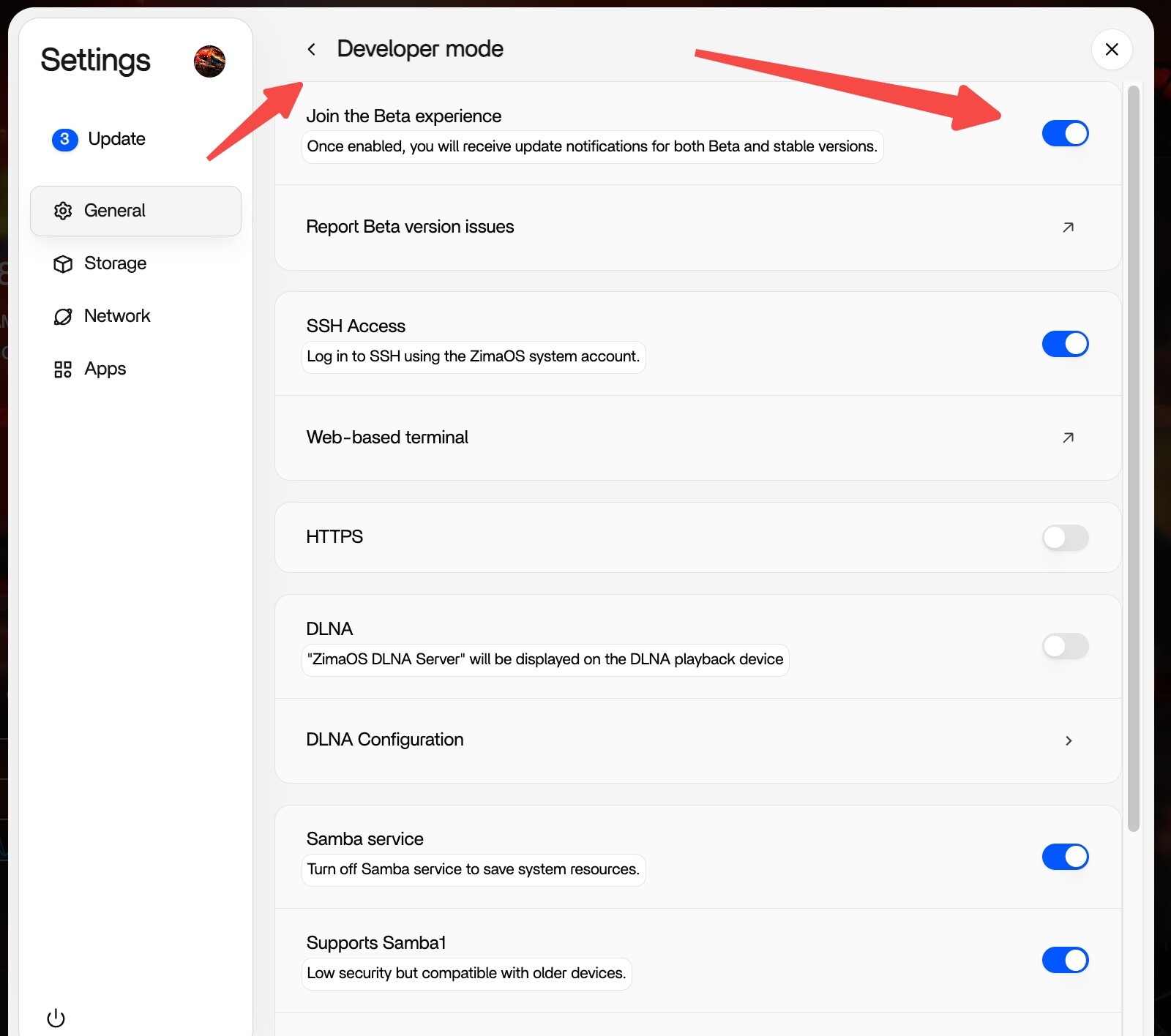
Of course, just toggle this switch on and wait for the red dot to update, or manually pull the new package.
Hello @777-Spider
I upgraded to v1.7.1-beta1 and tested the same HEIC files that previously caused the issue.
The HEIC synchronization and indexing are now working correctly and I can access the folder normally.
Thank you for the fix and for your support. 
1 Like