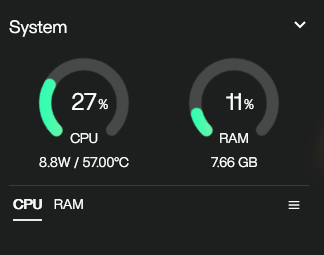
Hi, I’m running ZimaOS on a fresh install, and my CPU usage is around 30%. This is with no apps or processes running. Could somebody help me? I have an i3 6100T.
Do you have the AI Search enabled? Settings > General > Developer Mode > Zima AI Seach
If so, I have seen that they are working on optimizing that feature. I experience high CPU at idle with that enabled.
2 Likes
This is usually normal on a fresh ZimaOS install, especially on an i3-6100T (2 cores / 4 threads).
Why it happens
- Post-install background tasks (disk discovery, SMB, network, monitoring)
- WebUI polling keeps one core partially active
- Low-core CPUs show this as 20–30% where newer CPUs wouldn’t
What to do
- Wait 10–20 minutes after first boot
- Close the WebUI and check again
- Only investigate if it stays high hours later or a single process is pegging a core
Good sign
- ~57 °C and ~9 W indicates the CPU is not under real load
The different forms of Kworker is the thing that seems to be using the resources. It’s been around 10 hours and it is still at around 30% usage.
No, I don’t have the AI search enabled.. I think it might just be the fact that I have 2 cores but I’m not sure.
That helps. If it’s still kworker after 10+ hours, this is no longer first-boot activity.
On a 2-core i3-6100T this is generally expected behavior:
kworker is kernel work (power management, interrupts, drivers, disk and network polling). With only two cores, one semi-busy kernel thread shows up as ~25–30% CPU.
You’ve already ruled out AI search, and your temps and power draw are normal, so this isn’t real load or a runaway process.
It would only be a concern if CPU was stuck above ~80%, temps were climbing, or a single kworker was pegging a core continuously.
Bottom line: on low-core CPUs, this level of kworker usage on ZimaOS is normal and harmless.