Hi. I’d like to copy files from an external usb drive (NTFS formatted) to my storage (RAID1, connected with SATA Y cable). But usb drive is not visible in Files.
USB drive is present:
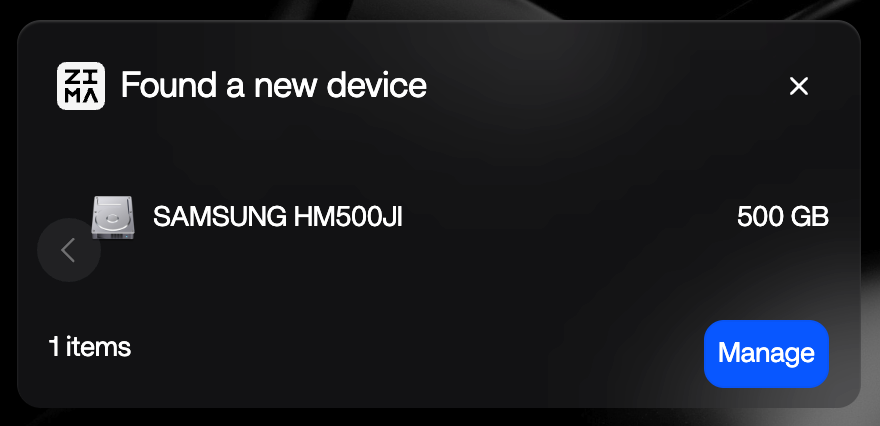
What should I do? thanx
Hi. I’d like to copy files from an external usb drive (NTFS formatted) to my storage (RAID1, connected with SATA Y cable). But usb drive is not visible in Files.
USB drive is present:
What should I do? thanx
This usually happens when ZimaOS detects the drive but hasn’t mounted it for use in Files yet.
I suggest checking this first:
If it shows but isn’t accessible, it’s often because of NTFS handling. ZimaOS sometimes doesn’t auto-mount NTFS drives properly.
You can verify from terminal:
lsblk -f
Look for your USB (likely sdb1 or similar). If it has a filesystem but no mountpoint, that’s the issue.
Then try mounting it manually:
mkdir -p /DATA/usb-test
mount -t ntfs-3g /dev/sdb1 /DATA/usb-test
If that works, the drive should become accessible.
If it fails, let us know the output of:
lsblk -f
dmesg | tail -50
I believe this is just a mount issue, not a hardware problem, since ZimaOS already detects the device.
ok, with lsblk I realize that the drive it’s not NTFS but HFS+.
Trying to mount I got no errors but it’s not yet visible in Files
Here the output:
lsblk -f
NAME         FSTYPE            FSVER LABEL                   UUID                                 FSAVAIL FSUSE% MOUNTPOINTS
loop0        squashfs          4.0
loop1        squashfs          4.0
loop2        squashfs          4.0
loop3        squashfs          4.0
loop4        squashfs          4.0
loop5        squashfs          4.0
sda          linux_raid_member 1.2   zimaos:42c718ef93ec44ac 25bed427-934a-4a3f-9f87-f7af3ca1cfc4
└─md0        btrfs                                           25bed427-934a-4a3f-9f87-f7af3ca1cfc4    1.8T     3% /var/lib/casaos_data/.media/myStorage
                                                                                                                 /DATA/.media/myStorage
                                                                                                                 /media/myStorage
sdb          linux_raid_member 1.2   zimaos:42c718ef93ec44ac 25bed427-934a-4a3f-9f87-f7af3ca1cfc4
└─md0        btrfs                                           25bed427-934a-4a3f-9f87-f7af3ca1cfc4    1.8T     3% /var/lib/casaos_data/.media/myStorage
                                                                                                                 /DATA/.media/myStorage
                                                                                                                 /media/myStorage
sdc
└─sdc1       hfsplus                 HD500temp               f55c7df2-b451-31f3-b8c5-94dcd0978a69   67.2G    86% /var/lib/casaos_data/usb-test
                                                                                                                 /DATA/usb-test
nbd0
nbd1
nbd2
nbd3
nbd4
nbd5
nbd6
nbd7
mmcblk0
├─mmcblk0p1  vfat              FAT16 casaos-boot             C5D8-FE69                              31.2M     2% /mnt/boot
├─mmcblk0p2  squashfs          4.0
├─mmcblk0p3  squashfs          4.0                                                                      0   100% /
├─mmcblk0p4
├─mmcblk0p5
├─mmcblk0p6
├─mmcblk0p7  ext4              1.0   casaos-overlay          f8551f36-1f8c-45d5-98da-b54be334206a   77.5M     0% /var/lib/rauc
│                                                                                                                /var/lib/zerotier-one
│                                                                                                                /mnt/overlay
└─mmcblk0p8  ext4              1.0   casaos-data             fc1be995-a511-4b35-9642-c04276f7fc07     11G    32% /var/log
                                                                                                                 /var/lib/docker
                                                                                                                 /var/lib/icewhale
                                                                                                                 /var/lib/libvirt
                                                                                                                 /var/lib/extensions
                                                                                                                 /media
                                                                                                                 /var/lib/casaos
                                                                                                                 /DATA
                                                                                                                 /opt
                                                                                                                 /var/lib/bluetooth
                                                                                                                 /var/lib/casaos_data
mmcblk0boot0
mmcblk0boot1
zram0                                                                                                            [SWAP]
zram1
zram2
nbd8
nbd9
nbd10
nbd11
nbd12
nbd13
nbd14
nbd15
aldox@ZimaBlade:~ ➜ $ dmesg | tail -50
[ 3892.407111] usb-storage 2-1:1.0: USB Mass Storage device detected
[ 3892.407788] scsi host2: usb-storage 2-1:1.0
[ 3893.609238] scsi 2:0:0:0: Direct-Access     SAMSUNG  HM500JI          1.02 PQ: 0 ANSI: 6
[ 3893.610923] sd 2:0:0:0: Attached scsi generic sg2 type 0
[ 3893.650048] sd 2:0:0:0: [sdc] 976773168 512-byte logical blocks: (500 GB/466 GiB)
[ 3893.651645] sd 2:0:0:0: [sdc] Write Protect is off
[ 3893.651652] sd 2:0:0:0: [sdc] Mode Sense: 37 00 00 08
[ 3893.653065] sd 2:0:0:0: [sdc] Write cache: disabled, read cache: enabled, doesn't support DPO or FUA
[ 3893.671279]  sdc: sdc1
[ 3893.671723] sd 2:0:0:0: [sdc] Attached SCSI disk
[ 4086.634194] usb 2-1: USB disconnect, device number 3
[ 5420.943528] usb 2-1: new SuperSpeed USB device number 4 using xhci_hcd
[ 5420.963430] usb 2-1: New USB device found, idVendor=0bda, idProduct=9201, bcdDevice=f2.00
[ 5420.963455] usb 2-1: New USB device strings: Mfr=1, Product=2, SerialNumber=3
[ 5420.963464] usb 2-1: Product: RTL9201
[ 5420.963470] usb 2-1: Manufacturer: Realtek
[ 5420.963477] usb 2-1: SerialNumber: 012345678999
[ 5420.990557] usb 2-1: Enable of device-initiated U1 failed.
[ 5420.991116] usb 2-1: Enable of device-initiated U2 failed.
[ 5420.991694] usb-storage 2-1:1.0: USB Mass Storage device detected
[ 5420.993241] scsi host2: usb-storage 2-1:1.0
[ 5422.183763] scsi 2:0:0:0: Direct-Access     SAMSUNG  HM500JI          1.02 PQ: 0 ANSI: 6
[ 5422.185040] sd 2:0:0:0: Attached scsi generic sg2 type 0
[ 5422.215866] sd 2:0:0:0: [sdc] 976773168 512-byte logical blocks: (500 GB/466 GiB)
[ 5422.217306] sd 2:0:0:0: [sdc] Write Protect is off
[ 5422.217312] sd 2:0:0:0: [sdc] Mode Sense: 37 00 00 08
[ 5422.218818] sd 2:0:0:0: [sdc] Write cache: disabled, read cache: enabled, doesn't support DPO or FUA
[ 5422.235386]  sdc: sdc1
[ 5422.235659] sd 2:0:0:0: [sdc] Attached SCSI disk
[ 6209.905196] usb 2-1: USB disconnect, device number 4
[21060.354314] md: md0: resync done.
[77386.795069] usb 2-1: new SuperSpeed USB device number 5 using xhci_hcd
[77386.814872] usb 2-1: New USB device found, idVendor=0bda, idProduct=9201, bcdDevice=f2.00
[77386.814899] usb 2-1: New USB device strings: Mfr=1, Product=2, SerialNumber=3
[77386.814907] usb 2-1: Product: RTL9201
[77386.814914] usb 2-1: Manufacturer: Realtek
[77386.814920] usb 2-1: SerialNumber: 012345678999
[77386.848108] usb 2-1: Enable of device-initiated U1 failed.
[77386.848779] usb 2-1: Enable of device-initiated U2 failed.
[77386.849481] usb-storage 2-1:1.0: USB Mass Storage device detected
[77386.850306] scsi host2: usb-storage 2-1:1.0
[77388.012308] scsi 2:0:0:0: Direct-Access     SAMSUNG  HM500JI          1.02 PQ: 0 ANSI: 6
[77388.013391] sd 2:0:0:0: Attached scsi generic sg2 type 0
[77388.049340] sd 2:0:0:0: [sdc] 976773168 512-byte logical blocks: (500 GB/466 GiB)
[77388.050877] sd 2:0:0:0: [sdc] Write Protect is off
[77388.050884] sd 2:0:0:0: [sdc] Mode Sense: 37 00 00 08
[77388.052451] sd 2:0:0:0: [sdc] Write cache: disabled, read cache: enabled, doesn't support DPO or FUA
[77388.073423]  sdc: sdc1
[77388.073689] sd 2:0:0:0: [sdc] Attached SCSI disk
[79209.272929] hfsplus: write access to a journaled filesystem is not supported, use the force option at your own risk, mounting read-only.
Thanks!
Good news, your drive is actually mounted and working.
From your output, I can see:
sdc1/DATA/usb-test/var/lib/casaos_data/usb-testSo the issue is not mounting, it’s just ZimaOS Files not showing that path.
I believe this is because ZimaOS Files only shows paths under its managed storage locations (like /DATA/.media/...), not manual mount points like /DATA/usb-test.
Also important note from your logs:
hfsplus: write access to a journaled filesystem is not supported
That means:
You’ve got 2 options:
Just access it directly via path:
/DATA/usb-test
You can use:
Mount it into a ZimaOS-visible location:
mkdir -p /DATA/.media/usb-drive
mount -t hfsplus /dev/sdc1 /DATA/.media/usb-drive
Then it should appear in Files UI
Because it’s HFS+:
If you need full read/write, I suggest copying data off and reformatting to:
So overall:
Nothing is broken, just a UI + filesystem limitation.