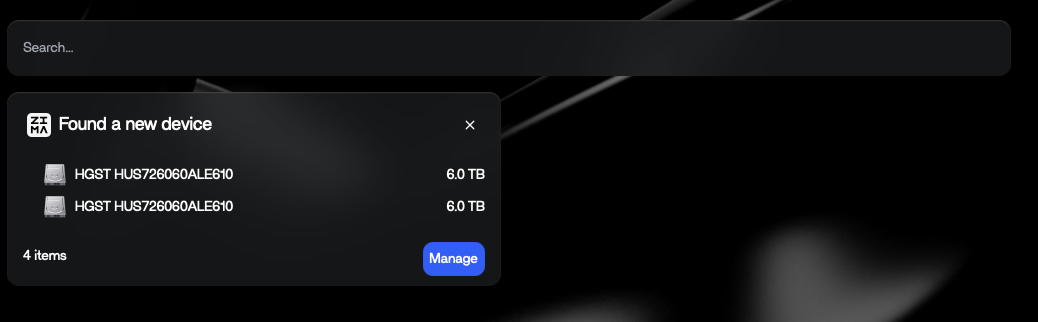
I have a Yottamaster four disk USB enclosure (JBOD, not one of their hardware RAID examples,) connected to a Bosgame Ryzen 7 mini PC running Zima. The enclosure has 4 x 6TB HSGT disks.
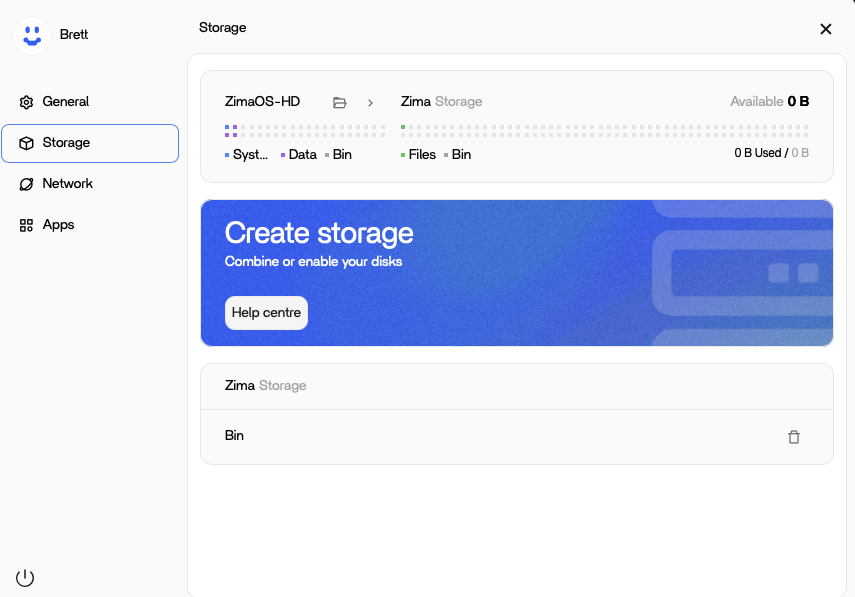
On attaching the enclosure, I get a dashboard message that ZimaOS has picked up the disks, but I can’t see any of them in the manage storage pane. Is that intended behaviour? The underlying linux installation is picking them up, because all four device files are present. I’ve tried formatting them manually, but no change in Zima.
I’d ideally like to use Zima to drive RAID over the disks, but I understand that ZimaOS doesn’t yet support the (any idea when it’s coming?) But what I’m really concerned about is that the disks aren’t even showing up standalone.
I believe this is a USB enclosure behaviour, not a disk failure. Linux will often detect the drives (/dev/sdX), but ZimaOS Storage Manager can be picky with multi-bay USB bridges, so the UI may not adopt the disks even though the OS can see them.
Also, if the drives were used before (NAS / RAID / ZFS etc.), ZimaOS may ignore them until old metadata is cleared:
wipefs -a /dev/sdX
I believe once we confirm how the enclosure presents the disks (USB bridge/UAS), we’ll know straight away whether it’s just leftover metadata or a USB chipset compatibility quirk.
If you paste the lsblk output, I can point you to the exact fix
Thanks so much for your help… I really appreciate it.
Here’s the lsblk output:
sda HGST HUS726060ALE610 K1JXWDHD disk usb sdb HGST HUS726060ALE610 K8HGEMHD disk usb sdc HGST HUS726060ALE610 K8GKJ1XD disk usb sdd HGST HUS726060ALE610 K1JYJ8PD disk usb
And the lsusb:
Bus 001 Device 001: ID 1d6b:0002 Linux Foundation 2.0 root hub Bus 002 Device 001: ID 1d6b:0003 Linux Foundation 3.0 root hub Bus 003 Device 001: ID 1d6b:0002 Linux Foundation 2.0 root hub Bus 003 Device 002: ID 046d:c548 Logitech, Inc. Logi Bolt Receiver Bus 003 Device 003: ID 8087:0032 Intel Corp. AX210 Bluetooth Bus 004 Device 001: ID 1d6b:0003 Linux Foundation 3.0 root hub Bus 005 Device 001: ID 1d6b:0002 Linux Foundation 2.0 root hub Bus 006 Device 001: ID 1d6b:0003 Linux Foundation 3.0 root hub Bus 007 Device 001: ID 1d6b:0002 Linux Foundation 2.0 root hub Bus 007 Device 002: ID 152d:0567 JMicron Technology Corp. / JMicron USA Technology Corp. JMS567 SATA 6Gb/s bridge Bus 008 Device 001: ID 1d6b:0003 Linux Foundation 3.0 root hub Bus 009 Device 001: ID 1d6b:0002 Linux Foundation 2.0 root hub Bus 010 Device 001: ID 1d6b:0003 Linux Foundation 3.0 root hub
Here’s the dashboard message, showing that Zima at least knows the disks are there:
Hi Brett, thanks for posting the outputs, that actually tells us a lot
I believe your enclosure is working correctly at the Linux level and ZimaOS is detecting the drives fine, because lsblk shows all 4 disks cleanly (sda–sdd, TRAN=usb).
The key detail is this line:
JMicron JMS567 SATA bridge
I suggest this is the reason they don’t appear in ZimaOS Storage Manager, ZimaOS sometimes won’t “adopt” disks presented via certain USB-to-SATA bridge chipsets / multi-bay enclosures, even though Linux can see them (which is exactly what you’re seeing: popup detects disks, Storage UI shows nothing).
What I suggest (fast tests)
Confirm drives have no old metadata (very common)
Run:
wipefs -a /dev/sda
wipefs -a /dev/sdb
wipefs -a /dev/sdc
wipefs -a /dev/sdd
Then unplug/replug the enclosure, refresh Storage.
If still no show in UI:
I believe this is a current ZimaOS UI limitation with that USB bridge.
Best workaround is:
connect drives via SATA / HBA (most reliable)
or use a DAS/enclosure that exposes drives in a way ZimaOS accepts
The good news
Your disks + enclosure are healthy, and ZimaOS is seeing them, it’s just the Storage Manager layer that isn’t adopting them.
If you want, paste dmesg -T | tail -200 after plug-in and I can confirm if it’s UAS/bridge quirks vs leftover RAID/ZFS metadata.
Thanks for your help. It’s so nice to have a supportive community when you embark on something new like this!
Here’s the output from dmesg:
[Sun Jan 11 12:33:28 2026] usb 7-1: USB disconnect, device number 2
[Sun Jan 11 12:34:24 2026] usb 7-1: new high-speed USB device number 3 using xhci_hcd
[Sun Jan 11 12:34:24 2026] usb 7-1: New USB device found, idVendor=152d, idProduct=0567, bcdDevice=13.24
[Sun Jan 11 12:34:24 2026] usb 7-1: New USB device strings: Mfr=1, Product=2, SerialNumber=3
[Sun Jan 11 12:34:24 2026] usb 7-1: Product: USB to ATA/ATAPI Bridge
[Sun Jan 11 12:34:24 2026] usb 7-1: Manufacturer: JMicron
[Sun Jan 11 12:34:24 2026] usb 7-1: SerialNumber: 0123456789ABCDEF
[Sun Jan 11 12:34:24 2026] usb-storage 7-1:1.0: USB Mass Storage device detected
[Sun Jan 11 12:34:24 2026] scsi host0: usb-storage 7-1:1.0
[Sun Jan 11 12:34:25 2026] scsi 0:0:0:0: Direct-Access JMicron Generic DISK00 0103 PQ: 0 ANSI: 6
[Sun Jan 11 12:34:25 2026] scsi 0:0:0:1: Direct-Access JMicron Generic DISK01 0103 PQ: 0 ANSI: 6
[Sun Jan 11 12:34:25 2026] scsi 0:0:0:2: Direct-Access JMicron Generic DISK02 0103 PQ: 0 ANSI: 6
[Sun Jan 11 12:34:25 2026] scsi 0:0:0:3: Direct-Access JMicron Generic DISK03 0103 PQ: 0 ANSI: 6
[Sun Jan 11 12:34:25 2026] sd 0:0:0:0: Attached scsi generic sg0 type 0
[Sun Jan 11 12:34:25 2026] sd 0:0:0:1: Attached scsi generic sg1 type 0
[Sun Jan 11 12:34:25 2026] sd 0:0:0:2: Attached scsi generic sg2 type 0
[Sun Jan 11 12:34:25 2026] sd 0:0:0:3: Attached scsi generic sg3 type 0
[Sun Jan 11 12:34:25 2026] sd 0:0:0:0: [sda] Very big device. Trying to use READ CAPACITY(16).
[Sun Jan 11 12:34:25 2026] sd 0:0:0:1: [sdb] Very big device. Trying to use READ CAPACITY(16).
[Sun Jan 11 12:34:25 2026] sd 0:0:0:2: [sdc] Very big device. Trying to use READ CAPACITY(16).
[Sun Jan 11 12:34:25 2026] sd 0:0:0:3: [sdd] Very big device. Trying to use READ CAPACITY(16).
[Sun Jan 11 12:34:25 2026] sd 0:0:0:0: [sda] 11721045168 512-byte logical blocks: (6.00 TB/5.46 TiB)
[Sun Jan 11 12:34:25 2026] sd 0:0:0:0: [sda] 4096-byte physical blocks
[Sun Jan 11 12:34:25 2026] sd 0:0:0:0: [sda] Write Protect is off
[Sun Jan 11 12:34:25 2026] sd 0:0:0:0: [sda] Mode Sense: 2b 00 00 00
[Sun Jan 11 12:34:25 2026] sd 0:0:0:0: [sda] No Caching mode page found
[Sun Jan 11 12:34:25 2026] sd 0:0:0:0: [sda] Assuming drive cache: write through
[Sun Jan 11 12:34:25 2026] sd 0:0:0:3: [sdd] 11721045168 512-byte logical blocks: (6.00 TB/5.46 TiB)
[Sun Jan 11 12:34:25 2026] sd 0:0:0:3: [sdd] 4096-byte physical blocks
[Sun Jan 11 12:34:25 2026] sd 0:0:0:3: [sdd] Write Protect is off
[Sun Jan 11 12:34:25 2026] sd 0:0:0:3: [sdd] Mode Sense: 2b 00 00 00
[Sun Jan 11 12:34:25 2026] sd 0:0:0:3: [sdd] No Caching mode page found
[Sun Jan 11 12:34:25 2026] sd 0:0:0:3: [sdd] Assuming drive cache: write through
[Sun Jan 11 12:34:25 2026] sd 0:0:0:2: [sdc] 11721045168 512-byte logical blocks: (6.00 TB/5.46 TiB)
[Sun Jan 11 12:34:25 2026] sd 0:0:0:2: [sdc] 4096-byte physical blocks
[Sun Jan 11 12:34:25 2026] sd 0:0:0:1: [sdb] 11721045168 512-byte logical blocks: (6.00 TB/5.46 TiB)
[Sun Jan 11 12:34:25 2026] sd 0:0:0:1: [sdb] 4096-byte physical blocks
[Sun Jan 11 12:34:25 2026] sd 0:0:0:1: [sdb] Write Protect is off
[Sun Jan 11 12:34:25 2026] sd 0:0:0:1: [sdb] Mode Sense: 2b 00 00 00
[Sun Jan 11 12:34:25 2026] sd 0:0:0:1: [sdb] No Caching mode page found
[Sun Jan 11 12:34:25 2026] sd 0:0:0:1: [sdb] Assuming drive cache: write through
[Sun Jan 11 12:34:25 2026] sd 0:0:0:2: [sdc] Write Protect is off
[Sun Jan 11 12:34:25 2026] sd 0:0:0:2: [sdc] Mode Sense: 2b 00 00 00
[Sun Jan 11 12:34:25 2026] sd 0:0:0:2: [sdc] No Caching mode page found
[Sun Jan 11 12:34:25 2026] sd 0:0:0:2: [sdc] Assuming drive cache: write through
[Sun Jan 11 12:34:25 2026] sd 0:0:0:3: [sdd] Attached SCSI disk
[Sun Jan 11 12:34:25 2026] sd 0:0:0:2: [sdc] Attached SCSI disk
[Sun Jan 11 12:34:25 2026] sd 0:0:0:0: [sda] Attached SCSI disk
[Sun Jan 11 12:34:25 2026] sd 0:0:0:1: [sdb] Attached SCSI disk
I’ve run the wipefs (I did that yesterday before I posted too, just forgot to mention it,) to no avail.
Given it’s a mini pc, I’m not entirely sure how to go about connecting them via SATA directly. I may have to install TrueNAS or something else that will handle USB (including RAID) in a ZVM, but that entirely defeats the object of ZimaOS, which I’ve otherwise been impressed with from a simplicity and look and feel standpoint. I certainly prefer it to ADM on my Asustor!
Hi Brett, thanks again for the detailed logs, that really helps
I believe we can now confirm your enclosure + drives are healthy and being detected correctly at the system level:
JMicron bridge detected
all 4 drives enumerate cleanly as sda–sdd
no obvious USB errors/resets
And since you’ve already run wipefs (good troubleshooting), I suggest what you’re seeing is simply a current ZimaOS Storage Manager limitation with some multi-bay USB JBOD bridge enclosures, ZimaOS can detect them (dashboard popup), but doesn’t yet “adopt” them into the Storage UI for pool creation / management.
Just as a real-world example: I previously ran ZimaOS on an Asustor and hit a lot of quirks, but since moving onto dedicated Zima hardware, it’s been very stable, which is why I’ve stuck with it.
I suggest raising this to IceWhale so they can improve compatibility for USB multi-bay JBOD enclosures like JMS567, this is a very common setup for mini-PC NAS builds.
Quick clarity note: the drives being detected is a great sign, but at the moment they’re simply not being adopted by Storage Manager, so they won’t appear as usable disks inside the ZimaOS Storage UI for pools/RAID yet.
Subject: ZimaOS Storage Manager not adopting multi-bay USB JBOD enclosure (JMicron JMS567)
Hi IceWhale Team,
I’d like to report a storage compatibility issue seen in ZimaOS with a multi-bay USB JBOD enclosure.
Environment:
ZimaOS (Buildroot-based OS)
Bosgame Ryzen 7 mini PC
Yottamaster 4-bay USB enclosure (JBOD, non-hardware RAID)
4 x 6TB HGST HDDs
USB chipset: JMicron JMS567 (152d:0567)
Observed behaviour:
ZimaOS dashboard detects the disks (“Found a new device”)
System enumerates drives cleanly (/dev/sda to /dev/sdd)
However, ZimaOS Storage Manager does not show/adopt the disks, so the user cannot create/manage a pool in the UI
wipefs -a has already been tested and does not change the behaviour
Evidence:
lsblk confirms the drives appear correctly as TRAN=usb
dmesg shows normal detection with no significant errors/resets
lsusb confirms JMicron JMS567 USB-to-SATA bridge
This looks like a Storage UI adoption/compatibility gap rather than a disk or enclosure failure. Multi-bay USB JBOD enclosures are common in mini-PC NAS builds, so improving compatibility here would be a big usability improvement.
Thanks for your feedback. What format are these 4 hard drives in?
If the drive formats aren’t clear, just run these two commands in the command line, then find the file(/ZimaOS-HD/disk-info.log) in Files and send it to us.
Hello i have a similar issue with a yottamaster enclosure. I find a solution. I connect the enclosure to another linux pc and I format it. After that I connect the enclosure back to my server and disk appear perfectly with the right name. Sorry for my english