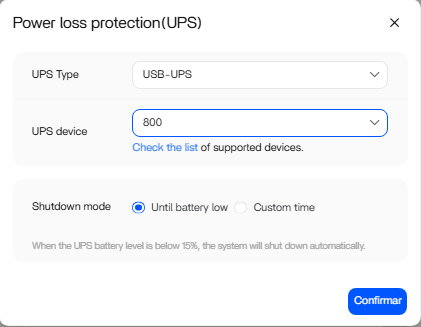
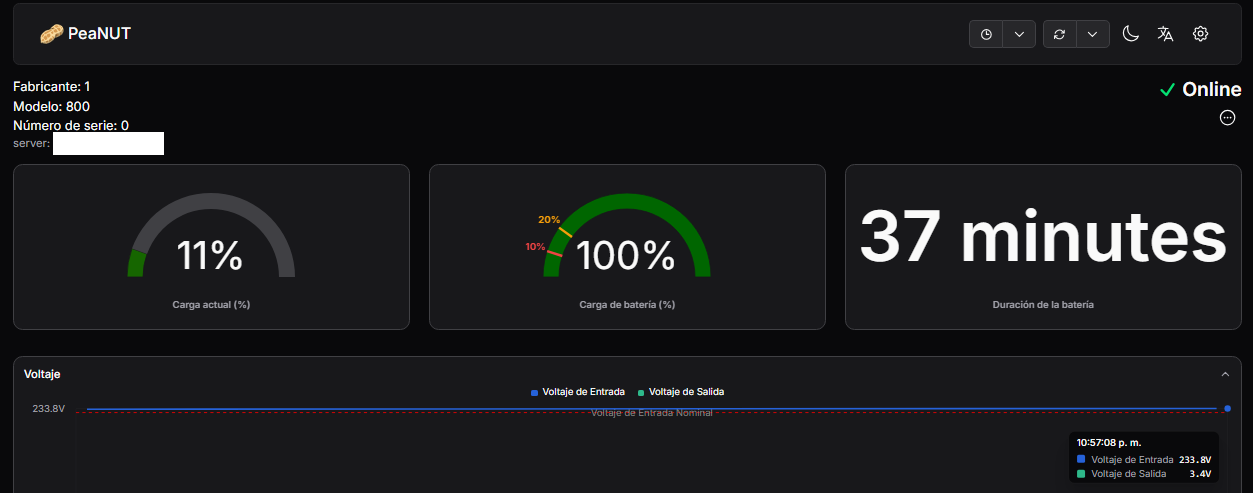
When Power loss protection (UPS) is activated, only “800” is displayed when UPS device is displayed.
If I select them, the server appears as Disconnected
To fix it I had to disable Power loss protection (UPS)
➜ # lsusb
Bus 003 Device 002: ID 0764:0601 Cyber Power System, Inc. PR1500LCDRT2U UPS
Clean processes:
pkill usbhid-ups
pkill upsd
Write configuration:
echo -e “[ups]\n\tdriver = usbhid-ups\n\tport = auto\n\tvendorid = 0764\n\tproductid = 0601\n\tdesc = “CyberPower EPYC”” > /etc/ups.conf
USB permissions:
chmod -R 777 /dev/bus/usb/
Start Driver y server:
upsdrvctl start
upsd
I can now connect, but I don’t have the option to shut down the NAS in a controlled manner.
If anyone knows how to fix the ZimaOS configuration problem, I would appreciate it.
This looks like a ZimaOS 1.5.4 UI detection issue, not a USB or driver problem.
Your lsusb confirms the UPS is detected:
ID 0764:0601 Cyber Power System PR1500LCDRT2U
Since usbhid-ups works manually, USB communication and the driver are fine.
The issue appears to be in the ZimaOS UI/NUT integration layer.
To diagnose properly, please share the output of:
upsc -l
upsc <your-ups-name>
ps aux | grep ups
cat /etc/ups/ups.conf
This will confirm:
• How the UPS is registered
• Whether Zima’s NUT wrapper is running
• What device name the UI expects
• Whether shutdown integration is active
Important:
Do not permanently run chmod -R 777 /dev/bus/usb. ZimaOS uses udev rules for permissions — 777 is not a correct fix.
If manual NUT works but controlled shutdown does not, the issue is likely in the ZimaOS shutdown hook layer, not the UPS driver itself.
Let’s review the outputs.
1 Like