I’m unable to reach zimaos from local network and now also from remote.
ZimaOS 1.6.2
Since some releases my zimablade has became impossible to find on the LAN network.
It was set in DHCP on port eth0 anche LAN address was 192.168.1.8
Then suddenly it became impossible to reach on lan network (like, i cannot ping it, find it using nmap and else).
Fortunately i had remote connection using ZimaOS VPN connection.
So zimablade was able to connect to internet but unreachable from LAN.
I hoped that the cause was a clash between VPN and LAN, so i disabled VPN and set IP as fixed on 192.168.1.8 like DHCP was doing before.
Now i cannot find the zimablade neither on LAN nor on VPN.
Moreover, now with this “safety shit” i cannot access TTY with internet connection and standard boot but just with rescue system. Which rescue system has disabled eth connection.
And i don’t know well but SSH is also disabled and i may try to enable it from config file but I’ve seen that all config files are commented with # and i should enable it from web interface.
Unfortunatly, LAN connection does not work so i cannot access webUI.
I’ve also see that now OS is OpenBSD, of which documentation is pretty poor in general.
What can i do to fix this?
Is there a firewall enabled without my permission that exclude zimaos to be seen on LAN?
Thanks a lot,
ZimaOS is not OpenBSD. You may have seen OpenSSH, which is the SSH service. ZimaOS is a Buildroot-based Linux system.
First, install or open ZimaClient on a computer connected to the same LAN. If the ZimaBlade is online, ZimaClient may detect it and display the current IP address and WebUI URL.
If ZimaClient cannot find it, boot the normal ZimaOS system, connect a monitor and keyboard to the ZimaBlade, and post the output of:
ip -br link
ip -br addr
Also confirm whether the Ethernet port link lights are active.
The issue could be the interface being down, an incorrect static IP, subnet or gateway settings, or an IP conflict. I suggest not editing the SSH or network configuration files from rescue mode yet.
Unable to find the device using ZimaClient.
As I said, ZimaOS untill 4 days ago was connected to tailscale (i could connect to it using VPN) but on LAN was undiscoverable.
I would like to help you doing
ip -br link

ip -bd addr
but if i connect the device to a monitor it initialize the system and after the system boot it is stuck to the ZIMA OS terminal logo without tty access.
Untill 1.6.2 i could obtain the tty switching login using ctrl+alt+F2 or F3 of F4 etcetera.
Now if i press any of these combinations I can not reach tty.
In rescue mode i can access tty BTW.
I think that, if can enable tailscale again, i should be able to connect to the ZimaOS using remote connection, but i should do it from configuration file because i cannot access the webUI.
Can i access the configuration of tailscale and enable it back from tty o rescue mode?
How to access the tty from normal boot?
Thanks a lot,
best regards.
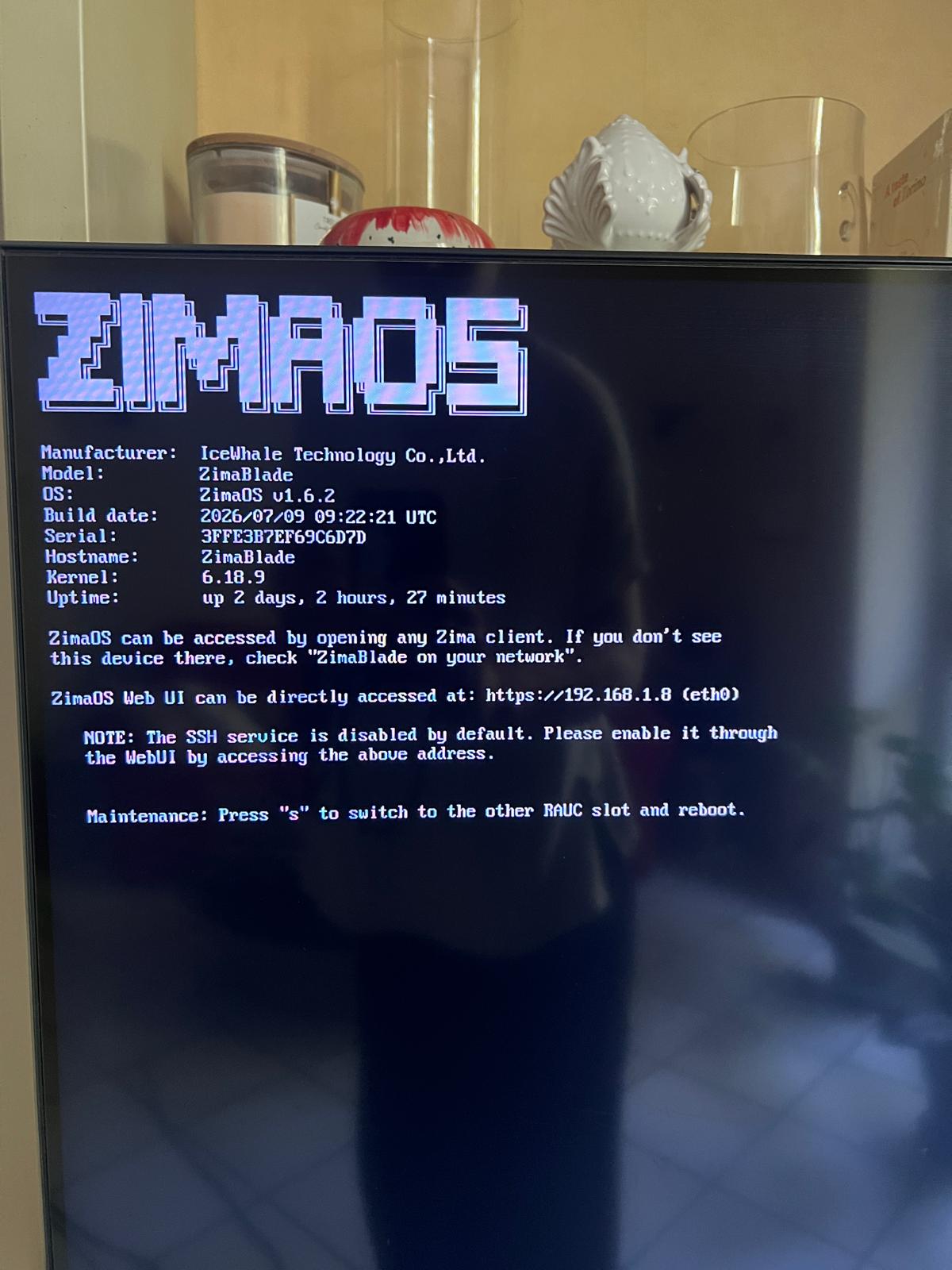
This is what i mean for “i cannot access tty at boot”.
After boot finishes, this is the screen i am left with.
No tty to input data.
If i press ctrl+alt+canc the system reboots, but i press ctrl+alt+F1 or any other F no tty shows up.