How do I select all files and folders in a Cloud location or USB location to backup to a location on my ZimaCube? I swear I was able to select all files/folders in a directory when setting up a backup job and it appears that feature has disappeared after I updated to the latest version of ZimaOS. I see the “select all” option when I migrate files, but nothing when creating a backup job.
The current backup and migration features do have such a distinction. If you want to back up all files/folders under a folder, one possible way is to select their parent/upper folder. Thanks for your feedback.
Hello there this is my first post, I’m new here 
I just received my ZimaCube Pro yesterday, I was having I was having difficulties with the installed OS version (don’t recall the version but it was old). So I installed fresh from a USB to the most recent version 1.5.0
I’m also am able to “Select All” when I migrate and all goes well but in regards to setting up a backup I’m having the most difficult time as there is no “Select All” option, I can only select individual folders one at a time.
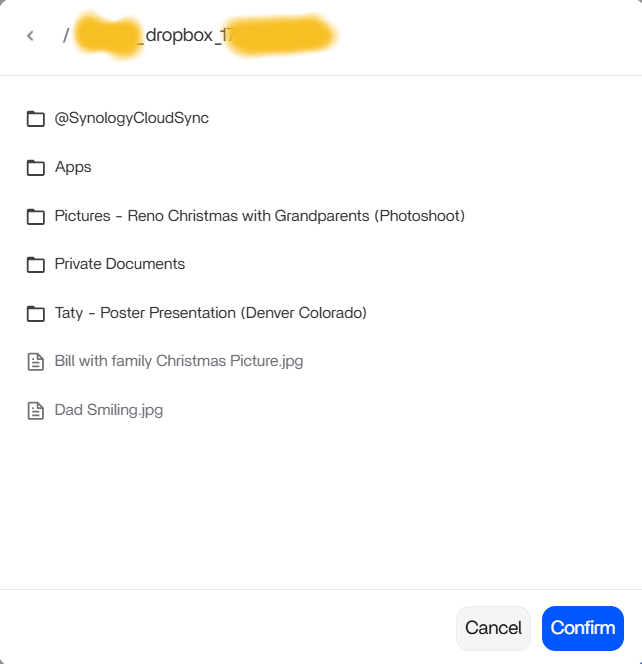
I also do not see the “Select All” button/option in the lower left hand corner and CTRL+A does not “select all” either.
I hope someone can help me get this working properly.
Thank you for your time,
ls
I think your issue would be solved, by doing the same thing that the original poster was advised to do.
Go back 1 DIR for the backup, which will backup ALL of them folders that you are trying to “select all”
Maybe try that
On my Dropbox I’m in the Root folder (main folder with all of my folders).
I suppose that I could create a single folder and move my files in there but it seems like a limitation that should have a workaround or something.
I really like this OS a lot, I’m trying to move away from Synology. I wish ZimaOS had RAIDZ2 via the GUI, I had to use RAID6 instead. Also wish they had a GUI rsync, that would make things so simple… The “Backup” option only copies single folders as well. Backing up a root (main) folder would be really nice. Synology has spoiled me over the last six years.
Agreed, I was going to try this for Onedrive, I can’t go back 1 directory when it is the root of the onedrive and I have 150 folders, and 36 files too in the root of my Onedrive. No way to select multiple items!
Hey all. Thanks for the feedback. We have talked about this. You will get the ability to back up the root folder of the Cloud drive. It will be within two releases. Cheers!