Can you post a screenshot of the qBittorrent network settings page and the container summary page after saving the network change? That should reveal what’s being missed.
Sorry, but I don’t see a Network settings page in qBittorrent . There is a “Connection” tab?
Same goes for the container summary page, not sure what you mean.
Thanks for the update.
Looking at your latest screenshot, I think I may have sent you down the wrong path regarding tun0.
The Hotio qBittorrent image actually includes its own WireGuard/OpenVPN support, which is why you’re seeing:
service init-wireguard successfully started
inside the qBittorrent logs.
So at the moment it looks like you may have two separate VPN approaches mixed together:
- Gluetun providing the VPN tunnel
- qBittorrent’s built-in VPN functionality
That would also explain why the logs show:
VPN_ENABLED=false
while still mentioning WireGuard startup.
Before changing anything else, can you post a screenshot of the Environment Variables section of the qBittorrent container configuration (feel free to blur any keys/passwords)?
I suspect qBittorrent may still be configured for its own VPN mode rather than simply using Gluetun’s network, and that will tell us exactly which setup is currently active.
The good news is that both Gluetun and qBittorrent appear to be starting successfully, so I think we’re down to identifying which networking mode is actually being used rather than fixing a broken container.
Thank you for the clarification. I think you’re on the right track because my Environmental Variables don’t contain any keys or passwords.
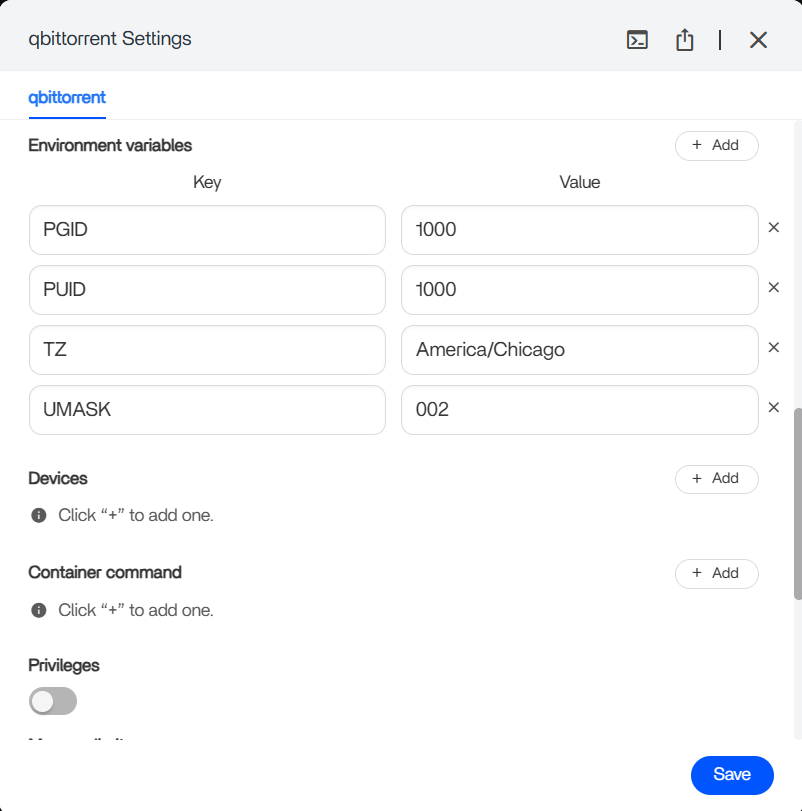
And you’re right, both seem to be starting/operating correctly.
I was able to download test torrents from BigBuckBunny and they DLd successfully, just not behind the VPN, I suspect.
Thanks, that screenshot helps.
I don’t see any VPN-related environment variables in qBittorrent, which is actually good news because it suggests qBittorrent isn’t trying to manage its own VPN connection.
Looking back at your earlier screenshot, I noticed the qBittorrent container is attached to the “gluetun” network, but that’s not the same thing as:
network_mode: "service:gluetun"
Simply placing qBittorrent on a Docker network called gluetun does not automatically route its traffic through the Gluetun container.
The fact that:
- torrents download successfully
- qBittorrent only shows
loandeth0 - no
tun0interface is visible
makes me suspect qBittorrent is still using normal Docker networking rather than sharing Gluetun’s network stack.
Can you post a screenshot of the Network section from the qBittorrent container settings (the same page where you selected gluetun from the dropdown)?
I suspect the container is attached to the gluetun Docker network, but not actually using network_mode: service:gluetun, which would explain why downloads work but appear to bypass the VPN.
You’re definitely getting close. The VPN itself is connected, so at this point we’re really just verifying how qBittorrent is attached to it.
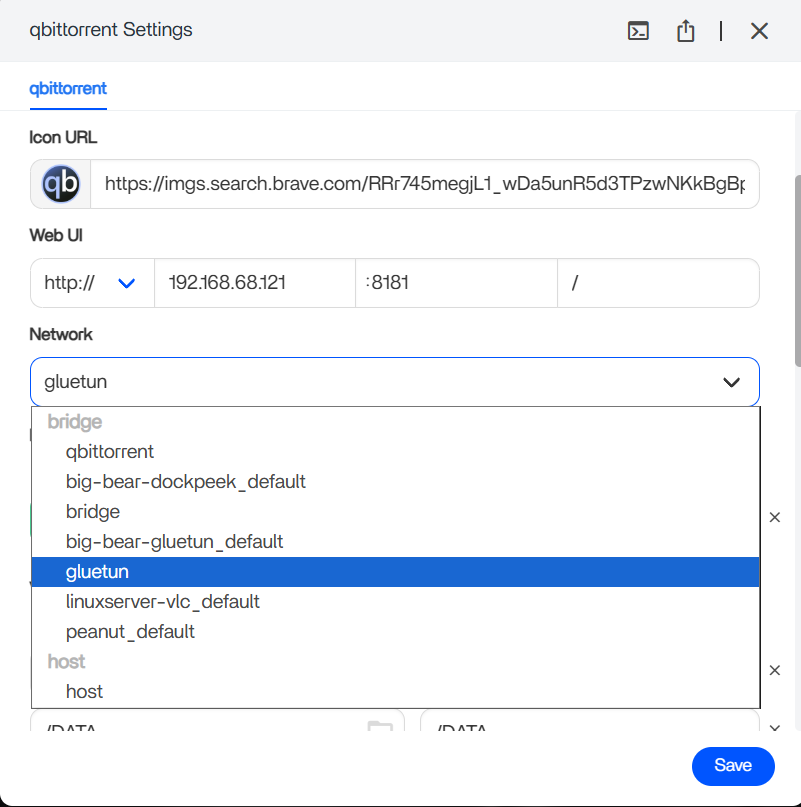
That screenshot explains quite a lot.
The Network dropdown in ZimaOS is selecting a Docker network, not necessarily telling qBittorrent to share Gluetun’s network stack.
So seeing:
bridgebig-bear-gluetun_defaultgluetun
simply means Docker networks exist with those names.
I believe your suspicion is correct: the extra big-bear-gluetun_default network is likely left over from the Compose deployment you tested earlier.
The interesting part is that qBittorrent starts and downloads successfully on the gluetun network, but still only sees lo and eth0. That suggests it’s connected to the same Docker network as Gluetun, not necessarily routing through Gluetun itself.
Before we chase ghosts, the easiest test is to check the public IP from inside the qBittorrent container. If it matches the VPN IP shown in the Gluetun logs, you’re done. If it matches your ISP IP, then qBittorrent is bypassing the VPN.
At this point I think we need to verify the actual IP path rather than relying on interface names or container logs.
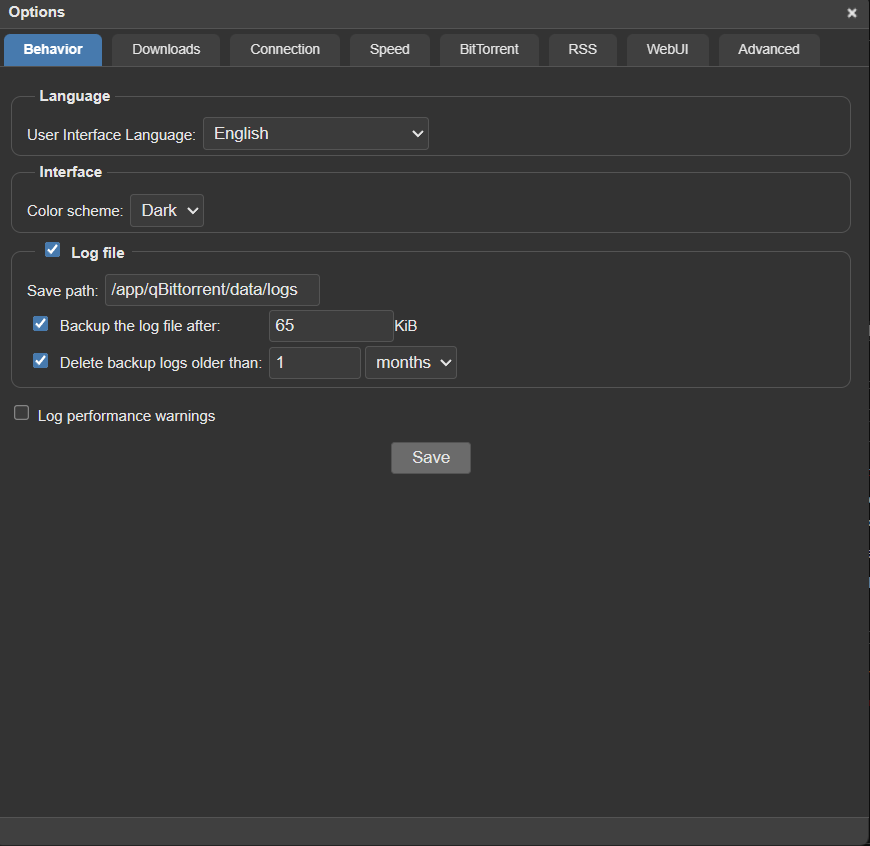
The Google result is probably referring to an older qBittorrent version. Recent versions don’t show the public IP in the UI anymore.
The easiest way is to compare the VPN IP from the Gluetun logs with the public IP seen from inside the qBittorrent container.
If you’re comfortable opening a terminal in the qBittorrent container, run:
curl https://ipinfo.io/ip
or
curl https://ifconfig.me
Then compare the result with the IP shown in your Gluetun log:
Public IP address is 149.88.101.18
If the IPs match, qBittorrent is going through the VPN.
If they don’t match and instead show your ISP’s public IP, then qBittorrent is bypassing the VPN.
In my opinion, that’s the most reliable test because it removes all the guesswork about Docker networks and interface names.
Both commands return my ISP IP 
I appreciate all of your time and help with this but I’m going to have to pick this back up tomorrow. It’s 3am here and I’m starting to get cross-eyed lol.
I have a feeling this is another one of those instances where some small, overlooked detail is tripping me up. But I am very grateful for your help.
Enjoy the rest of your evening. I will try again tomorrow and let you know how it goes.
Thank you so much.
No worries at all
Get some sleep. At 3am, Docker networking starts looking like ancient hieroglyphics to all of us.
The good news is we’ve actually made progress:
- Gluetun is connecting successfully
- qBittorrent is running and downloading
- We confirmed qBittorrent is currently using your ISP IP rather than the VPN IP
So we’ve narrowed the problem down quite a bit. We’re no longer troubleshooting Gluetun itself, we’re just figuring out why qBittorrent isn’t actually routing through it.
My suspicion is still that it’s something small in the networking setup rather than a broken VPN configuration.
Pick it up again tomorrow with fresh eyes and post whatever you find. We’ll get there eventually.
Have a good night!
I just installed Zima OS and started trying it and I’m on the same thing. first post here.
when I export the docker compose file, I have noticed the network_mode line is quietly dropped even though it was there when I first imported the file as a custom app. There are other small modifications which tell me Zima does not keep the imported file as is.
To make this work, you first need to drop the ports and networks (since they can not be used simultaneously with network_mode) and then import the file as a custom app. You do not want to edit the app much further in the UI, at least on those two parts since they will override network_mode . It works for me, without having to bring Portainer/etc .
I suppose it’s my turn to sleep 
I’m trying to do the same thing as the original poster, but I’m having absolutely no luck getting gluetun to work with my ProtonVPN. I’m completely new to this, so I might need some guidance getting things like the logs. I’ve tried some different tutorials for using the Docker Composer, but nothing seems to work. I can give details where I can for my network. I can also move this to a DM on Discord or an email chain if needed so I don’t leak any personal information.
Thank you so much. I have been trying to get this working for so long, gave up hope for half a year. After playing around with a debian server I came back to zima to try this comment out and wow. Can’t believe it actually works. Sincerely, thank you so much.