Hello,
I believe I have encountered an issue with the RAID management interface after replacing a failed drive.
System Information
-
Operating System: ZimaOS v1.7.0
-
Server: HP ProDesk 400 G5 Mini
-
Storage Enclosure: TerraMaster D4-320 (USB)
-
RAID Type: RAID5 (mdadm with Btrfs)
Original RAID Configuration
-
WD4002FFWX
-
WD4002FFWX
-
WD40EFRX
The WD40EFRX drive failed and was replaced with:
- Seagate IronWolf ST4000VN006
What Happened
I replaced the failed drive and rebuilt the RAID using the standard mdadm procedure.
The rebuild completed successfully.
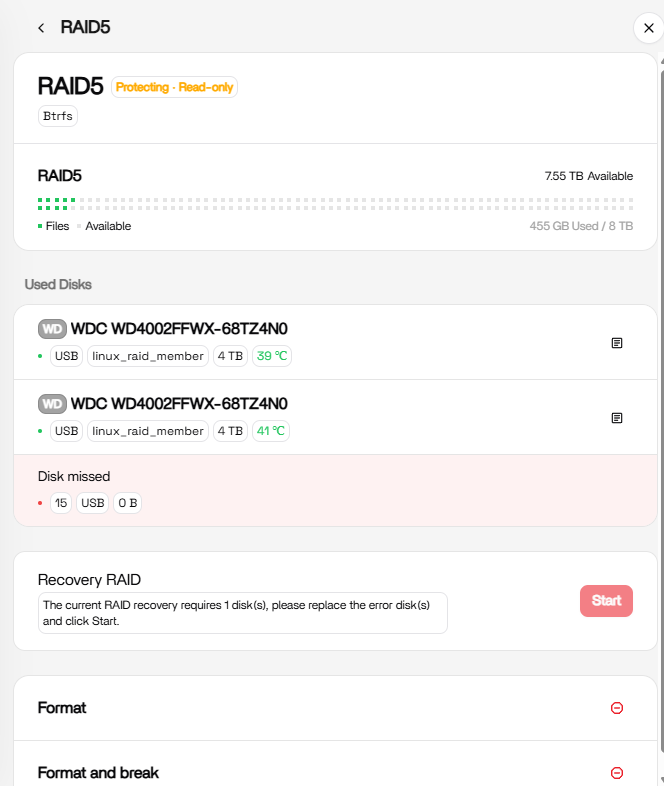
Since then, the actual RAID appears to be healthy, but the ZimaOS interface still reports that a drive is missing.
Current Behaviour
The RAID page shows:
-
Protecting - Read-only
-
Disk missed
-
Recovery RAID available
The replacement Seagate drive is not shown as a RAID member.
Linux Reports the RAID is Healthy
The underlying Linux system reports that everything is operating normally.
Verified checks include:
-
mdadmreports the array as clean. -
/proc/mdstatshows all RAID members present ([UUU]). -
The Btrfs filesystem is mounted read/write (
rw). -
Files can be created, modified and deleted successfully.
-
Docker applications (Jellyfin, Immich, etc.) continue to function normally using the RAID storage.
Additional Investigation
During troubleshooting I found that the ZimaOS local storage database still references the original failed WD drive rather than the replacement Seagate drive.
The RAID itself appears healthy, but the ZimaOS storage interface does not appear to have updated its internal metadata after the rebuild completed.
Expected Behaviour
After a successful RAID rebuild and replacement drive installation I would expect ZimaOS to:
-
Detect the replacement drive.
-
Remove the Disk missed warning.
-
Remove the Protecting - Read-only message.
-
Display all three RAID members correctly.
Request
Could you please advise whether this is:
-
a known issue in ZimaOS v1.7.0,
-
a metadata/database synchronization issue,
-
or whether there is an official procedure to refresh the RAID information without recreating the array?
At this time I have not used the Recovery RAID button because the Linux RAID is already healthy and I do not want to risk damaging the array.
Thank you for your assistance.