Does anyone know how to change the downloand path for qbitorrent? Ive updated the download path within qbitorrent and within the application setting.on the zima dash but every download errors out.
I believe this happens when the folder you picked isn’t actually mapped into the qBittorrent container (or it doesn’t have permission), so every torrent errors when it tries to write.
Step-by-step (common working layout on ZimaOS)
- Create the folder first (Files app)
Create something like:Downloads/qbittorrent - Set the ZimaOS app volume mapping
ZimaOS Dashboard > Apps > qBittorrent > Settings > Storage / Volumes
Use this common mapping:
- Host path:
/DATA/Downloads(or your storage pool path) - Container path:
/downloads
- Set qBittorrent to a container path (not a host path)
In qBittorrent WebUI > Settings > Downloads:
- Default Save Path:
/downloads/qbittorrent
- Check the real error if it still fails
qBittorrent WebUI > Tools > Execution Log
If you seePermission deniedorNo such file or directory, it confirms the mapping/permission is the issue.
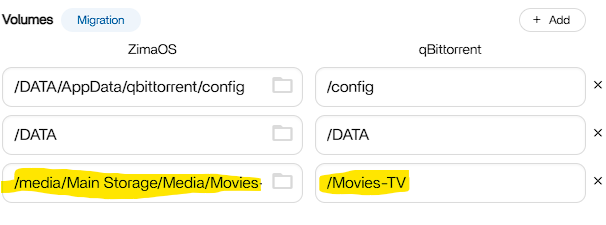
I believe your volume mapping is correct, but the error Permission denied means the qBittorrent container does not have write permission to the host folder.
Your mapping:
- Host:
/media/Main Storage/Media/Movies - Container:
/Movies-TV
Works for visibility, but not for writing.
Step 1 (recommended) Create a dedicated downloads folder
In Files app create:
/media/Main Storage/Media/Movies/qbittorrent-downloads
Then in qBittorrent set download path to:
/Movies-TV/qbittorrent-downloads
Step 2 Fix permissions on the host folder
SSH into ZimaOS and run:
ls -ld "/media/Main Storage/Media/Movies"
ls -ld "/media/Main Storage/Media/Movies/qbittorrent-downloads"
Then apply writable permissions (quick fix):
chmod -R 777 "/media/Main Storage/Media/Movies/qbittorrent-downloads"
Restart qBittorrent and test again.
Why this works
qBittorrent runs inside Docker using its own user ID. If the host folder is owned by a different user/group, writes will fail even though the mapping looks correct.
This worked! I’ve been at this for days. Thanks you!