Prometheus installation on CasaOs

Hi,
I’m new on casaos and I’d like to try to use the Grafana and Prometheus on it.

Please could you help me to installa Prometheus. I’ve found the container that is prom/prometheus but I think it is necessary to set up the directories and variables .

thanks

Have you solved your problem?

Is this helpful?

[Tutorial]How to understand Docker apps’ paths on ZimaOS? Take plex as an example ZimaOS

This tutorial is for ZimaOS, but is also applied to CasaOS.

1 Like

I think probably yes but Prometheus and Grafana doesn’t show any data . I don’t understand which is the issue. if it is about installation or what else .

DId you ever get this working? I am doing EXACTLY the same thing as both of these containers seem to be the most suggesed.

Grafana was easy. Right from the the Zima app store

Prometheus, not so. I keep setting errors and have made some inroads.

Is

I got a bit further with this as the tutorial does not quite get this working. I looked into the logs in Portainer and see that the /DATA/AppData/prometheus directory did not have the right permissions. Looking further, found out that Prometheus expects this directory to be owned by the user ‘nobody’ for security reasons.

SSHed into my Dev server and chown and chgrp on the /DATA/AppData/prometheus directory and it seemed to come right. That was just to get the first screen up. I’ll be checking the logs and messing with the permissions further but this is what the container looks like

The queries.active was the file that initially complained

/prometheus $ ls -la
total 24
drwxr-xr-x 4 nobody nobody 4096 Jun 21 11:20 .
drwxr-xr-x 1 root root 4096 Jun 21 11:06 ..
drwxr-xr-x 2 nobody nobody 4096 Jun 21 11:20 chunks_head
-rw-r–r-- 1 nobody nobody 0 Jun 21 11:20 lock
-rwxrwxrwx 1 nobody nobody 212 Jun 21 11:04 prometheus.yml
-rw-r–r-- 1 nobody nobody 20001 Jun 21 11:21 queries.active
drwxr-xr-x 2 nobody nobody 4096 Jun 21 11:20 wal

zimaAdmin@ZimaOS:~/AppData/prometheus ➜ $ cat prometheus.yml
global:
scrape_interval: 15s

scrape_configs:

  • job_name: ‘prometheus’
    static_configs:

    • targets: [‘localhost:9090’]
  • job_name: ‘cadvisor’
    static_configs:

    • targets: [‘cadvisor:8080’]

Prometheus writes its runtime data inside the mounted data directory, so if /DATA/AppData/prometheus is not writable by the user Prometheus runs as, it can fail on files like queries.active.

I would still suggest verifying the exact mount path and logs first:

docker ps -a | grep -i prometheus
docker inspect prometheus --format '{{json .Mounts}}' | jq
docker logs prometheus --tail=100

If the mounted path is confirmed as /DATA/AppData/prometheus, then this should be safe to test:

chown -R nobody:nobody /DATA/AppData/prometheus

Then restart Prometheus:

docker restart prometheus

Also, your prometheus.yml indentation is important. It should be formatted like this:

global:
  scrape_interval: 15s

scrape_configs:
  - job_name: 'prometheus'
    static_configs:
      - targets: ['localhost:9090']

  - job_name: 'cadvisor'
    static_configs:
      - targets: ['cadvisor:8080']

For the cadvisor:8080 target to work, Prometheus and cAdvisor normally need to be on the same Docker network. If they are not, Prometheus may start but Grafana will still show no useful data.

That is pretty much where I have headed but will do the checks you recommend. I did change the compose file to put config and data in in separate directories in AppData.

Also found out, at about 2am, that some of these data exporters need to be installed as well. Since I was interested at hardware health first (partition,CPU,RAM) I got Node Exporter installed in a container and that is now gathering metrics… LOTS of metrics. It’s very interesting.

I’ll look into cAdvisor next to look at Container health as the next stop when I see machine health suffering.

Does this sound like a proper way forward for monitoring?

Trying to sort different building blocks of the homelab so I can get other things planned like VLANs and Proxy, etc, to put these things together and away from everything else.

zimaAdmin@ZimaOS:~/AppData/prometheus/config ➜ $ sudo docker inspect prometheus --format ‘{{json .Mounts}}’ | jq
[
{
“Type”: “bind”,
“Source”: “/DATA/AppData/prometheus/config”,
“Destination”: “/etc/prometheus”,
“Mode”: “”,
“RW”: true,
“Propagation”: “rprivate”
},
{
“Type”: “bind”,
“Source”: “/DATA/AppData/prometheus/data”,
“Destination”: “/prometheus”,
“Mode”: “”,
“RW”: true,
“Propagation”: “rprivate”
}
]

Yes, that sounds like a proper way forward.

A good basic monitoring stack is:

Prometheus = collects and stores metrics
Grafana = dashboards and visualisation
node_exporter = host / hardware metrics
cAdvisor = Docker container metrics

For the health checks you mentioned, node_exporter is the right place to start. It will give you CPU, RAM, disk, filesystem, network, and general host-level metrics.

Then cAdvisor is the next logical step for container visibility, such as container CPU, memory, network, and filesystem usage.

So the order I would suggest is:

1. Get Prometheus running cleanly
2. Add node_exporter for system / hardware metrics
3. Add cAdvisor for Docker container metrics
4. Connect Grafana to Prometheus as the data source
5. Import or build dashboards after the metrics are confirmed

The main thing is not to start with Grafana dashboards first. First confirm Prometheus can actually scrape each target.

In Prometheus, check:

Status → Targets

You want each target to show as UP.

For example:

prometheus:9090
node-exporter:9100
cadvisor:8080

Once those targets are UP, Grafana becomes much easier because the data is already confirmed.

So yes, Prometheus + Grafana is a very strong setup, but Prometheus targets and Docker networking need to be correct first.

1 Like

First - thanks so much for your very considered replies. VERY helpful.

Second - Question: Is it good practice to try to get these port numbers into some type of consistent numbering convention?

e.g.

Prometheus - Port 9090

Node Exporter - Port 9100

cAdvisor - Port 9101

Grafana - Port 9200

Or something like that?

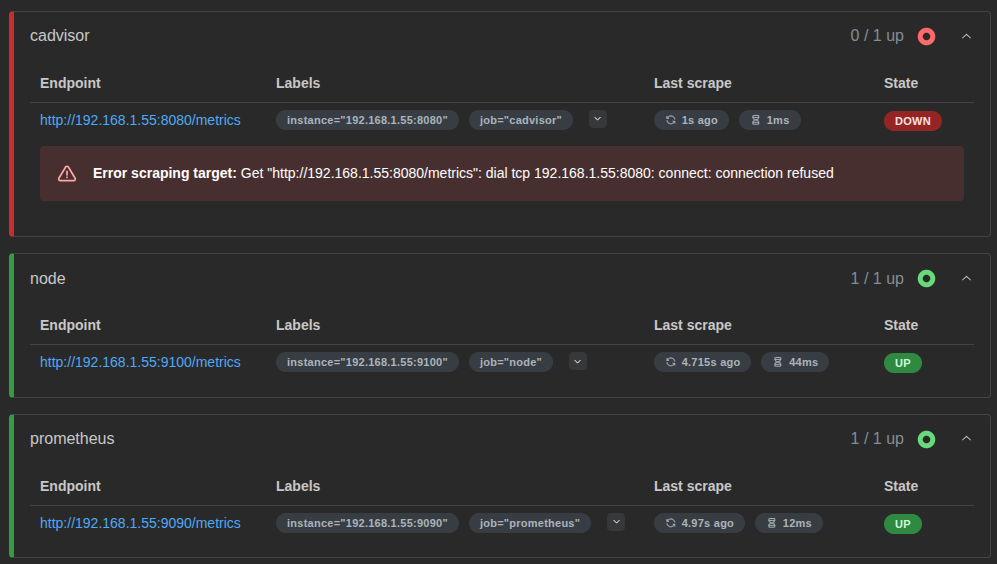
As suspected, cAdvisor not connecting

Yes, using a clean port convention is fine, but I would separate host ports from container internal ports.

For Prometheus scraping, the important part is the port the exporter is actually listening on.

Typical defaults are:

Prometheus:    9090
node_exporter: 9100
cAdvisor:      8080
Grafana:       3000

You can map them to cleaner external ports if you want, for example:

Grafana host port: 9200 -> container port 3000
cAdvisor host port: 9101 -> container port 8080

But inside Prometheus, the target must match the real reachable address.

Your screenshot shows:

http://192.168.1.55:8080/metrics
connection refused

That usually means Prometheus can reach the IP, but nothing is listening on port 8080 there, or cAdvisor is not mapped to that host port.

I would check cAdvisor first:

docker ps -a | grep -i cadvisor

Then check the actual port mapping:

docker port cadvisor

And check the logs:

docker logs cadvisor --tail=100

If cAdvisor is mapped like this:

0.0.0.0:9101->8080/tcp

Then your Prometheus target should be:

  - job_name: 'cadvisor'
    static_configs:
      - targets: ['192.168.1.55:9101']

If Prometheus and cAdvisor are on the same Docker network, then you can normally use:

  - job_name: 'cadvisor'
    static_configs:
      - targets: ['cadvisor:8080']

So yes, the monitoring plan is good. I would just avoid changing the container internal ports unless needed. Keep the exporter defaults internally, then only customise the host-side ports if you want a cleaner convention.

1 Like