Had Peanut all setup and connected. Was able to see my UPS that’s setup in Zima OS on my Home Assistant setup and had it all configured for my UPS to not only shutoff my connected Zima OS machine but also my Home Assistant machine on the same network. However, all settings are lost on Zima OS reboot and Peanut says no devices/ add device. But it seems like it’s still running as I can see my UPS info in HA and it says “online”. Am I doing something wrong? Is there any way to get Peanut to retain settings upon Zima reboot without having to add it again? Have just installed TrueNAS on another machine to start testing and see if that’s something I can manage. I really like Zima OS but all of the little bugs and workarounds are starting to get to me. (Windows client not working, disks not spinning down, Zima Cron losing settings on reboot, Peanut losing settings on reboot, Android app frequently losing connection, losing network locations in Windows created by Zima, no zfs without CLI, app store issues, etc, etc.) Will keep Zima OS going until I can find a replacement but unfortunately I feel that Zima OS still has a way to go before it can seriously compete in this arena. The fact that Casa OS and Zima OS are routinely conflated online only adds to the troubles resulting in confusion when trying to find solutions. I need a solution I can trust and rely on and unfortunately Zima OS is not there (yet?). It does a lot of things well, but it’s the small hiccups that keep popping up that are holding it back. The fact that I don’t have a lot of experience setting up a NAS/media server doesn’t help either, but I feel like I’ve come a long way in just a few weeks. Might give the beta a try and see things improve but Zima OS feels more like a side project than a priority.
Yeah that lines up with what we’ve been seeing lately, it’s not you.
What’s happening is Peanut isn’t persisting its config to a proper volume, so on reboot the container just comes back clean like a fresh install. ZimaOS doesn’t retain anything unless it’s explicitly mapped into /DATA/AppData, so anything stored inside the container filesystem is basically temporary.
That’s why:
- Peanut loses settings
- Home Assistant thinks there’s a power event
- your shutdown automation fires
So the issue isn’t your UPS logic, it’s Peanut resetting.
At a high level, you want to check two things:
- Peanut container actually has a volume mapped
If there’s no bind mount to something like:
/DATA/AppData/peanut/...
then config will never survive a reboot. - Where Peanut stores its config
Some apps don’t use obvious paths, so even if a volume exists, it might not be mapped to the right directory.
This is a pretty common pattern on ZimaOS right now with newer or less-tested apps.
Your frustration is fair. ZimaOS is powerful, but it’s still very Docker-first and assumes apps are correctly packaged. When they’re not, you get exactly this behaviour.
If you want a stable path forward without jumping ship yet, you’ve got two options:
- Fix Peanut by mapping its config properly (most reliable if you want to keep current setup)
- Replace Peanut with a more mature NUT-based container where config is explicitly volume-backed
If you want, next step we can do it properly, check the container, confirm mounts, and fix it clean so it survives reboot.
Hi gelbuilding, thanks for the fast reply.
I thought it was configured properly but I very well may be missing something. Here’s a screenshot of my settings. Thanks in advance for any help or insights. 
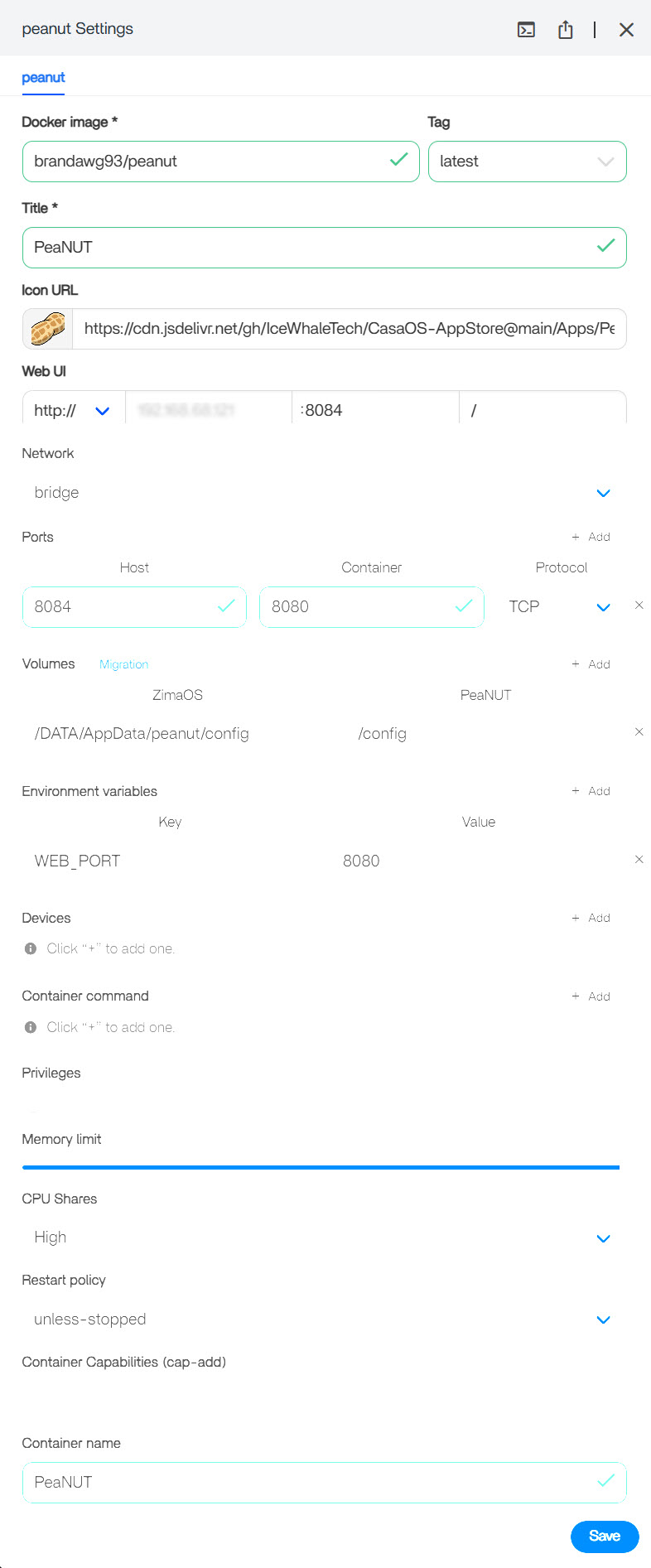
p.s. Are there any other NUT-based apps available in the app store that you would recommend?
Yeah I see the issue, your setup looks right, but PeaNUT is the problem.
It doesn’t actually use /config, even though the UI says it does. It writes to /app/config, so your volume isn’t being used, that’s why everything resets on reboot.
Fix is simple:
Change the volume to:
/DATA/AppData/peanut/config > /app/config
That should stop the resets.
On alternatives, honestly you’re already on the most stable path:
NUT + Home Assistant.
PeaNUT is just a UI layer and a bit hit and miss.
So yeah, not you, just a dodgy container.
Thanks so much @gelbuilding . That did the trick! I appreciate your help with this. Learning a little more with every hurdle so it’s all good.
I’m curious so I’ll ask, when it comes to peanut, for example, is there somewhere I could be looking where I might have noticed that the path was wrong? I’ve read a lot about log files and such but being a bit of a noob, I’m not sure where to find these logs and even when I do manage to find them, I’m not exactly sure what to be looking for unless it’s glaringly obvious.
I’m not jumping ship just yet. I really do like Zima OS. It’s so mush easier to get setup and running than the alternatives, without a lot of terminal use, which I really appreciate. It does the main jobs well, it’s just the little extra accompaniments that we need to get sorted out.
Thanks again!
Yeah that’s a really good question, and honestly you’re thinking about it the right way.
With something like this, there’s no single “one place” that tells you the path is wrong. It’s usually a combination of checking a few things:
1) Container logs (first place to look)
That’s where apps usually complain.
On ZimaOS:
docker logs PeaNUT
What you’re looking for:
- “cannot write”
- “permission denied”
- “creating config at…”
- or any path it mentions (that’s the gold clue)
2) Inspect what’s actually being used inside the container
This is the one that would’ve exposed it quickly:
docker exec -it PeaNUT sh
ls -la /app
ls -la /app/config
ls -la /config
If you see files being created in /app/config but nothing in /config > mismatch.
3) Check mounts vs reality
docker inspect PeaNUT | grep -A5 Mounts
Confirms what you mapped, then you compare that to what the app is actually using.
4) Upstream docs / GitHub issues
This is usually where these quirks show up.
A quick search like:
“PeaNUT docker config path”
would’ve led to that exact bug.
How to think about it going forward
When something resets on reboot:
- 90% of the time = data not in a volume
- next step = find where the app is really writing
You don’t need to read logs perfectly, just scan for paths and errors.
And yeah, you’ve nailed it:
ZimaOS is great for getting things running fast
it’s just when apps aren’t packaged properly, you have to drop one level deeper (Docker view instead of UI).
Thanks for all of that great info. So, I went ahead and tried all of those commands and have come across another issue.
When I tried to execute #2
docker exec -it PeaNUT sh
ls -la /app
ls -la /app/config
ls -la /config
It came back with the following…
OCI runtime exec failed: exec failed: unable to start container process: exec: “sh”: executable file not found in $PATH: unknown
This same error also shows in the PeaNUT container settings under “Terminal”

A Google search of this suggests
If
/bin/shis missing, try/bin/bashif available, or check for other shells…
Not exactly sure what to make of this. Any thoughts?
Again, thanks so much for your help. It’s already really helping me understand all of this better.
Yeah this one’s actually simple, nothing broken.
That container just doesn’t include a shell (no sh, no bash).
Pretty common with minimal images.
So:
docker exec -it PeaNUT sh> fails- Zima “Terminal” tab > also fails (same reason)
What it means
You can’t “enter” the container, but:
- the app still runs fine
- logs still work
- volumes still work
So no issue with your setup.
How to work around it
Just use logs instead:
docker logs PeaNUT
That’s your main visibility for containers like this.
If you really want to inspect files
You can still check from the host side:
ls -la /DATA/AppData/peanut/config
If files are appearing there > persistence is working.
Big picture
This isn’t an error with Zima or your config, just a very stripped-down container image.
You already fixed the real issue (the config path), so you’re in a good spot now.
This isn’t an error with Zima or your config, just a very stripped-down container image.
You already fixed the real issue (the config path), so you’re in a good spot now.
Good to know. I really appreciate you taking the time to help an old dog like me. I have copied all of this great info you have provided. It’s a great tutorial for troubleshooting issues and I thank you for sharing your knowledge with me.
Hope you have a good day/night wherever you may be, 
Anytime mate, you’re very welcome.
You’re doing it exactly right, asking questions, testing things, and learning as you go. That’s all this stuff is.
And honestly, half the battle with ZimaOS is just understanding how Docker behaves underneath, once that clicks, everything starts making a lot more sense.
Shout out anytime if you get stuck again.