NVMevM.2 SSD stick not showing in web UI

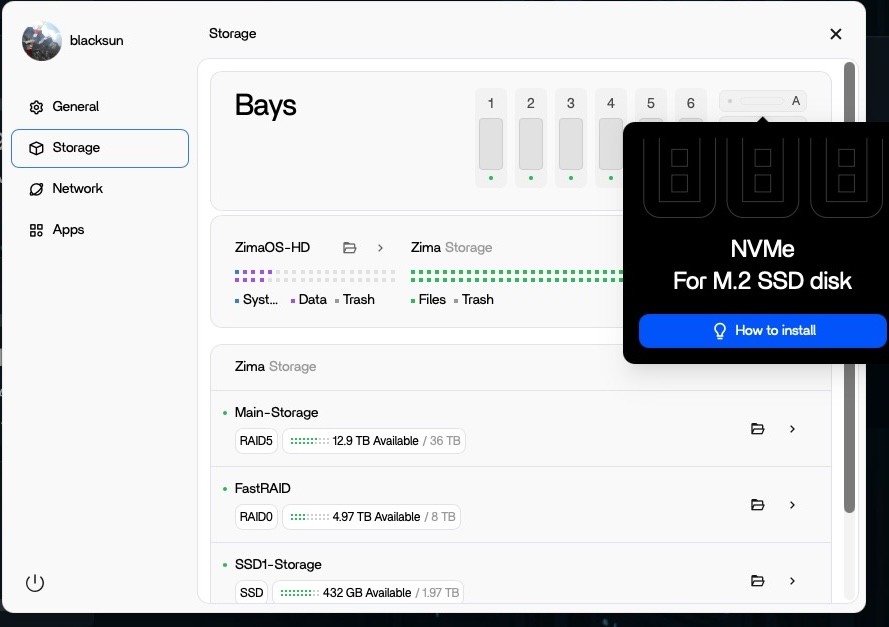
Hey, guys - just noticed that the 2 TB SSD stick I have installed in slot A of my ZimaCube is not showing up in the web UI correctly like it has in the past. See pic attached. Dunno how long it has been this way. I have tried restarting the interface as well as restarting my Cube to no avail. Any advice?

TIA,
Pat

Hey, I will forward this issue to the team.

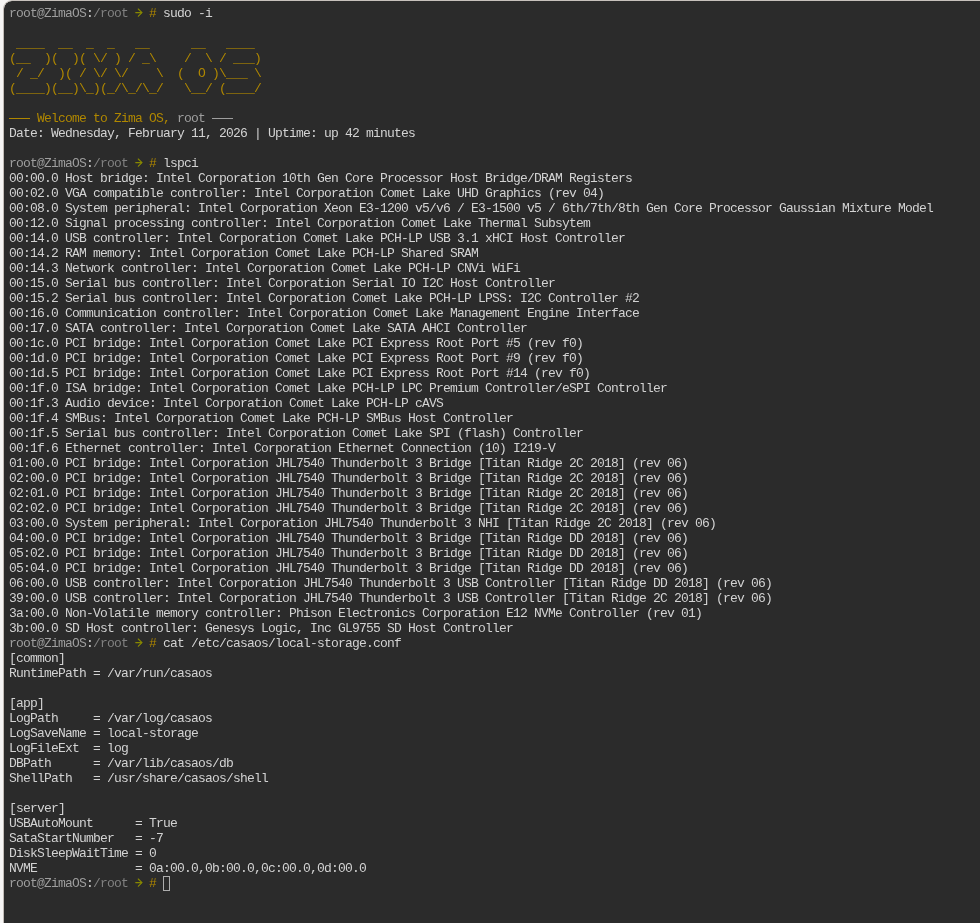
Can you execute the following three lines of commands and then send the results to us?

sudo -i
lspci
cat /etc/casaos/local-storage.conf

root@zimacube:/root ➜ # lspci
00:00.0 Host bridge: Intel Corporation Device 461c
00:02.0 VGA compatible controller: Intel Corporation Alder Lake-N [UHD Graphics]
00:0a.0 Signal processing controller: Intel Corporation Platform Monitoring Technology (rev 01)
00:14.0 USB controller: Intel Corporation Alder Lake-N PCH USB 3.2 xHCI Host Controller
00:14.2 RAM memory: Intel Corporation Alder Lake-N PCH Shared SRAM
00:16.0 Communication controller: Intel Corporation Alder Lake-N PCH HECI Controller
00:1a.0 SD Host controller: Intel Corporation Device 54c4
00:1c.0 PCI bridge: Intel Corporation Device 54b8
00:1c.6 PCI bridge: Intel Corporation Device 54be
00:1d.0 PCI bridge: Intel Corporation Alder Lake-N PCI Express Root Port
00:1d.2 PCI bridge: Intel Corporation Alder Lake-N PCI Express Root Port
00:1e.0 Communication controller: Intel Corporation Alder Lake-N Serial IO UART Host Controller
00:1e.3 Serial bus controller: Intel Corporation Device 54ab
00:1f.0 ISA bridge: Intel Corporation Alder Lake-N PCH eSPI Controller
00:1f.3 Audio device: Intel Corporation Alder Lake-N PCH High Definition Audio Controller
00:1f.4 SMBus: Intel Corporation Alder Lake-N SMBus
00:1f.5 Serial bus controller: Intel Corporation Alder Lake-N SPI (flash) Controller
01:00.0 PCI bridge: ASMedia Technology Inc. ASM2806 4-Port PCIe x2 Gen3 Packet Switch (rev 01)
02:00.0 PCI bridge: ASMedia Technology Inc. ASM2806 4-Port PCIe x2 Gen3 Packet Switch (rev 01)
02:02.0 PCI bridge: ASMedia Technology Inc. ASM2806 4-Port PCIe x2 Gen3 Packet Switch (rev 01)
02:06.0 PCI bridge: ASMedia Technology Inc. ASM2806 4-Port PCIe x2 Gen3 Packet Switch (rev 01)
02:0e.0 PCI bridge: ASMedia Technology Inc. ASM2806 4-Port PCIe x2 Gen3 Packet Switch (rev 01)
03:00.0 Ethernet controller: Intel Corporation Ethernet Controller I226-V (rev 04)
04:00.0 Ethernet controller: Intel Corporation Ethernet Controller I226-V (rev 04)
05:00.0 Non-Volatile memory controller: Kingston Technology Company, Inc. OM8PGP4 NVMe PCIe SSD (DRAM-less)
07:00.0 PCI bridge: ASMedia Technology Inc. ASM2806 4-Port PCIe x2 Gen3 Packet Switch (rev 01)
08:00.0 PCI bridge: ASMedia Technology Inc. ASM2806 4-Port PCIe x2 Gen3 Packet Switch (rev 01)
08:02.0 PCI bridge: ASMedia Technology Inc. ASM2806 4-Port PCIe x2 Gen3 Packet Switch (rev 01)
08:06.0 PCI bridge: ASMedia Technology Inc. ASM2806 4-Port PCIe x2 Gen3 Packet Switch (rev 01)
08:0e.0 PCI bridge: ASMedia Technology Inc. ASM2806 4-Port PCIe x2 Gen3 Packet Switch (rev 01)
09:00.0 Non-Volatile memory controller: Samsung Electronics Co Ltd NVMe SSD Controller S4LV008[Pascal]
0d:00.0 SATA controller: ASMedia Technology Inc. ASM1166 Serial ATA Controller (rev 02)
0e:00.0 3D controller: NVIDIA Corporation GP104GL [Tesla P4] (rev a1)
root@zimacube:/root ➜ # cat /etc/casaos/local-storage.conf
[common]
RuntimePath = /var/run/casaos

[app]
LogPath = /var/log/casaos
LogSaveName = local-storage
LogFileExt = log
DBPath = /var/lib/casaos/db
ShellPath = /usr/share/casaos/shell

[server]
USBAutoMount = True
EnableMergerFS = false
SataStartNumber = 0
NVME = 09:00.0,0a:00.0,0b:00.0,0c:00.0
DiskSleepWaitTime = 242

thank you !

Pat

Need to execute the following command

vi /etc/casaos/local-storage.conf

Then delete the NVME line, and after the deletion is complete, this paragraph should look like this

[server]
USBAutoMount = True
EnableMergerFS = false
SataStartNumber = 0
DiskSleepWaitTime = 242

Finally restart the service

systemctl restart zimaos-local-storage.service

Thank you, @Dina! That fixed the issue. You guys rock.

Pat

2 Likes

E505: "/etc/casaos/local-storage.conf" is read-only (add ! to override)

As I asked on Discord, what do I add “!” to?

This is a permissions issue, you need root privileges to execute the command.

sudo -i
vi /etc/casaos/local-storage.conf

Thanks, that worked.

But FYI: Once the SSD was recognized, I realized I had placed it in the D slot instead of A slot, so I reinstalled it into the A slot. But then it did not show up correctly anymore and said “89” again. I had to go back into the command line where there was a new NVME line at the end, and delete it again.

I repeat same steps, but with no luck.. the nvme line comes back same as before. but never shows up in UI.

Thanks for your feeback, what is your machine model, have you deleted the nvme in local-storage.conf and restarted the service?

I have installed zimaos plus on a intel NUC.

Yes I tried deleting NVMe line in the config file and restarted the local-storage service.

This method applies to ZimaCube, and we will add the custom hard drive compartment function of other models in the next version