Hi, my PC has 2 disks. HDD and NVMe. NVMe has data I backed up from HDD so I can install zimaos on HDD. After installation successfully, it showed the message found new disk NVMe. but I couldn’t do anything. It is no longer visible.
I tried deleting the NVMe line from conf file.. but no luck.. it repears back again but still disk is not visible.
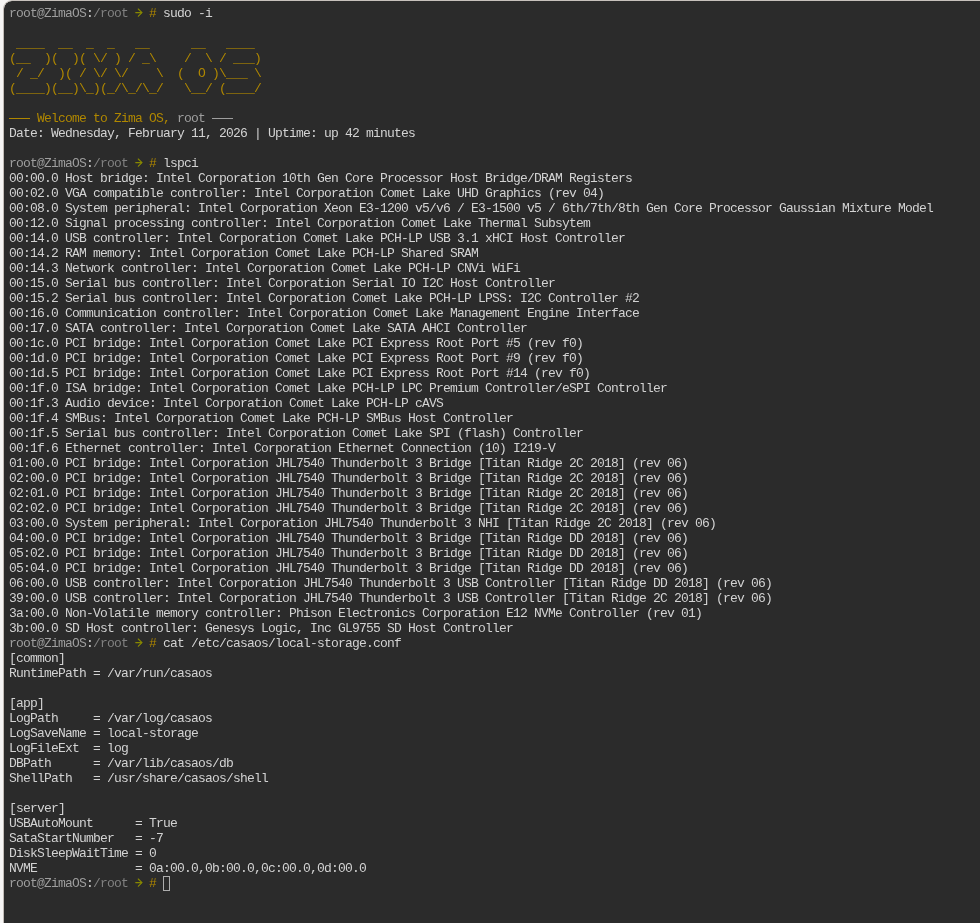
Your NVMe is detected by the system.
lspci shows:
Phison E12 NVMe Controller (3a:00.0)
So this is not a hardware issue.
The problem is filtering.
In /etc/casaos/local-storage.conf:
NVME = 0a:00.0,0b:00.0,0c:00.0,0d:00.0
Your NVMe is 3a:00.0, not in that list.
CasaOS local-storage ignores devices outside the allowed PCI range and rewrites the config on restart. That’s why your manual edit doesn’t stick.
Before changing anything, please run:
lsblk -o NAME,SIZE,TYPE,MOUNTPOINT
nvme list
We need to confirm the block device exists (likely /dev/nvme0n1) and isn’t mounted or flagged as system.
If it appears there but not in the UI, this is a local-storage filtering issue, not a disk failure.
lsblk -o NAME,SIZE,TYPE,MOUNTPOINT
NAME SIZE TYPE MOUNTPOINT
loop0 1.1M loop
loop1 4.5M loop
loop2 137.3M loop
loop3 208K loop
loop4 1.1M loop
loop5 137.3M loop
loop6 208K loop
loop7 4.5M loop
sda 465.8G disk
├─sda1 32M part /mnt/boot
├─sda2 24M part
├─sda3 6G part /
├─sda4 24M part
├─sda5 6G part
├─sda6 8M part
├─sda7 96M part /mnt/overlay
└─sda8 453.6G part /DATA
sdb 2.7T disk
sdc 1.8T disk
└─sdc1 1.8T part /var/lib/casaos_data/.media/Seagate Backup Plus
nbd0 0B disk
nbd1 0B disk
nbd2 0B disk
nbd3 0B disk
nbd4 0B disk
nbd5 0B disk
nbd6 0B disk
nbd7 0B disk
zram0 0B disk
zram1 0B disk
zram2 0B disk
nvme0n1 953.9G disk
└─nvme0n1p1 953.9G part
nbd8 0B disk
nbd9 0B disk
nbd10 0B disk
nbd11 0B disk
nbd12 0B disk
nbd13 0B disk
nbd14 0B disk
nbd15 0B disk
nvme list
Failed to open /dev/nvme0
Node SN Model Namespace Usage Format FW Rev
/dev/nvme0n1 0 0.00 B / 0.00 B 1 B + 0 B

Your NVMe is detected correctly.
lsblk shows:
nvme0n1 953.9G
└─nvme0n1p1 953.9G
So:
- PCI detection OK
- Block device OK
- Partition exists
This is not a CasaOS visibility issue.
But nvme list showing 0.00 B usage suggests the namespace or partition table may be corrupted or unreadable.
Before doing anything destructive, run:
blkid /dev/nvme0n1
blkid /dev/nvme0n1p1
fdisk -l /dev/nvme0n1
We need to confirm whether the GPT and filesystem are valid. Do not wipe yet.
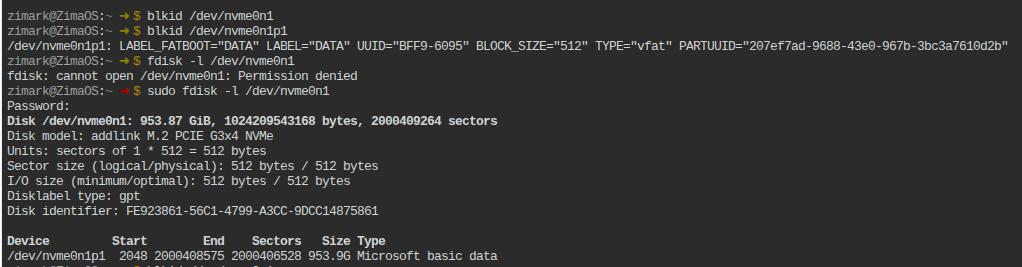
Perfect, this confirms everything.
Your NVMe is healthy.
From your output:
Disklabel type: gpt
/dev/nvme0n1p1 953.9G Microsoft basic data
TYPE="vfat"
LABEL="DATA"
So:
- GPT is valid
- Partition exists
- Filesystem is valid (vfat)
- Disk size is reported correctly
This is NOT corruption.
The reason it is not visible in CasaOS is simple:
CasaOS does not auto-mount Microsoft Basic Data (Windows-style vfat) partitions created externally. It only auto-manages disks it initializes itself.
Your NVMe contains existing Windows-formatted data. ZimaOS sees it, but does not auto-import it into /DATA or the UI storage manager.
Now confirm it is not mounted:
mount | grep nvme
If nothing returns, manually mount it to test:
mkdir -p /mnt/nvme-test
mount /dev/nvme0n1p1 /mnt/nvme-test
ls /mnt/nvme-test
If your files appear, the disk is fine.
At that point the issue is UI integration, not hardware.
Tell me if the manual mount works.
sudo mkdir -p /mnt/nvme-test
mkdir: cannot create directory ‘/mnt/nvme-test’: Read-only file system
It looks like your system has remounted itself read-only.
Please confirm first:
mount | grep " / "
mount | grep DATA
If you see ro in the mount flags, the filesystem is in read-only mode.
Then check for errors:
dmesg | tail -50
ZimaOS switches to read-only if it detects disk or filesystem issues.
Let’s confirm that before trying any more mounts.
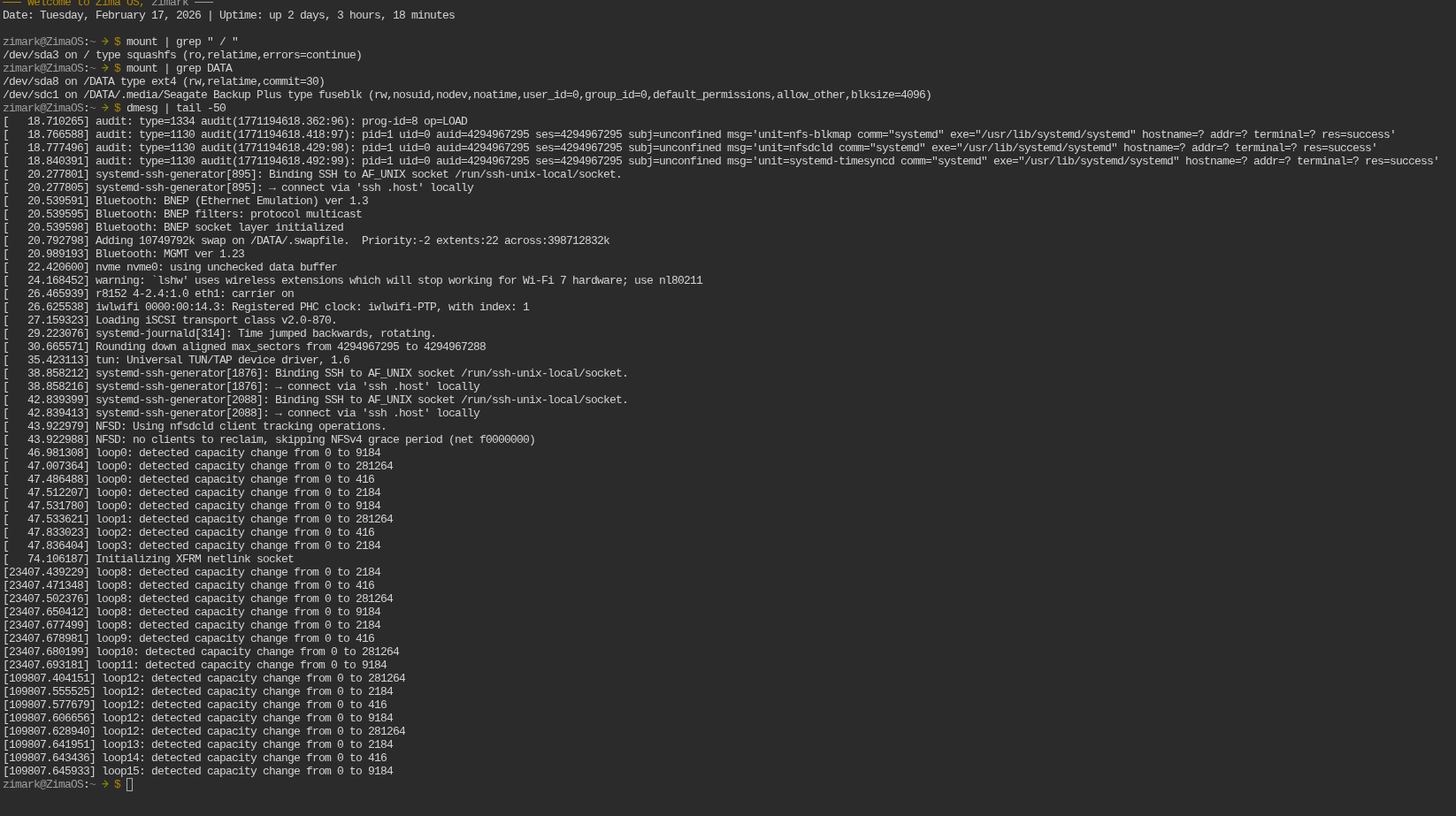
This is expected behavior on ZimaOS.
The root filesystem / is squashfs and permanently read-only. That is why creating /mnt/nvme-test fails. It is not a system error.
From your mount output:
/dev/sda3 on / type squashfs (ro,...)
/dev/sda8 on /DATA type ext4 (rw,...)
/DATA is the writable partition on ZimaOS.
I believe the system is functioning normally.
I suggest creating the mount point under /DATA instead:
mkdir -p /DATA/nvme-test
sudo mount /dev/nvme0n1p1 /DATA/nvme-test
ls /DATA/nvme-test
If the files appear, the NVMe is healthy and this is simply a ZimaOS storage import/UI limitation — not a disk issue.
This worked!!! Thank you!
I now see nvme-test in files app as well.
1 Like