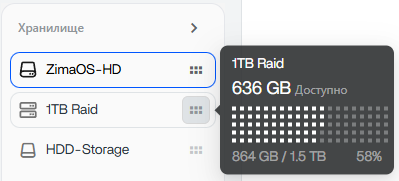
Recently i expanded my Raid 5 setup from 3x500gb to 4x500gb. I expected to get extra 500gb space in raid.
I expanded it as it should, waited some time and saw result in system settings - 1500gb of free space, but in Files it’s still 1000gb available. So basically i cant use new raid disk.
I rebooted system couple times, but it did’t help. Am i doing something wrong, or is it a bug?
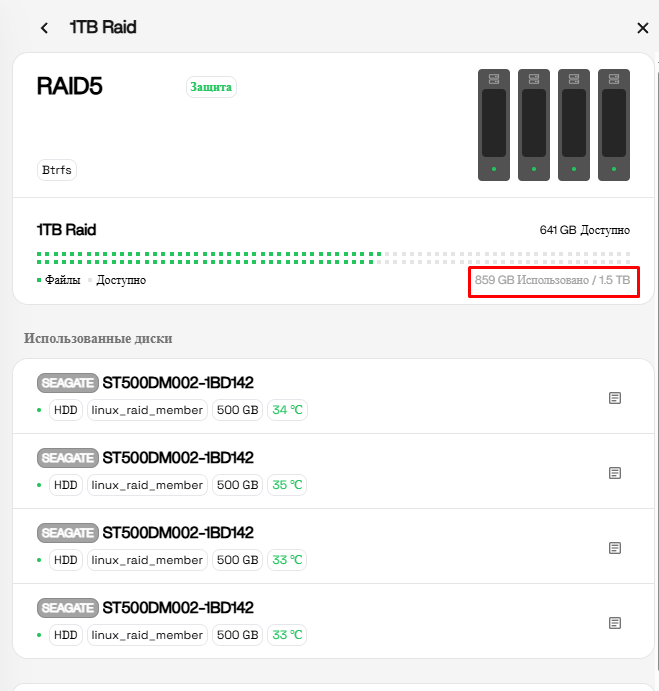
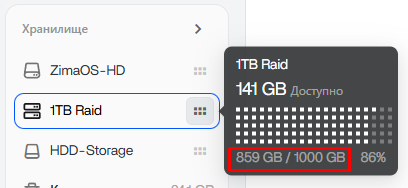
That actually looks like the RAID itself expanded correctly, but the Files app/storage widget has not refreshed its internal quota/cache yet.
Your first screenshot shows the important part:
- RAID total size = 1.5 TB
- Used = 859 GB
- Free = 641 GB
That math is correct for a 4×500GB RAID5 setup.
But the Files panel in the second screenshot is still showing the old logical size:
- 859 GB / 1000 GB
So this looks more like a UI/database refresh issue than a RAID problem itself.
I would probably check two things first before doing anything destructive:
df -h
and
sudo btrfs filesystem usage /media/1TB\ Raid
(Adjust the path if your RAID mount name is slightly different.)
If both commands show around 1.5TB total size, then your data is safe and the expansion succeeded correctly. At that point it’s likely just ZimaOS Files not updating its cached capacity display yet.
Would also be interesting to know:
- ZimaOS version
- whether the RAID was expanded through the UI only
- whether a balance/rebalance operation is still running in background
because Btrfs RAID expansion can sometimes take a while before all layers report the new size consistently.
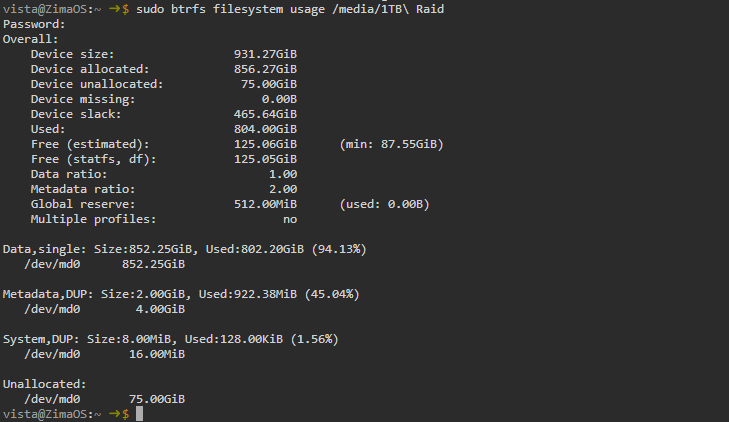

Based on those outputs, this is not just a Files app display issue.
The important lines are:
Device size: 931.27GiB
and
/dev/md0 932G 805G 126G 87% /media/1TB Raid
Both Btrfs and df are reporting a filesystem of roughly 1TB, not 1.5TB.
What’s strange is that your earlier ZimaOS storage page showed:
859 GB Used / 1.5 TB
while the actual filesystem underneath is still:
~932 GiB total
So right now the UI and the filesystem disagree.
My guess is that during the expansion from 3×500GB to 4×500GB:
- The RAID device may have been expanded at some point.
- The filesystem itself never fully grew to consume the new capacity.
- A metadata/database mismatch may have been introduced somewhere between 1.5.4 and 1.6.x.
Before doing anything else, I would verify what mdadm thinks the array size actually is:
cat /proc/mdstat
and
sudo mdadm --detail /dev/md0
Those two commands will tell us whether:
- the RAID itself is still effectively a 3-disk-sized array (~1TB usable), or
- the RAID is actually 4-disk-sized (~1.5TB usable) and only the Btrfs filesystem failed to expand.
At the moment the evidence points to the filesystem only having about 932GiB available, regardless of what the Storage UI is showing.
So I don’t think you’re doing anything wrong. It looks more like the expansion either never completed fully, or ZimaOS 1.5.4 left the array/filesystem in an inconsistent state that survived the upgrade to 1.6.1.
Let’s see the output of:
cat /proc/mdstat
sudo mdadm --detail /dev/md0
That should tell us exactly where the missing 500GB went.

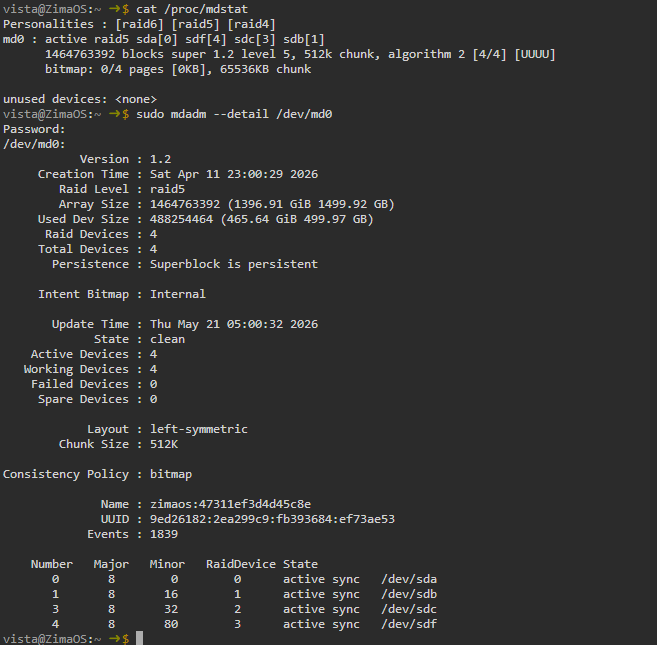
That’s actually very encouraging.
Your RAID itself looks healthy and fully expanded:
Array Size : 1464763392 (1396.91 GiB / 1499.92 GB)Raid Devices : 4State : clean
So no, I don’t think you’re looking at a “format and start again” situation.
What’s interesting is that mdadm clearly sees the full ~1.5TB RAID5 array, while Btrfs and df -h are still reporting a filesystem of only ~932GB.
That suggests the RAID expansion succeeded, but the filesystem sitting on top of it never fully grew to use the additional space.
Before doing anything risky, I’d be curious to see:
sudo btrfs filesystem show
and
sudo btrfs filesystem resize max /media/1TB\ Raid
The first command is read-only and will show what Btrfs thinks is available. The second simply tells Btrfs to use all available space already present in the underlying RAID device.
Given that mdadm reports the full 1.5TB array and the array is clean, I don’t see any evidence of disk failure or a need to recreate the RAID at this stage. It looks more like a filesystem expansion issue than a RAID issue.
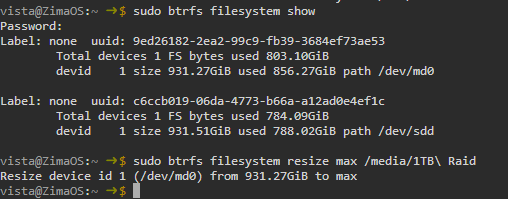
That’s getting very interesting now.
The good news is that I still don’t see anything that suggests the RAID is damaged or that you need to format the disks.
Your earlier mdadm --detail output showed:
Array Size : 1499.92 GB
State : clean
Raid Devices : 4
so the RAID layer itself definitely knows about all four drives and the full ~1.5TB capacity.
What’s puzzling is that Btrfs was still reporting:
devid 1 size 931.27GiB path /dev/md0
which is only about 1TB.
You then ran:
sudo btrfs filesystem resize max /media/1TB\ Raid
and Btrfs accepted the command without any errors:
Resize device id 1 (/dev/md0) from 931.27GiB to max
That is encouraging, because if Btrfs thought something was seriously wrong it would normally complain rather than silently accept the resize request.
Could you post the output of:
df -h /media/1TB\ Raid
and
sudo btrfs filesystem usage /media/1TB\ Raid
I’m curious whether the resize actually took effect and the filesystem has now grown to use the full RAID capacity.
At this point it feels more like a mismatch between the RAID layer and the filesystem layer than a failed expansion, and I definitely wouldn’t be reaching for the “reformat everything” button yet.
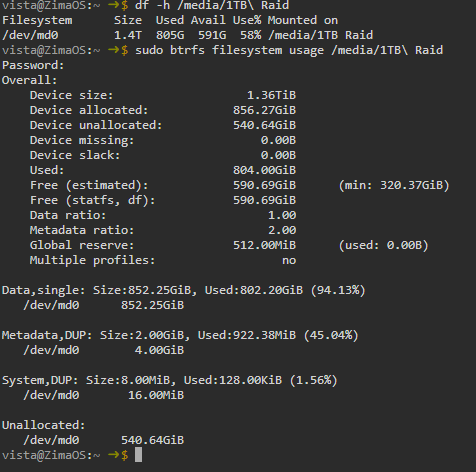
There we go! 
The resize definitely worked.
Before the resize, Btrfs was only seeing about 931GiB. Now it’s reporting:
/dev/md0 1.4T 805G 591G 58%
and:
Device size: 1.36TiB
Device unallocated: 540.64GiB
which matches the expected capacity of your 4×500GB RAID5 array.
So the RAID expansion itself had succeeded, but the Btrfs filesystem never expanded to use the additional space until you manually ran:
sudo btrfs filesystem resize max /media/1TB\ Raid
The good news is:
- RAID is healthy (
clean) - All 4 drives are active
- No rebuild running
- No formatting required

- Your missing ~500GB has been recovered
The only thing I’d check now is whether the Files app updates its displayed capacity after a refresh/relogin or reboot. If it still shows 1TB while df -h shows 1.4T, then we’d be looking at a ZimaOS UI/database caching issue rather than a storage problem.
Nice catch tracking this down. Without checking the Btrfs layer it would have looked like the expansion had completed successfully when in reality the filesystem never grew to use the extra space.