The first app I install home assistant took nearly 3 hours to install i then tried immich this has been installing for nearly 24 hours i am connected to router by cable and have a fast cable connection which I have no issues with also i have my vpn switched off to test this i guess this is not normal can anyone help
Yep, that’s not normal. Even on slower hardware, Home Assistant should not take 3 hours, and Immich definitely shouldn’t sit “installing” for 24 hours.
Here’s the most likely cause + the fastest way to prove it.
Thanks for the information unfortunately I am new to zimaos docker etc how do I open terminal is it in the web portal where you install the apps or direct on the pc also i tried zimaos on another pc I had and the same thing happened if that helps
To use Terminal in ZimaOS, I suggest installing the app called ttydBridge (this is the Terminal app I use). You do not need to use the built-in UI terminal.
Step 1: Install Terminal (ttydBridge)
Open your ZimaOS dashboard in the browser
Go to Apps
Search for: ttydBridge
Click Install
Once installed, open it from your dashboard
Login:
Username: root
Password: your ZimaOS password
You will then see a black terminal window.
Step 2: Run these 3 commands (copy/paste)
Run these one by one and paste the results back here:
1) Check if containers exist / are stuck
docker ps -a
2) Check free disk space (important)
df -h
3) Test if Docker can download images
docker pull hello-world
Why this helps
Because you tested on another PC and the same thing happened, I believe the problem is most likely DNS/network blocking Docker image downloads, which causes apps like Immich / Home Assistant to sit on “installing” for hours.
Once you paste the output of those commands, I can tell you exactly what is blocking it and what to change.
MalginYury thanks, that screenshot is very helpful.
If docker pull hello-world hangs on Waiting, it confirms the issue is not Immich or Home Assistant. It means Docker is unable to pull images from Docker Hub, so ZimaOS apps will sit on “installing” for a very long time (or forever).
If docker pull hello-world hangs on Waiting, it usually means the Docker service/network pull is stuck. What helped me immediately was restarting Docker.
Instead of staying on Waiting, it should start downloading layers and progress normally.
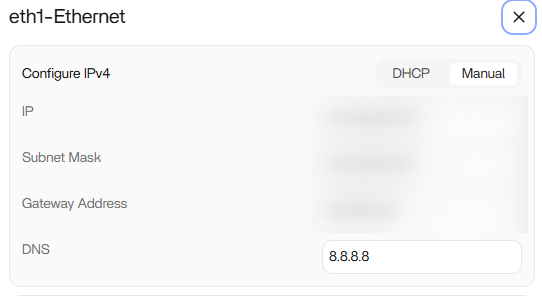
If it still hangs after the restart, then it’s likely DNS/router filtering (Pi-hole/AdGuard/router security). In that case I suggest changing DNS to Cloudflare (1.1.1.1 / 1.0.0.1) or Google (8.8.8.8 / 8.8.4.4) and trying again.
Putting 8.8.8.8 in the DNS field is correct, but I suggest adding a second DNS as well (more reliable).
Best DNS options
Google DNS
Primary: 8.8.8.8
Secondary: 8.8.4.4
OR Cloudflare DNS (often faster)
Primary: 1.1.1.1
Secondary: 1.0.0.1
What to do
Enter two DNS IPs (if the UI allows it)
Save/apply
Restart Docker:
sudo systemctl restart docker.service
Test again:
docker pull hello-world
Expected result
It should no longer hang on “Waiting” and should start pulling layers immediately.
If it still hangs after DNS + Docker restart, then the router/ISP is blocking registry traffic and we’ll need to test using a phone hotspot to confirm.
Thanks everyone for your help my latest is it does hang on waiting so going to change the DNS as suggested sorry if this sounds stupid I do change them on my router
gave up as i just could not fix this but i really want to get this to work how do i get a command prompt so i can try and enter the commands you suggested sorry i am so new to all this and i really appreciate any help