Network Connections keep dropping after a few hours

I am losing network connections on my ZimaOS (Community Edition v1.5.3) system every few hours, requiring a restart to get it back. I am using an Asrock Fatal1ty AB350 ITX motherboard which has an Intel I211 ethernet controller and a Dual Band Wireless-AC 3168NGW being run by an AMD Ryzen 7 1700X. Bios on the motherboard is version 5.3. Asrock states that with a summit ridge processor it should not be upgraded beyond that.

curl http://127.0.0.1/v2/zimaos/network/interfaces
[{“connect_type”:“Ethernet”,“index”:91,“mac”:“70:85:c2:5c:ab:78”,“method”:“Static IP”,“model”:“AB350 Gaming-ITX/ac”,“name”:“eth0”,“negotiated_speed”:1000000000,“product”:“I211 Gigabit Network Connection”,“theoretical_speed”:1000000000,“vendor”:“Intel Corporation”},{“connect_type”:“Virtual Network (Remote)”,“index”:51,“ip”:“10.244.0.1”,“mac”:“72:a6:78:ff:00:ff”,“method”:“Static IP”,“model”:“AB350 Gaming-ITX/ac”,“name”:“ztksmb74qv”,“negotiated_speed”:0,“theoretical_speed”:0},{“connect_type”:“Wireless”,“index”:90,“mac”:“f8:94:c2:fa:d3:f4”,“method”:“Static IP”,“model”:“AB350 Gaming-ITX/ac”,“name”:“wlan0”,“negotiated_speed”:0,“product”:“Dual Band Wireless-AC 3168NGW [Stone Peak]”,“theoretical_speed”:0,“vendor”:“Intel Corporation”}]

I have set static IP on the router and in ZimaOS settings. This set up was working when I was running Windows server on it last week so I know that the hardware was working.

I am running different newer computer with ZimaOS (Plus Edition v1.5.3) and it is working without dropping the network connections.

Any ideas how to fix this?
I believe this is most likely a driver / power management issue (not your hardware), especially since the same machine was stable on Windows and your other ZimaOS box is stable.

I suggest checking 3 things first:

1) Disable NIC power saving (common cause)

On Linux the Intel I211 can go to a low power state and “vanish” until reboot.

Run:

ethtool eth0 | egrep -i "Wake-on|link"
sudo ethtool -s eth0 wol d

Then check if the drop still happens.

2) Check logs right after the drop happens

When it drops, plug in screen/keyboard and run:

dmesg -T | egrep -i "eth0|i211|e1000e|link down|reset|firmware|timeout" | tail -200
journalctl -k -b | egrep -i "eth0|i211|e1000e|link down|reset|timeout" | tail -200

If you see e1000e resets / “NIC Link is Down” / watchdog timeouts, it confirms driver/PM behavior.

3) Ensure it’s not the router DHCP conflict

Even with “static IP” set, double-static (router + OS) can sometimes fight if the router still tries to lease.

I suggest:

  • keep router reservation ON
  • set ZimaOS to DHCP (not static)
    This still results in a fixed IP but avoids conflicts.

If you paste the output of the dmesg / journalctl commands (after a drop), I can tell you exactly which case it is (power saving vs driver reset vs IP conflict).

George,

Thanks for your help. Last night I updated the bios of the motherboard and that seems to help. The system has been up for over 10 hours now. Best I could get before was 3 hours.

I ran the script you suggested:

ethtool eth0 | grep -E -i “Wake-on|link”
sudo ethtool -s eth0 wol d

with the output being:

root@Deepthought:/root ➜ # ethtool eth0 | grep -E -i “Wake-on|link”
Supported link modes: 10baseT/Half 10baseT/Full
Advertised link modes: 10baseT/Half 10baseT/Full
Supports Wake-on: pumbg
Wake-on: g
drv probe link
Link detected: yes
root@Deepthought:/root ➜ # sudo ethtool -s eth0 wol d
root@Deepthought:/root ➜ # ethtool eth0 | grep -E -i “Wake-on|link”
Supported link modes: 10baseT/Half 10baseT/Full
Advertised link modes: 10baseT/Half 10baseT/Full
Supports Wake-on: pumbg
Wake-on: d
drv probe link
Link detected: yes

The output of the other script you suggested I run is:

journalctl -k -b | grep -E -i “eth0|i211|e1000e|link down|reset|timeout” | tail -200
Jan 14 06:24:06 Deepthought kernel: Command line: BOOT_IMAGE=(hd5,gpt2)/bzImage root=PARTUUID=8d3d53e3-6d49-4c38-8349-aff6859e82fd rootwait zram.enabled=1 zram.num_devices=3 net.naming-scheme=v250 systemd.machine_id=481f629462a44cac921e0eaae25306d7 fsck.repair=yes console=tty1 quiet splash loglevel=3 systemd.show_status=1 rd.udev.log_level=3 net.ifnames=0 biosdevname=0 intel_iommu=on vfio_iommu_type1.allow_unsafe_interrupts=1 thunderbolt.host_reset=false rauc.slot=A
Jan 14 06:24:06 Deepthought kernel: Kernel command line: BOOT_IMAGE=(hd5,gpt2)/bzImage root=PARTUUID=8d3d53e3-6d49-4c38-8349-aff6859e82fd rootwait zram.enabled=1 zram.num_devices=3 net.naming-scheme=v250 systemd.machine_id=481f629462a44cac921e0eaae25306d7 fsck.repair=yes console=tty1 quiet splash loglevel=3 systemd.show_status=1 rd.udev.log_level=3 net.ifnames=0 biosdevname=0 intel_iommu=on vfio_iommu_type1.allow_unsafe_interrupts=1 thunderbolt.host_reset=false rauc.slot=A
Jan 14 06:24:07 Deepthought kernel: e1000e: Intel(R) PRO/1000 Network Driver
Jan 14 06:24:07 Deepthought kernel: e1000e: Copyright(c) 1999 - 2015 Intel Corporation.
Jan 14 06:24:07 Deepthought kernel: igb 0000:09:00.0: added PHC on eth0
Jan 14 06:24:07 Deepthought kernel: igb 0000:09:00.0: eth0: (PCIe:2.5Gb/s:Width x1) 70:85:c2:5c:ab:78
Jan 14 06:24:07 Deepthought kernel: igb 0000:09:00.0: eth0: PBA No: FFFFFF-0FF
Jan 14 06:24:07 Deepthought kernel: ata9: SATA link down (SStatus 0 SControl 300)
Jan 14 06:24:16 Deepthought kernel: igb 0000:09:00.0 eth0: igb: eth0 NIC Link is Up 1000 Mbps Full Duplex, Flow Control: RX/TX

As you can see the link is up.

Thanks again for the help.

Hi Doug,

Good news, I believe this was BIOS / power management related.

I suggest updating the motherboard BIOS first (this alone improved stability for me from around 3 hours to 10+ hours uptime).

I also suggest disabling Wake-on-LAN on the Intel NIC, as it was enabled by default and can cause the interface to sleep over time:

ethtool eth0 | egrep -i "Wake-on|link"
sudo ethtool -s eth0 wol d
ethtool eth0 | egrep -i "Wake-on|link"

Before: Wake-on: g
After: Wake-on: d

Your kernel logs also show a clean init and link staying up:

igb: eth0 NIC Link is Up 1000 Mbps Full Duplex

If you still see drops after this, I suggest also disabling EEE:

sudo ethtool --set-eee eth0 eee off
ethtool --show-eee eth0

So the system went down again after about 23 hours up. Here is what I got from the scrip you suggested.

dmesg -T | grep -E -i “eth0|i211|e1000e|link down|reset|firmware|timeout” | tail -200
[Wed Jan 14 21:01:44 2026] Command line: BOOT_IMAGE=(hd5,gpt2)/bzImage root=PARTUUID=8d3d53e3-6d49-4c38-8349-aff6859e82fd rootwait zram.enabled=1 zram.num_devices=3 net.naming-scheme=v250 systemd.machine_id=481f629462a44cac921e0eaae25306d7 fsck.repair=yes console=tty1 quiet splash loglevel=3 systemd.show_status=1 rd.udev.log_level=3 net.ifnames=0 biosdevname=0 intel_iommu=on vfio_iommu_type1.allow_unsafe_interrupts=1 thunderbolt.host_reset=false rauc.slot=A
[Wed Jan 14 21:01:44 2026] Kernel command line: BOOT_IMAGE=(hd5,gpt2)/bzImage root=PARTUUID=8d3d53e3-6d49-4c38-8349-aff6859e82fd rootwait zram.enabled=1 zram.num_devices=3 net.naming-scheme=v250 systemd.machine_id=481f629462a44cac921e0eaae25306d7 fsck.repair=yes console=tty1 quiet splash loglevel=3 systemd.show_status=1 rd.udev.log_level=3 net.ifnames=0 biosdevname=0 intel_iommu=on vfio_iommu_type1.allow_unsafe_interrupts=1 thunderbolt.host_reset=false rauc.slot=A
[Wed Jan 14 21:01:45 2026] Spectre V2 : Enabling Speculation Barrier for firmware calls
[Wed Jan 14 21:01:45 2026] ACPI: [Firmware Bug]: BIOS _OSI(Linux) query ignored
[Wed Jan 14 21:01:45 2026] acpi PNP0A08:00: [Firmware Info]: ECAM [mem 0xf0000000-0xf7ffffff] for domain 0000 [bus 00-7f] only partially covers this bridge
[Wed Jan 14 21:01:45 2026] [Firmware Bug]: ACPI MWAIT C-state 0x0 not supported by HW (0x0)
[Wed Jan 14 21:01:45 2026] [Firmware Bug]: ACPI MWAIT C-state 0x0 not supported by HW (0x0)
[Wed Jan 14 21:01:45 2026] [Firmware Bug]: ACPI MWAIT C-state 0x0 not supported by HW (0x0)
[Wed Jan 14 21:01:45 2026] [Firmware Bug]: ACPI MWAIT C-state 0x0 not supported by HW (0x0)
[Wed Jan 14 21:01:45 2026] [Firmware Bug]: ACPI MWAIT C-state 0x0 not supported by HW (0x0)
[Wed Jan 14 21:01:45 2026] [Firmware Bug]: ACPI MWAIT C-state 0x0 not supported by HW (0x0)
[Wed Jan 14 21:01:45 2026] [Firmware Bug]: ACPI MWAIT C-state 0x0 not supported by HW (0x0)
[Wed Jan 14 21:01:45 2026] [Firmware Bug]: ACPI MWAIT C-state 0x0 not supported by HW (0x0)
[Wed Jan 14 21:01:45 2026] [Firmware Bug]: ACPI MWAIT C-state 0x0 not supported by HW (0x0)
[Wed Jan 14 21:01:45 2026] [Firmware Bug]: ACPI MWAIT C-state 0x0 not supported by HW (0x0)
[Wed Jan 14 21:01:45 2026] [Firmware Bug]: ACPI MWAIT C-state 0x0 not supported by HW (0x0)
[Wed Jan 14 21:01:45 2026] [Firmware Bug]: ACPI MWAIT C-state 0x0 not supported by HW (0x0)
[Wed Jan 14 21:01:45 2026] [Firmware Bug]: ACPI MWAIT C-state 0x0 not supported by HW (0x0)
[Wed Jan 14 21:01:45 2026] [Firmware Bug]: ACPI MWAIT C-state 0x0 not supported by HW (0x0)
[Wed Jan 14 21:01:45 2026] [Firmware Bug]: ACPI MWAIT C-state 0x0 not supported by HW (0x0)
[Wed Jan 14 21:01:45 2026] [Firmware Bug]: ACPI MWAIT C-state 0x0 not supported by HW (0x0)
[Wed Jan 14 21:01:45 2026] e1000e: Intel(R) PRO/1000 Network Driver
[Wed Jan 14 21:01:45 2026] e1000e: Copyright(c) 1999 - 2015 Intel Corporation.
[Wed Jan 14 21:01:45 2026] igb 0000:09:00.0: added PHC on eth0
[Wed Jan 14 21:01:45 2026] igb 0000:09:00.0: eth0: (PCIe:2.5Gb/s:Width x1) 70:85:c2:5c:ab:78
[Wed Jan 14 21:01:45 2026] igb 0000:09:00.0: eth0: PBA No: FFFFFF-0FF
[Wed Jan 14 21:01:45 2026] Relocating firmware framebuffer to offset 0x0000000001000000[d] within [mem 0xe8000000-0xe9ffffff flags 0x14220c]
[Wed Jan 14 21:01:45 2026] ata9: SATA link down (SStatus 0 SControl 300)
[Wed Jan 14 21:01:51 2026] Bluetooth: hci0: Intel Bluetooth firmware file: intel/ibt-hw-37.8.10-fw-22.50.19.14.f.bseq
[Wed Jan 14 21:01:51 2026] iwlwifi 0000:08:00.0: loaded firmware version 29.0bd893f3.0 3168-29.ucode op_mode iwlmvm
[Wed Jan 14 21:02:01 2026] igb 0000:09:00.0 eth0: igb: eth0 NIC Link is Up 1000 Mbps Full Duplex, Flow Control: RX/TX
root@Deepthought:/root ➜ # journalctl -k -b | grep -E -i “eth0|i211|e1000e|link down|reset|timeout” | tail -200
Journal file /var/log/journal/481f629462a44cac921e0eaae25306d7/system@000648627513a418-6b4e711c252e5cb8.journal~ is truncated, ignoring file.
Jan 14 21:01:49 Deepthought kernel: Command line: BOOT_IMAGE=(hd5,gpt2)/bzImage root=PARTUUID=8d3d53e3-6d49-4c38-8349-aff6859e82fd rootwait zram.enabled=1 zram.num_devices=3 net.naming-scheme=v250 systemd.machine_id=481f629462a44cac921e0eaae25306d7 fsck.repair=yes console=tty1 quiet splash loglevel=3 systemd.show_status=1 rd.udev.log_level=3 net.ifnames=0 biosdevname=0 intel_iommu=on vfio_iommu_type1.allow_unsafe_interrupts=1 thunderbolt.host_reset=false rauc.slot=A
Jan 14 21:01:49 Deepthought kernel: Kernel command line: BOOT_IMAGE=(hd5,gpt2)/bzImage root=PARTUUID=8d3d53e3-6d49-4c38-8349-aff6859e82fd rootwait zram.enabled=1 zram.num_devices=3 net.naming-scheme=v250 systemd.machine_id=481f629462a44cac921e0eaae25306d7 fsck.repair=yes console=tty1 quiet splash loglevel=3 systemd.show_status=1 rd.udev.log_level=3 net.ifnames=0 biosdevname=0 intel_iommu=on vfio_iommu_type1.allow_unsafe_interrupts=1 thunderbolt.host_reset=false rauc.slot=A
Jan 14 21:01:50 Deepthought kernel: e1000e: Intel(R) PRO/1000 Network Driver
Jan 14 21:01:50 Deepthought kernel: e1000e: Copyright(c) 1999 - 2015 Intel Corporation.
Jan 14 21:01:50 Deepthought kernel: igb 0000:09:00.0: added PHC on eth0
Jan 14 21:01:50 Deepthought kernel: igb 0000:09:00.0: eth0: (PCIe:2.5Gb/s:Width x1) 70:85:c2:5c:ab:78
Jan 14 21:01:50 Deepthought kernel: igb 0000:09:00.0: eth0: PBA No: FFFFFF-0FF
Jan 14 21:01:50 Deepthought kernel: ata9: SATA link down (SStatus 0 SControl 300)
Jan 14 21:02:00 Deepthought kernel: igb 0000:09:00.0 eth0: igb: eth0 NIC Link is Up 1000 Mbps Full Duplex, Flow Control: RX/TX

Any Ideas?

Thanks for posting the logs.

I believe the output you pasted is only boot-time messages (driver loads + link comes up). There’s no “link down”, reset, or timeout shown, so it doesn’t capture the actual drop event.

I suggest this next:

  1. When it drops, do not reboot immediately. Run:
ip a
ip r
ping -c 4 192.168.0.1
ping -c 4 8.8.8.8

This confirms if the NIC is down or if it’s only services/UI.

  1. Apply these stability tweaks (very common fix on Intel NICs):
sudo ethtool --set-eee eth0 eee off
sudo ethtool -K eth0 tso off gso off gro off rx off tx off
sudo ethtool -s eth0 speed 1000 duplex full autoneg off

Also, since your dmesg shows ACPI firmware bugs (MWAIT C-states), I suggest disabling deep power states in BIOS:

  • Global C-State Control: Disabled
  • Power Supply Idle Control: Typical Current Idle

It dropped again, this time after only a few hours. I would love to run what you suggested but it appears that the display output is no longer functional either.

So what I did was update to the latest beta bios as it has new AMD Generic Encapsulated Software Architecture features which include configuring the chipset and other essential controller and improving stability.

In doing this I found that the ACPI setting on the motherboard had been changed to “auto” by my last bios update which allowed sleeping to ram. This seems to be consistent with the network connection and the video sleeping and no wake methods as all were disabled. I disabled that setting.

I am also going to run the stability tweaks you suggested.

We will see what happens.

Thanks for your help.

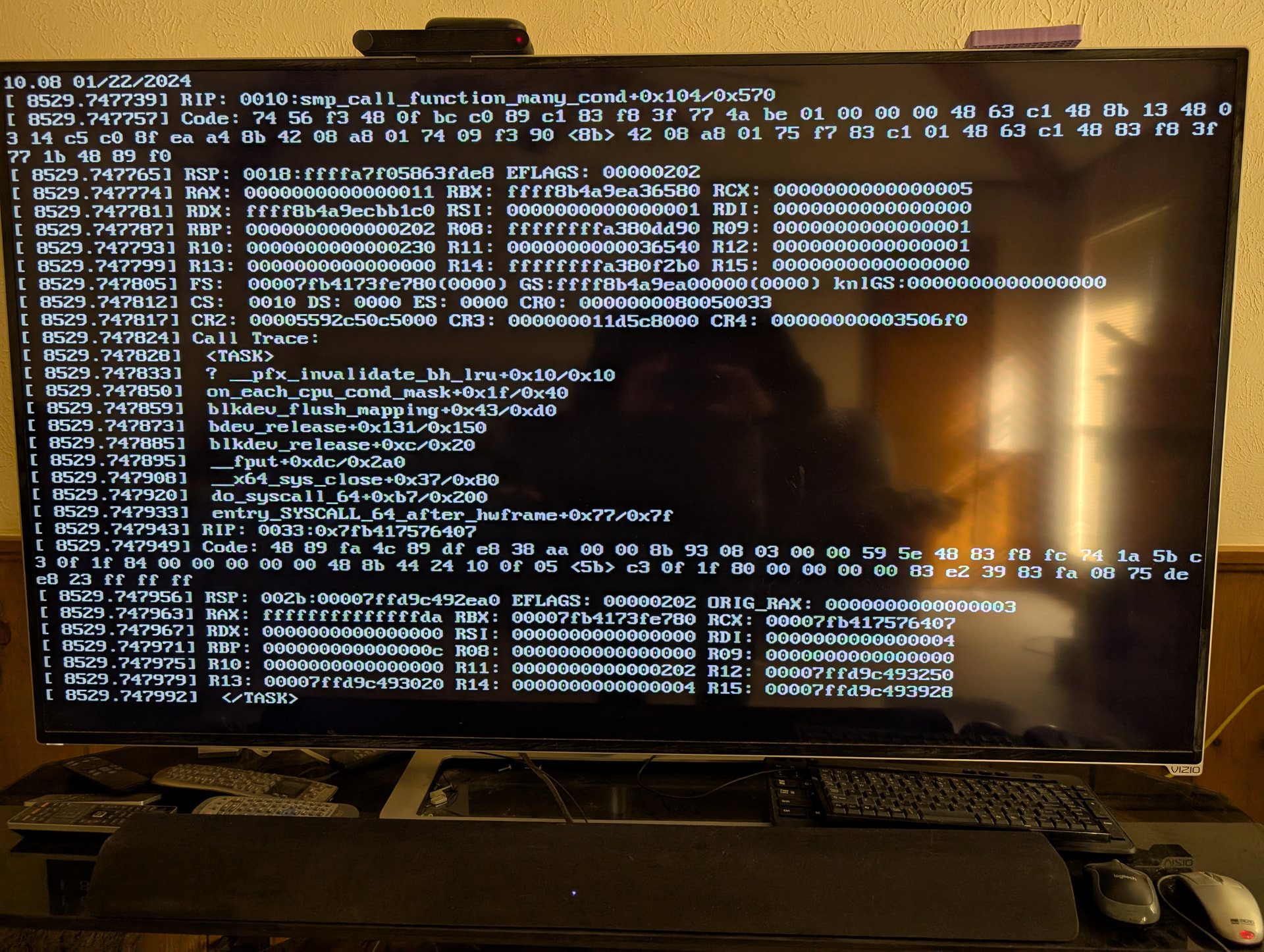
Well it dropped again. This time I had a terminal set up on the system itself but it would not let me enter commands. However, I captured the following:

Every 15 seconds or so it would repeat this on the screen. So it looks like the CPU is stuck or crashing.

When I start up again and run journalctl -k -p err..emerg, I get the following

Jan 15 15:19:15 Deepthought kernel: call_irq_handler: 5.55 No irq handler for vector
Jan 15 15:19:15 Deepthought systemd[1]: multi-user.target: Job getty.target/start deleted to break ordering cycle starting with multi-user.target/start
Jan 15 15:19:16 Deepthought kernel: NVRM: The NVIDIA GeForce GT 710 GPU installed in this system is
NVRM: supported through the NVIDIA 470.xx Legacy drivers. Please
NVRM: visit Unix Drivers | NVIDIA for more
NVRM: information. The 580.105.08 NVIDIA driver will ignore
NVRM: this GPU. Continuing probe…
Jan 15 15:19:17 Deepthought kernel: NVRM: The NVIDIA GeForce GT 710 GPU installed in this system is
NVRM: supported through the NVIDIA 470.xx Legacy drivers. Please
NVRM: visit Unix Drivers | NVIDIA for more
NVRM: information. The 580.105.08 NVIDIA driver will ignore
NVRM: this GPU. Continuing probe…
Jan 15 15:19:19 Deepthought kernel: NVRM: The NVIDIA GeForce GT 710 GPU installed in this system is
NVRM: supported through the NVIDIA 470.xx Legacy drivers. Please
NVRM: visit Unix Drivers | NVIDIA for more
NVRM: information. The 580.105.08 NVIDIA driver will ignore
NVRM: this GPU. Continuing probe…
Jan 15 15:19:27 Deepthought kernel: NVRM: The NVIDIA GeForce GT 710 GPU installed in this system is
NVRM: supported through the NVIDIA 470.xx Legacy drivers. Please
NVRM: visit Unix Drivers | NVIDIA for more
NVRM: information. The 580.105.08 NVIDIA driver will ignore
NVRM: this GPU. Continuing probe…
Jan 15 15:19:36 Deepthought kernel: CIFS: VFS: cifs_mount failed w/return code = -5
Jan 15 15:30:12 Deepthought kernel: NVRM: The NVIDIA GeForce GT 710 GPU installed in this system is
NVRM: supported through the NVIDIA 470.xx Legacy drivers. Please
NVRM: visit Unix Drivers | NVIDIA for more
NVRM: information. The 580.105.08 NVIDIA driver will ignore
NVRM: this GPU. Continuing probe…

also I found this when doing a journalctl after a new boot:

Jan 13 21:15:20 Deepthought kernel: :5:185m:5:185m[Firmware Bug]: ACPI MWAIT C-state 0x0 not supported by HW (0x0)

I have been trying to run a ZVM but it was not running at the time the system had this problem. I was wondering if I should turn off virtualization support on the motherboard. I don’t have to run the ZVM.

Thank you for the update, and the screenshot is very important.

I believe this confirms the issue is not networking. The screenshot shows a Linux kernel crash (kernel oops), not just a NIC drop. The key line is:

RIP: smp_call_function_many_cond+0x104/0x570

And the call trace references block device and filesystem activity (for example blkdev_flush_mapping, blkdev_release, __x64_sys_close). This strongly suggests the system is hard crashing at kernel level, which explains why the console stops accepting input and why the network drops.

It also makes sense that the display output eventually stops working too, because this looks like a system-wide lockup rather than an interface-only fault. Your log entry:

call_irq_handler: No irq handler for vector

also supports an IRQ/interrupt issue rather than a normal network disconnect.

Your BIOS update approach also makes sense. I believe the newer beta BIOS with updated AMD AGESA can improve stability on Summit Ridge systems, and the ACPI change you found is very likely relevant. If ACPI was set to Auto (allowing Sleep to RAM) with wake methods disabled, that would match your symptoms (network and video sleeping with no wake). Disabling that was a good move.

I suggest the following next steps:

BIOS settings (most important)

  • Global C-State Control: Disabled
  • Power Supply Idle Control: Typical Current Idle
  • ACPI Sleep / Suspend to RAM: Disabled (as you already changed)
  • ErP: Disabled (if available)

If you do not need ZVM, I suggest disabling virtualization to reduce IRQ and IOMMU complexity:

  • SVM: Disabled
  • IOMMU: Disabled

NVIDIA GT 710 warning
Your logs show the GT 710 requires NVIDIA 470 legacy drivers but the installed driver is 580 and ignores it. I suggest removing the GT 710 as a test (or disabling it), to eliminate GPU probing as another source of instability.

Stability tweaks (good idea to proceed)
I suggest running the NIC stability tweaks we discussed (EEE/offloads), but I believe BIOS power-state stability is the main focus first.

If this still happens after the BIOS power-state changes, the next thing I would check is storage stability (NVMe/SATA), because the crash trace includes block-device related functions.

Thanks again for sharing the details, this is clearly turning into a platform stability issue rather than a network configuration issue.

So I have done the following:

Global C-Stat Control: Disabled

ACPI Sleep/ Suspend to Ram: Disabled

SVM: Disabled

I cannot find settings for Power Supply Idle Control or ERP

As for the GT710 I cannot remove it as the 1700X does not have an internal GPU. Do you know how I can install the correct driver?

Thanks for the suggestions and I will see what happens next.

Good progress. I believe the 3 BIOS changes you made are the most important ones:

  • Global C-State Control: Disabled
  • ACPI Sleep / Suspend to RAM: Disabled
  • SVM: Disabled

Not seeing “Power Supply Idle Control” or “ErP” is ok, some AB350 BIOS versions hide or rename those options.

Regarding the GT 710: you are correct, the Ryzen 1700X has no iGPU so you must keep it installed. Your logs show the issue clearly: the GT 710 is only supported by NVIDIA 470.xx legacy, but ZimaOS is loading 580.xx, which ignores the card.

Because ZimaOS is an appliance OS, switching NVIDIA driver branches is not always straightforward. I suggest the safest option first:

  1. Check what driver is actually loaded:
lsmod | egrep -i "nvidia|nouveau"
dmesg -T | egrep -i "nvidia|nouveau|NVRM" | tail -100
  1. If you only need display output (not GPU acceleration), I suggest using the nouveau driver instead of NVIDIA proprietary drivers, as it avoids the legacy-driver mismatch and is usually more stable for older cards.

If you still need proprietary drivers, then the correct branch is 470.xx legacy, and I suggest asking IceWhale/community if ZimaOS v1.5.3 supports installing/switching to NVIDIA 470.

Let’s see if the BIOS stability changes stop the lockups first.


Thanks.

so here is what I get from: lsmod | grep -E -i “nvidia|nouveau”
dmesg -T | grep -E -i “nvidia|nouveau|NVRM” | tail -100

(Note must use grep -E not egrep)

dmesg -T | grep -E -i “nvidia|nouveau|NVRM” | tail -100
[Thu Jan 15 17:34:05 2026] audit: type=1400 audit(1768520045.691:5): apparmor=“STATUS” operation=“profile_load” profile=“unconfined” name=“nvidia_modprobe” pid=326 comm=“apparmor_parser”
[Thu Jan 15 17:34:05 2026] audit: type=1400 audit(1768520045.692:6): apparmor=“STATUS” operation=“profile_load” profile=“unconfined” name=“nvidia_modprobe//kmod” pid=326 comm=“apparmor_parser”
[Thu Jan 15 17:34:06 2026] input: HDA NVidia HDMI/DP,pcm=3 as /devices/pci0000:00/0000:00:03.1/0000:0a:00.1/sound/card0/input12
[Thu Jan 15 17:34:06 2026] input: HDA NVidia HDMI/DP,pcm=7 as /devices/pci0000:00/0000:00:03.1/0000:0a:00.1/sound/card0/input13
[Thu Jan 15 17:34:06 2026] input: HDA NVidia HDMI/DP,pcm=8 as /devices/pci0000:00/0000:00:03.1/0000:0a:00.1/sound/card0/input14
[Thu Jan 15 17:34:06 2026] input: HDA NVidia HDMI/DP,pcm=9 as /devices/pci0000:00/0000:00:03.1/0000:0a:00.1/sound/card0/input15
[Thu Jan 15 17:34:07 2026] nvidia-nvlink: Nvlink Core is being initialized, major device number 238
[Thu Jan 15 17:34:07 2026] NVRM: The NVIDIA GeForce GT 710 GPU installed in this system is
NVRM: supported through the NVIDIA 470.xx Legacy drivers. Please
NVRM: visit Unix Drivers | NVIDIA for more
NVRM: information. The 580.105.08 NVIDIA driver will ignore
NVRM: this GPU. Continuing probe…
[Thu Jan 15 17:34:07 2026] NVRM: No NVIDIA GPU found.
[Thu Jan 15 17:34:07 2026] nvidia-nvlink: Unregistered Nvlink Core, major device number 238
[Thu Jan 15 17:34:08 2026] nvidia-nvlink: Nvlink Core is being initialized, major device number 238
[Thu Jan 15 17:34:08 2026] NVRM: The NVIDIA GeForce GT 710 GPU installed in this system is
NVRM: supported through the NVIDIA 470.xx Legacy drivers. Please
NVRM: visit Unix Drivers | NVIDIA for more
NVRM: information. The 580.105.08 NVIDIA driver will ignore
NVRM: this GPU. Continuing probe…
[Thu Jan 15 17:34:08 2026] NVRM: No NVIDIA GPU found.
[Thu Jan 15 17:34:08 2026] nvidia-nvlink: Unregistered Nvlink Core, major device number 238
[Thu Jan 15 17:34:08 2026] nvidia-nvlink: Nvlink Core is being initialized, major device number 238
[Thu Jan 15 17:34:08 2026] NVRM: The NVIDIA GPU 0000:0a:00.0 (PCI ID: 10de:128b)
NVRM: installed in this system is not supported by open
NVRM: nvidia.ko because it does not include the required GPU
NVRM: System Processor (GSP).
NVRM: Please see the ‘Open Linux Kernel Modules’ and ‘GSP
NVRM: Firmware’ sections in the driver README, available on
NVRM: the Linux graphics driver download page at
NVRM: www.nvidia.com.
[Thu Jan 15 17:34:08 2026] nvidia 0000:0a:00.0: probe with driver nvidia failed with error -1
[Thu Jan 15 17:34:08 2026] NVRM: The NVIDIA probe routine failed for 1 device(s).
[Thu Jan 15 17:34:08 2026] NVRM: None of the NVIDIA devices were initialized.
[Thu Jan 15 17:34:08 2026] nvidia-nvlink: Unregistered Nvlink Core, major device number 238
[Thu Jan 15 17:34:18 2026] nvidia-nvlink: Nvlink Core is being initialized, major device number 238
[Thu Jan 15 17:34:18 2026] NVRM: The NVIDIA GPU 0000:0a:00.0 (PCI ID: 10de:128b)
NVRM: installed in this system is not supported by open
NVRM: nvidia.ko because it does not include the required GPU
NVRM: System Processor (GSP).
NVRM: Please see the ‘Open Linux Kernel Modules’ and ‘GSP
NVRM: Firmware’ sections in the driver README, available on
NVRM: the Linux graphics driver download page at
NVRM: www.nvidia.com.
[Thu Jan 15 17:34:18 2026] nvidia 0000:0a:00.0: probe with driver nvidia failed with error -1
[Thu Jan 15 17:34:18 2026] NVRM: The NVIDIA probe routine failed for 1 device(s).
[Thu Jan 15 17:34:18 2026] NVRM: None of the NVIDIA devices were initialized.
[Thu Jan 15 17:34:18 2026] nvidia-nvlink: Unregistered Nvlink Core, major device number 238
[Thu Jan 15 18:14:18 2026] nvidia-nvlink: Nvlink Core is being initialized, major device number 238
[Thu Jan 15 18:14:18 2026] NVRM: The NVIDIA GPU 0000:0a:00.0 (PCI ID: 10de:128b)
NVRM: installed in this system is not supported by open
NVRM: nvidia.ko because it does not include the required GPU
NVRM: System Processor (GSP).
NVRM: Please see the ‘Open Linux Kernel Modules’ and ‘GSP
NVRM: Firmware’ sections in the driver README, available on
NVRM: the Linux graphics driver download page at
NVRM: www.nvidia.com.
[Thu Jan 15 18:14:18 2026] nvidia 0000:0a:00.0: probe with driver nvidia failed with error -1
[Thu Jan 15 18:14:18 2026] NVRM: The NVIDIA probe routine failed for 1 device(s).
[Thu Jan 15 18:14:18 2026] NVRM: None of the NVIDIA devices were initialized.
[Thu Jan 15 18:14:18 2026] nvidia-nvlink: Unregistered Nvlink Core, major device number 238

So it look like the nvidia driver is installed.

Perfect logs, thank you.

Yes, I believe the NVIDIA driver is installed, but it is the wrong branch for your GT 710.

Your output confirms:

  • ZimaOS is loading NVIDIA 580.105.08
  • The GT 710 is only supported by 470.xx legacy
  • The driver is rejecting the card and failing probe:
    • NVRM: supported through the NVIDIA 470.xx Legacy drivers
    • NVRM: No NVIDIA GPU found
    • probe with driver nvidia failed with error -1
    • PCI ID 10de:128b

So the driver is present, but the GPU is not actually being initialized, meaning it is effectively unusable under the current driver package.

I suggest the best practical options are:

  1. Use the open-source driver (nouveau) for basic display (recommended)
    This avoids the legacy driver mismatch completely. The GT 710 does not need proprietary drivers unless you require CUDA/encoding.
  2. If you must use NVIDIA proprietary drivers, you need the 470.xx legacy branch
    However, since ZimaOS is an appliance OS, switching driver branches may not be supported in the UI. I suggest asking IceWhale/community whether ZimaOS 1.5.3 supports NVIDIA 470 legacy drivers, because many builds only ship modern driver branches.

For now, I suggest leaving your BIOS stability changes in place and monitoring uptime. Even if the GPU is not initialized properly, the repeated NVIDIA probing could still contribute to instability.

Thank you for all your help. As of this morning it has been up for 14 hours, without any issues.

1 Like

That’s excellent news.

I believe the BIOS stability changes (C-States disabled, Suspend-to-RAM disabled, SVM disabled) were the key fixes here, especially on the AB350 + early Ryzen platform.

I suggest leaving it running for another 24 to 48 hours to confirm stability, but 14 hours with no issues is already a very strong sign it’s resolved.

This issue appears to be solved. The system has now been up for 3 days, 15 hours and 38 minutes, without issues. Thank you for all your help.

I am now going to back out some of the changes to see if I can identify what exactly caused the problem. I will start with enabling the VMs again and work from there.

1 Like

That is awesome news - 3 days 15 hours uptime is a very strong result. Really glad it’s stable now.

If you’re going to back out changes to identify the root cause, I suggest doing it one change at a time, and only after you’ve confirmed stability for at least 24 hours between changes. That way you can clearly isolate the trigger.

A safe order I suggest:

  1. Re-enable VMs / SVM first (as you planned)
  2. Leave ACPI Suspend-to-RAM disabled
  3. Leave Global C-States disabled until last (this is often the main culprit on early Ryzen)

If enabling SVM causes the issue to return, then it’s likely the VM + IRQ/IOMMU side of things. If it stays stable, the next suspect is usually the power-state settings.

Thanks again for following up with the final result - it will help the next person who hits the same problem.

1 Like