I just switched to ZimaOS on proxmox. But sometimes ZimaOS just doesn’t give me any data or apps at all. Can someone help me?
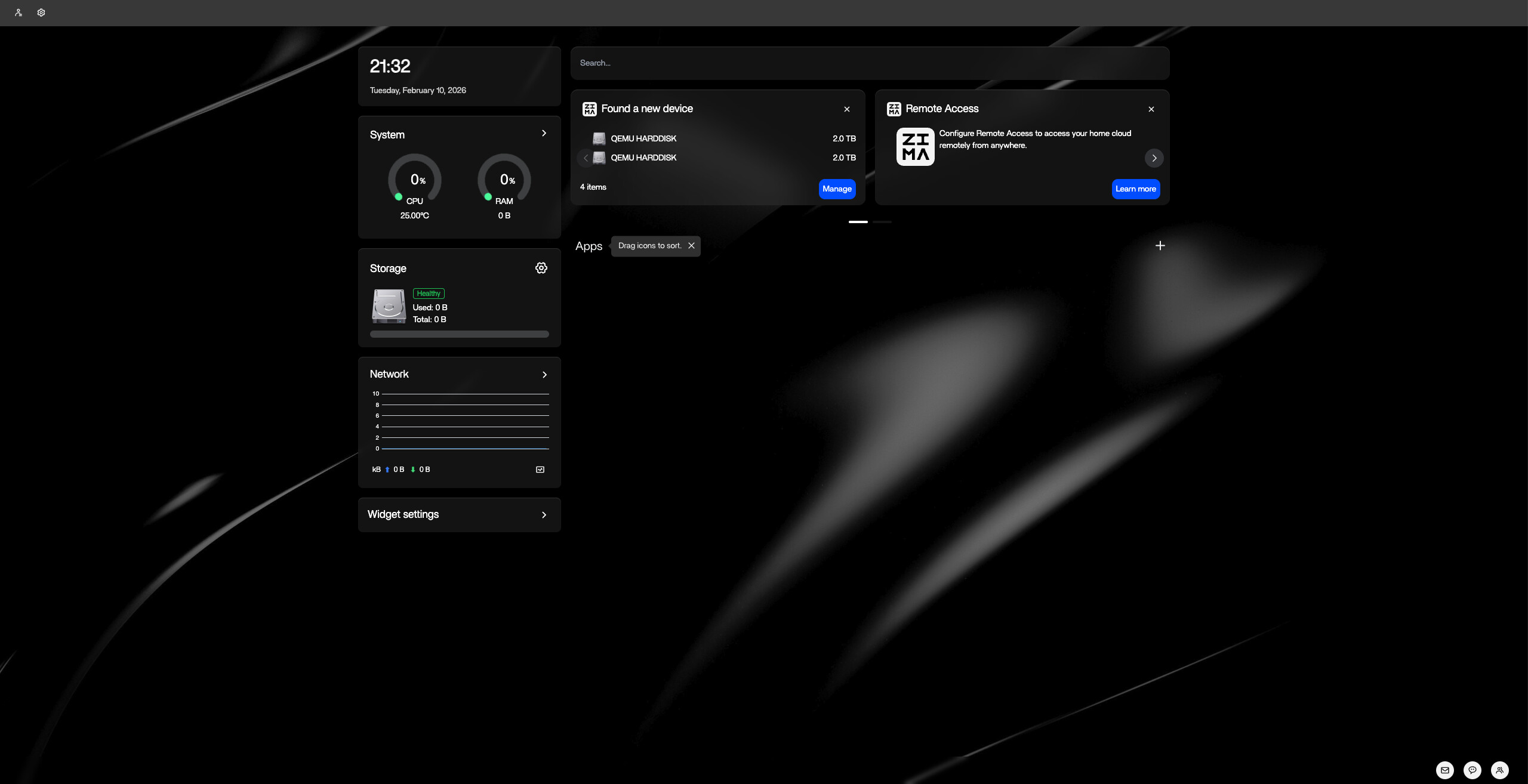
From your screenshot, ZimaOS UI loads but:
- No apps
- Storage shows 0B
- CPU/RAM at 0
- QEMU disk detected
In Proxmox this is usually either DATA not mounted or Docker not running.
SSH into ZimaOS and run:
docker ps
lsblk
df -h
We’re checking:
• Is Docker running?
• Is the 2TB disk visible?
• Is /DATA mounted?
If this is intermittent, also confirm in Proxmox:
- Disk type = VirtIO (not IDE)
- Disk is persistent
- No disk errors in Proxmox log
Post those three command outputs and we’ll pinpoint it cleanly.
jmrd@ZimaOS:~ ➜ $ sudo docker ps
Password:
CONTAINER ID IMAGE COMMAND CREATED STATUS PORTS NAMES
819b4b031655 tailscale/tailscale:v1.90.8 “/bin/sh -c 'tailsca…” 8 hours ago Up 55 minutes tailscale
jmrd@ZimaOS:~ ➜ $ lsblk
NAME MAJ:MIN RM SIZE RO TYPE MOUNTPOINTS
loop0 7:0 0 1.1M 1 loop
loop1 7:1 0 4.5M 1 loop
loop2 7:2 0 208K 1 loop
loop3 7:3 0 4.5M 1 loop
loop4 7:4 0 208K 1 loop
loop5 7:5 0 1.1M 1 loop
sda 8:0 0 64G 0 disk
├─sda1 8:1 0 32M 0 part /mnt/boot
├─sda2 8:2 0 24M 0 part
├─sda3 8:3 0 6G 0 part /
├─sda4 8:4 0 24M 0 part
├─sda5 8:5 0 6G 0 part
├─sda6 8:6 0 8M 0 part
├─sda7 8:7 0 96M 0 part /var/lib/rauc
│ /var/lib/zerotier-one
│ /mnt/overlay
└─sda8 8:8 0 51.8G 0 part /var/log
                              /var/lib/libvirt

                              /var/lib/icewhale

                              /var/lib/extensions

                              /var/lib/docker

                              /var/lib/casaos

                              /var/lib/bluetooth

                              /opt

                              /DATA

                              /media

                              /var/lib/casaos_data
sdb 8:16 0 3.6T 0 disk
└─md127 9:127 0 5.5T 0 raid5 /DATA/.media/HDDs
                              /var/lib/casaos_data/.media/HDDs

                              /media/HDDs
sdc 8:32 0 3.6T 0 disk
└─md127 9:127 0 5.5T 0 raid5 /DATA/.media/HDDs
                              /var/lib/casaos_data/.media/HDDs

                              /media/HDDs
sdd 8:48 0 1.8T 0 disk
└─md127 9:127 0 5.5T 0 raid5 /DATA/.media/HDDs
                              /var/lib/casaos_data/.media/HDDs

                              /media/HDDs
sde 8:64 0 1.8T 0 disk
└─md127 9:127 0 5.5T 0 raid5 /DATA/.media/HDDs
                              /var/lib/casaos_data/.media/HDDs

                              /media/HDDs
sr0 11:0 1 1024M 0 rom
nbd0 43:0 0 0B 0 disk
nbd1 43:32 0 0B 0 disk
nbd2 43:64 0 0B 0 disk
nbd3 43:96 0 0B 0 disk
nbd4 43:128 0 0B 0 disk
nbd5 43:160 0 0B 0 disk
nbd6 43:192 0 0B 0 disk
nbd7 43:224 0 0B 0 disk
zram0 252:0 0 0B 0 disk
zram1 252:1 0 0B 0 disk
zram2 252:2 0 0B 0 disk
nbd8 43:256 0 0B 0 disk
nbd9 43:288 0 0B 0 disk
nbd10 43:320 0 0B 0 disk
nbd11 43:352 0 0B 0 disk
nbd12 43:384 0 0B 0 disk
nbd13 43:416 0 0B 0 disk
nbd14 43:448 0 0B 0 disk
nbd15 43:480 0 0B 0 disk
jmrd@ZimaOS:~ ➜ $ df -h
Filesystem Size Used Avail Use% Mounted on
/dev/root 1.2G 1.2G 0 100% /
devtmpfs 3.9G 0 3.9G 0% /dev
/dev/sda7 85M 216K 78M 1% /mnt/overlay
overlayfs 85M 216K 78M 1% /etc
tmpfs 3.9G 0 3.9G 0% /dev/shm
tmpfs 1.6G 4.2M 1.6G 1% /run
tmpfs 3.9G 0 3.9G 0% /tmp
tmpfs 3.9G 1.8M 3.9G 1% /var
tmpfs 1.0M 0 1.0M 0% /run/credentials/systemd-journald.service
tmpfs 1.0M 0 1.0M 0% /run/credentials/systemd-udev-load-credentials.service
tmpfs 1.0M 0 1.0M 0% /run/credentials/systemd-network-generator.service
tmpfs 1.0M 0 1.0M 0% /run/credentials/systemd-tmpfiles-setup-dev-early.service
tmpfs 1.0M 0 1.0M 0% /run/credentials/systemd-tmpfiles-setup-dev.service
tmpfs 1.0M 0 1.0M 0% /run/credentials/systemd-sysctl.service
/dev/sda1 32M 732K 32M 3% /mnt/boot
tmpfs 1.0M 0 1.0M 0% /run/credentials/systemd-vconsole-setup.service
/dev/sda8 51G 2.9G 49G 6% /DATA
/dev/md127 5.5T 620G 4.9T 12% /media/HDDs
tmpfs 1.0M 0 1.0M 0% /run/credentials/systemd-tmpfiles-setup.service
tmpfs 1.0M 0 1.0M 0% /run/credentials/systemd-networkd.service
sysext 3.9G 8.0K 3.9G 1% /usr
jmrd@ZimaOS:~ ➜ $
Btw, I just checked and my disks are VirtIO, my disks are persistent and there were no disk errors on proxmox. Also I am getting some issues with Zimaos.service which I think that might be the root of the problem.
● zimaos.service - zimaos Main Service
 Loaded: loaded (/usr/lib/systemd/system/zimaos.service; enabled; preset: enabled)

 Active: activating (start) since Wed 2026-02-11 05:17:56 GMT; 7s ago
Invocation: dae299f4cff4473ba8891cf2e1056be0
Main PID: 16347 (zimaos)
  Tasks: 8 (limit: 9484)

 Memory: 20.8M (peak: 20.8M)

    CPU: 2.416s

 CGroup: /system.slice/zimaos.service

         └─16347 /usr/bin/zimaos -c /etc/casaos/zimaos.conf
Feb 11 05:17:55 ZimaOS systemd[1]: :5:185m:5:185mzimaos.service: Failed with result ‘exit-code’.
Feb 11 05:17:56 ZimaOS systemd[1]: Failed to start zimaos Main Service.
Feb 11 05:17:56 ZimaOS systemd[1]: zimaos.service: Consumed 17.889s CPU time, 42.4M memory peak.
Feb 11 05:18:00 ZimaOS systemd[1]: zimaos.service: Scheduled restart job, restart counter is at 45.
Feb 11 05:18:00 ZimaOS systemd[1]: Starting zimaos Main Service…
~
~
~
~
~
~
~
~
~
~
~
~
~
~
~
~
~
~
~
~
~
~
~
~
~
~
~
~
~
~
~
~
~
~
~
~
~
~
~
~
~
~
~
~
~
jmrd@ZimaOS:~ ➜ $
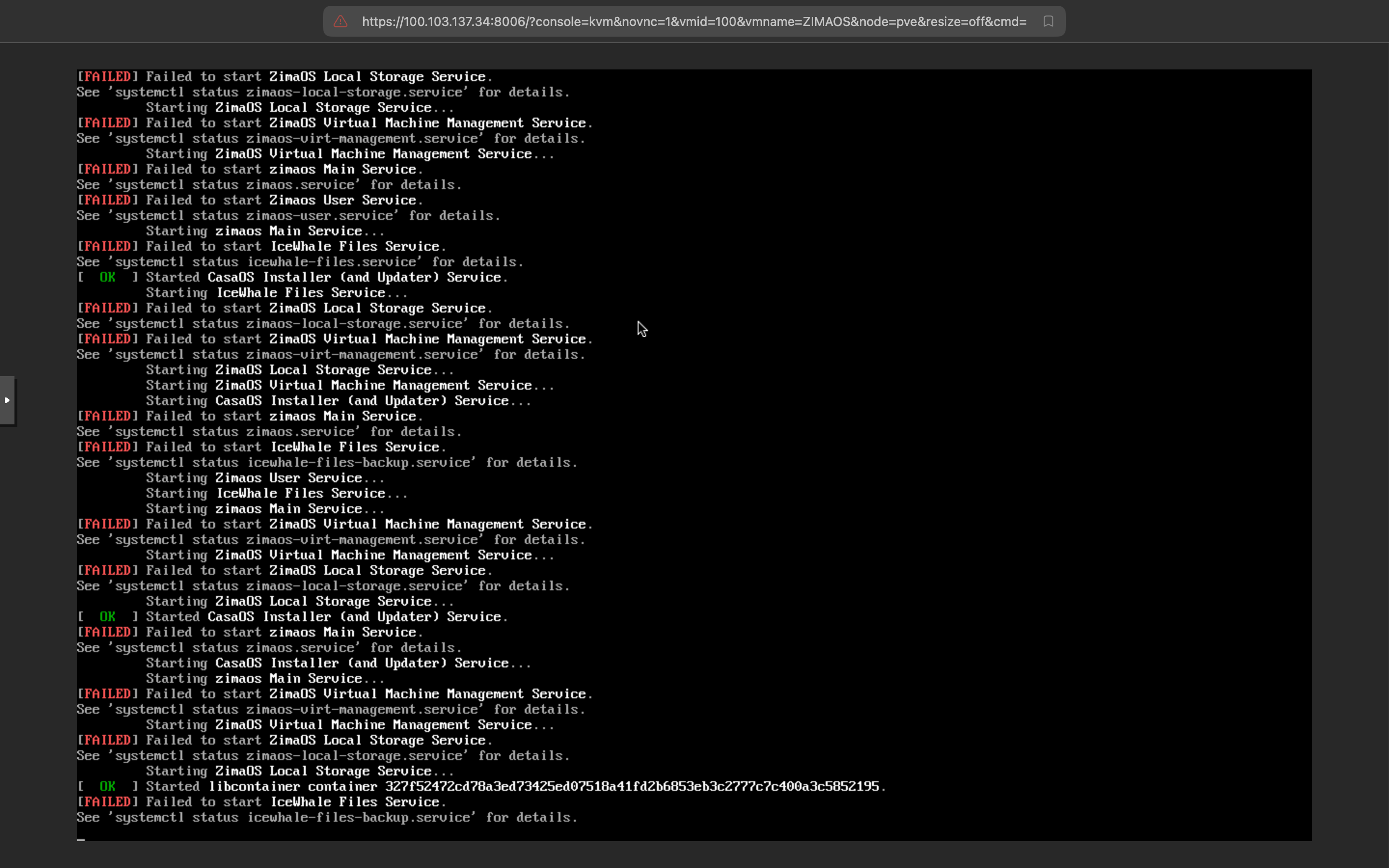
From your previous output we already know:
zimaos.serviceis failing withexit-code- It is stuck in a restart loop (restart counter 45)
- The main service never reaches active state
That explains why the dashboard shows 0B storage and no apps — the backend is not staying up.
Now we need the actual crash reason.
Please run:
journalctl -u zimaos.service -n 100 --no-pager
Then confirm disk and mount status:
lsblk
df -h
We are verifying:
- Is
/DATAmounted - Is the 2TB QEMU disk visible
- What error causes zimaos to exit
Post those outputs and we’ll proceed precisely.
jmrd@ZimaOS:~ ➜ $ journalctl -u zimaos.service -n 100 --no-pager
Feb 11 14:13:54 ZimaOS systemd[1]: zimaos.service: Main process exited, code=exited, status=1/FAILURE
Feb 11 14:13:54 ZimaOS systemd[1]: zimaos.service: Failed with result ‘exit-code’.
Feb 11 14:13:54 ZimaOS systemd[1]: zimaos.service: Consumed 16.545s CPU time, 42.8M memory peak.
Feb 11 14:13:59 ZimaOS systemd[1]: zimaos.service: Scheduled restart job, restart counter is at 1350.
Feb 11 14:13:59 ZimaOS systemd[1]: Starting zimaos Main Service…
Feb 11 14:14:02 ZimaOS zimaos[425663]: 2026-02-11T14:14:02.564Z error error initializing NVML {“func”: “service.NewGPUService”, “file”: “/home/runner/work/ZimaOS-Main/ZimaOS-Main/service/gpu.go”, “line”: 22, “result”: “Driver Not Loaded”}
Feb 11 14:14:04 ZimaOS zimaos[425663]: 2026-02-11T14:14:04.221Z info joined {“func”: “izerotier.CheckNetwork”, “file”: “/home/runner/work/ZimaOS-Main/ZimaOS-Main/pkg/izerotier/zthelp.go”, “line”: 74, “joined”: true, “networkId”: “f8321c559e18c27f”, “address”: “”, “ip”: “172.23.0.1”}
Feb 11 14:14:11 ZimaOS zimaos[425663]: 2026-02-11T14:14:10.983Z error connect wifi failed {“func”: “core.Seventh”, “file”: “/home/runner/work/ZimaOS-Main/ZimaOS-Main/route/core/init.go”, “line”: 196, “error”: “failed to connect to wifi: exit status 1, output: Error: No Wi-Fi device found.\n”}
Feb 11 14:14:11 ZimaOS zimaos[425663]: 2026-02-11T14:14:11.525Z info DeviceInfo Changed {“func”: “core.DectectDeviceChange”, “file”: “/home/runner/work/ZimaOS-Main/ZimaOS-Main/route/core/init.go”, “line”: 242}
Feb 11 14:14:12 ZimaOS zimaos[425663]: 2026-02-11T14:14:12.773Z info Port updated {“func”: “core.DectectPortChange”, “file”: “/home/runner/work/ZimaOS-Main/ZimaOS-Main/route/core/init.go”, “line”: 214, “new_port”: 80}
Feb 11 14:14:12 ZimaOS zimaos[425663]: 2026-02-11T14:14:12.849Z info Network status updated {“func”: “service.UpdateNetworkStatus”, “file”: “/home/runner/work/ZimaOS-Main/ZimaOS-Main/service/network.go”, “line”: 142}
Feb 11 14:14:17 ZimaOS zimaos[425663]: 2026-02-11T14:14:17.137Z info Notified systemd that casaos main service is ready {“func”: “main.startMainHTTPServer”, “file”: “/home/runner/work/ZimaOS-Main/ZimaOS-Main/main.go”, “line”: 538}
Feb 11 14:14:17 ZimaOS zimaos[425663]: 2026-02-11T14:14:17.286Z info ZimaOS main service is listening… {“func”: “main.startMainHTTPServer”, “file”: “/home/runner/work/ZimaOS-Main/ZimaOS-Main/main.go”, “line”: 543, “address”: “127.0.0.1:38710”}
Feb 11 14:14:17 ZimaOS zimaos[425663]: ⇨ http server started on 127.0.0.1:38710
Feb 11 14:14:17 ZimaOS systemd[1]: Started zimaos Main Service.
Feb 11 14:14:18 ZimaOS systemd[1]: zimaos.service: Main process exited, code=exited, status=1/FAILURE
Feb 11 14:14:18 ZimaOS systemd[1]: zimaos.service: Failed with result ‘exit-code’.
Feb 11 14:14:18 ZimaOS systemd[1]: zimaos.service: Consumed 16.736s CPU time, 41.3M memory peak.
Feb 11 14:14:23 ZimaOS systemd[1]: zimaos.service: Scheduled restart job, restart counter is at 1351.
Feb 11 14:14:23 ZimaOS systemd[1]: Starting zimaos Main Service…
Feb 11 14:14:26 ZimaOS zimaos[426005]: 2026-02-11T14:14:26.363Z error error initializing NVML {“func”: “service.NewGPUService”, “file”: “/home/runner/work/ZimaOS-Main/ZimaOS-Main/service/gpu.go”, “line”: 22, “result”: “Driver Not Loaded”}
Feb 11 14:14:29 ZimaOS zimaos[426005]: 2026-02-11T14:14:29.230Z info joined {“func”: “izerotier.CheckNetwork”, “file”: “/home/runner/work/ZimaOS-Main/ZimaOS-Main/pkg/izerotier/zthelp.go”, “line”: 74, “joined”: true, “networkId”: “f8321c559e18c27f”, “address”: “”, “ip”: “172.23.0.1”}
Feb 11 14:14:32 ZimaOS zimaos[426005]: 2026-02-11T14:14:32.646Z error connect wifi failed {“func”: “core.Seventh”, “file”: “/home/runner/work/ZimaOS-Main/ZimaOS-Main/route/core/init.go”, “line”: 196, “error”: “failed to connect to wifi: exit status 1, output: Error: No Wi-Fi device found.\n”}
Feb 11 14:14:32 ZimaOS zimaos[426005]: 2026-02-11T14:14:32.830Z info DeviceInfo Changed {“func”: “core.DectectDeviceChange”, “file”: “/home/runner/work/ZimaOS-Main/ZimaOS-Main/route/core/init.go”, “line”: 242}
Feb 11 14:14:35 ZimaOS zimaos[426005]: 2026-02-11T14:14:35.102Z info Port updated {“func”: “core.DectectPortChange”, “file”: “/home/runner/work/ZimaOS-Main/ZimaOS-Main/route/core/init.go”, “line”: 214, “new_port”: 80}
Feb 11 14:14:35 ZimaOS zimaos[426005]: 2026-02-11T14:14:35.781Z info Network status updated {“func”: “service.UpdateNetworkStatus”, “file”: “/home/runner/work/ZimaOS-Main/ZimaOS-Main/service/network.go”, “line”: 142}
Feb 11 14:14:39 ZimaOS zimaos[426005]: 2026-02-11T14:14:39.116Z info Notified systemd that casaos main service is ready {“func”: “main.startMainHTTPServer”, “file”: “/home/runner/work/ZimaOS-Main/ZimaOS-Main/main.go”, “line”: 538}
Feb 11 14:14:39 ZimaOS zimaos[426005]: 2026-02-11T14:14:39.186Z info ZimaOS main service is listening… {“func”: “main.startMainHTTPServer”, “file”: “/home/runner/work/ZimaOS-Main/ZimaOS-Main/main.go”, “line”: 543, “address”: “127.0.0.1:38710”}
Feb 11 14:14:39 ZimaOS zimaos[426005]: ⇨ http server started on 127.0.0.1:38710
Feb 11 14:14:40 ZimaOS systemd[1]: Started zimaos Main Service.
Feb 11 14:14:41 ZimaOS sudo[426280]: root : PWD=/ ; USER=root ; COMMAND=/usr/sbin/dmidecode -s system-uuid
Feb 11 14:14:41 ZimaOS sudo[426280]: pam_unix(sudo:session): session opened for user root(uid=0) by (uid=0)
Feb 11 14:14:41 ZimaOS sudo[426280]: pam_unix(sudo:session): session closed for user root
Feb 11 14:14:42 ZimaOS systemd[1]: zimaos.service: Main process exited, code=exited, status=1/FAILURE
Feb 11 14:14:42 ZimaOS systemd[1]: zimaos.service: Failed with result ‘exit-code’.
Feb 11 14:14:42 ZimaOS systemd[1]: zimaos.service: Consumed 17.558s CPU time, 41M memory peak.
Feb 11 14:14:47 ZimaOS systemd[1]: zimaos.service: Scheduled restart job, restart counter is at 1352.
Feb 11 14:14:47 ZimaOS systemd[1]: Starting zimaos Main Service…
Feb 11 14:14:49 ZimaOS zimaos[426325]: 2026-02-11T14:14:49.301Z error error initializing NVML {“func”: “service.NewGPUService”, “file”: “/home/runner/work/ZimaOS-Main/ZimaOS-Main/service/gpu.go”, “line”: 22, “result”: “Driver Not Loaded”}
Feb 11 14:14:51 ZimaOS zimaos[426325]: 2026-02-11T14:14:51.259Z info joined {“func”: “izerotier.CheckNetwork”, “file”: “/home/runner/work/ZimaOS-Main/ZimaOS-Main/pkg/izerotier/zthelp.go”, “line”: 74, “joined”: true, “networkId”: “f8321c559e18c27f”, “address”: “”, “ip”: “172.23.0.1”}
Feb 11 14:14:59 ZimaOS zimaos[426325]: 2026-02-11T14:14:59.626Z error connect wifi failed {“func”: “core.Seventh”, “file”: “/home/runner/work/ZimaOS-Main/ZimaOS-Main/route/core/init.go”, “line”: 196, “error”: “failed to connect to wifi: exit status 1, output: Error: No Wi-Fi device found.\n”}
Feb 11 14:15:00 ZimaOS zimaos[426325]: 2026-02-11T14:15:00.306Z info DeviceInfo Changed {“func”: “core.DectectDeviceChange”, “file”: “/home/runner/work/ZimaOS-Main/ZimaOS-Main/route/core/init.go”, “line”: 242}
Feb 11 14:15:01 ZimaOS zimaos[426325]: 2026-02-11T14:15:01.952Z info Port updated {“func”: “core.DectectPortChange”, “file”: “/home/runner/work/ZimaOS-Main/ZimaOS-Main/route/core/init.go”, “line”: 214, “new_port”: 80}
Feb 11 14:15:02 ZimaOS zimaos[426325]: 2026-02-11T14:15:02.403Z info Network status updated {“func”: “service.UpdateNetworkStatus”, “file”: “/home/runner/work/ZimaOS-Main/ZimaOS-Main/service/network.go”, “line”: 142}
Feb 11 14:15:06 ZimaOS systemd[1]: zimaos.service: Main process exited, code=exited, status=1/FAILURE
Feb 11 14:15:06 ZimaOS systemd[1]: zimaos.service: Failed with result ‘exit-code’.
Feb 11 14:15:06 ZimaOS systemd[1]: Failed to start zimaos Main Service.
Feb 11 14:15:06 ZimaOS systemd[1]: zimaos.service: Consumed 15.246s CPU time, 41.3M memory peak.
Feb 11 14:15:11 ZimaOS systemd[1]: zimaos.service: Scheduled restart job, restart counter is at 1353.
Feb 11 14:15:12 ZimaOS systemd[1]: Starting zimaos Main Service…
Feb 11 14:15:14 ZimaOS zimaos[426627]: 2026-02-11T14:15:14.815Z error error initializing NVML {“func”: “service.NewGPUService”, “file”: “/home/runner/work/ZimaOS-Main/ZimaOS-Main/service/gpu.go”, “line”: 22, “result”: “Driver Not Loaded”}
Feb 11 14:15:17 ZimaOS zimaos[426627]: 2026-02-11T14:15:17.629Z info joined {“func”: “izerotier.CheckNetwork”, “file”: “/home/runner/work/ZimaOS-Main/ZimaOS-Main/pkg/izerotier/zthelp.go”, “line”: 74, “joined”: true, “networkId”: “f8321c559e18c27f”, “address”: “”, “ip”: “172.23.0.1”}
Feb 11 14:15:21 ZimaOS zimaos[426627]: 2026-02-11T14:15:21.531Z error connect wifi failed {“func”: “core.Seventh”, “file”: “/home/runner/work/ZimaOS-Main/ZimaOS-Main/route/core/init.go”, “line”: 196, “error”: “failed to connect to wifi: exit status 1, output: Error: No Wi-Fi device found.\n”}
Feb 11 14:15:22 ZimaOS zimaos[426627]: 2026-02-11T14:15:22.274Z info DeviceInfo Changed {“func”: “core.DectectDeviceChange”, “file”: “/home/runner/work/ZimaOS-Main/ZimaOS-Main/route/core/init.go”, “line”: 242}
Feb 11 14:15:23 ZimaOS zimaos[426627]: 2026-02-11T14:15:23.828Z info Port updated {“func”: “core.DectectPortChange”, “file”: “/home/runner/work/ZimaOS-Main/ZimaOS-Main/route/core/init.go”, “line”: 214, “new_port”: 80}
Feb 11 14:15:24 ZimaOS zimaos[426627]: 2026-02-11T14:15:24.738Z info Network status updated {“func”: “service.UpdateNetworkStatus”, “file”: “/home/runner/work/ZimaOS-Main/ZimaOS-Main/service/network.go”, “line”: 142}
Feb 11 14:15:29 ZimaOS zimaos[426627]: 2026-02-11T14:15:29.367Z info Notified systemd that casaos main service is ready {“func”: “main.startMainHTTPServer”, “file”: “/home/runner/work/ZimaOS-Main/ZimaOS-Main/main.go”, “line”: 538}
Feb 11 14:15:29 ZimaOS systemd[1]: Started zimaos Main Service.
Feb 11 14:15:30 ZimaOS zimaos[426627]: 2026-02-11T14:15:30.072Z info ZimaOS main service is listening… {“func”: “main.startMainHTTPServer”, “file”: “/home/runner/work/ZimaOS-Main/ZimaOS-Main/main.go”, “line”: 543, “address”: “127.0.0.1:38710”}
Feb 11 14:15:30 ZimaOS systemd[1]: zimaos.service: Main process exited, code=exited, status=1/FAILURE
Feb 11 14:15:31 ZimaOS systemd[1]: zimaos.service: Failed with result ‘exit-code’.
Feb 11 14:15:31 ZimaOS systemd[1]: zimaos.service: Consumed 16.390s CPU time, 41.8M memory peak.
Feb 11 14:15:36 ZimaOS systemd[1]: zimaos.service: Scheduled restart job, restart counter is at 1354.
Feb 11 14:15:36 ZimaOS systemd[1]: Starting zimaos Main Service…
Feb 11 14:15:39 ZimaOS zimaos[426937]: 2026-02-11T14:15:39.479Z error error initializing NVML {“func”: “service.NewGPUService”, “file”: “/home/runner/work/ZimaOS-Main/ZimaOS-Main/service/gpu.go”, “line”: 22, “result”: “Driver Not Loaded”}
Feb 11 14:15:41 ZimaOS zimaos[426937]: 2026-02-11T14:15:41.727Z info joined {“func”: “izerotier.CheckNetwork”, “file”: “/home/runner/work/ZimaOS-Main/ZimaOS-Main/pkg/izerotier/zthelp.go”, “line”: 74, “joined”: true, “networkId”: “f8321c559e18c27f”, “address”: “”, “ip”: “172.23.0.1”}
Feb 11 14:15:45 ZimaOS zimaos[426937]: 2026-02-11T14:15:45.825Z error connect wifi failed {“func”: “core.Seventh”, “file”: “/home/runner/work/ZimaOS-Main/ZimaOS-Main/route/core/init.go”, “line”: 196, “error”: “failed to connect to wifi: exit status 1, output: Error: No Wi-Fi device found.\n”}
Feb 11 14:15:46 ZimaOS zimaos[426937]: 2026-02-11T14:15:46.086Z info DeviceInfo Changed {“func”: “core.DectectDeviceChange”, “file”: “/home/runner/work/ZimaOS-Main/ZimaOS-Main/route/core/init.go”, “line”: 242}
Feb 11 14:15:47 ZimaOS zimaos[426937]: 2026-02-11T14:15:47.181Z info Port updated {“func”: “core.DectectPortChange”, “file”: “/home/runner/work/ZimaOS-Main/ZimaOS-Main/route/core/init.go”, “line”: 214, “new_port”: 80}
Feb 11 14:15:50 ZimaOS zimaos[426937]: 2026-02-11T14:15:50.841Z info Network status updated {“func”: “service.UpdateNetworkStatus”, “file”: “/home/runner/work/ZimaOS-Main/ZimaOS-Main/service/network.go”, “line”: 142}
Feb 11 14:15:52 ZimaOS zimaos[426937]: 2026-02-11T14:15:52.408Z info ZimaOS Avahi service updated successfully {“func”: “core.updateAvahiServiceFile”, “file”: “/home/runner/work/ZimaOS-Main/ZimaOS-Main/route/core/init.go”, “line”: 373}
Feb 11 14:15:53 ZimaOS systemd[1]: Started zimaos Main Service.
Feb 11 14:15:53 ZimaOS zimaos[426937]: 2026-02-11T14:15:53.144Z info Notified systemd that casaos main service is ready {“func”: “main.startMainHTTPServer”, “file”: “/home/runner/work/ZimaOS-Main/ZimaOS-Main/main.go”, “line”: 538}
Feb 11 14:15:53 ZimaOS zimaos[426937]: 2026-02-11T14:15:53.195Z info ZimaOS main service is listening… {“func”: “main.startMainHTTPServer”, “file”: “/home/runner/work/ZimaOS-Main/ZimaOS-Main/main.go”, “line”: 543, “address”: “127.0.0.1:38710”}
Feb 11 14:15:53 ZimaOS zimaos[426937]: ⇨ http server started on 127.0.0.1:38710
Feb 11 14:15:54 ZimaOS sudo[427210]: root : PWD=/ ; USER=root ; COMMAND=/usr/sbin/dmidecode -s system-uuid
Feb 11 14:15:54 ZimaOS sudo[427210]: pam_unix(sudo:session): session opened for user root(uid=0) by (uid=0)
Feb 11 14:15:54 ZimaOS sudo[427210]: pam_unix(sudo:session): session closed for user root
Feb 11 14:15:55 ZimaOS systemd[1]: zimaos.service: Main process exited, code=exited, status=1/FAILURE
Feb 11 14:15:55 ZimaOS systemd[1]: zimaos.service: Failed with result ‘exit-code’.
Feb 11 14:15:55 ZimaOS systemd[1]: zimaos.service: Consumed 17.290s CPU time, 42.8M memory peak.
Feb 11 14:16:00 ZimaOS systemd[1]: zimaos.service: Scheduled restart job, restart counter is at 1355.
Feb 11 14:16:00 ZimaOS systemd[1]: Starting zimaos Main Service…
Feb 11 14:16:03 ZimaOS zimaos[427281]: 2026-02-11T14:16:02.994Z error error initializing NVML {“func”: “service.NewGPUService”, “file”: “/home/runner/work/ZimaOS-Main/ZimaOS-Main/service/gpu.go”, “line”: 22, “result”: “Driver Not Loaded”}
Feb 11 14:16:04 ZimaOS zimaos[427281]: 2026-02-11T14:16:04.734Z info joined {“func”: “izerotier.CheckNetwork”, “file”: “/home/runner/work/ZimaOS-Main/ZimaOS-Main/pkg/izerotier/zthelp.go”, “line”: 74, “joined”: true, “networkId”: “f8321c559e18c27f”, “address”: “”, “ip”: “172.23.0.1”}
Feb 11 14:16:09 ZimaOS zimaos[427281]: 2026-02-11T14:16:09.218Z error connect wifi failed {“func”: “core.Seventh”, “file”: “/home/runner/work/ZimaOS-Main/ZimaOS-Main/route/core/init.go”, “line”: 196, “error”: “failed to connect to wifi: exit status 1, output: Error: No Wi-Fi device found.\n”}
Feb 11 14:16:09 ZimaOS zimaos[427281]: 2026-02-11T14:16:09.856Z info DeviceInfo Changed {“func”: “core.DectectDeviceChange”, “file”: “/home/runner/work/ZimaOS-Main/ZimaOS-Main/route/core/init.go”, “line”: 242}
Feb 11 14:16:11 ZimaOS zimaos[427281]: 2026-02-11T14:16:11.304Z info Port updated {“func”: “core.DectectPortChange”, “file”: “/home/runner/work/ZimaOS-Main/ZimaOS-Main/route/core/init.go”, “line”: 214, “new_port”: 80}
Feb 11 14:16:13 ZimaOS zimaos[427281]: 2026-02-11T14:16:13.661Z info Network status updated {“func”: “service.UpdateNetworkStatus”, “file”: “/home/runner/work/ZimaOS-Main/ZimaOS-Main/service/network.go”, “line”: 142}
Feb 11 14:16:14 ZimaOS zimaos[427281]: 2026-02-11T14:16:14.783Z info Notified systemd that casaos main service is ready {“func”: “main.startMainHTTPServer”, “file”: “/home/runner/work/ZimaOS-Main/ZimaOS-Main/main.go”, “line”: 538}
Feb 11 14:16:14 ZimaOS zimaos[427281]: 2026-02-11T14:16:14.787Z info ZimaOS main service is listening… {“func”: “main.startMainHTTPServer”, “file”: “/home/runner/work/ZimaOS-Main/ZimaOS-Main/main.go”, “line”: 543, “address”: “127.0.0.1:38710”}
Feb 11 14:16:14 ZimaOS zimaos[427281]: ⇨ http server started on 127.0.0.1:38710
Feb 11 14:16:15 ZimaOS systemd[1]: Started zimaos Main Service.
Feb 11 14:16:16 ZimaOS sudo[427549]: root : PWD=/ ; USER=root ; COMMAND=/usr/sbin/dmidecode -s system-uuid
Feb 11 14:16:16 ZimaOS sudo[427549]: pam_unix(sudo:session): session opened for user root(uid=0) by (uid=0)
Feb 11 14:16:16 ZimaOS sudo[427549]: pam_unix(sudo:session): session closed for user root
Feb 11 14:16:18 ZimaOS zimaos[427281]: 2026-02-11T14:16:18.035Z info ZimaOS Avahi service updated successfully {“func”: “core.updateAvahiServiceFile”, “file”: “/home/runner/work/ZimaOS-Main/ZimaOS-Main/route/core/init.go”, “line”: 373}
Feb 11 14:16:18 ZimaOS systemd[1]: zimaos.service: Main process exited, code=exited, status=1/FAILURE
Feb 11 14:16:19 ZimaOS systemd[1]: zimaos.service: Failed with result ‘exit-code’.
Feb 11 14:16:19 ZimaOS systemd[1]: zimaos.service: Consumed 17.787s CPU time, 42.5M memory peak.
jmrd@ZimaOS:~ ➜ $ lsblk
NAME MAJ:MIN RM SIZE RO TYPE MOUNTPOINTS
loop0 7:0 0 4.5M 1 loop
loop1 7:1 0 1.1M 1 loop
loop2 7:2 0 208K 1 loop
loop3 7:3 0 1.1M 1 loop
loop4 7:4 0 208K 1 loop
loop5 7:5 0 4.5M 1 loop
sda 8:0 0 64G 0 disk
├─sda1 8:1 0 32M 0 part /mnt/boot
├─sda2 8:2 0 24M 0 part
├─sda3 8:3 0 6G 0 part /
├─sda4 8:4 0 24M 0 part
├─sda5 8:5 0 6G 0 part
├─sda6 8:6 0 8M 0 part
├─sda7 8:7 0 96M 0 part /var/lib/zerotier-one
│ /var/lib/rauc
│ /mnt/overlay
└─sda8 8:8 0 51.8G 0 part /var/log
                              /var/lib/libvirt

                              /var/lib/icewhale

                              /var/lib/extensions

                              /var/lib/docker

                              /var/lib/casaos

                              /var/lib/bluetooth

                              /opt

                              /media

                              /DATA

                              /var/lib/casaos_data
sdb 8:16 0 3.6T 0 disk
└─md127 9:127 0 5.5T 0 raid5 /var/lib/casaos_data/.media/HDDs
                              /DATA/.media/HDDs

                              /media/HDDs
sdc 8:32 0 3.6T 0 disk
└─md127 9:127 0 5.5T 0 raid5 /var/lib/casaos_data/.media/HDDs
                              /DATA/.media/HDDs

                              /media/HDDs
sdd 8:48 0 1.8T 0 disk
└─md127 9:127 0 5.5T 0 raid5 /var/lib/casaos_data/.media/HDDs
                              /DATA/.media/HDDs

                              /media/HDDs
sde 8:64 0 1.8T 0 disk
└─md127 9:127 0 5.5T 0 raid5 /var/lib/casaos_data/.media/HDDs
                              /DATA/.media/HDDs

                              /media/HDDs
sr0 11:0 1 1024M 0 rom
nbd0 43:0 0 0B 0 disk
nbd1 43:32 0 0B 0 disk
nbd2 43:64 0 0B 0 disk
nbd3 43:96 0 0B 0 disk
nbd4 43:128 0 0B 0 disk
nbd5 43:160 0 0B 0 disk
nbd6 43:192 0 0B 0 disk
nbd7 43:224 0 0B 0 disk
zram0 252:0 0 0B 0 disk
zram1 252:1 0 0B 0 disk
zram2 252:2 0 0B 0 disk
nbd8 43:256 0 0B 0 disk
nbd9 43:288 0 0B 0 disk
nbd10 43:320 0 0B 0 disk
nbd11 43:352 0 0B 0 disk
nbd12 43:384 0 0B 0 disk
nbd13 43:416 0 0B 0 disk
nbd14 43:448 0 0B 0 disk
nbd15 43:480 0 0B 0 disk
jmrd@ZimaOS:~ ➜ $ df -h
Filesystem Size Used Avail Use% Mounted on
/dev/root 1.2G 1.2G 0 100% /
devtmpfs 3.9G 0 3.9G 0% /dev
/dev/sda7 85M 216K 78M 1% /mnt/overlay
overlayfs 85M 216K 78M 1% /etc
tmpfs 3.9G 0 3.9G 0% /dev/shm
tmpfs 1.6G 4.2M 1.6G 1% /run
tmpfs 3.9G 0 3.9G 0% /tmp
tmpfs 3.9G 1.8M 3.9G 1% /var
tmpfs 1.0M 0 1.0M 0% /run/credentials/systemd-journald.service
tmpfs 1.0M 0 1.0M 0% /run/credentials/systemd-udev-load-credentials.service
tmpfs 1.0M 0 1.0M 0% /run/credentials/systemd-network-generator.service
tmpfs 1.0M 0 1.0M 0% /run/credentials/systemd-tmpfiles-setup-dev-early.service
tmpfs 1.0M 0 1.0M 0% /run/credentials/systemd-tmpfiles-setup-dev.service
tmpfs 1.0M 0 1.0M 0% /run/credentials/systemd-sysctl.service
/dev/sda1 32M 732K 32M 3% /mnt/boot
tmpfs 1.0M 0 1.0M 0% /run/credentials/systemd-vconsole-setup.service
/dev/sda8 51G 3.0G 48G 6% /DATA
/dev/md127 5.5T 620G 4.9T 12% /media/HDDs
tmpfs 1.0M 0 1.0M 0% /run/credentials/systemd-tmpfiles-setup.service
tmpfs 1.0M 0 1.0M 0% /run/credentials/systemd-networkd.service
sysext 3.9G 8.0K 3.9G 1% /usr
jmrd@ZimaOS:~ ➜ $
I mounted my disks as a Raid 5 on ZimaOS.
Thanks for the detailed logs.
Your storage and RAID5 are healthy:
/DATAis mounted- RAID (
md127) is active - Disks are visible
- No mount issues
So this is not a storage problem.
The reason your apps are not showing is because the main backend keeps crashing.
From the logs we see this loop:
zimaos.servicestarts- HTTP server binds
- Service exits with
status=1 - Restart counter increases
When the backend dies, the dashboard cannot load apps, storage info, or Docker state — so everything appears empty.
The repeating error before each crash is:
error initializing NVML ... "Driver Not Loaded"
You’re running ZimaOS inside Proxmox.
Are you passing through an NVIDIA GPU to this VM, or is this CPU-only?
That will determine the next step.
Hi, I am not passing through a NVIDIA GPU.
Thanks, that helps.
Since you’re not passing through an NVIDIA GPU, the VM is CPU-only.
However your logs clearly show:
error initializing NVML ... "Driver Not Loaded"
ZimaOS is attempting to initialize NVIDIA GPU services (NVML) inside a VM that has no GPU.
What we see in the logs:
- GPU init fails
- Service continues
- HTTP server starts
- Service exits with status=1
- Restart loop repeats
Because the backend keeps crashing, the dashboard cannot load apps, storage info, or Docker state, so everything appears empty.
This is not a RAID or disk issue.
This looks like GPU initialization causing the main service to terminate inside a CPU-only Proxmox VM.
At this point this may be a 1.5.4 regression in VM environments without GPU.
Let’s confirm your ZimaOS version:
cat /etc/os-release
Then we can determine the safest next step.
(__ )( )( / ) / \ / \ / )
/ / )( / / / \ ( O )_**
()(__)_)(/_/_/ _/ (___/
─── Welcome to Zima OS, jmrd ───
Date: Thursday, February 12, 2026 | Uptime: up 6 minutes
jmrd@ZimaOS:~ ➜ $ cat /etc/os-release
NAME=“ZimaOS”
BOARD=“ZimaCube”
VERSION=“v1.5.4”
ID=zimaos
VERSION_ID=1.5.4
PRETTY_NAME=“ZimaOS v1.5.4”
CPE_NAME=cpe:2.3:o:icewhale:zimaos:1.5.4::development::::zimacube:*
VARIANT=“ZimaOS ZimaCube”
VARIANT_ID=zimacube
SUPERVISOR_MACHINE=ZimaCube
SUPERVISOR_ARCH=amd64
BUILD_DATE=“2026/02/02 11:46:00 UTC”
MANUFACTURER=“IceWhale Technology”
MODEL=ZimaCube
jmrd@ZimaOS:~ ➜ $
I got it to work
1 Like
Good to hear
Thanks for confirming you’re on v1.5.4 (ZimaCube variant).
Since it’s now working, it would really help others if you could share what you changed or adjusted in Proxmox to resolve it.
That way we can better understand whether this was:
- A VM configuration issue
- A timing/init issue
- Or something else
Appreciate the update.
I meant that now I can open it, but I can’t see my apps now. Actually, now it’s even worse, now I can’t even see my GUI.

It’s still unstable.
The blank GUI means the frontend loads, but the backend service is crashing or restarting in the background.
Your earlier logs show zimaos.service exiting repeatedly after NVML initialization fails.
Let’s confirm if it’s still looping.
Please run:
systemctl status zimaos.service
If you see “activating (auto-restart)” or a high restart counter, the service is still crashing.
Also run:
journalctl -u zimaos.service -n 30 --no-pager
We need to confirm whether the crash pattern is still the same.
It’s ok, thanks for your help. I ultimately decided to just create a new vm and that’s working so far. Thank you very much!