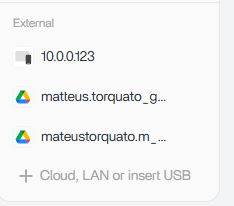
After using the Backup app and selecting OneDrive as the backup destination (source: ZimaBoard - destination: OneDrive), my OneDrive and Dropbox mounts disappeared from the Files app. I also have Google Drives that are still there
They no longer appear under External / Cloud sources.
When I try to add the cloud account again, nothing happens, No error message, no confirmation, and the mount is not added back.
However, via SSH, I can still see leftover cloud-related directories under /media

OneDrive directories exist under /media but are not mounted (different from google drive):
Any ideas?
1 Like
This looks like a UI / mount state desync rather than actual data loss.
What’s likely happening is that the Backup app temporarily takes ownership of the cloud mount, and when it exits, the Files app doesn’t re-register the mount correctly. That’s why the directories still exist under /media, but OneDrive/Dropbox no longer appear as active cloud sources, and re-adding them silently fails.
Google Drive still showing is the giveaway, it’s mounted via FUSE and remained attached, while OneDrive/Dropbox didn’t remount.
At this point:
- The cloud data itself is not gone
- The Files app has simply lost track of the mount state
- Leftover directories under
/media confirm this
A reboot usually restores visibility. If not, removing the stale cloud entries and re-adding the account after reboot typically fixes it.
This feels like a Backup + Cloud integration bug rather than user error, especially with no error message or confirmation shown in the UI. Definitely worth reporting so IceWhale can tighten the mount lifecycle handling between Backup and Files.
Identified the underlying cause for this class of OneDrive failure.
The mount disappearance is the visible symptom; the actual error is
AADSTS7000222 from Microsoft Entra (IceWhale’s Azure app client_secret
expired). Backend logs and full diagnosis here: https://community.zimaspace.com/t/root-cause-onedrive-integration-broken-globally-icewhales-azure-client-secret-has-expired-aadsts7000222/8569
1 Like
That explains a lot actually.
So the disappearing mount was probably never the real root issue, the Files app was just failing silently after Microsoft rejected authentication because IceWhale’s Azure client_secret expired.
AADSTS7000222 is specifically an Entra ID authentication failure for an expired client secret, so once the token refresh failed:
- OneDrive mounts would disappear
- Re-adding the account would fail silently
- Existing stale directories under
/media would remain
- Google Drive would continue working normally because it uses a different auth flow
The important part here is this was likely a global backend issue, not something users broke locally on their systems.
The bigger concern honestly is the lack of visible error reporting in the UI. Users were seeing disappearing mounts with no indication that authentication had failed upstream. A simple “Microsoft authentication expired” message would have saved people a huge amount of troubleshooting.
1 Like