MULTIPLE Drives failing and NVMe bay is not working properly

The Zimacube has given me a lot of headache and I regret buying this system to be completely honest with you. If I could return it, i would.

I messaged support about this over the email at support@icewhale.org + info@icewhale.org but I do not get a response or a confirmation that they have received my request.

I will describe this problem as follows:
Multiple drives give this error in SMART:
Failed SMART usage Attribute: 7 Seek_Error_Rate..

And I can reproduce the problem like this:
When I place my drives like this C and D are offline:
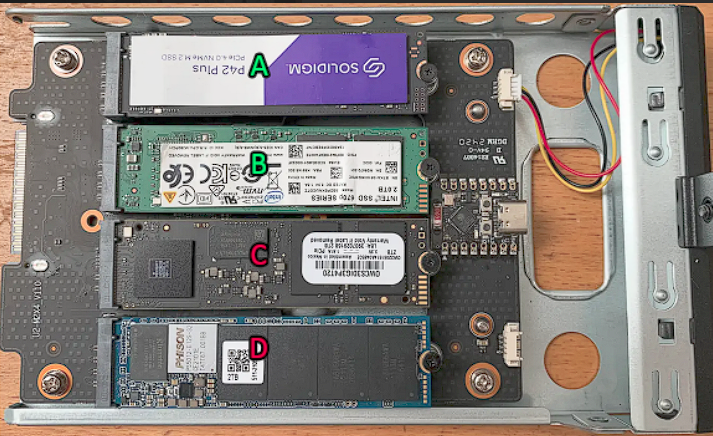
Imgur

And if I put my drive like so then A and B are offline:
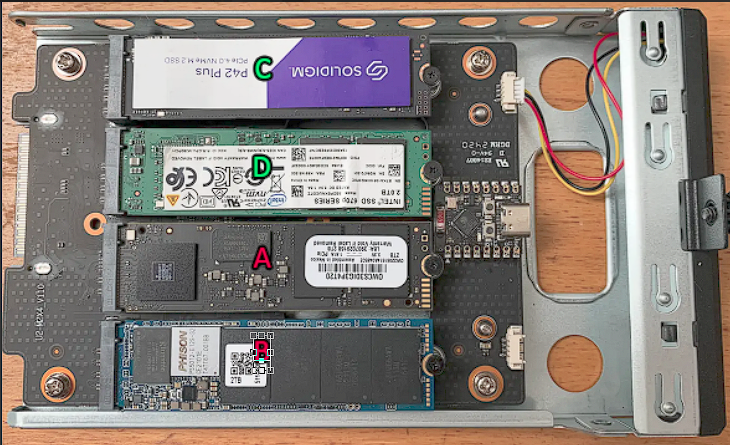
Imgur

And I remember I did this to my machine before the problem showed up:
I woke up to these issues. The system is not even two weeks online.

And I have tried these operations to fix it:

  1. I have WIPED all the drives and REINSTALLED my hypervisor(Proxmox) and passed the drives to TrueNAS(REINSTALLED TOO).
  2. I ran short and LONG SMART tests on my drives HDD BAY:
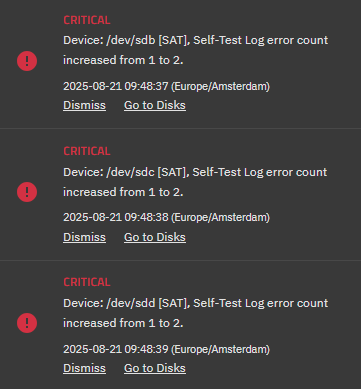
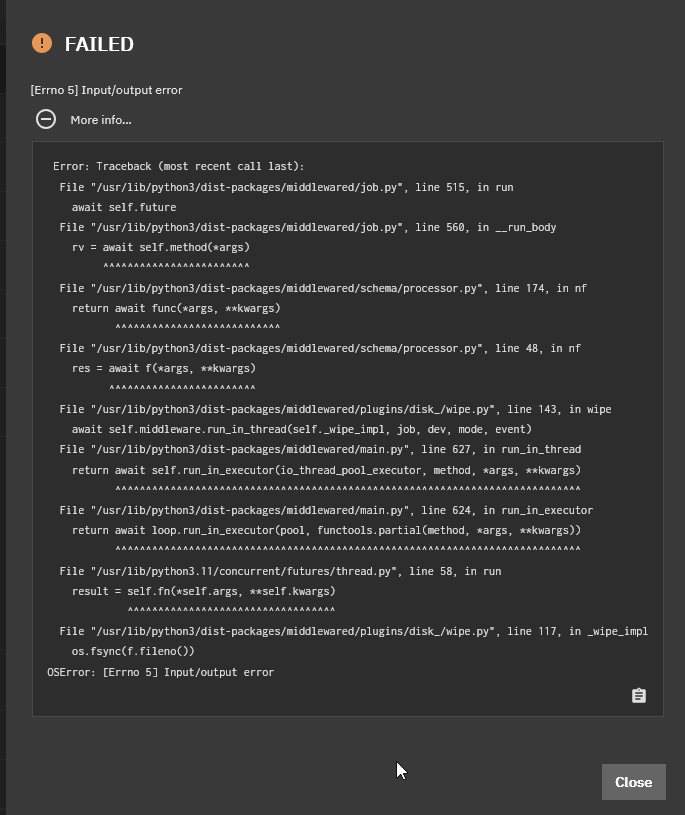
3. Reseated the NVMe drives in various orders but always the same connectors are broken. 4. Cube side panel taken off and ADDED ACTIVE COOLING (can add pictures later) 5. Cannot wipe NVMe that DOES get recognized in TrueNAS:

I work with ROOT user in TrueNAS and Proxmox to execute the tests/scrubs/wipes

And here are the specs of my machine:
ZimaCube Pro Creators
64GB Ram
3 x WD Ultrastar drive HC580 HDD
3 x Samsung 990 Pro NVMe
2 x Intel Optane p1600x NVMe

I think the HDD and NVMe connectors are just very low quality because the chance that 3 HDD and 5 NVMe drives are from a bad batch is 0% when they were bought over time(I couldnt spend everything at once so I bought the items monthly on payday :smiley: )

I need your assistance and I would like to receive it as soon as possible. Please help.

Sorry to see this, looks like you need to contact after-sales to replace the seventh bay.

Which I have done a while ago:
image

Same issue here.

I have 4 Samsung SSD 990 PRO 4TB a bit costly. failing one by one. I had tried 4x 4TB Mushkin previously and all died! Really it’s now up to $2k in just NVMEs. So far the cost of this system is not worth the hype. NVME drive dying in under 2 weeks. Poor design and lack of transparent support on this issue. May have to bite the bullet and head back to one of the main NAS players that will support there product and customers. The systems is killing NVME drives, coming up on 32TB worth. :face_with_symbols_on_mouth:

That is very scary to hear and I am going to shut down the server right now. Currently I am testing my HARD DRIVES that essentially started dying right after the NVMe bay showed signs of breaking down.
I got the same NVMe drives as you so I hope you still got RMA and please test if you can update their firmware on a windows machine!

As for the HDDs WD DC Ultrastars they can’t seem to pass any SMART tests so I contacted WD to check if we can do something with the firmware otherwise I have to RMA those as well.

Hang in there bro.

While I agree with getting the drives RMAed, Icewhale is responsible for there failure not the Mushkin or Samsung. They need to take responsibility for the instability in there platform. I have to wait till I can save up and get another NAS. The Cube will be getting the BOOT!! I can not use it for by personal dat or a backup for our business. Even as a redundant backup it’s to unstable hardware wise. Drives failed under TrueNAS as well so it’s the hardware not the software.
I would love to send my Cube back for a full refund and let them dissect it for failures. Adding icing to that would be the replacement of the NVME drives. Send them all the failed drives so they can see where the failures are and fix there hardware for everyone else.
Here’s to wishful thinking!

Currenty support is reviewing my case but it takes a little while due to their new product launch. It seems my cube is failing on multiple parts and I hope they will take it back.