Should I keep the operating system in the zimaboard or move it to me big 8tb drive ???
Benefits / disadvantages ???
Should I keep the operating system in the zimaboard or move it to me big 8tb drive ???
Benefits / disadvantages ???
In general, I suggest you keep ZimaOS installed on the ZimaBoard’s original system storage (eMMC / onboard OS), and use your 8TB drive only for DATA / Storage Pool / apps.
That’s the setup ZimaOS is designed around, and it’s the most stable.
Keep OS on ZimaBoard
Use 8TB for Storage Pool + AppData + files
This gives the cleanest separation and the easiest recovery.
If you want maximum speed for apps, the “ideal upgrade” is:
Thank you !!! Makes sense.
While checking the 8TB I saw different folders such as containers, AppData etc.
can I recover the apps that installed l, . Its is posible or do I need to installer the apps again and do all The configuration again.?
I will keep the OS in the zimaboard, but I had plex, some photo app, Jellyfin, Nextcloud (which worked great ), and other apps…
Not sure if I could do a backup next time and safe the configuration files so in the event something happens, I can easily get this up and running again.
Thanks
Yes, in most cases you can recover your apps without redoing all the configuration.
On ZimaOS, the OS is on the ZimaBoard, but your apps live on the 8TB DATA drive, mainly inside:
So if those folders are still there and the drive wasn’t formatted, you can usually:
reinstall the apps > they will reuse the same AppData > and come back with your settings.
For the future, the best backup is simply:
backup /DATA/AppData/
That’s what saves all your Plex/Jellyfin/Nextcloud configs.
thank you, so, here is what i have :
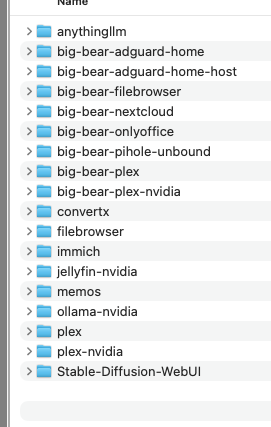
sda/AppData :
and inside i have big-bear- ( the asterisk ** are for different apps, filebrowser, nextcloud, pihole, plex, plex-nvidia)
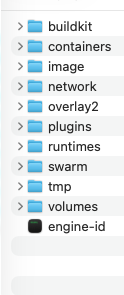
I also have something called docker ( with the files below ),
Question : How can i reinstall the apps again, is there something I have to do ? my disk is sda/AppData, let me know if this is okey.
Thank you,
Yes, this looks correct
The big-bear-* folders inside /sda/AppData are your saved app configs + data (that’s what matters most).
After you reinstall ZimaOS, you don’t need to manually “restore” those folders, just set AppData location back to /sda/AppData, then install the same apps again from the App Store.
ZimaOS will detect the existing folders and the apps will come back with their old settings/data.
I suggest not touching the /sda/AppData/docker folder unless IceWhale support asks, the BigBear AppData folders are what you need.