Logged users monitoring

What is the best way to monitor users activity on my ZimaOS server?
I would ideally want to get notification on my phone when anyone logged to my server or is trying to acces it with failed login attempts.

Can Netdata app do it?

Thanks for any clues.

Netdata can’t do this on its own, at least not in a reliable or security-focused way.

Why Netdata isn’t ideal
Netdata is great for system metrics (CPU, RAM, disks, network), but it does not track authentication events like:

  • SSH logins
  • Failed login attempts
  • Web UI access attempts

It also doesn’t provide meaningful security alerts for user access.

Best way to monitor logins on ZimaOS
If your goal is login monitoring + alerts to your phone, I believe the best solution is a security agent, not a monitoring app.

Recommended option: Wazuh
Wazuh is designed exactly for this and works well with Docker-based systems like ZimaOS.

With Wazuh you can:

  • Detect successful and failed SSH logins
  • Detect brute-force attempts
  • Monitor system auth logs
  • Send alerts via email, Telegram, Slack, etc.
  • View everything in a web dashboard

Many ZimaOS users run:

  • Wazuh Manager (container)
  • Wazuh Agent on the same host

Lightweight alternative (manual)
If you only want visibility (no alerts), you can manually check:

  • SSH activity
  • Failed login attempts

But this won’t give you real-time phone notifications.

Summary

  • Netdata: good for performance, not security
  • For login alerts: use Wazuh
  • For basic checks: manual log inspection only

Thanks for your answer, this is a level hard for me as I am just starting with Zima, used Synology before and it was ready made solution.

So far I got here using this:

then I installed single-node-wazuh.manager-1 using this website

and got here: exported wazuh.yaml below

name: single-node
services:
  wazuh.dashboard:
    depends_on:
      wazuh.indexer:
        condition: service_started
        required: true
      wazuh.manager:
        condition: service_started
        restart: true
        required: true
    environment:
      - API_PASSWORD=MyS3cr37P450r.*-
      - API_USERNAME=wazuh-wui
      - DASHBOARD_PASSWORD=kibanaserver
      - DASHBOARD_USERNAME=kibanaserver
      - INDEXER_PASSWORD=SecretPassword
      - INDEXER_USERNAME=admin
      - WAZUH_API_URL=https://wazuh.manager
    hostname: wazuh.dashboard
    image: wazuh/wazuh-dashboard:4.14.2
    links:
      - wazuh.indexer:wazuh.indexer
      - wazuh.manager:wazuh.manager
    ports:
      - mode: ingress
        target: 5601
        published: "443"
        protocol: tcp
    restart: always
    volumes:
      - type: bind
        source: /DATA/wazuh-docker/single-node/config/wazuh_indexer_ssl_certs/wazuh.dashboard.pem
        target: /usr/share/wazuh-dashboard/certs/wazuh-dashboard.pem
        bind:
          create_host_path: true
      - type: bind
        source: /DATA/wazuh-docker/single-node/config/wazuh_indexer_ssl_certs/wazuh.dashboard-key.pem
        target: /usr/share/wazuh-dashboard/certs/wazuh-dashboard-key.pem
        bind:
          create_host_path: true
      - type: bind
        source: /DATA/wazuh-docker/single-node/config/wazuh_indexer_ssl_certs/root-ca.pem
        target: /usr/share/wazuh-dashboard/certs/root-ca.pem
        bind:
          create_host_path: true
      - type: bind
        source: /DATA/wazuh-docker/single-node/config/wazuh_dashboard/opensearch_dashboards.yml
        target: /usr/share/wazuh-dashboard/config/opensearch_dashboards.yml
        bind:
          create_host_path: true
      - type: bind
        source: /DATA/wazuh-docker/single-node/config/wazuh_dashboard/wazuh.yml
        target: /usr/share/wazuh-dashboard/data/wazuh/config/wazuh.yml
        bind:
          create_host_path: true
      - type: volume
        source: "[object Object]"
        target: /usr/share/wazuh-dashboard/data/wazuh/config
        volume: {}
      - type: volume
        source: "[object Object]"
        target: /usr/share/wazuh-dashboard/plugins/wazuh/public/assets/custom
        volume: {}
    devices: []
    cap_add: []
    command: []
    deploy:
      resources:
        reservations:
          devices: []
        limits:
          memory: 16543305728
    networks:
      - default
    privileged: false
    container_name: ""
    cpu_shares: 90
  wazuh.indexer:
    environment:
      - OPENSEARCH_JAVA_OPTS=-Xms1g -Xmx1g
    hostname: wazuh.indexer
    image: wazuh/wazuh-indexer:4.14.2
    ports:
      - mode: ingress
        target: 9200
        published: "9200"
        protocol: tcp
    restart: always
    ulimits:
      memlock:
        soft: -1
        hard: -1
      nofile:
        soft: 65536
        hard: 65536
    volumes:
      - type: volume
        source: "[object Object]"
        target: /var/lib/wazuh-indexer
        volume: {}
      - type: bind
        source: /DATA/wazuh-docker/single-node/config/wazuh_indexer_ssl_certs/root-ca.pem
        target: /usr/share/wazuh-indexer/config/certs/root-ca.pem
        bind:
          create_host_path: true
      - type: bind
        source: /DATA/wazuh-docker/single-node/config/wazuh_indexer_ssl_certs/wazuh.indexer-key.pem
        target: /usr/share/wazuh-indexer/config/certs/wazuh.indexer.key
        bind:
          create_host_path: true
      - type: bind
        source: /DATA/wazuh-docker/single-node/config/wazuh_indexer_ssl_certs/wazuh.indexer.pem
        target: /usr/share/wazuh-indexer/config/certs/wazuh.indexer.pem
        bind:
          create_host_path: true
      - type: bind
        source: /DATA/wazuh-docker/single-node/config/wazuh_indexer_ssl_certs/admin.pem
        target: /usr/share/wazuh-indexer/config/certs/admin.pem
        bind:
          create_host_path: true
      - type: bind
        source: /DATA/wazuh-docker/single-node/config/wazuh_indexer_ssl_certs/admin-key.pem
        target: /usr/share/wazuh-indexer/config/certs/admin-key.pem
        bind:
          create_host_path: true
      - type: bind
        source: /DATA/wazuh-docker/single-node/config/wazuh_indexer/wazuh.indexer.yml
        target: /usr/share/wazuh-indexer/config/opensearch.yml
        bind:
          create_host_path: true
      - type: bind
        source: /DATA/wazuh-docker/single-node/config/wazuh_indexer/internal_users.yml
        target: /usr/share/wazuh-indexer/config/opensearch-security/internal_users.yml
        bind:
          create_host_path: true
    devices: []
    cap_add: []
    command: []
    deploy:
      resources:
        reservations:
          devices: []
        limits:
          memory: 16543305728
    networks:
      - default
    privileged: false
    container_name: ""
    cpu_shares: 90
  wazuh.manager:
    environment:
      - API_PASSWORD=MyS3cr37P450r.*-
      - API_USERNAME=wazuh-wui
      - FILEBEAT_SSL_VERIFICATION_MODE=full
      - INDEXER_PASSWORD=SecretPassword
      - INDEXER_URL=https://wazuh.indexer:9200
      - INDEXER_USERNAME=admin
      - SSL_CERTIFICATE=/etc/ssl/filebeat.pem
      - SSL_CERTIFICATE_AUTHORITIES=/etc/ssl/root-ca.pem
      - SSL_KEY=/etc/ssl/filebeat.key
    hostname: wazuh.manager
    image: wazuh/wazuh-manager:4.14.2
    ports:
      - mode: ingress
        target: 1514
        published: "1514"
        protocol: tcp
      - mode: ingress
        target: 1515
        published: "1515"
        protocol: tcp
      - mode: ingress
        target: 514
        published: "514"
        protocol: udp
      - mode: ingress
        target: 55000
        published: "55000"
        protocol: tcp
    restart: always
    ulimits:
      memlock:
        soft: -1
        hard: -1
      nofile:
        soft: 655360
        hard: 655360
    volumes:
      - type: volume
        source: "[object Object]"
        target: /var/ossec/api/configuration
        volume: {}
      - type: volume
        source: "[object Object]"
        target: /var/ossec/etc
        volume: {}
      - type: volume
        source: "[object Object]"
        target: /var/ossec/logs
        volume: {}
      - type: volume
        source: "[object Object]"
        target: /var/ossec/queue
        volume: {}
      - type: volume
        source: "[object Object]"
        target: /var/ossec/var/multigroups
        volume: {}
      - type: volume
        source: "[object Object]"
        target: /var/ossec/integrations
        volume: {}
      - type: volume
        source: "[object Object]"
        target: /var/ossec/active-response/bin
        volume: {}
      - type: volume
        source: "[object Object]"
        target: /var/ossec/agentless
        volume: {}
      - type: volume
        source: "[object Object]"
        target: /var/ossec/wodles
        volume: {}
      - type: volume
        source: "[object Object]"
        target: /etc/filebeat
        volume: {}
      - type: volume
        source: "[object Object]"
        target: /var/lib/filebeat
        volume: {}
      - type: bind
        source: /DATA/wazuh-docker/single-node/config/wazuh_indexer_ssl_certs/root-ca-manager.pem
        target: /etc/ssl/root-ca.pem
        bind:
          create_host_path: true
      - type: bind
        source: /DATA/wazuh-docker/single-node/config/wazuh_indexer_ssl_certs/wazuh.manager.pem
        target: /etc/ssl/filebeat.pem
        bind:
          create_host_path: true
      - type: bind
        source: /DATA/wazuh-docker/single-node/config/wazuh_indexer_ssl_certs/wazuh.manager-key.pem
        target: /etc/ssl/filebeat.key
        bind:
          create_host_path: true
      - type: bind
        source: /DATA/wazuh-docker/single-node/config/wazuh_cluster/wazuh_manager.conf
        target: /wazuh-config-mount/etc/ossec.conf
        bind:
          create_host_path: true
    devices: []
    cap_add: []
    command: []
    deploy:
      resources:
        reservations:
          devices: []
        limits:
          memory: 16543305728
    networks:
      - default
    privileged: false
    container_name: ""
    cpu_shares: 90
networks:
  default:
    name: single-node_default
volumes:
  filebeat_etc:
    name: single-node_filebeat_etc
  filebeat_var:
    name: single-node_filebeat_var
  wazuh-dashboard-config:
    name: single-node_wazuh-dashboard-config
  wazuh-dashboard-custom:
    name: single-node_wazuh-dashboard-custom
  wazuh-indexer-data:
    name: single-node_wazuh-indexer-data
  wazuh_active_response:
    name: single-node_wazuh_active_response
  wazuh_agentless:
    name: single-node_wazuh_agentless
  wazuh_api_configuration:
    name: single-node_wazuh_api_configuration
  wazuh_etc:
    name: single-node_wazuh_etc
  wazuh_integrations:
    name: single-node_wazuh_integrations
  wazuh_logs:
    name: single-node_wazuh_logs
  wazuh_queue:
    name: single-node_wazuh_queue
  wazuh_var_multigroups:
    name: single-node_wazuh_var_multigroups
  wazuh_wodles:
    name: single-node_wazuh_wodles
x-casaos:
  hostname: ""
  scheme: http
  index: /
  port_map: "443"
  author: self
  category: self
  icon: ""
  title:
    custom: ""

I will need sometime to figute it out.

Got the dashboard running, but not sure how to use it. Also not sure how to Deploy new agent, command not working.

Your manager is running. The missing step is adding one agent.

On ZimaOS, the agent is added as another Docker container (not via the dashboard button).

How to add the agent (ZimaOS / Docker)

  1. Go to Terminal in ZimaOS
  2. Run this command (replace the IP if needed):
docker run -d \
  --name wazuh-agent \
  --restart unless-stopped \
  -e WAZUH_MANAGER="YOUR_ZIMA_IP" \
  -e WAZUH_AGENT_NAME="zimaos-agent" \
  wazuh/wazuh-agent:4.14.2

Example if your ZimaOS IP is 192.168.0.189:

-e WAZUH_MANAGER="192.168.0.189"
  1. Wait about 30–60 seconds
  2. Refresh the Wazuh dashboard

What will happen

  • The agent auto-registers using port 1515
  • It starts sending data on port 1514
  • The dashboard will immediately show 1 active agent
  • Login and failed login events will begin appearing

That’s it

No dashboard button, no extra config, no certificates needed for this step.

Once this agent is connected, your system is fully monitored.

Yes it was exacly what I tired and still wasn’t showing in the dashboard.

In the meantime I found another solution.
I am now using cloudflare.com ZeroTrust tunnel with 2 factor authentification and it is a lot more difficult to login to my server now.

I am also considering GitHub - AuxXxilium/arc: Arc is a customized Redpill Loader for DSM 7.x (Xpenology) with enhanced hardwaresupport, addons, guided (semi-automated) installation and more. Multiple customization options are built-in. It is modified to run on different hardware (More informations in wiki). that will allow me to install DSM on my Trigkey miniPC and all security options will be built in, but this is last resort as I like ZimaOS so far.

Thanks for the update.

Cloudflare Zero Trust with 2FA is a good perimeter protection choice, so that already significantly reduces external login risk.
Just note it protects access to the UI, not what happens inside the server.

One clarification on Wazuh, for completeness:
If the agent didn’t appear, it’s almost always due to agent enrollment (1515) or data (1514) not actually reaching the manager — not the dashboard. The manager will silently ignore agents it can’t register.

As for DSM / Xpenology:
It does give a more turn-key security experience, but at the cost of:

  • Running an unsupported loader
  • Losing ZimaOS’ native Docker-first design
  • More risk long-term than it appears up front

Your current setup (ZimaOS + Cloudflare Zero Trust) is already secure enough for most home / prosumer use. You can always revisit Wazuh later once everything else is stable.

Good call focusing on security early, that’s the right instinct.

1 Like

You are very helpfull, thanks. Yeah I didn’t give up on Wazuh yet. This can wait as I dont have supersensitive data on this server, only using it for Immich and Jellyfin as my old Synology is too slow to run such a demanding task, but I am running them both as Synology is good enough for NAS storage and keep my documents safe.

BTW. I have installed DSM / Xpenology on my spare laptop i3 +4gb ram and it flyes there and feels like original Synology so far plus got all features of more expensive devices.

Glad it helped,

Your setup makes sense, and just to be clear ZimaOS is fully capable of handling both workloads, apps and storage, when you are ready to consolidate. Running Immich and Jellyfin on it is exactly what it is designed for, and many users run their full NAS and app stack on ZimaOS without issues.

Using Synology alongside it for now is totally fine while you get comfortable, and it gives you a familiar reference point.

Good to hear Xpenology is running smoothly on your spare hardware. It is a useful way to explore DSM features, but it is nice that ZimaOS gives you a clean, modern, Docker first path going forward.

Welcome aboard, enjoy the journey with ZimaOS.

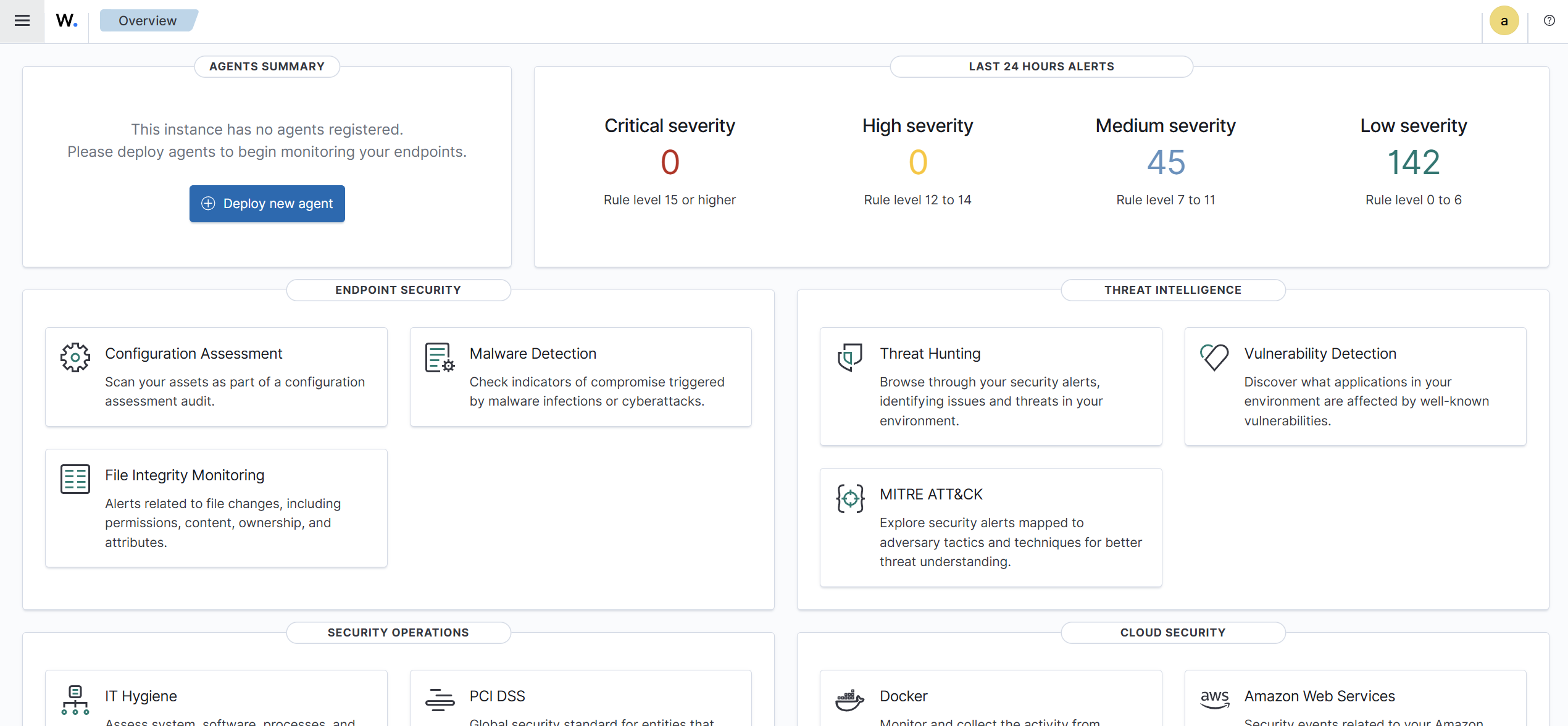
Agent working now, but there must be something not right, not much information is displayed, definitely nothing about users. I went through most of the sections on the dashboard.

Good, that screenshot confirms the agent is connected and working.

What you’re seeing is normal. By default, Wazuh does not immediately show “user activity” in the overview panels.

A few important points to clarify:

• Login and failed-login events come from authentication logs, not from the agent summary
• Those events appear under Security Events / Authentication, not the main agent widgets
• It can take a little time for log volume to build before dashboards populate
• If there is no SSH or local login activity, there will be nothing to show yet

To actually see user-related events, make sure you:

  • Generate a login or failed login attempt (SSH is easiest)
  • Then check Security Events or filter alerts by authentication rules

Nothing is broken. The agent is healthy, it’s just that Wazuh only shows what actually happens, and the default dashboards are very conservative.

Once login activity occurs, you’ll see it reflected in alerts.