Hi, I installed an NVIDIA P2000 Quadro GPU. Zima sees it and reports it in the widgets but neither Zima nor Jellyfin use it. I disabled it in the Jelly settings and in the control panel but nothing. It doesn’t use it. How do I force the transcoding? It blocks the video. What should I do? Has anyone solved this? Thanks
Hey, good question, this usually comes down to how the container is set up, not Jellyfin itself.
ZimaOS detecting the GPU just means the host can see it. Jellyfin won’t use it unless the container has access to the NVIDIA runtime and drivers.
A few key things to check:
- Jellyfin container must have GPU access
If you installed Jellyfin from the App Store, it normally does NOT include GPU support by default.
You need to confirm the container has NVIDIA enabled. From SSH:
docker inspect jellyfin | grep -i nvidia
If nothing shows, the container doesn’t have GPU access.
- NVIDIA runtime must be installed on host
ZimaOS doesn’t always include full NVIDIA container support.
Check:
docker info | grep -i runtime
You should see nvidia listed.
If not, that’s the real issue, Jellyfin can’t use the GPU at all.
- Jellyfin settings (inside UI)
Once GPU access is correct:
Dashboard > Playback > Transcoding
Set:
- Hardware acceleration: NVIDIA NVENC
- Enable hardware decoding
- Enable hardware encoding
Then save.
- Check if it’s actually transcoding
Play a video that needs transcoding (not direct play), then run:
docker exec -it jellyfin nvidia-smi
If GPU is working, you’ll see a process using it.
- Important reality check
On ZimaOS, GPU support is still a bit rough.
Even if the GPU shows in widgets, that does NOT mean Docker containers can use it.
Most working setups use a custom Jellyfin container with:
--gpus all- proper NVIDIA runtime
- correct driver libs mapped
Simple conclusion
Right now your issue is almost certainly:
Jellyfin container was deployed without GPU access
, not a Jellyfin bug.
1 Like
"I have the NVIDIA runtime installed, VT-d is ON, and I’m using the --runtime=nvidia flag. However, Jellyfin still gets ‘Operation not permitted’ or won’t play files. It seems the NVIDIA Container Toolkit on ZimaOS 1.1/1.2 is bugged with Quadro P2000
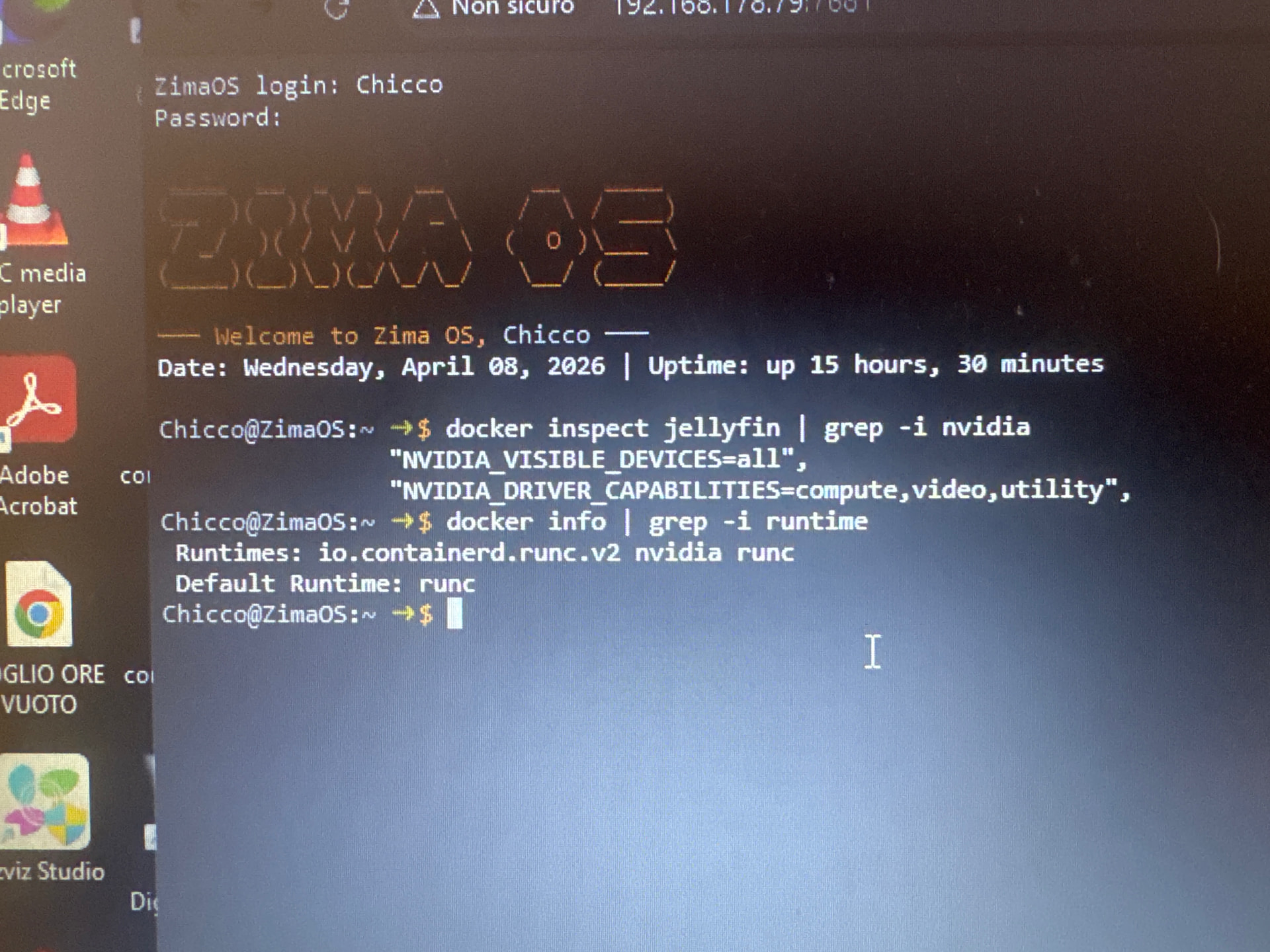
Yeah nice, this screenshot actually confirms you’ve done things properly.
You’ve got:
- NVIDIA runtime showing in Docker
- Jellyfin container seeing NVIDIA env vars
So your setup is basically correct.
At this point, the issue isn’t “you missed something”, it’s more likely how ZimaOS is handling GPU passthrough to containers.
That “operation not permitted” error is the giveaway. It usually means the container doesn’t have proper access to the /dev/nvidia* devices, even though everything looks enabled.
I’d just quickly sanity check this:
docker exec -it jellyfin ls -l /dev/nvidia*
If those devices aren’t there or look restricted, that’s your problem right there.
Also worth doing one clean test outside Jellyfin:
docker run --rm --gpus all nvidia/cuda:12.3.0-base-ubuntu22.04 nvidia-smi
If that fails, then it confirms it’s not Jellyfin at all, it’s the NVIDIA stack on ZimaOS.
Honestly, I believe this is one of those ZimaOS GPU edge cases right now, especially with Quadro cards. The system detects the GPU fine, but Docker access isn’t fully clean yet.
“Hey! Thanks for the tip, we went deep down the rabbit hole.
I checked the devices inside the container and found that/dev/nvidia-caps/nvidia-cap1 was restricted to root only (cr-------).
I even tried to force permissions with sudo chmod 666 on the host. The files are now crw-rw-rw- (1 can see them in yellow now), but Jellyfin still fails with ‘Operation not permitted’.
It looks like ZimaOS has a hard-coded AppArmor or security profile that blocks Docker from actually using those capabilities, regardless of file permissions.
l’ve contacted Zima support (Rally) and sent them all the evidence. It seems like a core OS limitation on how they handle NVIDIA passthrough for now. Thanks again for the help, you pointed me in the right direction!”
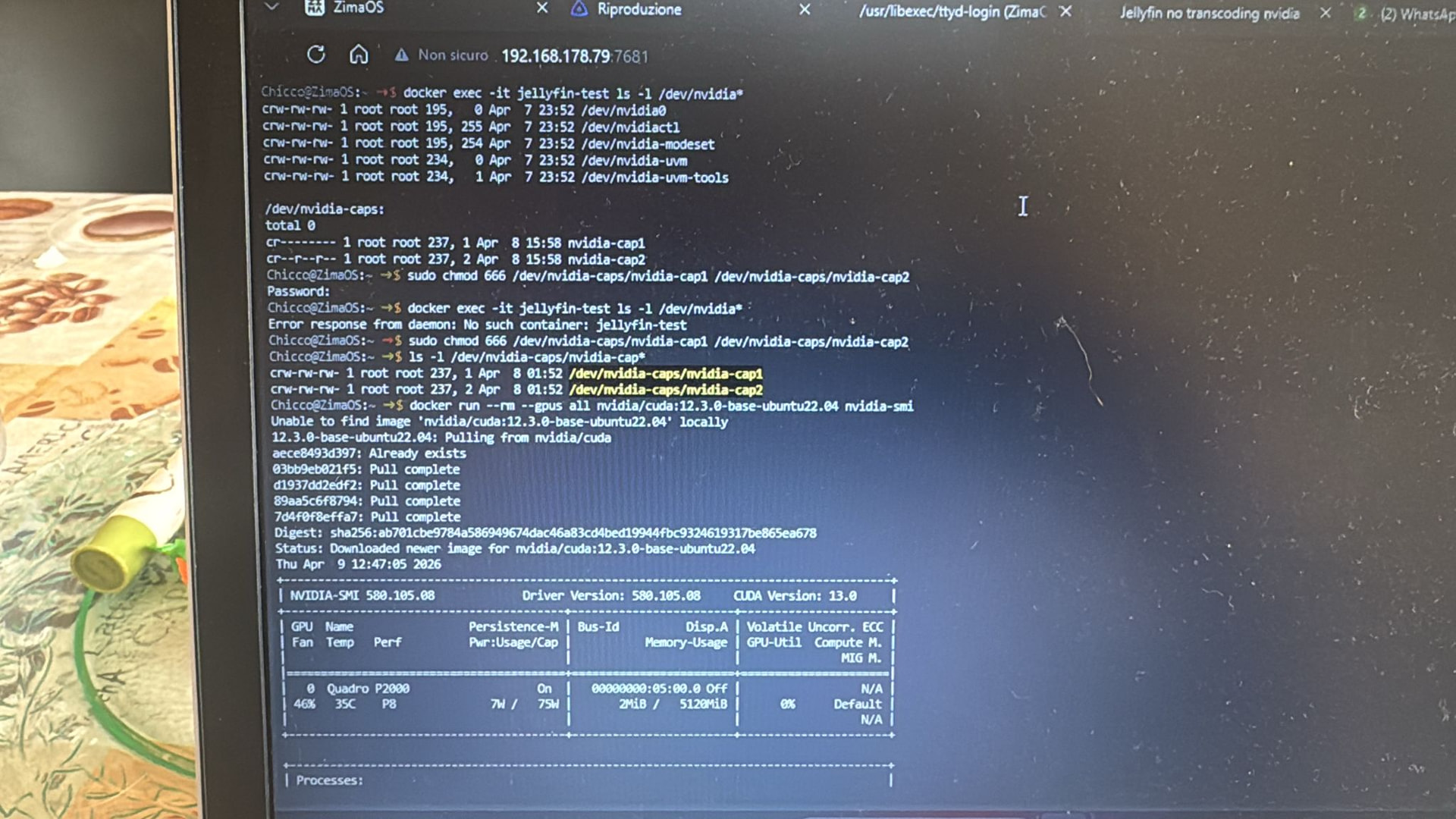
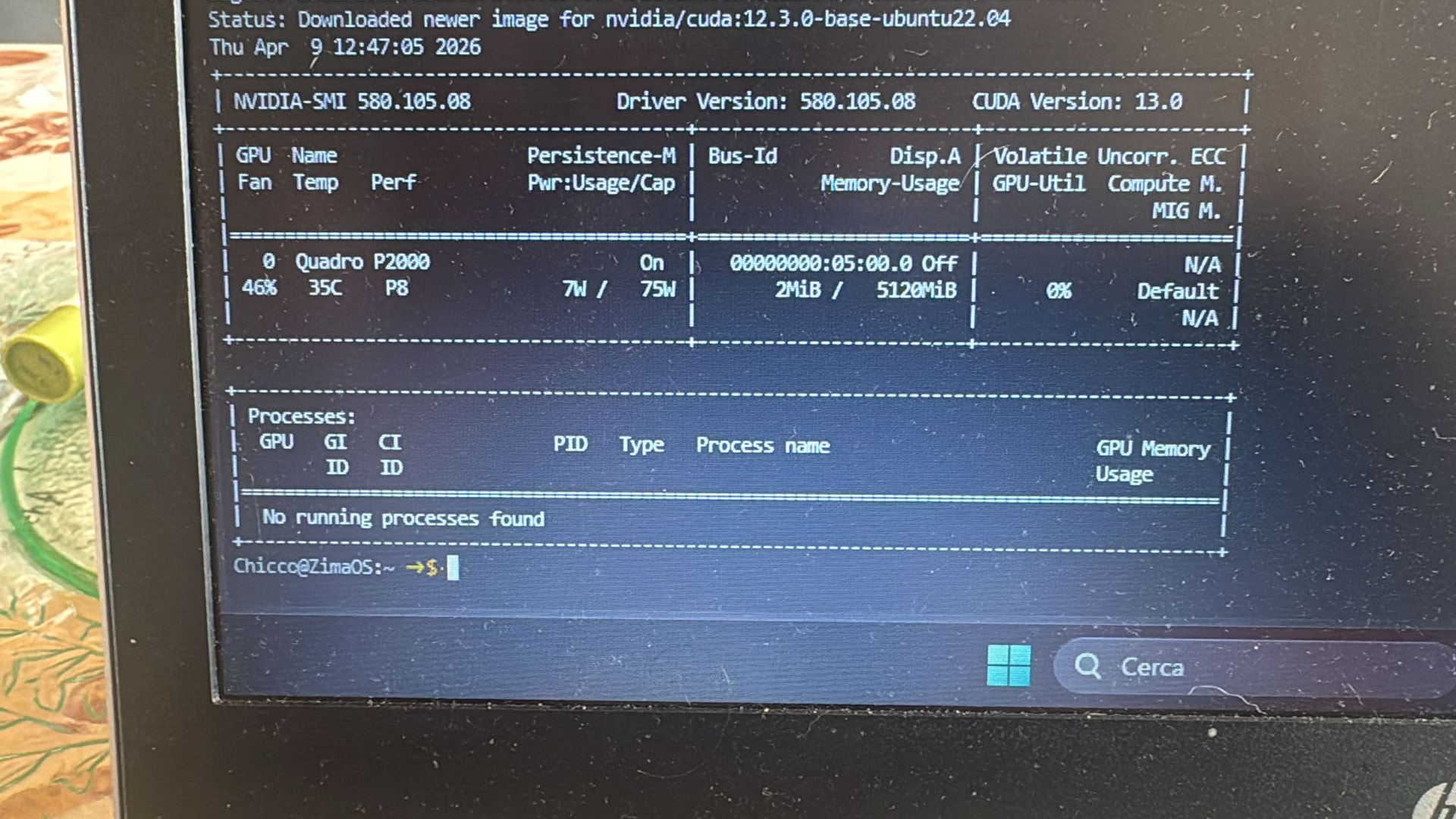
1 Like
Yeah that’s a really solid breakdown and honestly you’ve already proven everything that matters.
The fact that nvidia-smi works in a test container tells us the NVIDIA stack itself is fine. Then inside Jellyfin you can see all the /dev/nvidia* devices, and you even opened up the permissions, so it’s definitely not a simple access issue.
That “operation not permitted” error at this point is the giveaway. It’s not filesystem permissions, it’s something higher up blocking it, most likely AppArmor or a ZimaOS security profile stopping the container from actually using the NVIDIA capabilities.
So yeah, I agree with you, this isn’t a misconfiguration on your side. It really does look like a core limitation in how ZimaOS is handling NVIDIA passthrough right now, especially for apps like Jellyfin.
Good move escalating it to Rally as well, you’ve got proper evidence, which is exactly what they need to fix it.
Only extra thing worth mentioning for testing (not as a real solution), if you ran the container in privileged mode it would probably work, which would further confirm it’s a security restriction. But obviously not something you’d want to run long term.
Overall, you’ve done everything right here.
Did you install the Jellyfin (NVIDIA GPU) version from the app store?
Yes, I started with the Jellyfin (NVIDIA GPU)
version from the ZimaOS App Store.
With that version, the hardware acceleration options (NVENC) finally appeared in the settings, but the playback still fails with the same ‘Operation not permitted’ error.
As I showed in my previous logs, the OS is restricting access to /dev/nvidia-caps/nvidia-
cap1 and nvidia-cap2. Even the official App Store version cannot bypass this restriction on my hardware.
This seems to be a specific issue with how
ZimaOS handles NVIDIA device mapping/
AppArmor profiles on non-Zima hardware. How can we force the OS to grant full access to these
devices?"
Okay, I’ll check the system. If this issue does exist, we’ll fix it.
Thanks Jerry, I appreciate the support. I’m available if you need more logs or tests on my hardware. Looking forward to the fix.
Since I don’t have a P2000 GPU, I can only test with an Nvidia RTX A2000, and I found that by default, Jellyfin (NVIDIA GPU), /dev/nvidia-caps/nvidia-cap1/2 is not mapped to the container by default, and of course in my case, it transcodes normally. If you must use /dev/nvidia-caps/nvidia-cap1/2, you need to add the mapping manually:
devices:
- /dev/nvidia-caps/nvidia-cap1:/dev/nvidia-caps/nvidia-cap1
- /dev/nvidia-caps/nvidia-cap2:/dev/nvidia-caps/nvidia-cap2
When I add the map, I can see two devices in the container.
/dev/nvidia-caps/nvidia-cap1 (0400)
/dev/nvidia-caps/nvidia-cap2 (0444)
At the same time, when I perform the actual transcoding playback, the host does not appear AppArmor DENIED log container security configuration: AppArmorProfile=docker-default
BTW, I think jellyfin should not need a /dev/nvidia-caps/nvidia-cap1/2 device for transcoding
Thanks Jerry! I’Il try to add the manual mapping for nvidia-cap1 and nvidia-cap2 in my compose file as you suggested.
However, it’s strange: on your A2000 it works without them, but on my P2000 setup, Jellyfin logs specifically complain about those devices being missing or ‘Operation not permitted’.
I will test this manual mapping and check if the AppArmor ‘DENIED’ log disappears. I’ll get back to you with the results in a moment.