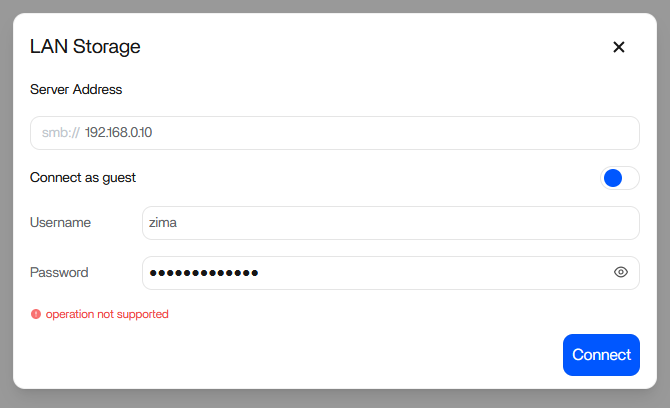
Zimaos, I installed Jellifin and want to add a source in the form of an SMB resource on the LAN (password protected). How do I do this?
To add a password-protected SMB share to Jellyfin on ZimaOS, do it in two steps: mount the share in the Files app first, then map it into the Jellyfin container.
1. Mount the SMB share in ZimaOS
Open:
Dashboard > Files > Add > LAN Storage (SMB)
Enter:
Server Address: 192.168.0.50 (or your NAS IP/hostname)
Share Name: Movies (or your share name)
Username: your_username
Password: your_password
Important:
Do NOT combine server and share.
Do NOT use 192.168.0.50/Movies in the server field.
Enter them in separate fields.
After clicking Connect, verify the mount:
ls /media
You should see something like:
/media/Movies
The exact name might vary slightly (for example /media/[IP-ShareName]).
Use whatever appears in your system.
Confirm files are accessible:
ls /media/Movies
(Replace Movies with the exact name shown in /media.)
2. Map the share into Jellyfin
Go to:
Apps > Jellyfin > Edit > Volumes
Add a new volume:
Host path:      /media/Movies   (use the exact name from ls /media)
Container path: /media/movies
Save and restart the Jellyfin container.
3. Add the library inside Jellyfin
Open Jellyfin:
Dashboard > Libraries > Add Media Library
Browse to:
/media/movies
Select your folders, set content type if needed, and save.
This is the recommended and most stable way on ZimaOS. The mount survives reboots and updates.
Do not try to mount SMB directly inside the Jellyfin container.
If it does not connect, please share:
ZimaOS version:
SMB host type (Windows / Synology / TrueNAS / Linux):
Exact error message from the Files app: